

A few weeks ago, ASUS France invited us to review the TUF Gaming B760M-BTF WiFi D4 motherboard. This motherboard has the particularity of being a “BTF” model, i.e. from the new ” Back To (the) Future ” range. This range currently comprises just two B760M motherboards in DDR4 and DDR5. The hallmark of this range is a PCB devoid of connectors on the front panel. They have all been moved to the rear of the PCB to facilitate cable management. If you have a case with a glass front, most of the cables will be invisible, because as you’d expect, there will still be at least those feeding your graphics card, although ASUS is already working on a solution.
Now, there’s a problem with a design like this: “how do you fit it into a case? Indeed, you’ll need a case that’s compatible with the location of the connectors on the back of the PCB. ASUS France provided us with an example of the Prime A21 case. To stay with a 100% ASUS configuration, we also equipped our PC with a ROG Ryuo III 240 cooling system, a TUF Gaming RX 7700 XT OC graphics card and the ROG LOKI SFX-L 850 watt Platinum power supply.

Many thanks to ASUS France for making all these components available to us for this test. The TUF Gaming B760M-BTF WiFi D4 is available for 245.95 euros and the ASUS A21 case for 89.95 euros.
[nextpage title=”TUF Gaming B760M-BTF D4 : “]
Our TUF Gaming B760M-BTF WiFi D4 is built around the B760 chipset, which is used on motherboards that will be more affordable than those designed around the Z790. In fact, we’ve already been able to test this chipset with our review of the ROG Strix B760-A Gaming Wifi motherboard in DDR4 version.
The bundle:
A quick look at the bundle for this TUF Gaming B760M-BTF WiFi D4 to see if it benefits from any “special items”. Overall, we find a fairly standard bundle with the traditional SATA cables, Wi-Fi antenna and motherboard manual. It’s a fairly logical bundle, and quite comparable to what we’ll find from our competitors in the same price range.


Architecture:
As we said in the introduction, this TUF Gaming B760M-BTF WiFi D4 motherboard is built around Intel’s B760 chipset, a mid-range chipset that retains Intel’s latest socket, the LGA-1700. The LGA-1700 socket features 1700 pins and is compatible with Alder Lake (12xxx) and Raptor Lake (13xxx) processors.


The B760 chipset officially supports PCIe 5.0, but makes do with PCIe 4.0 M.2 SSD slots. Note, however, that there are DDR4-compatible B760 motherboards and DDR5 versions, just as there are for the Z790 chipset. Please note that Intel has announced that these will be the last chipsets to support DDR4.
The various heat sinks :
The board dimensions are 244 mm x 244 mm, corresponding to the micro-ATX format. The PCB color is black, with radiators in the same spirit. The design is quite dark, with only the TUF Gaming series references and logos.
Let’s start with the radiators, of which there are three!
First of all, the two radiators located on top of the motherboard and covering the power supply stage. These two radiators are independent and are not connected by a heat pipe. The rear connectors are covered by a plastic cover. This is an entirely passive system.


The third one covers the chipset, reducing its surface area to a minimum. On the other hand, the low height ensures that the graphics cards can be easily inserted. It features the TUF logo and the TUF Gaming series name.
Three 4.0 x4 SSD slots:
Two aluminum plates cover the three M.2 SSD slots on the PCB. This gives you a very large storage area. The first two slots are in 2242/2260/2280 format and wired in PCIe 4.0 x4. The third, at the rear of the PCB, is in 2280 format and also in PCIe 4.0 x4.

The two plates on the front are fitted with a thermal pad to optimize dissipation of the heat emitted by the SSD. Don’t forget to remove the protective plastic film before installing your SSD. On this mid-range model, ASUS offers the same quick-release system for SSDs as on the Z690: no need to fasten a screw, simply rotate the latch to lock the SSD in place.
The socket and PCIe :
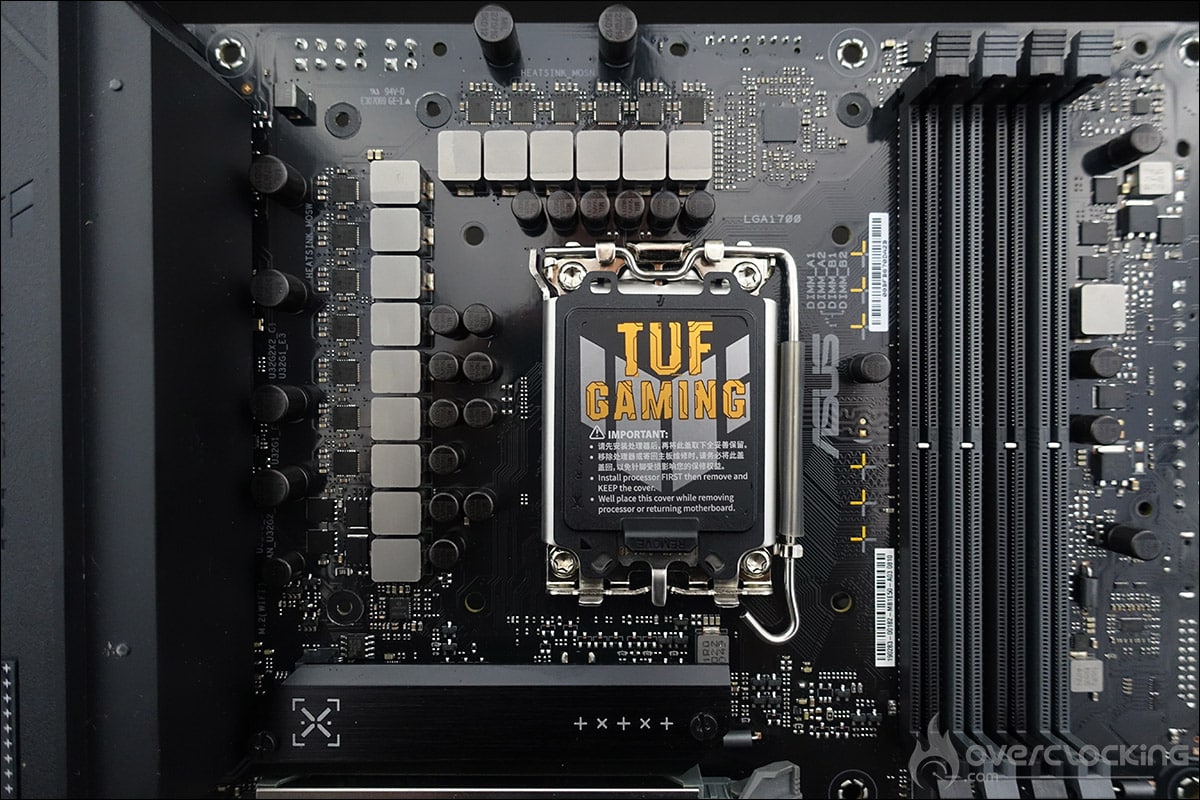
The space around the socket is clear enough, and the LGA-1700 socket mounting holes are there. The TUF Gaming B760M-BTF WiFi D4 can accommodate a maximum of four DDR4 memory modules and supports dual-channel memory kits up to 5333 MHz (OC) for a maximum of 128 GB.


There’s a PCIe 5.0 x16 slot, a PCIe 4.0 x16 and a PCIe 4.0 x1. Let’s move on to the connectors on the rear of the PCB. The board features a 24-pin connector and an 8-pin 4-pin connector.
[nextpage title=”The PCB and connectors: “]
Clocker tools :
Let’s start with the elements inserted on the PCB, which can prove to be interesting tools for overclockers. There are very few of them, as this is an entry-level board. The only ones to be found are
- CMOS CLR: allows you to clear BIOS settings to return to the default ones.
Connections:
The rear panel features the following elements. Firstly, the Clear CMOS and antenna supports for dual-band Wi-Fi. The board also features an HDMI port and a DisplayPort.


There’s also a USB 3.2 Gen 2×2 Type-C port, two USB 3.2 Gen 2 ports (1 Type-A and 1 Type-C), three USB 3.2 Gen 1 ports (2 Type-A and 1 Type-C) and four USB 2.0 ports. The card also features traditional audio inputs and outputs, as well as a 2.5 Gb Ethernet port. Finally, the audio part is handled by a Realtek chip.
PCB:
The power supply stage on this TUF Gaming B760M-BTF WiFi D4 has 12 1 phases. The part in charge of the CPU has 12 phases, and this model has no doubler, but the phases are placed in parallel, so there are really 6 of them. The mosfets are 50A models.
[nextpage title=”Assembly:”]
Let’s get on with assembling the various components that will equip this configuration. As a reminder, here’s the complete configuration we’re going to put in place:
- Motherboard: ASUS TUF Gaming B760M-BTF WiFi D4 (BIOS 1220)
- Processor: Intel i5-13600KF
- Memory : 16 GB Corsair Dominator
- Graphics card: ASUS TUF Gaming RX 7700 XT OC
- Cooling system: ROG Ryuo III de 240
- SSD: Kingston NV2 NVMe PCIe 4.0 SSD Internal 2TB
- Power supply: ROG
- Operating system: Windows 11 64-bit
- Display: ROG PG27UQ
The first step is to insert our i5-13600 KF processor into the socket of our TUF Gaming B760M-BTF WiFi D44, and then secure it inside the Prime A21 case. As you can see, there’s no difficulty at all, despite the connectors on the rear of the motherboard, as the case is designed for this purpose.


Let’s move on to the installation of the ROG LOKI SFX-L 850 watts Platinum. As this is a model originally designed for SFX format, you’ll need to attach the bracket beforehand to ensure compatibility with the Prime A21 case.


The cooling system we’ll be using is the 240 ROG Ryuo III. We’ve placed it in the top position, but it could also have been mounted vertically on the front panel.


The motherboard is the TUF Gaming RX 7700 XT OC, a model that will allow you to take full advantage of 1440p definition. As part of the graphics card bundle, ASUS supplies a stand to prevent the card from twisting under its own weight.


Now that our components are installed, we’re going to insert our DDR4 memory kit, 16 GB Dominator Platinum RGB 4266 MT/s CL19 from Corsair. Now it’s time to get down to cable management, and see if the connectors on the back of the PCB make it easier to organize the cables.


That’s it, everything’s in place and all that’s left to do is install the OS, update the drivers and, above all, flash the motherboard with the latest BIOS, 1220, dated 18/08/2023. Had these been available, we would of course have added three fans on the front and one on the rear to optimize air circulation within the case.
[nextpage title=”Effective frequencies: “]
As with every new processor test, our first concern is to check whether the advertised frequencies are actually achieved. To do this, we’re going to use the Cinebench R23 benchmark. Two scenarios will be used: a single-core benchmark and a multi-core benchmark. The idea is to be able to judge the frequency achieved and compare it with what Intel has announced in its slides.
It’s worth remembering that the Boost frequency in the bench is different for each processor. As Intel points out, Max Turbo frequency refers to the maximum frequency attainable by one of the processor cores running a single-core workload. This frequency varies according to several factors: the load, the cooling system and therefore the temperature of your processor. It’s important to keep this in mind. Here are the frequencies we expect to reach on a single core during our run under Cinebench R23.
First, we leave everything in AUTO in the BIOS except the XMP profile, which we load. We make no other changes to the BIOS.
Testing the i5-13600KF :
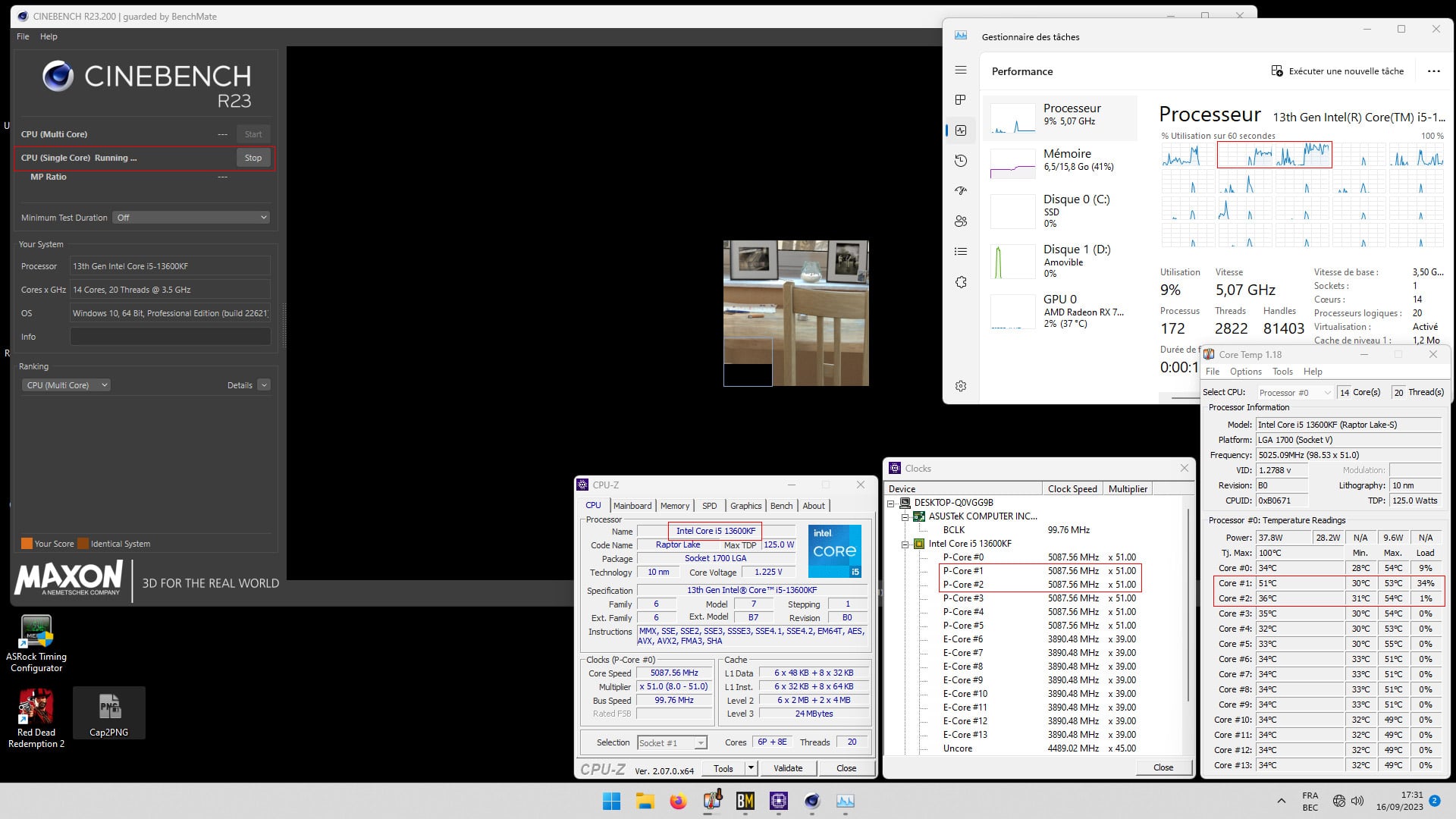
We’re now going to test our i5-13600KF and its 6 P-Core/8E-Core. In single core mode, we can see that core #1 alternates with core #2 at a frequency of 5100 MHz, but strangely enough, the other cores also remain at this frequency. It seems to be the AUTO settings in our BIOS that are removing Intel’s limits, since the temperature is correct. The temperature of the requested core is 53/54°C.
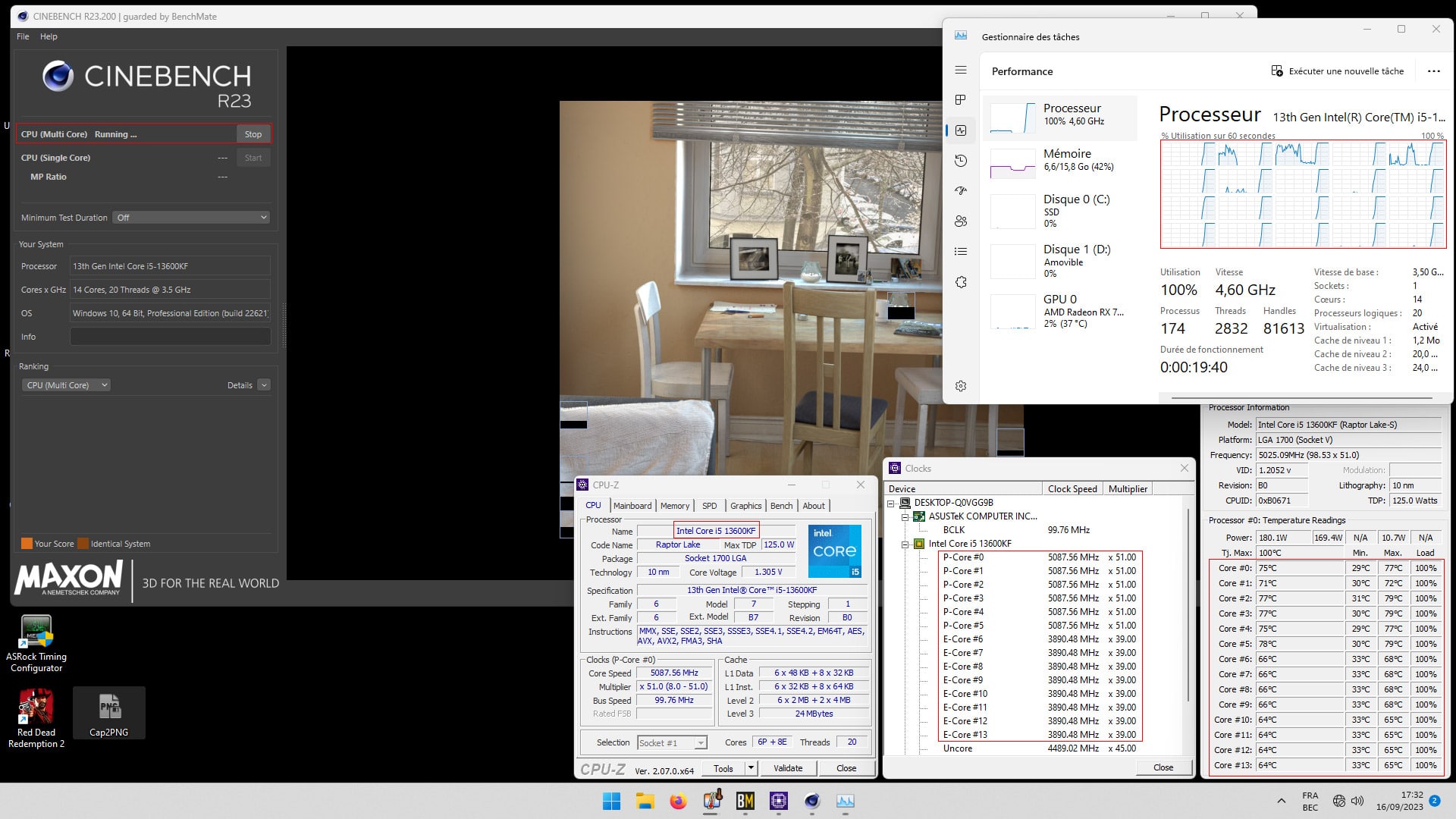
When all cores are used, the frequency is always 5.1 GHz for P-Core and 3.9 GHz for E-Core. Finally, we’re not going to complain, since temperatures are excellent, with the hottest P-Core at 79°C and the E-Core at 65°C.
Now that we know our processor is fully operational, let’s see how it performs against the B760 chipset, which we also tested with the ROG Strix B760-A Gaming WiFi D4 motherboard.
[nextpage title=”Comparative tests: “]
For our comparative tests, we’re going to compare our results with the performance obtained with the ROG Strix B760-A Gaming WiFi D4. However, we’ve changed the memory kit we used with this one, the 16 GB GSKill Trident Z Royal Elite 4000 MHz CL14. The rest of the configuration is virtually the same, so we can compare our results.
Let’s start with a memory performance test on AIDA64. The latest version is used. Performance is very similar, with the exception of latency, but this can be explained by the characteristics of the DDR4 kit used with the B760 Strix. Please note that we’re also running two different OSes, but this has very little influence on today’s benchmarks.


Let’s move on to the performance of our i5-13600KF under the Cinebench R23 benchmark. Here again, nothing to report: performance is virtually identical.


Finally, under Geekbench 3, we notice a difference that can be explained here by Windows 10, which performs better under this benchmark, but also by the timings of the GSKill kit used with the Strix B760.


As we can see, in terms of performance, there’s nothing to worry about with this TUF Gaming B760M-BTF WiFi D4. We’d just like to make a comment about the temperatures recorded during our tests. We stressed the processor with the Cinebench R23 run for 15 minutes, and the temperatures were just right with our i5-13600KF. In our opinion, given the architecture of the power stage, we don’t recommend adding an i7 or i9 unless you have a very solid cooling system.
[nextpage title=”The last word:”]
Let’s cut to the chase: we’ve fallen head over heels for this new series. If we had to build a PC today on a tight budget, we’d definitely go for this BTF and ASUS Prime A21 combo. Now that we know the motherboard exists in a DDR5 version, we’d go for this model instead, choosing the TUF Gaming B760M-BTF WiFi (DDR5), which is even more aesthetically pleasing. We imagine this motherboard in DDR5, with an i5-13500 processor or even an Intel T model, a 32 GB DDR5 kit and an AMD RX 7600, all in this ASUS Prime A21 case. Thanks to its HDMI and DisplayPort ports, you can even dispense with the graphics card in the first instance.
Is the BTF series a revolution?
For us, yes, in any case, it brings its share of advantages and, above all, makes cable management much simpler to set up. We believe that ASUS should continue in this direction, not only with other models, but also with other cases. Indeed, the current drawback is the only compatibility with the Prime A21 case. In the future, these BTF models could become a series in their own right, like the TUF, STRIX or ROG. We know that ASUS is also working on a PCIe connector capable of directly powering the graphics card without the need to use traditional power connectors. We’re curious to see what this could lead to, especially as the cards demand more and more juice.

The Prime A21 case is also perfectly designed and accommodates this TUF Gaming B760M-BTF WiFi D4 without a hitch. Priced at 89.95 euros, it’s a perfectly reasonable budget as the basis for your next configuration!
The TUF Gaming B760M-BTF WiFi D4:
We liked:
- The presence of rear connectors
- Perfect compatibility with the Prime A21 case
- Sufficient power stage for our i5-13600KF
- The possibility of using your DDR4 memory kit again
- A comprehensive BIOS
- Comprehensive connectivity for this price
- A very affordable price for this new series
- Availability of the same model in DDR5
We would have liked :
- The possibility of placing it on a bench, but that’s logical ^^
- “We’d like to see other models and other cases come out
 We really fell in love with this BTF model. We believe this series has a real future, and we’re curious to see how ASUS will develop it over the coming months. As we pointed out, if we had to design a configuration on a tight budget today, we’d have no trouble imagining ourselves turning to this TUF Gaming B760M-BTF WiFi D4.
Thanks to ASUS France for the loan of the components used for this test.