
Today we’re reviewing the Dell Gaming G16 laptop. This is the first laptop in the Dell Gaming range that we’re testing. It boasts great specs (86Wh battery, QHD screen, 13900HX, RTX4070) at an attractive price. Let’s see if it’s as interesting on paper as it is in reality.
The Dell Gaming G16 is available for €1,799. 50 in the i9-13900HX, RTX 4070 and 16GB RAM version we’re testing here.

Thanks to Dell for providing us with this product.
[nextpage title=”The Dell Gaming G16″]
The Dell Gaming G16 is a 16-inch laptop with a 2560 x 1600p IPS panel and a 240 Hz refresh rate. The processor is an Intel Core i9-13900HX and an Nvidia RTX 4070 GPU, accompanied by 16 GB DDR5-4800 RAM, a 1 TB NVMe SSD and powered by an 86 Wh battery.
We start with the unpacking of the device, this laptop comes in a simple box, inside we have the laptop. Next to it we have the 330W charger.


The charger is a 330W power supply unit using special connectors to be plugged into the back of the laptop.
Presentation
To begin with, we have the weight with 2.73 kg on the scale, it holds perfectly in place and the screen can be opened with a single finger even if a little stiff. The overall design is predominantly plastic. Overall, this Dell Gaming G16 exudes quality despite its use of plastic, and offers a decent performance for its price.


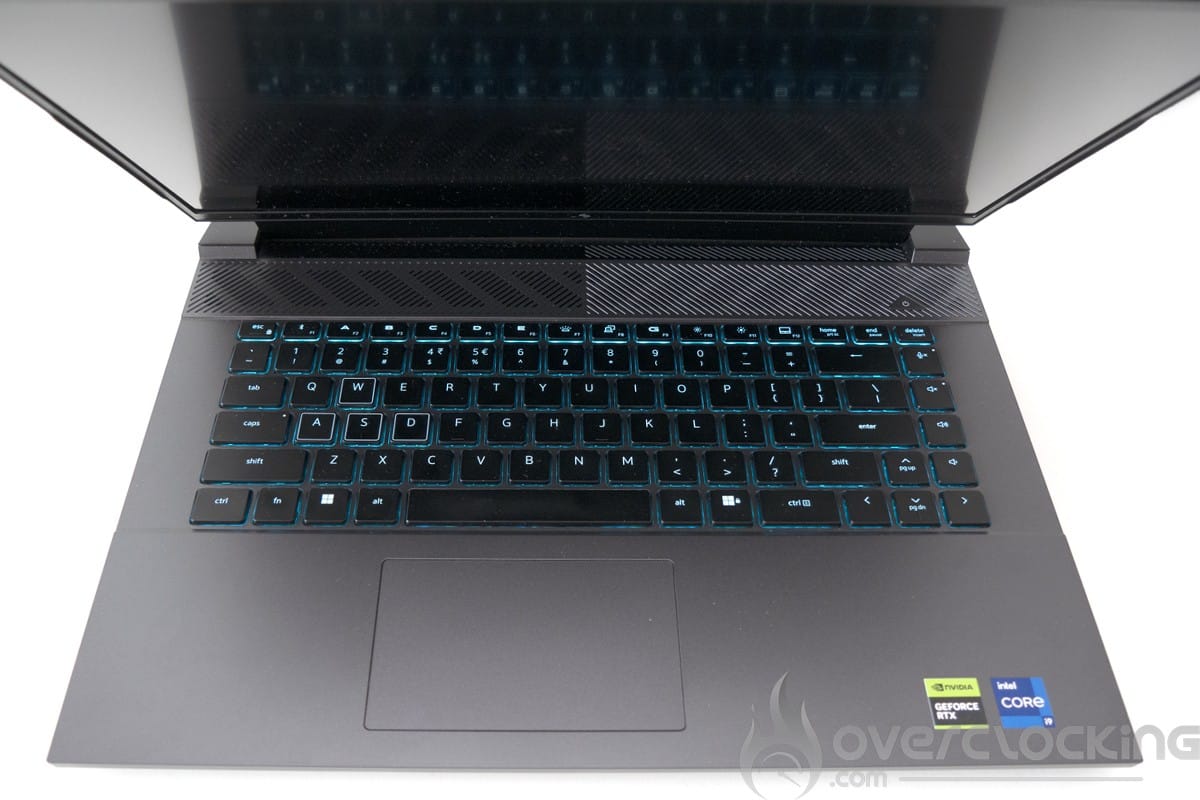
We begin our tour with the keyboard, which is quite pleasant to use. With the rigidity of the laptop, the keyboard is quiet but a little too soft. There’s no numeric keypad here, which isn’t a bad thing, as it would have been to the detriment of its overall ergonomics.


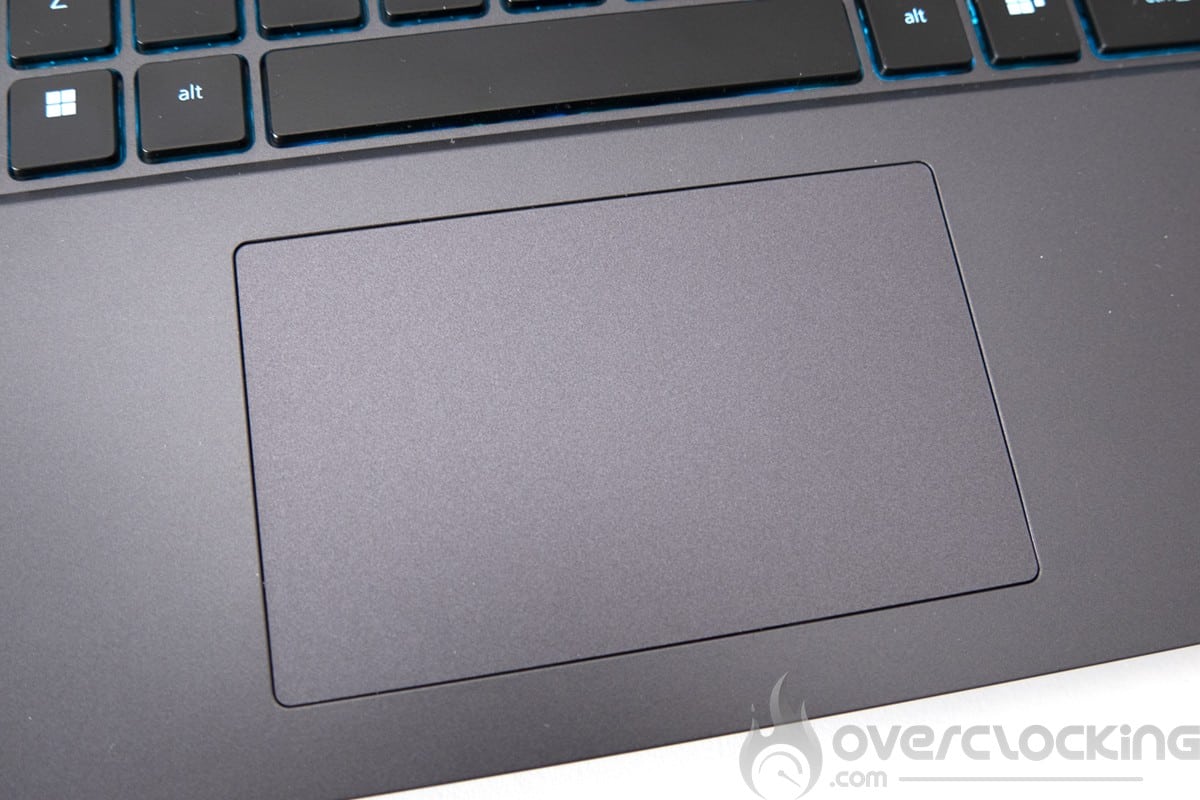
We now move on to the trackpad, which is extremely smooth and really pleasant to use. Its size is average, but will allow decent use of the laptop without a mouse. There is no fingerprint reader here. The PC will be secured by password or via the camera.
Let’s move on to the audio section. Here we have an audio zone above the keyboard and two woofers at the rear. The sound is very good indeed, and this laptop is not at all noisy when gaming, which means it can be used without headphones.


Next we come to the connectors, a very limited solution here. On the right there are two USB type-A 3.2 gen 1 ports, while on the left there ‘s an Ethernet port and a headphone socket. At the rear, we have a Thunderbolt 4 port, an HDMI port, a mini-DiplayPort and, last but not least, a charger socket. Connectivity is therefore rather limited, and we would have liked to see a second USB type C port or a Mini-DisplayPort to connect a 3400 x 1440p 165Hz screen, for example, in addition to a USB type C dock.


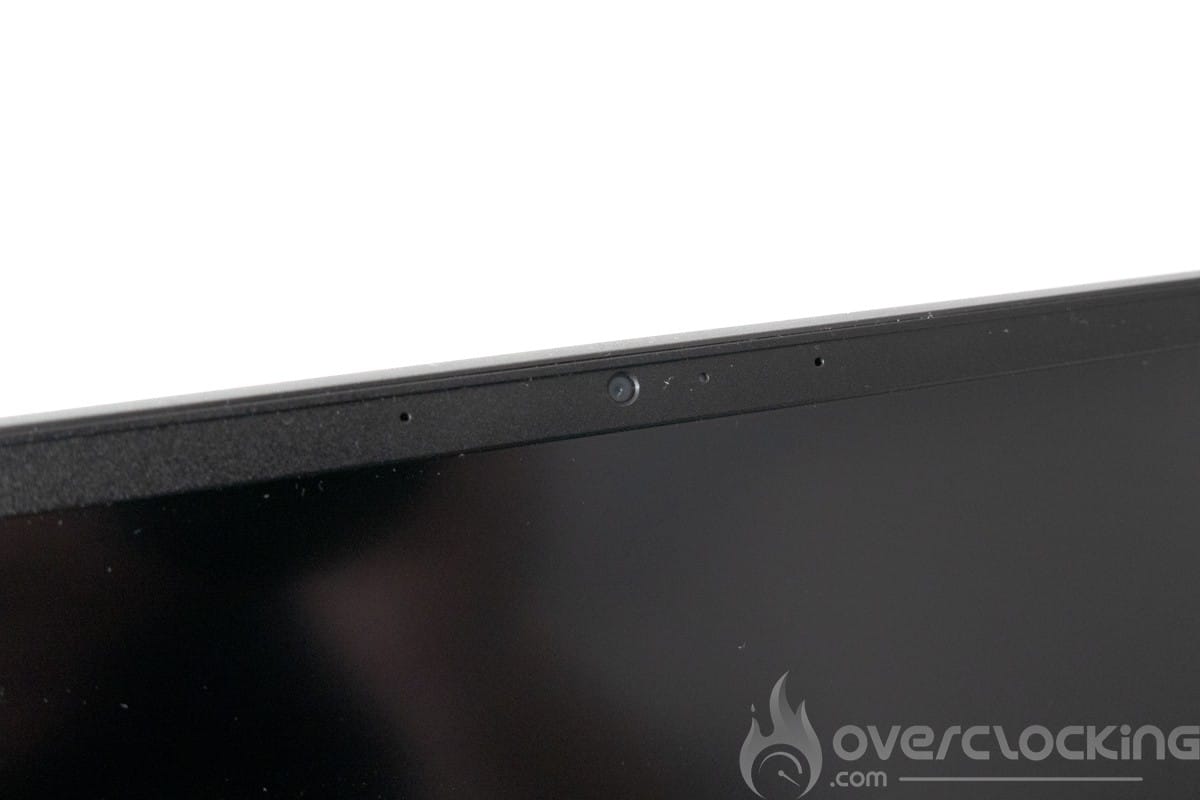
The camera, meanwhile, is FHD (30 fps @ 720p) and is relatively acceptable for troubleshooting or videoconferencing.
[nextpage title=”Configuration overview”]
The configuration of this Dell Gaming G16 is based on an Intel Raptor-lake platform. The CPU used (i9-13900HX) has the same configuration as the i9-13900K found on desktop PCs, but with lower frequencies.

The various components
We start with the CPU, motherboard and RAM, here on CPU-Z we can see that the Dell Gaming 16 is equipped with an i9-13900HX. For RAM, we’re on two Micron DDR5 sticks for 16 GB of RAM in total, all running in single rank at 4800 Mt/s CL40. We’d recommend upgrading to at least 32 or even 64 GB of RAM to get the most out of this machine.

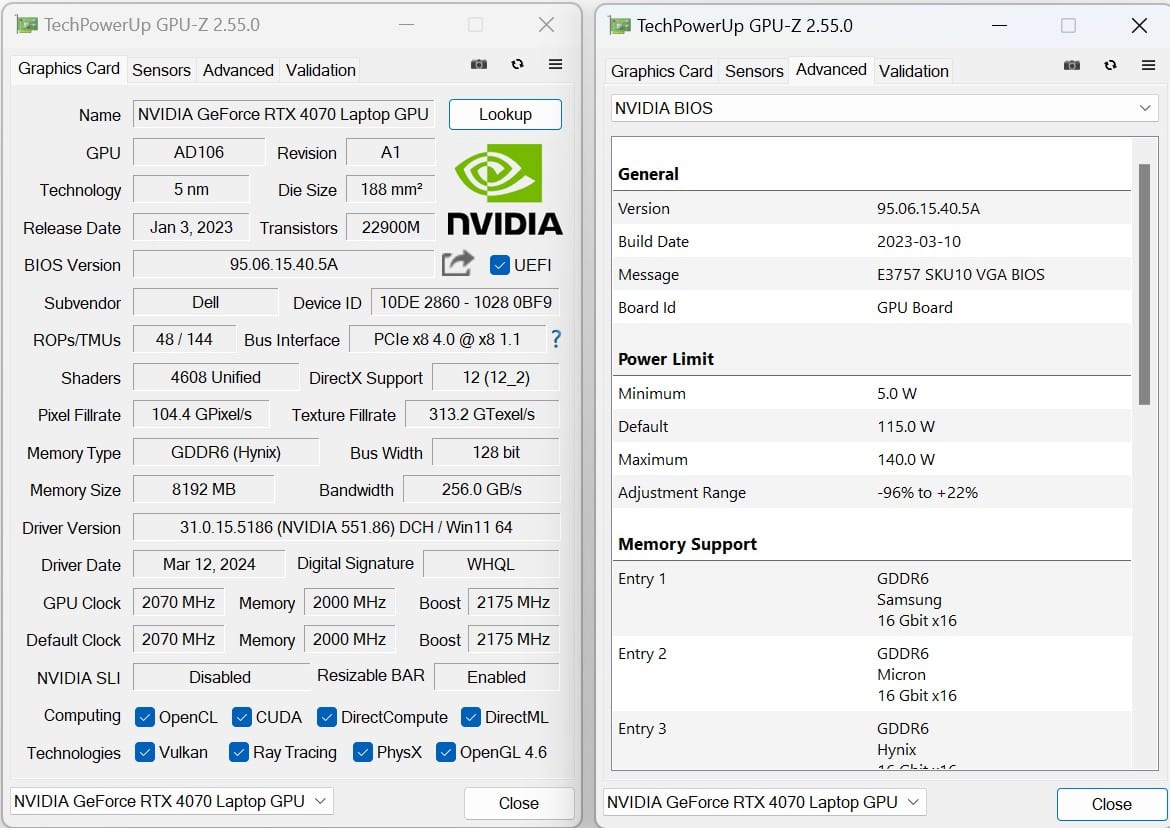
Let’s move on to the graphics card. This is an interesting solution on paper for a notebook PC. In fact, the 140W RTX 4070 mobile offers attractive specifications for the budget allocated to this machine.
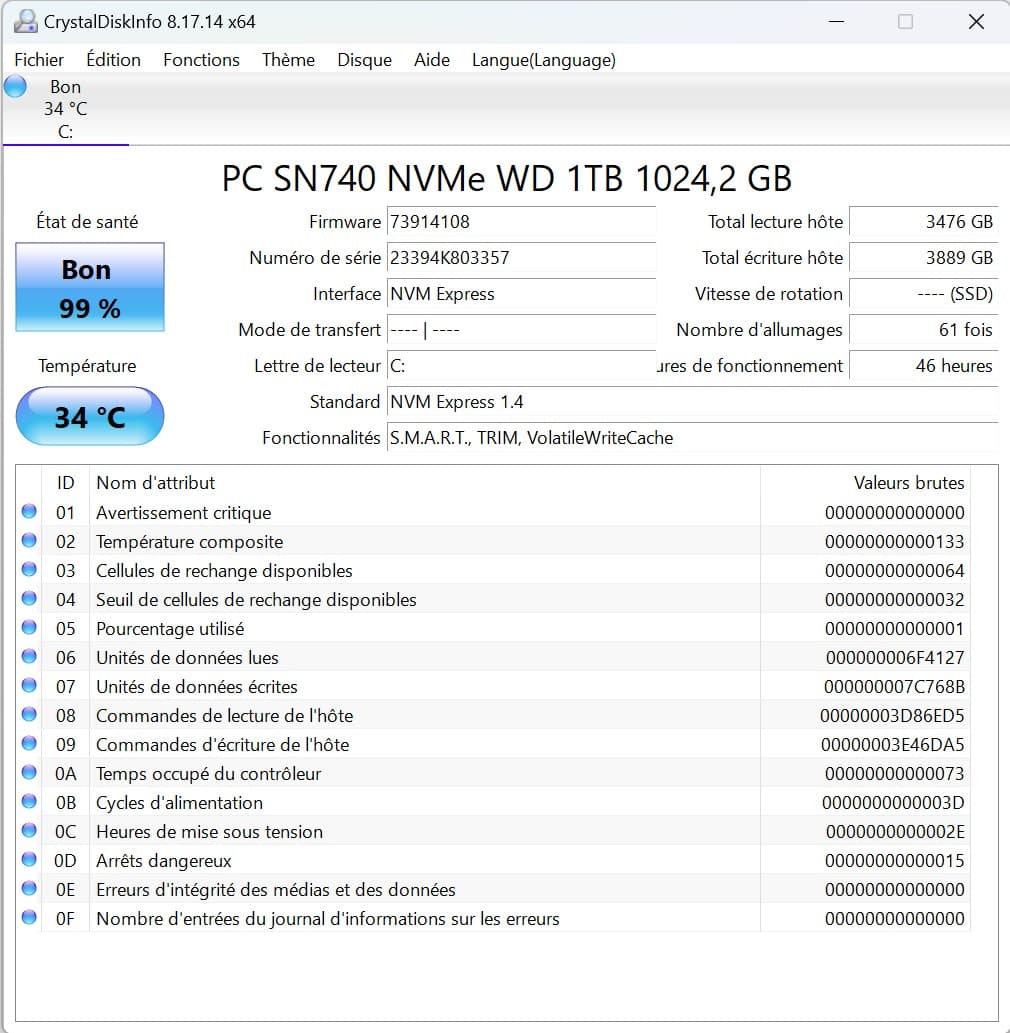
For storage, we have a Western digital SN740 PCIe 4.0 x4. The performance of this WD SSD is very good, with very low latency even if throughput is rather low due to its lack of cache.


As for the screen, we’re on a 240Hz 2K IPS panel (2560x1600p) capable of 350 nits.
Disassembly, repair and upgrade
Disassembly is performed by removing the 10 screws on the back of the unit, then using the plastic tools found in ifixit kits. For any modification or manipulation, the battery must be disconnected.

Disassembly is straightforward, thanks to the screws at the bottom which open the laptop when unscrewed, as on Alienware.


From a modification point of view, we have easy access to the 2 M.2 slots in PCIe 4.0 x4 format 2280 and 2232. The Wi-Fi card is also easily accessible. As for RAM, we can easily swap the 16GB in place for a 64GB kit. As far as RAM is concerned, the Kingston kit we installed at the end of this test only worked with 4800CL36 instead of 5600 CL40.
[nextpage title=”Test protocol”]
The test protocol has been revised to offer something more complete. We now have software for autonomy measurements, as well as a thermal camera for surface heating measurements.
New e-sport video games have been added to the tests, as well as a few titles featuring Nvidia DLSS and/orRay tracing.
The protocol
- Screen measurements
- Autonomy and heating
- Synthetic CPU test
Cinebench R20
Cinebench R23
Geekbench 3
Geekbench 5
3DMark CPU Profile
Aida 64 - Synthetic GPU performance
3DMark Timespy
3DMark Timespy extreme
3DMark Firestrike
3DMark Firestrike Extreme
3DMark Firestrike Ultra
3DMark Speedway - Productivity performance
PCMark 10 Extented
PCMark 10 Applications test
Blender Benchmark
PugetBench Davinci Resolve - Gaming performance Resterisation (1080p ultra / 1440p ultra)
Shadow of the tomb raider
Anno 1800
Cyberpunk 2077
COD MW2
War thunder - Esport gaming performances
Counter strike : Global offensive
Raimbow 6 siege - Gaming performance RTX & DLSS/FSR (1080p/1440p ultra)
Shadow of the tomb raider
Cyberpunk 2077
War Thunder
COD MW2
Tests were performed with NVIDIA driver version 537.58.
[nextpage title=”Screen measurement with probe”]
Screen measurements
We begin our test with the panel, and in order to find out the colorimetric quality of this screen out of the box, we took measurements of the screen.
For this test, we didn’t use the 10-bit mode for this panel, but we did run the tests with the graphics card in discrete mode , thanks to the laptop ‘s built-in MUX switches. Measurements are better in this mode, and it’s possible to get a better rendering after calibration.
This was tested on DisplayCal following 51 color patches with the sRGB profile as the target.
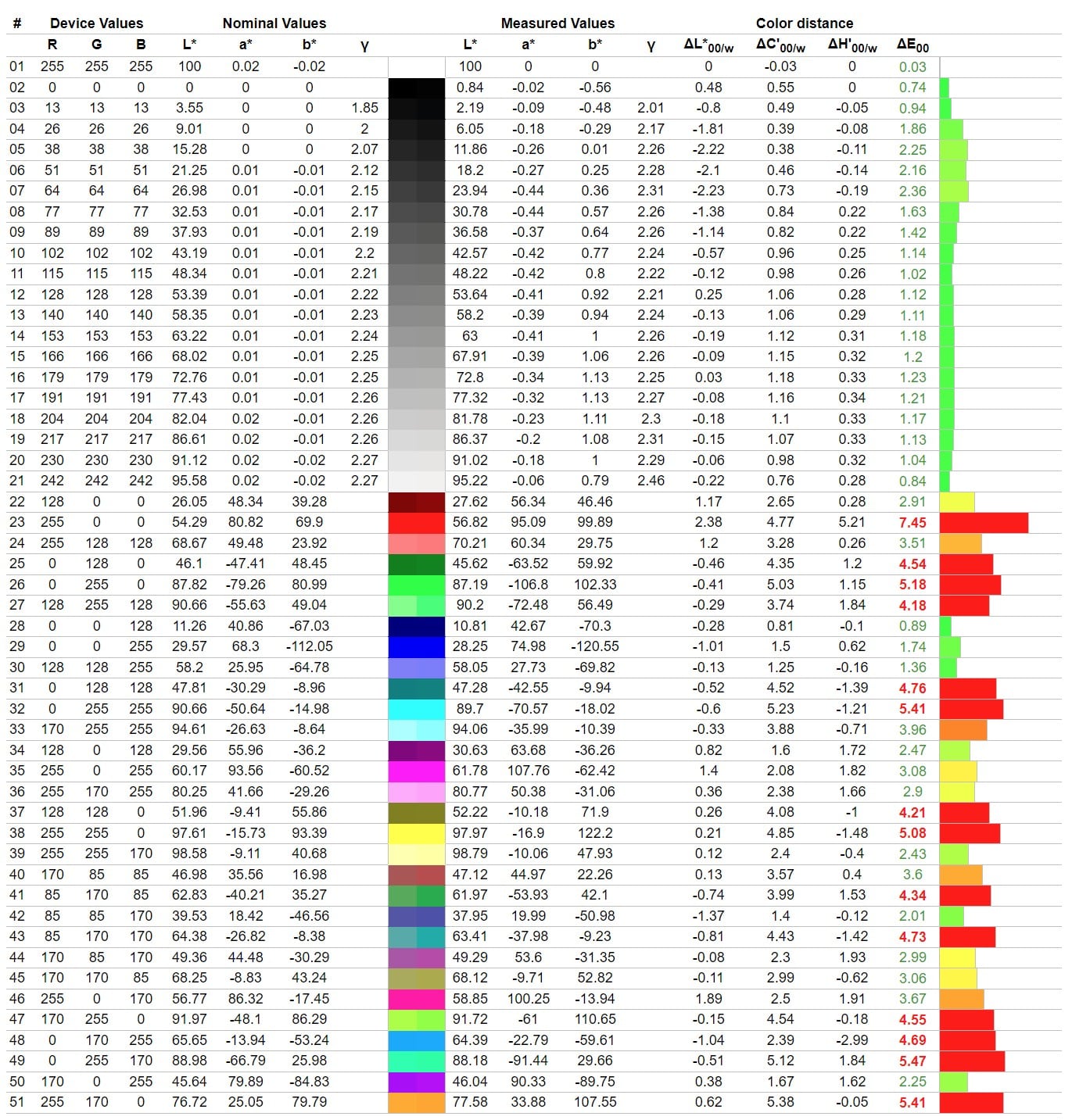
As can be seen, the calibration is rather disappointing from the outset, with 6400K for the expected 6500K, which is very good. Delta E is just 2.74% on average and 7.45% at maximum.
In terms of brightness, the screen is capable of 306 cd/m², with a contrast ratio of around 1065:1.
Gamut (according to Dell) is :
- 100% DCI P3
As for screen reflectance, we have a matte panel, a good choice for use in bright environments, even if it does reflect light.
[nextpage title=”Autonomy and heating”]
Autonomy
Device autonomy was measured using the PCMark10 integrated battery benchmark. The modes tested were video, productivity and gaming. Power management remained in normal mode and the GPU in hybrid mode. Screen brightness was set to 200Cd/m² without HDR, and sound was output via headphones plugged into the laptop’s jack.
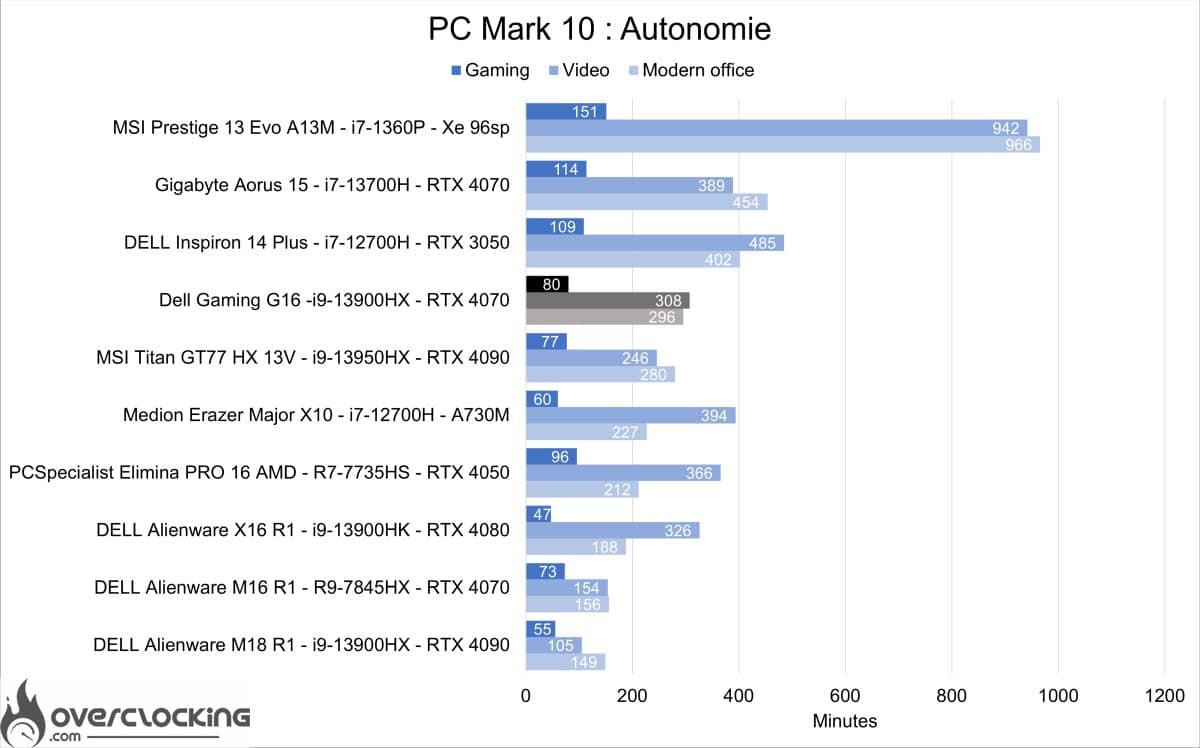
As we can see, we have here a good student in the gaming laptop category, with almost 5h in video mode and almost 1h20 in gaming, this G16 is a real nomad laptop for gaming and why not for work?
Heats up
To test the machine’s heating, we carried out three separate tests, firstly IDLE heating, then heating under CPU load on Cinebench R23 for 10 minutes.
The cooling system


On the outside, we start with an opening on each side of the laptop, right and left, and at the rear we have two large openings to expel hot air. Underneath, we have a large grille to draw in fresh air via the fans we can see through it.
In IDLE


Loaded


On Cinebench R23 after 10 min of stress. The CPU rose to 100°C in the first few minutes before stabilizing at around 84°C. Before stabilizing, the temperature oscillated for several minutes between 100°C and 75°C. Power consumption and frequency fell from 150W and 3900 MHz to 90W and 3200 MHz during this stress test. On the surface, the maximum temperature on the keyboard side was 40°C.
[nextpage title=”Synthetic CPU performance”]
Synthetic CPU performance
Let’s take a look at what this machine has to offer, starting with CPU and memory performance on a few synthetic benchmarks. The i9-13900HX on this machine will be compared with the results obtained by the Ryzen 9 7945HX and the i9 13900HK.
Cinebench R20
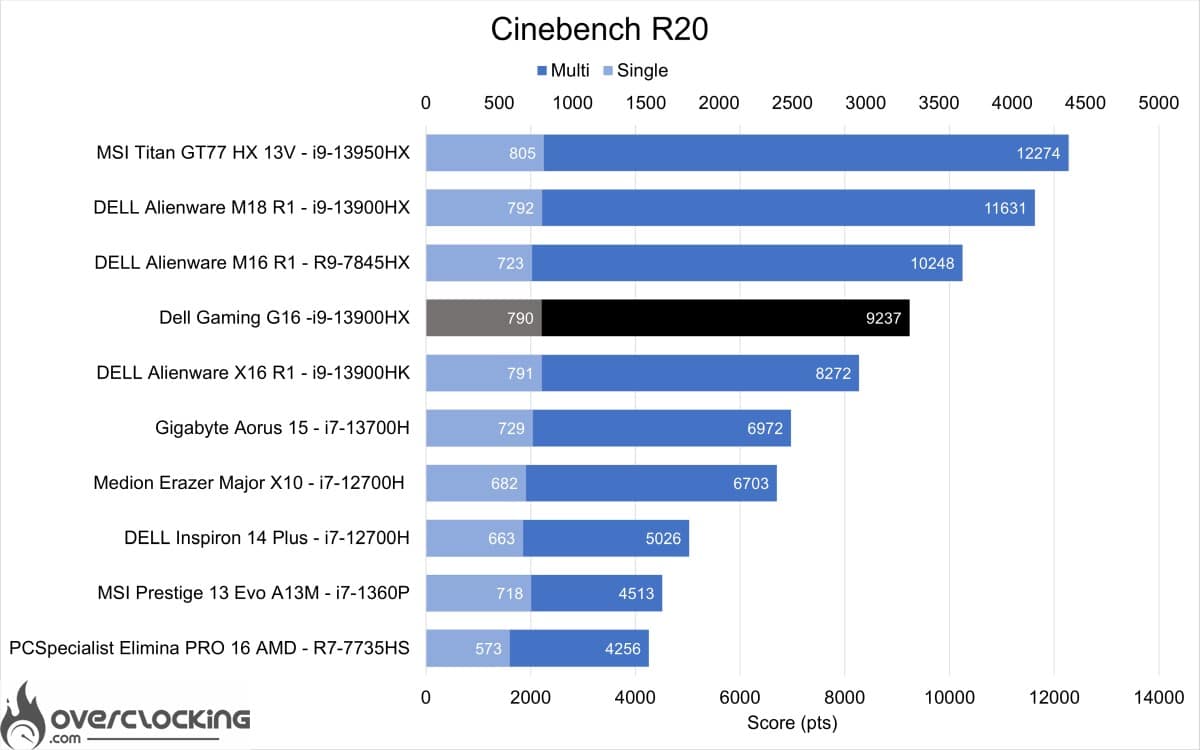
We start with Cinebench R20, here the 13900HX comes in ahead of the 13900HK and behind the 7945HX.
Cinebench R23
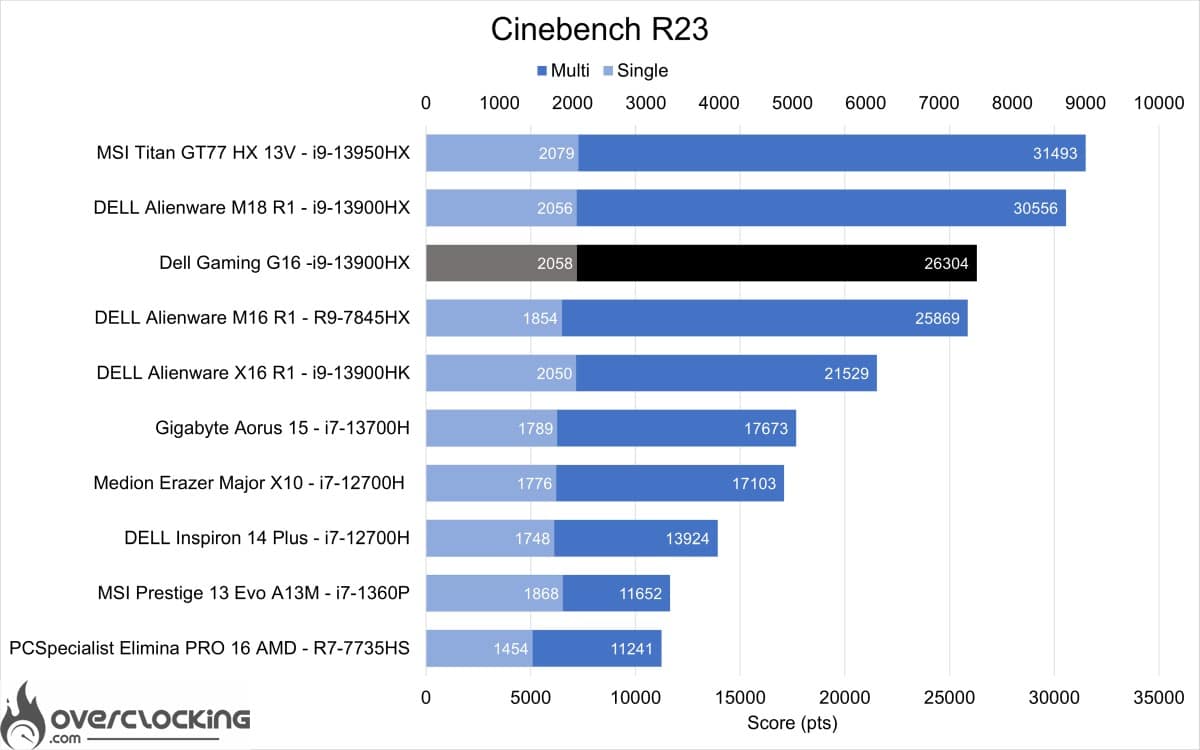
Continuing with Cinebench R23, here the 13900HX is ahead of the 7945HX.
Geekbench 3
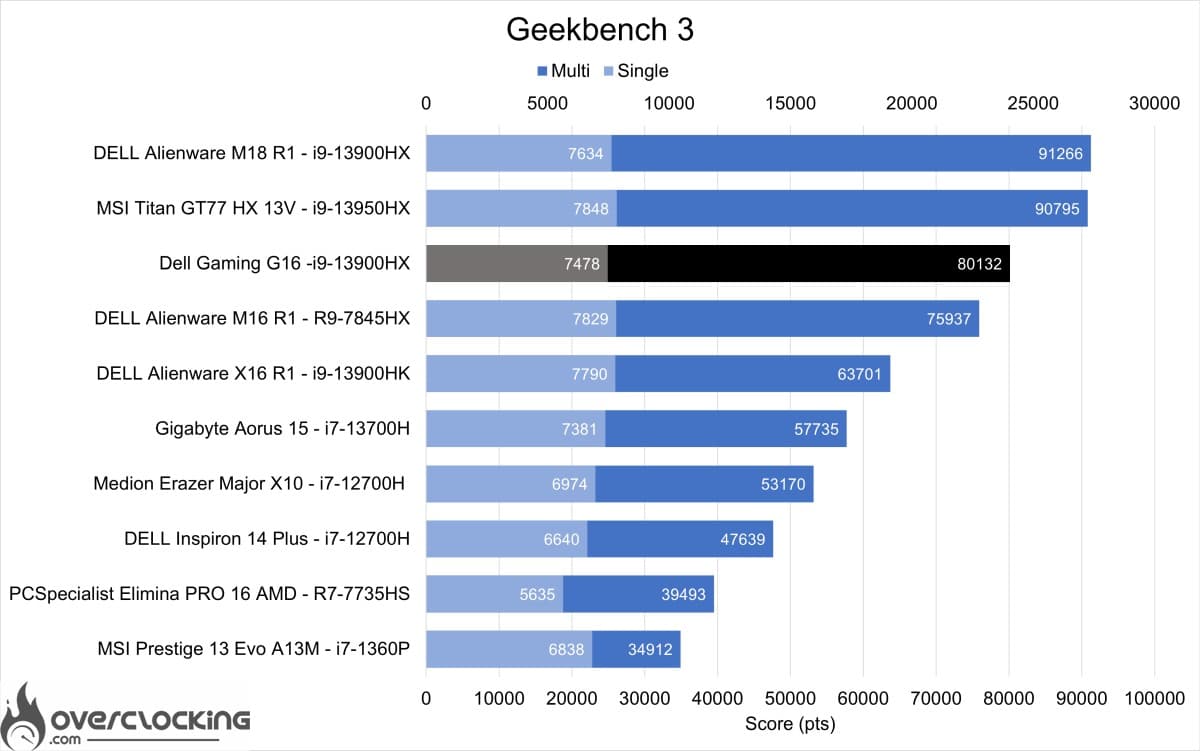
On Geekbench 3, the 13900HX is once again ahead of the 7945HX.
Geekbench 5
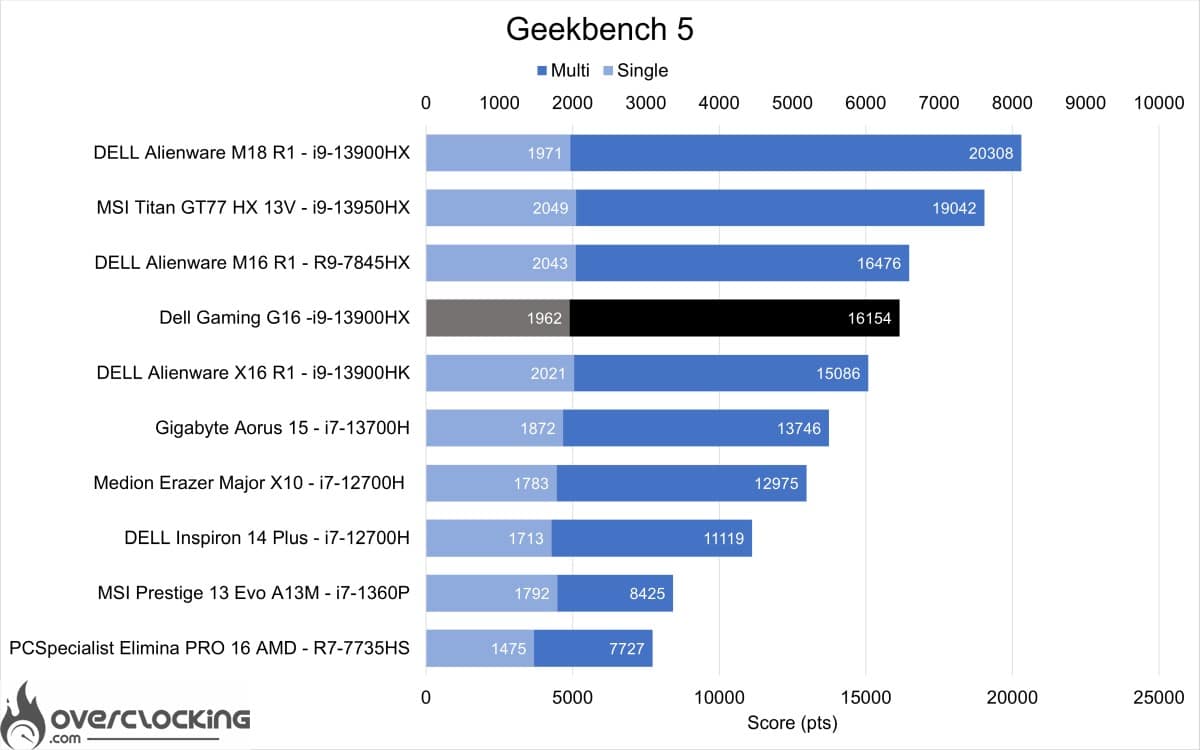
For Geekbench 5, the 13900HX this time ranks behind the 7945HX.
3DMark CPU Profile
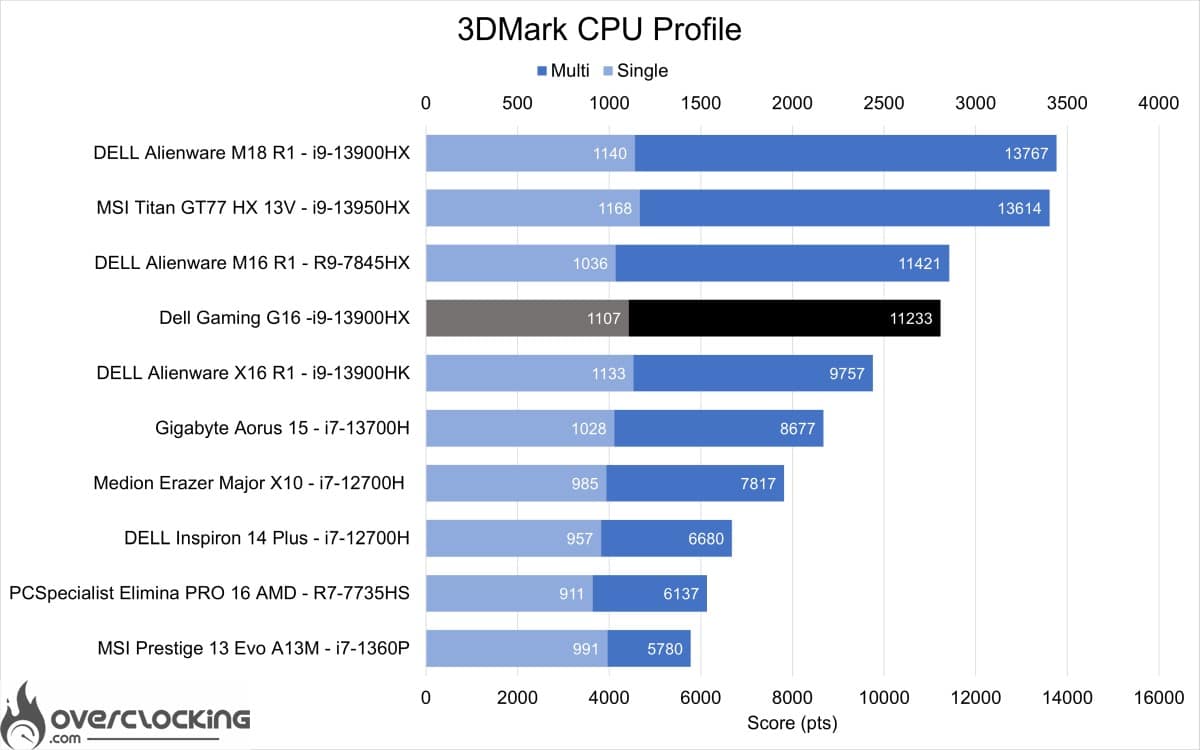
On 3DMark CPU profile, the 13900HX is just behind the 7945HX in multicore. However, it remains ahead in single core.
Aida 64
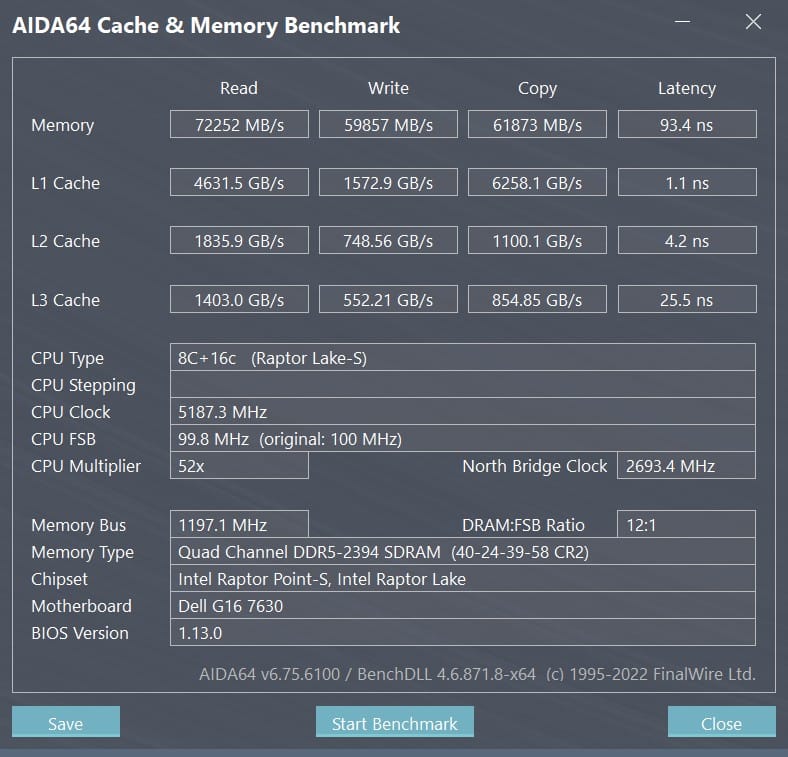
For AIDA64, we’re mainly looking at RAM. Here, performance is in line with the memory used. Latency is close to 89 ns and data rates reach 67 Gb/s. Quite high throughputs, albeit very disparate.
[nextpage title=”Synthetic GPU performance”]
Synthetic GPU performance
Now that we know the performance of the CPU part, we can move on to the GPU on a few synthetic benchmarks. The RTX 4070 coupled with the i9-13900HX will be compared mainly with the scores obtained with the R9-7845HX and RTX 4070.
3DMark Timespy
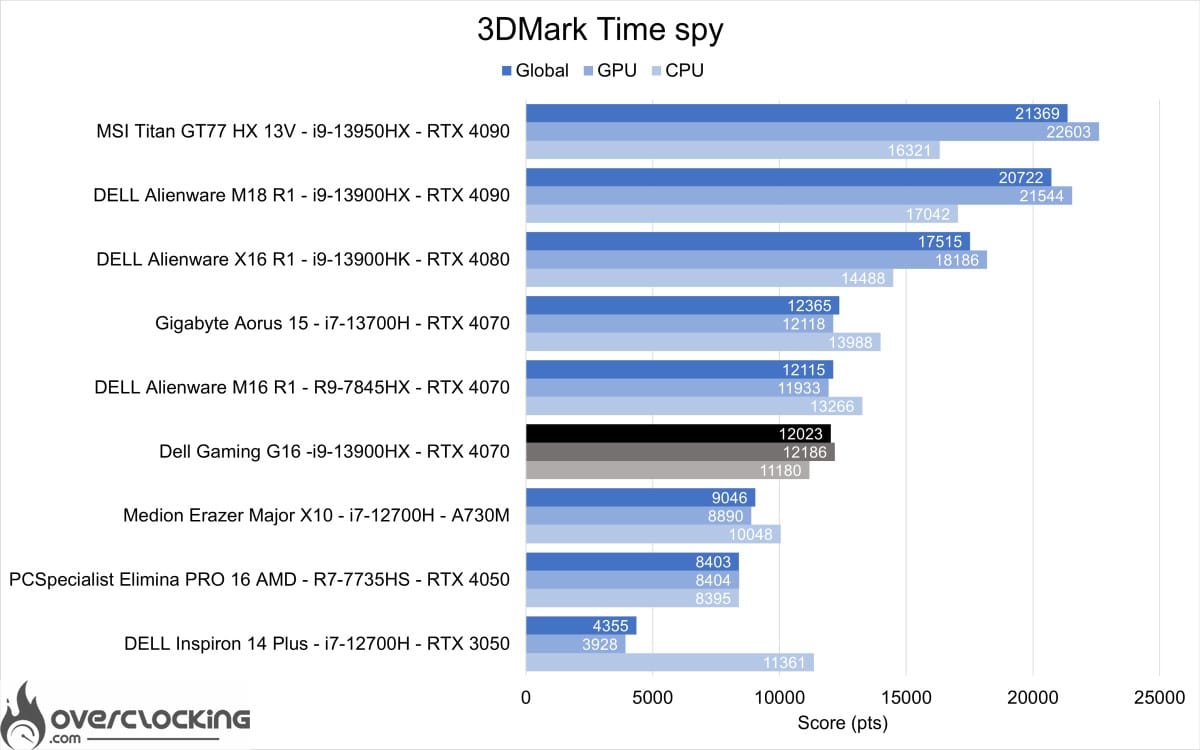
We start with 3DMark Time Spy, here the RTX 4070 Mobile of this Gaming G16 ranks ahead of the Alienware le Aorus in graphics score, the CPU however brings down the overall score.
3DMark Timespy extreme
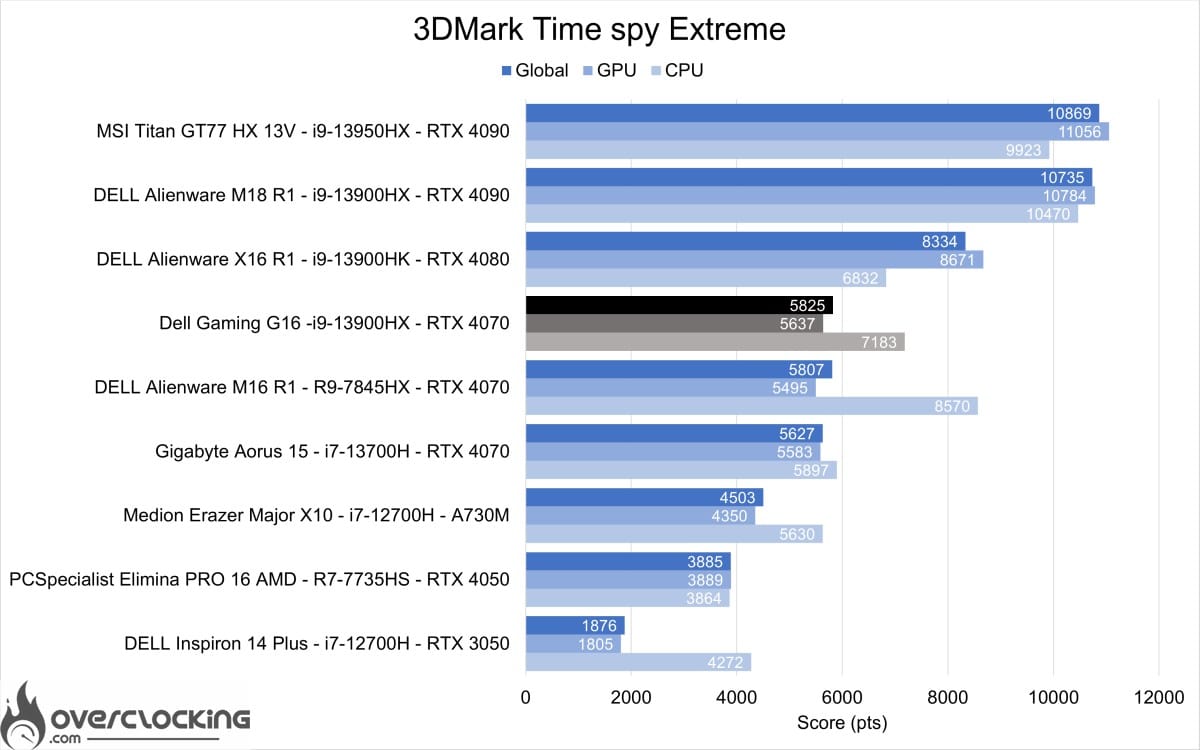
As with Time Spy, the same applies. Here, the Gaming G16 beats the other two laptops thanks to its graphics score and better CPU score.
3DMark Firestrike
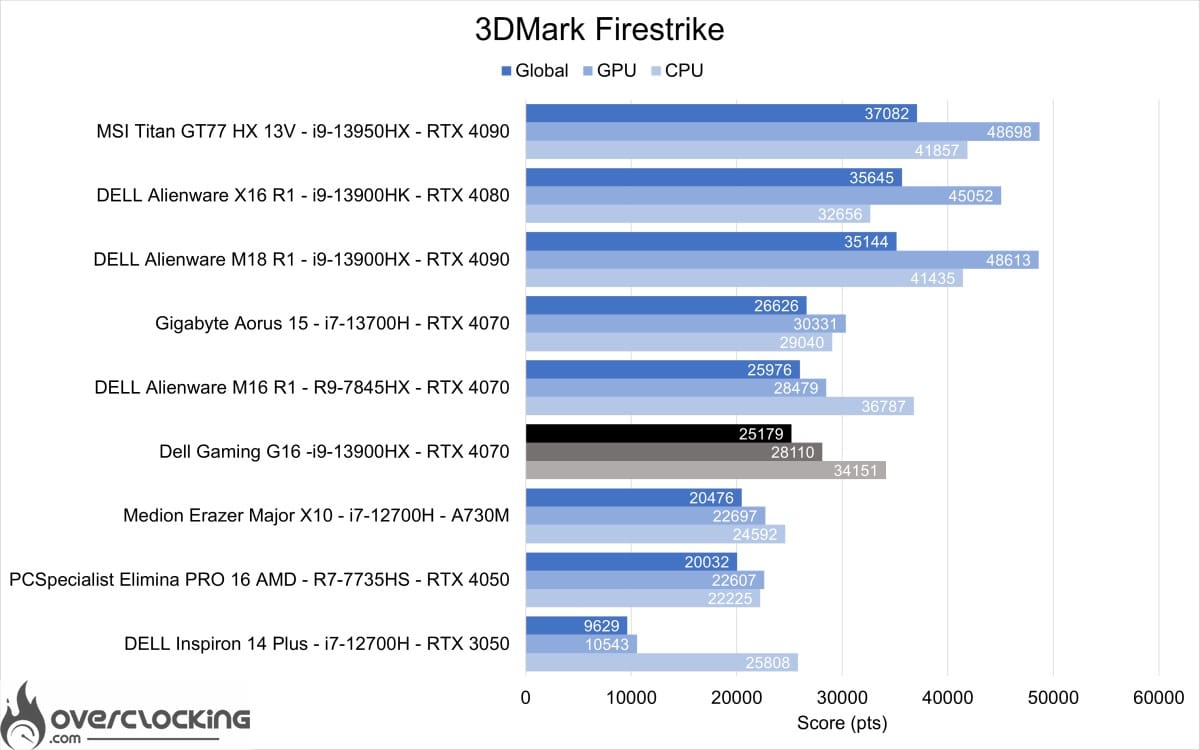
On 3DMark Firestrike, this RTX 4070 mobile performs a little less well this time. As with the Alienware M16 R1, it achieves a lower graphics score on Firetrike.
3DM Firestrike Extreme
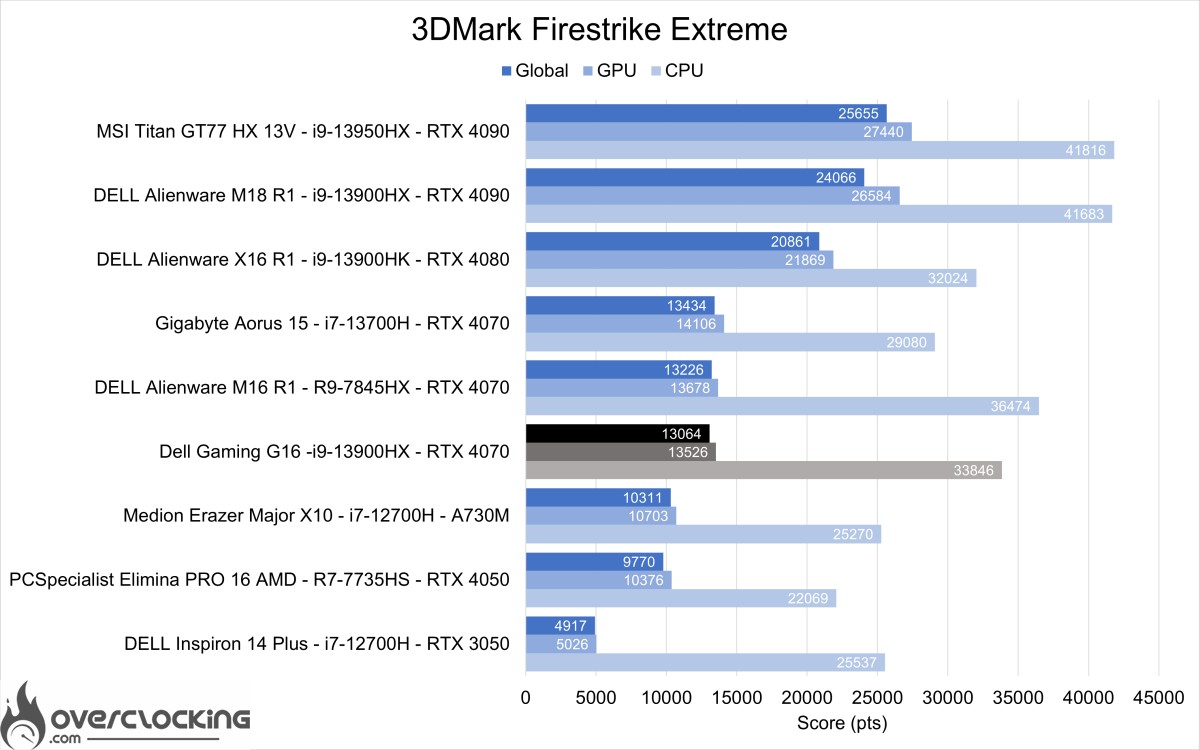
On 3DMark Firestrike Extreme, performance once again lags behind the other two laptops.
3DM Firestrike Ultra
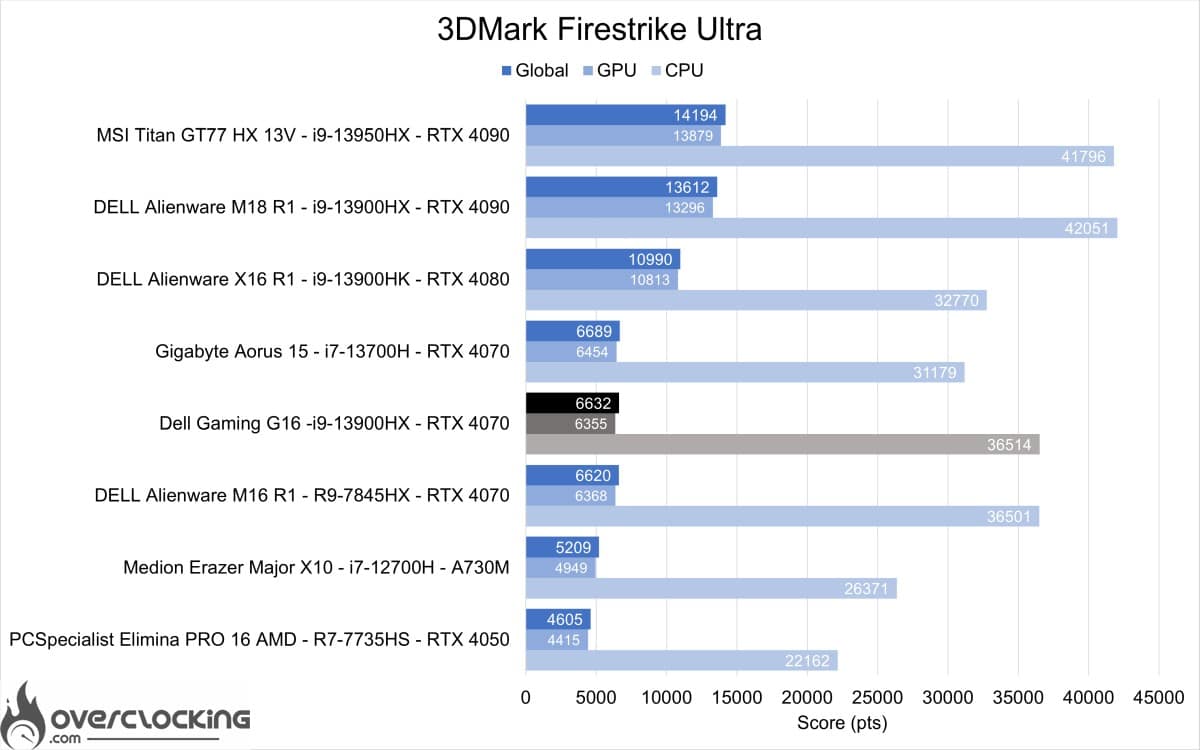
On Firestrike Ultra, the Dell Gaming G16 is this time ahead of the Alienware thanks to a slightly higher CPU score.
3DM Speedway
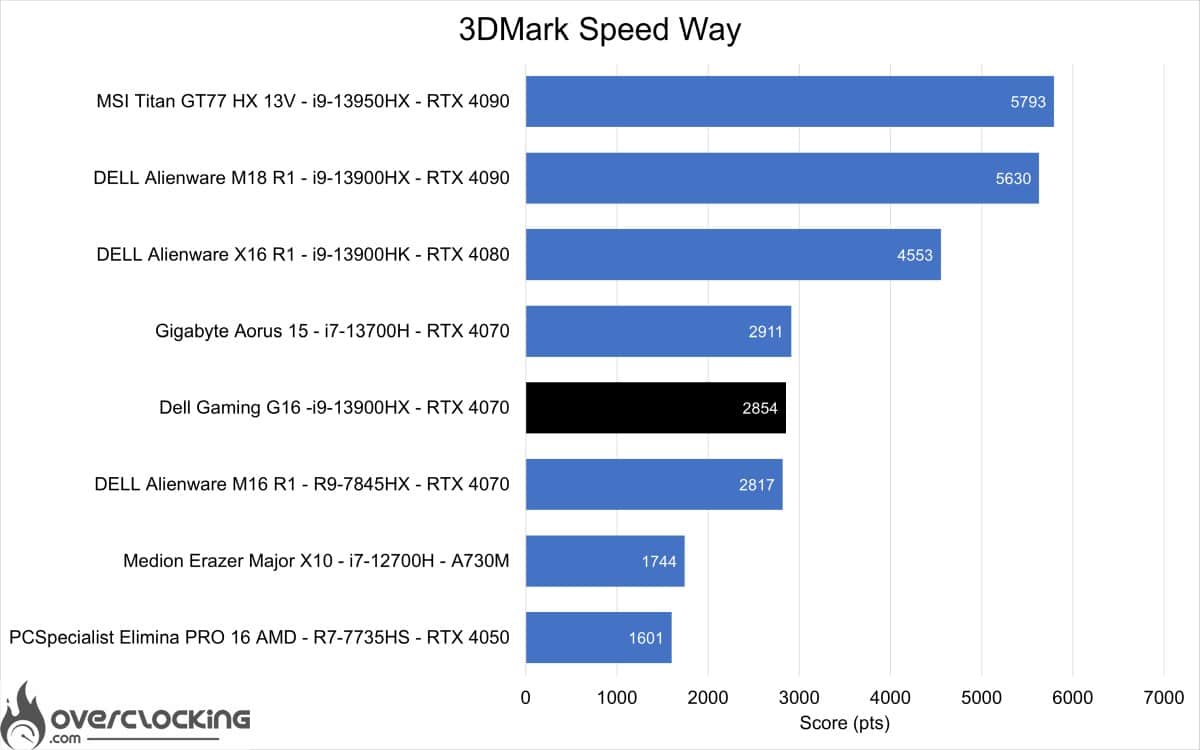
Last but not least, 3DMark Speedway is a graphics-only benchmark. Here, the differences in raw performance with Ray Tracing are clearly visible. The RTX 4070 powering this Gaming G16 performs slightly better than that of Alienware’s M16 R1, but lags behind that of the Aorus 15.
[nextpage title=”Productivity performance”]
Productivity performance
In this section, we focus on productivity performance. In other words, the machine’s performance on software such as Microsoft Office, Blender or DaVinci Resolve.
PCMark 10 Extented


On PCMark 10, the Gaming G16 again performs very well, even if it doesn’t necessarily stand out. It performs very well in essential scoring and content creation, but lacks in productivity.
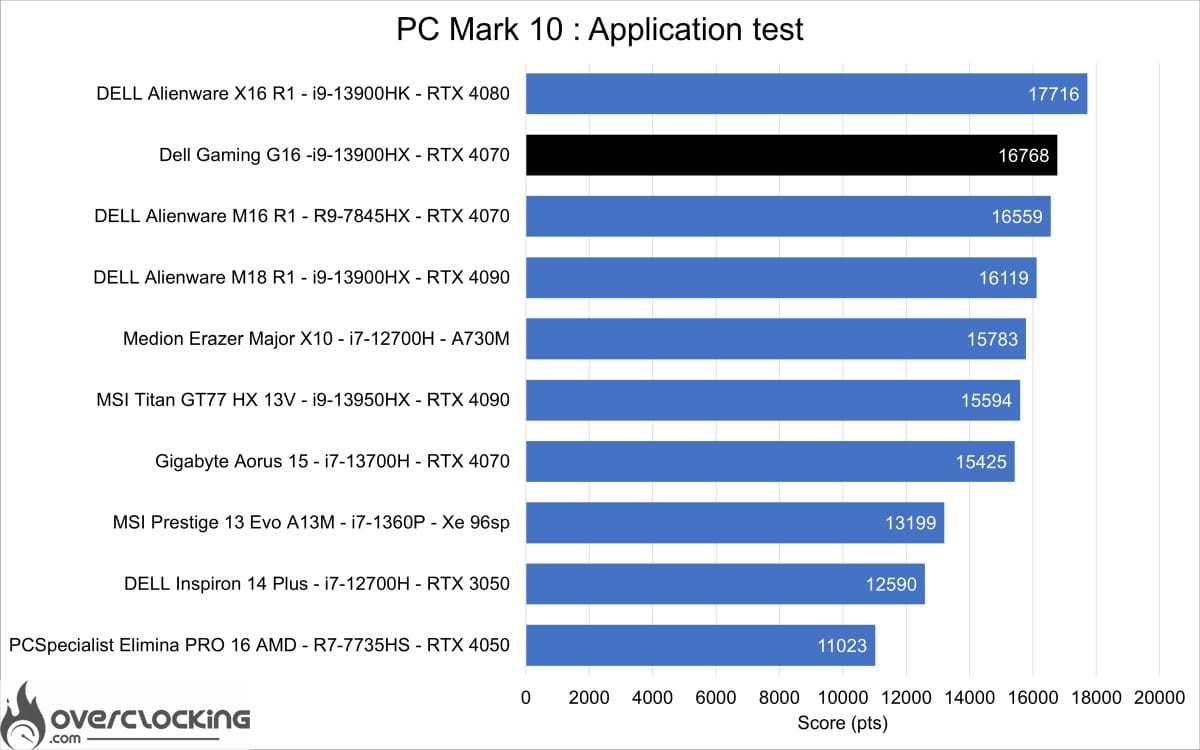
PCMark 10 : application
The benchmark presented here uses the Microsoft Office suite to give us our machine’s performance on Word, Excel and Powerpoint. Here, the Dell Gaming G16 is a very good performer, coming in second in this comparison.
Blender


On Blender, the Gaming G16 and its 13900HX rank between the 13900HK and behind the 7945HX for the CPU part. In terms of GPU performance, the RTX 4070 lags behind other RTX 4070s.
PugetBench: Davinci Resolve
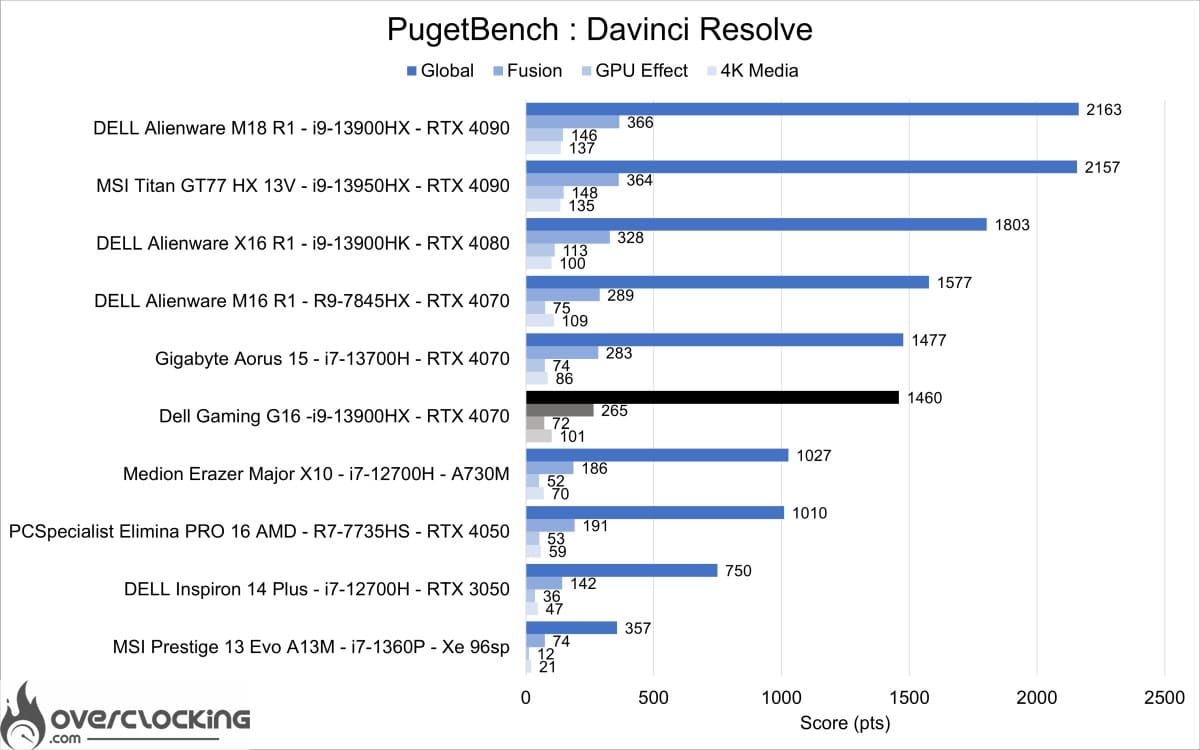
On Davinci Resolve, the Gaming G16 offers very good performance thanks to its RTX 4070, but still lags behind the Alienware M16 R1 and Aorus 15.
This Gigabyte Gaming can therefore easily cope with office use and content creation. Its comfortable autonomy and performance mean it could easily be transformed into an auxiliary workstation.
However, you’ll need to invest in 32 or 64 GB of RAM for this use, as 16 GB of RAM will be a limiting factor for content creation.
[nextpage title=”Gaming performance”]
Gaming performance Rasterization
Now that we’ve finished with the synthetic benchmarks, let’s move on to the gaming tests. Initially, we’ll be testing AAA titles in native resolutions and without DLSS or other upscaling.
Shadow of the Tomb Raider
Shadow of the Tomb Raider integrated benchmark results. In ultra quality, 1080p, 1440p under DX12.
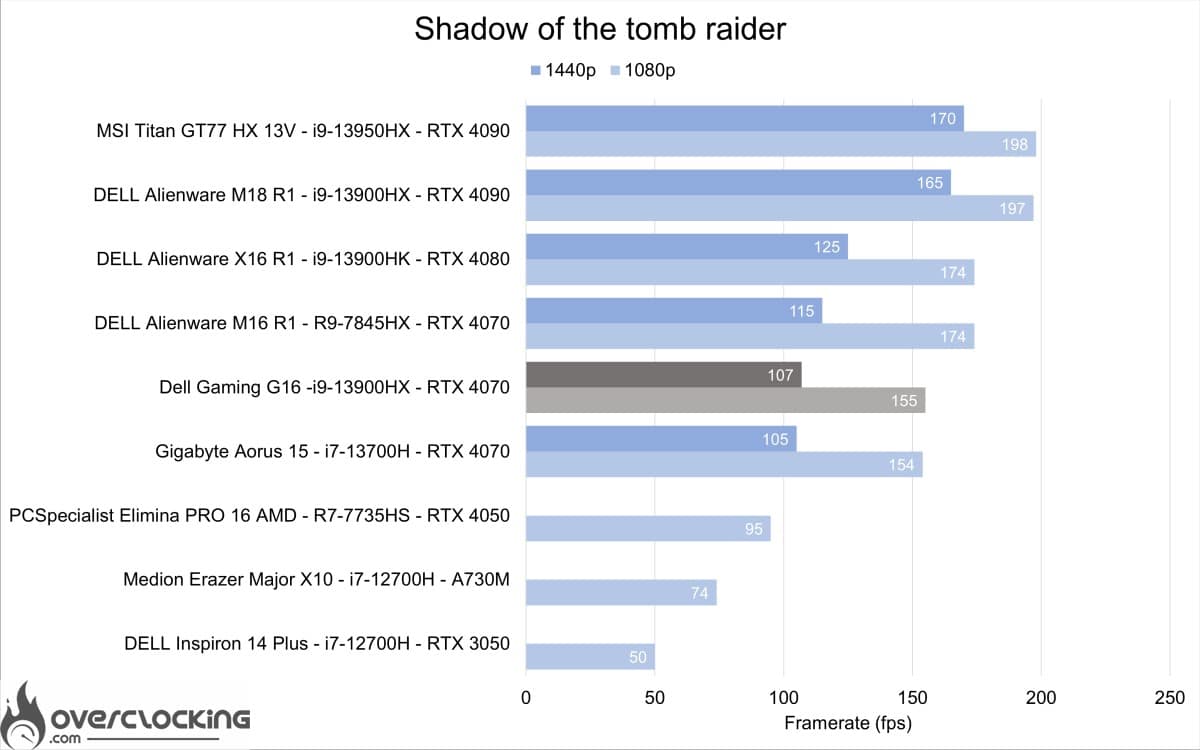
The Gaming G16 lags well behind the M16 R1, just on a par with the Aorus 15.
Anno 1800
Anno 1800 integrated benchmark results. In ultra quality, 1080p, 1440p under DX12.
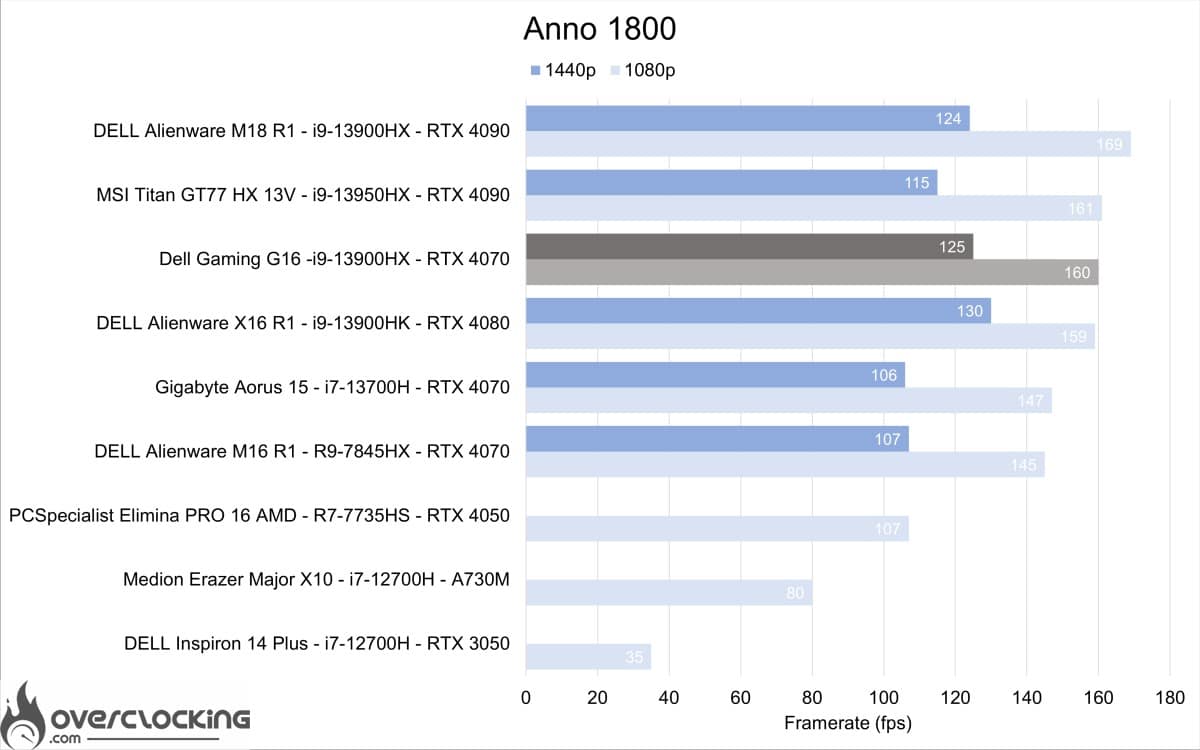
Moving on to Anno 1800, still in ultra, this time we have very good performance from the Dell Gaming G16. Whether in 1080p or 1440P, it’s up there with the best-performing laptops on the market.
Cyberpunk 2077
Results of the Cyberpunk 2077 integrated benchmark. In ultra quality, 1080p, 1440p under DX12.
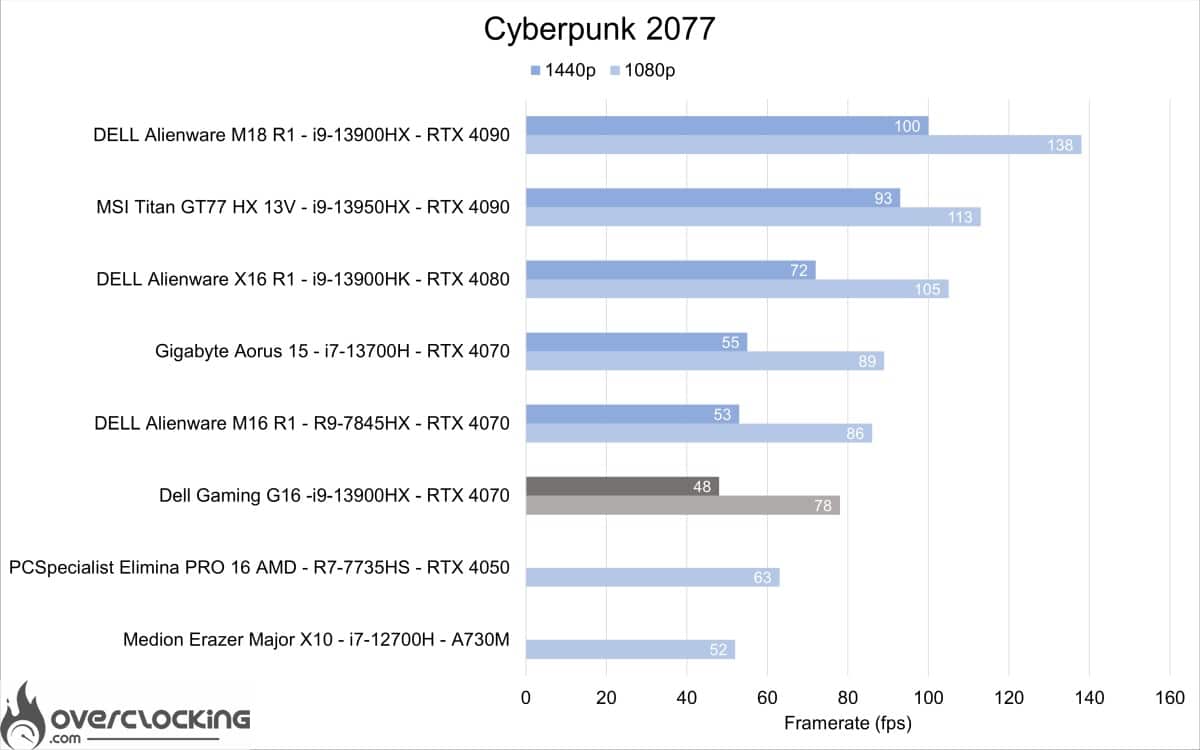
On Cyberpunk 2077, too, performance lags behind that of the M16 R1 and Aorus 15 in 1080p and 1440p.
Call Of Duty Modern Warfare II
Call Of Duty Modern Warfare II integrated benchmark results. In ultra quality, 1080p, 1440p under DX12.
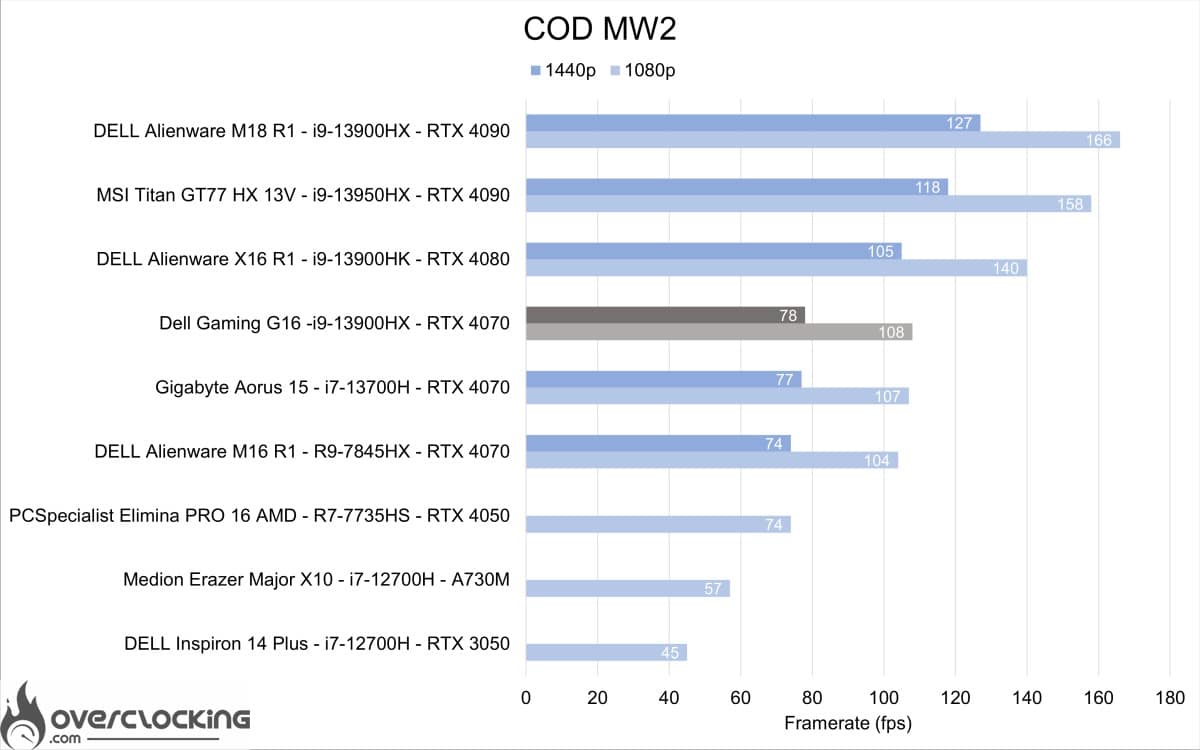
For COD MW2, the Gaming G16 outperforms the M16 R1 and Aorus 15 in 1080 and 1440p.
War Thunder
Results of the War Thunder integrated benchmark (modern conflict). In ultra quality, 1080p, 1440p under DX12.
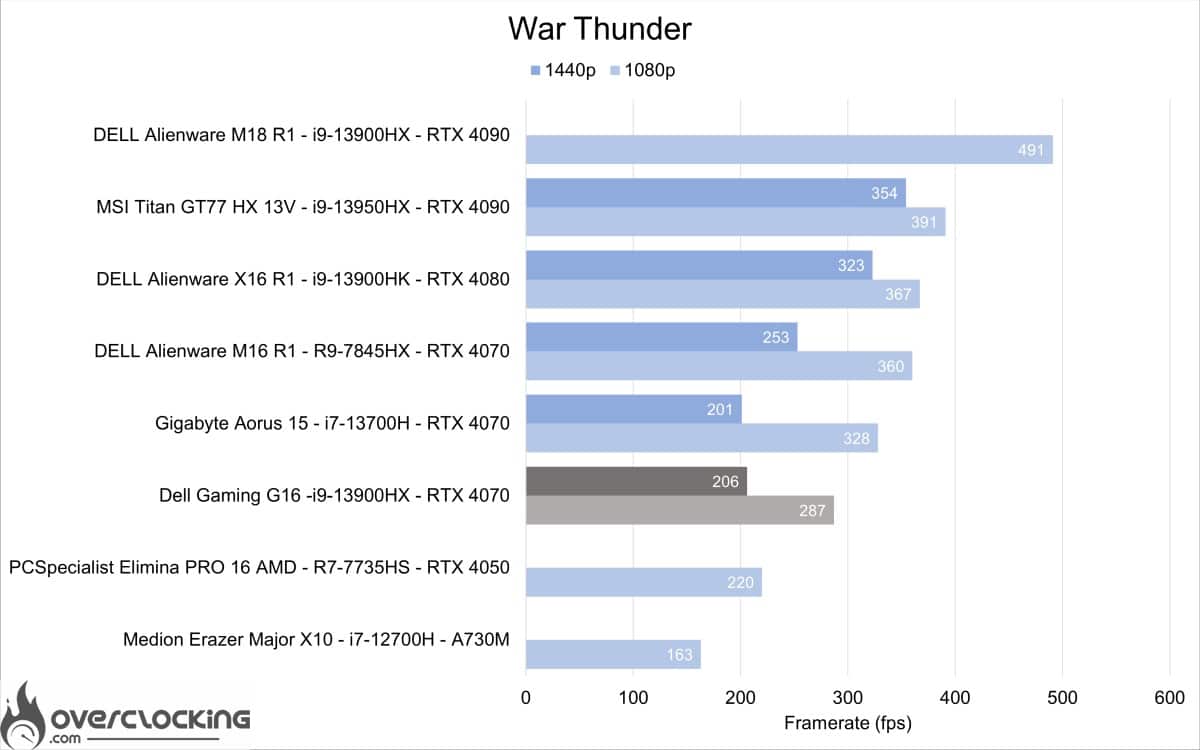
As with SOTTR, RAM has a major impact on performance. Kits with 2×8 GB have always performed less well than those with 2×16 GB. This upgrade should be considered soon.
[nextpage title=”Esport gaming performance”]
E-sport gaming performance
We now move on to some e-sport titles with built-in benchmarks. Here, it’s mainly CPU performance that’s being tested. The graphics card isn’t called upon much at low resolutions. For a machine of this caliber, we can expect at least 360 fps in 1080p without too much trouble.
CSGO
CS:GO integrated benchmark results. In ultra quality, 1080p, 1440p under DX9.
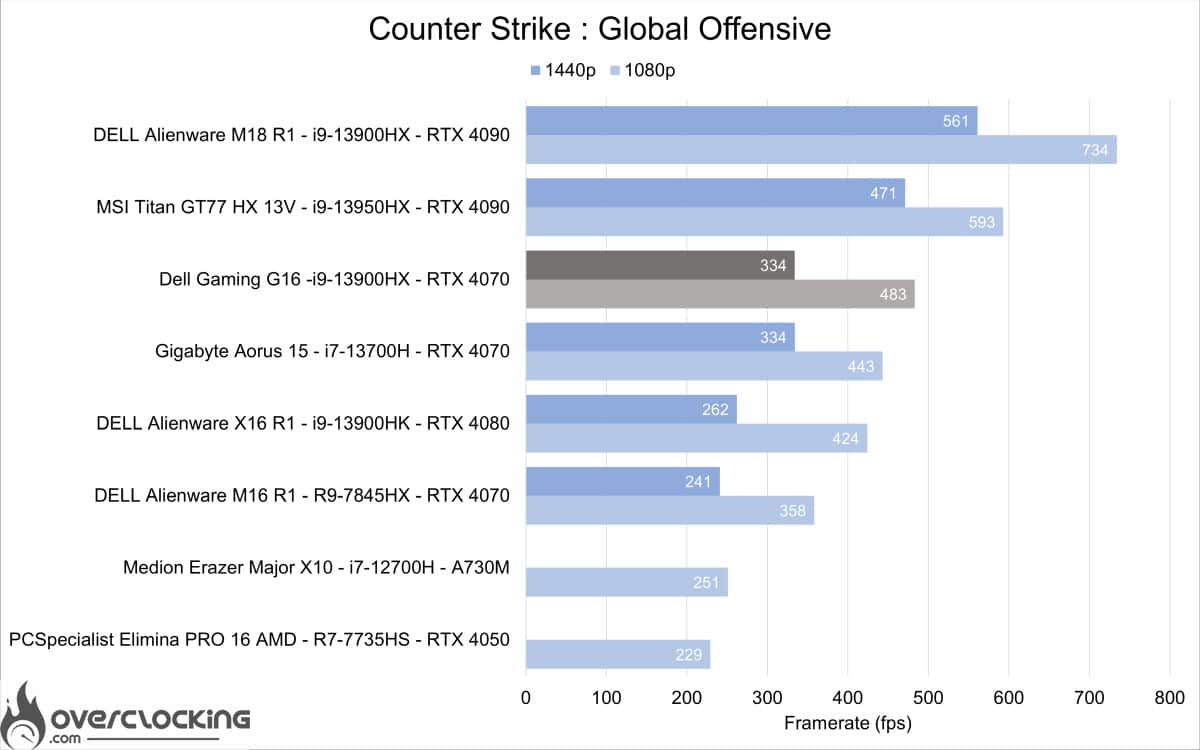
As expected, performance is very good. Here, the Dell Gmaing G16 is a top performer, beating out the big RTX 4080 and 13900HK machines.
Raimbow 6 siege
R6S integrated benchmark results. In ultra quality, 1080p, 1440p under DX12.
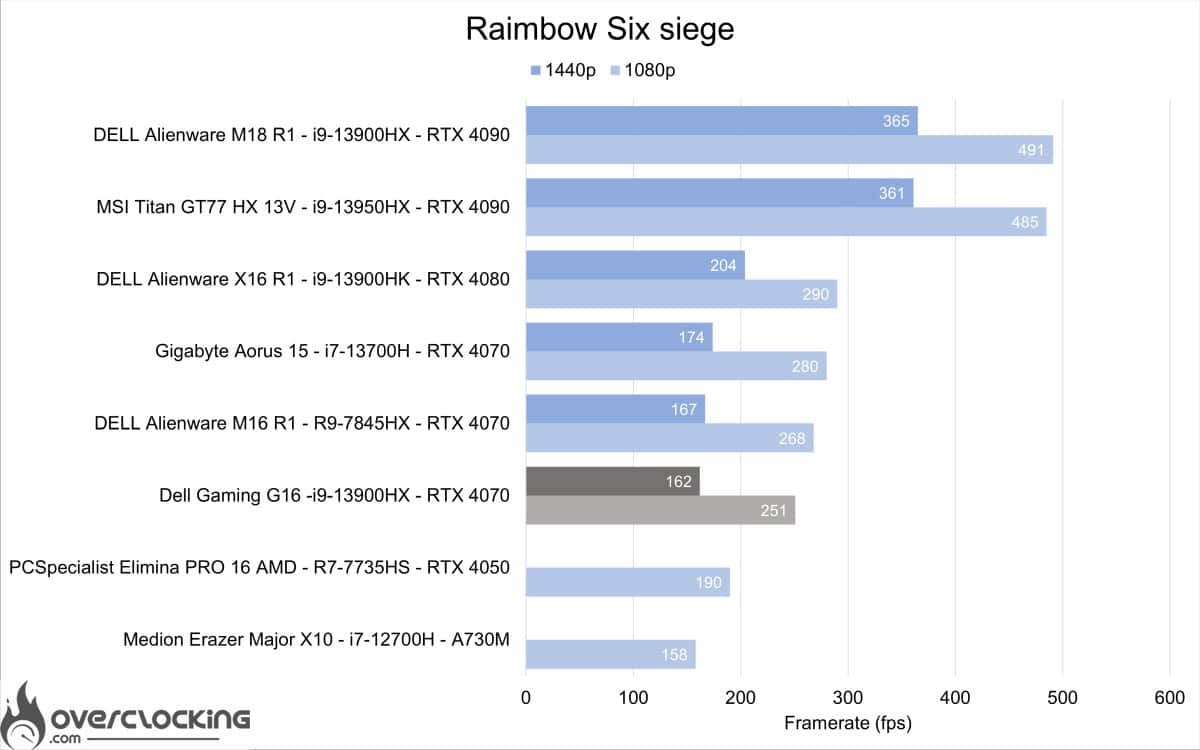
Like CS:GO, performance is very good, with over 240 fps in 1080p. Enough to run the game in this resolution at 240Hz without any problem. Or even 1440p at 165Hz. However, it’s still less powerful than the M16 R1 and Aorus 15 on this title.
[nextpage title=”RTX & DLSS/FSR gaming performance “]
Gaming performance RTX & DLSS/FSR
The Dell Gaming G16 is equipped with an RTX 4070 featuring the latest generation of DLSS (Deep Learning Super Sampling), DLSS 3.
DLSS 3 with optical multi-image generation
Improves graphics performance by harnessing the power of AI to generate more images. DLSS analyzes sequential images and motion data from the new optical flow gas pedal on GeForce RTX 40 series GPUs to create additional images of the highest quality.
DLSS 3 will therefore be tested on Cyberpunk 2077 in comparison with DLSS 2. For other titles, only the DLSS version without image generation will be compared with the native resolution with Ray Tracing enabled.
Shadow of the Tomb Raider
Shadow of the Tomb Raider integrated benchmark results. In ultra quality with Ray tracing active, in 1080p, 1440p under DX12.
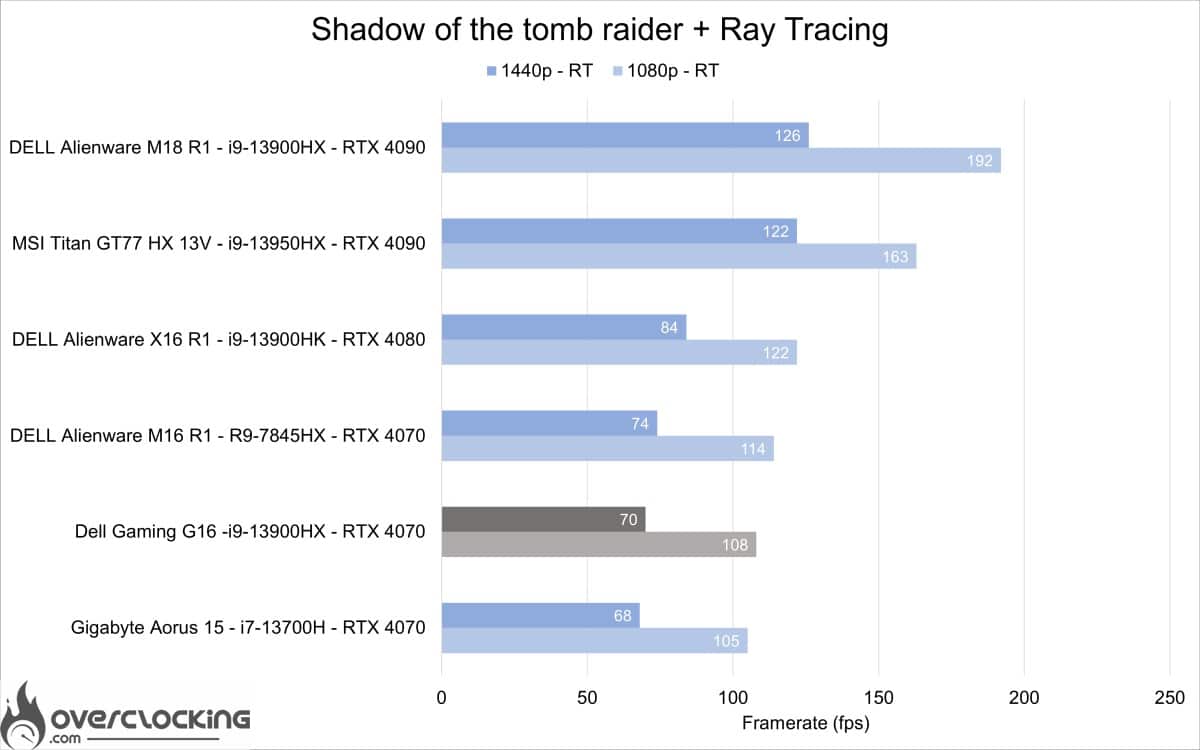
As can be seen on this title with Ray Tracing active, the Gaming G16 remains behind Alienware’s M16 R1 on this game, but ahead of the Aorus 15.
Shadow of the Tomb Raider integrated benchmark results. In ultra quality with active Ray tracing, in 1080p and 1440p native and DLSS Performance under DX12.
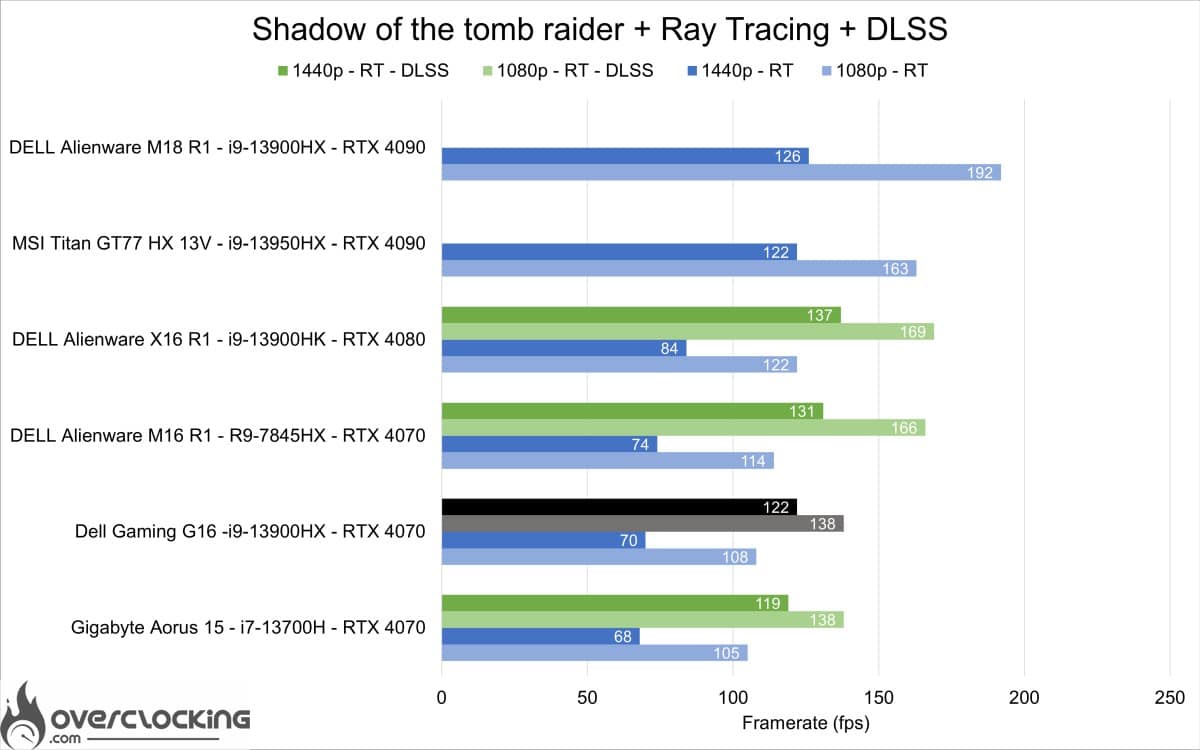
With DLSS enabled, we get performance close to that of games in native resolution without Ray Tracing. The gain is particularly noticeable at 1440p, with results very close to those of Aorus 15.
Cyberpunk 2077
Results of the Cyberpunk 2077 integrated benchmark . In ultra quality with Ray Tracing active (Psycho), in 1080p, 1440p under DX12.
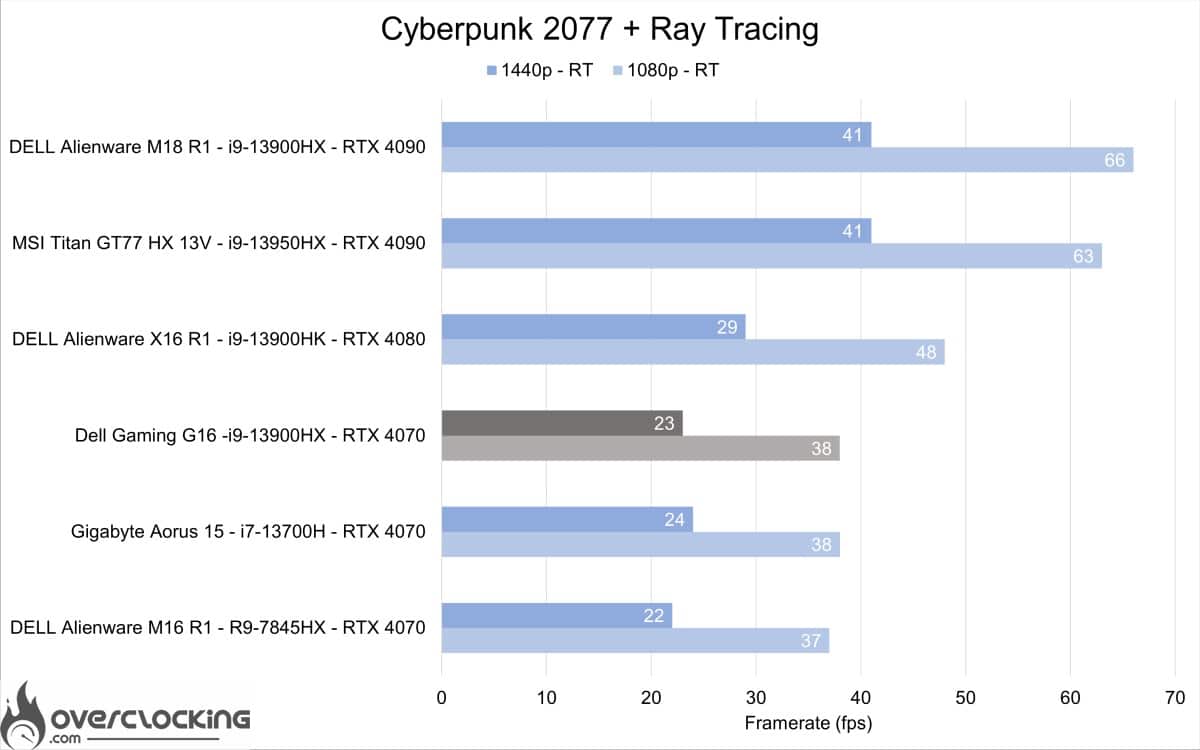
On Cyberpunk 2077, Ray Tracing in psycho mode divides performance by 2, this time achieving performance close to that of Aorus 15 and M16 R1. In this case, you’ll need to activate DLSS.
Results of the Cyberpunk 2077 integrated benchmark. In ultra quality with Ray Tracing active (Psycho), in 1080p and 1440p native and 2160p DLSS 2 or 3 performance under DX12.
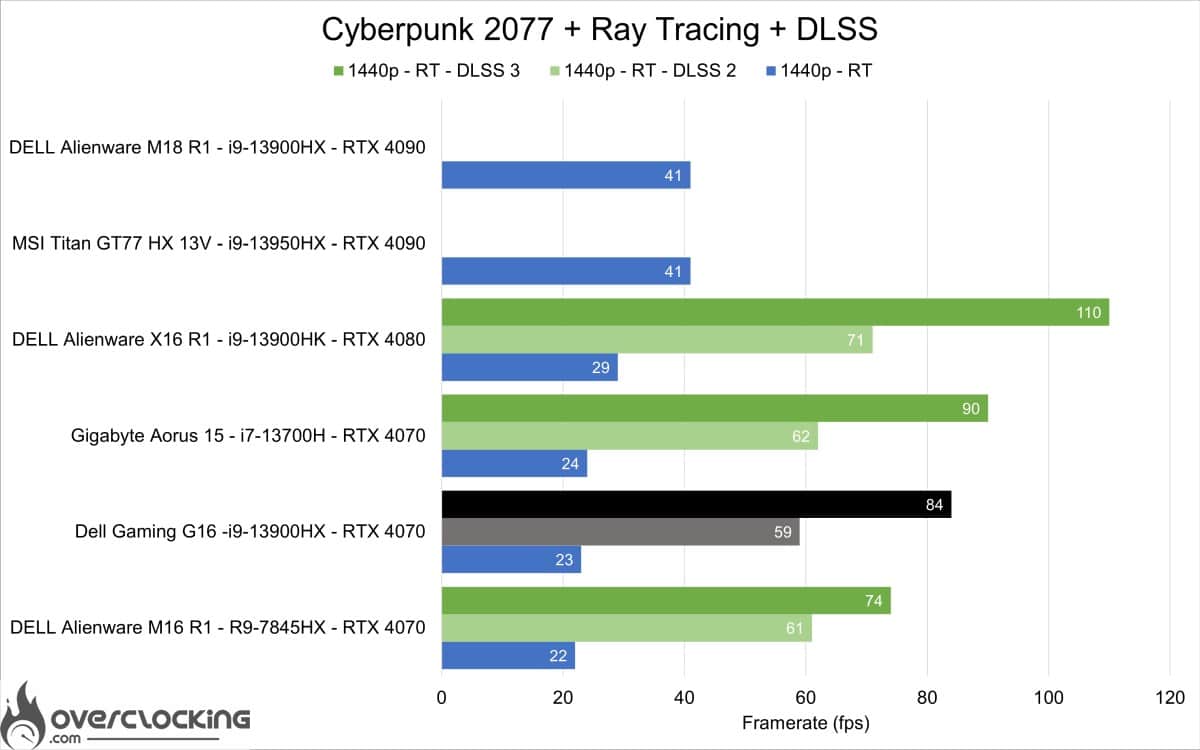
With DLSS 2 active on Cyberpunk 2077, we managed to reach almost 60 FPS in 1440p with Ray Tracing active. With DLSS 3 activated, we pass the 80 FPS mark in 1440p and 120 FPS in 1080p. In these conditions, the game is perfectly playable.
Call Of Duty Modern Warfare II
Call Of Duty Modern Warfare II integrated benchmark results. In ultra quality, 1080p, 1440p with and without DLSS performance under DX12.
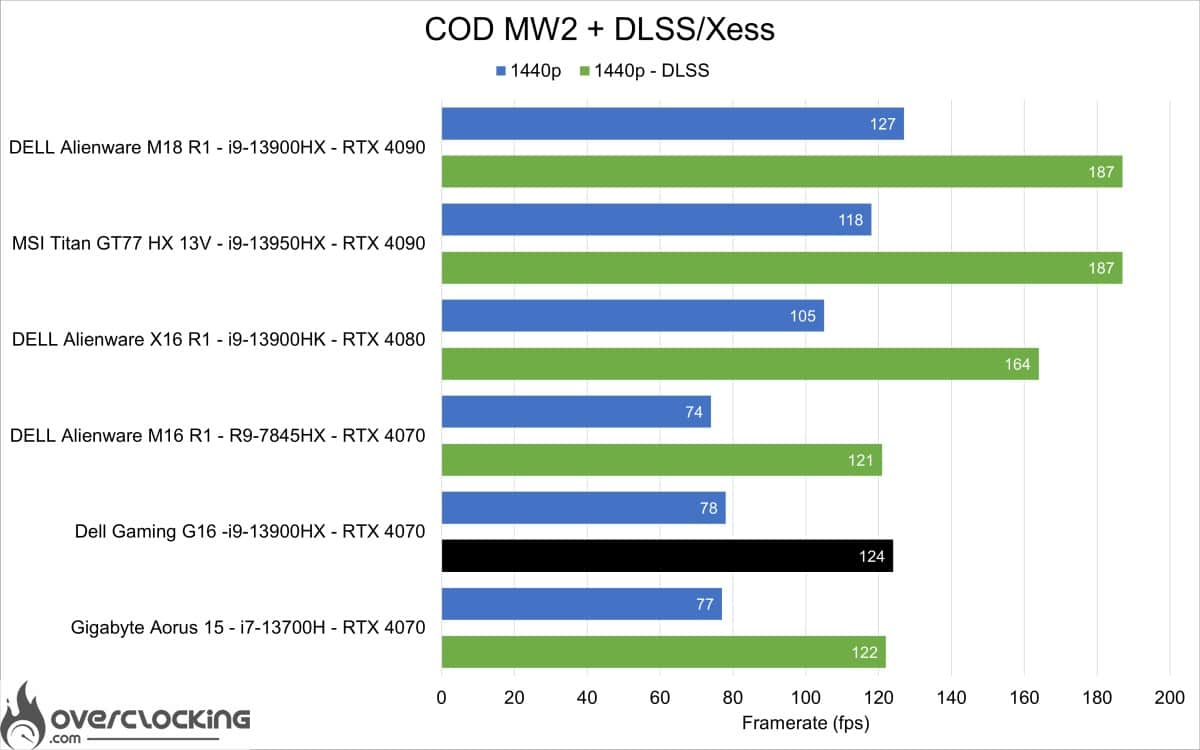
On COD MW2, activation of DLSS allows you to exceed 120 FPS in 1440p and 150 FPS in 1080p. By adjusting certain settings, it will be possible to play at 165 Hz.
War thunder
Results of the War thunder integrated benchmark (modern conflict). In ultra quality, 1080p, 1440p with and without DLSS performance under DX12.
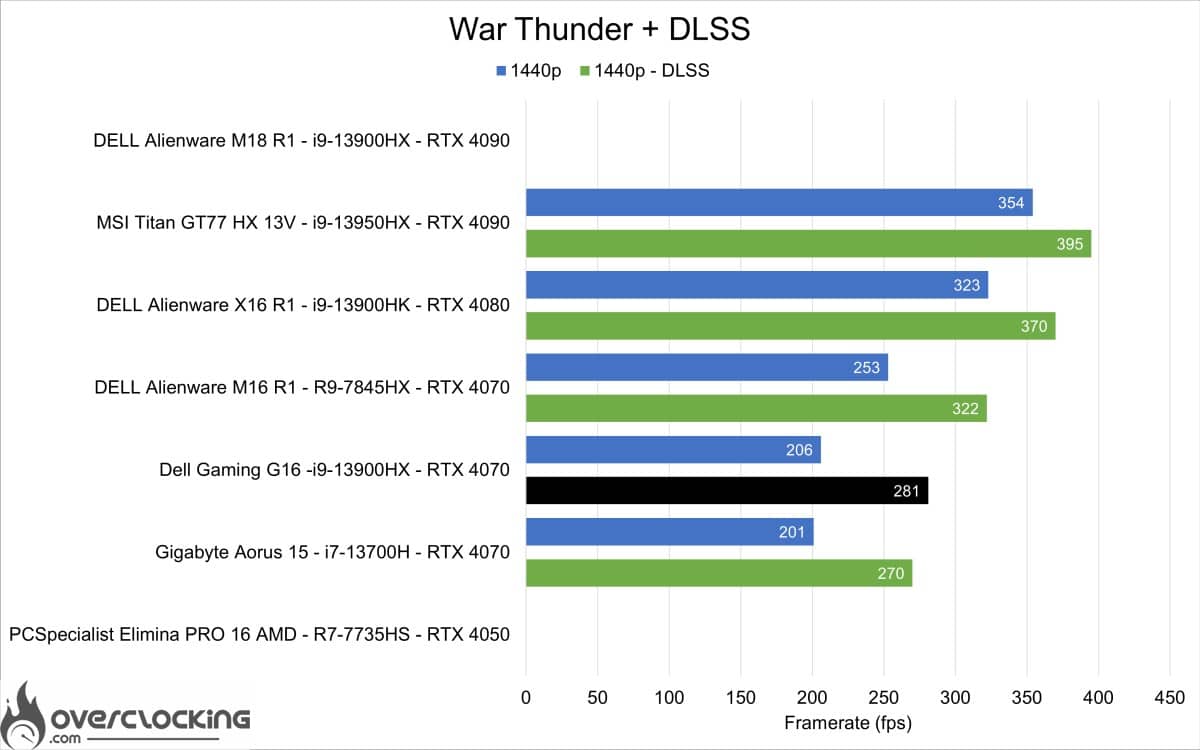 On War Thunder, DLSS doesn’t make a difference in 1080p, but in 1440p we’ve seen a gain of over 70 FPS.
[nextpage title=”RAM changes”]
Windows optimization and RAM change
In this section, we’re going to talk about hardware upgrades and RAM in particular. In the case of this Dell Gaming G16, we have the option of choosing the RAM in a 2×8 GB RAM and Linux version for €300 less than 2×16 GB. Why would we do that? Quite simply, to enable us to upgrade to 2x 32 GB of 5600 Cl40 at €229. 90, dropping the bill by €70 without Windows. Or 2×16 GB at €130. 90, for a final price cut of €170. All this while benefiting from faster memory and tighter timings.
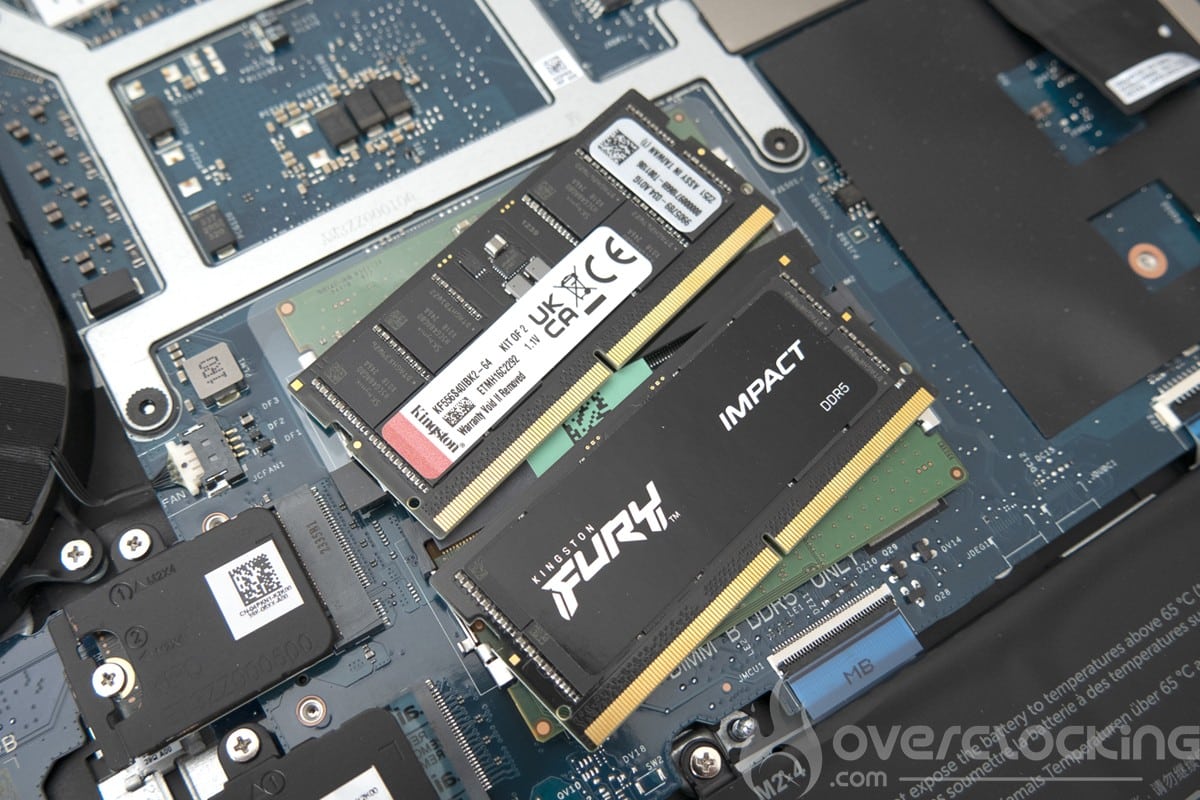
Let’s take a look at our Kingston Fury Impact 5600 Mt/s CL40 2×32 GB kit.


On CPU-Z we can see that the kit runs at the 4800 Mt/s limit for a tCL36. This grants a 10 Gb/s gain and a 3 ns drop in latency on AIDA64, as well as a performance gain on most of our benchmarks.
Synthetic CPU and GPU performance


On Geekbench 3 and 5, to begin with, we note a gain in single-core and multi-core performance. The memory score on Geekbench 3 rises from 8016 points to 9374 points.
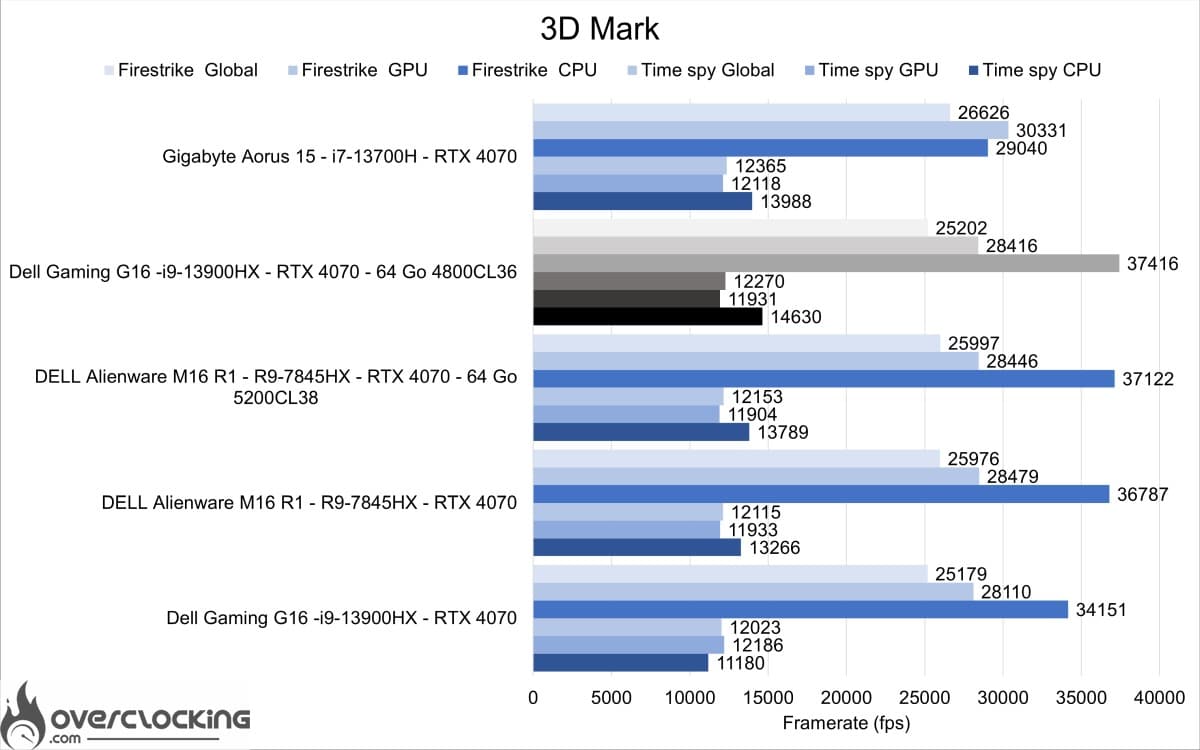
For the 3DMark suite, the gain is essentially on the CPU score, with minimal gains on Firestrike and Timespy.
Game performance
Let’s move on to the in-game tests. With all the games previously tested in 1080p Ultra.
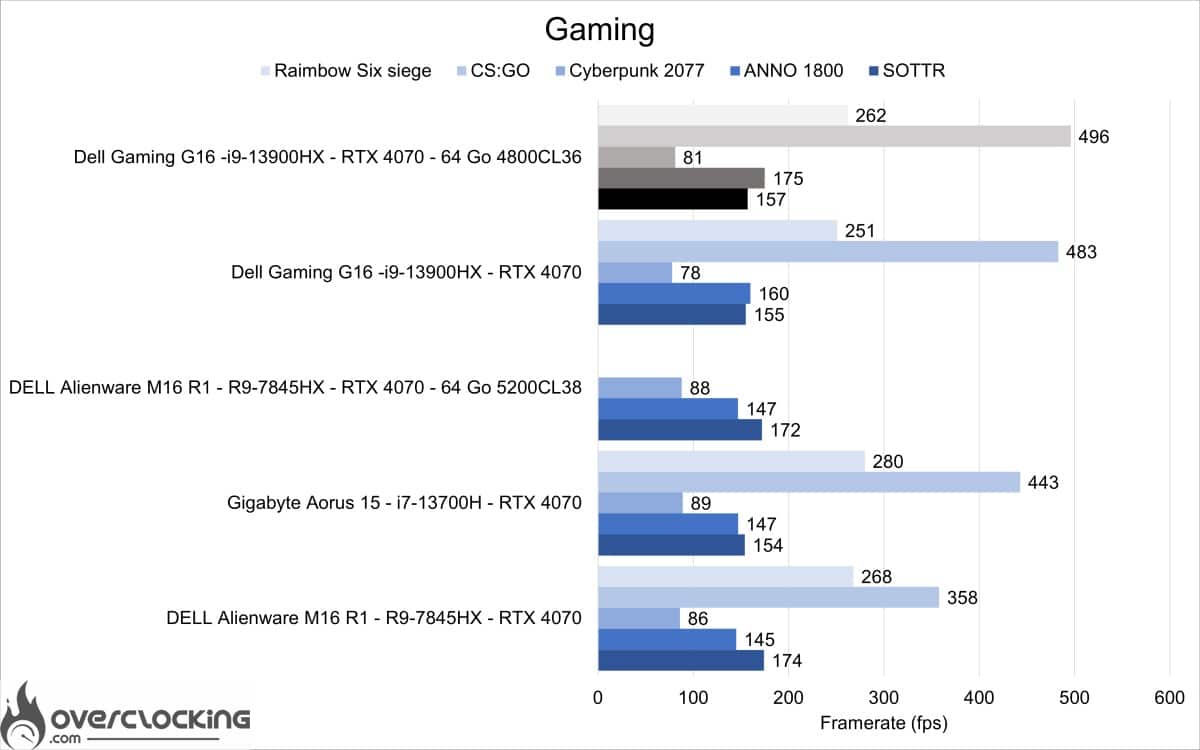
As we can see, the gain is really minimal overall, and for gaming use there will be little impact from a change of kit on big ultra games. There is, however, a significant gain on Anno 1800.
Although the performance gain is very minimal, the simple fact of saving money on the configuration by taking a faster 2×16 GB kit is a good idea. Secondly, Dell’s 2×16 GB kit costs €100 less than the 2×8 GB kit. That’s a nice saving of €270, which you can use to buy a mouse, dock, bag and other accessories.
[nextpage title=”Conclusion”]
Conclusion
The Dell Gaming G16 is certainly a laptop worth taking a look at. It’s certainly not for everyone, with its huge charger and 2.7 kg weight for nomadic use. But as a workstation or main gaming PC, it will be a wise choice. However, we regret the lack of connectivity, and in our case, it was impossible to run an Xrite pro on its USB ports, as on all Dell laptops tested to date. For photo use, therefore, it won’t be the best choice, given the slab’s inaccurate calibration.
As far as possible configurations are concerned, we prefer the 2×8 GB version with Linux at €1,499 at the moment and €1,699 excluding special offers. In this configuration, you’ll need to upgrade RAM to 2×16 or 2×32 GB at 5600 Mt/s (running at 4800CL36) for maximum performance.
As a reminder, the Dell Gaming G16 is available for €1,799. 50 in the i9-13900HX, RTX 4070 and 16GB RAM version we test here.
The Dell Gaming G16
We liked:
- CPU performance
- GPU performance
- DLSS 3 gain
- Build quality
- Price
We would have liked :
- More RAM
- Better connectivity
- Better thermal management
 It could have been a “coup de coeur” for this Dell Gaming G16, which boasts good battery life and the best price-performance ratio to date. But certain points, such as the screen calibration, the inability to calibrate it with my probe, and the restricted connectivity, make me revise the score downwards. Nonetheless, it remains the best gaming laptop I’ve tested to date, in my opinion.

