











Energy consumption and efficiency:
We finally have the means to effectively monitor the power consumption of our graphics cards thanks to the Benchlab telemetry system. We’ll now be able to carry out a complete analysis of our graphics card’s total power consumption via the dedicated 3 x PCIe and 2 x 12VHPWR power cables. But that’s not all, because we also need to be able to measure the power supplied via the PCIe slot. So we’re going to use a PCI-E PMD adapter from the ElmorLabs shop. This will give us the overall power consumption of the graphics card under test, completely independently. Here’s a series of photos of our Benchlab installation, to which we’ll be devoting a dedicated test in a few weeks’ time.


These various readings will be taken via Benchlab’s dedicated application. The photos below were taken with the NVIDIA RTX 4060 Ti 8 GB FE graphics card to illustrate our power consumption readings.


To get the total power consumption, we’ll read the 12VHPWR Power consumption, which corresponds to the power supply to the card via its 16-pin mini-connectors, and the EPS1 reading, which supplies the adapter. We export the readings, which are taken every 500 ms, and calculate the average power consumption in the Cyberpunk 2077 game in 4K rasterisation with the graphics options in Ultra
Power consumption under Cyberpunk 2077 :
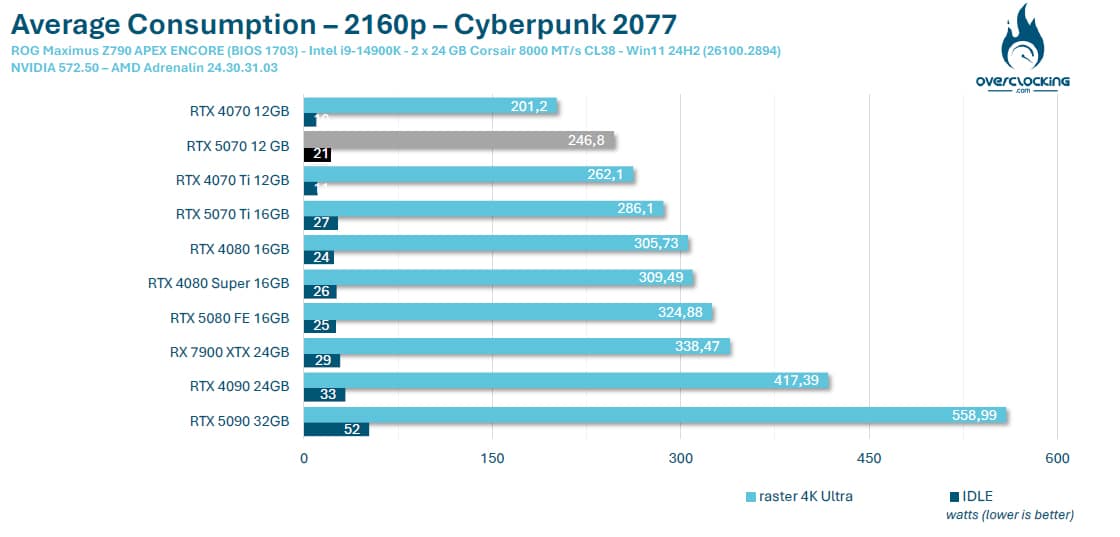
As we can see, the power consumption of our NVIDIA RTX 5070 Founders Edition is up on the previous generation, but nothing catastrophic, with an average of 246.8 watts. We can quickly do the maths with the 20% gain in terms of rasterisation, which is reflected here with a 20% higher power consumption.