

Stickers on PCs—some people like them, others not so much. It’s true that it can feel like you’re turning into a walking billboard, indirectly advertising CPU and GPU manufacturers, while for others, it comes across as a statement about the hardware they’re using… though some simply couldn’t care less. In any case, this Reddit user tried to remove the stickers from his laptop using a hair dryer, but ended up melting two keys on his keyboard.
Laptop: How to Melt Your Keyboard Keys?
The hair dryer: an effective weapon!
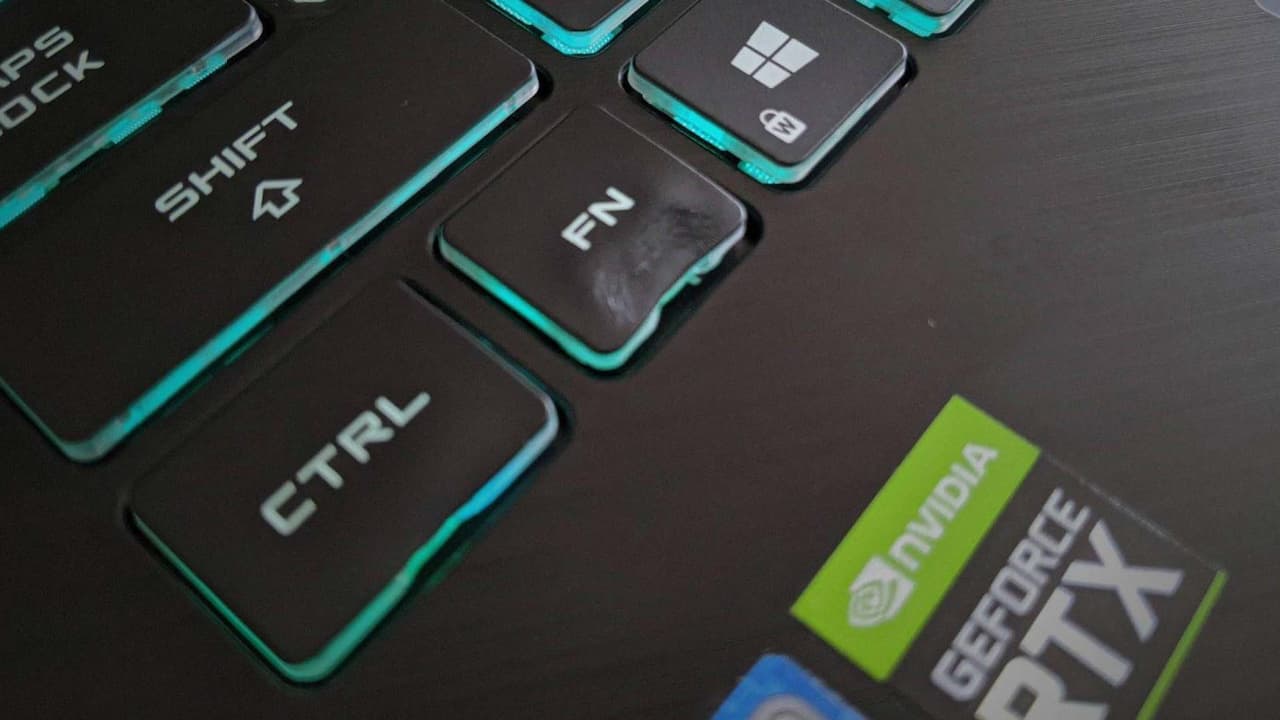
Yet there was a gentler way to remove the stickers from the laptop. Instead, the owner pulled out the hair dryer. That’s too bad, since the 2,000-watt device blows out very hot air that, when directed at the keyboard’s ABS or PBT keys, melts them. That’s exactly what happened to an FN key, which ended up melting. Similarly, the Ctrl key was starting to show signs of trouble as well. It goes without saying that blowing air at temperatures between 60 and 100°C just a few centimeters from the keys is not a good idea.
But he was lucky—not all laptops have an aluminum chassis, and he could have melted the palm rest in the same way. Now we’ll have to see if he managed to find replacement keys for his laptop keyboard.
The gentle approach:
Otherwise, rather than bringing out the heavy artillery, he could have simply peeled off the stickers and removed the glue residue with something oily like vegetable oil or isopropyl alcohol… Even “spray” for cleaning furniture works and leaves no residue. Incidentally, the post has since been deleted by the moderators.