

Today, we review the flagship laptop from MSI, the Titan GT77 HX 13VI. It is a laptop to put in the category of workstations / main portable gaming PC. Indeed, it embeds a multitude of components and peripherals that can make this laptop look like a real desktop PC in a transportable format.
The MSI Titan GT77 HX 13V is available for $5,799 or €6,999 in its i9-13980HX, RTX 4090 and 128Gb RAM version. Here we are on a slightly lower version with an I9 13950HX, RTX 4090 and 64 Gb of ram.

Thanks to Intel for providing us with this copy.
[nextpage title=”The MSI GT77 HX”]
The MSI Titan GT77 HX 13V is a 17.3-inch laptop, featuring a 3820x2160p mini-LED IPS panel with a 144 Hz refresh rate. We find as processor a Raptor Lake i9-13950HX from Intel and a GPU RTX 4090 from Nvidia, accompanied by 64 GB of DDR5-4800 RAM, two 2 TB NVMe SSDs in Raid 0 and powered by a 99 Wh battery.
We start with the unpacking of the device, this laptop comes in a suitcase-like box, inside we have the laptop. Next to it, we have the charger of 330W.


The charger is a 330W power supply unit using a special connector that will have to be connected to the left of the laptop.


Presentation
To begin with, the MSI Titan GT77 HX is colossal, its 3,3Kg on the scale are felt. Thanks to its weight, it holds perfectly in place and the screen can be opened with a single finger. The general design is plastic and aluminum, the exterior and the screen are made of plastic and the keyboard face is made of aluminum.


We start the tour with the keyboard, which is really remarkable for a laptop. This is the best keyboard I have ever used on a laptop. We have here keys using cherry mx low profile switches that we also find on our desktop keyboards. With the rigidity of the laptop, we have an excellent and quiet keyboard. We regret however the placement of the directional arrows to recover the little space available for the numeric keypad. I still don’t understand why manufacturers haven’t switched to TKL or 75% keyboard for their laptops.


We now move to the trackpad, the latter is extremely smooth and really pleasant to use. Its size is large enough to use the laptop without a mouse. To the right of the trackpad, we find a very responsive fingerprint reader. Concerning the surface around the keyboard and trackpad, it takes fingerprints very easily.


Let’s move on to the audio part. Here we have a large audio part on the top of the keyboard and at the back two woofers. The sound is quite good but without, the Nahimic software tries to correct it with a digital sound processing but it only makes things worse with the basic presets. So you’ll have to put your hands in to find the right setting.

Then we have the connectors, we are here on a very complete solution. We have 3 USB type-A 3.2 gen ports, 2 Thunderbolts 4 ports, one of which is charging, an RJ45 port, 1 SD card reader and finally the two HDMI 2.1 video outputs and mini-Displayport. So there is plenty here to connect our peripherals, screen and audio interfaces.


The camera is an HD (30 fps @ 720p) with infrared and offers nothing great, rather disappointing even. Do not expect to stream with it.

Small point on the RGB to finish with the back of the PC that illuminates very well coupled with the RGB keyboard key by key.

[nextpage title=”Configuration overview”]
The configuration of this MSI Titan GT77 HX 13V is based on an Intel Raptor Lake platform. The CPU used (I9-13950HX) is a version of the I9-13900K found on LGA desktops but adapted to BGA laptops.
The different components :
We start with the CPU, motherboard and RAM, here on CPU we can see that the GT77 is equipped with an I9-13950HX mounted on a HM770 chipset motherboard. For RAM, the sticks are 32 Gb for 64 Gb of RAM in total, we are on Samsung B-die modules in dual rank at 4800 Mt/s CL40. Well, that’s on paper, because in fact a problem with the bios makes the RAM run at 4000 Mt/s CL32 and the PC thinks that slots 1 and 4 are filled.

Let’s move on to the graphics card. Here, we are on the most powerful for a laptop. Indeed, the RTX 4090 mobile manages to match a desktop RTX 3090 without any difficulty. It has the same chip as the desktop RTX4080 but with lower frequencies and GRDD6 memory instead of GDDR6X.

For storage, we have two Samsung PCIe 4.0 x4 in Raid 0. The use of Raid 0 allows to reach very high data rates while keeping a large capacity.


As for the screen we are on a Mini-LED IPS 4K (3820x2160p) capable of reaching 1000 nits in HDR.
Disassembly, repair and upgrade:
Disassembly is done by removing the 8 screws on the back of the device, you will then need to use plastic tools as in the ifixit kits. For any modification or manipulation, it will be necessary to disconnect the battery, especially for the change of the DDR5 which dies rather easily if always fed in 5V.

From a modification point of view, we have easy access to the 4 so-dimm DDR5 slots but also to the 3 M.2 slots in PCIe 5.0 and 4.0 x4. The Wi-Fi card is also easily accessible as is the cooling system.


[nextpage title=”Test protocol”]
The test protocol has been revised to offer something more complete. We now have software for the autonomy measurements but also a thermal camera for the surface heating measurements.
New e-sport video games have been added to the test as well as some titles benefiting from Nvidia DLSS and/orRay tracing.
The protocol:
- Screen measurements
- Autonomy and heating
- Synthetic CPU test
Cinebench R20
Cinebench R23
Geekbench 3
Geekbench 5
Aida 64 - Synthetic GPU Performance
3DMark Timespy
3DMark Timespy extreme
3DMark Firestrike
3DMark Firestrike Extreme
3DMark Speedway - Productivity Performance
PCMark 10 Extended
PCMark 10 Applications test - Gaming Performance Resterisation (1080p medium & ultra / 1440p medium & ultra)
Shadow of the tomb raider
Anno 1800
Cyberpunk 2077
COD MW2
War thunder - Esport gaming performances
Counter strike : Global offensive
Raimbow 6 siege - Gaming performance RTX & DLSS/FSR (1080p/1440p ultra)
Shadow of the tomb raider
Cyberpunk 2077
War Thunder
COD MW2 + consumption 1080p @ 144Hz
The tests were performed with the NVIDIA driver version 528.49.
[nextpage title=”Screen measurement with probe”]
Screen measurements
We begin our test with the test of the panel and in order to know the colorimetric quality of this screen out of box, we carried out measurements of the screen.
For this test, we put the graphics card in discrete mode, which allows to have more adjustment for the screen and to pass it in 10bit via the Nvidia control panel. The measurements are better in this mode and it is possible to have a better rendering after calibration.
This one has been tested on DisplayCal following 51 color patches with the sRGB profile as target.

As we can see, the calibration is quite disappointing, we have 6500K for 6500K expected, which is in the specs. The delta E is more than 4% of average deviation and 9.31% at the maximum.
As for brightness, the screen can go up to 852cd/m² with a contrast ratio around 11188:1.
The gamut is :
- 99.5% of sRGB
- 97.8% of Adobe RGB
- 98,6 % of DCI P3
After calibration we have 6300K for 6500K expected, which is in the specs. The delta E is contained to less than 0.6% average deviation and 1.36% at the maximum.
As for brightness, the screen can go up to 800cd/m² with a contrast ratio around 9777:1.

We are therefore in SDR on a particularly good slab. The contrast ratio offered by the mini-LED technology makes this screen almost perfect.
Let’s move on to HDR mode. Here we have 6400K for 6500K expected, which is in the specs. The delta E is contained to less than 3.6% average deviation and 8% at the maximum.
As for brightness, the screen can go up to 933cd/m² with a contrast ratio around 11904:1.

When calibrated in HDR, we have 6500K for 6500K expected, which is in the specs. The delta E is contained to less than 2.9% average deviation and 6.6% maximum.
As for brightness, the screen can go up to 965cd/m² with a contrast ratio around 7730:1.

Even calibrated, the HDR mode does not allow to have a very accurate image in colors. It will be necessary to disable it for photo editing and rather bet on the SDR 10 bits mode.
As for the reflectance of the screen, we have a matte slab, a good choice for use in a bright environment. The grain is very low or even invisible, so the sharpness is also very good for photography.

[nextpage title=”Autonomy and heating”]
Autonomy
The autonomy of the device has been measured with the PCMark10 battery benchmark. The tested modes are video, productivity and game modes. The power management remained on normal mode and the GPU in hybrid mode except for the video game part where it was in discrete mode (RTX4090 only). The screen brightness was set to 220Cd/m² without HDR and the sound was output via headphones plugged into the GT77 jack.

As we can see, we are not on a champion of autonomy but it must be said that it is doing pretty well with more than 4 hours in video playback or productivity. In video games, you’ll have to use the charger to play in the right conditions because the performance of the device is greatly impacted on battery.
Heats up
To test the heating of the machine, we started with three distinct tests, first the heating in IDLE, then the heating in CPU load on Cinebench R23 during 10 minutes and finally the heating on COD MW2 in 2160p without DLSS.
The cooling system
Exterior
On the outside, we have to start with an opening on each side of the right and left of the laptop and at the back a large opening to expel the hot air. Underneath, we have a large grill that allows us to draw in cool air via 4 fans that we see through.


Interior
Inside we find the fans, with on the left the one for the GPU and on the right the one for the CPU. These blow air through radiators connected to the chips by heat pipes. 3 large, one medium and one small for the graphics chip and 2 large plus 2 medium for the CPU.


CPU heat only
In IDLE


After 8 min of Cinebench R23


We start with the heating in IDLE and on Cinebench R23 after 10 min of stress. The CPU went up to 96°C during the first minutes before stabilizing around 80°C. The power consumption and frequency went from 185 W and 4300 MHz to 120 W and 3800 MHz during this stress test. On the surface, we note a maximum temperature on the keyboard side of 43°C. As such, this GT77 HX is perfectly well cooled even if an adjustment on the voltages would be very appreciable for this CPU. The undervolt being locked as well as the overclocking on this machine we will not be able to play on this adjustment to consider a drop in the temperatures on the CPU side.
CPU and GPU heat up in game:


In game, we have CPU temperatures quite similar to what we have in CPU-only benchmark during the first minutes. Once the window of time at the maximum power limit is over, the CPU temperatures go back under the 70°C mark. On the GPU side the temperatures are also very well contained with an average of 70°C. The most important thing here will be the use of DLSS on compatible games, if you activate it while keeping a FPS limit (144 Hz in Vsync for example), you can greatly reduce the power consumption and therefore the heating and noise pollution. In the case of Modern Warfare II, it is a gain of 40 W and 5 °C with a graphic rendering just as good.

[nextpage title=”Synthetic CPU performance”]
Synthetic CPU performance
Let’s see what this machine has in store, we start with the CPU and memory performances on some synthetic benchmarks. The i9 13950HX on board this machine will be compared to the results obtained with an i7 13700K and an i9 13900K.
Cinebench R20

We start with Cinebench R20, here the 13950HX manages to match the 13700K but remains behind the 13900K.
Cinebench R23

We start with Cinebench R23, here the 13950HX manages to match the 12900K but remains behind the 13900K.
Geekbench 3

On Geekbench 3, the performance is at the level of the 13900K, however the memory at 4000CL32 greatly reduces the performance of the 13950HX with less than 8000 points in memory score. Unfortunately we can’t set it to 4800C40 because of a BIOS issue. Even if we change the kit for a 5600C40 with Hynix A die we stay at 4000CL30. This greatly impacts the performance of this CPU and therefore the performance in game.
Geekbench 5

For Geekbench 5, we are on the back burner compared to the i7 13700K and very far from the 13900K.
Aida 64

For AIDA64, we look mainly at the RAM and here the performance is disappointing. High latency and low throughput. Even entry level laptops with DDR5 manage to do better at 4800CL40. MSI should have equipped these Raptor Lake gaming laptops with DDR5 at 5600 Mt/s which is the speed recommended by Intel in JEDEC.
[nextpage title=”Synthetic GPU performance”]
Synthetic GPU performances
Now that we know the performance of the CPU part, we can move to the GPU on some synthetic benchmarks. The RTX4090 coupled with i9 13950HX and 2x32Gb of DDR5 at 4000CL32 will be compared mainly to the scores on RTX 4070 Ti and RTX 4080 desktop version with i9 12900K and 2x16gb 5200CL38.
3DMark Timespy

We start with 3DMark Time Spy, here we are at the Desktop i9 12900K and RTX 4070TI combo. Although the RTX 4090 Mobile and RTX 4080 desktop share the same chips, the difference in frequency is felt. Also, the GDDR6 memory in comparison to GDDR6X is much slower and also impacts the performance. According to benchmarks, we are at 2100MHz on 9784 core against 2800 Mhz on 9784 for the 4080 desktop. The 33% difference in frequency is directly reflected in the score.
3DMark Timespy extreme

Just like for Time Spy, we have on the extreme version of the benchmark performances closer to the 4070Ti than to the 4080. The scores compared here are the global scores and because of the very slow RAM, we can’t get away from the scores obtained with the i9 12900K and RTX 4070 Ti. On the Time spy benchmark seen before, the CPU score at 16000 points is very low, we were expecting more than 20000 points. Unfortunately, the 4000 Mt/s RAM completely ruins the performance.
3DMark Firestrike

On 3DMark Firestrike, the difference is mostly in CPU performance and RAM.
3DM Firestrike Extreme

On 3DMark Firestrike, performance is again very good for a laptop even though once again the RAM drags the CPU down.
3DM Firestrike Ultra

On Firestrike Ultra, the CPU has less of an impact on performance thanks to native 4K resolution.
3DM Speedway

We finish with 3DMark Speedway which is a graphics-only benchmark. Here we can see the performance differences with other desktop graphics solutions. This RTX 4090 Mobile is found to be 6% faster than the RTX 4070 ti suprim X and 20% slower than the RTX 4080 Trio using the same core.
[nextpage title=”Performance in productivity”]
Performance in productivity
In this part, we will focus on the productivity performances. That is to say the performance of the machine on software such as Microsoft Office, Blender or Davinci Resolve.
PCMark 10 Extented

On PCMark 10, we have unsurprisingly a very high score thanks to the performance of the RTX4090. In addition, the SSDs in Raid0 increase the score a bit thanks to reduced opening times.
PCMark 10: application

The benchmark presented here uses the Microsoft office suite to give us the performance of our machine on Word, Excel and Powerpoint. Not surprisingly, we have here a device that performs perfectly well with more than 23% more performance than the Dell Inspiron 14 plus equipped with an i7 12700H.
Blender

On Blender, the RTX 4090 does wonders. We have performances up to 7x higher than the RTX 3050. According to online data from the Blender website, the performances shown here are between the RTX 4070 Ti and the RTX 4080 and around 25% ahead of the RTX 3090 Ti. For the CPU, the i9 13950HX is about 2x better than the i7 12700H from the Dell Inspiron 14 Plus.
PugetBench : Davinci Resolve

On Davinci Resolve, the gap with the RTX3050 is narrowing. The RTX 4090 performs 3x better on this software. For information, AV1 was not used here, the gap should be even more wider using this encoding.
This MSI Titan GT77 can be used for office work or content creation without any problem.
[nextpage title=”Gaming performance”]
Gaming performances Rasterization
We are done with the synthetic benchmarks, let’s go to the video games tests. At first, we will test AAA titles in native resolution and without DLSS or other upscaling.
Shadow of the Tomb Raider
Results of the Shadow of the Tomb Raider integrated benchmark. In ultra quality, in 1080p, 1440p, 2160p under DX12.

With more than 97 FPS on average in 4K ultra, the RTX 4090 does wonders on Shadow of the Tomb Raider. The difference between 1080p and 1440p is quite small. In fact, we have more FPS in 4k ultra on this 4090 than on the RTX 3060 in 1080p ultra.
Anno 1800
Anno1800 integrated benchmark results. In ultra quality, in 1080p, 1440p, 2160p under DX12.

We now move to Anno 1800 still in ultra, we have here without difficulty more than 60 FPS in 4K.
Cyberpunk 2077
Results of the integrated benchmark of Cyberpunk 2077. In ultra quality, in 1080p, 1440p, 2160p under DX12.

On Cyberpunk 2077 this time, you’ll have to opt for 1080p in ultra to get a good framerate on this excellent RPG in first person view.
Call Of Duty Modern Warfare II
Results of the Call Of Duty Modern Warfare II integrated benchmark. In ultra quality, in 1080p, 1440p, 2160p under DX12.

For COD MW2, native 1080p seems to be the right resolution to play on this 144Hz screen.
War Thunder
Results of the War Thunder integrated benchmark (modern conflict). In ultra quality, in 1080p, 1440p, 2160p under DX12.

For War Thunder, the performance is very good. Here, even 4K allows to reach more than 144 fps.
[nextpage title=”Esport gaming performance”]
Esport gaming performances
We now move on to some e-sport titles with integrated benchmarks. Here, it’s mainly the CPU performances that are tested. The graphics card is not much used in low resolutions. For a machine of this caliber, we can expect at least 360 fps in 1080p without too many worries.
CSGO
Results of the CS:GO integrated benchmark. In ultra quality, in 1080p, 1440p, 2160p under DX9.

As expected, the performance is excellent. Even in 4K, the framerate is well above the 144Hz of the screen. It will even be possible to play on the latest Alienware screen at 500Hz in 1080p in Ultra.
Raimbow 6 siege
Results of the integrated benchmark of R6S. In Ultra quality, in 1080p, 1440p, 2160p under DX12.

Just like CS:GO, the performance of this Titan GT77 on this e-sport title is very good. It will manage without difficulty to hold the 144Hz in ultra on a 4K resolution. The use of an external monitor in 360Hz or 480Hz will also be possible in 1080p.
[nextpage title=”RTX & DLSS/FSR gaming performance “]
RTX & DLSS/FSR gaming performances
The MSI Titan GT77 HX 13VI is powered by an RTX4090 which features the latest generation of DLSS (Deep Learning Super Sampling), the DLSS 3.
DLSS 3 with multi-frame optical generation
Improves graphics performance by harnessing the power of AI to generate more images. DLSS analyzes sequential images and motion data from the new GeForce RTX 40 series GPU optical stream gas pedal to create additional images of the highest quality.
DLSS 3 will be tested on Cyberpunk 2077 in comparison to DLSS 2. For other titles only the version of DLSS without image generation will be compared to the native resolution with Ray Tracing enabled.
Shadow of the Tomb Raider
Results of the Shadow of the Tomb Raider integrated benchmark. In ultra quality with Ray tracing active, in 1080p, 1440p, 2160p under DX12.

As we can see on this title with active Ray Tracing, the RTX 4090 mobile is still behind the RTX 4070 Ti desktop. The addition of Ray Tracing increases the power consumption which negatively impacts the frequency of the mobile card and its lower TDP. Nevertheless, at 64 fps in Ultra 4k with Ray tracing the game is perfectly playable.
Results of the Shadow of the Tomb Raider integrated benchmark. In Ultra quality with active Ray tracing, in native 2160p and DLSS Performance under DX12.

With DLSS enabled in 4K the results are better but still behind the i9 12900K and RTX 4070 Ti combo.
Cyberpunk 2077
Results of the Cyberpunk 2077 integrated benchmark . In ultra quality with Ray Tracing active (Psycho), in 1080p, 1440p, 2160p under DX12.

Here again, the performance is not as good as with the RTX 4070 Ti. At less than 60 FPS in 1440p and 2160p, you’ll have to go through DLSS to get a better gaming experience.
Cyberpunk 2077 integrated benchmark results. In ultra quality with active Ray Tracing (Psycho), in native 2160p and 2160p DLSS 2 or 3 performance under DX12.

With DLSS 2 active on Cyberpunk 2077, we manage to reach almost 60 FPS in 4K and Active Ray Tracing. With DLSS 3 enabled, we pass the 80 FPS mark. In these conditions, the game is magnificent especially with the active HDR that can go up to 1000 nits.
Call Of Duty Modern Warfare II
Results of the integrated benchmark of Call Of Duty Modern Warfare II. In ultra quality, in 1080p, 1440p, 2160p with and without DLSS performance under DX12.

On COD MW2, we test here the DLSS alone without Ray Tracing. Here, the use of DLSS allows to go from 74 FPS to 124 FPS in 4K. This makes the FPS perfectly playable on this 144Hz screen. The bonus here is the use of DLSS to lower the power consumption and heating of the graphics card. In 1080P, with Vsinc enabled, it’s 40W and 5°C saved with DLSS enabled.
War thunder
Results of the War thunder integrated benchmark (modern conflict). In ultra quality, in 1080p, 1440p, 2160p with and without DLSS performance under DX12.

On War Thunder, the performance was basically excellent. But thanks to DLSS, we are able to reach almost 360 Fps in 4K Ultra.
[nextpage title=”Overclocking”]
Overclocking on laptops is commonplace, even if it is more often called undervolting. In the case of this MSI Titan GT77 HX 13VI, you’ll have to forget about it for the CPU part. Basically, XTU is locked in overclocking and even if you unlock it in the bios, you will have to leave the anti undervolting option activated to be able to open it. For memory overclocking, it will also be impossible to set up. So you’ll have to focus on GPU overclocking.
GPU overclocking on MSI Afterburner
For the overclocking of this Titan GT77, we can follow our overclocking tutorial for RTX30 with this time a particularity. It will indeed be necessary to play only on a core and memory offset with an unlocking of the power limit. The RTX 4090 uses a well thought out power management system that allows you to get maximum performance at optimum operating points as described in this article.
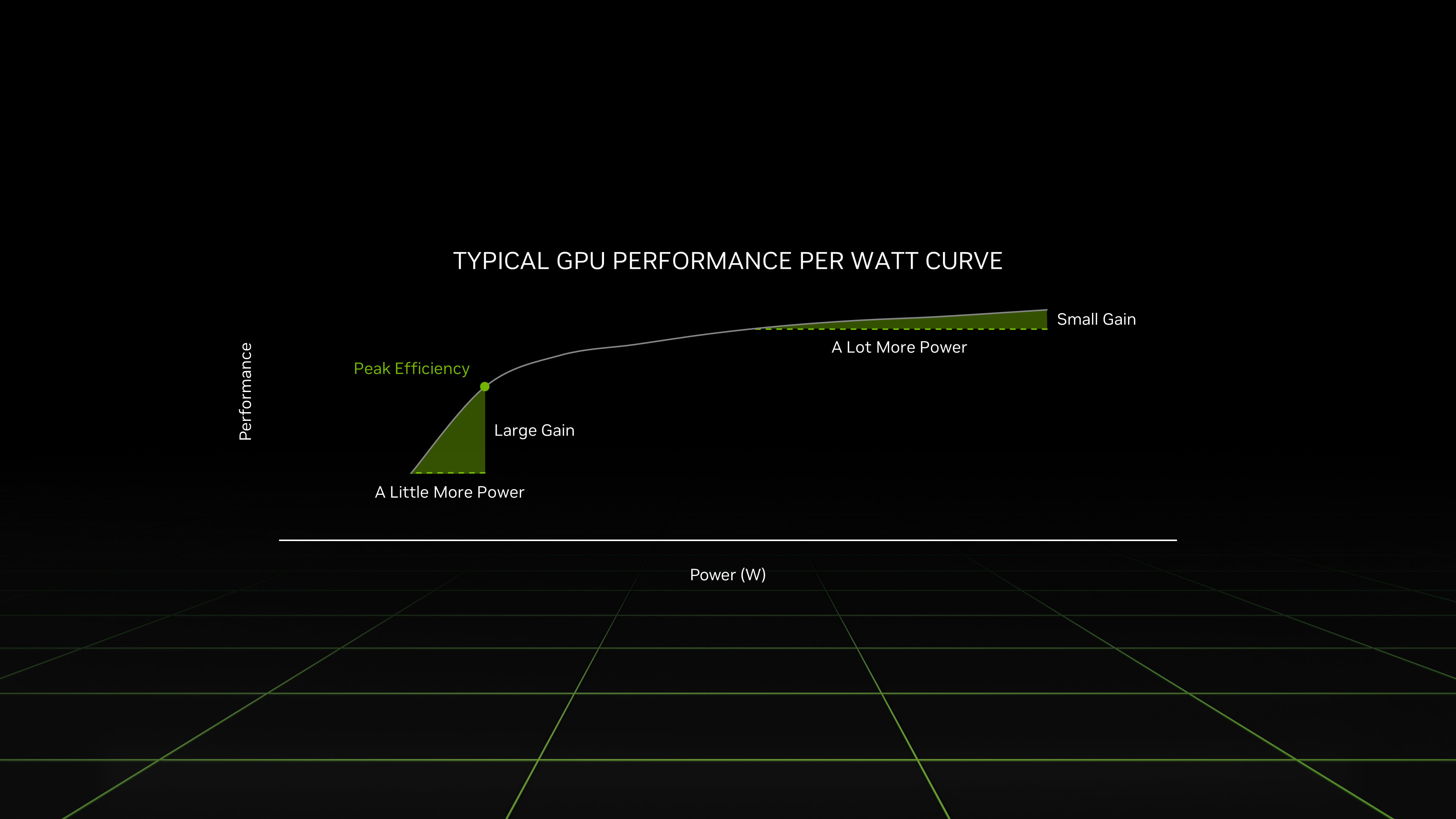
For our overclocking, we started with a stress test on Time Spy to know the limits of our chip. Here, we can push the core offset to +270 MHz which allows to reach 2655 Mhz at the maximum. The memory has been pushed to +1000 MHz with an effective frequency from 2250 MHz to 2500 MHz. The memory speeds have therefore increased from 576 GB/s to 640 GB/s.
Here is a comparison of before and after overclocking of this RTX 4090 mobile on 3DMark Time Spy.


The gain is therefore 5% with an increase in consumption of 15% at most. The overclocking is therefore possible on this machine but not recommended given the thermal losses that this can generate.
[nextpage title=”Conclusion”]
Conclusion
It goes without saying that this MSI Titan GT77 HX 13VI is made for gaming use. Despite the unflattering RAM, we manage to achieve very good performance. But that’s not enough, because the use of DDR5 at more than 5600 Mt/s should not be reserved for desktop PCs. The gain granted by some setting could make the machine gain several tens of FPS and have a more consistent framerate. For a laptop that wants to be a replacement for a full desktop setup, the details should not stop at the components you put in it. Offering uncluttered software starting with the BIOS on par with its desktop counterparts should be a priority.
When it comes to content creation usage, this Titan GT77 HX manages to deliver a satisfactory experience for a laptop. However, there are CPU tuning restrictions via XTU or in the BIOS that do not allow to take advantage of the i9 13950HX. A CPU which, we recall, is an i9 13900K ported to a laptop socket. The last impacting point is the screen setting out of the box, without switching the graphics card to discrete mode only, it will not be possible to get its full potential. The use of 10-bit SDR is not possible on hybrid solutions based on IGP Intel. And even if you go directly to the graphics card, you’ll have to calibrate the screen with a probe and deal with the 800 nits that cannot be adjusted in this mode.

All in all, this MSI Titan GT77 HX 13VI had everything to please on paper and at first hand. But the excellent keyboard, the superb screen and the performance worthy of a high-end desktop PC won’t make you forget the few shortcomings mentioned above. Nevertheless, this laptop is a real workstation that allows you to play the latest AAA titles occasionally.
As a reminder, the MSI Titan GT77 HX 13V is available for $5,799 or €6,999. 95 in its i9-13980HX, RTX 4090 and 128Gb RAM version.
The MSI Titan GT77 HX 13VI
We liked:
- The performance of the CPU
- GPU performance
- The efficient cooling for the GPU
- The quality panel for photo/video use once calibrated
- The well-made mechanical keyboard
- The autonomy for its performance
- The gain of the DLSS 3
- The 60 FPS in ultra Ray Tracing on all 4K titles
We would have liked :
- A BIOS like on a desktop PC
- Less lock on the CPU
- A RAM with the frequency and timings displayed in description
- A good calibration of the factory screen
- A lower price
- An all-aluminum chassis
 As a first experience with an Nvidia RTX 4090 graphics card, this MSI Titan GT77 HX will finally convince me for the Ada Lovelace graphics card range. Alas, the latter’s shortcomings will have left me dubious about the usefulness of switching from a desktop setup to a laptop of this caliber. Although the on-board peripherals make it possible to get away from any keyboard or screen. The lack of attention to detail for a €7,000 machine does not put it in a good position against a more entry-level solution coupled with a powerful desktop PC. In particular the CPU lockup, the slow DDR5 memory it carries or the poorly calibrated screen out of the box.