
[nextpage title=”Introduction:”]
Today sees the end of the NDA on the performance of the Intel Core Ultra 200S processors, aka the Arrow Lake processors. We’ve already had the opportunity to talk to you about this new generation in this article, as well as unboxing several motherboards, including the ROG Maximus Z890 HERO, the ROG Maximus Z890 APEX, the AORUS Z890 MASTER and, most recently, the MSI MEG Z890 Unify-X.
The arrival of this new generation, and more recently the Ryzen 9000, has prompted us to update all our test configurations and offer you a new, much more comprehensive CPU test protocol. It’s taken us quite a few hours of work over the last few weeks to re-test the latest generations of CPUs with the new BIOSes implementing the patches for Intel processors in particular. The task is not yet complete, as we will be adding another series of ‘older’ processors over the coming weeks. We’ll also be back with a test dedicated to overclocking with the ROG Maximus Z890 APEX.
@cornerjack_occ Installation du processeur Intel Core Ultra 9 285K sur la carte mère ROG Maximus Z890 APEX. @ROG Global @ROG France @Intel Corporation @G.SKILL @Overclocking.com #benchlab #gskill #ASUS #ROG #DDR5 #intel #z890 #coreultra200 #lga1851 #gaming #pcgaming #pcgaming #watercooling #optimus #shorts
Thanks to Intel France for providing the Intel Core Ultra 9 285K and Ultra 5 245K, and to ASUS France for the rest of the components. We will be carrying out comparative tests on the Z890 APEX model.
[nextpage title=”Arrow Lake 1/2 architecture: “]
The Intel Core Ultra 200S processors in the press kit:
This one uses the same colour code as the one we received for the launch of Gen 14, with blue dominating. The first step is to open it from the left, like a book.
There’s an illustration of a Core Ultra 200S processor, and on the right there’s a transparent block into which is inserted, not a processor, but a cardboard illustration of a Core Ultra 200S. At the back is a table listing the five processors officially launched on 24 October: the Core Ultra 9 285K, the Core Ultra 7 265K/265KF and the Core Ultra 5 245K/245KF. We currently only have the Core Ultra 9 and Core Ultra 5 models, but we should be bringing you the test of the Core Ultra 7 265K very soon.


Finally, if you open the second part, on the right, the Core Ultra 9 285K and Core Ultra 5 245K are revealed. They are, of course, protected by a plastic shell before being placed on one of our Z890 motherboards.


Let’s take a look at all the announcements surrounding this launch.
Five processors for the launch :
The first things we’re going to be looking at are, of course, the new Intel Core Ultra 200S desktop processors, aka the Arrow Lake-S. Intel will no doubt be aiming to make you forget the stability problems encountered by its 14th generation, which now seem to have been completely resolved by a series of updates and fixes via your motherboard’s BIOS.
Initially, Intel will be concentrating on launching five ‘K’ or ‘KF’ version processors. As a reminder, the ‘K’ processors have an unlocked multiplier and the ‘KF’, in addition to the unlocked multiplier, also lack the integrated graphics chip.


Intel will be launching the Core Ultra 9 285K, the Core Ultra 7 265K/265KF and the Core Ultra 5 245K/245KF. These new processors will again feature a “hybrid” architecture, mixing two types of cores: Lion Cove P-Cores and Skymont E-Cores. These cores naturally have different roles. The first, the Performance cores, are used for tasks requiring computing power, while the second, the Efficient cores, are used for office automation or background tasks. Now, the two types of core will work together depending on the task in hand. Another very important point to note is the absence of hypertreading on this generation of processors.
The Core Ultra 9 285K will be the most powerful model at launch, with its 24 cores (8P 16E), 36MB Intel Smart Cache and 40MB L2 cache. The Boost frequency of the P-Cores will be up to 5.7 GHz.
The mid-range will be represented by the Core Ultra 7 265K/KF and its 20 cores (8P 12E). It will benefit from 30 MB Intel Smart Cache and its 36 MB L2 cache, with a Boost frequency flirting with 5.5 GHz.


Finally, the Core Ultra 245K/KF will have 14 cores (6P 8E) and a boost frequency of 5.2 GHz. It will have 24 MB Intel Smart Cache and 26 MB L2 cache. For these five processors, the maximum frequency of Efficient cores will be 4.6 GHz. In terms of performance, Intel has announced a gain of 9% for the Lion Cove P-Cores and 32% for the Skymont E-Cores, compared with the 13th and 14th GENs.


As far as the integrated graphics chip is concerned, it will have 4 Xe cores and a maximum frequency of 2 GHz on the Intel Core Ultra 285K and 265K, and 4 Xe cores and a maximum frequency of 1.9 GHz for the 245K. This new generation also benefits from an NPU, a chip designed for AI calculations, with a power of 13 TOPS.
A new chipset and a new socket :
While Intel will initially be offering just three processors, there will also be just one chipset, the Z890. The rest of the range, in terms of processors and chipsets, is not due to arrive until 2025.
If you want to buy an Intel Core Ultra 200 processor, you’ll have to change motherboards because this new CPU requires a new socket with more pins, 1851 to be exact, and therefore an LGA-1851 socket. This socket retains the same dimensions as its predecessor, i.e. 450 x 357 mm.


The good news is that the mounting holes are still compatible with the LGA-1700. This means you can keep your current cooling system if you have this Intel platform. We have learned, however, that the hot spot on Arrow Lake processors may have moved upwards. It will be interesting to see what impact this has on temperatures, as some brands seem to be talking about an adapter for LGA-1851 sockets. We’ll be keeping a close eye on this during our tests.
[nextpage title=”Arrow Lake architecture 2/2: “]
DDR5 memory continues to evolve:
As far as memory is concerned, there’s no change. You can keep your DDR5 kit if you already have one. However, Intel has announced support for DDR5 CUDIMM(Clocked Unbuffered Dual Inline Memory Module) memory kits. What’s special about these new modules, compared to what we currently have with DDR5 UDIMMs, is the presence of a new chip integrated into the PCB, called the CKD(Client Clock Driver).
OK, but what does this actually change? These new CUDIMM memory kits will make it possible to reach higher frequencies than we currently know. This CDK chip will dynamically adjust the memory frequency and voltage according to the workload. From what we’ve been able to read, DDR5 CUDIMM kits will require an Arrow Lake processor, and therefore the 15th GEN memory controller. We’ll be testing these new kits carefully, as we’ve already received one at the editorial office.

As for the rest, the Z890 chipset will support memory modules up to 48 GB, for a total of 192 GB. Finally, Intel is no longer expected to offer DDR4-compatible Z890 motherboards.
Synthetic and gaming performance:
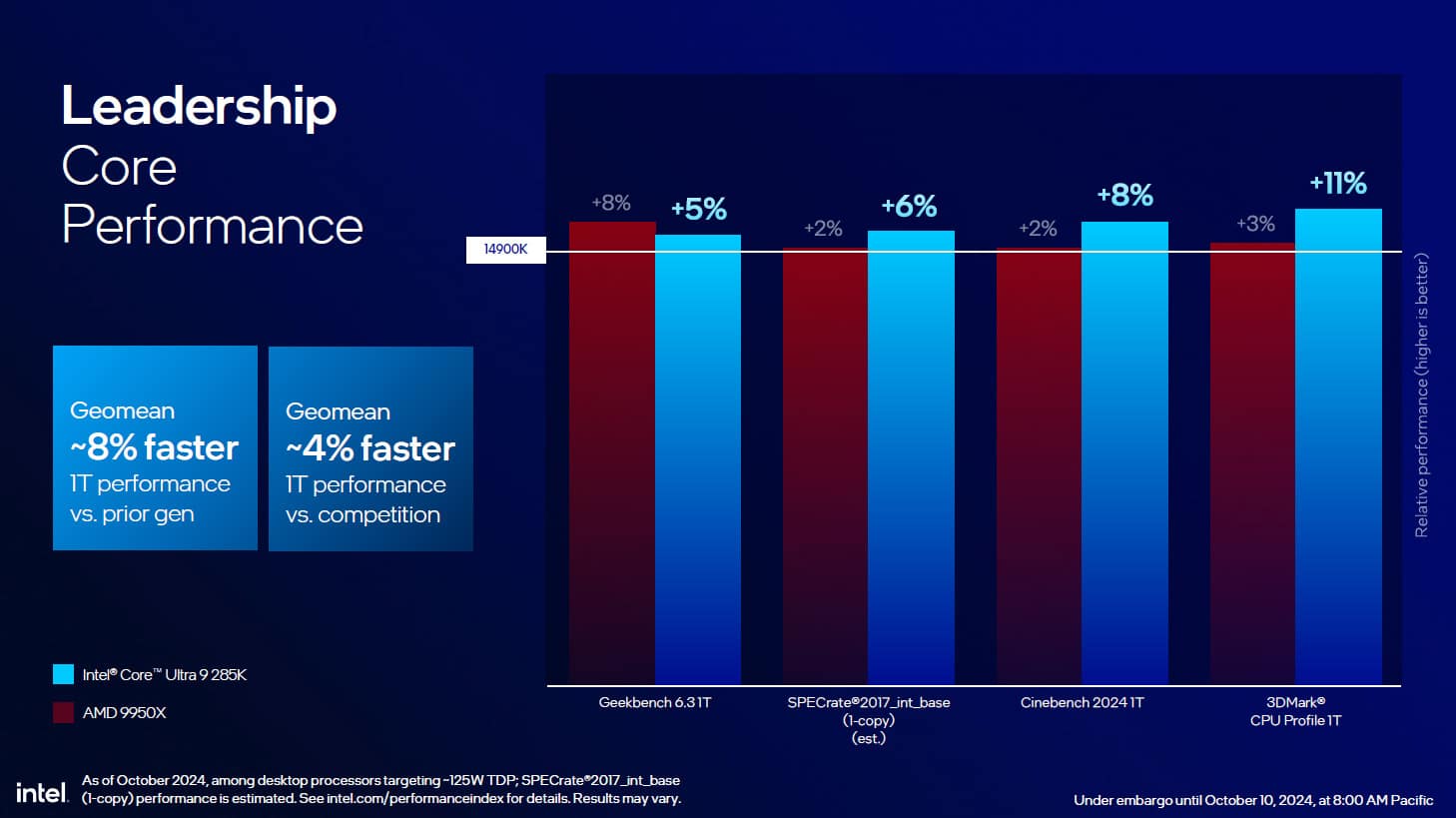
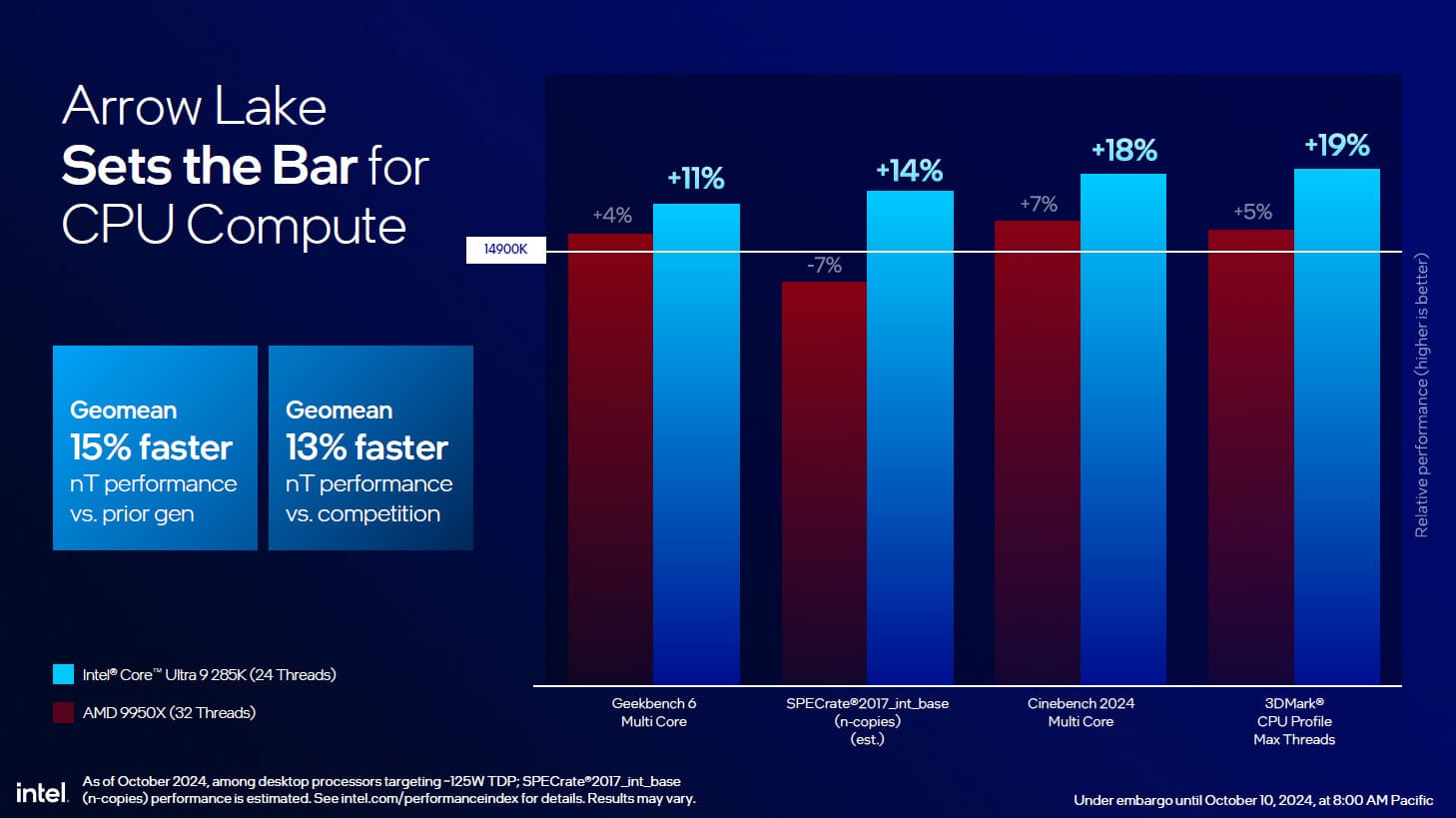
We were also able to discover Single Core performance, which has improved even further compared to the 14900K and will also outperform the latest AMD Ryzen 9 9950X. The latter performed spectacularly well against the previous generation of Ryzen 7000s. In terms of multithreaded tasks, the gain is much greater, and could exceed 15% depending on the application used.
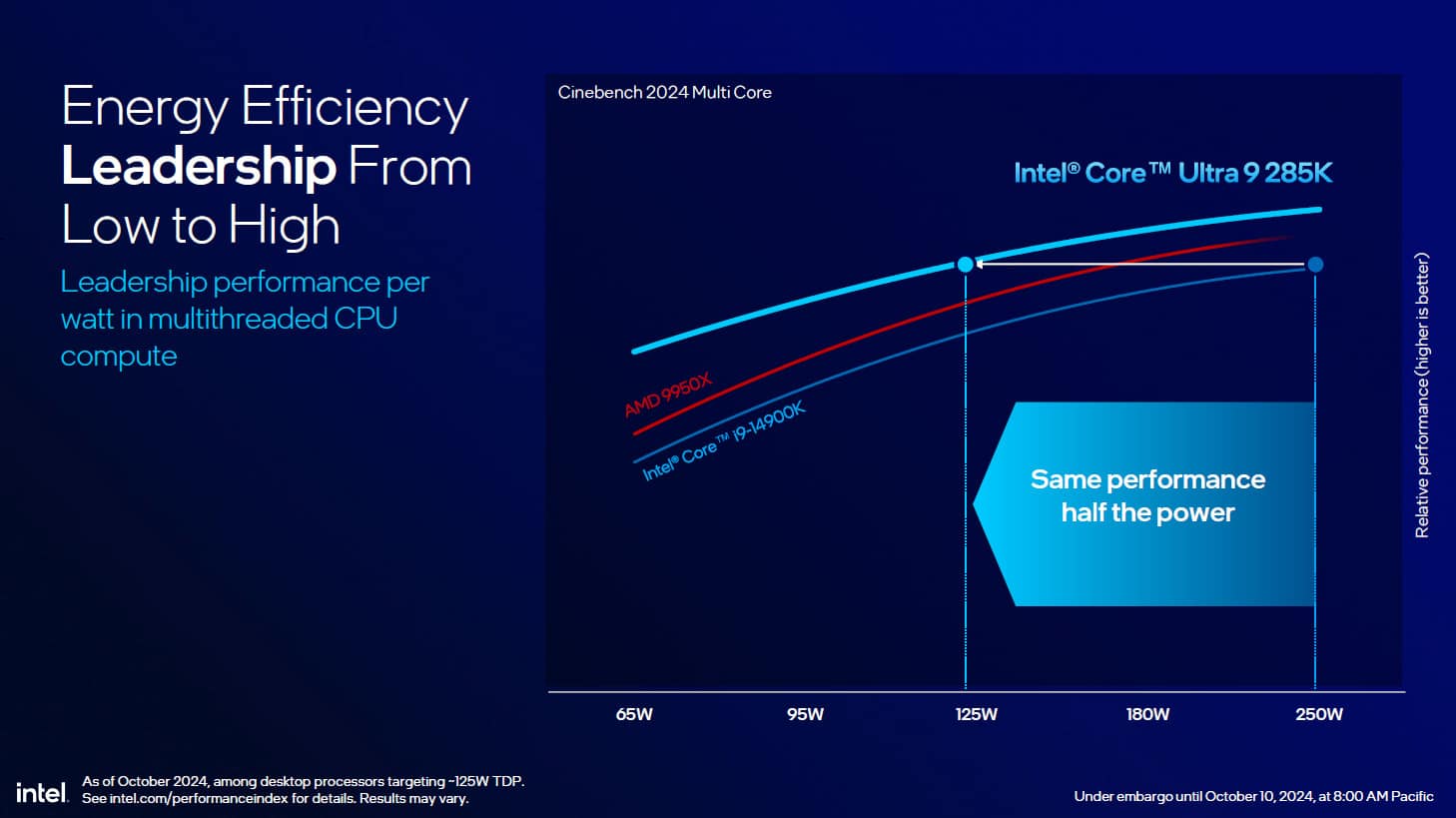
As we said in the slide below, Intel has demonstrated that the same performance as the 14900K can be achieved by the Core ULTRA 9 285K at 125 watts, whereas the 14900K requires 250 watts, i.e. double the power.
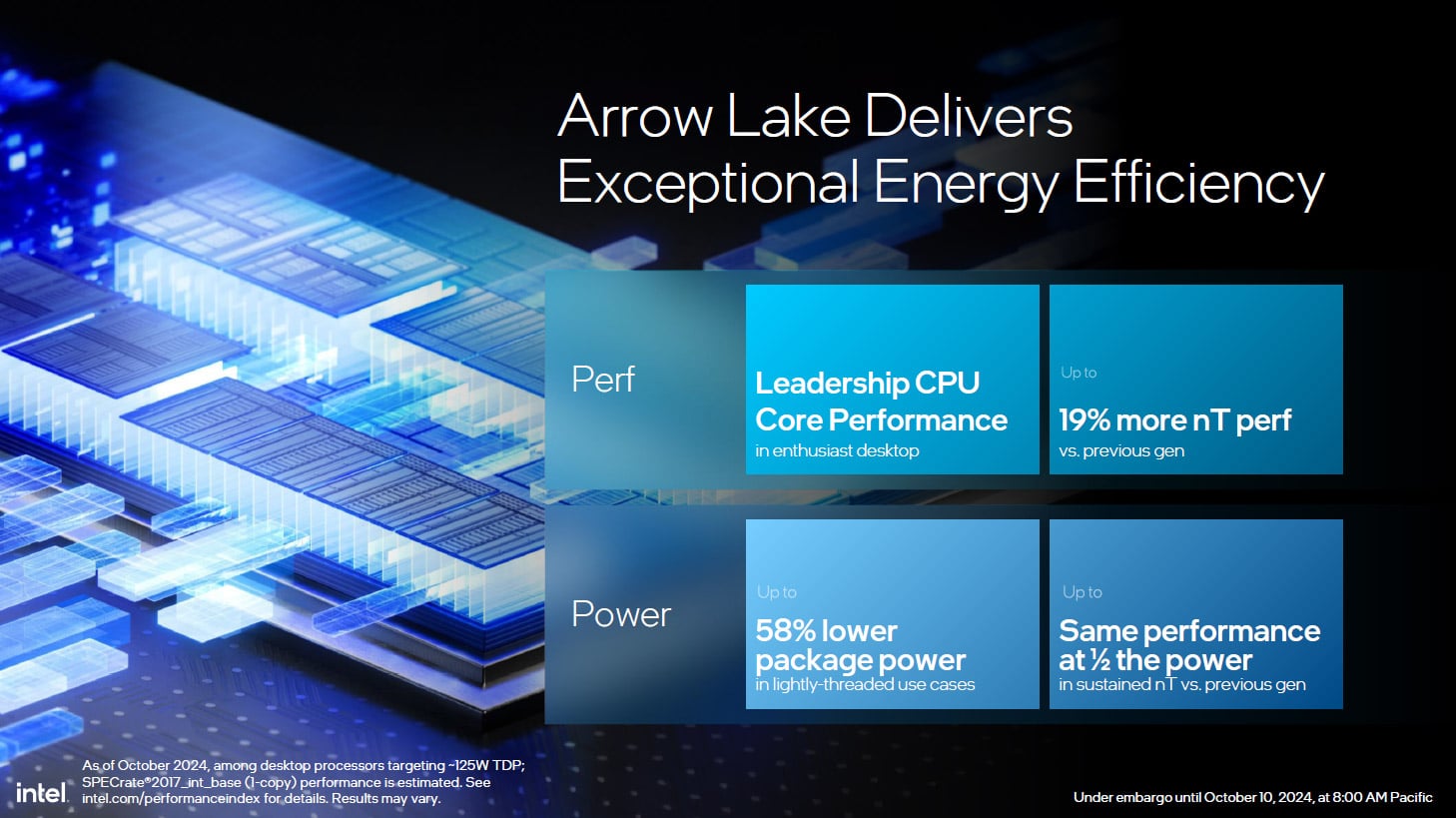
This section should be taken with a certain amount of hindsight, as we will be reacting to Intel’s slides. We’ll be able to form our own opinion during our tests. One thing is certain, the performance of the Core ULTRA 200S should be very close to what we had with Raptor Lake Refresh in terms of gaming performance , but with much more controlled power consumption, as shown in the slide below against the i9-14900K
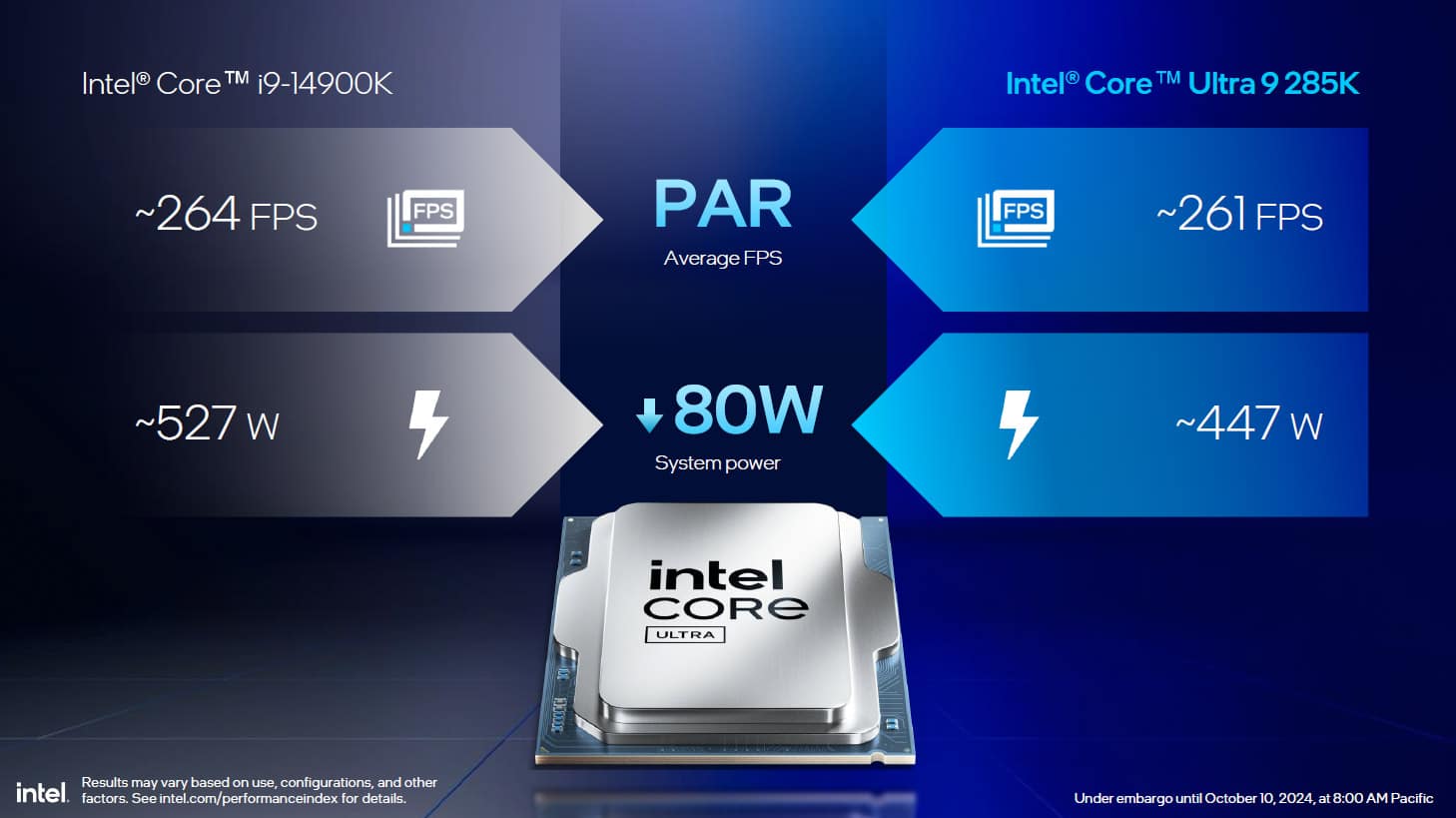
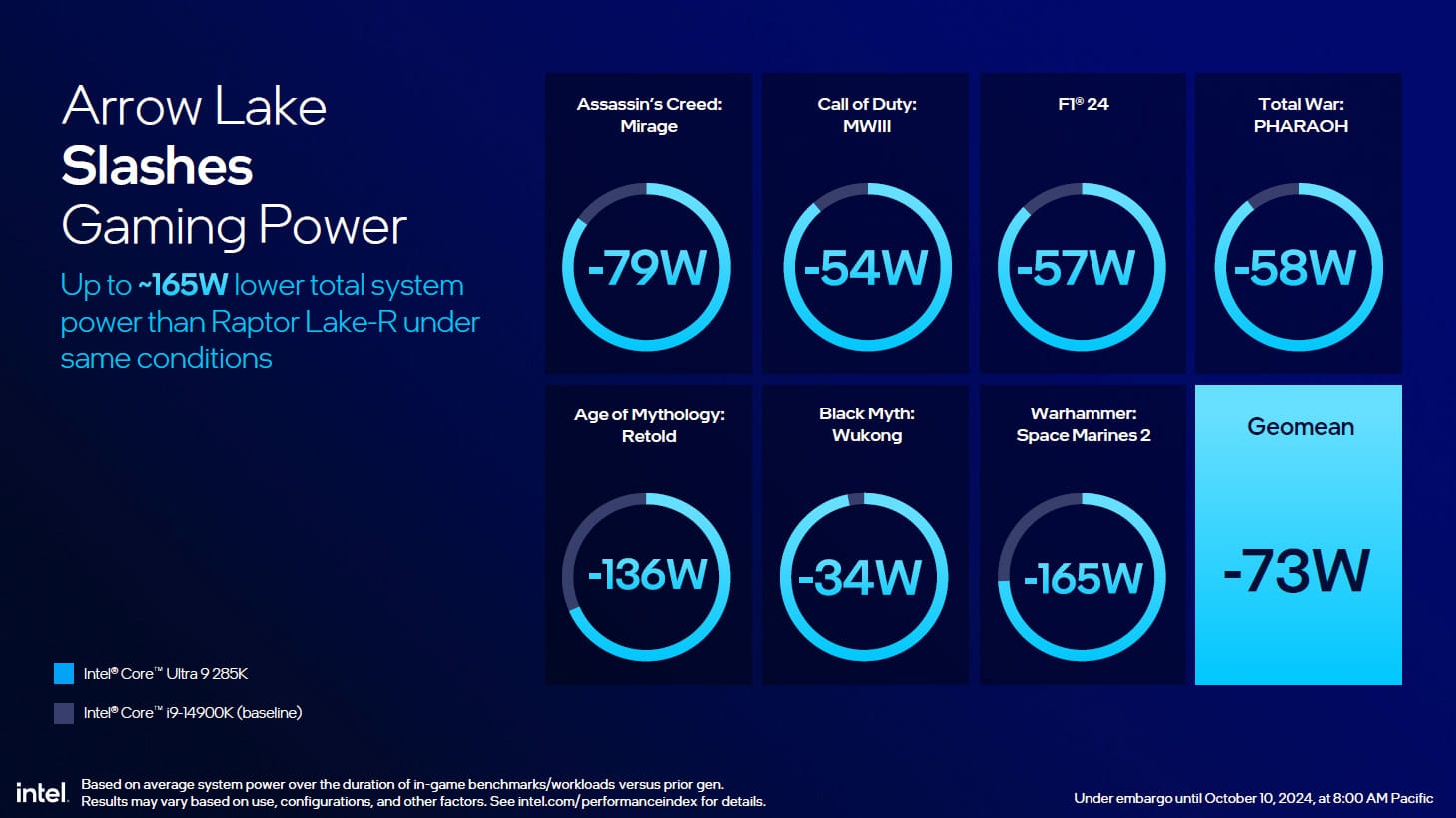
When it comes to gaming, don’t expect a revolution in terms of raw performance. Even if a gain is visible in certain games, Intel is once again highlighting the drop in power consumption of its Core ULTRA 200 processors. Now, it’s important to point out, because we haven’t done so yet, that this gain in terms of power consumption will have a direct impact on the temperatures of this new generation.
On the following slide, we can see the readings taken with a 360 mm AIO-type cooling system, where the gains measured can reach 17°C between the i9-14900K and the Core ULTRA 9 285K. This was one of the criticisms we made of the 14900K during our test: “performance that takes off, but at what price? Consumption and temperatures”. This should no longer be the case with the Intel Core ULTRA 200s, but we’ll see when we carry out our own tests.
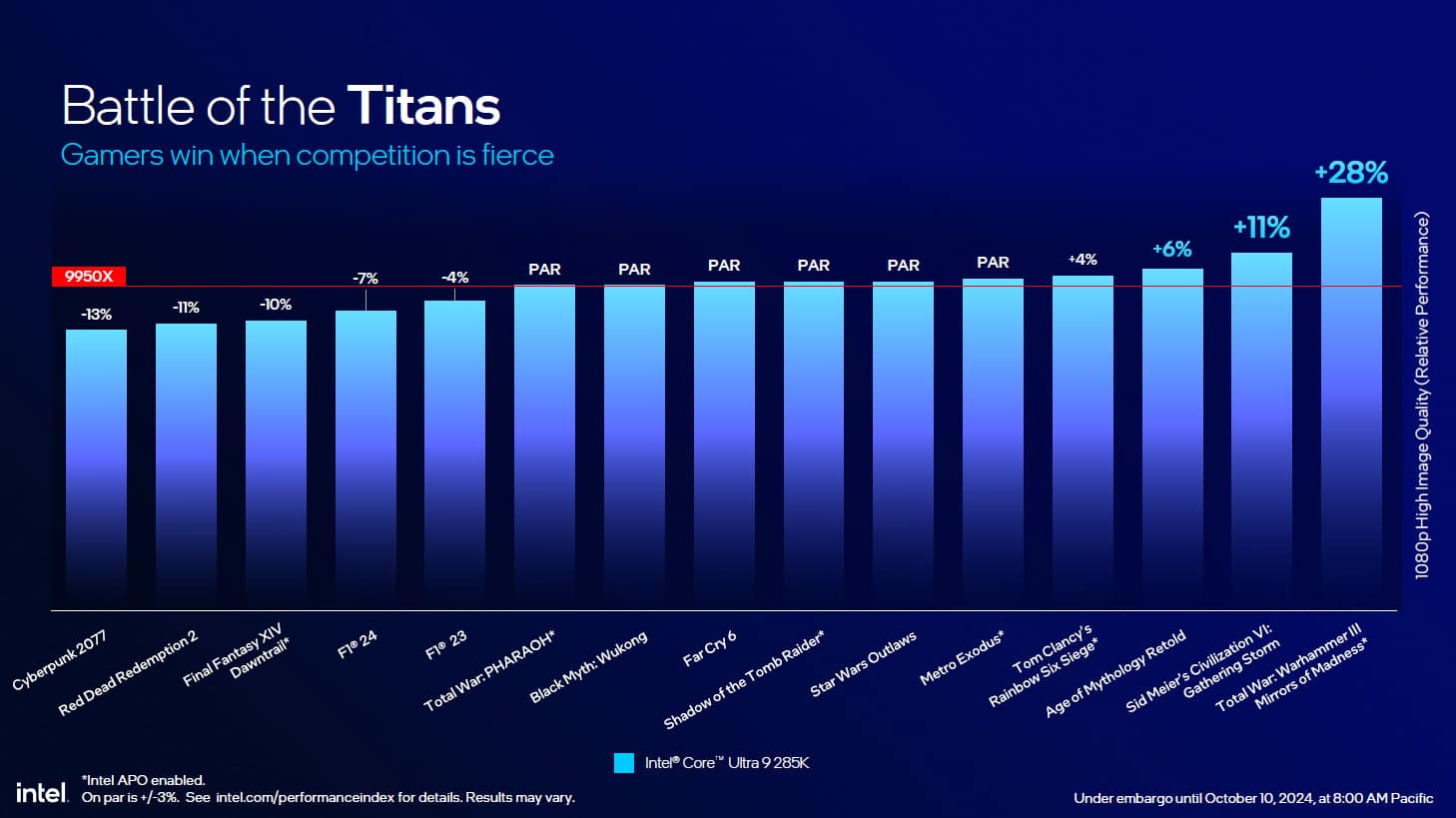
Faced now with AMD’s latest processor, the Ryzen 9 9950X, performance is fairly similar, and depending on the game chosen, it’s sometimes Intel, sometimes AMD that takes the lead. Note, however, that some of these games benefited from Intel APO technology.
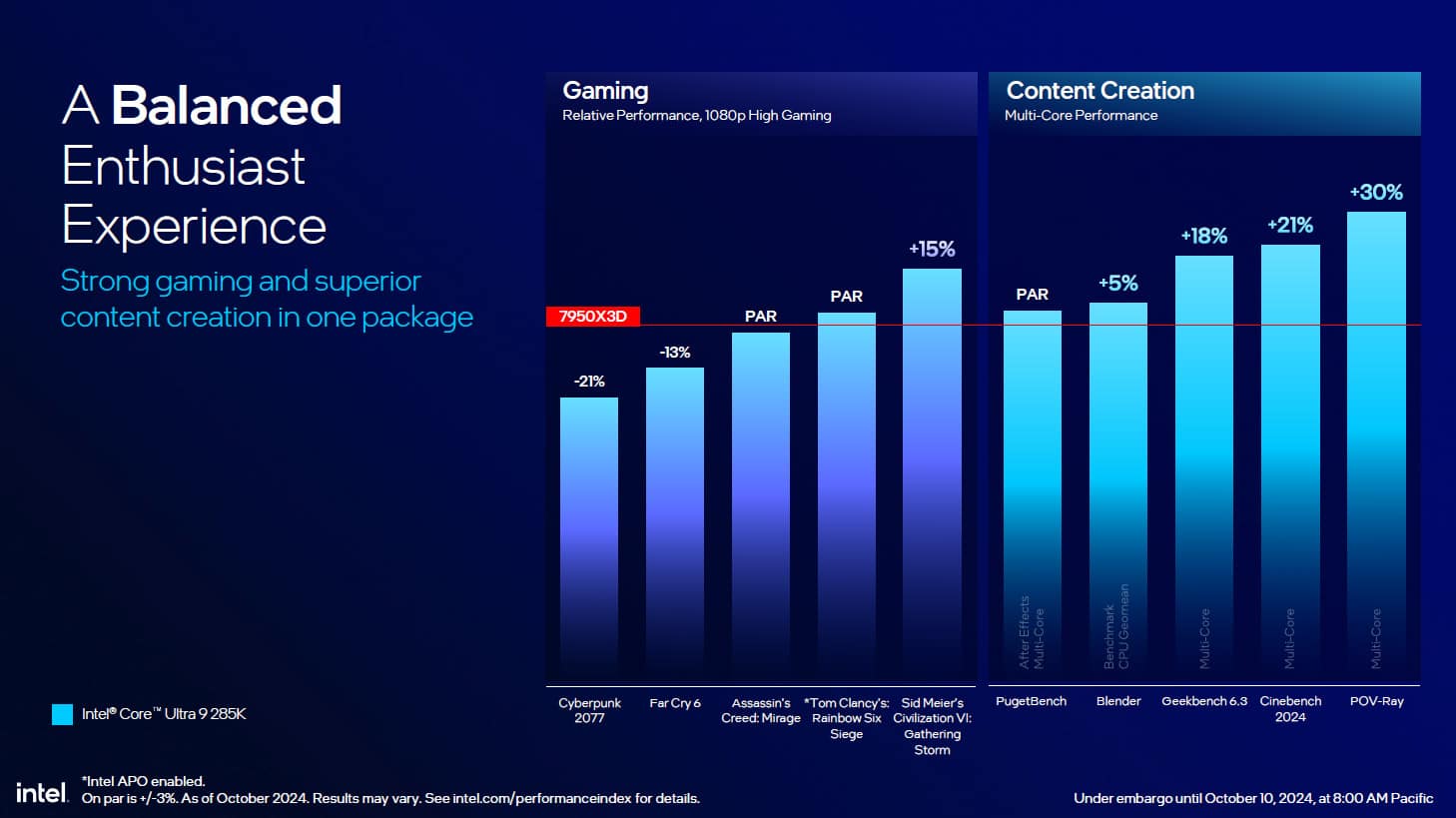
Intel has also revealed performance data for games and creative work against the Ryzen 9 7950X3D. We can see that the Core ULTRA 9 285K can lag by up to 21% in a game like Cyberpunk 2077, but performs better in creative applications.
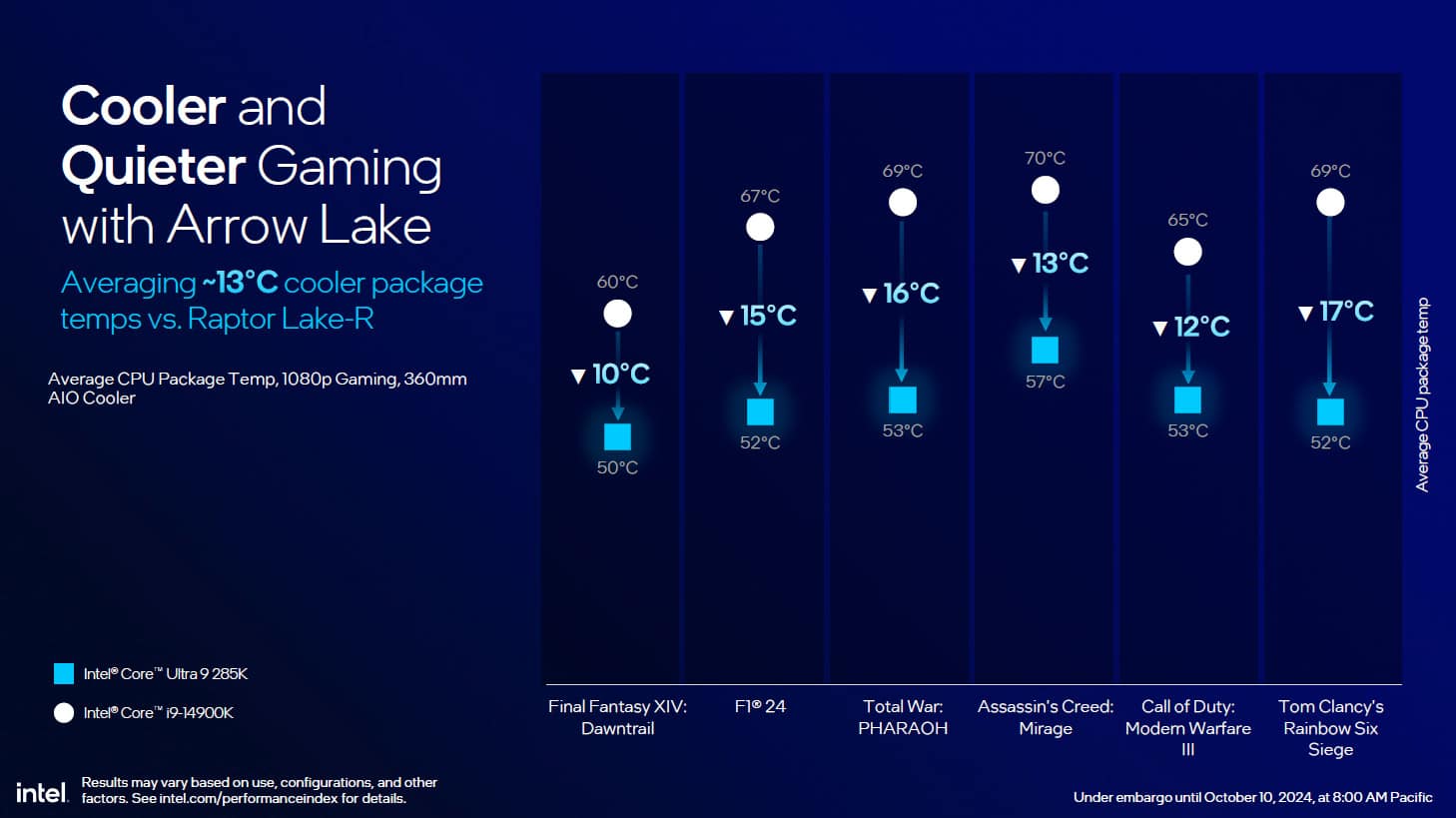
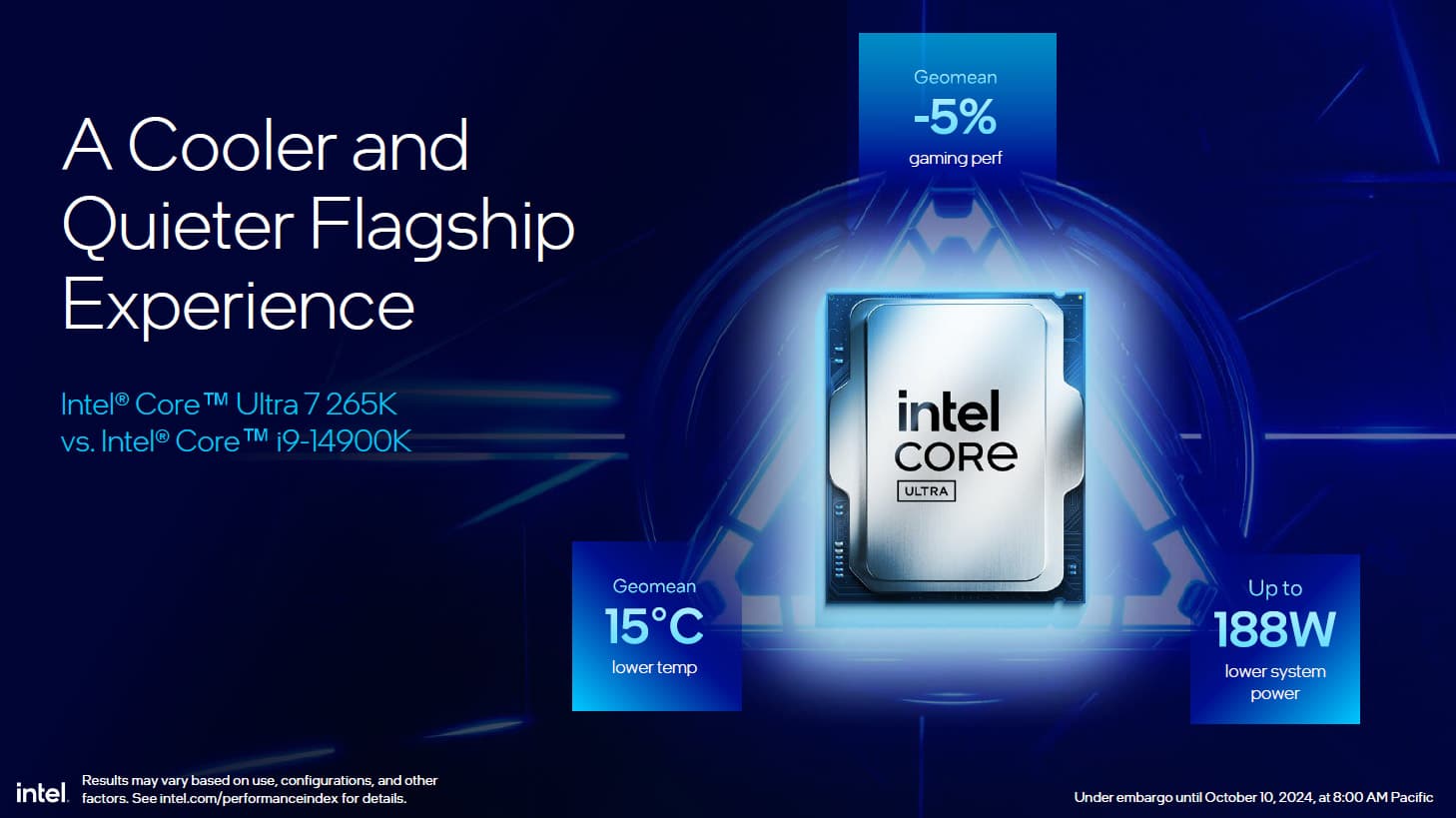
Finally, this drop in power consumption will have a direct impact on the processor’s temperature, making it possible (at last) to return to temperatures that are acceptable for high-end processors. We’ll be coming back to this in detail during our tests.
Prices for this generation of Intel Core Ultra 200S :
As far as prices are concerned, here are those available to us with the Intel Core Ultra 9 285K priced at $589 and the current entry-level at $294 for the Intel Core Ultra 5 245KF model. Even if we don’t yet know the prices in euros at the time of closing this presentation, one thing is certain: the prices in dollars are lower or identical to those of the previous generation.
 As far as European prices are concerned, we could spot the ulta 9 285K at up to 760€ to give you an idea !
[nextpage title=”Test protocol (to be read):”]
We’re pleased to present our new test protocol. It was time to update it and, above all, to expand the benchmark series we use. It was also an opportunity to update our test platforms with the arrival of the X870E and Z890 chipsets. We also took the opportunity to give our graphics a facelift to make them visually clearer. And don’t forget that we’re going to be adding even more in the coming weeks, with the addition of the Ryzen 7000 series as well as other 14th Gen Intel processors such as the i5 14500, i5 14400F and i3 14100.
We have also equipped our OBT Edition V2 benchmark table with the Benchlab measurement tool, which will now enable us to correctly measure the single voltage of the processor and soon also of the graphics cards via the Benchlab PR 1.0 software.
Test configurations :
Here are the details of the different test configurations that will be used for all the benchmarks :
- Intel motherboard: ROG Maximus Z790 APEX Encore (BIOS 1602) for Intel 14th GEN, ROG Maximus Z890 APEX (BIOS 0805) for Core Ultra and ROG Crosshair X890E HERO (BIOS 0501) for Ryzen 9000/7000.
- Processor: Intel Raptor Lake 14e GEN, Intel Core Ultra 200S and AMD Ryzen 9000/7000
- Memory: 48 GB G.SKILL Trident Z5 8000 MT/s CL40 and 32 GB G.SKILL Trident Z5 Royal Neo 8000 MT/s CL38
- Graphics card: ROG Strix RTX 4090 OC
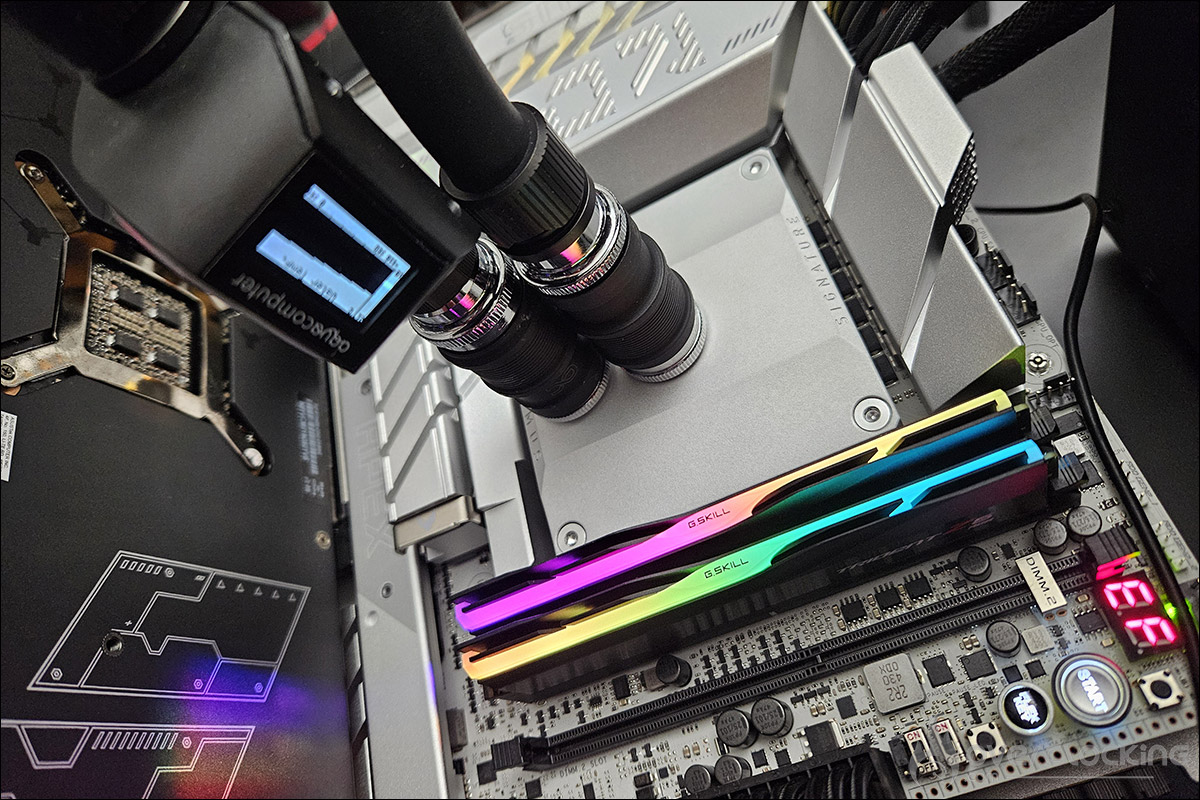
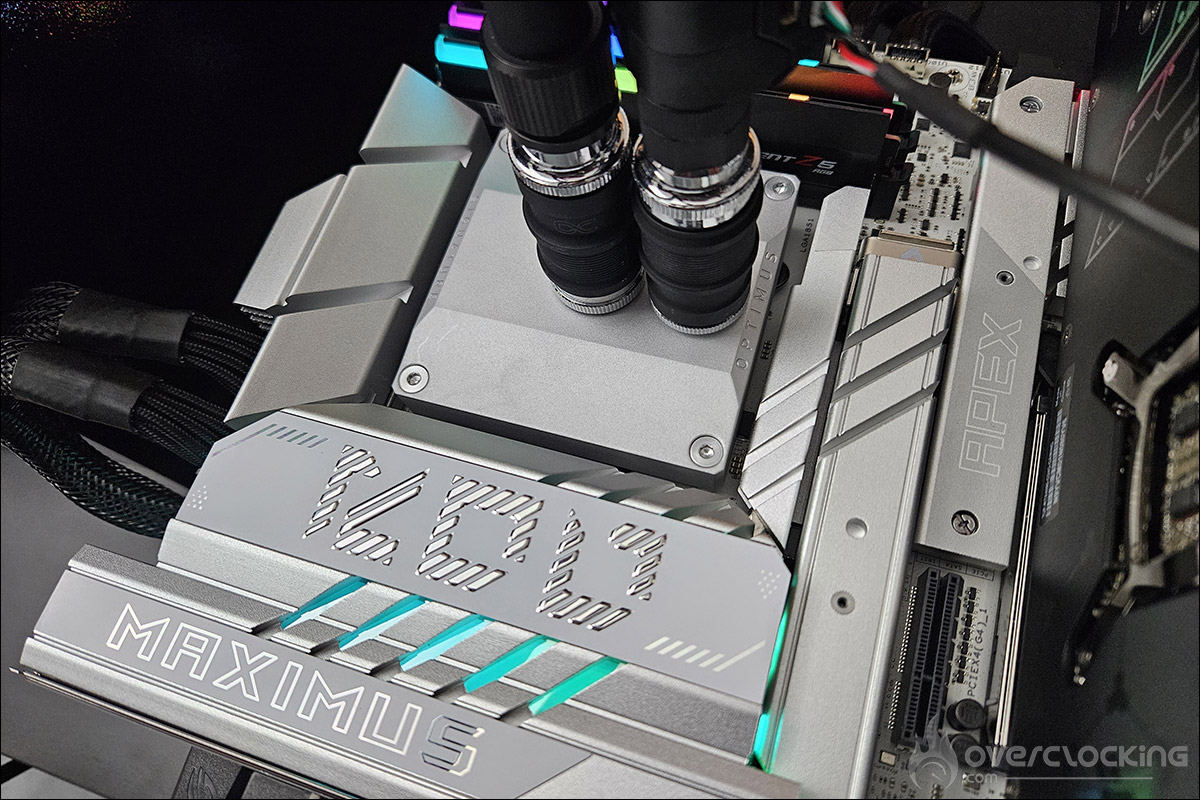
- Cooling system: Optimus V3 Intel or AMD waterblock with Alphacool Eiszeit 2000 chiller
- Power supply: be quiet! Dark Power 13 1000w
- Operating system: Windows 11 64-bit (24H2) without optimisation
The BIOS for Ryzen 9000X processors:
The BIOSes used are the latest, i.e. with the option to increase the TDP to 105 watts for the Ryzen 7 9700X and Ryzen 5 9600X. We carried out the tests at 65 and 105 watts to highlight the differences in results.
The BIOS of the Intel 14e Gen :
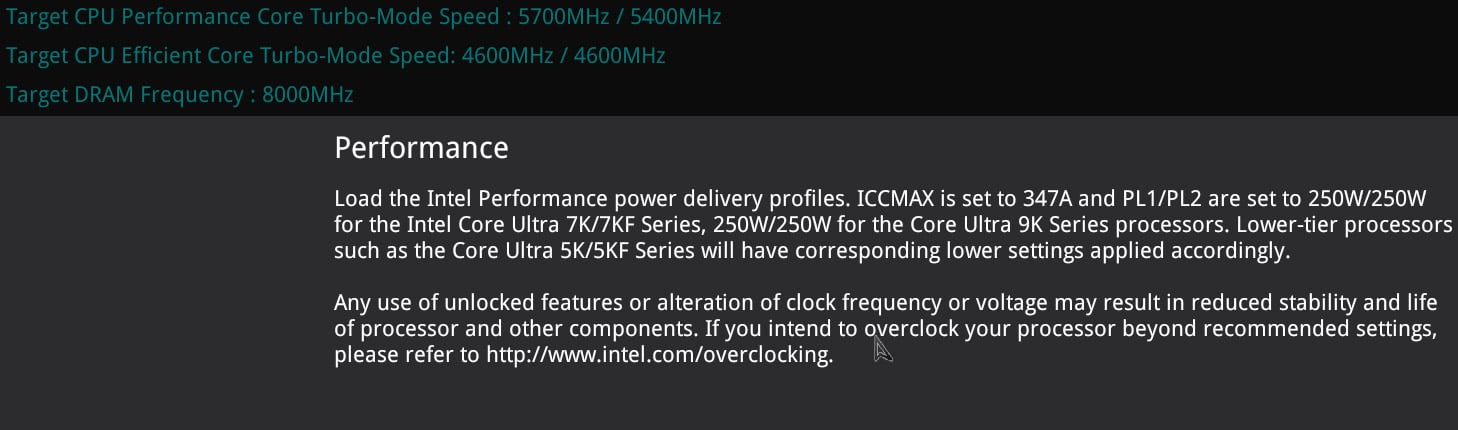
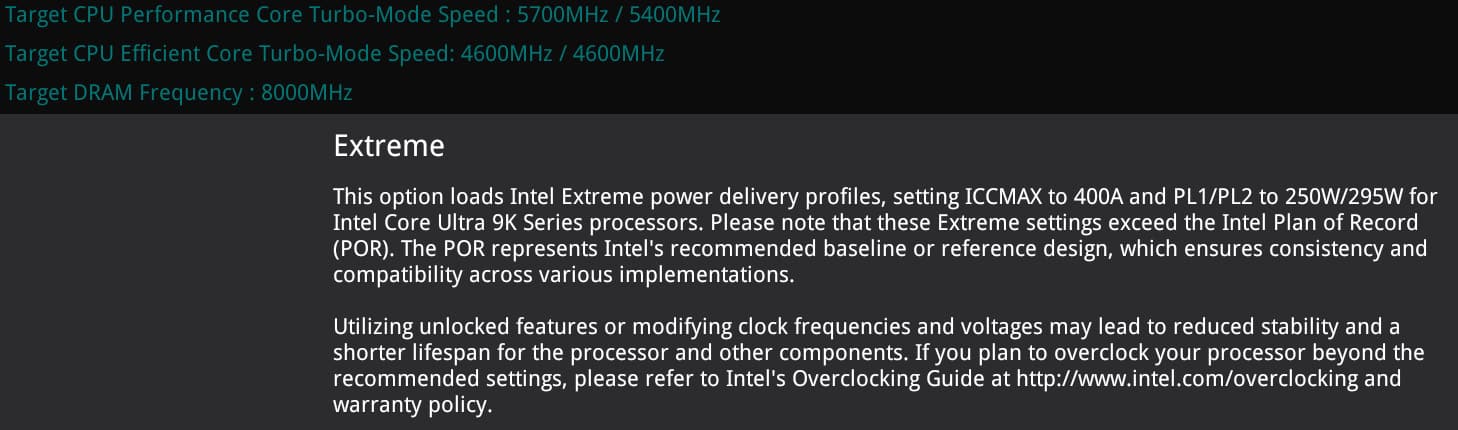
Since the patches and latest BIOS updates, Intel has inserted itself into manufacturers’ BIOSes with recommendation settings for the use of its processors under the name: ” Intel Default Settings “. There are two options, either Performance or Extreme for high-end processors, and just Performance for the i7 and i5.
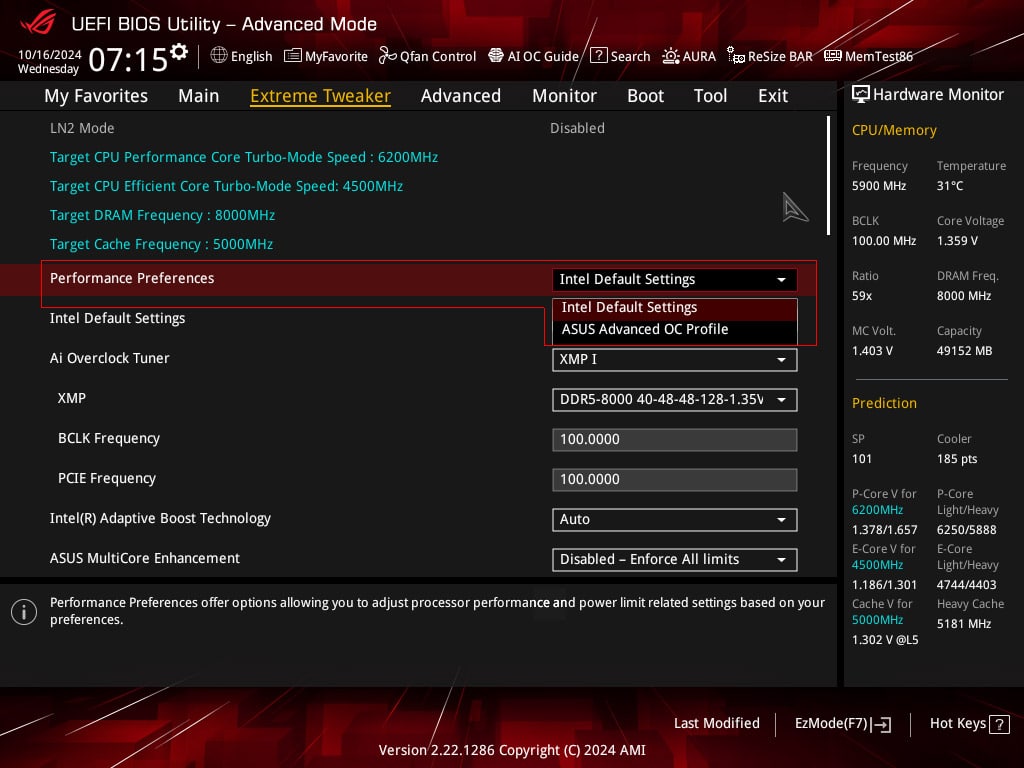
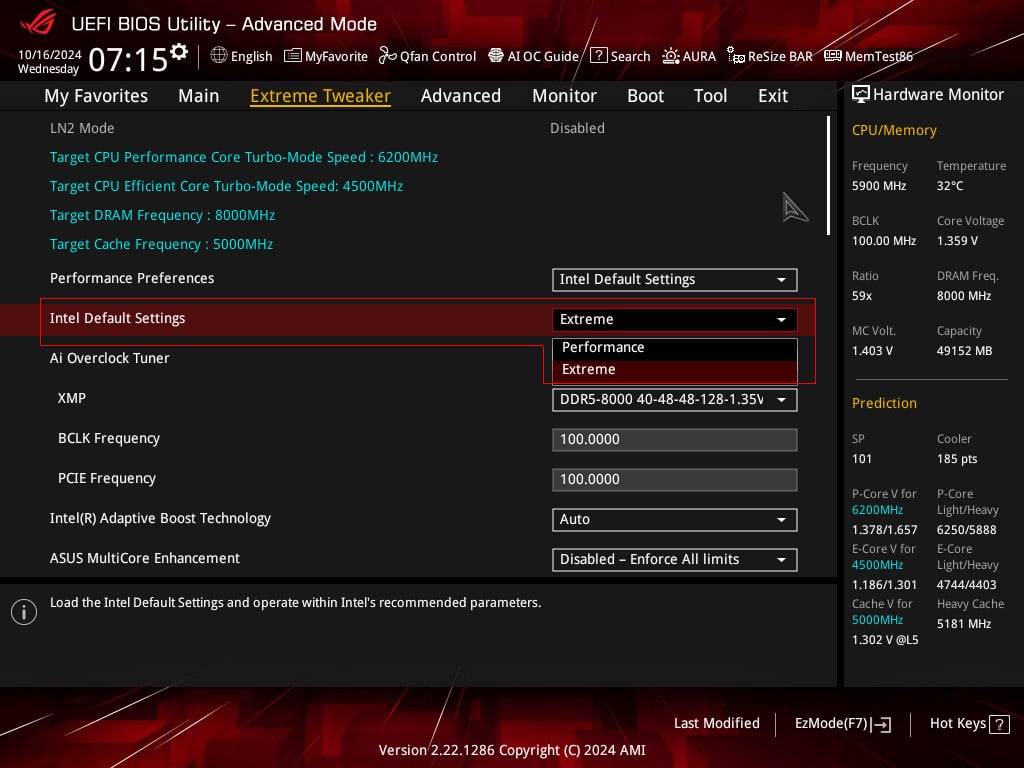
We tested the i9-14900Ks with these three different profiles so that you can see for yourself the differences in performance between these three operating modes.
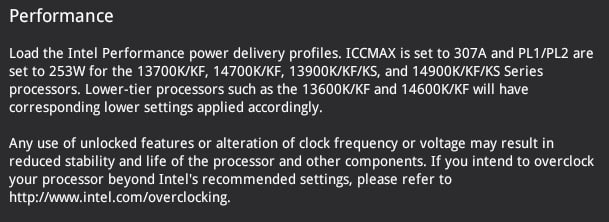
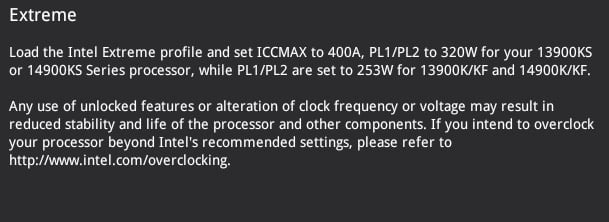
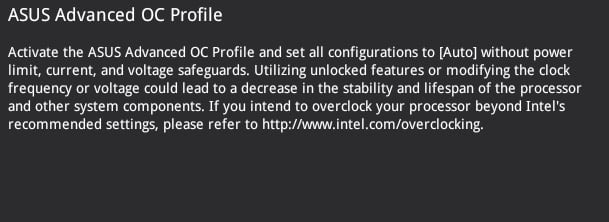
For the other two processors in the Intel 14th Gen range, the i5-14600K and i7-14700K, we have always opted for the ” ASUS Advanced OC Profile”.
The BIOS of the Intel Core Ultra 200S processors :
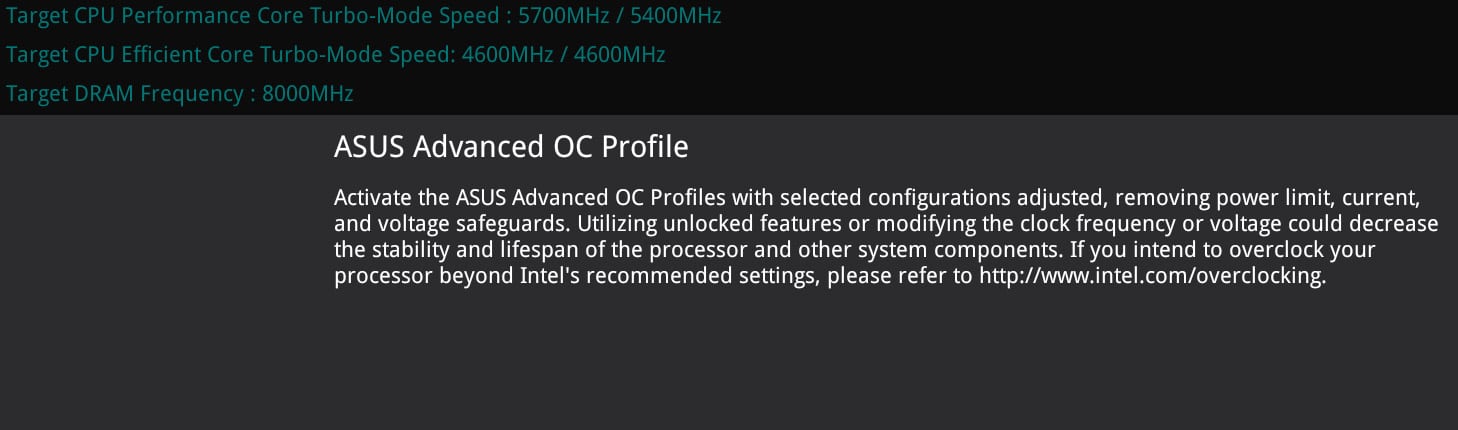
In the BIOS of our ROG Maximus Z890 APEX, we find the ‘ Intel Default Settings ‘ profiles with the Performance and Extreme options for the Core Ultra 9 285K and just Performance for the Core Ultra 5 245K. We’ll be using all three modes in our tests.
Memory kits :
We weren’t able to use the same memory kits, as we hadn’t yet received the 48 GB Trident Z5 Royal Neo 8000 MT/s model from G.SKILL. We therefore used the kit consisting of 2 x 16 GB for the AMD configuration and 2 x 24 GB for the Intel configurations.
The cooling system :
The use of the Alphacool Eiszeit 2000 chiller will allow us, with the temperature of the liquid set at between 19.5 and 20.5°C, to test all the processors under the same conditions. The idea is to judge how the processor will perform under optimum conditions, i.e. with controlled temperatures. The waterblocks used to keep the various chips cool are both Optimus Signature V3 models, with the Intel model and the AMD version.
[nextpage title=”Frequencies reached: “]
As with every new processor test, our first idea is to check whether the advertised frequencies are actually achieved. To do this, we’re going to use the Cinebench R23 benchmark. Two scenarios will be used: a single-core benchmark and a multi-core benchmark. The idea is to be able to judge the frequency achieved and compare it with what Intel has announced in its slides.
Remember that the Boost frequency in the bench differs according to the processor. As Intel points out, when we talk about Max Turbo frequency, we are talking about the maximum frequency achievable by one of the processor cores running a single-core (mono-threaded ) workload. This frequency varies according to several factors: the load, the cooling system and therefore the temperature of your processor. It’s important to keep this in mind.
The first step is to select the ‘ Intel Default Settings Performance ‘ profile in the BIOS and activate the XMP I profile. We’ll start by using Intel’s recommendations for this frequency test.
Test with the Core Ultra 9 285K :
Here we go with the beefier of the two processors we received, the Core Ultra 9 285K. As you can see, we’ve opened several windows to check frequencies, temperatures, working cores and power consumption. We’ll start with a Single Core run of Cinebench R23.
 We can see that two Performance cores are working alternately, core #0 and core #1, and that they easily reach a frequency of 5700 MHz, as indicated by Intel on its slides. Let’s see what happens when we launch a Multi Core run.
 All the cores come into action. The Lion Cove P-Cores reach 5400 MHz and the Skymont E-Cores 4600 MHz. Power consumption is 205 watts, measured at the processor’s two power connectors, and the temperature of the hottest core is 66°C. Let’s get on with our various tests.
Test with the Core Ultra 5 245K :
Let’s move on to the Core Ultra 5 245K. Same principle, we start with a Single Core run.
 You can see that one of the cores, Core #1, is running at 5200 MHz. Let’s see what happens when we launch a Multi Core run.
 Here we can see that the Lion Cove P-Cores reach 5000 MHz and the Skymont E-Cores 4600 MHz. As far as temperature is concerned, the hottest core is at 54°C.
[nextpage title=”AIDA64 and CPUZ:”]
First of all, in order to fully understand the titles in our graphs, we invite you, if you haven’t already done so, to go and read the page dedicated to the protocol in order to understand the different profiles present in the BIOS of our ROG Maximus Z890 APEX concerning the 14th Gen Intel processors as well as the new Core Ultra 200S. The idea behind our choice of benchmarks is mainly to be able to run them at home so that you can compare your readings with ours.
AIDA 64 :
This is a piece of software capable of providing you with a great deal of information about your configuration, but above all it has a memory benchmark. This calculates the read, write and copy speeds, as well as the latency, of your memory kit. It is often used to compare memory kits. It’s an excellent tool if you want to compare the performance of your memory kit with those we’ve already tested. The version used for testing is v7.35.7030 beta.


AIDA64 does not yet seem to take proper account of the new Arrow Lakes. The benchmark states at the end of the test: ” Please note that this AIDA64 Benchmark is not fully optimized for the CPU of this computer “. It will therefore be worth repeating these tests with the next revision of AIDA64.
CPUZ 17.01.64 Benchmark:
Using it couldn’t be easier: just download the latest version of CPU-Z, which is currently version 2.11. Then go to the ‘ Bench ‘ tab to check single-thread and multi-thread performance. The benchmark version we used is 17.01.64.

 While the i9-14900KS remains king in this single thread benchmark, it’s the Core Ultra 9 285K that takes first place when all the cores are used, despite the absence of hyper-threading. The AMD Ryzen 9 9950X processor also performed well.
[nextpage title=”Cinebench and Geekbench:”]
Cinebench R23:
How does this version differ from its predecessors? Firstly, it’s more realistic in terms of the score obtained depending on the processor used. As a reminder, Cinebench only tests the capabilities of your processor in single or multi-thread mode. But the main difference is that the benchmark lasts 10 minutes by default! MAXON’s idea with Cinebench R23 is to offer a benchmark that provides a degree of stability in terms of temperature and boost frequencies. Here we’ll be testing the fast version in Single Core and Multi Core.


It’s our Core Ultra 9 285K that tops our rankings, in both Single Core and Multi Core. The arrival of this new top-of-the-range Arrow Lake processor highlights the enormous gain also achieved by the Ryzen 9 9950X. As far as the Core Ultra 5 245K is concerned, the aim is to do better than the i5-14600K, and this has been achieved, even if the difference is more marked in Single Core.
Cinebench R24:
As you might expect, this is the latest version of MAXON’s Cinebench benchmark. It was released in September 2023 to provide more accurate testing for current and next-generation CPUs. You’ll see straight away that the scores are lower, the benchmark lasts longer and it’s also possible to evaluate your graphics card.


There’s no change in performance, with our Core Ultra 9 285K dominating the ranking and our Core Ultra 5 245K doing better than the i5-14600K.
Geekbench 3.4.4 :
This is a benchmark available in several revisions, with version 5 being used more and more in recent months and often used for CPU performance leaks, although the latest version is slowly taking over. It allows you to obtain two scores: one in single core and the other in multi-core. To take full advantage of this benchmark, you will need a licence. Even if this benchmark is no longer really up to date, it is still very often used by overclockers to highlight the memory score .

 Here, the latest Ryzen 9000Xs are the most productive in Single Core, even if the ranking returns to a more logical order when we switch to the Multi Core score. Note again the position of the Ryzen 9 9950X, which is never far behind our Core Ultra 9 285K.
Geekbench 5.2.5 :
Like the version above, version 5 of Geekbench allows you to test memory and processor performance. We’ve decided to add this extra benchmark, but why? The CPU benchmark uses new tests that more closely simulate the tasks faced by processors in recent applications. Geekbench 5 also increases the memory used during the benchmark to better reflect the impact of this parameter on the CPU results.

 The findings are identical to those in version 3.4.4, with AMD dominating the Single Core segment and Intel taking the upper hand in Multi Core. There is also a notable gain for the Core Ultra 5 245K.
Geekbench 6.3.0 :
We recently received a key for version 6 of Geekbench. So we took advantage of the change in configuration to add this new benchmark to our test suite. This is the latest benchmark and is intended to be more representative of current configurations. Primate Labs also assures us that the scores displayed by Geekbench 6 are more accurate in relation to the various existing devices and platforms. The test is also much longer than the other two versions we use.

 With this latest test, the gaps have narrowed and although it’s still the Ryzen 9 9950X that dominates the Single Core, the Ryzen 9 9950X comes very close to the Core Ultra 9 285K in Multi Core. The difference between the two is 4.5%.
[nextpage title=”V-Ray 6, Corona and Blender:”]
V-Ray 6:
A new benchmark in addition to those we use to test our processors. The V-Ray 6 benchmark is produced by the company Chaos to enable users to quickly evaluate the rendering speeds of this benchmark for both your processor and your graphics card. We’re also thinking of adding this benchmark to our next GPU tests.
The advantage of this benchmark is that it’s free and can be downloaded directly by following this link. You can then compare your score directly with those below or directly online on the Chaos page.
 The Ryzen 9 9950X takes first place, ahead of the Core Ultra 9 285K. Moving down the ranking, we can see that the Ryzen 9 7950X3D is also ahead of the i9-14900KS. The performance of the Core Ultra 5 245K is slightly better than that of the i5-14600K.
Corona 10:
This is another benchmark from Chaos, which can be downloaded by following this link. The advantage of these two benchmarks is that you can measure the performance of your system by rendering a scene, but without having to run (or even install) any other software, as will be the case for the next test.
 The profile of this graph remains unchanged, giving the Ryzen 9 9950X a second victory. The rendering tests seem to be going in favour of the latest high-end processor from the Reds.
Blender 4.2:
Blender is a free software package for modelling, computer animation and 3D rendering. We have chosen to download the rendering of “BMW27”. The principle of this benchmark is to calculate the rendering of the image. We will evaluate the performance of the different processors according to the time needed to complete the rendering. As you can see, the faster the better! You can download Blender and the BMW27 renderer free of charge to test this benchmark.
 It’s our Core Ultra 9 285K that executes the rendering the fastest, with a duration of 54 seconds. The Ryzen 9 9950X is not far behind at 57 seconds. The rest of the graphics are logical and follow the trend we noted with V-Ray 6, where AMD processors are not outdone.
[nextpage title=”7-Zip 19.0:”]
7-Zip 19.0:
This benchmark is an integral part of the Benchmate software, which we also use for Cinebench tests. The advantage of this tool is that it is validated by Hwobt and can therefore be used to encode your scores directly onto the platform.
7-Zip, as its name suggests, is a file compression and decompression benchmark. You can either use the one available directly in the 7-zip utility, which will give you a compression score and a decompression score. Here, with 7-Zip 19.0, the result is an overall score that takes into account compression and decompression performance. Here too, Benchmate is free, so you can evaluate your score with your configuration.
 The score obtained with our Intel Core Ultra 200S does not seem to reflect reality. These may not be correctly supported by the benchmark. We are waiting for confirmation as to whether or not we will be keeping this benchmark in the future.
[nextpage title=”UL Procyon AI:”]
We couldn’t do without adding an AI benchmark. Although we also carried out tests with Geekbench AI, we decided not to publish the tests, as we had very different results between our different runs. However, we did receive a licence for Procyon AI Computer Vision, so we did carry out this series of tests. We’ll be coming back to the various aspects of the tests in detail from time to time.
In this benchmark, common computer vision tasks are performed using a range of popular and state-of-the-art neural networks. Measure the performance of the AI accelerator by comparing it to the same operations performed with either your processor or your graphics card. This benchmark will also be added to our upcoming graphics card tests.
Procyon AI Computer Vision :
We have carried out the Float32 test, which is the most widely used, but we will also be adding the other two tests shortly.
 Once again, we’re neck and neck for first place, with the Ryzen 9000s doing very well.
[nextpage title=”3DMark :”]
Let’s start with a series of synthetic tests that we use regularly. We’ve opted for the CPU scores of the benchmarks in the 3DMark series. The idea is to isolate only the CPU score by creating a customtest.
Here are the results for Fire Strike and Time Spy. In Fire Strike, the physics (CPU) test is identical for both the ‘standard’ and ‘ultra’ versions. As a result, you’ll only see the Fire Strike score. For Time Spy and Time Spy Extreme, on the other hand, the tests are different, so you’ll get both scores. These scores are of great interest to overclockers, so they can choose the platform with the best performance to break as many records as possible. We’ve also decided to add the ‘CPU Profile’ benchmark, retaining only the max-threads score.
3DMark CPU Profile :
The 3DMark CPU Profile introduces a new approach to CPU benchmarking. Instead of producing a single figure, the 3DMark CPU Profile shows you how your CPU’s performance changes and evolves according to the number of cores and threads used. The 3DMark CPU Profile includes six tests that help you evaluate and compare CPU performance for gaming and other activities. Run all six tests to get a more complete picture of CPU performance.
We have chosen to isolate only the max-threads score, which represents the full performance potential of the CPU when using all available threads.
 Unsurprisingly, it’s the new Core Ultra 9 285K that takes first place. The Ryzen 9 9950X did just as well as the i9-14900KS. As for our Core Ultra 5 245K, it gained 23% over the i5-14600K, which is far from negligible.
CPU score at Fire Strike :
Let’s start with 3DMark Fire Strike, which is one of the most widely used benchmarks today. It consists of two graphics tests, a CPU test and a fourth test that combines GPU and CPU. Don’t forget to disable the demo, which makes no difference to the final score and (unnecessarily) prolongs the benchmark.
 This benchmark has difficulties with processors with many cores. In fact, when you’re looking for the best performance, you need to disable some of them. Here again, very interesting performance for our Core Ultra 9 285K.
CPU score at Time Spy :
The second test is 3DMark Time Spy. Although this one is performed in 1440p, its main feature is that it uses DirectX 12. It consists of two graphics tests and a CPU test. As with Fire Strike, don’t forget to disable the demo. These first two benchmarks are provided by UL Benchmark.

Once again, Intel processors dominate this second Time Spy benchmark, with a clear lead over the Ryzen 9000.
CPU score in Time Spy Extreme :
The second test is 3DMark Time Spy. Although this one is performed in 2160p, its main feature is that it uses DirectX 12. It consists of two graphics tests and a CPU test. As with Fire Strike, don’t forget to disable the demo.
 This latest test is just like the previous ones, with our Core Ultra 9 285K taking first place. The Core Ultra 5 245K still has a clear advantage over the previous-generation i5-14600K.
[nextpage title=”Power consumption:”]
This is where we’ll see whether the promises made by Intel at the launch of the Intel Core Ultra 200S prove to be true. As a reminder, we used the solution offered by Benchlab, which allows the processor and graphics card to be monitored independently. For the test itself, we activated the Intel Default Settings Performance profile and enabled the XMP profile.
As far as power consumption is concerned, we used the Cinebench R23 benchmark and carried out three sessions in Multi Core to obtain an average. This will give us the power consumption of our processor as measured by the Benchlab software. We’ll also be adapting these readings for our upcoming graphics card tests. We’ll be back with a more detailed article on the software and how to use this Benchlab monitoring system.
 The good news is that processor power consumption has indeed fallen compared to the 14th Gen, and that’s excellent news. This table also highlights the behaviour of the Ryzen 9000s, which also do very well indeed. Note also the difference in power consumption when we activate the 105-watt profile for the Ryzen 7 9700X and the Ryzen 5 9600X.
[nextpage title=”The last word:”]
What about gaming?
We were determined to bring you a fuller gaming section, but our internet connection was a bit of a mess this week, with a 50 Mbps downlink, so we had to scale back the benchmarks we used. The latest COD MW3 update also weighed heavily on our results, without really understanding why. In short, it was a bit of a mess and we decided not to post anything, rather than just talk nonsense. Don’t panic, we’re busy updating everything so that we can ar least bring you the results for early November, with the new Ryzen 9000 X3D announced by AMD. We will then include the full range of games we use to evaluate graphics cards.
The performance of this new generation :
We thought Intel was very cautious when it launched the Intel Core Ultra 200S, announcing straight away that there would be no significant increase in performance compared to the 14th Gen, but that it would work on power consumption. Intel has fully won this bet, even though we found the performance of this new generation very interesting. Overall, the Core Ultra 9 285K does better than the i9-14900KS and takes the lead, sometimes by a short head, over the Ryzen 9 9950X. The Core Ultra 5 245K is also very interesting in terms of power consumption and performance, and doesn’t really have any direct competitors from AMD. We will also be adding the Core Ultra 7 265K to our benchmarks as soon as possible.
Power consumption is indeed more controlled, although we were not totally convinced by the Intel profiles present in the manufacturers’ BIOS. With the exception of AORUS, these profiles sometimes seem too identical. What’s more, an Intel Default Settings Performance profile can be quite different from one manufacturer to another in terms of power consumption. For some manufacturers, this will be close to 210/215 watts, while for others it will be around 250 watts, which will certainly be adjusted in the future by a BIOS update. We also have to admit that these profiles have had a significant impact on the performance of the 14th Gen, causing quite a few results to drop in our benchmarks.
As far as cooling solutions are concerned, we continue to advise you to opt for a liquid cooling system, despite the improvement in power consumption.
Intel Core Ultra :
The advantage of having already unveiled the Intel Core Ultra 200S range on 10 October is that they are already listed in the majority of online shops. So we have an overview of the various current offerings. Personally, as we’ve already said, we can’t imagine upgrading from Intel’s 13th or 14th Gen to Arrow Lake, as the benefits are very limited in terms of performance. Don’t forget that you’ll also need to buy a new motherboard, because the socket is different, as we’re moving from an LGA-1700 to an LGA-1851. We think the upgrade is worthwhile for those with a 12th Gen processor, as they’ll be able to keep their memory kit, but for 11th Gen and below, a DDR5 kit will be added to the bill.
Finally, its current competitor is almost certainly the Ryzen 9 9950X. Anyone looking to build a top-of-the-range configuration today is entitled to ask the question between Intel and AMD. At Top Achat, the Ryzen 9 9950X costs €699.99, while the Core Ultra 9 285K costs €729.99. The Ryzen 9000 generation also has a number of advantages that may make it worth buying these new Core Ultra systems.
As far as the Core Ultra 5 245K is concerned, the choice is much easier, since it still dominates the trade and has no direct competitor in the Ryzen 9000 range, since it does better than the 9700X, priced at almost the same level. It remains to be seen what the availability of the Core Ultra 200S will be on launch day.
Z890 motherboards :
Looking at the references tested today and searching for X870E equivalents, the ROG Maximus Z890 HERO is on pre-order at 829 euros and its equivalent on the AMD X870E chipset at 729 euros. The same applies to the ‘MASTER’ series, which is also priced higher on the Intel chipset. There’s no doubt that this is another factor to take into account, given that the cards use virtually the same technologies.
The biggest unknown when it comes to concluding is the life expectancy of the LGA-1851 socket. Intel has been asked this question on several occasions, but has never been willing to answer. Yet this is a very important question for future buyers. Would there only be one generation on this socket, given that AMD announced, at the launch of the Ryzen 9000, that its AM5 socket would last until at least 2027?
In conclusion, Intel has made the best choice of all by prioritizing improving the power consumption of its processors to the detriment of a significant increase in performance. The future of socket LGA-1851 and the price balance in the weeks to come will be the two points to watch. Thank you to Intel France for making this press kit available to us for testing. See you in a fortnight’ time for our big gaming comparison with the arrival of the new AMD Ryzen X3D.

