
G.SKILL Trident Z5 NeoX: AMD EXPO ULL
Although the situation regarding hardware component prices is far from stable, our testing continues, and we’ve just received a sample of G.SKILL’s Trident Z5 NeoX RGB DDR5 2 x 16 GB memory kit, clocked at 6,000 MT/s with timings of 36-36-36-76. This kit is quite unique because it is AMD EXPO ULL-compatible, which stands for “Ultra Low Latency.” The new AMD ULL logo has been officially approved and certified by AMD. This new standard will allow you, after updating your BIOS accordingly, to improve performance compared to an AMD EXPO kit. These kits feature a profile that optimizes subtimings to minimize latency and boost performance.
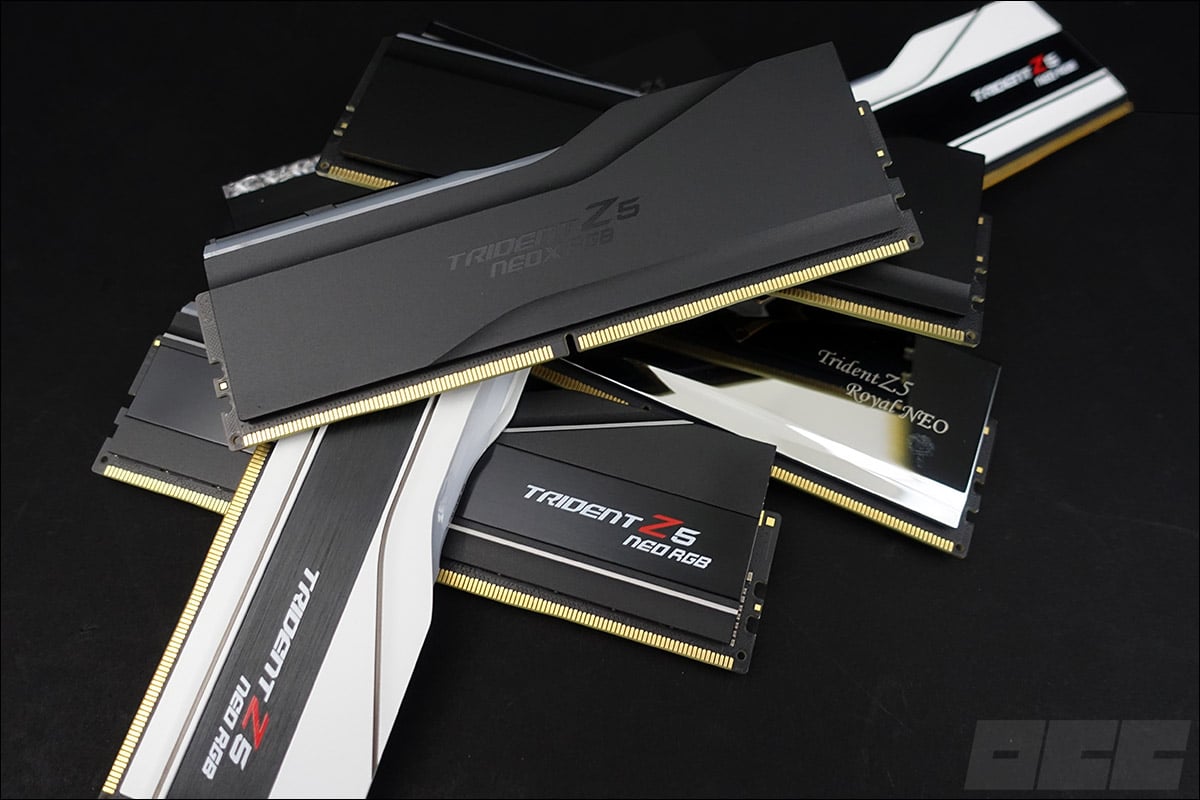
Thank you to G.SKILL for providing this Trident Z5 NeoX RGB kit. We’ll compare its performance against three other G.SKILL kits with different frequencies and timings.
Unboxing the G.SKILL Trident Z5 NeoX RGB:
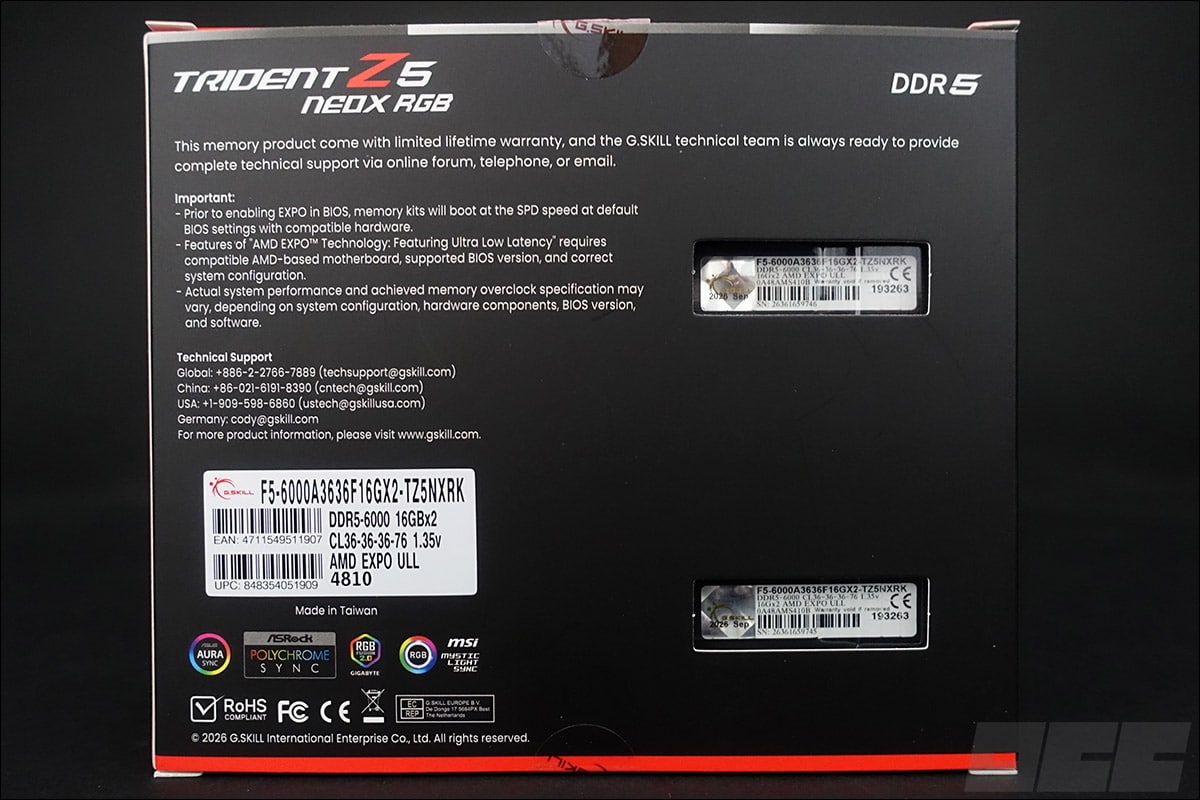
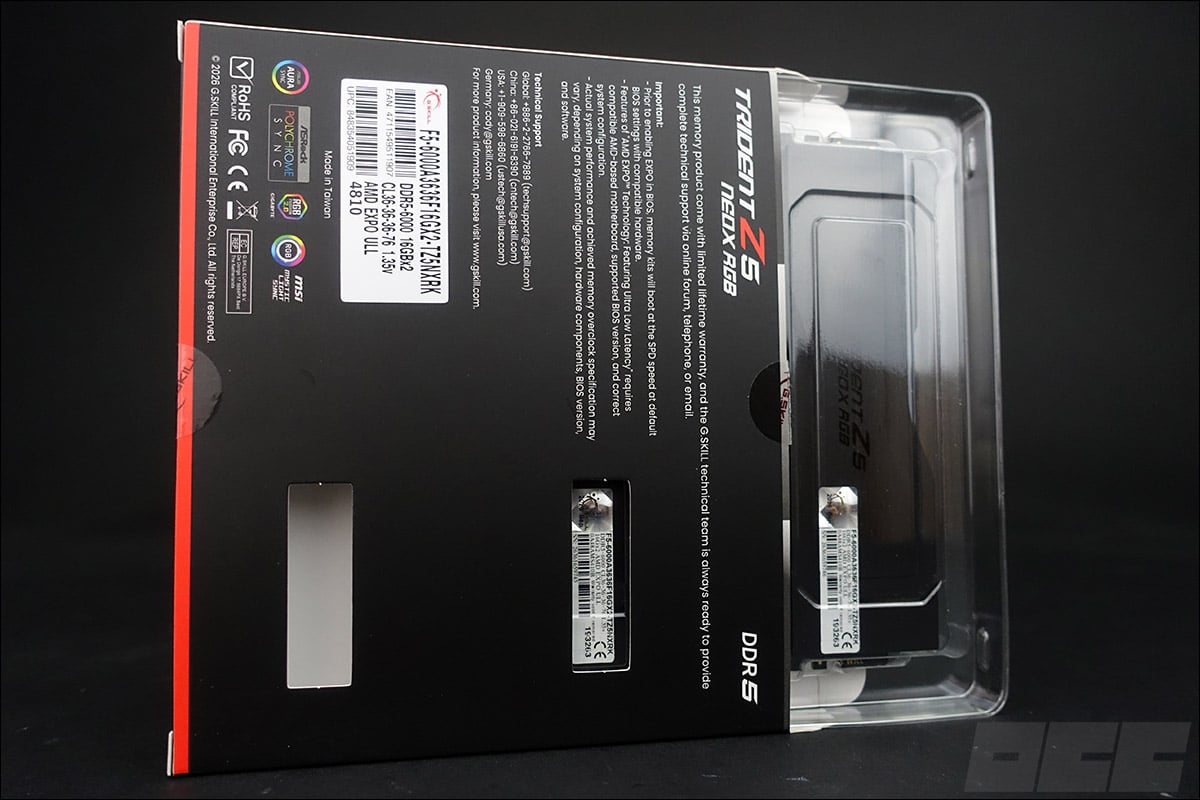
Our G.SKILL Trident Z5 NeoX RGB 6,000 MT/s CL36 kit comes in a cardboard box featuring the brand’s signature color scheme. The labels on our two matte black memory modules are visible through two cutouts on the back of the box. You can see that the modules are enclosed and protected by a clear plastic sleeve. On the back of the box is also a label informing the prospective buyer of the memory kit’s specifications. Two cutouts at the labels provide visual confirmation of this information.
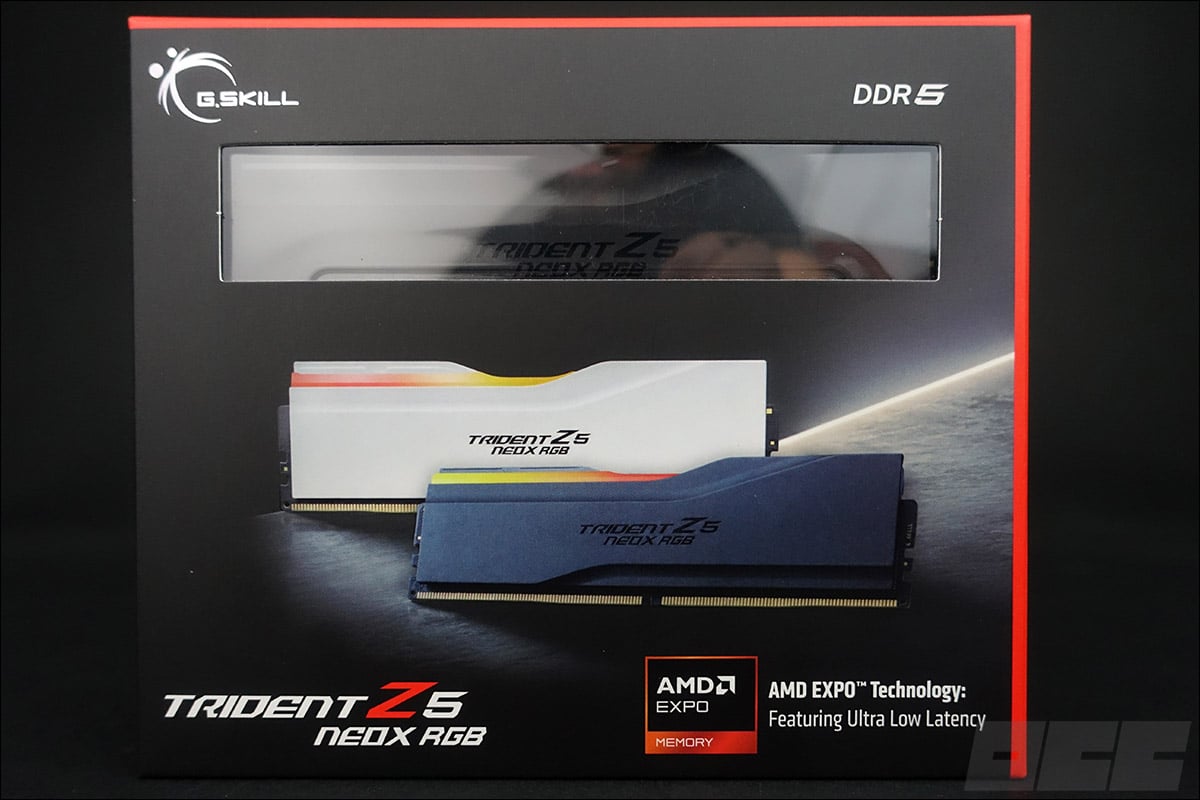
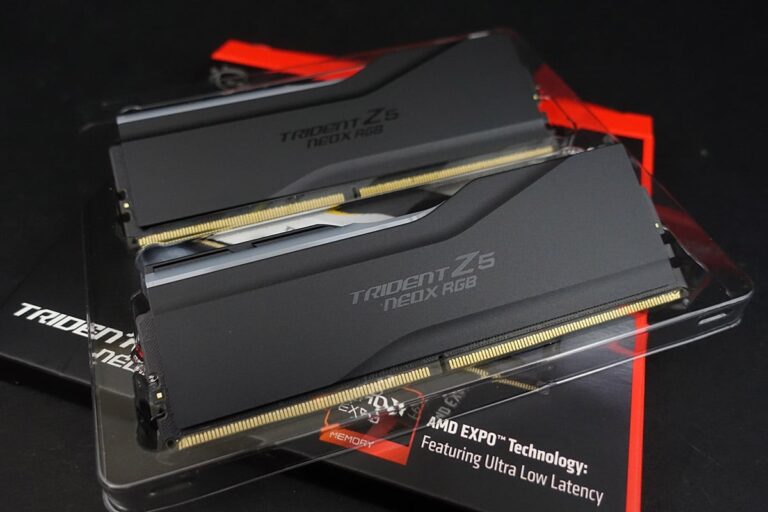
Once the box is opened, you’ll find our two modules perfectly protected inside a clear plastic case. This “Trident Z5 NeoX” series is a brand-new line that’s AMD EXPO ULL (Ultra Low Latency) compatible and certified. These are DDR5 kits designed for AMD systems and require an up-to-date BIOS, but we’ll discuss that later in the article.
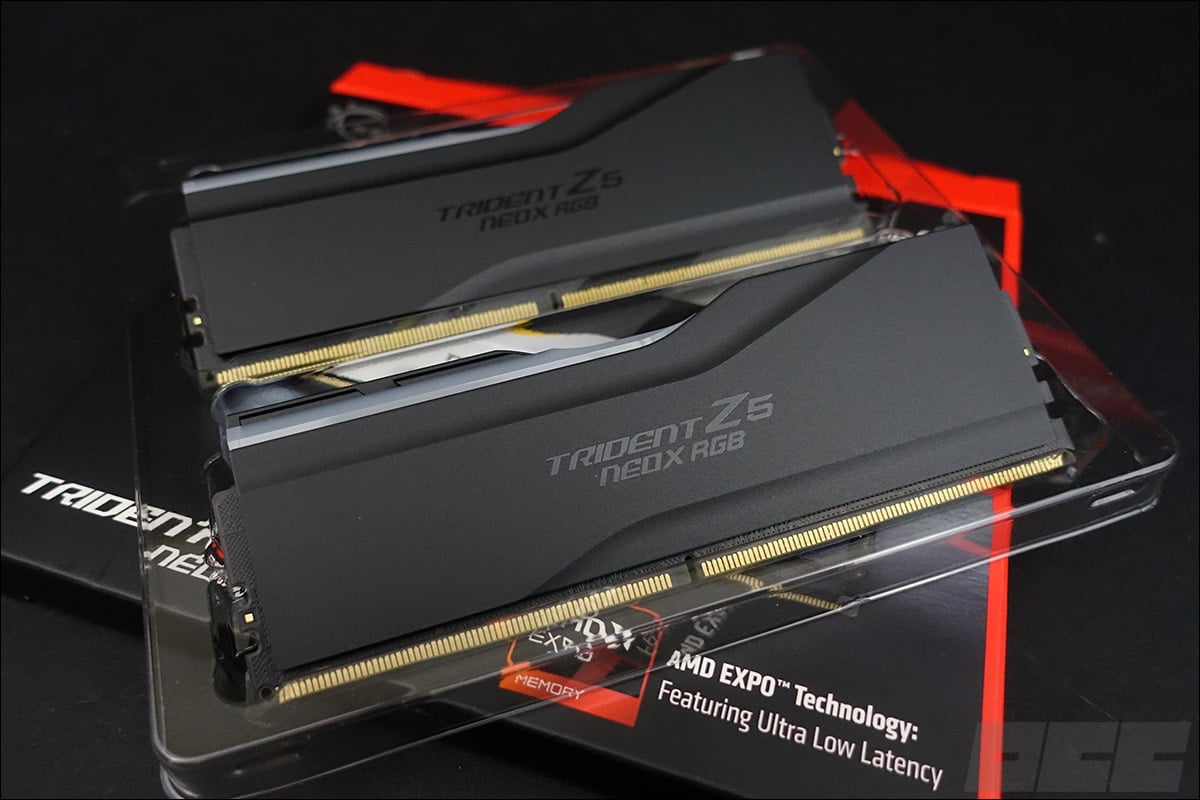
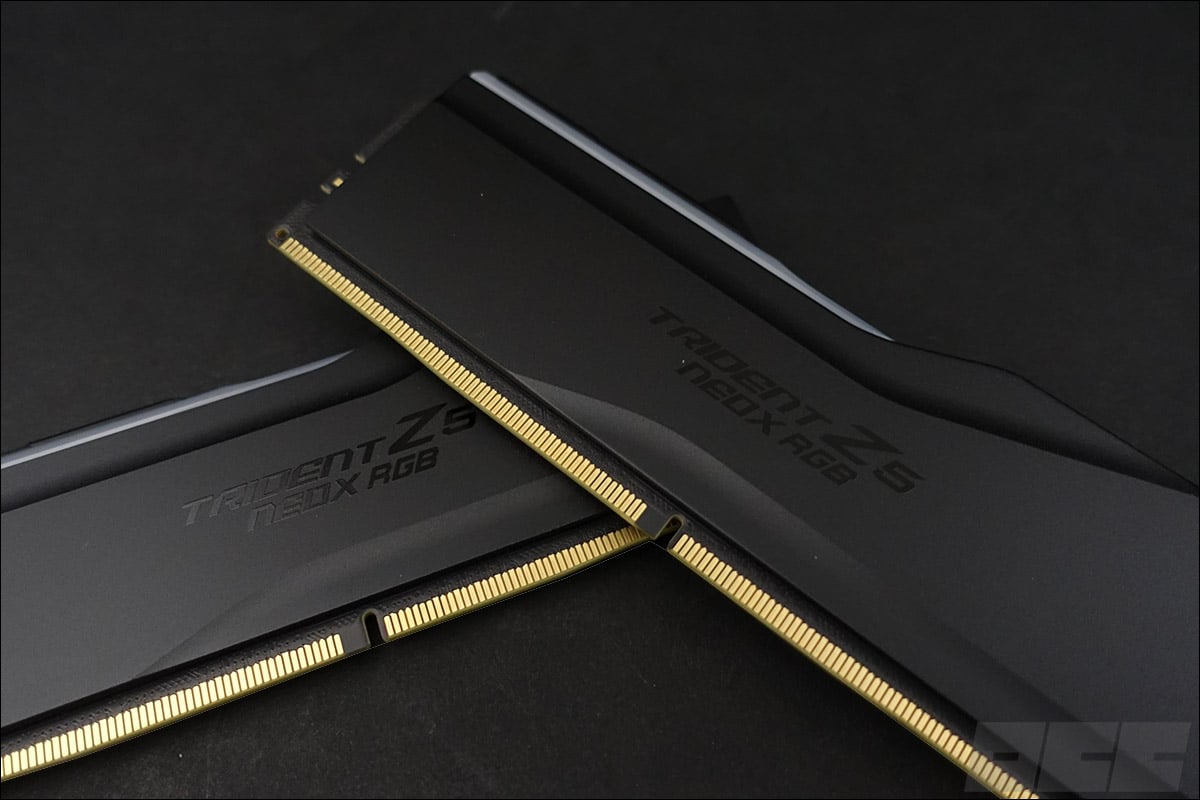
The Trident Z5 NeoX kit is available in three colors: matte black, matte white, or black with a mirror finish. In the Trident Z5 NeoX series, only kits with RGB backlighting are available. However, you can opt for the AMD EXPO ULL-compatible Flare X5X series, which has a much more understated design. Our sample today is white, from the Trident Z5 NEO series, and features RGB backlighting.
Specifications and Cooling:
Our kit runs at 6,000 MT/s, has timings of 36-36-36-76, and requires a voltage of 1.35 volts to operate. It consists of two 16 GB modules for a total of 32 GB. On paper, this kit is far from being a powerhouse, but we might be surprised by its performance.
The heat spreaders are made of aluminum. They are designed to dissipate the heat generated by the eight-layer PCB as well as that from the memory chips. If you’ve ever held a G.SKILL Trident kit in your hands, you’ll quickly notice that G.SKILL has maintained the same design philosophy for the heat spreader.
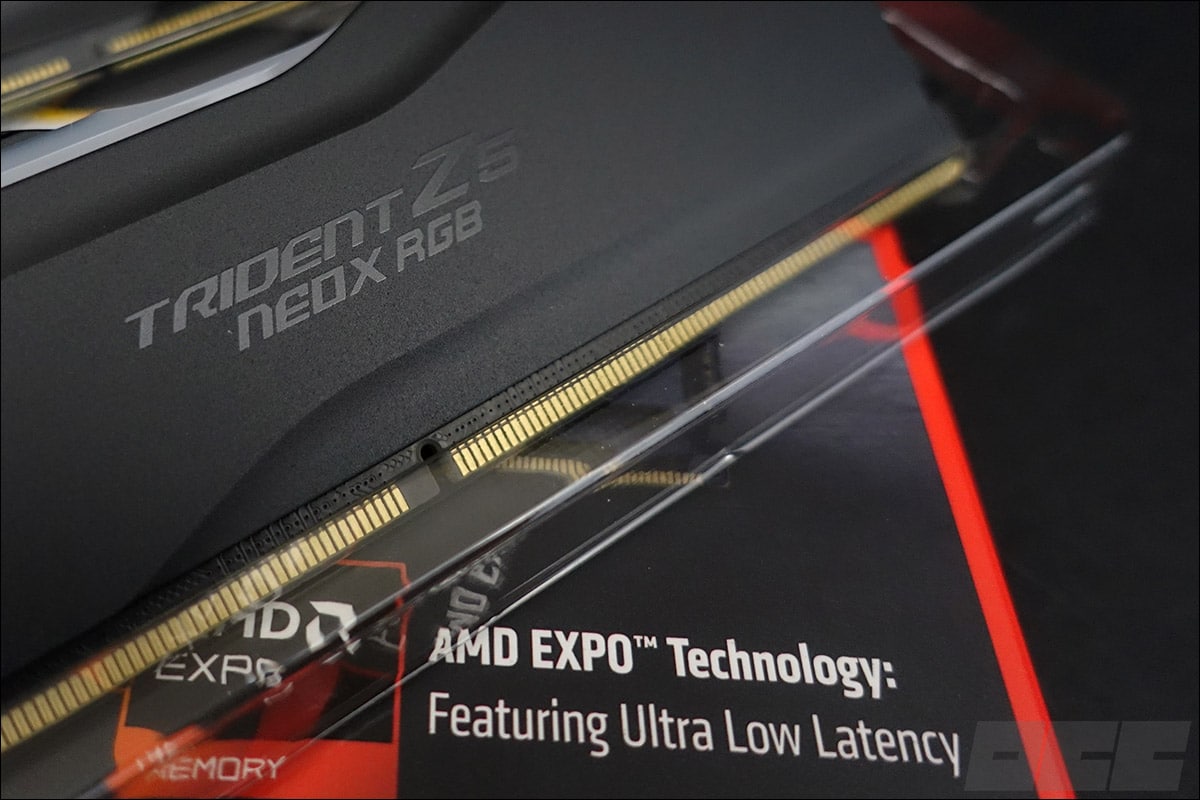
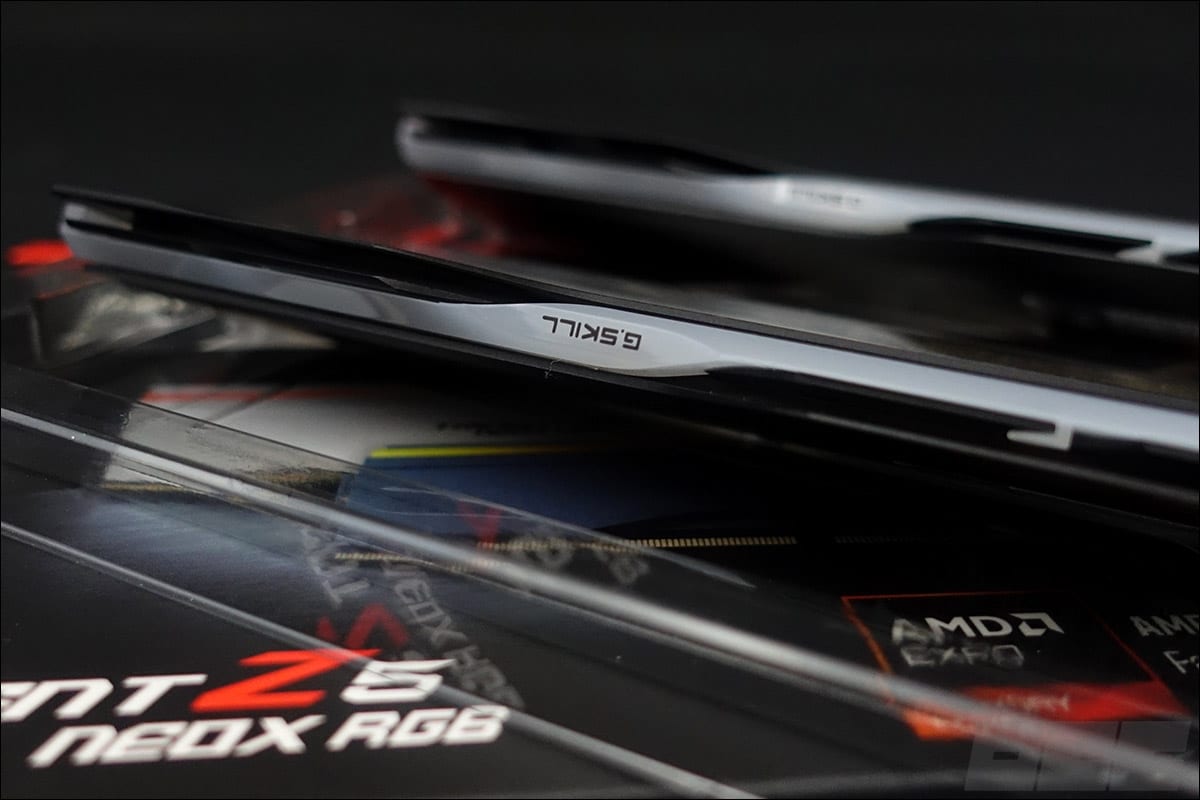
On both sides, the name of the G.SKILL Trident Z5 series is centered on the heatsink. A label lists some of the specifications of our kit. As for the price, it’s currently available in France for around 600€. On the top, there’s RGB backlighting with the G.SKILL logo. Our kit is 42 mm tall and weighs 74 grams.
This kit features RGB backlighting, and each memory module has eight independent LEDs hidden beneath an opaque plastic strip sandwiched between the two heat spreaders. It is, of course, compatible with ASUS Aura, Gigabyte RGB Fusion, MSI Mystic Light, and ASRock Polychrome Sync software.
Basic specifications:
You might say that’s pretty easy since all you have to do is look at the specs listed by the manufacturer. Yes, but that’s not enough—especially if you plan to overclock it! Some information is provided by the manufacturer, but you’ll have to dig deeper—or even remove the heatsinks—to find the rest, or search online for confirmation.
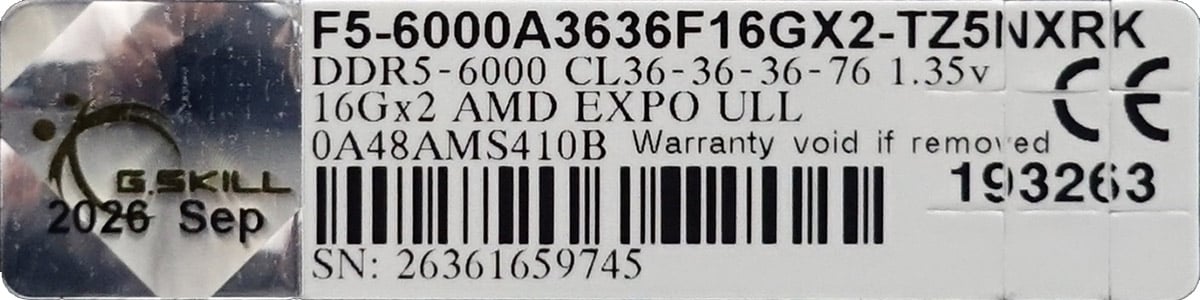
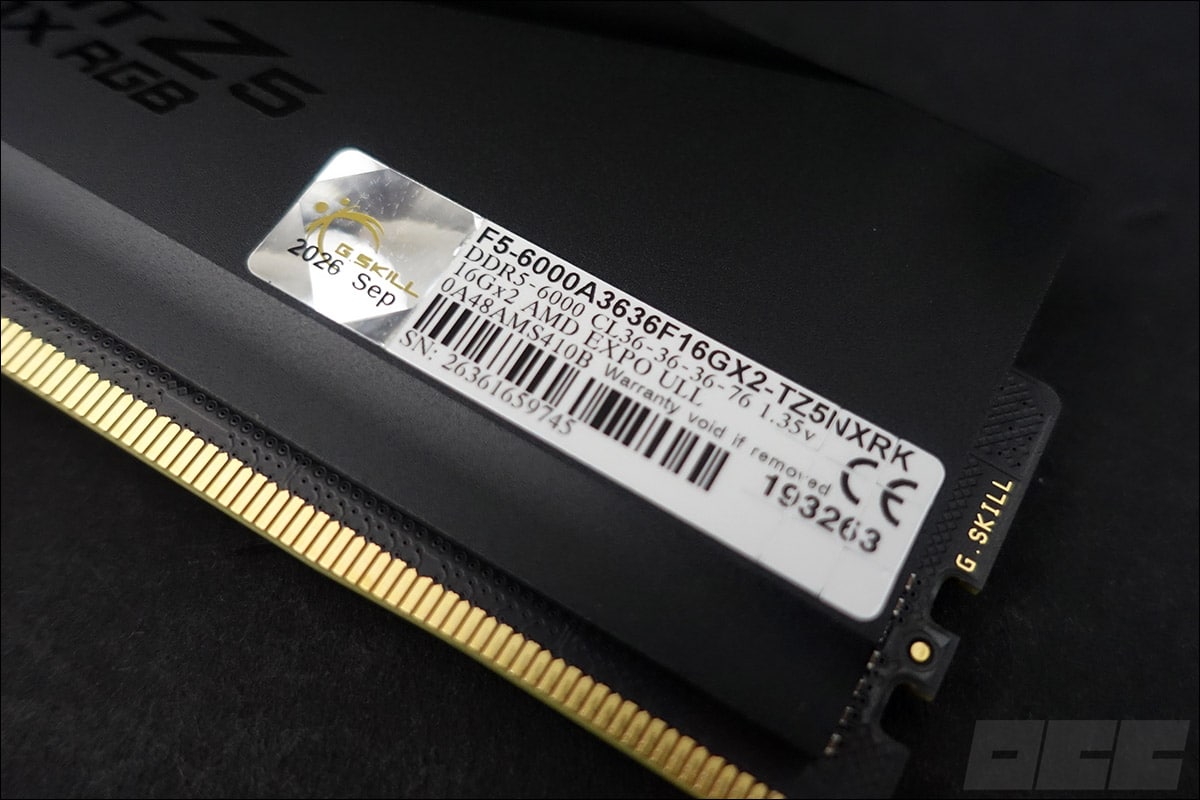
On one side of the heatsink is the inscription “Trident Z5 NeoX RGB,” and on the other, a label listing the technical specifications of our unit, which looks more like a codename: “F5-6000A3636F16GX2-TZ5NXRK.” That’s what we’ll be examining in detail. For example, here’s the information we have about the unit we’re reviewing today.
- Brand: G.SKILL
- Model: Trident Z5 NeoX RGB
- Capacity: 2 x 16 GB
- Frequency: 6,000 MT/s
- Timings: 36-36-36-76
- Voltage: 1.35 volts
- Revision: September 2026
To get an idea of your memory kit’s overclocking potential, this information isn’t enough—you’ll need to dig deeper. In fact, it’s also very important to know the kit’s revision number as well as the model of the memory chips in your kit. Depending on this information, the kit’s overclocking performance will vary significantly.
There aren’t many ways to find this information. One option is to carefully examine the label to uncover additional details. In the part number 0A48AMS410B, the “T810” designation indicates that these are Samsung B-die chips.
CPU-Z Is Always There:
Fortunately, our trusty CPU-Z software is always there to help, allowing us to verify this information—particularly regarding the type of chips in our kit. Currently, there are three types of chips: Samsung, Hynix, and Micron.
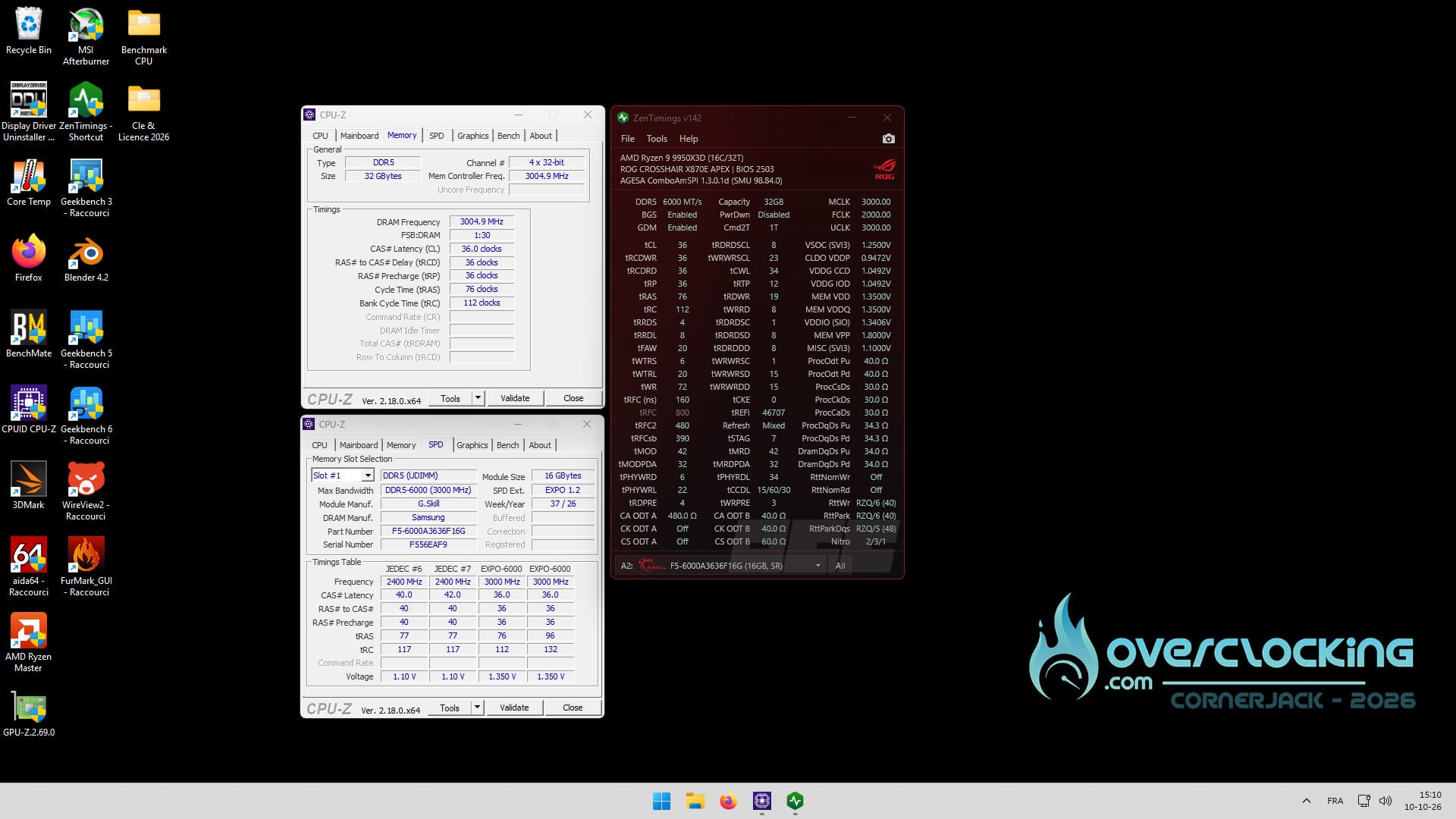
Our kit is fully recognized by Windows 11, and the various primary timings are read correctly. The memory chips in our kit are Samsung chips. These chips offer decent overclocking potential. Using the ZenTimings V1.42 software, we can obtain even more information than CPU-Z provides, including all secondary and tertiary timings, as well as certain voltages.
The PCB of our memory kit:
Our kit features eight 2 GB chips, for a total of 16 GB per module. These chips are arranged in a single-rank (SR) configuration, meaning they’re mounted on a single side of the PCB. In contrast, a “DR” ( dual-rank) kit would have its chips distributed across both sides of the PCB. The chips are Samsung B-Die models.
BIOS Configuration: Update Required
We can’t stress this enough: your memory kit’s settings won’t adjust automatically after you install it on your motherboard. While this may be the case for your processor, it’s not true for your memory kit—you’ll need to access the BIOS!
Unless you’re in the habit of updating your BIOS regularly, if you haven’t done so in a while, you’ll need to go through this step. To ensure compatibility with your AMD EXPO ULL kit, you’ll need a BIOS that includes at least AGESA PI microcode version 1.3.0.1b (or 1.3.0.1). That’s what we did with our ROG Crosshair X870E APEX motherboard, by flashing the AGESA ComboAM5 PI 1.3.0.1d BIOS.
What is AMD EXPO ULL?
As we mentioned, this new G.SKILL series is compatible with AMD EXPO ULL, and to take advantage of it, you’ll need a compatible kit and a motherboard flashed with the latest BIOS. A few years ago, AMD introduced EXPO (Extended Profiles for Overclocking) to establish a standard similar to Intel’s XMP. AMD continues to develop it to support the ULL standard and, soon, CUDIMM kits. However, the principle remains just as simple: just enable the profile in the BIOS, and everything happens automatically.
The advantage of these new kits is that they offer additional ULL certification, providing better performance compared to an equivalent “non-ULL” kit—and even compared to other kits that, on paper, are more powerful. But we’ll have to wait for our tests to confirm this.
Please note: one important thing to keep in mind is that to achieve certain XMP profiles and maintain perfect stability, the capabilities of your processor and motherboard will be put to the test. Of course, we’re talking about a minority of cases here—and kits that are primarily intended for overclocking.
Now, onto the BIOS:
We can’t stress this enough: your memory kit’s settings aren’t configured automatically after installation. While this may be the case for your processor, it certainly isn’t for your memory kit—you’ll need to access the BIOS! That’s exactly what we had to do with our ROG Crosshair X870E APEX so that the BIOS would load the EXPO profile.
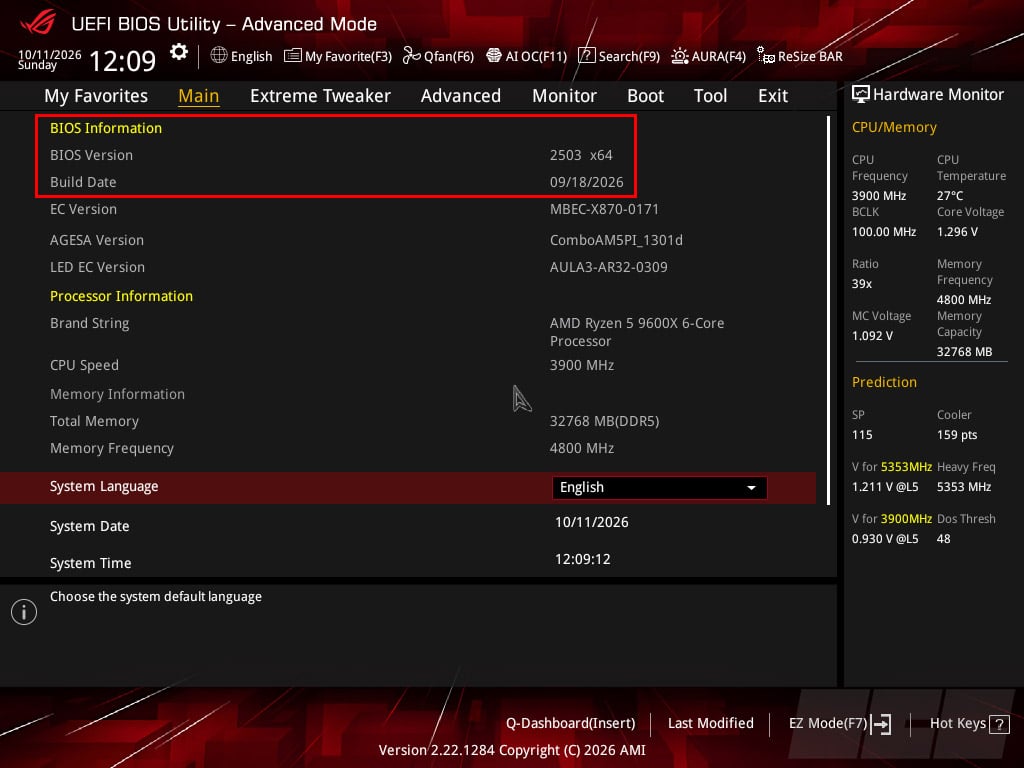
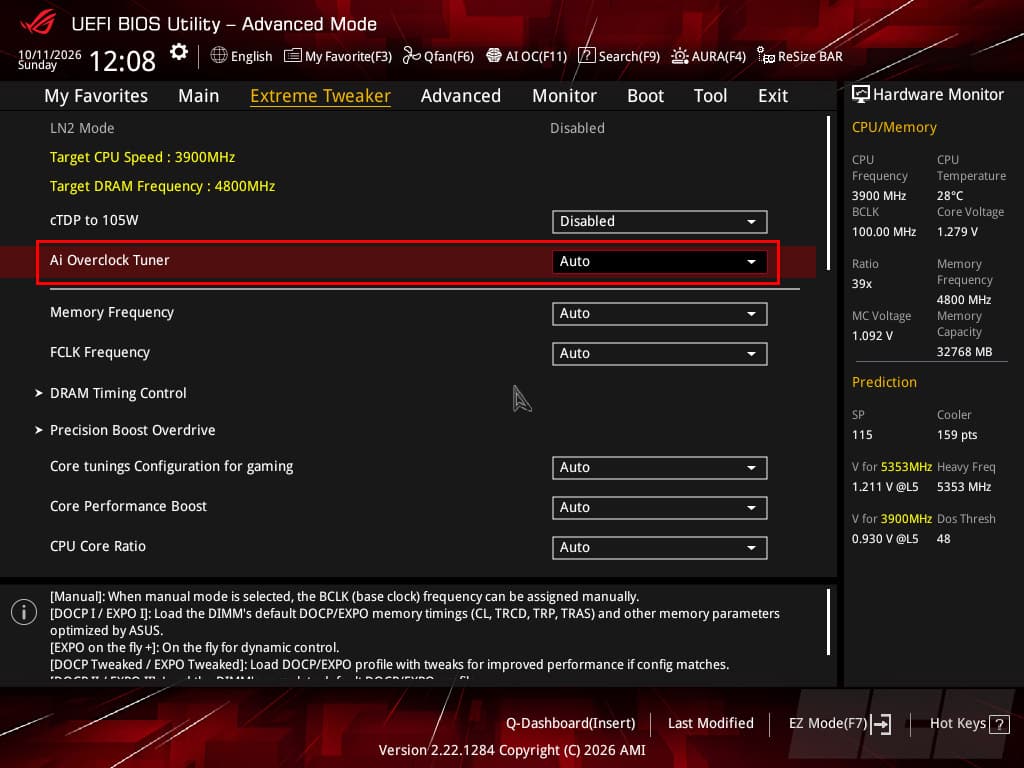
If you leave it in auto mode, your performance will be affected across the board, and you’ll end up with a kit that doesn’t exceed a frequency of 4,800 MHz at CL40. Performance will then be severely limited. So we’ll enable our EXPO profile directly in the BIOS. Good news: the latest BIOS version for our motherboard clearly indicates that this is an EXPO ULL profile.

As you can see in the screenshots above, once the EXPO profile is enabled, the settings are automatically detected. The frequency is indeed 6,000 MT/s, the 36-36-36-76 timings are enabled, and the voltage increases to 1.35 volts.
Test setup:
Of course, this kit will only be tested on an AMD platform, since it was designed from the outset for this configuration. We opted for the ROG Crosshair X870E APEX motherboard, which remains the latest model based on this chipset and offers excellent overclocking capabilities.
- Motherboard: ROG Crosshair X870E APEX (BIOS 2503)
- Processor: Ryzen 9 9950X3D and Ryzen 5 9600X
- Memory: see below
- Graphics card: MSI GT 710
- SSD: Western Digital SN850 NVMe SSD M.2
- Power supply: be quiet! Dark Power PRO 12 1500W
- Operating system: Windows 11 64-bit
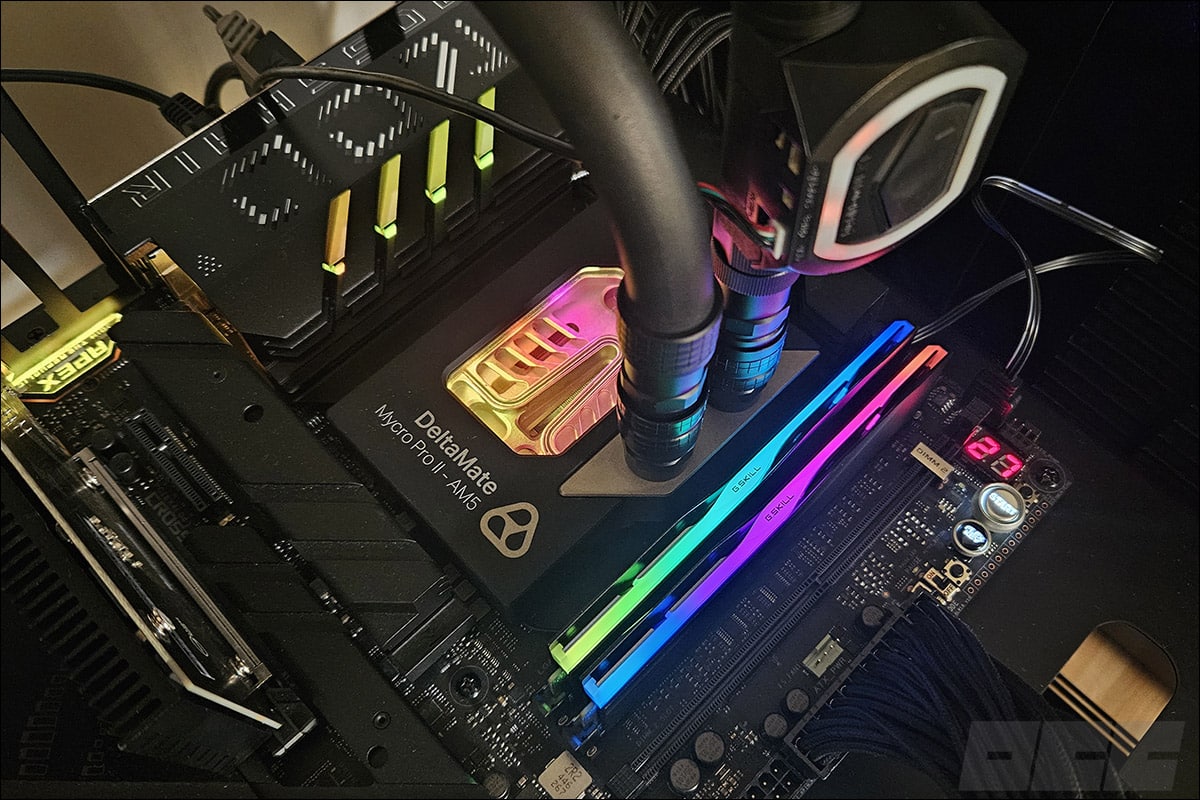
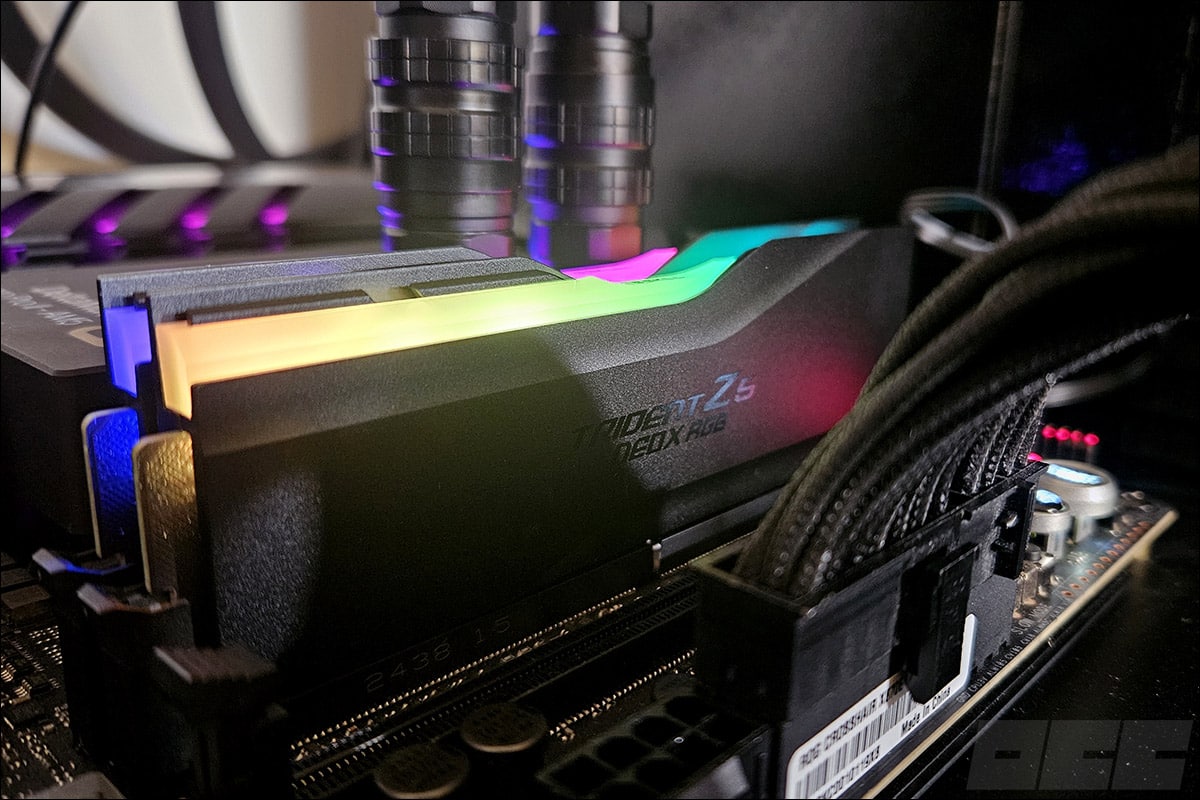
Our OS is not optimized at all, since this is the one we use as our “standard” setup for our processor tests. As you can see, we’ll be using two processors at G.SKILL’s request. The company wanted to demonstrate the performance gains achieved with non-X3D AMD processors.
The contenders:
The goal here isn’t to conduct a comprehensive comparison of all our kits, but rather to compare G.SKILL kits with different specifications. In addition to today’s sample, the G.SKILL Trident Z5 NeoX RGB 6,000 MT/s CL36, we’ll pit it against two other kits from the brand.
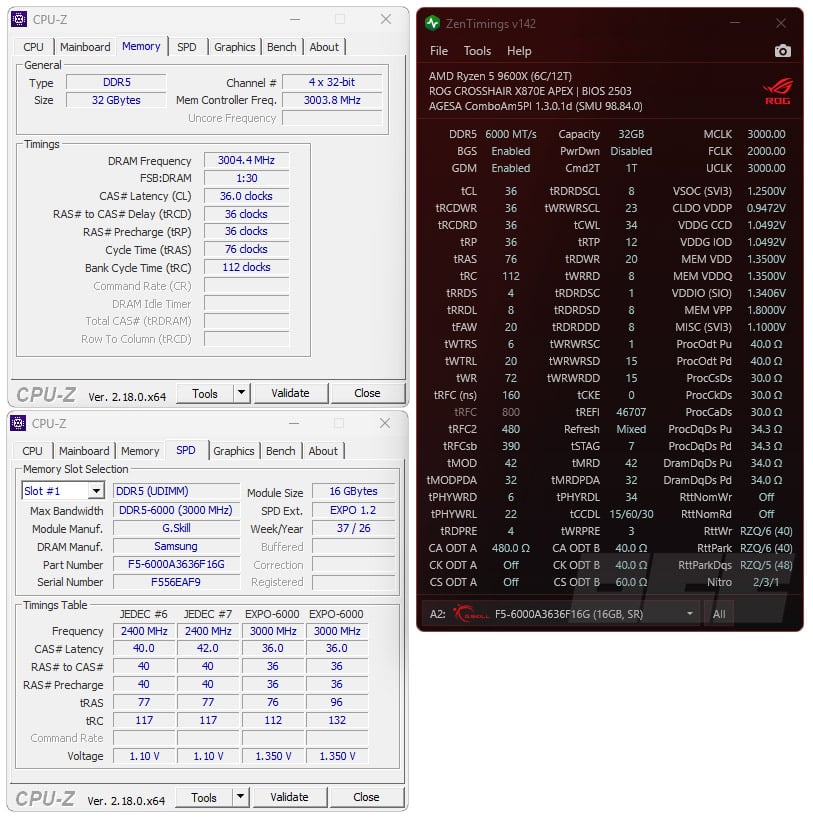
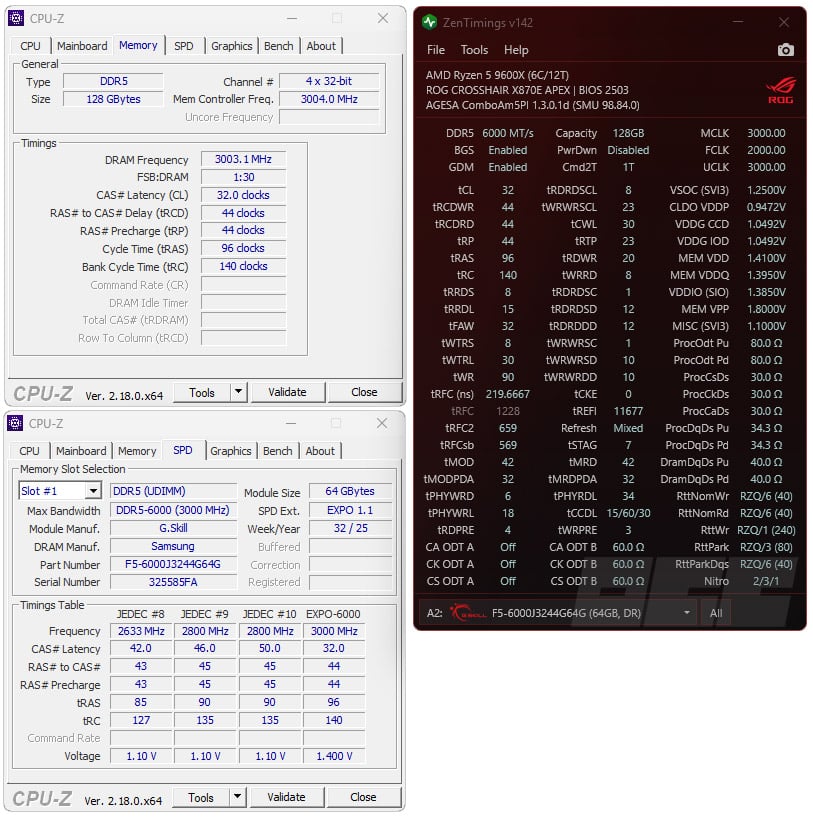
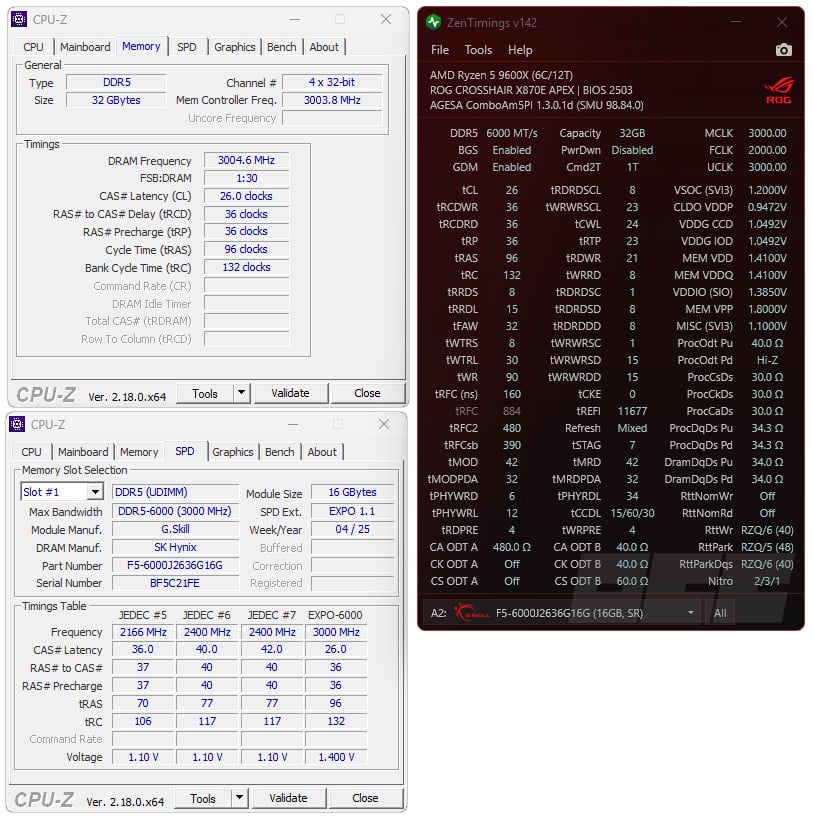
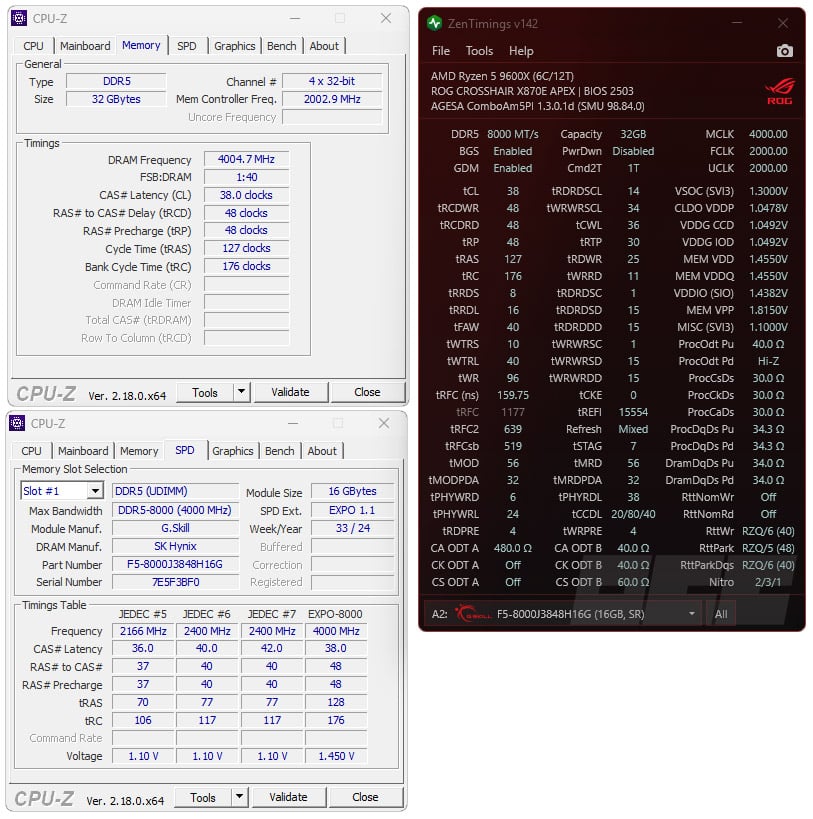
The first is the G.SKILL Trident Z5 NEO RGB 6,000 MT/s CL26, the G.SKILL Trident Z5 NEO RGB 6,000 MT/s CL32, and the G.SKILL Trident Z5 Royal NEO 8,000 MT/s CL38. We’ve enabled the AMD EXPO and AMD EXPO ULL profiles for today’s kit. As you can see in our BIOS screenshots, the EXPO ULL indicator is clearly present. Let’s see how this performs in Zentimings V1.42 to identify the differences in the subtimings listed above.
Comparative tests with the Ryzen 9 9950X3D:
AIDA64:
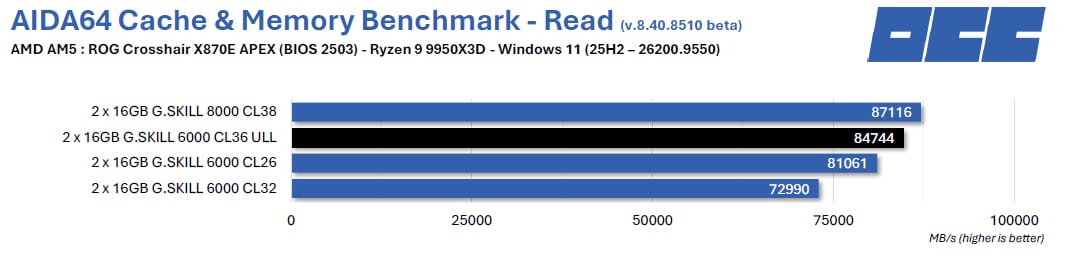
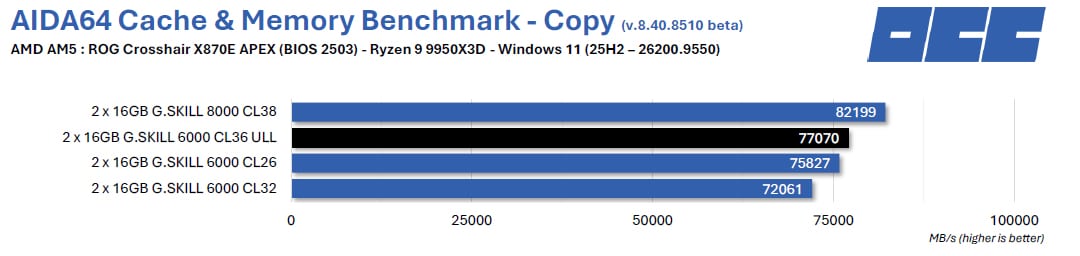
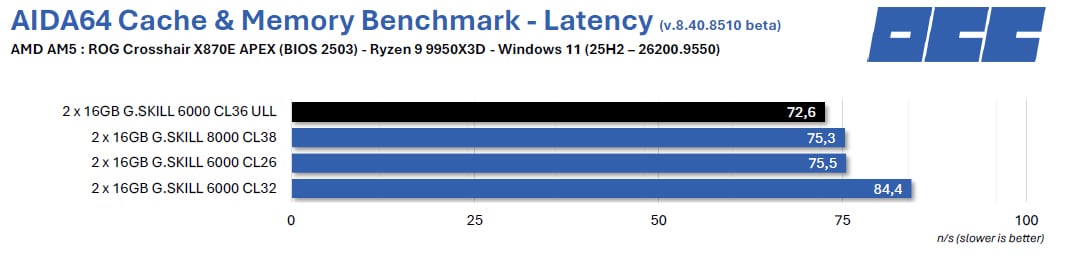
This software provides a wealth of information about your system configuration, but its standout feature is its memory benchmark. This benchmark measures the read, write, and copy speeds, as well as the latency of your memory kit. It’s used very frequently, particularly to compare different memory kits. It’s an excellent tool if you want to compare the performance of your memory kit with those we’ve already tested.
Geekbench 3.4.4:
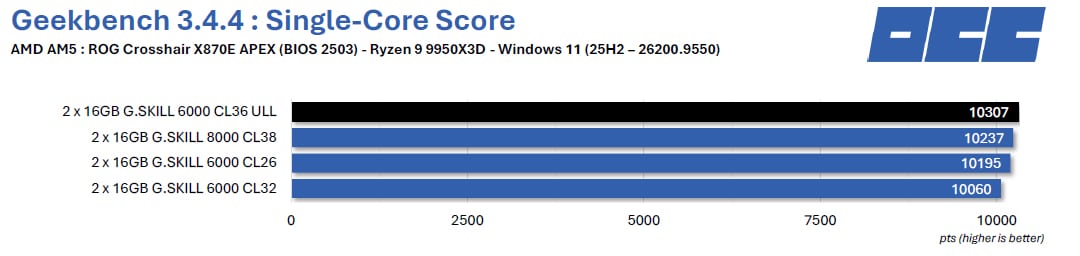
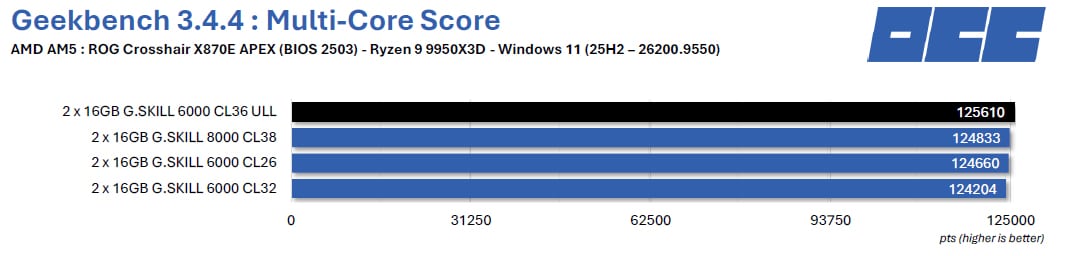
This is a benchmark available in several versions. It provides two scores: one for single-core and one for multi-core. Using this benchmark, we’ll focus on the performance achieved on the “Memory Multi-Core ” score, which helps distinguish memory performance. The version used for testing is 3.4.4.
Geekbench 5.5.1:
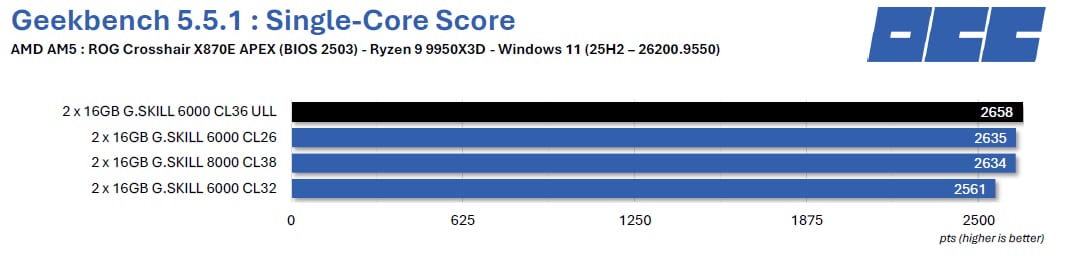
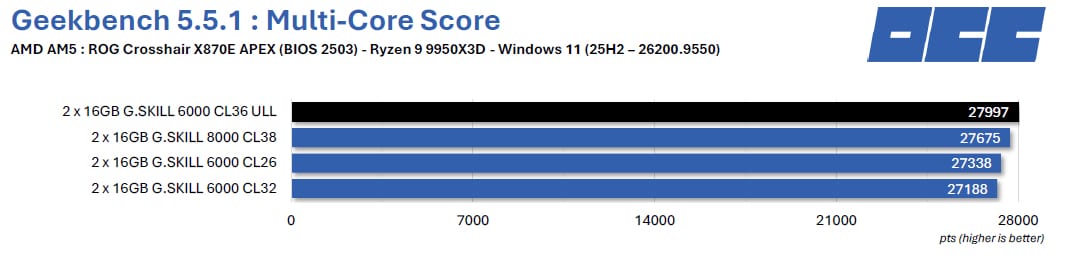
We decided to add this additional benchmark —but why? The CPU benchmark uses new tests that more accurately simulate the tasks processors face when running recent applications. Geekbench 5 also increases the amount of memory used during the benchmark to better reflect the impact of this parameter on CPU results. We’ve also upgraded to the latest version, which is 5.5.1.
Geekbench 6.5:
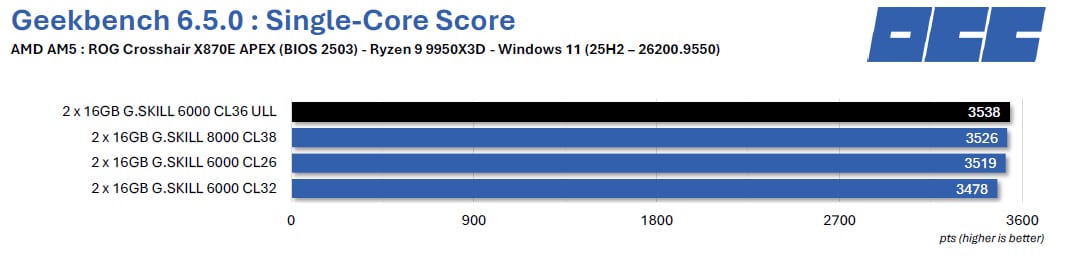
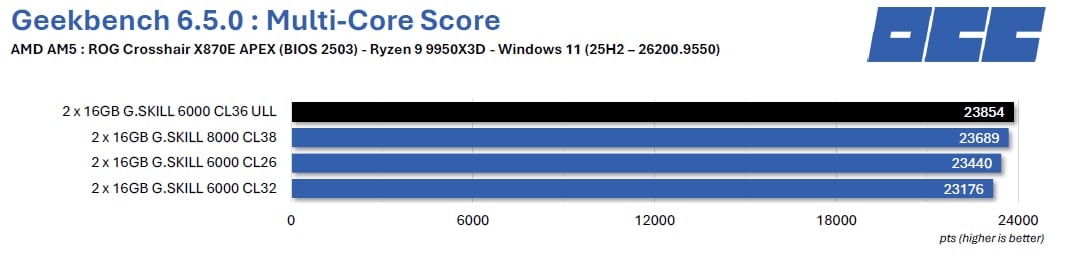
Until a few weeks ago, this benchmark was the most recent version and is intended to be more representative of current configurations. Primate Labs also claims that the scores displayed by Geekbench 6 are more accurate than those from other existing devices and platforms. The test also takes much longer than the other versions we use.
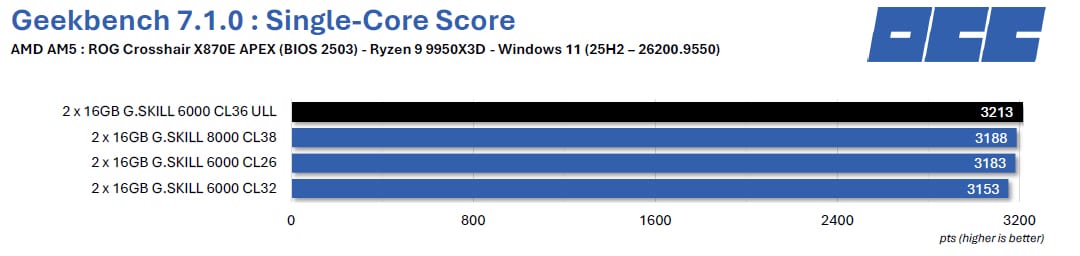
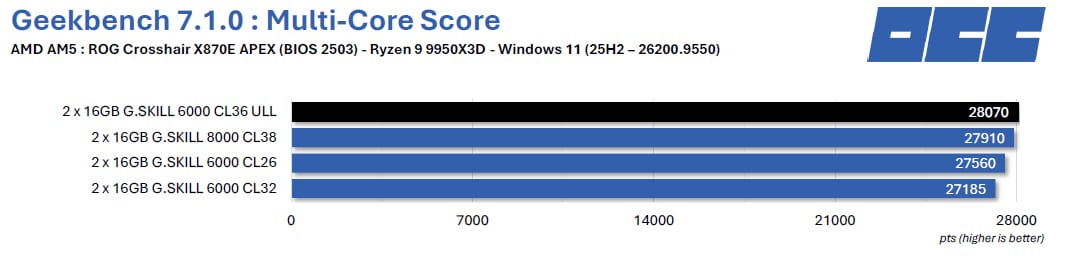
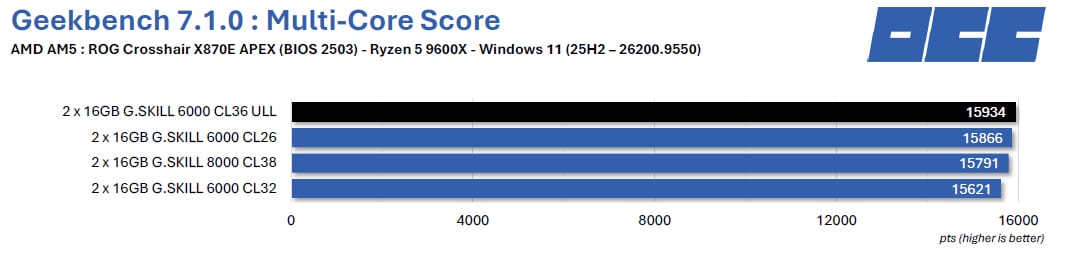
Geekbench 7.1.0:
Geekbench 7 introduces a new category of multimedia tests that simulate video conferencing, streaming, and content consumption—activities that are central to how today’s systems are used. The new tests include scenarios that encode screen-sharing videos for video conferencing using the AV1 codec, compress voice memos and podcasts using the Opus audio codec, and decode videos and generate automatic captions using Whisper speech recognition.
Impressions:
Despite using an “X3D” processor, performance is solid, with our 6,000 MT/s 36-36-36-76 memory kit ranking first in various Geekbench tests. Admittedly, the gaps aren’t always huge, but it’s well ahead. Of course, if we’d had an AMD EXPO 6,000 MT/s CL36 kit available in the lab, the gaps would have been more significant.
Comparative tests with the Ryzen 5 9600X:
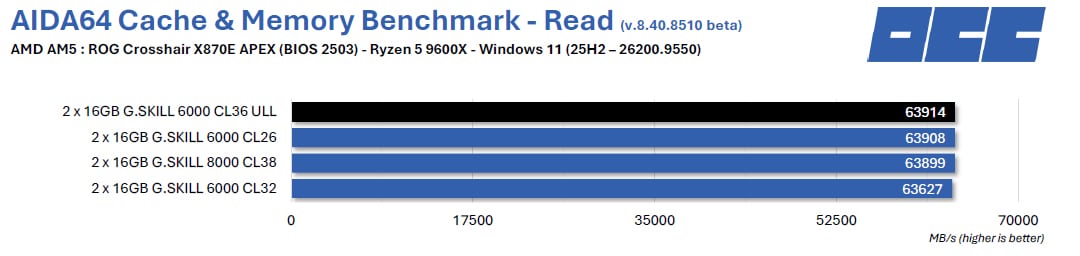
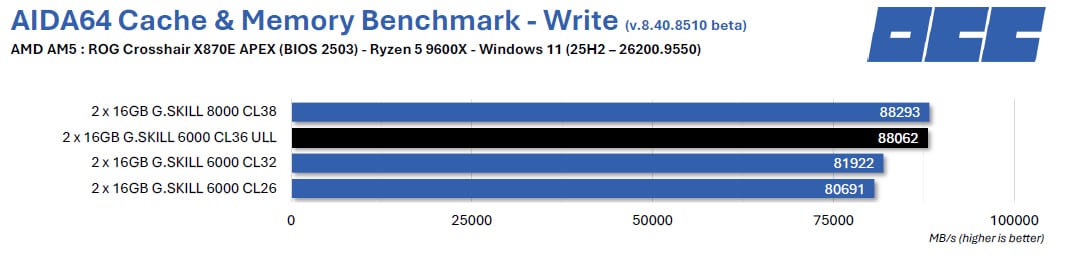
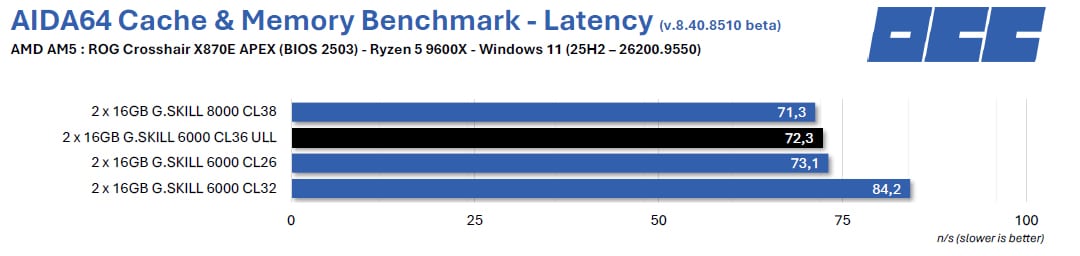
AIDA64:
This software provides a wealth of information about your system configuration, but its standout feature is its memory benchmark. This benchmark measures the read, write, and copy speeds, as well as the latency of your memory kit. It’s used very frequently, particularly to compare different memory kits. It’s an excellent tool if you want to compare the performance of your memory kit with those we’ve already tested.
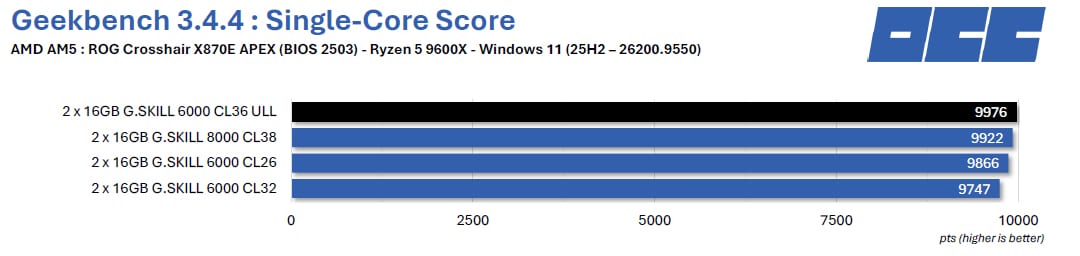
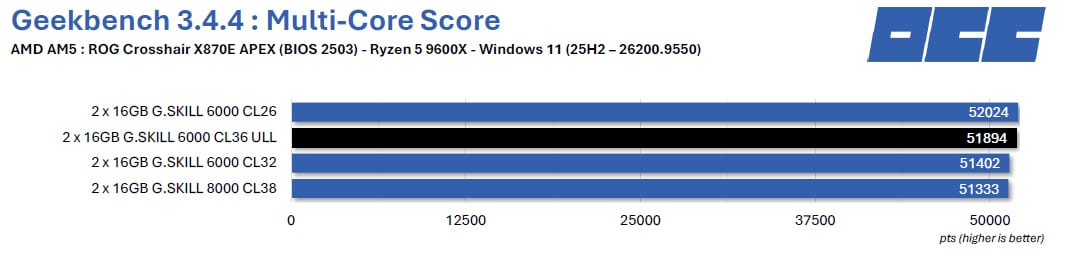
Geekbench 3.4.4:
This is a benchmark available in several versions. It provides two scores: one for single-core and one for multi-core. Using this benchmark, we’ll focus on the performance achieved on the “Memory Multi-Core ” score, which helps distinguish memory performance. The version used for testing is 3.4.4.
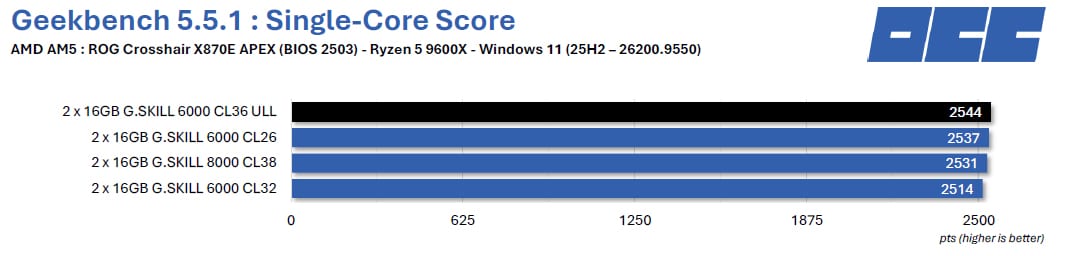
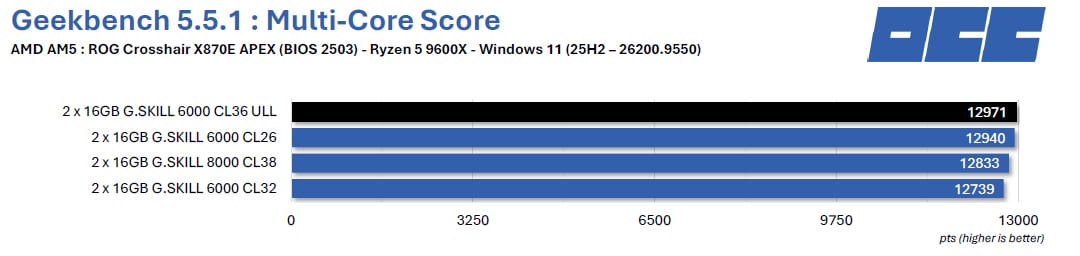
Geekbench 5.5.1:
We decided to add this additional benchmark —but why? The CPU benchmark uses new tests that more accurately simulate the tasks processors face when running recent applications. Geekbench 5 also increases the amount of memory used during the benchmark to better reflect the impact of this parameter on CPU results. We’ve also upgraded to the latest version, which is 5.5.1.
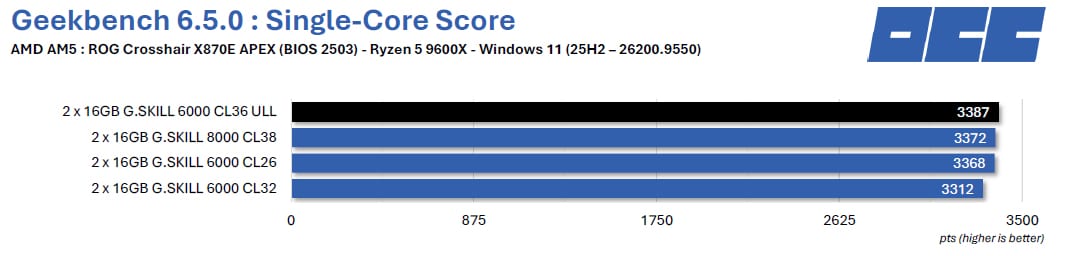
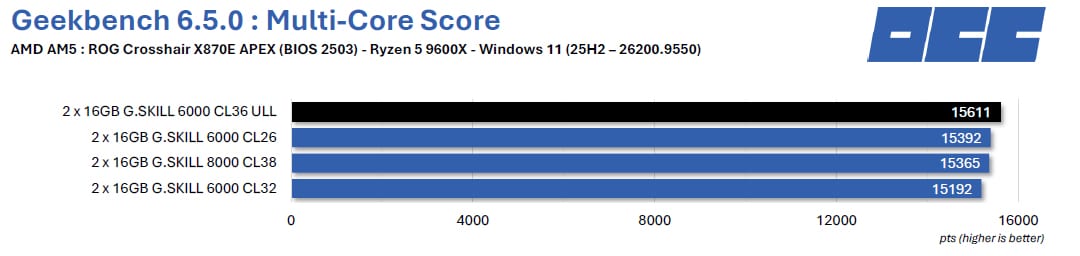
Geekbench 6.5:
Until a few weeks ago, this benchmark was the most recent version and is intended to be more representative of current configurations. Primate Labs also claims that the scores displayed by Geekbench 6 are more accurate than those from various existing devices and platforms. The test also takes much longer than the other versions we use.
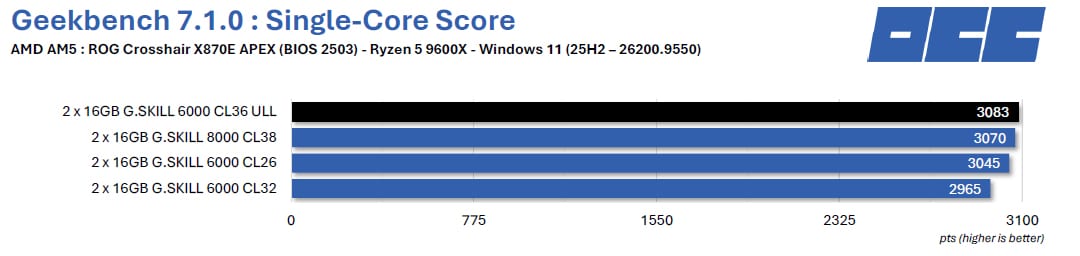
Geekbench 7.1.0:
Geekbench 7 introduces a new category of multimedia tests that simulate video conferencing, streaming, and content consumption—activities that are central to how today’s systems are used. The new tests include scenarios that encode screen-sharing videos for video conferencing using the AV1 codec, compress voice memos and podcasts using the Opus audio codec, and decode videos and generate automatic captions using Whisper speech recognition.
Impressions:
The same holds true for the Ryzen 5 9600X; our test unit today proves to be extremely efficient and takes first place in our various benchmarks, whether in single-core or multi-core tests.
Final Thoughts:
A complicated situation:
We will, of course, refrain from commenting on the current price—nearly 600 euros—since it affects all memory kits and, more broadly, hardware components. Surprisingly enough in this chaotic situation, the price difference compared to an AMD EXPO kit isn’t particularly noticeable on Amazon—if it exists at all. This complicated situation seems to be dragging on and doesn’t appear to be improving as the weeks go by—quite the opposite, in fact. That’s why, in a few weeks, we’ll be publishing a guide to help you optimize the performance of your current memory kit.
AMD EXPO ULL Certification:
What should we make of this new NeoX series and its support for AMD EXPO ULL? Nothing but good things—but it would be too easy to settle for that conclusion. AMD EXPO ULL certification lets you enjoy a performance boost compared to a standard AMD EXPO profile. Basically, much like with a graphics card, you get factory overclocking that’s available right out of the box—and, most importantly, without having to dig into your motherboard’s BIOS. You won’t need any technical knowledge to enjoy this performance boost right out of the box: it’s plug-and-play! Now, let’s keep things in perspective: performance is better, but not exceptional—we estimate the gain at 2% to 4%, which makes sense.
Those familiar with memory overclocking or who optimize timings can achieve similar—or even better—performance. It’s entirely possible to make these adjustments to your AMD EXPO memory kit via your motherboard’s BIOS. Now, with an identical kit—if we take the example of a 6,000 MT/s CL36 in AMD EXPO or AMD EXPO ULL—the performance differences will, of course, be much more pronounced.
As we’ve seen—and we were surprised given the feedback we’d received—the performance gains are noticeable with both our Ryzen 9 9950X3D and the Ryzen 5 9600X. When it comes to gaming, the kit proves to be worthwhile, but especially at 1080p resolutions. As the resolution increases, your graphics card will become the deciding factor.
To wrap up this article, we’d like to call out to G.SKILL—we’d be really curious to compare the performance of our current top kit across all categories, the G.SKILL Trident Z5 RGB 6,000 MT/s CL26, with its AMD EXPO ULL-compatible counterpart. We’ll also try to get a screenshot of this kit’s timings to show you how to adjust them in the BIOS.
Thank you to G.SKILL for providing this sample of the Trident Z5 NeoX RGB memory kit clocked at 6,000 MT/s with timings of 36-36-36-76.
G.SKILL Trident Z5 NeoX RGB

Les +
- Best-in-class performance right out of the box
- Ease of use to take advantage of this performance
- High-quality finish
- The new AMD EXPO ULL profile
- Lifetime warranty
Les -
- The current price of DDR5
- JEDEC at 4,800 MT/s, not 5,600 MT/s
This kit, which is AMD EXPO ULL-certified, is primarily intended for users seeking the best out-of-the-box performance without having to adjust the timings in the BIOS.

