
At the beginning of February, Corsair announced new all-in-one watercooling kits with an effective availability at the beginning of this month of March. On our side, we received the highest kit of the range, the H170i Elite LCD XT. Moreover, with the reworking of our protocol, we have been somewhat late in publishing it, but this time it’s good… At least in part, the section noted Intel is still missing, but it will come.
In short, what is this Corsair worth that over $300 or nearly 400 €? We’ll tell you everything.

Presentation:
With this Elite series, the Corsair brand updated its AIOs with new fans, the AF Elite RGB. This update concerns the cooling systems in 240 mm, 360 mm and 420 mm. The American brand then offers us its H100i Elite LCD XT, H150i Elite LCD and H170i Elite LCD.
Of course, as their name suggests, we find there cooling systems equipped with a display on top of the pump. The screen is qualitative with its diagonal of 2.1″ IPS type. Similarly, it displays a resolution of 480×480 pixels and a brightness of 600 cd/m². Enough to display adequately the information related to your system or your .gif or .jpeg personalized.
The management of the AIO will therefore go through the software suite iCUE of the brand. Via the latter, as well as the iCUE Commander Core controller, you can manage up to six fans, whether their speed or their lighting.
By the way, while we’re on the subject of fans, you should know that the brand opts for its highest performing RGB mills. Corsair says that its mills provide an intense and concentrated airflow. In addition, we can count on a semi-passive operation, which ensures a golden silence when the machine is not very busy.
Regarding the pump, the brand puts forward an efficient block which, coupled with its home-made paste, the XTM70, will ensure a good cooling of your CPU. This set is supposed to help the processor to scrape a maximum of MHz via an adapted cooling.
Finally, the installation is simplified, especially thanks to the presence of a pump retention mechanism that can be mounted without tools. The latter ensures exemplary compatibility with all platforms currently on the market.

Well, it only remains to talk about the price which is around 400 € or more on the internet. Here, clearly, Corsair positions its kit on a premium segment. The competition is likely to be tough, since it is right in front of the ready to assemble custom kits from Alphacool, Thermaltake and even Raijintek.
[nextpage title=”The H170i Elite LCD XT”]
Unpacking:


The packaging of this kit remains faithful to those of Corsair with black and yellow colors. If on the front we have an illustration of the AIO with a reminder of the reference, on the back, we have a reminder of the detailed characteristics.
Inside, we find the usual cardboard protections. Also each element is packed in plastic bags. In short, protections that have proven themselves over time.
The radiator :
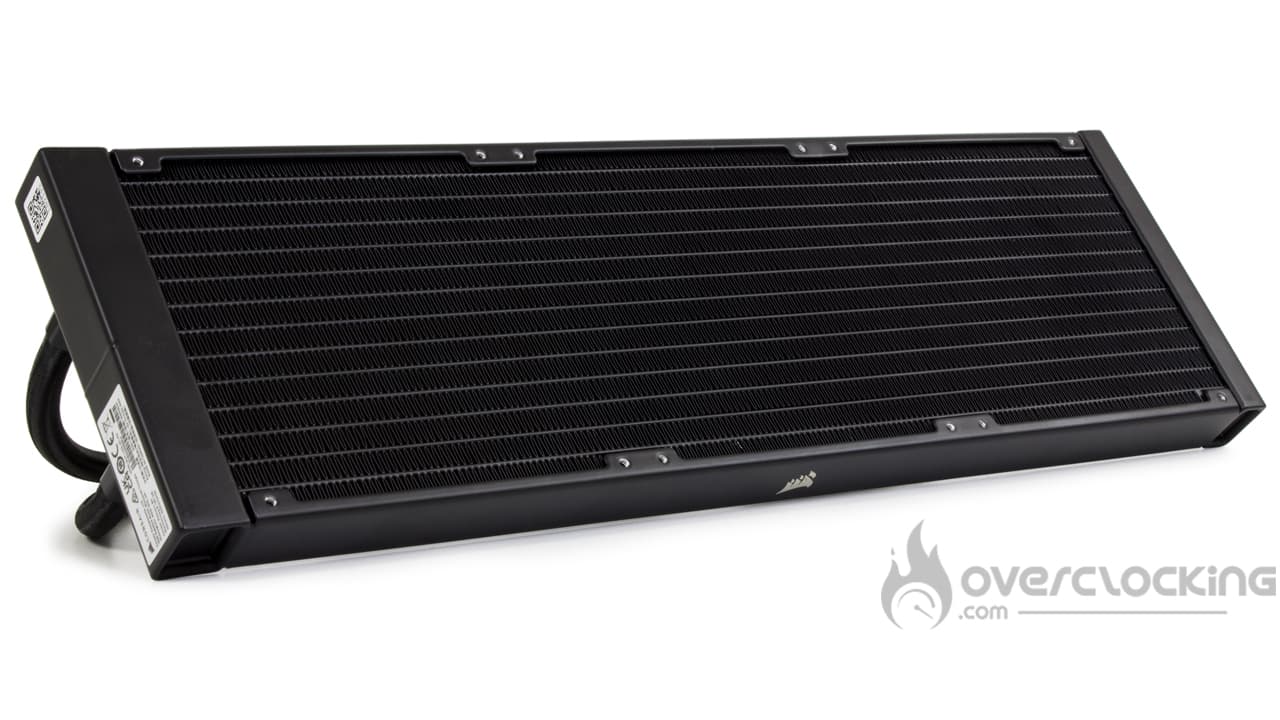 We now move on to the radiator part of this H170i Elite LCD XT which, out of its format in 3x 140 mm remains quite classic. Indeed, the manufacturer in aluminum and the thickness is 27 mm. Regarding the number of channels, we are at 13, as for the former H170i Elite Capellix. Finally, there is also no change in dimensions at this level since we find a total length of 457 mm and a width of 140 mm.
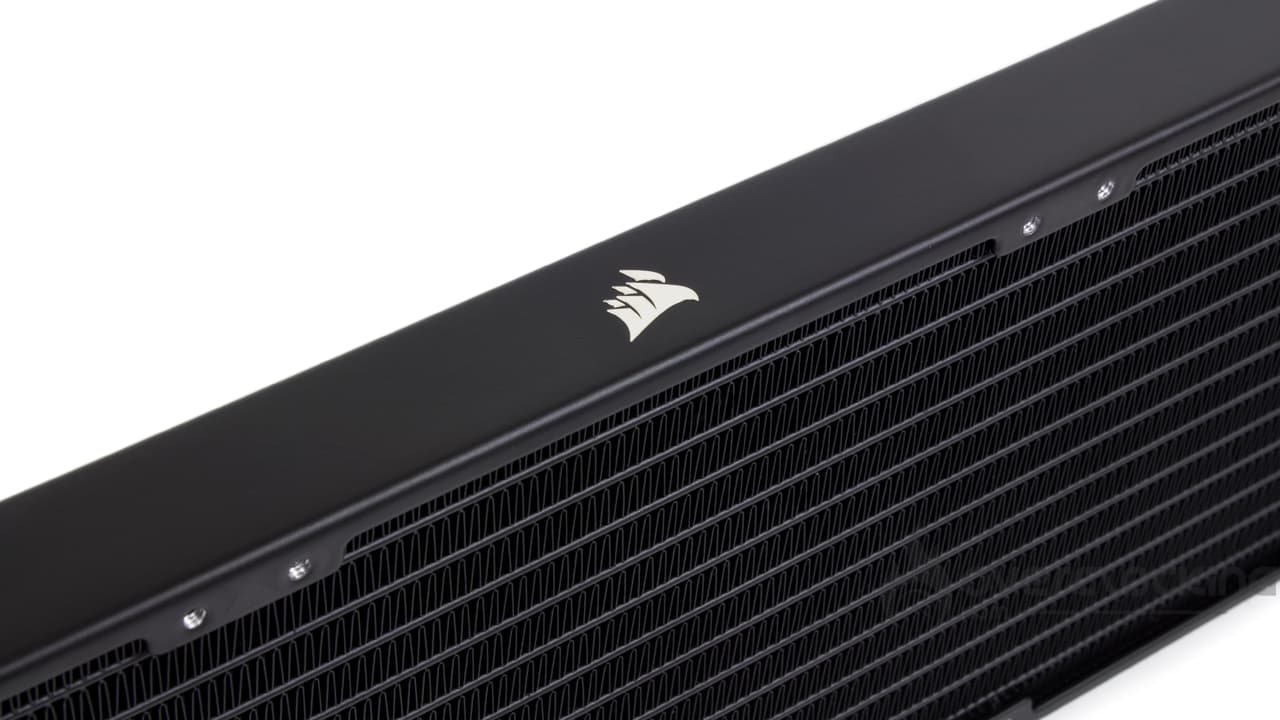
In addition, the finish does not change since the block remains square, without visible screws. It is also painted in black with a paint applied correctly. It will not leave a gray area at the level of the fins. Finally, we have, on the sides, a small bright Corsair logo in gray.
Finally, the only real drawback to this radiator is the dimensions of the radiator. 457 mm, clearly, you need a case that can accommodate such a monster.
To connect the pump and the radiator, we find two tubes of 45 cm in length. Regarding the finish, R.A.S since we find a nice nylon sheath very soft to the touch. In addition, the pipes remain very flexible, so that you can make tight curves without forcing, which is very practical for the assembly.
The waterblock:
We now move on to the pump which offers us a square shape with rounded edges. The construction is made of plastic with a shell with a low granulometry. On the top, is present one essential point of this kit: the screen. For this XT version, the brand opts for a 2.1″ IPS screen with a resolution of 480×480 pixels. Similarly, the lighting will be rather bright with its 600 cd/m². Finally, we can distinguish the presence of an internal translucent ring through which will be diffused an aRGB lighting.


As for the dimensions, we have tried to find them, but they are not present on the box or on the website of the brand. For the blow, we take out our good old Ikea tape measure which will give us exactly approximate measurements. Thus, we get dimensions of 72 mm on a side for a height of 55 mm.
Underneath, we have our copper base which will be in contact with our processor. This base measures 56 mm on each side and will cover the IHS of the AM5 and LGA-1700 CPUs. For the AMD sTR(X)4, if a big part of the processor should be covered, the whole will not be. Finally, it will be held in place by eight Phillips screws.

On the connectivity side, there’s a lot to talk about since starting from the pump we have two connectors, one big, flat, 22-pin and a second one of USB 2.0 type. Finally, we have a third, non-PWM fan type with a single cable pin to retrieve the pump speed.
Compatibility:
With the H170i Elite LCD XT, Corsair provides exemplary compatibility as the vast majority of recent platforms are compatible:
- Intel: LGA-1100 – LGA-1200 – LGA-1366 – LGA-1700 – LGA-2000
- AMD: AM5 – AM4 – AM3 – sTR(X)4
With its kit, the brand is confident enough in its performance to offer support for the AMD HEDT platform. At the same time, a 420 mm radiator, it can be understood!
Fans:
Finally, the biggest change Corsair has made is in the ventilation. Unlike its Elite Capellix counterpart, this time we get three 140mm AF RGB Elite fans.
These feature a smooth frame with four rubber silentblocks to reduce stray vibrations. In addition, the mills offer nine long, rather curved and thin blades. They are white and translucent to maximize the diffusion of aRGB lighting.
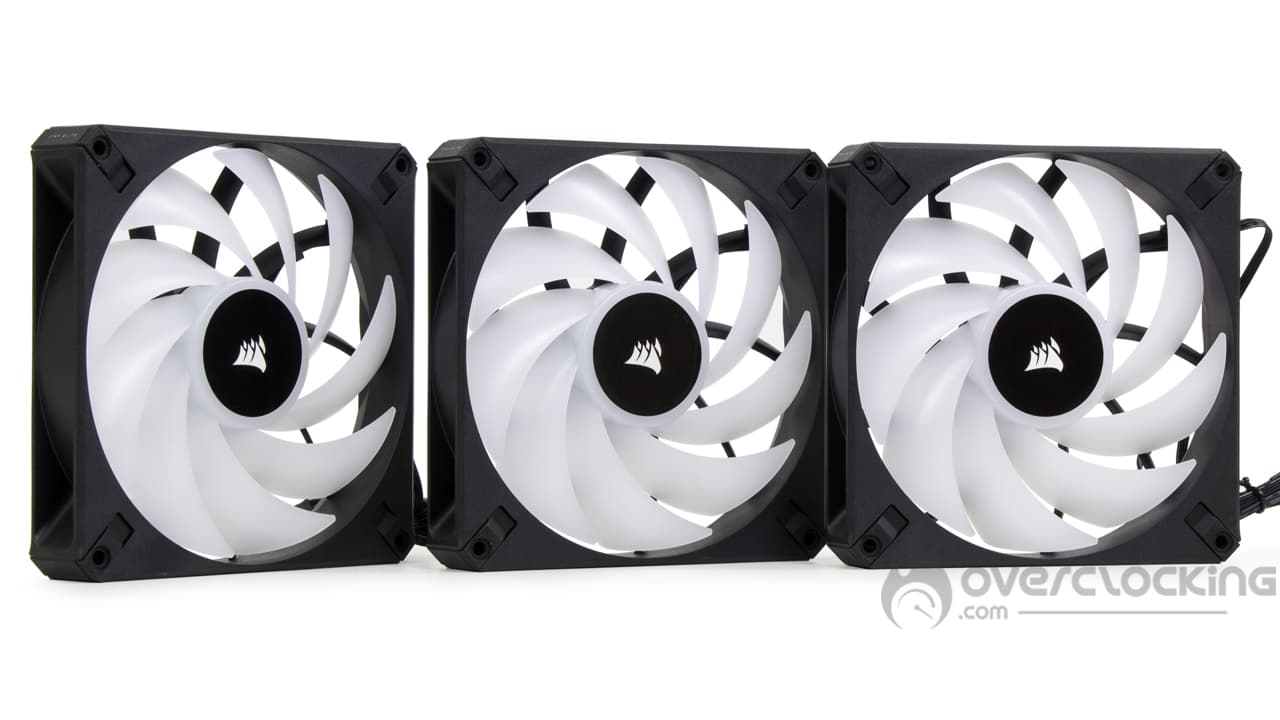
Besides, we find a double RGB connector with a proprietary connector and PWM with a universal connector. While the first will be used for color management, the second will be used to manage the operating speed.
Now, what interests us is the performance. At this level, the brand announces speeds between 500 rpm and 1700 rpm. At full speed, the air flow will reach 89 CFM while the static pressure will rise to 2.00 mmH2O.
The bundle:

As for the accessories, we find something complete since the brand offers :
- A warranty guide.
- An Intel steel backplate.
- The screws and bolts necessary for mounting as well as the AMD mounting arms.
- ICUE Commander Core controller for up to six fans.
- AUSB splitter to connect the AIO pump and controller to your motherboard.
- Two 3M adhesive patches to place the Commander Core in your case.
- The screws for mounting the fans and the radiator.
With its H170i Elite LCD XT, Corsair offers us everything we need to mount its AIO. In addition, we find what to connect while limiting the impact on the connectivity with the USB splitter. The same goes for the screws for the fans, which are present in sufficient number to attach a whole battery of additional fans on the radiator.
Roughly speaking:
With its kit, Corsair seems to offer us a convincing reference with a good level of finishing. The integration of the screen seems to us neat, of course, to see once under tension what it gives. For the moment, it looks promising, we’ll just have to see what happens next of course.
[nextpage title=”Installation and RGB”]
For the installation part, you’ll have to keep your AMD backplate, the manufacturer doesn’t provide one. If you don’t have one anymore, a quick look on eBay should allow you to find one easily.
Preparation of the pump :

If you have an Intel motherboard, there is no need to try to mount anything on the pump, you can move on. On the other hand, on AMD platform, you will have to install the corresponding arms. To do this, you will have to remove the pre-installed Intel ones, by simply pulling on them. The AMD ones will be positioned by sliding them into the groove just above the pump.
Mounting the pump :


Once the pump is ready, we will have to screw the spacers on the motherboard. To do this, we will remove the original mounting arms on an AMD board and drop the appropriate backplate on the back with an Intel motherboard.
Once the spacers are in place, all that remains is to position the pump and screw it on. Remember that the thermal paste is pre-applied to the base. If not, you will have to put a small amount of paste on the CPU before positioning the pump and screwing it.
We will finish this step of assembly by wiring the iCUE Commander Core by connecting the pump and fans. Then, this controller will also be connected to the board via a USB 2.0 header. On the power side, it will require a SATA plug. Be careful though, because the pump will also require a USB 2.0 socket, hence the splitter. And to get the speed of the pump within the system, don’t forget to connect the fan plug at the pump output on the motherboard.
[nextpage title=”A word about the screen”]
Of course, to take full advantage of the IPS screen integrated in the pump cover, you will have to use the iCUE suite from Corsair. Via the latter, you will be able to manage everything on the AIO, from the fan speed to the aRGB lighting and the screen animation.
In fact, that’s what it’s all about, “what are we going to display”. To do this, go to the “Screen Configuration” section of Corsair’s software to see all the options available.


From there, several solutions, several presets are presented to you. You will then have the possibility to display different designs. Of course, at each setting, you can manage different parameters. We are thinking in particular of the probe on which the software must rely, but not only. Indeed, there is also the color of the different gauges for example.
There is also an option for customizing your kit. You will be able to display a .jpeg or a .gif that you like. However, unlike the MEG CoreLiquid S kits from MSI, there is no support for video formats such as .MP4 for example. On a 400 € kit, it’s a bit of a shame.
The screen in the facts:


In fact, we find a nice bright screen with nice colors. The viewing angles are wide, thanks to the use of a small IPS panel. Facing the competition, we find a good element that seems brighter than that of MSI despite the fact that it is the same type. Moreover, it is also the best defined screen that we had in our hands, with its 480×480, it does better than :
- MSI and its MEG CoreLiquid S : 320×240
- NZXT and its Kraken Z : 320×320
But as well as Thermaltake and its Toughliquid Ultra also in 480×480. Anyway, we find a fine display, not too pixelated. It remains readable and usable!
[nextpage title=”Protocol”]
Big update of our test protocol since we proceed to a change of platform. First, we take temperature readings with a Ryzen 9 7900X coupled with an MSI X670E Carbon WiFi. The CPU is configured so that it consumes 100W, 150W and 200W. If it’s not the configuration that changes, our reading methods don’t change except the heating method. We then use the PowerMax software and launch a SSE type test on an unlimited duration.
Afterwards, other readings on LGA-1700 platform with Core i will be added to the protocol.
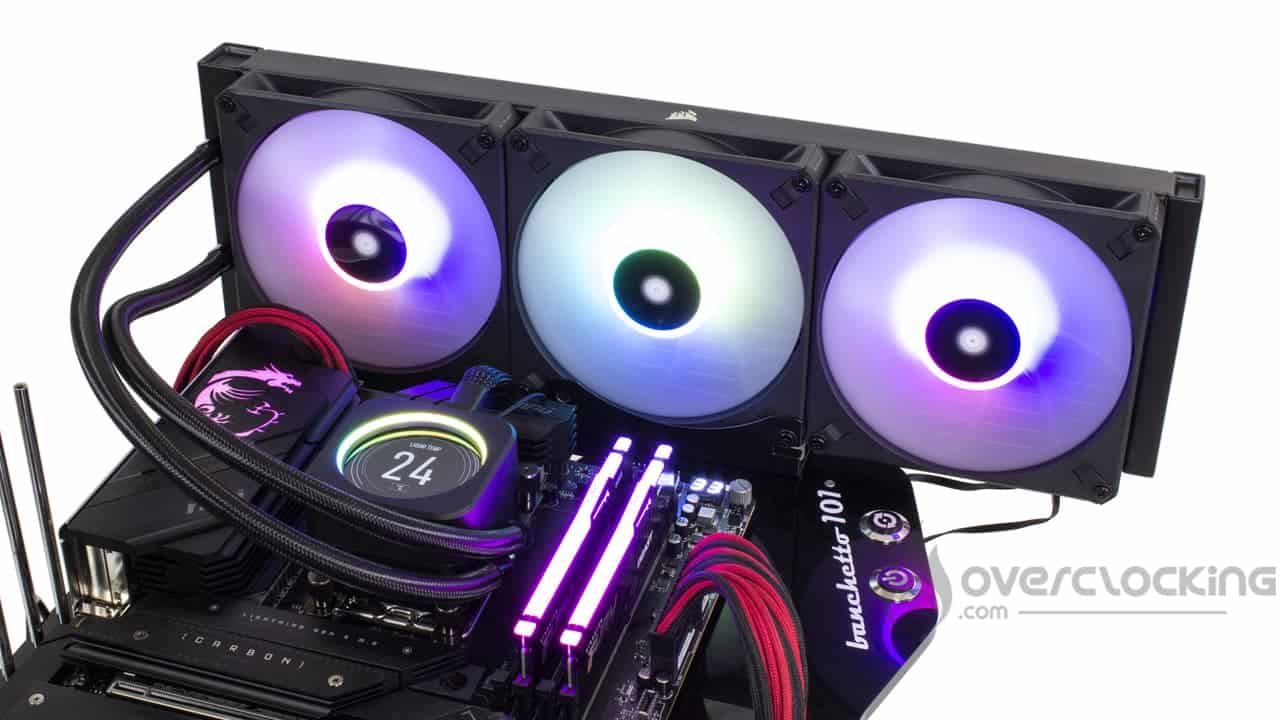
For the purpose of the test, the H170i Elite LCD XT will be compared to other kits in 240mm, 280mm, 360mm and 420mm. Here is the list of AIOs in question:
- H170i Elite Capellix (Corsair)
- H170i Elite LCD XT (Corsair)
- Liquid Freezer II 240 (Arctic)
- Liquid Freezer II 280 (Arctic)
- Liquid Freezer II 420 (Arctic)
- Ryuo III 240 (Asus)
- Ryuo III 360 (Asus)
- Vida 240 Slim (Silverstone)
[nextpage title=”Speed and noise”]
Fan speed :
So we attack our series of temperature readings. Here, we start from zero. Let us specify all the same the speeds of ventilation recorded at the time of our statements (for 12V, 8V, 5V):

Despite our new protocol, we start by recording the fan speed. Here, at low RPM, the AF 140 RGB Elite trio runs at 900 RPM, similar speeds to the H170i Elite Capellix or the Liquid Freezer II 240. However, we notice that the fan speeds are quite similar in 12V and 8V with, respectively, 1700 rpm and 1400 rpm.
Noise:

In terms of noise, despite fairly close speeds between full and half throttle, the noise level is quite different. At 1700 rpm, our sound level meter shows 46 dB compared to 37.5 dB at half speed. Finally, it will remain silent at low speed: only 30.5 dB.
Compared to the Capellix, the previous generation, we notice that Corsair has managed to drastically improve the noise of its kit despite similar speeds. The shape of the blades certainly helps. In any case, it is a welcome improvement!
[nextpage title=”Temperatures”]
Processor at 100W:
Despite a more violent 100W profile, this still represents the least stressful phase of this protocol. It allows to highlight the performance obtained with compact/entry-level heatsinks.

In 100W, given the size of the Corsair kit, there is no doubt that temperatures are good. In broad strokes, it is on par with our Liquid Freezer II 420, also equipped with a large heatsink. However, at high speeds, the Ryuo III 360 from Asus does slightly better.
150W Processor:
Here, our CPU will run at 3.90 GHz constantly and on all its cores. We apply a VCore of 1.246V to obtain a consumption of about 150W. To simplify the reading of the graph, we may have rounded some values to the nearest integer.

With a power consumption of 200W, our Corsair kit of the day keeps our Ryzen 9 7900X in the range of 60°C to 65°C at low speeds. Again, it rivals the Ryuo III 360 from Asus and Liquid Freezer II 420 from Arctic. However, if there is one reference that should be kept in mind, it is the Ryuo II 240 from Asus, which promises to perform quite well at high speeds. Compared to the older generation Capellix model, the differences widen and we gain between 2°C and 3°C depending on the speed of the fans.
Processor at 200W:
Finally, we finish with our 200W profile. Here the heat release is more important, let’s see how our coolings are doing!
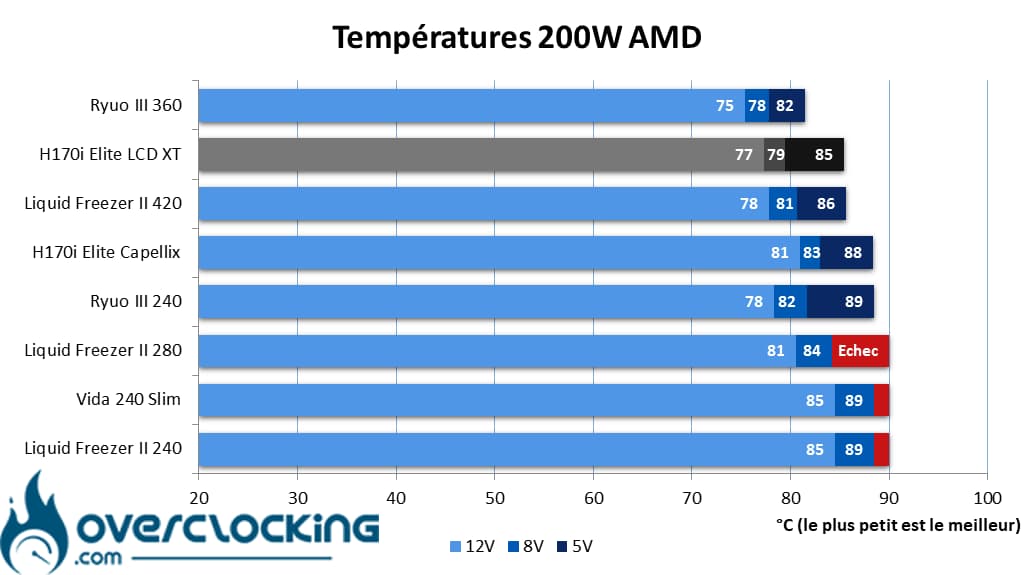
In 200W, we note the first failures of our panel. For example, the Liquid Freezer II 240/280 and Vida 240 Slim kits with two fans are not able to keep our Ryzen 9 7900X at low speed. For this, we will have to turn to the Ryuo II 240.
As for our H170i Elite LCD XT, against the Ryuo III 360, Corsair’s kit is in trouble since it shows up to 3°C delay at low speed. However, against its elder Capellix, it keeps a serious lead!
Summary:
With its H170i Elite LCD XT, Corsair offers us a powerful AIO, but above all a nice improvement in temperature compared to its older generation kits, that is undeniable. However, we were expecting better at full speed, especially against the Ryuo III 360 (which will be tested soon) which looks formidable with its eighth generation Asetek base. Now, it remains to be seen how it is positioned on the performance/noise aspect!
[nextpage title=”The temperature/noise ratio”]
On these perf/noise ratio graphs, we remind you that the best is to be placed as much as possible at the bottom left of the graph. For the reading, the left most point symbolizes the ventilation in 12V, the one in the center the ventilation in 8V and the right most in 5V.

With our processor consuming 100W, we feel that the H170i Elite LCT XT is rather comfortable. It is positioned between the two Ryuo III from Asus, showing that it is more at ease on the low rpm. On the other hand, it does not manage to compete with the Liquid Freezer II 420 from Arctic, which looks formidable, the Swiss kit burying all the competition!

With an increase in consumption, we feel that the kits with large radiators are largely favored over the others. Moreover, we notice that Corsair’s model is getting stronger by tickling the Ryuo III and Arctic’s Liquid Freezer II very closely. However, the Swiss kits have a definite advantage when it comes to noise pollution. 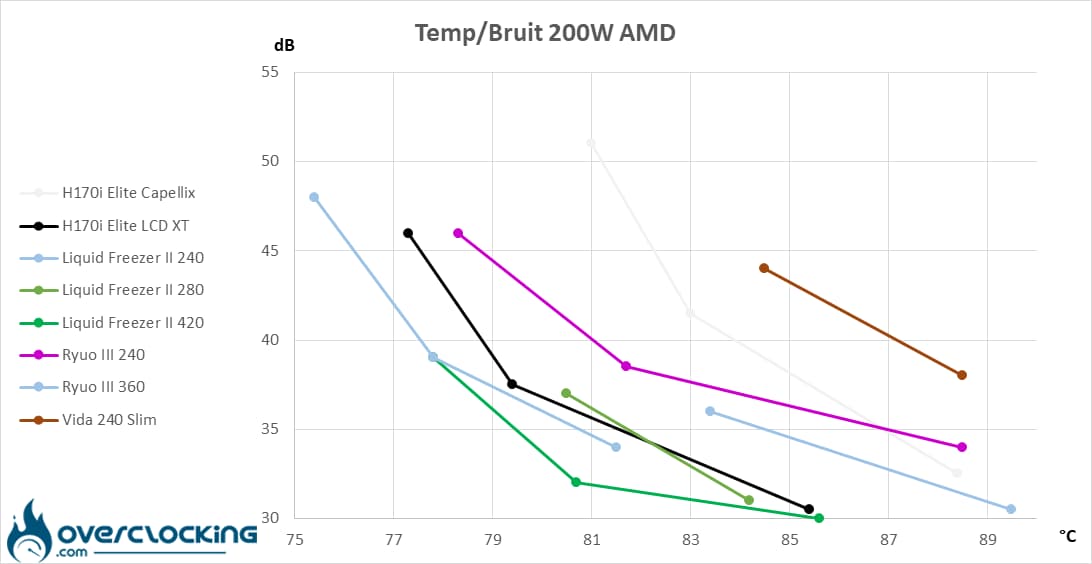
Clearly, when our processor consumes 200W, the leader remains the Liquid Freezer II 420 from Arctic. However, the H170i Elite LCD XT does well, although it is also outdone by the Ryuo III 360… Which hardly manages to be discreet at low rpm.
In any case, Corsair has managed to greatly improve the situation compared to its H170i Elite Capellix and it shows a lot.
[nextpage title=”Conclusion”]
We are now at the end of this test of the H170i Elite LCD XT from Corsair. So, what is this model worth? We take stock.
Very nice kit and very nice screen!
As you can see, one of the major assets of this AIO is the integration of a very nice 2.1″ IPS screen. Despite this format, we find a resolution of 480×480 pixels offering a very satisfactory definition. The images displayed will offer a good rendering, especially since the screen is bright and the viewing angles are good, much better than what the K360 from MSI offered. On the other hand, considering the range, we would have appreciated being able to play video files like on an S360, still from MSI.
Nevertheless, we have a kit that offers a very good finish with a complete accessory part. In the box, we will have what we need to mount push-pull configurations for those who want to look for the latest degrees. The same goes for the USB splitter that will avoid using all the connectors on your motherboard.
Apart from that, the assembly goes well and will not be particularly difficult. Although after a first installation, we find ourselves lacking thermal paste, which is a shame. Remember that we are on very high end, too bad not to have a small syringe in the box. Moreover, with this AIO in 420 mm, we will watch the capacity of its case.
Good temperatures despite a slim radiator!
Regarding performance, compared to the previous generation of the brand’s kit, there is clearly some improvement. On our Ryzen 9 7900X, it offers better temperatures while generating less noise, the temperature to noise ratio is greatly improved.
However, it has competition, starting with Asus and its Ryuo III 360, which was very good on temperatures, especially on our 200W CPU. On the other hand, we have the Arctic Liquid Freezer II 420 kit which offers similar temperatures but more controlled noise.
It’s time to rob a bank:
In the end, the cold shower will finally concern the price. For the US, you’ll have to count $309.99 which seems expensive but fair. But for Europe, currently, it is necessary to count between 400 € and 420 € depending on the stores. At this price, the kit is very, very difficult to recommend, unless you are in love with the brand and want to have the best in Corsair AIO. Otherwise, what else can I tell you except to opt for a Liquid Freezer II 420 which performs very well in AM5 (which is 35% of the Corsair price) or a custom watercooling set!
By the way, in Europe, we can’t help but feel cheated, especially if we compare the US price to the European price. On the American website of the brand, the kit is displayed at $309.99, we are far from the 400 € here… Even if we consider an exchange rate of $1 = 1 €, even if we add the VAT at 20% where we arrive at ~372 €.
Corsair H170i Elite LCD XT :
We like:
- The look of Corsair, as well as the good level of finishing of the kit
- The quality of the display: bright and well defined
- The complete accessory part with up to six fans
- The complete software support allowing the management of the lighting, the screen and the speed of the fans/pump
- Overall simple assembly
- Flexible tubing for easy installation
- Improved performance over the previous generation!
- A more controlled noise
We liked less :
- The pre-applied thermal paste good for one use only
- The imposing dimensions of the radiator implying a particular attention to the choice of the case
- The lack of support for video files as is the case with MSI
- The temperatures at 200W, we expected better
- The stratospheric price
- The Liquid Freezer II 420 costs more than 2x less!
 In the end, we choose to award bronze to this kit signed Corsair which remains extremely expensive. It is typically the kind of solution that we will choose because we like the brand and we want the best in their catalog. Otherwise, we don’t see any objective reason to buy this H170i Elite LCD XT as a Liquid Freezer II 420 does better for 140 €. And if you have a full purse and you like to get your hands dirty, you might as well go for a custom one.
A big thank you to Corsair !

