

As part of our test of the Intel Xeon W9-3495X processor, we asked Kingston to test a memory kit meeting the specifications of this platform, i.e. R-DIMM. We therefore received a copy of the Kingston Fury Renegade 5600 MT/s CL36 ECC R-DIMM kit, comprising four 16 GB memory modules, for a total of 64 GB, and bearing the reference KF556R36RBK4-64. Please note that before starting this article, it’s very important to specify that these are R-DIMM memory sticks and not U-DIMM as we’re used to testing. This kit is intended for very specific motherboards, such as the Asus Pro WS W790E-SAGE SE. We’ll talk more about this in the rest of our article.

This is not a comparison, as it’s the only 64 GB R-DIMM kit we currently have, and the platform used is not the one we use for comparisons, as our ROG Z790 APEX is only U-DIMM compatible. We contacted Intel France to get a new Xeon so we could review the overclocking of this Kingston Fury Renegade 5600 MT/s CL36 kit.
[nextpage title=”Packaging description: “]
Our Kingston Fury Renegade 5600 MT/s CL36 kit comes in a rather unusual box. We have to admit, we’re not used to this kind of packaging. Mind you, this is not a reproach. It’s important to understand that this type of memory kit is mainly intended for professional configurations, and therefore for use on server motherboards. The packaging is therefore only there to preserve the kit’s integrity. In this respect, the kit meets this need perfectly.


Once the box has been opened, we find our four strips inserted in pre-molded plastic. It’s not hard to imagine that there could be room for four more. On the transparent plastic lid is a label with all the technical information concerning this memory kit.


The Kingston Fury Renegade 5600 MT/s CL36 kit is aesthetically very sober, and the justification is also explained by its main use in professional configurations. The black PCB features no heatspreaders. The memory chips are simply covered with labels.
R-DIMM rather than U-DIMM format:
As we said in the introduction, there’s no need to buy this kit for your configuration, as the modules won’t fit on your motherboard. Our PCs are compatible with U-DIMM memory modules. Memory kits for server motherboards, for example, are in R-DIMM format. To put it simply, it’s the notch that’s not in the same place.
Features and cooling :
Our kit is clocked at 5600 MT/s, has timings of 36-38-38-80 and requires a voltage of 1.25 volts to operate. It comprises four 16 GB memory modules for a total of 64 GB. Each DDR5 R-DIMM memory module supports ECC to detect and correct data errors, improving data accuracy and reliability.


One side features the series name. On the other side, a label lists some of our kit’s features. In terms of price, this kit is currently available from Alternate Germany for 390 euros. Finally, the kit is XMP 3.0(Extreme Memory Profile) compatible. So don’t forget to activate the profile directly via your motherboard’s BIOS. nextpage title=”How to identify your memory kit: “]
Basic features :
You’re going to tell me that this is easy enough, since all you have to do is look at the references advertised by the manufacturer. Yes, but that’s not enough, especially if you’re planning to overclock it! Some information is given by the manufacturer, but you’ll have to dig around or even remove the heat sinks to find out the rest.
One side of the heatsink reads “Fury Renegade”, while the other features a label with the technical specifications of our model. This is what we’re going to look at in detail. For example, in the case of today’s model, here’s the information we know.
- Brand: Kingston
- Model: Fury Renegade
- Capacity: 4 x 16 GB
- Frequency: 5600 MT/s
- Timings: 36-38-38-80
- Voltage : 1.25 volts
- Review: –
In order to get an idea of the overclocking potential of your kit, this information is insufficient and you’ll need to go further. It’s also very important to know the revision of the PCB and the model of the chips used in your memory kit. Depending on this information, the kit’s overclocking performance will be very different.

To find this information, there’s currently only one solution: remove the heat sinks. The Taiphoon Burner software does not currently support DDR5 kits. Nor is there any indication that this will be the case in the coming weeks.
CPU-Z always present :
Fortunately, our trusty CPU-Z software is still with us, enabling us to verify this information, particularly with regard to the type of chips used in our kits. At present, there are three types of chip: Samsung, Hynix and Micron. Please note, however, that DDR5 kits can now be fitted with either Hynix M-die or Hynix A-die.

Our kit is perfectly recognized under Windows 11, and the different timings read perfectly. However, the SPD tab is not fully read. We also encountered this problem with the GSKill 128 GB Zeta R5 DDR5-6400 CL32 kit. It is therefore impossible for us to know via the software, the type of chips used.
The PCB of our memory kit:
We’re going to dismantle the heatsinks so that we can observe the PCB and identify the chips. Be careful not to accidentally detach any chips from the PCB! There’s no need to worry here, as these are stickers only.

As a reminder, the design of DDR5 modules will also be different from DDR4, with the presence of an on-board PMIC (power management integrated circuit) chip. The idea is to enable better power management and therefore system stability. The chip used here is a Texas Instrument TPS 53830. We also find the M88DR5RCD01 chip, which is a register clock driver (RCD) specific to R-DIMM memory kits that manage ECC.

Our kit therefore benefits from 10 Hynix M-die chips. But are you going to tell us that there are two too many? In fact, 8 are used for the 16 GB (8 x 2 GB) and two additional chips are there for the error detection specific to ECC kits. The Hynix chips carry the reference “H5CG48MEBD” and are 2 GB versions.
[nextpage title=”The importance of the XMP profile: “]
BIOS settings:
We can’t stress this enough, but your memory kit ‘s parameters are not automatically set once you’ve installed it. If this is the case for your processor, it’s not so for your memory kit, and you’ll need to go through the BIOS! You can then configure it manually, choosing the right frequency, timings and voltage for your kit. For ease of use, we advise you to activate XMP (Intel) or DOCP (AMD) mode in “AI Overclock Tuner”, so as to set it up automatically.
Without this, your performance will be impacted in all areas, and you’ll end up with a kit that doesn’t exceed the CL40 frequency of 4800 MHz. So we’re going to activate our XMP profile directly in the BIOS. Many of you have asked us about the difference between XMP I and XMP II profiles. XMP profile I loads the default profile, while XMP profile II sometimes optimizes a few more subtimings.
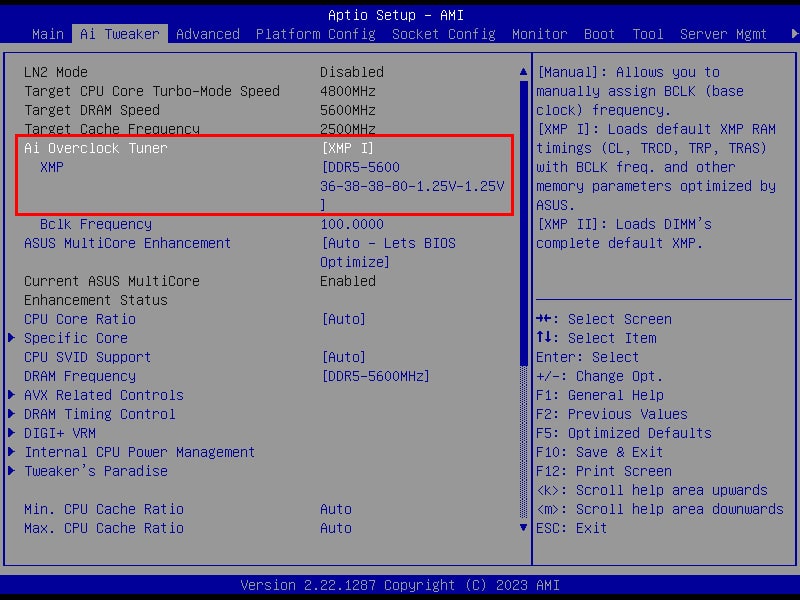
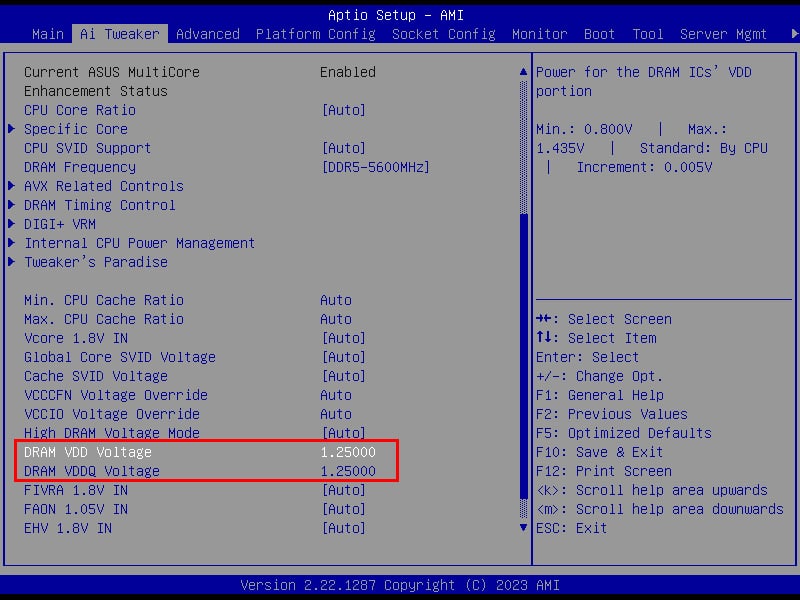
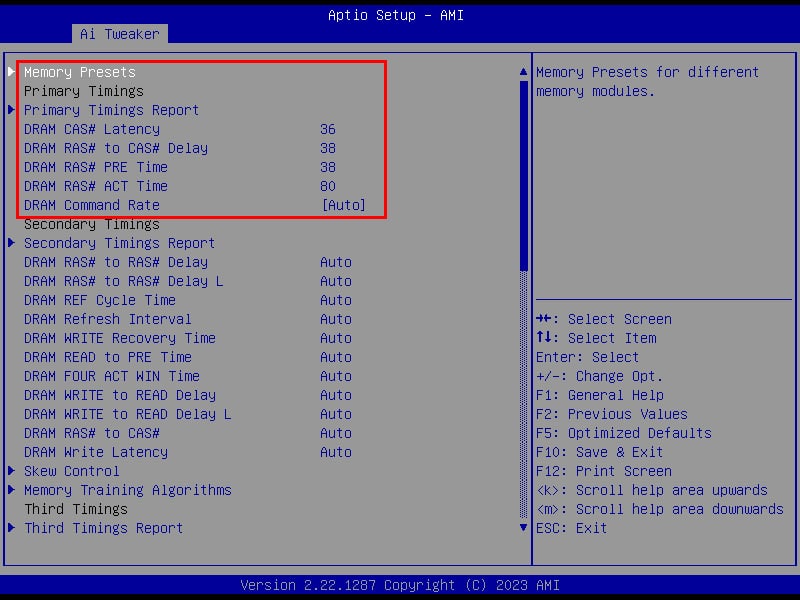
As you can see from the screenshots above, once the XMP profile has been activated, the settings are automatically detected. The frequency rises to 5600 MT/s, timings are activated and the voltage rises to 1.25 volts on the VDD and VDDQ.
[nextpage title=”Intel configuration test: “]
Of course, this kit will only be tested on an Intel platform, as we’re here in a particular configuration with the WS W790E-SAGE SE motherboard. As a reminder, this Kingston kit is only compatible with this motherboard, the only one we have here in the lab.
- Motherboard: Asus Pro WS W790E-SAGE SE
- Processor: Intel Xeon W9-3495x
- Memory: 64 GB Kingston Fury Renegade 5600 MT/s CL36
- Graphics card: MSI GT710
- Cooling system: waterblock EK-Pro CPU WB 4677 Ni Acetal 480 mm EK radiator
- SSD: Western Digital SN850 NVMe SSD M.2
- Power supply: be quiet! Dark Power PRO 12 1500w
- Operating system: Windows 11 64-bit
Aida 64 :
 This is a software program capable of providing you with a wealth of information about your configuration, but above all it features a memory benchmark. This calculates the read, write and copy speeds, as well as the latency, of your memory kit. It is often used to compare memory kits. It’s an excellent tool if you want to compare the performance of your memory kit with those we’ve already tested.
The version used for our tests is 6.50.2812 beta, and we’ve used the performance of previously tested kits.
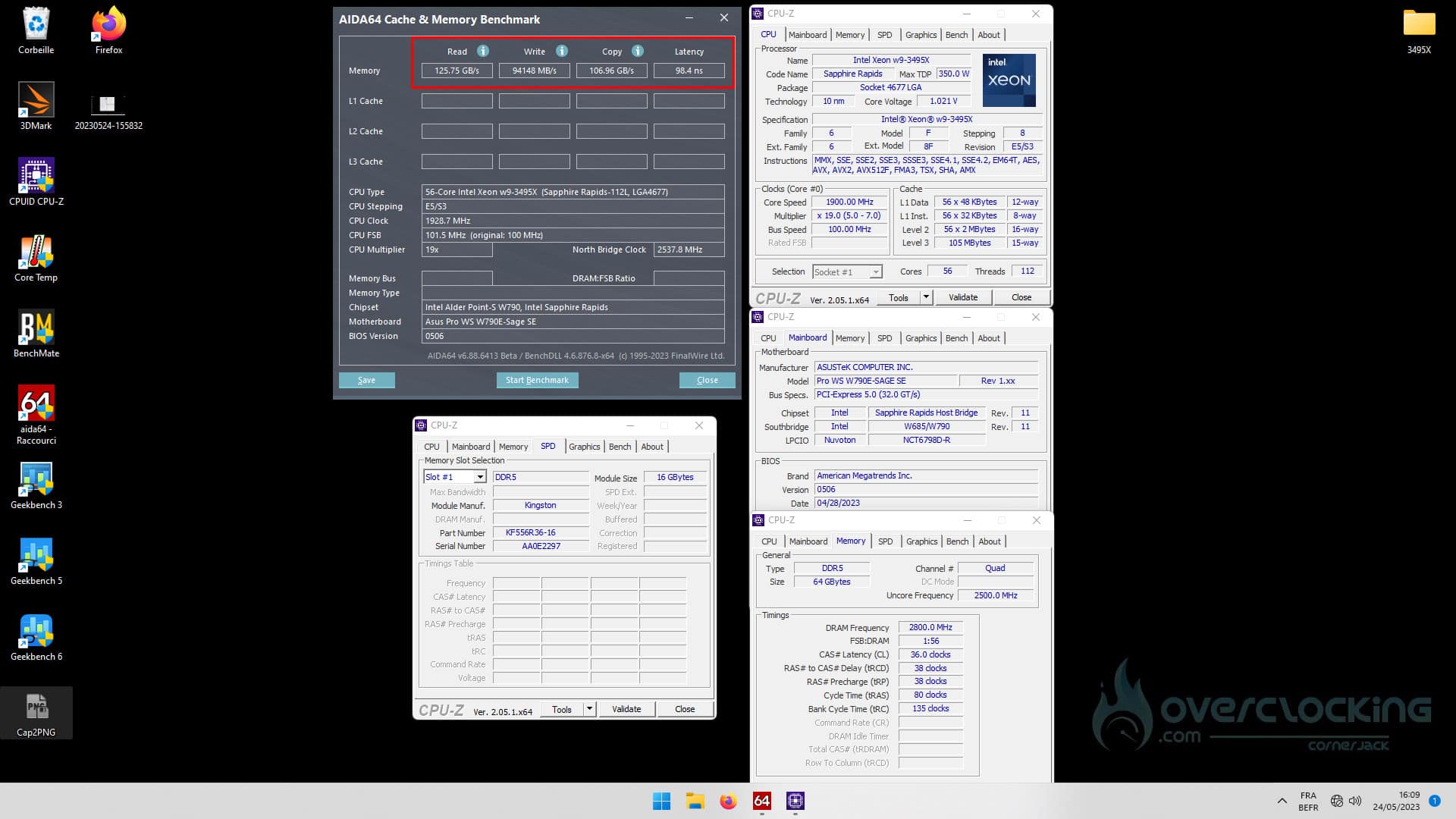
After this benchmark, we have 4 values: read, write, copy and latency. The results are within the norm for a 64 GB kit, but as we can see, latency is quite high. Remember that it’s more interesting to have the lowest value. Now, this value is linked to the amount of memory. For example, with our 128 GB GSKill kit, we obtained a latency of 100.6 n/s. Of course, frequency and timings also play a role.
Geekbench 3.4.4:
 This benchmark is available in several revisions, version 5 having just been released a few weeks ago. It provides two scores: one single and one multi. Using this benchmark, we’re going to focus on the performance obtained on the ” Memory Multi-Core ” score, which differentiates memory performance.
The version used for testing is 3.4.4.
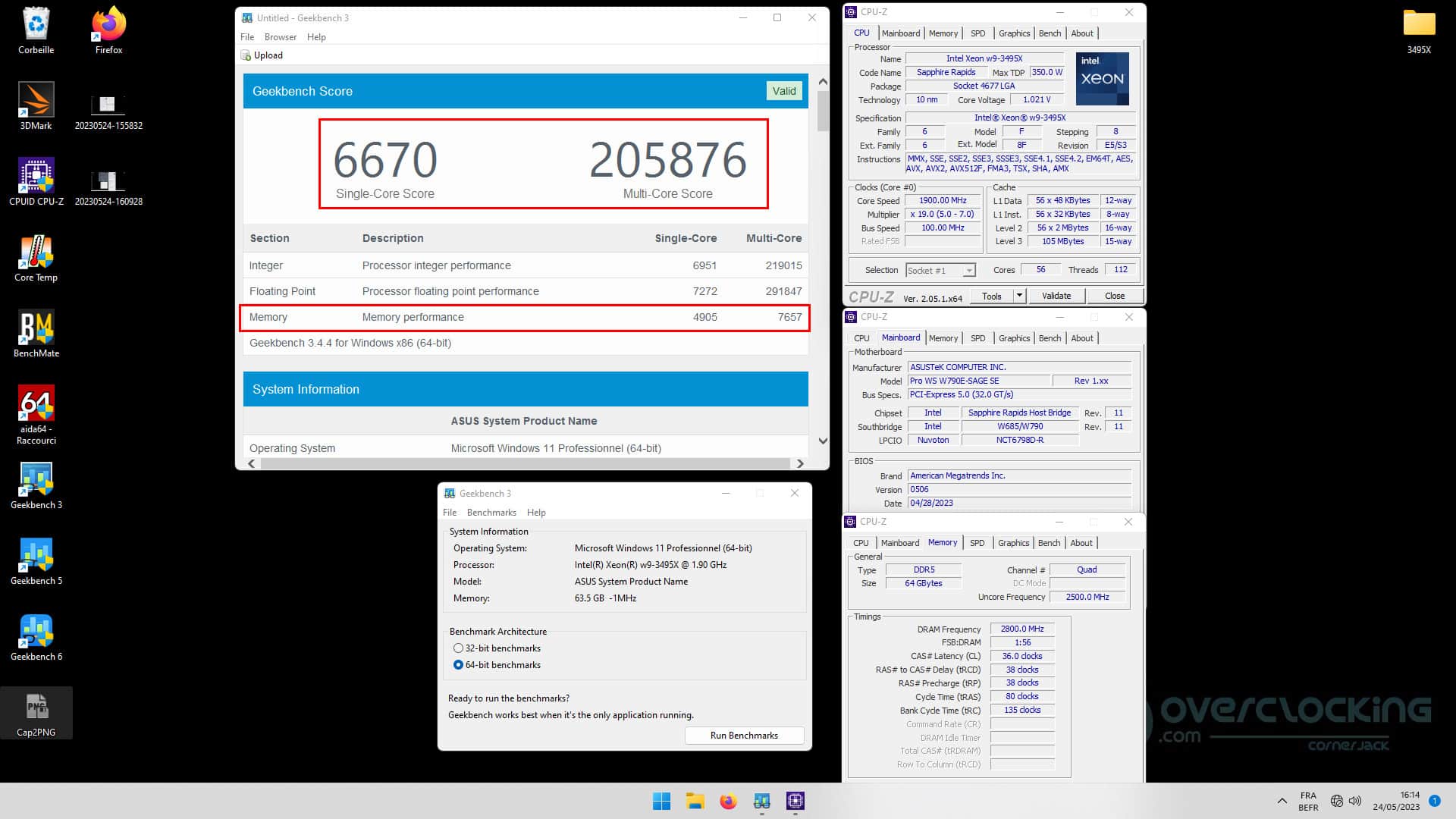
Here, we’ll be looking at both single-score and multi-core. The score of 6670 points is obtained with a single active core out of the 56 available in our Xeon W9-3495X. The 205876 points are obtained with all 56 cores active. By way of comparison, we obtain a score of 113394 points with our i9-13900KS and its 8 P-Cores 16 E-Cores.
As soon as we isolate the memory score, real differences are visible between the kits. Our kit of the day scores 7657 points! This score will be better the higher the frequency and the tighter the timings.
Geekbench 5.2.5:
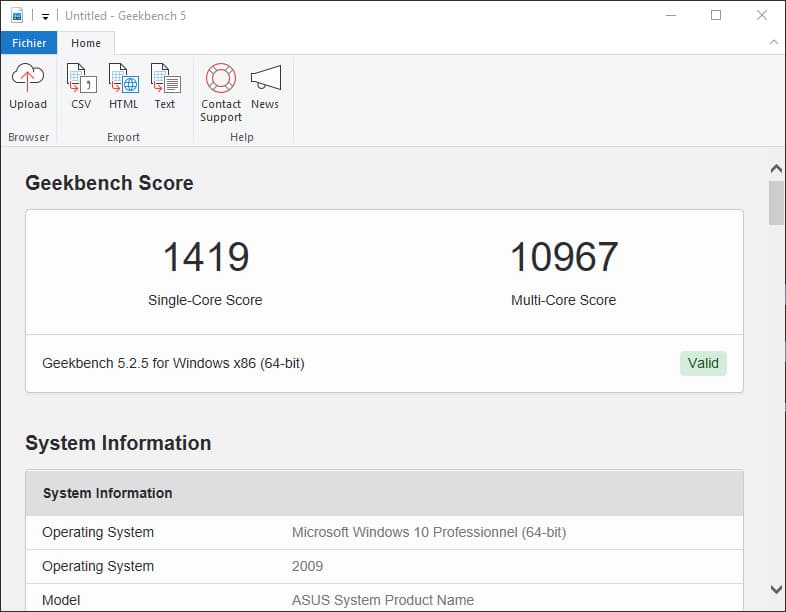 We decided to add this extra benchmark, but why? The CPU benchmark uses new tests that more closely simulate the tasks facing processors in the face of recent applications. Geekbench 5 also increases the memory used in the benchmark to better reflect the impact of this parameter on CPU results. For the time being, we’ll be keeping both, since version 3 is still widely used.
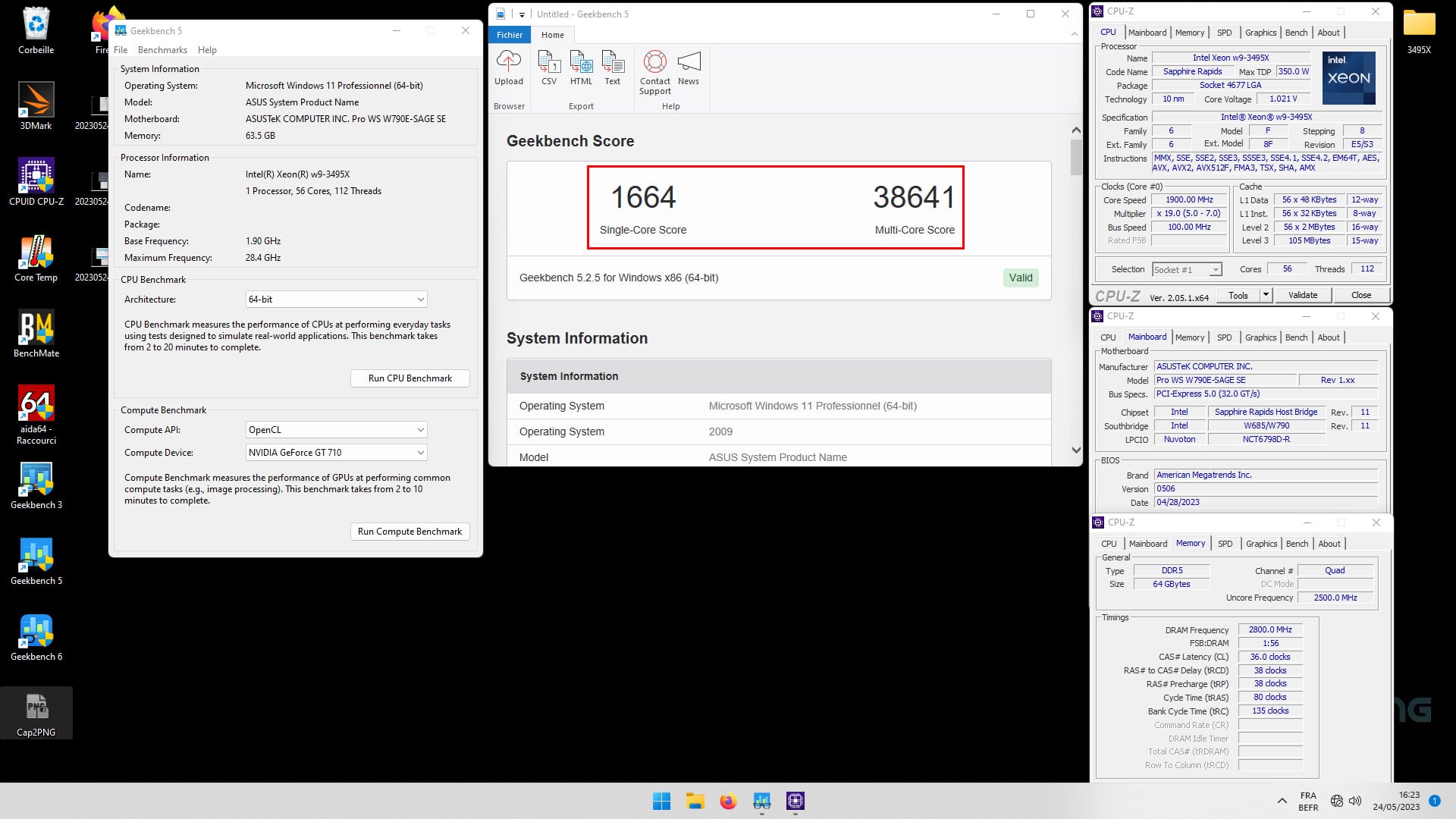
The last benchmark we use for our memory tests. Here we obtain a score of 1664 points in single-core and 38641 in multi-core. For comparison, with our i9-13900KS, we obtain a score of 26398 in multi-core.
[nextpage title=”The final word: “]
Kingston Fury Renegade 5600 MT/s CL36
We didn’t get the chance to delve into overclocking with this Kingston Fury Renegade 5600 MT/s CL36 memory kit, as our copy of the Xeon W9-3495X had to go to press. We’re trying to pick one up as soon as possible to see what we can expect from this kit, bearing in mind that it benefits from Hynix memory chips with excellent overclocking potential.
 With this kit, Kingston offers an interesting proposition for those who have a motherboard capable of accepting 64 GB of memory, and in particular more professional boards such as the Asus Pro WS W790E-SAGE SE. The kit is aesthetically sober, but in the end, nothing more is needed for the role it will be asked to play in the configuration set up.
As far as pricing is concerned, it can be found in Germany at Alternate for 390 euros, which is a (higher) price for a kit of this capacity, bearing in mind that the Fury Beast RGB kit is available for 267 euros but, and it’s important to remember this, we’re here on an R-DIMM kit dedicated to “server” motherboards and not U-DIMM as we use on our PCs. We know that this type of kit is more expensive than the kits we usually test with identical characteristics. Thanks to Kingston for making this sample available.
We liked :
- The clean look of the heat sinks and the black color of the PCB
- The quality finish of the memory modules
- Voltage of 1.25 volts, which is very reasonable
- Lifetime warranty