

Thanks to Intel and Asus, we were able to test an ultra-high-end configuration featuring an Intel Xeon W9-3495X processor with 56 cores, combined with an Asus Pro WS W790E-SAGE SE motherboard. For this test, we also received a Noctua NH-U14S DX-4677 cooling unit and an EK-Pro CPU WB 4677 Ni Acetal waterblock. To accompany this configuration and to make sure we had enough memory, a 128 GB Zeta R5 DDR5-6400 CL32 kit. As you can imagine, to run and overclock this configuration we needed a powerful power supply, so we opted for the 1500-watt be quiet! Dark Power PRO 12!
In this article, we’ll show you the different components we used, as well as our impressions and the results obtained in various benchmarks.

Many thanks to our partners who helped us gather the necessary hardware for this test: Asus, Intel, GSKill, Noctua and EK waterblock.
[nextpage title=”The Intel Xeon w9-3495X processor:”]
The top-of-the-range Xeon W-3400 series is currently the Xeon W9-3495X, with 56 cores and 112 threads. The base frequency is 1.9 GHz, with a single-core boost to 4.8 GHz. Pricing is announced at $5889. Suffice to say, we’ll be very careful when handling it and during our tests. A quick run through CPU-Z to see if our W9-3495X is perfectly recognized. No problem, only the SPD tab seems to have a small reading and display bug.

Frequencies reached?
Here we go with our Intel Xeon W9-3495X. As you can see, we’ve opened several windows to check frequencies and temperatures. The idea is to see if all 56 cores are active during a task that calls for 100 cores.

As we can see, all 56 cores are working, and needless to say, the R23 benchmark is completed in record time. Temperatures are excellent, as can be seen here with the Noctua cooler. All cores reach 2.88 GHz. We’ll come back to the score in our tests.
[nextpage title=”The Asus Pro WS W790E-SAGE SE:”]
As we said in the introduction, this Pro WS W790E-SAGE SE motherboard carries the reference SE for “Special Edition”. Asus also has a second motherboard in its range, the Pro WS W790-ACE model, which is aimed more at Xeon processors in the W-2400 series. We therefore have in our hands the highest-end version.
The bundle:
A quick look at the bundle of this Asus Pro WS W790E-SAGE SE to see if it benefits from “special accessories”. As this is a motherboard intended for professional use, the bundle should be small and different from what we’re used to finding on consumer boards.


Finally, we find a fairly classic bundle with SATA cables, Q-connector, quick installation guide, manual, … and a special tool, the “VRM Fan holder” which attaches to the radiator covering the VRMs and allows three 40 mm fans to be attached.
W790 architecture and chipset:
The Pro WS W790E-SAGE SE is built around Intel’s W790 chipset, and features a new socket, LGA-4677. As you’ll see, the socket is larger than what we’re used to seeing with the LGA-1700.
The part that covers the external connectors is covered by a transparent, smoky-grey cover that lets you see what’s hidden underneath. At the rear of the motherboard is a protective aluminum cover that covers almost the entire surface of the board and protects the rear of the socket.


The W790 chipset naturally supports PCIe 5.0, offering higher storage performance than the previous generation, as well as DDR5 support.
The various heat sinks :
The board’s dimensions are 305 mm x 330 mm, corresponding to the SSI-EEB format. If you’re buying this motherboard, don’t forget to check that your case is compatible with this format.
The dominant color on the PCB is black. Asus has chosen this color in order to keep it neutral. The design is rather unusual in that the memory slots are above and below the socket, whereas if you remember the X299 chipset, the memory slots were on the left and right of the processor.
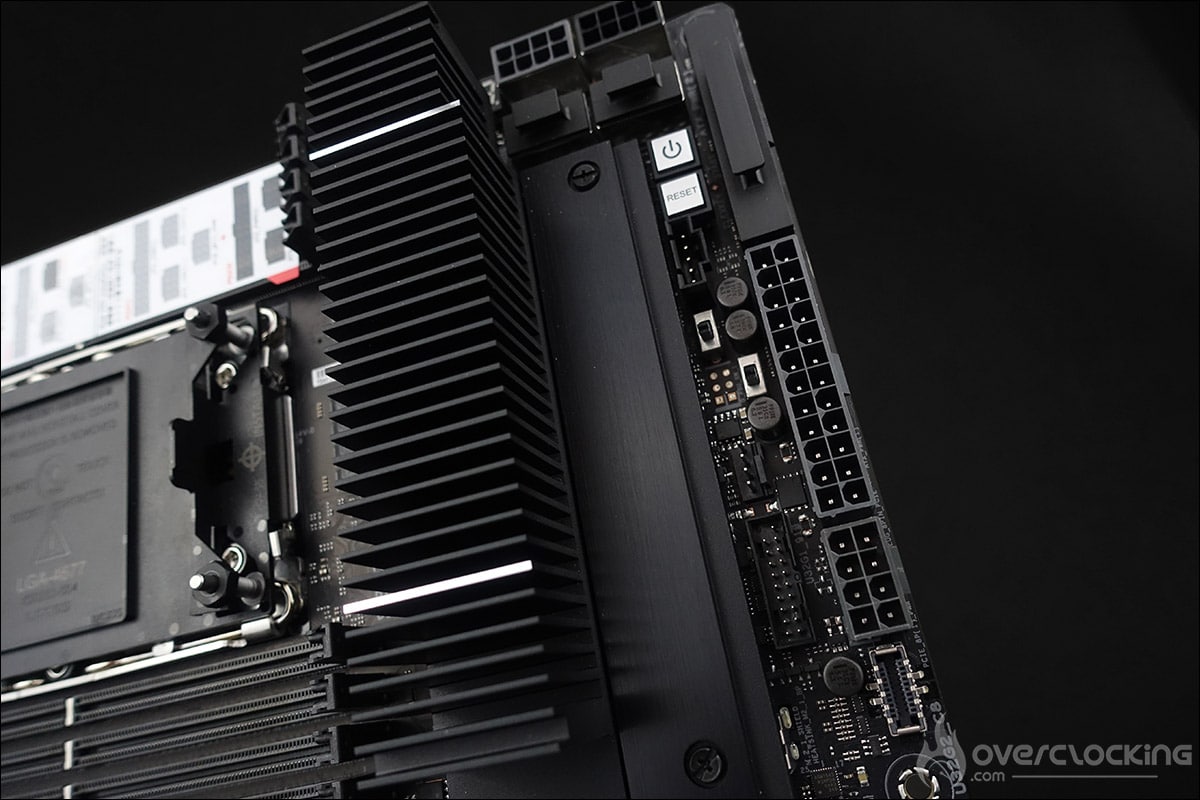

Let’s start with the radiators, of which there are two!
The first is the imposing radiator on the right-hand side of the socket, covering the power supply stage. The second covers the chipset. The height is low, so that graphics cards can be easily inserted.
The socket and PCIe :
The space around the socket is quite limited, which is quite logical given the size of this LGA-4677 socket and the presence of four memory slots on either side. This Pro WS W790E-SAGE SE can accommodate a maximum of eight DDR5 memory modules. It supports quad-channel memory kits up to 6800 (OC) and a maximum capacity of 2TB.


There are no less than seven PCIe 5.0 16x ports. To power all this, the board has two 24-pin connectors and four 8-pin connectors next to the power supply stages. You can see how to power this card on the stickers below.


Three M.2 SSD slots:
A long black aluminum plate covers two M.2 SSD slots on the PCB. These two slots are in 22110 format and compatible with the PCIe 5.0 standard.


A third slot, again 22110 but PCIe 4.0, is also located under an aluminum cover, beneath the chipset. As you can see, they all feature the quick-clamping system already present on much of the mainstream motherboard range.
Clocker tools :
Let’s start with the elements inserted on the PCB, which can prove to be interesting tools for overclockers. There are quite a few on this model, which is perhaps surprising on this type of motherboard. This confirms Asus’ desire to offer a professional board with overclocking tools.
- The power button: powers up the motherboard.
- FlexKEY (reset): restarts the motherboard in the event of failure. The button can now be assigned to another task, such asSafe Boot or disabling the backlight.
- Safe Boot: allows the board to be rebooted even if the parameters selected in the bios do not allow boot. This avoids having to perform a CMOS Clear to reboot and thus lose your encoded settings.


- ReTry Button: during cold tests, sometimes the OS freezes and a reset doesn’t restart the motherboard: the only solution is to hold down the START button for 6 or 7 seconds. The ReTry button restarts immediately.
- LN2 jumper: enables LN2 profiles to be activated in the bios.
- Q-LED: 4 LEDs (CPU – DRAM – VGA – BOOT) to diagnose errors during board boot . The one that stays lit corresponds to the problem.


- Q-Code: displays a code corresponding to the component responsible for the boot error. This is now displayed on the OLED screen, and the list of codes can be found in the manual.
- CMOS CLR: clears BIOS settings to return to default.
The PCB:
Our Asus Pro WS W790E-SAGE SE is based on a 14 1 1 phase power supply. The part in charge of the CPU consists of 12 phases. We await further information on the management of this power supply stage.


The mosfets in the power stages generate the most heat, as they are responsible for voltage conversion and delivery to the CPU from the 12-volt EPS connector. It will therefore be necessary to keep them cool via the imposing heatsink placed on them.
Connectors:
The rear panel features the following elements. First of all, the Clear CMOS and the button for flashing the BIOS from a USB key.


In terms of USB ports, this Pro WS W790E-SAGE SE features two USB 2.0, four USB 3.2 Gen 2 Type A, one USB 3.2 Gen 2 Type C and one USB 3.2 Gen 2×2 Type C. There are also two Intel 10Gb Ethernet ports and a Realtek 1FB. Finally, there’s a VGA port, audio outputs and an optical output.
[nextpage title=”GSKill 128 GB Zeta R5 DDR5-6400 CL32:”]
GSKill has provided us with one of its top-of-the-range kits, the 128 GB Zeta R5 DDR5-6400 CL32. As you can see from the photos, this kit consists of 8 memory sticks, each with 16 GB. As usual, GSKill takes great care with the packaging, and thanks to pre-cut foam pieces, your kit will arrive at your door in perfect tranquillity.
Our kit is clocked at 6400 MT/s with timings of 32-39-39-102, requiring a voltage of 1.40 volts to operate. As you can see, we’re using a black finish with a light gold trim on the top.


The kit is priced at around 1,400 euros. Let’s turn now to our two cooling solutions.
[nextpage title=”The Noctua NH-U14S DX-4677: “]
Noctua is a brand that needs no introduction, having been part of the ” aircooling ” world for many years, offering highly efficient cooling solutions! Today, we welcome to the lab an example of the NH-U14S DX-4677, a single-tower heatsink with two 140 mm fans. This will be used for our first tests with the professional platform built around the Asus Pro WS W790E-SAGE SE motherboard.
Thanks to Noctua for making a copy of this NH-U14S DX-4677 available.
The bundle:
Once the box is opened, we find the radiator and the two fans bearing the reference NF-A15. The rest of the bundle consists of the following items: a NA-YC1 4-pin PWM Y-cable, a SecuFirm2 LGA4677 fastening system and an NM-SMT5 Torx T30 clamping tool.


The cooler comes pre-installed with both fans. The Noctua NH-U14S DX-4677 is priced at 139.90 euros and comes with a 6-year warranty.
Owner’s tour :
The Noctua NH-U14S DX-4677 is part of the “DX” series of cooling solutions for Intel Xeon processors. The radiator features a larger contact surface designed specifically for processors with socket LGA-4677. The 70x56mm copper contact surface is more than twice as large as the standard model. Note that the base benefits from pre-applied NT-H1 thermal paste to ensure optimum even distribution for the user, as well as saving precious time.


Based on the NH-U14S 140 mm cooler and equipped with two 140 mm fans, it offers the best performance without neglecting noise. As we expected, the quality is top-notch, with a perfect finish. The nickel finish is perfectly applied. The radiator has six 6 mm heat pipes and a fin surface area of over 6000 cm².


The NH-U14S DX-4677 is equipped with two 140 mm NF-A15 fans. The rotation range of the latter starts from 300 rpm ( /- 10%) and goes up to 1500 rpm ( /- 10%). At full speed, the NF-A15 generates an airflow of 140.2 m3/h, and Noctua claims a maximum noise level of 24.6 dB.


The radiator measures 165 (H) x 150 (W) x 52 (D) mm and weighs 797 g without the two fans. When these are installed, the thickness increases to 111 mm and the weight rises to 1136 gr.


And that’s not all!
We also received two NF-A14 industrial PPC fans. Well, let’s be honest, we’re not looking for silence but for performance with these two, since they run at 3000 rpm( /- 10%). At full speed, the NF-A14 industrial PPC generates an airflow of 269.3 m3/h, that’s right, and as far as noise levels are concerned, Noctua claims a maximum of 41.3 dB. The idea, of course, is to get the best performance out of this aircooling solution.


Finally, this fan is priced at 32.90 euros. We’ll come back to its installation later in this article.
[nextpage title=”The EK-Pro CPU WB 4677 Ni Acetal waterblock:”]
Tests on the Intel Xeon processor W9-3495X will initially be carried out with the Noctua NH-U14S DX-4677 cooling unit. Now, if we want to push the configuration to overclocking, we’ll of course need a liquid cooling solution. A number of brands already offer a waterblock compatible with the LGA-4677 socket, and our choice fell on the EK-Pro CPU WB 4677 Ni Acetal block available for 162 euros. You can see for yourself the quality of the finish – a strong point of the EK brand – by looking at the front panel and base of this EK-Pro CPU WB 4677 Ni Acetal waterblock.


Well, everything seems to be ready, so let’s move on to the description of the configuration and its installation, which as you’ll see is quite different from what we’re used to.
[nextpage title=”Installing the test configuration: “]
So here are the various components that make up our test platform. For the publication of these tests, I used the latest BIOS received directly from Asus. This is version 0506. The motherboard is not a mass-market model, and BIOS updates are a little less frequent than on the motherboards we’re used to reviewing. Nevertheless, Asus has provided us with several BIOS to test this motherboard.
- Motherboard: Asus Pro WS W790E-SAGE SE
- Processor: Intel Xeon W9-3495x
- Memory: 128 GB Zeta R5 DDR5-6400 CL32
- Graphics card: MSI GT710
- Cooling system: Noctua NH-U14S DX-4677 and waterblock EK-Pro CPU WB 4677 Ni Acetal 480 mm EK radiator
- SSD: Western Digital SN850 NVMe SSD M.2
- Power supply: be quiet! Dark Power PRO 12 1500w
- Operating system: Windows 11 64-bit
Installing the W9-3495X processor :
As you may have noticed from the motherboard presentation, the LGA-4677 socket of our Asus Pro WS W790E-SAGE SE is very different from what we’re used to seeing on mainstream motherboards. Here, there’s no retention system to keep the processor trapped in the socket. In the case of the LGA-4677 socket, the processor is first inserted into a plastic retaining frame and then dropped into the socket. The cooling system holds the processor in place, ensuring perfect contact.


The first step is to insert the W9-3495X into the socket. To do this, the first step is to remove the socket protection , unscrewing the 4 nuts and then removing the plastic cover.


Following our tests with the Noctua NH-U14S DX-4677, we’ve now carried out overclocking tests with the EK-Pro CPU WB 4677 Ni Acetal waterblock. The installation principle is very similar.


The first step is to push the 4 small levers into the socket. The next step is to screw in the 4 white cylinders as far as they will go. Then, of course, you need to connect the waterblock to your cooling loop.


Now that we’ve introduced you to the two cooling systems responsible for keeping our W9-3495X cool, let’s move on to the BIOS of our Asus Pro WS W790E-SAGE SE.
[nextpage title=”The motherboard BIOS: “]
As far as the BIOS is concerned, at first glance we might be a little confused, because if we’re used to Asus BIOS but from the ROG series, here we feel like we’re going back twenty years in terms of design. But don’t panic: after a quick glance, it’s easy to find your way around, even if some of the options are Xeon-specific.
Before getting started, we’d like to remind you that it’s essential to regularly update your BIOS, even on this type of motherboard. What’s more, the Asus team offered me several BIOS, so it would be a shame not to take advantage. You can also save your BIOS or profiles on a USB key. This will enable you to reload them after updating your BIOS, should you decide to keep certain profiles, notably those dedicated to CPU or memory overclocking.


Let’s move on to the testing of this unusual configuration.
[nextpage title=”Test results: “]
This is the part that will interest us most, allowing us to assess the performance of this ultra-high-end configuration. As a reminder, our copy of the Xeon W9-3495X is equipped with 56 cores and 112 threads. We’ve taken our usual graphics and added the performance of this stock processor, i.e. without any overclocking.
Let’s start with a staple of processor benchmarks, the Cinebench series. We’ve opted for Cinebench R23 and R20. Scores will be given in single-core and multi-core mode. By this we mean that the benchmark tests performance on a single processor core and then on all available cores.
To do this, we’re going to use Benchmate, which has just been updated to version 10.12.2 and can be downloaded here. The advantage of Benchmate is that it already contains a whole series of benchmarks, and what’s more, it’s recognized and certified when you want to encode your results on the Hwbot site.
Cinebench multi core in R20 and R23 with the W9-3495X :
Let’s start with two Cinebench multi-core benchmarks with R20 and R23. There’s no point in running them in single core, since the 4.8 GHz frequency won’t produce interesting scores. Here, it’s the use of the 56 cores that should make the difference!


We’ve added them to our CPU test charts so you can see the performance impact. The results speak for themselves.
Geekbench multi core 3.4.4, 5.2.5 and the new 6 PRO with W9-3495X :
This is a benchmark available in several revisions, with version 5 being increasingly used in recent months and often used for CPU performance leaks. It provides two scores: one single-core and one multi-core. The versions used for testing are 3.4.4 and 5.2.5. Please note that to take full advantage of these three benchmarks, a license is required and we’re running the bench in 64-bit.


Once again, scores that crush the competition.
CPU-Z 17.01.64 multi-threaded and Y-Cruncher benchmark with the W9-3495X :
A new benchmark that we’ve just added, as it’s increasingly used by brands to showcase processor performance. To use it, simply download the latest version of CPU-Z, currently 2.0.2. Then go to the “Bench” tab to check single-thread and multi-thread performance. The benchmark version we used is 17.01.64. We also took the opportunity to test Y-cruncher.


Here too, performance is monstrous, with our Xeon W9-3495X scoring 33271 points in the multi-threaded CPU-Z benchmark and 7.707 seconds under Y-cruncher PI-1b.
AIDA 64 with the W9-3495X :
This software can provide you with a wealth of information about your configuration, but above all it features a memory benchmark. This calculates the read, write and copy speeds, as well as the latency, of your memory kit. It is often used to compare memory kits. It’s an excellent tool if you want to compare the performance of your memory kit with those we’ve already had the opportunity to test.

Here too, throughputs are impressive, particularly when using our eight GSKill memory arrays at 6400 MT/s CL 32. Last but not least, we didn’t run a 3DMark, as the scores were simply not good enough. The 3DMark benchmark suite can’t handle that many cores. As an example, we obtain a CPU Time Spy score of 10822 points with the W9-3495X, where the i9-13900KS scores 24684 points.
Overclocking the Xeon W9-3495X :
One thing’s for sure: as soon as we started overclocking, temperatures began to soar, and an excellent cooling system was needed, especially as the north is currently the south! After a great deal of research and BIOS tweaking, we managed to achieve stability at 4.2 GHz on the 56 cores of our W9-3495X.


The Cinebench R23 multi-core score rises from 71115 points to 101304 points, an increase of 42.4%. Geekbench 3.4.4 scores 303465 points, a gain of 47.1%. Temperatures are in the region of 88°C. We’re looking forward to testing a “slightly lighter” Xeon in terms of cores when overclocking. Unfortunately, we weren’t able to run it under LN2, as it requires a special fixture that only der8auer currently has.
[nextpage title=”The last word: “]
Let’s start this final word by once again thanking our various partners who enabled us to get our hands on this top-of-the-range configuration, which, let’s not forget, costs almost 9,000 euros without a graphics card! It was a real pleasure to spend hours testing this configuration. As our tests have shown, this Intel Xeon W9-3495X processor is a little bombshell which, when used at stock frequencies, delivers impressive scores while maintaining very decent temperatures (we were at 55°C with the Noctua NH-U14S DX-4677).
Overclocking also provided us with some pleasant surprises, with a frequency of 4.2 GHz on the 56 cores, while maintaining reasonable temperatures with the EK-Pro CPU WB 4677 Ni Acetal waterblock. Multi-tasking performance gains under Cinebench R23 and Geekbench 3.4.4 were in excess of 45%! Of course, this is not the configuration of the average person, but it was great fun to be able to judge its potential. Finally, let’s not forget to highlight the quality of the Asus Pro WS W790E-SAGE SE motherboard, which lived up to all its promises, offering the right tools even on a motherboard designed for servers. We would have liked to have been able to test the impact of the integrated LN2 tools, but that’s for another time!
 We’ll be trying to get our hands on other Xeon processors to make a new comparison against our top-of-the-range processors like the Intel i9-13900KS and AMD Ryzen 9 7950X. As far as the products are concerned, we can definitely give a platinum award to the Asus Pro WS W790E-SAGE SE motherboard. There aren’t many boards compatible with these new Xeons, and this one has all the features you’ll need if you want to buy a copy of the W9-3495X or another CPU in the range.