

After having tested the new generation of Ryzen 7000X processors last September, today we will review no less than three new non-X Ryzen 7000 processors with the Ryzen R9 7900, the R7 7700 and the R5 7600. These three processors differ from the CPUs already tested in September by lower frequencies and a lower TDP. We will of course come back to these differences in detail in our article. Of course, and this is quite logical, these non-X processors will be offered at a more attractive price!
You should also know that these processors will have an aircooling solution in bundle. We will find a Wraith Prism LED fan for the R9 7900 and R7 7700 and a Wraith Stealth fan for the R6 7600.

Thanks to AMDfor the availability of these Ryzen R9 7900, R7 7700 and R5 7600.
[nextpage title=”ZEN 4 architecture and Ryzen 7000(X): “]
Before starting our tests, it seemed logical to remind you the new features brought by this new architecture.
AMD Zen 4 architecture:
Let’s take a look at the new AMD processors. These were announced at the end of August during a conference on YouTube. Dr. Lisa Su unveiled four new processors available for launch today. These new Ryzen 7000 processors benefit from a 5 nm etching by TMSC and are designed on the new Zen 4 architecture. To be totally precise, the CCD(core compute die) are indeed etched in 5 nm but the IOD (I/O die) remains on the N6 process (6 nm) from TSMC. The improvement of the engraving fineness allows the Ryzen 7000 to benefit from higher frequencies of origin as well as a better energy efficiency compared to the previous generation. We will come back to this in the details of the different processors.


As a reminder, the previous generation of Ryzen 5000s had a 7nm etch and the Zen 3 architecture, so it will be very interesting to measure the benefits of this new architecture.
What’s new in the Zen 4 architecture:
First of all, AMD has announced an expansion of the front-end as well as support for AVX-512 instructions. The new Ryzen 7000s also see the amount of L2 cache doubled from 512KB to 1MB of L2 cache per core, compared to the previous generation (Ryzen 5000).


On the other hand, there is no change in the amount of shared L3 cache memory, which remains at 32 MB per CCD. These various changes to the Zen 4 architecture should bring an average gain of IPC of 13% compared to Zen 3 according to AMD. We will check this performance in our tests.


Finally, you should know that these new processors have integrated RDNA 2 graphics cores (iGPU). We will detail below, in graphic form, all the characteristics of these new Ryzen 7000.
Four processors available at launch:
AMD unveiled four processors at its conference at the end of August. Let’s start with the Ryzen 7950X which will represent the flagship of this new architecture with 16 cores and 32 threads for a Boost frequency up to 5.7 GHz, and a price of $ 699. Then comes the Ryzen 7900X with 12 cores and 24 threads with a boost frequency of 5.6 GHz and a price of $ 549.


The other two processors announced are the Ryzen 7700X and its 8 cores (Boost at 5.4 GHz) and the Ryzen 7600X benefiting from 6 cores and 12 threads with a Boost at 5.3 GHz. It remains to be seen at what price these four processors will be announced in Europe and more particularly in France. The first prices indicated on online sites in the last few hours announce a still painful conversion to the euro. Since the publication of our first article, AMD has lowered the prices of these different Ryzen 7000.
In terms of cooling, AMD recommends the use of a 280mm AIO liquid cooling system for the Ryzen 7950X and 7900X. For the Ryzen 7700X and 7600X, a tower type cooling unit should do the job. We will of course give you our opinion at the end of this article.
Three new non-X processors:
These are of course the models we will test today. As we said in the introduction, they are distinguished by lower frequencies, a lower TDP and restrictions on overclocking. Here is a summary table of the complete offer since the CES 2023 announcements of this generation of Ryzen 7000. You will be able to judge the differences between the different models. Please note that the Ryzen 7000X3D models have just been announced at CES but will only be available in February.

Basically, these non-X chips offer the same characteristics as their X counterparts… At least on the number of cores/threads. Thus, the Ryzen 9 7900 displays 12c/24t, the Ryzen 7 7700 goes up to 8c/16t while the Ryzen 5 7600 offers 6c/12t. The same goes for the amount of cache memory, respectively 76 MB, 40 MB and 38 MB.


On the other hand, they highlight a reduced TDP of 65W. As a reminder, the 7900X is 170W of TDP, when we are at 105W for the 7600X and 7700X. However, in order to reduce the thermal envelope, it is necessary to reduce the frequencies. The processors lose between 100 MHz and 1 GHz on the base and boost frequencies.
One new socket, hello AM5 socket:
After the Z690 chipset and the LGA-1700 socket, it’s AMD’s turn to make its revolution. Goodbye socket AM4, hello socket AM5. It’s time to forget the PGA socket(Pin Grid Array) in which you used to put your processor in order to welcome the LGA socket(Land Grid Array). This socket will look like those already present for years on Intel motherboards. Why this change? Simply because of the larger number of pins on the Ryzen 7000 (1718).


AMD decided, with the AM5 socket, to keep a back plate already present for the AM4 socket. The 4 external holes that hold the retention system to fix your cooling system are still present. The distance between these 4 holes is identical to the AM4 socket, so you will still be able to use your cooling system as long as it uses the four external holes of the backplate!


But AMD goes further and adds 4 additional holes. These will be used to hold the AM5 socket in place but also to hold the backplate in place. This one should not be removed as on the previous generation. Finally, the locking mechanism changes. We find the reinforcement frame, the force frame and the latch. Once your Ryzen 7000 is placed in the right position, you just have to close the latch to keep it in place.
Small remark following my tests, where I have several times removed and put back these new Ryzen 7000, know that the grip is far from being obvious with the particular shape of the IHS. There is a risk of accidents if you are not careful with the processor which could slip out of your hands and damage the pins of the socket. So be careful!
PCI-Express 5.0 and DDR5 support:
The new AMD X670E chipset that we will test today with the AORUS X670E Master motherboard supports PCI-Express 5.0 as well as DDR5 support. AMD took the opportunity to unveil its AMD EXPO technology. It is an alternative to the XMP profile (A-XMP at AMD). As a reminder, the XMP allows, via the BIOS, to automatically activate the characteristics of your memory kit: frequency, timings and voltage. The AMD EXPO technology will also allow you to overclock DDR5 in a single click in combination with the Ryzen 7000.

The idea is to bring an extra gain through this automatic overclocking. The performance can improve up to 11% at 1080p and with a latency of less than about 63 nanoseconds. Of course, we’ll come back to this in detail in our EXPO-compatible memory kit tests. You should know that MSI has already responded by offering to include this technology on its Z690 motherboards.
Finally, you should know that other chipsets will be available in the coming weeks, in particular the much awaited B650E. Motherboards built around it should be more interesting financially.

Above is a summary table to understand the differences between these four chipsets . Let’s move on to the protocol of our comparative tests.
[nextpage title=”Test configurations: “]
All the results that you can discover in the following pages have just been updated in September. We have replayed all the processors at our disposal in order to have results realized with the latest BIOS from the manufacturers as well as the latest drivers, especially for the chipset, be it the Z690 or the X570.
The memory kit question:
Yes, which memory kit should we use for our comparative tests? This is a question we asked you on our Discord. Whether it is for DDR4 or DDR5, we are on memory kits composed of two 16 GB strips for a total of 32 GB. For our tests using DDR4, it is a Corsair Vengeance LPX kit clocked at 3733 MHz in 18-22-22-42. For the AMD platform in DDR4, the FCLK is 1866 MHz in order to keep a 1:1 ratio. The rest of the BIOS settings are in auto mode.
For DDR5 on the Z690 platform, we used our Teamgroup 6400 MT/s CL34 kit which we set to 6000 MT/s in 30-38-38-96. Why this choice? The kit delivered by AMD for the tests on the X670E chipset is a GSKill Trident Z5 NEO 6000 MT/s in 30-38-38-96. So we have two kits with almost identical performances on the two platforms AMD X670E and Intel Z690.
Finally, as far as the operating system is concerned, we chose Windows 11, which is the latest version 21H2 Build 22000.918. You should know that we noticed that for benchmarks, overall the results are always slightly better under Windows 10.
[nextpage title=”The frequencies reached?”]
As with all new processor tests, our first idea is to check if the announced frequencies are actually reached. To do this, we will use the Cinebench R23 benchmark. Two cases will be used: a single core bench and a second one in multi core. The idea is to be able to judge the frequency reached and thus, to compare with what was announced by AMD in its slides.
Remember that the Boost frequency in bench is different depending on the processor. Be careful, as AMD points out, when we talk about maximum Boost frequency, it is the maximum frequency achievable by one of the processor’s cores running a workload in single core(mono-thread). The maximum boost varies according to several factors: the load, the cooling system and therefore the temperature of your processor. This is a notion to keep in mind. Here are the maximum frequencies that we should reach on a single core during our run under Cinebench R23.

First step, we leave everything in AUTO in the BIOS except the EXPO profile which we load in order to have a frequency of 6000 MT/s in 30-38-38-96 for our memory kit. We do not make any other changes in the BIOS.
Testing with the Ryzen 9 7900:
Here we go with the strongest non-X processor, the Ryzen 9 7900. As you can see, we opened several windows to check the frequency as well as the temperature.

In single core, we can see that core #2 reaches a frequency of 5450 MHz which is slightly higher than the 5.4 GHz announced by AMD. The reason for this is most likely the cooler temperatures brought on by our liquid cooling.

When the 12 cores of our Ryzen 7950X are used, the frequency varies depending on the CCD. On CCD 0, the frequency stabilizes at 4350 MHz and on CCD 1 at 4250 MHz. So, to put it simply, 6 cores at 4350 MHz and the other 6 at 4250 MHz. The CCD 0 is therefore more powerful.
The other element to take into account is undoubtedly the temperature. We are equipped with a 480 mm custom cooling loop and a very large difference is felt compared to the Ryzen 9 7900X which was flirting with 83°C while we are here at 47°C. It is indeed cooler in the lab at this time, but it is mainly the lower frequency of the 7900 and therefore also a lower voltage that explains these cooler temperatures. We can therefore imagine without fear an aircooling solution which was unthinkable with the Ryzen 7000X.
Testing with the Ryzen 7 7700 :
We continue with the Ryzen 7 7700 and its 8 cores. In single core, we can see that the #4 core reaches a frequency of 5350 MHz which is a bit higher than the 5.3 GHz announced by AMD. So our processor is perfectly operational.

When the 8 cores are used, the frequency varies slightly although all the cores are in a single CCD. We can thus read a frequency of 4875 MHz on all the cores with a maximum temperature during the R23 benchmark of 50°C.

Against the Ryzen 7 7700X, the frequency when all the cores were solicited rose to 5275 MHz but the temperature was also much higher with 84°C.
Testing with the Ryzen 5 7600 :
Let’s go to the Ryzen 5 7600 and its 6 cores. In single core, we can see that core #1 reaches a frequency of 5150 MHz which is like the two previous processors, slightly higher than the 5.1 GHz announced by AMD.

When the 6 cores are called upon, the frequency no longer varies according to the CCD since the Ryzen 5 7600 has only one CCD. The 6 cores stabilize at 4875 MHz on a multithreadedtask.

Good news, our three processors seem to be perfectly operational to start our different benchmarks.
We take a look at the Ryzen 7000 tested:
We thought it would be interesting to provide you with a summary table of the real frequencies we found during our tests. You will be able to better understand the results on the following pages.
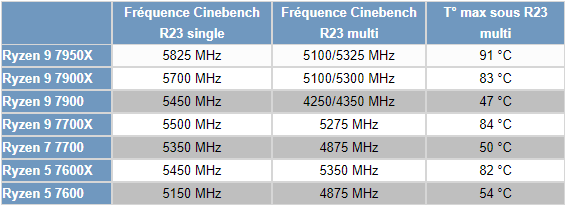
As you can see, the frequencies of the Ryzen 7000X processors are much higher and will consequently give higher scores in the benchmarks against the non-X Ryzen 7000 with the same number of cores and threads. Temperatures will also be quite different, as a higher voltage is needed to hold these higher frequencies. No doubt we will also be looking at the differences in power consumption between these processors.
[nextpage title=”Cinebench, Geekbench and CPUZ benchmarks:”]
Let’s start with an essential processor benchmark, the Cinebench series. We chose Cinebench R15, the R20 version, which is also more and more used and finally Cinebench R23, the latest one. The scores will be given in Single core and Multi core. This means that the benchmark tests the performance on one of the processor’s cores and then on all the available cores.
To do this, we will use Benchmate which has just been updated to version 10.12.2 and can be downloaded here. The advantage of Benchmate is that it already contains a whole series of benchmarks and moreover, it is recognized and certified when you want to encode your results on the Hwbot site.
As a reminder, before you start reading these results, make sure you take a look at the previous page to understand the operating frequencies of these non-X Ryzen.
Cinebench R15 Single Core and Multi Core:
This benchmark is used by overclockers to compare the performance of processors. It also allows you to judge the optimizations of your OS as well as your memory kit by setting a frequency and trying to score a maximum of points. Even if it is a little less used today with the arrival of R20 and R23, it remains a reference to compare CPUs between them since it is one of the first benchmarks used by the community.

We were expecting an improvement in single thread performance with the Ryzen 7000 and we have to admit that it is indeed the case. Our non-X Ryzen shows a very good performance against the Raptor Lake processors and of course against the previous generation of Ryzen 5000.

In multi-threaded mode, the results are slightly different and this is logical. It is mainly the total number of cores that will determine the score as well as the frequency of these cores. Our non-X Ryzen 7000s are logically behind their X counterparts but ahead of the previous generation of Ryzen 5000s.
Cinebench R20 Single Core and Multi Core:
Cinebench R20 offers similar tests to the R15 version with SingleThread and MultiThread. Freshly landed in March 2019, it offers a more complex benchmark than the R15 version which had become a bit too easy for CPUs with many cores. Cinebench R20 requires eight times more computing power than the R15 version, and four times more memory. It can already be more like a stress benchmark since it forces your CPU to be stable for the duration of the bench.

Our non-X Ryzen 7000s still manage to hold their own against the Raptor Lakes.

In multi-core, it is the number of cores that speaks once again. We are on a graph that looks like the one of Cinebench R15. Note that it is the Raptor Lake i9-13900K that dominates this graph by a short head over the Ryzen 9 7950X.
Cinebench R23 Single Core and Multi Core :
How does this new version differ from the previous ones? First of all, it is more realistic when it comes to the score obtained depending on the processor used. As a reminder, Cinebench only tests the capabilities of your processor in single-thread or multi-thread. But the main difference is to propose a benchmark which by default will last 10 minutes! The idea for MAXON with Cinebench R23 is to propose a benchmark that will allow a certain stability in terms of temperature and boost frequencies. We will test here the fast version.

The Cinebench are similar, even if this one is more in favor of the 13th generation Intel processors. The non-X Ryzen 7000s are once again the best, leaving the 5000 versions and even the 5950X, the flagship of the previous generation, far behind.

In multiplayer, the profile of the graphics remains unchanged, with scores that are once again convincing and just behind the Ryzen 7000X.
Geekbench 3.4.4 Single Core and Multi Core:
This is a benchmark available in several revisions, version 5 is more and more used in recent months and is often used for CPU performance leaks. It allows to obtain two scores: one in single core and the other in multi core. The version used for the tests is 3.4.4 and 5.2.5. Attention, in order to take full advantage of these two benchmarks, a license is required and we perform the bench in 64-bit.

The trend we have noticed in Cinebench is confirmed in Geek Bench 3 with still excellent single thread performance for our three non-X Ryzen 7000 processors.

Nothing to report in the multi-core version where the ranking is repeated once again. The Raptor Lake processors manage to make the difference thanks to their E-cores.
GeekBench 5.2.5 Single Core and Multi Core:
The latest version of the GeekBench software, it is increasingly widespread and used by journalists. It allows, like the version above, to do memory and processor performance tests. We decided to add this additional benchmark but why? The CPU benchmark uses new tests that more closely simulate the tasks that processors face with recent applications. Geekbench 5 also increases the memory used in the benchmark to better reflect the impact of this parameter on the CPU results.

Doesn’t this sound like déjà vu? Well, yes, we can agree on the excellent performance of Ryzen in single coretasks.

In multi-threaded tasks, our non-X Ryzen 7000s perform less well than the X versions due to lower frequencies across all cores, but leave the previous generation far behind.
CPU-Z 17.01.64 Benchmark in Single Thread and Multi Thread:
A new benchmark that we have just added, as it is increasingly used by brands in order to bring forward the performance of the processor. To use it, nothing could be easier, just download the latest version of CPU-Z which is currently version 2.0.2. Then go to the “Bench” tab to check the performance in single and multi thread. The version of the benchmark that we used is 17.01.64.

Ah, finally a tighter gap and one that gives the advantage to 13th and 12th generation Intel processors. In this benchmark, the domination of Ryzen 7000 is no longer effective.

Finally, we find a table that respects the number of cores and the most recent generations of processors. This first series of tests allows us to confirm all the good things we expected from these Ryzen 7000 non-X!
[nextpage title=”Synthetic benchmarks:”]
Let’s start with a series of synthetic tests that we use regularly. We have chosen the CPU scores of the 3DMark benchmarks. The idea is to isolate only the CPU score by making a customtest.
Here are the results obtained in Fire Strike and Time Spy. In Fire Strike, whether it is for the “standard” or the “ultra” version, the physics test (CPU) is identical. Therefore, you will only find the score of Fire Strike. On the other hand, for Time Spy and Time Spy Extreme, the tests are different, so you will get both scores. These scores are very interesting for overclockers to choose the platform that will offer the best performance in order to break a maximum of records.
CPU score at Fire Strike:
Let’s start with 3DMark Fire Strike, which is one of the most widely used benchmarks today. It consists of two graphics tests, a CPU test and a fourth test that combines GPU and CPU. Don’t forget to disable the demo which doesn’t add anything to the final score and prolongs the benchmark(unnecessarily).

As far as CPU scores in 3DMark benchmarks are concerned, it is often the number of cores that will make the difference. The more cores you have, the higher the score should be. However, the generation of the processors must also be taken into account. Even if the scores are correct, the use of all the cores on this benchmark does not penalize Ryzen non-X, which has lower frequencies than the competition.
CPU score in Time Spy :
The second test is 3DMark Time Spy. Although this one is done in 1440p, it has the particularity of using DirectX 12. It consists of two graphical tests and a CPU test. As for Fire Strike, don’t forget to disable the demo. These two first benchmarks are proposed by UL Benchmark.

Here, we can’t hide our little disappointment. It is indeed the Raptor Lake that fully dominates this graph.
CPU score at Time Spy Extreme:
The second test is 3DMark Time Spy. Although this one is done in 2160p, it has the particularity of using DirectX 12. It consists of two graphical tests and a CPU test. As for Fire Strike, don’t forget to disable the demo.

On the “Extreme” version of Time Spy, the graphical structure remains identical to what we encountered before. If your goal is to get 3DMark for Hwbot, we can only advise you to go for either a Ryzen 7000X or a Raptor Lake processor.
[nextpage title=”Benchmark AIDA64: “]
So, for this test which will be done with the AIDA64 software, I’m going to compare the two platforms, AMD and Intel, since I used the same kit at the same frequency and with the same timings.
AIDA has just seen its beta version evolve to 6.32.5659. It can be downloaded directly on the site but in order to benefit from all the results, you will need a license.
AIDA 64:
It is a software capable of providing you with a lot of information about your configuration, but it has the particularity of having a memory benchmark. It will calculate the speed of reading, writing, copying as well as the latency of your memory kit. It is very often used to compare memory kits between them. It is an excellent tool if you want to compare the performance of your memory kit with those we have already had the opportunity to test. The version used for the tests is v6.75.6121 beta, the latest version at the time of starting the tests.

We know that since the launch of Ryzen 7000X and DDR5, there is a “bottleneck” in terms of speed, which is not as good as with Intel. This problem does not really seem to be solvable on the AMD side. So yes, it climbs against the Ryzen 5000 combined with DDR4, but it is far behind what the Alder Lake offers on the Z690 chipset. Some motherboards have options in the BIOS to increase performance by automatically tightening the timings and subtimings.

In writing, the trend is reversed and strangely enough, it is our Ryzen 5 7600X and Ryzen 7 7700X that do the best.

The same is true for copying, where throughputs improve for our non-X Ryzen 7000 and are quite close to the performance of the 7000X versions.

We end on a positive note with a latency that is around 62 n/s. We will not hesitate to come back to the performance in AIDA64 if the next BIOS solve or improve these scores.
[nextpage title=”Power consumption: “]
As far as power tests are concerned, we didn’t modify anything and we wanted to know how our configuration would react by default. Basically, we installed the CPU and loaded the XMP profile. Then we did our various readings and benchmarks.
Regarding the power consumption, we used the Cinebench R23 benchmark. We are here on multi thread. The idea is to measure the average consumption of our different processors. Be careful, this is a global consumption of the configuration. Currently, we are not yet able to measure independently and correctly the CPU consumption, but it is in progress. We still have some points to optimize in order to be fully convinced of the accuracy of our readings.

While the Ryzen 7000X left us with a good impression regarding power consumption, these new non-X Ryzen 7000s are really ultra efficient. None of our three processors exceeded the 190 watt mark in several Cinebench R23 tests. Remember, this is our full PC setup and we are only stressing the processor. Our NVIDIA RTX 3070 Ti is perfectly at rest.
Excellent point for AMD.
[nextpage title=”Overclocking: “]
Well, I have to admit that I had in mind that the multiplication coefficient of the non-X Ryzen was blocked but of course, this is not the case at all. Maybe it’s a residual alcohol from the New Year’s Eve party. So let’s see what we can expect from our Ryzen 5 7600 and why not go for the score of its big brother, the Ryzen 5 7600X.
To overclock our processor, we must either do it directly via the BIOS or via the AMD Ryzen Master software. It is the latter solution that we chose for these first tests.
Protocol:
Before starting, it is necessary to have one or more reference scores with your processors at stock frequencies , i.e. without having made any modification except having activated the XMP/EXPO profile. It is also very important to have a sheet of paper at hand that will allow you to note down all the tests that you will perform as well as the results or failures. Personally, I have hundreds of sheets of my tests on which I sometimes return to know how the processor behaved on such motherboard or in such test conditions. My own little bible.
For H24 overclocking, it will of course be necessary to take more time to fine-tune the voltage in order to provide it with the minimum necessary, but also to adjust each core independently if you want to take advantage of the maximum performance.
Load-Line Calibration:
The idea of modifying the Load Line Calibration is that the voltage chosen should be as close as possible to the load voltage. Asus offers several levels of “calibration” and recommends a Level 5 for overclocking . Personally, we opted for a Level 7 in order to have as little vdroop as possible. Basically, I want the voltage chosen to be as close as possible to the load voltage. The readings are taken with a multimeter on the PCB of the motherboard. It is very important to know the real voltage brought to the different components but especially to your processor.
Ryzen 5 7600 Operation:
Once again, it is via the OS that we will start our overclocking tests using AMD Ryzen Master. It is a tool that can be used very easily and is therefore very intuitive provided that you have a good understanding of the structure of your processor and here of our Ryzen 5 7600. It is quite easy since the 6 cores are integrated into a single CCD. Overclocking is a bit more subtle when the processor has two CCDs as we explained here with the Ryzen 9 7950X.


Above left is the default Ryzen Master capture and right is our overclocking. We pushed the 6 cores to 5500 MHz and increased the voltage to 1.26 volts. The idea being to exceed the base score of a Ryzen 5 7600X which gets a score under Cinebench R23 of 1968 points in single and 15662 in multi. We will also compare temperatures and power consumption.


So was the bet successful? Yes and in a good way! The score obtained under Cinebench R23 is 1991 points in single and 16060 in multi. As you can see, the objective of overtaking the Ryzen 5 7600X is perfectly achieved.
The other good news concerns temperatures and power consumption. Of course, overclocking our Ryzen 7600 and increasing its voltage have an impact on temperature and power consumption, but it remains completely controlled. We went from a stock temperature under Cinebench R23 multi of 48°C to 69°C. As for the power consumption, it was 177.7 watts at stock and we climb to 205.3 watts during the benchmark. The power consumption of the Ryzen 7600X at stock during a R23 multi was 222.4 watts, which is perfect for our Ryzen 7600.
[nextpage title=”The last word:”]
We come to the end of this review on these 3 new non-X AMD Ryzen 7000 processors. In September, when we concluded on the performance of the Ryzen 7000X, we were delighted with the performance but we noted that the price seemed too high at the time of their release. The arrival of our 13th generation Intel processors test at the end of October also counterbalanced our conclusion as they performed very well and were significantly cheaper.
But the price drop of the Ryzen 7000X since a few weeks should have a positive effect on these new non-X Ryzen 7000. The figures speak for themselves, the sales of Ryzen 7000X remain complicated, hence the price drop by AMD and the arrival of these Ryzen 7000 non-X could well change the game in terms of sales. Our test of the day highlights a very well controlled power consumption as well as performances behind the Ryzen 7000X but all for a more attractive price. There is talk of a Ryzen 5 7600 at $ 229.
So are we finally on a scenario more to the advantage of AMD? Mmm, not sure finally since Intel has also just unveiled at CES 2023 these non-K processors that on paper also seem to have some under the elbow, but AMD may have a card to play!
Overclocking to the rescue for non-X Ryzen 7000s?
We were talking about a “but” and this “but” could be important. Our non-X Ryzen 7000s still have the overclocking advantage that seems to be definitively lost for the 13th generation non-K Intel. As a reminder, some motherboards with a clockgen integrated in the motherboard allowed overclocking of 12th generation Intel via the BCLK. However, everything leads us to believe that this will be impossible on this 13th generation.
AMD may have a significant advantage with overclocking when we see that our Ryzen 5 7600 manages to exceed the performance of the Ryzen 5 7600X thanks to a frequency increase. On the other hand, you will need a watercooling solution.

So it’s a very interesting battle that is coming up in the next few weeks, and we will be paying close attention to it! If the i5-13500 performs better than the Ryzen 5 7600, will the Ryzen 5 7600 be able to make up for it with overclocking? In addition to a price war, we will have a performance war with and without overclocking and we are already salivating. This will be an opportunity to think about designing an entry-level 1080p gaming setup based on one of these two processors.
The B650(E) chipset for these non-X processors:
We haven’t officially posted any motherboard reviews of this chipset yet, but we have already tested it in the lab and reviews are coming in the next few days. This chipset is financially more interesting than the X670E. It will be the ideal companion for a non-X Ryzen 7000 based configuration. See you in the coming weeks for the design of non-X Ryzen based configurations and motherboards with the B650 chipset and DDR5 modules.
The Ryzen 7000 non-X series:
 AMD could see its processor sales take off again with the arrival of this series of non-X Ryzen 7000 processors. They have many advantages, starting with a reduced power consumption compared to their big brothers 7000X. Of course, the performance is lower because of the lower frequencies, but thanks to their identical characteristics in terms of cores/threads and overclocking, it is quite possible to achieve performance close to that of the X version while having bought the processor for a more affordable price! One thing is for sure, we’ll be talking about these processors and particularly the Ryzen 5 7600 in the weeks to come.