
Mountain is a brand that claims to create innovative, high-end hardware and software for users. They sum it up in their slogan “Reach Your Summit”. Let’s see if these promises are fulfilled in reality with a keyboard from the brand.
For this test, we’re going to focus on Mountain’s keyboard, the Everest Max, which is a 100% keyboard (even more), that is, 104 keys, plus extra macro keys. We will also talk about the BaseCamp software, as it plays a big role in the use.
Technical specifications:
As far as the Everest Max keyboard is concerned, we are dealing with a keyboard designed for several uses, via these 4 keys. They are Display Keys, which are made of TFT LCD screens of 72 by 72 pixels (a total of 5184 pixels).
As for the rest of the keys, we have Cherry MX 3-Pin, which are hot-swappable. As for the structure of the keys, they are made of ABS. The rest of the keyboard is made of aluminum. As for the “Media Dock Display” part, the screen is a TFT IPS screen of 240 by 240 pixels.
The whole is clocked at 1,000 Hz, or 1 ms of response. It makes a total weight of 1373grams for a complete dimension of 265 x 461 x 43 mm.
Recommended system:
To be able to fully use the Everest Max keyboard, as well as the Pads, you will have to install the software named BaseCamp. Attention, it is only possible to install this software under Windows. I could not see with which version of Windows precisely, but I could test on Windows 10 and 11. The connectivity is a USB Type-C in 3.1 Gen 1 from a USB Type-A to Type-C. [nextpage title=”Unpacking”]
Unpacking – The box
The Everest Max comes in a very plain box, slightly larger than a shoebox. It is mostly matte black with Mountain’s famous “Reach Your Summit” written in satin black. 
Only the two sides are blue and part of the front is their logo. We understand very quickly that it is by here that we must open. We feel a slight restraint when opening, it is the magnets and there we discover the keyboard without the numeric keypad. Hence the size of the box in length. It is wrapped in a plastic bag that “shower” a little on the perception of quality compared to the rest. Once removed, we can see the wrist rest. Further down, in front of the box, we have a drawer with four small boxes inside that contain the bundle.
The bundle
From the right to the left. 
In the first box we have everything for customization. First a tool to remove the keys and switches. A black ” Esc ” key, because the key is grey. But also, 5 Cherry switches , one of each type to be able to test and get a good idea. And finally we have 8 magnetic feet, to be able to give the angle that we want to the keyboard.
In the second box, we have the famous Media Dock Display. As for the third box, we have the numeric pad.
And finally the fourth box, we have not one, but two complementary USB cables. We have, more precisely, a cable from USB Type-A male to Type-C male of 2 meters. The second is a USB Type-C female to Type-C male cable of 15 cm. The latter can be used as an extension to the first, but also can deport the keypad.
Under all these boxes, we have access to the guide and warranty.
Overall appearance / front
When you take it out of the box, you can feel the weight right away. As for the finish, the brushed aluminum part is nice, but you can still see the machining under the keys (especially under the directional cross). 
Overall appearance / back
As for the back, we can see a multitude of channels, to pass a USB cable. In addition, there are the famous magnetic feet to put it at the level we want.  Finally, there is a label, which gives us the serial number, the name of the model and all the information of recycling.
The BaseCamp software
The software, called BaseCamp, makes it all possible. You can download it at this address. [nextpage title=”Test”]
Test – Handling
Once out and plugged in, we quickly notice the modularity of the numeric pad and the Media dock, which can be put on the left or on the right, with a certain ease since we can do it with one hand and even during the use. An interesting possibility because sometimes we don’t need a numeric pad when we play (for example) and we may need more space for the mouse. 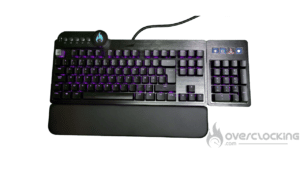 Another important point is the possibility of tilting the keyboard in steps with small magnetic wedges that you put in the corners under the keyboard (it really holds very well). The wrist rest is quite comfortable and quick to remove and put back if needed.
The design
Since the brushed part of the aluminum is not uniform, it gives an unfinished look, which is a shame considering the quality of the rest. 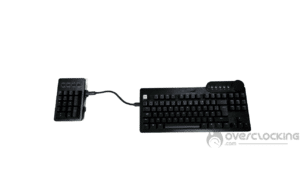 As a reminder, on the back we have several channels to pass a USB cable. By default, we’ll put it at the top, but it’s possible to put it on the right as well as the left, but also at the bottom. I think this is useful when we plug another USB cable into the keyboard, because yes, it also acts as a hub (plus an extension cord, because there is only one plug) with a USB type-A output, which is on the top edge of the keyboard.
Switches
Basically, on our sample, there are switches of the brand Cherry more precisely MX Red. We have in the bundle 5 types of Cherry MX: MX Brown, MX Red, MX Blue, MX Silent Red and finally MX Speed Silver.
This intention to send with the keyboard each of the possible switches from Cherry is nice to know if you like, or even to make a change on a single key, and thus give another feeling when pressing it (space bar for example).
 This keyboard being built on Cherry MX, there is no problem to change switches and thus radically change the quality of the typing. To test the compatibility, we tried to use YOK Mint Pandas switches and it works very well. Also, don’t forget that all the tools to remove the keycaps and switches are included.
Noise
For this test, we put the five switches side by side on the A, Z, E, R and T keys in this order, MX Blue, MX Red, MX Silent Red, MX Brown and MX Speed Silver.
MX Blue You can hear the recognizable click of the Blue with this hold effect.
MX Red Much lighter and more direct on the press, you can still hear the hit at the end of the stroke.
MX Silent Red Much smoother than the simple Red, it is also quieter. Good, that’s the goal. But we can feel a slight restraint stronger than the simple Red .
MX Brown The classic and basic one when you don’t know what to turn to. It’s a switch that is a mix of all the others. The sound is a bit more metallic. This must be due to the fact that it is resting on the aluminum chassis of the keyboard.
MX Speed Silver Less metallic noise than the Brown, but faster than the Red.
The RGB
Of course, the keyboard is RGB with a customizable LED per key. But there is also lighting between the two aluminum plates. A detail that gives something very ” smooth ” and pleasant on a desk.
The software
This software is convenient to use and to set up. For example, there is no need to create an account, as is the case with some competitors. Nevertheless, there are a lot of things to review, like for example the ergonomics, when you want to select an icon to display it under the key.

To record a macro, you have to choose the function and then a second zone appears to do what you want. Either link it to a program, or even a key combination. It is also possible to make subdirectories or to swap between profiles. This really gives a multitude of possibilities on only 4 keys.
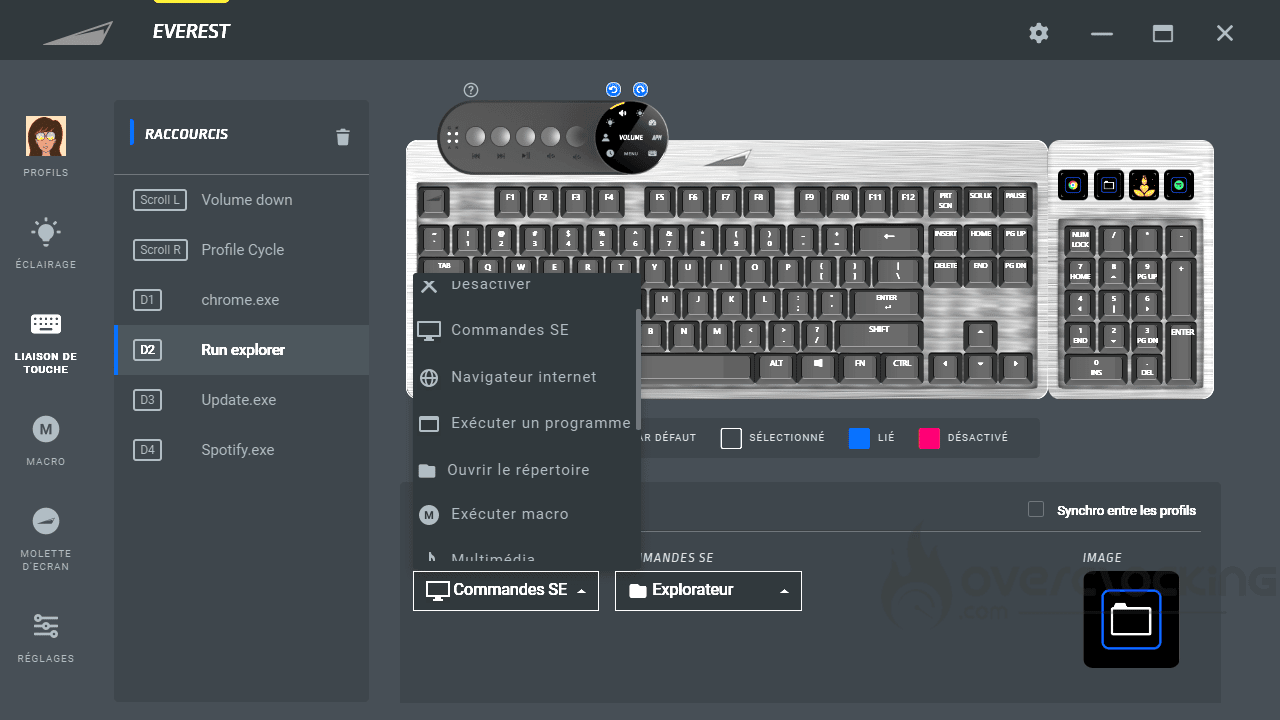 For the RGB part, it has 8 possible effects, it goes from the wave to the reactivity when pressing the key. The customization is rather limited, because you can’t choose more than 2 different colors. For example, we want to make a wave of color, it is only a single color. This means that only the chosen color will be shown and the rest is black. Or in double color, that is to say, that the black previously, is replaced by the second color chosen. No gradient possible. And finally we have the “rainbow” mode with all the colors.
Concerning the speed setting, we touch here something more personal. The minimum speed remains too fast…But it remains subjective. Concerning the brightness, it is ON or OFF and not between the two, and when it is OFF, you can’t see anything, so you might as well stay on the full brightness constantly.
It is possible to put information such as the clock but also information about the CPU usage in percentage. However, if you use the latter, it is impossible to use a macro on it. So unfortunately we lose a key. For example, you can put the view of the live CPU usage, which is very useful when you are streaming or even playing. Clicking on the task manager is unfortunately impossible. Hoping to be able to do it with an update in the future.[nextpage title=”Conclusion”]
Conclusion
Does this Everest Max meet the philosophy of the Mountain brand: innovation, performance, aesthetics and modularity?
A modularity Mountain sauce
As far as modularity is concerned, we have a very modular keyboard, with many possibilities, which makes it very pleasant to configure throughout its life. The aesthetic side is still to be refined.
As for the performance, it’s on the software level that there is still some work to do. Luckily, this can be changed by updates. And finally, a point that encompasses the other three: yes, it is innovative, even if there are some points to change, it is on a very good way.
Given its modularity and sober aesthetics, it can be used anywhere without disrupting your setup. Its design suggests that it is a keyboard that will last and that should help us to write mail and kill zombies.
Price
For the price, we are at 249.99 € on their online store. Mountain is doing the “black november”, so the price of the keyboard is down to 179.99 €, which makes it a great deal of the moment. We can see that we are in the average price for this kind of keyboard.
Mountain Everest Max
We liked
- The very complete bundle
- The weight for stability
- Possibility to use it for left-handed people
- The great flexibility in the possibility of modulation (for example, the hot-swappable switches)
- Possibility to choose the angle of the keyboard
- Additional macro keys with display
- The RGB that also comes out on the edge
- Additional USB port
- The channels to pass the USB cable
We liked less
- Some parts of the software really need to be revised.
- The numpad can be removed a little too easily
- The price, which does not put it within the reach of all the purses.
- The aluminium finish which seems to look like an unfinished product in some places.
 In the end, we have a keyboard that is here to stay and that should follow us as we wish. There are certainly things that need to be revised. But for us this product has very good bases.

