
After launching the iCUE Link RGB series, Corsair shortly afterwards offered the same series, but equipped with an LCD screen. Corsair is renewing its series with a screen, and taking the opportunity to send us its iCUE Link H150i LCD, the 360 mm version of the series.

Presentation:
The iCUE Link series gets new watercooling kits with the addition of the LCD series. The H170i, H150i and H100i LCD models are available in 420 mm, 360 mm and 240 mm sizes. In terms of color, the AIO is available in black, with a 360 mm version in white.
As this model is very similar to the H170i RGB, we find a large common base. First and foremost, there’s the new iCUE Link connection system. This drastically reduces the number of cables in your installation. What’s more, it greatly simplifies AIO installation!
Once again, the brand highlights its high performance, thanks in particular to its “split-flow” copper base. What’s more, heat transfer between the CPU and the base will be greatly simplified thanks to the pre-applied paste of the in-house XTM70. This promises to be a high-performance product!
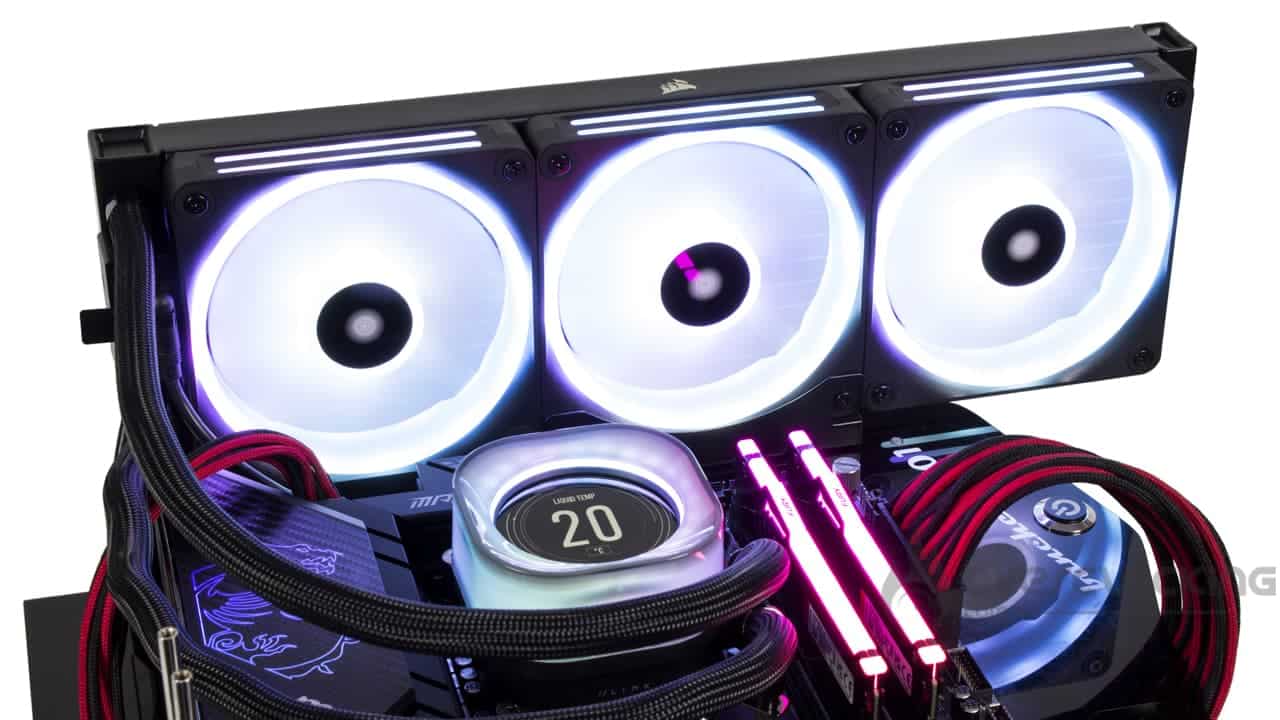
In terms of ventilation, the brand opts for its new QX RGB fans, mills equipped with 34 aRGB diodes. These fans feature a clever frame connection system. These fans have no connectors, making them easy to install… especially as they are fitted as standard to the radiator, saving even more time during assembly!
Once again, we have an AIO that can be fully controlled via the brand’s iCUE software suite. Via the latter, we can take advantage of 0 RPM for maximum idle silence. Likewise, this software will enable us to customize the pump’s LCD screen. Via the latter, we can choose what to display: system information or .jpeg/.gif for more customization. 
Unfortunately, when it comes to the price tag, Corsair has clearly let itself go. The iCUE H170i RGB was already expensive, but now it’s gone up a notch. Officially, the invoice is almost €400 – €379.90 to be precise. At this price, it’s clear that you’ll be able to find better-performing solutions, especially when it comes to custom watercooling.
[nextpage title=”The iCUE Link H150i LCD kit”]


In terms of packaging, we find something similar to the kit tested previously. The product arrives in a black and yellow box with an illustration of the kit on the front. Once again, a reminder of its functions/features can be found on the back and sides.
Inside, it’s the classic cardboard mold in charge of protecting all this little world. Once again, recycled plastic makes an appearance in the form of a bag enveloping theAIO’s various components. This time, there are no screws and bolts to wander around like last time.
Radiator:
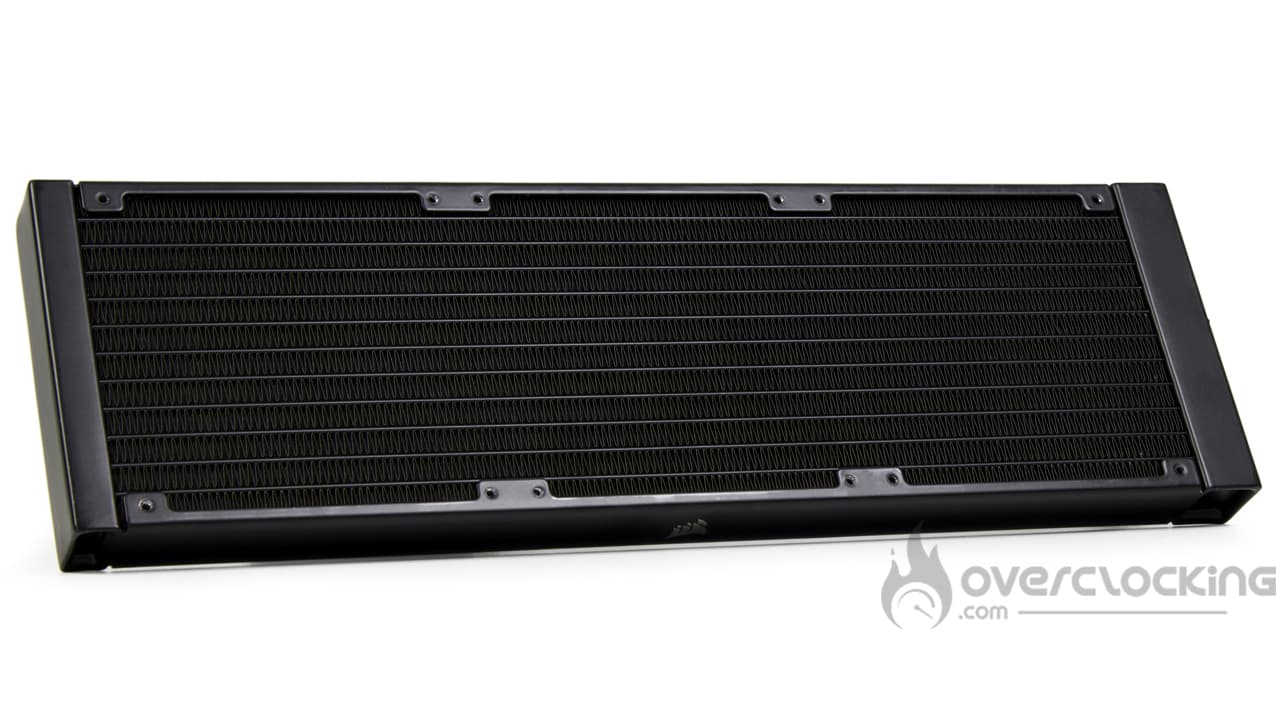
After reviewing the H170i RGB, the radiator on this 360 mm version looks tiny to us, but it’s not. Just a “bigger” habit. This translates into dimensions of 397 (W) x 120 (D) x 27 (H) mm. Here, the height is a standard 27 mm. Gone are the big radiators like the Arctic Liquid Freezer II in 38 mm.
Once again, there’s an imposing block between the tubes. This is the block to which the kit will be connected. It features two proprietary connectors linked to the iCUE Link system, plus a USB type C connector. The latter will be useful for connecting and powering the pump’s LCD screen.
Once again, the radiator is beautifully finished. The radiator features a neatly applied black paint finish. On the sides, unlike what NZXT can offer, there are no visible rivets or screws. Only the brand logo is present.


To connect the radiator to the pump, two 45 cm long tubes are used. These feature a nylon sheath for finishing, which is of the same type as that of the H170i. If it appears looser than on previous series, it’s because it’s also used to conceal cables, rather like Arctic’s Liquid Freezer II.
Pump block:
In itself, the design of the pump on this iCUE Link H150i LCD changes very little from the RGB version. The design is very similar, with translucent plastic tinted black. In the center, there’s no logo, no, here we’re dealing with an LCD screen.


Speaking of screens, Corsair offers us an IPS LCD model. With a diagonal of 2.1″, it displays in 480×480, all at 30 Hz. Brightness is good, at 600 cd/m², while colors are displayed in 24-bit. And having tried it out, it’s clear that the display stands out, it’s easy to read and the viewing angles are open. You don’t have to be right in front of it to see what’s on the screen!
Once again, the block is 75 mm square and XX mm high. The iCUE Link H150i LCD pump also benefits from a slightly eccentric base so as not to clutter the memory. This base measures 56 x 56 mm, ideal for covering theIHS of any CPU currently on the market.
Once again, the 90° end caps on the side of the pump are particularly neat. They are finished in black chrome, while the pump’s cables are concealed. Yes, there’s no cable at the block outlet!

Finally, under the copper base, we can see the thermal paste pre-applied in the form of a triangle. The copper base, meanwhile, is screwed to the rest of the carcass via 8 Phillips-head screws!
Compatibility :
In terms of compatible platforms, Corsair highlights support for :
- Intel: LGA-115x – LGA-1200 – LGA-1700 – LGA-2000
- AMD: AM5 – AM4
Compared with its H170i RGB counterpart, this iCUE Link H150i LCD loses compatibility with AMD’s HEDT platform. It has to be said that this socket imposes very specific constraints in terms of pump size and dissipation capacity. Clearly, this heatsink doesn’t seem to fit.
Fans :
In terms of ventilation, once again we find mills from the QX RGB series. This time, they come in 120 mm and feature a design very similar to those in 140 mm. The frame is square and features rubber silentblocks to dampen vibrations. Luminous double edgings are present on the edges, while the inside features a luminous ring.
Once again, with so many LEDs (x34), this makes for a particularly thick frame, leading to shortened blades. The blades, of which there are seven, have a rather thick, curved profile. They are translucent, white in color, the aim being to maximize the diffusion of RGB lighting.


Connection is via the frame, using a connector bridge system. Opposite this, a wedge is present to ensure that the fans stay firmly in place. They are also magnetic to simplify positioning.
As for specifications, the brand announces fans with a particularly high speed range: from 480 rpm to 2400 rpm. At full fan speed, airflow is 63.1 CFM, while static pressure rises to 3.8 mmH2O.
The bundle:
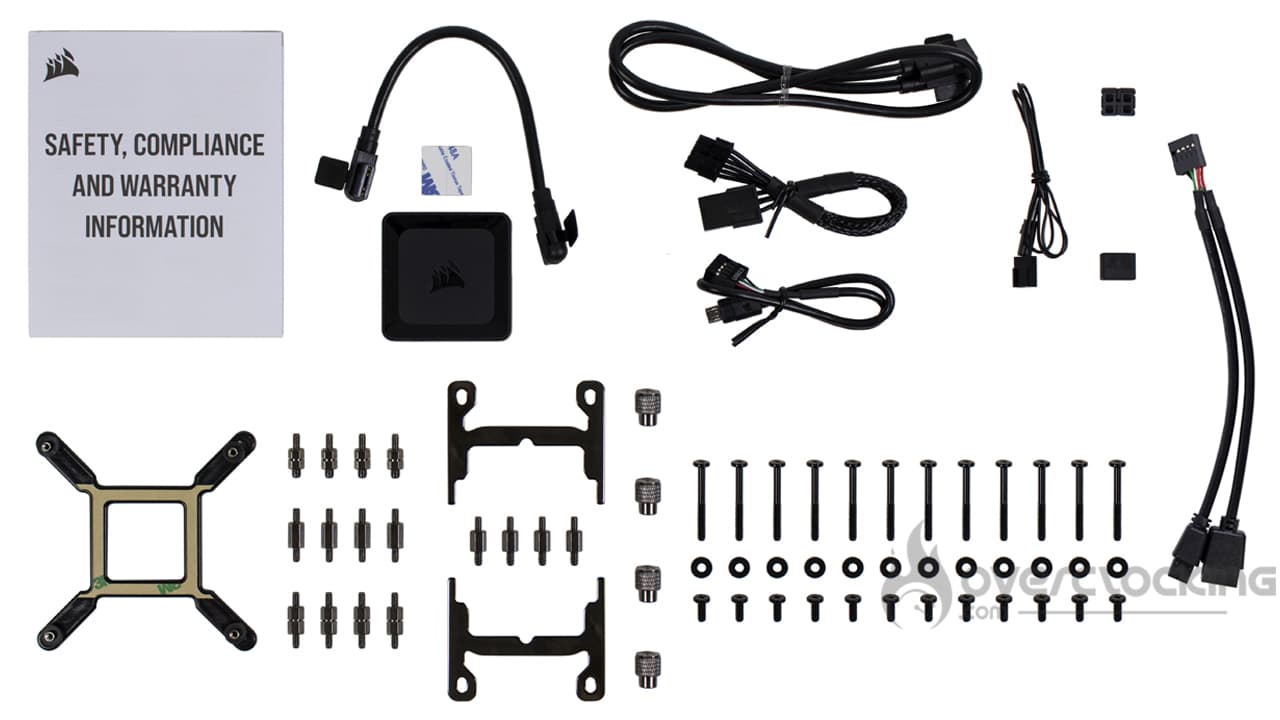
The accessory part arrives in various small plastic bags containing :
- A warranty guide
- A cable to connect the fans to the radiator
- ICUE Link hub
- A second cable to connect the radiator to the iCUE Link hub
- 6-pin PCIe power cord for the hub
- USB cable for connecting hub to motherboard
- Tachometer cable
- Connector bridge and shim (for fans)
- Metal backplate and screws for Intel sockets
- Mounting arms and spacers for socket AM4/5
- Fans/radiators screws and washers
- USB 2.0 dual header splitter
Once again, we find an accessory section offering everything you need to assemble the kit. This time, the splitter for a dual header 2.0 is supplied, as you’ll need to connect the screen to your motherboard in addition to the hub to benefit from all the kit’s features.
Roughly speaking:
Basically, this is a watercooling kit that presents itself very well, with an attractive design and good finish. In itself, there’s very little change from the RGB version, apart from the presence of an LCD display on top of the pump. Now, to find out how to install it, go to the next page!
[nextpage title=”Installation”]
For the installation part, you’ll need to keep your AMD backplate, as Corsair doesn’t supply one. If you don’t have one any more, a quick look on eBay should make it easy to find one.
Assembling the iCUE Link H150i LCD :

In the case of the iCUE Link H150i LCD, mounting is identical to that of the H170i RGB from the same series. So, if you’re equipped with an AMD platform, you’ll need to start by removing the original (Intel) mounting arms. To do this, simply pull them out, then insert the AMD ones around the pump. Grooves simplify the operation.


Next, we place the multi-socket backplate on the back of the Intel board. As for the AMD motherboard, we’ll need to remove the original mounting arms. A large Phillips screwdriver will do the trick.
Once this second stage has been completed, the spacers need to be screwed into the four corners of the socket. Once the spacers are in place, there’s no need to apply thermal paste, as it’s already pre-applied to the base of the pump. All that’s left to do is place the whole assembly on the CPU and screw it in place using the nuts supplied.


Connection:


Once again, there’s very little wiring to deal with. The first thing to do is to connect the fans to the radiator via the short iCUE Link cable. Then, all this will be connected to the hub supplied with the kit.
Next, the power supply is connected via a 6-pin PCIe socket, while a USB 2.0 connector is required for software control. Finally, the tachometer is connected to a fan socket on your motherboard. This LCD model is a little unusual in that a USB-C to USB 2.0 header cable is required to drive the kit’s display.
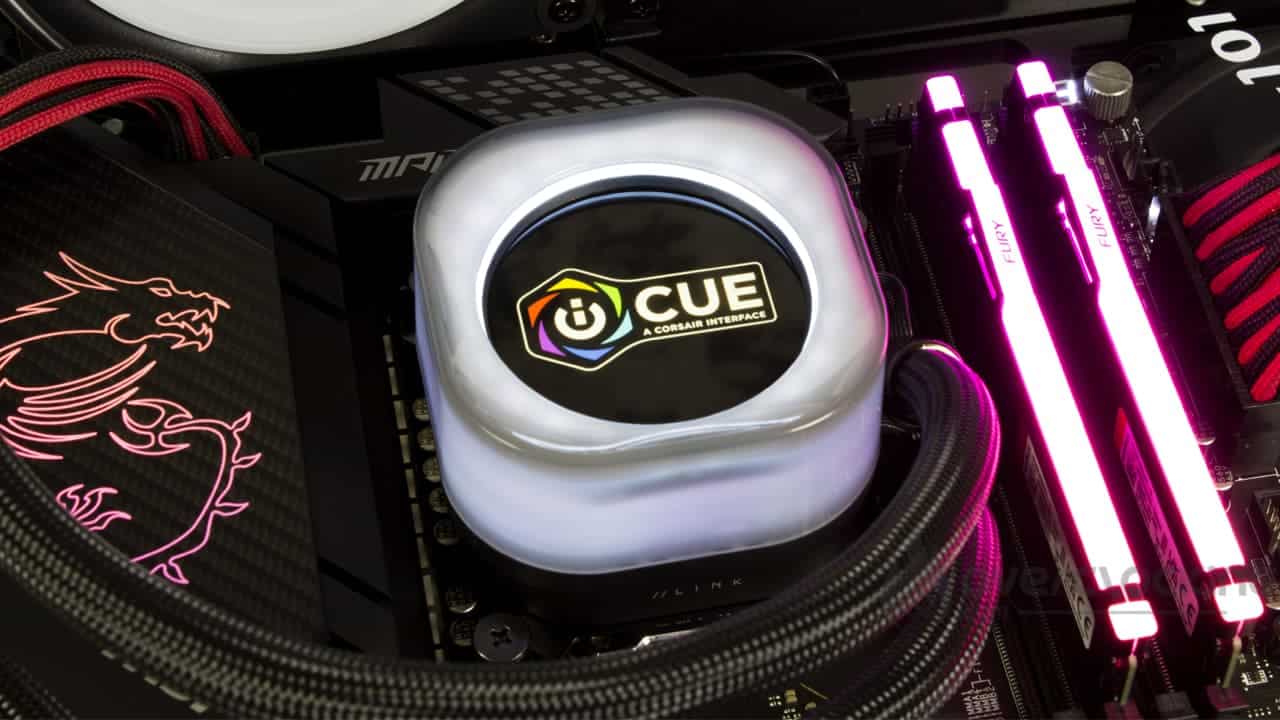
In any case, compared with previous-generation kits such as the Elite Capellix, the number of cables is greatly reduced. What’s more, the hub is even more compact, taking up even less space on the back of your motherboard tray.
[nextpage title=”Protocol”]
A small update to our test protocol. We’ve changed the software we used to stress our configuration. The same applies to the different profiles.
For test purposes, we’ll be comparing the Pure Loop 2 280 with other models in 240 mm, 280 mm, 360 mm and even 420 mm:
- iCUE Link H150i LCD (Corsair)
- iCUE Link H170i RGB (Corsair)
- Kraken 240 RGB (NZXT)
- Kraken Elite 360 (NZXT)
- Liquid Freezer II 240 (Arctic)
- Liquid Freezer II 420 (Arctic)
- Pure Loop 2 280 (be quiet!)
- Ryuo III 240 (Asus)
- Ryuo III 360 (Asus)
- Vida 240 Slim (Silverstone)
[nextpage title=”Speed and noise”]
Fan speed :
We’re starting from scratch with our series of temperature readings. Let’s specify the fan speeds recorded during our readings (for 12V, 8V, 5V):

As far as fan speeds are concerned, we’re dealing here with particularly fast mills. At full speed, they reach 2400 rpm, compared with 1000 rpm at low speed. At mid-range, with 66% PWM signal, we record 1600 rpm.
Noise :

As for noise, at full speed the kit proves to be particularly noisy, as we recorded 49.5 dB. That’s a far cry from the 39 dB of a Liquid Freezer II 420… Fortunately, as soon as you adjust the fan speed, you can significantly reduce the noise level. At 1600 rpm, we’re down to 37.5 dB, while the fan will be inaudible at low speeds… OUF!
[nextpage title=”Intel CPU temperatures”]
95W processor :
We start with the 95W profile, a fairly average power consumption, especially when you consider the basic consumption of this 13600K. We’re here to simulate the power consumption of small processors with a reasonable number of cores. In theory, everyone should do well!

As far as temperatures are concerned, at 95W we find a kit that behaves rather well at full speed. As we can see, at 51°C, it’s not far behind a Ryuo III 360, for example… However, as fan speed drops, temperatures rise. This takes us to 53°C at mid-range, compared with 56°C at low speed. As it stands, a 240 mm kit performs just as well.
130W processor :
Here, we’re taking our readings on a Core i5 13600K, so power consumption reaches 130W. The P-Core runs at 4.5 GHz, the E-Core at 3.5 GHz and the VCore at 1.270V!

As consumption increases to 130W, temperatures inevitably rise. Once again, Corsair’s kit finds itself in difficulty as soon as its ventilation is running at low rpm… probably due to fans lacking punch at low speeds. Otherwise, when operating at full speed, we find ourselves on a par with a Kraken 240 RGB and ahead of a Liquid Freezer II 420.
130W processor:
Finally, we end our series of readings with our Core i5 13600K, which consumes 170W. For this, we push the frequencies a little further, as well as the VCore, which now rises to 1.350V!

Finally, with high power consumption, we obtain interesting results at full speed with 77°C. As it stands, it stands out from the other 240 mm kits, while coming close to the Ryuo III 360. However, it is quickly penalized as fan speed decreases.
Summary :
In broad terms, the iCUE Link H150i is a kit that performs well at high temperatures, with its ventilation fully calibrated. Otherwise, it seems to lack the low-end punch needed to compete with the biggest kits.
[nextpage title=”Intel temperature-to-noise ratio”]
On these perf/noise ratio graphs, we remind you that it’s best to be positioned as far to the bottom left of the graph as possible. For ease of reading, the leftmost point symbolizes 12V ventilation, the central point 8V ventilation and the rightmost 5V.

At 95W, the iCUE Link H150i isn’t exactly at its best, since, as can be seen, it tends to be detached from the rest of the competition. As it is, we prefer smaller 240 mm/280 mm kits that manage to offer just as much, but with a lower noise level.

With a power consumption of 130W on our processor, the situation isn’t much better for this Corsair kit… Even if it comes a little closer to the Kraken 240 RGB and Pure Loop 2 280 kits, it still lags behind the pack in 360/420 mm.

At 170W, we find a particularly stretched curve that picks up the larger kits at full revs. As the revs drop, we find ourselves with a kit that lags behind, a sign of ventilation that deserves to be more punchy at low speeds.
[nextpage title=”Conclusion”]
We’ve come to the end of this test of Corsair’s iCUE Link H150i RGB. Are we dealing with a successful product? Let’s take a closer look!
At last, a kit with few cables!
Once again we find a watercooling kit from the iCUE Link series. We’re not going to lie: this second run confirms what we thought of the H170i RGB: it’s a real plus for the series… Especially when you think of the brand’s previous Capellix kits. Here, we find ourselves with few cables to manage, an even more compact controller and, in short, wiring that’s simple to install.
As for the rest of the assembly, it’s easy enough to do without a tool to tighten the pump… although a screwdriver is recommended to exert the right pressure on the processor.
This time, the brand is equipping its kit with an LCD screen for monitoring the temperature of its components or for further customization. In any case, the latter is very attractive, with sufficient resolution to be perfectly legible. What’s more, the brightness and wide viewing angles make it easy to see!
Half-tone performance..
As far as temperatures are concerned, our kit is rather… delicate. Indeed, as long as it’s running at full speed, it’s a willing performer, especially with a model with high power consumption. As we’ve seen, in these conditions, it can compete with the Ryuo III 360 from Asus. However, as soon as you regulate it just a little, temperatures soar quite rapidly, to the point of delivering performance similar to that of a much more compact 240 mm kit.
Inevitably, the temperature/noise ratio takes a hit, with the AIO lagging behind its rivals in the same format… even though it’s trying to break through at full speed.
As for noise, of course it’s (very) noisy at full throttle, but once muzzled, it becomes bearable again. At 1000rpm, we have a perfectly silent AIO that won’t bother you in the slightest, unlike ASUS kits, for example, which are slightly noisy.
An unaffordable price :
However, there’s one thing to consider beyond performance and noise: the price tag. Clearly, at $270 in the US or €380 in Europe, the brand is really pulling out all the stops by offering us an AIO at this price. Yes, it’s got a nice screen, and yes, the cabling system has been simplified, but it’s still dangerously close to €400.
At this price, it’s clear that you’ll find ready-to-install custom sets that perform much better. And if you want an AIO with a screen, there are other, less expensive references on the market.
Corsair iCUE Link H150i LCD:
We like:
- The radiator is as well finished as ever!
- Pleasing pump design.
- Attractive, well-defined, bright display
- The new iCUE Link system is easy to plug in… and requires very few cables.
- Ventilation already fitted as standard
- Full management via Corsair’s iCUE suite(RGB, speeds, etc.)
- Correct temperatures at full speed
- Controlled noise at low speeds.
We liked less :
- Temperatures that lag as soon as you reduce speed
- Noise pollution at full throttle!
- The bill that literally explodes!

Sad to say, we don’t see how we can recommend such a kit. Yes, the wiring is simple to install, yes, the screen is high-quality, and full software management is possible. However, even beyond the temperatures and noise, the price tag makes it de facto unaffordable. Who’d spend $270 or €380 on a watercooling kit when you can have a custom loop? And if it’s the screen you’re after, there are other, less expensive solutions available, even from Corsair… Even if you have to bother with cables.
Many thanks to Corsair!

