
Another brand to pass through our hands is Endorfy. The Polish-based company generously sent us their latest AIO kit, aka the Navis F360 RGB. We were a bit curious, as this isn’t the first time we’ve talked about the brand on OCC, and we wanted to see what their equipment was like. So we’re off to test this model!

Presentation:
Endorfy, formerly SilentiumPC, is a brand specialising in computer hardware. Its catalogue includes AIOs such as the Navis series, which comes in 240 mm with the F240, 280 (F280) and 360 mm with the F360. Of course, RGB and no-light versions are also available.
Broadly speaking, the brand praises the silence of its kit in operation. To ensure quiet operation, the kit features a pump with a ceramic bearing. This ensures smooth operation when the pump is running.
Coupled with the pump are a trio of Fluctus 120 aRGB fans, which the brand claims have won awards for their silent operation. And to ensure this silence in operation, the blades have ridges at their tips. We’ll see how this tickles our sound meter in operation, but believe us, it’s pretty effective.
As for the radiator, we find a 360 mm block with a length of around 40 cm, ensuring effective heat exchange, according to the brand.
Finally, there’s aRGB lighting on both the fans and the pump. Even the brand logo is illuminated. What’s more, if you have a motherboard that’s a little old, or an entry-level model, you can still take advantage of the lighting thanks to a small remote control supplied.

As for the price, this Navis F360 aRGB kit can easily be found on the Net for around €130. As you can see, the kit is positioned rather aggressively. At this price, you’re looking at MSI’s CoreLiquid I360 MAGs, for example.
[nextpage title=”The Navis F360 aRGB from Endorfy”]


The packaging is fairly simple, with a recycled cardboard box. The box features an illustration of the kit on the front and a detailed specification on the back.
Inside, the kit is housed in a block of white foam. Clearly, the protections are at their maximum level, so there should be no breakage on receipt. We have nothing to report.
The radiator :


The radiator has a neat finish but a very basic design. While the radiator is square and has a carefully applied black paint job, the sides are sadly empty, with no brand logo or little embellishments like you’ll see on other competitors such as NZXT.
Finish and design aside, this is a block with classic dimensions. It measures 395 (W) x 120 (D) x 28 (H) mm. With this kit, there are no nasty surprises like on an Arctic Liquid Freezer or a Hyte Thicc Q60, for example. It’s true that these AIOs benefit from a particularly thick heatsink, which means you have to be careful about compatibility with your case.

To connect the pump to the radiator, we find, like other AIOs, two hoses. Here, the finish is meticulous, with a finely braided nylon sheath surrounding them. The length is a comfortable 42 cm. Be warned, though, that although the brand claims that they are flexible, they are less so than those found on Corsair or MSI, for example.
The pump unit :
The pump unit is fairly compact, measuring 90 (W) x 95 (D) x 51 (H) mm.
 The design is fairly simple, especially compared with what the competition is offering. For this Navis F360 aRGB, Endorfy has opted for a pump cover with a black anodised brushed aluminium section. In the centre, the brand logo is machined directly into the plate.
What’s more, you can already see the different aRGB zones on this pump cover, with a border running around the pump. A second zone is also present around the brand logo.
As is so often the case, only part of the pump’s information is known; here, only the speed is announced by the brand, with a rotation range of between 1,600 and 2,600 rpm.
Beneath the pump unit is the copper base. Here, the finish is particularly meticulous, with a sandblasted finish. There are no traces of machining as can be the case on kits sourced from Asetek or CoolIt, for example. What’s more, a total of twelve square-head screws are used to secure it to the rest of the block… the kind of end cap that’s hard to find. Otherwise, the 52.5 x 58.5 mm dimensions of the cold plate will allow you to cover the IHS of any processor.

Note that the mounting arms make one with the pump and cannot be removed. If the arms are made of plastic, their thickness and shape should ensure that they hold up well over time. In any case, compared with metal parts, there is no risk of them deforming under the pressure of screwing.
Finally, this block contains a number of connectors, including a SATA socket for the power supply. Pump speed information is sent back to the system via a 3-pin fan socket, while an aRGB male and female socket completes the picture.
Compatibility :
In terms of socket compatibility, Endorfy focuses on mainstream platforms and Intel’s HEDT sockets:
- Intel: LGA-2000 – LGA-1851 – LGA-1700 – LGA-1200 – LGA-115x
- AMD: AM5 – AM4
In itself, this is a classic list of compatible sockets, with support for the main mainstream platforms on the market. Likewise, Intel’s old high-end sockets are compatible, but there’s nothing from AMD, but that’s hardly surprising.
Fans:
As far as ventilation is concerned, the brand has equipped its AIO with a trio of Fluctus 120 aRGB fans. These fans are rather unusual in the shape of their blades. As you can see, there are nine of them, with a fairly significant curvature. However, that’s not their only peculiarity, as they also have rather pronounced serrations on their edges. According to the brand, it is this particular shape that enables the fans to be silent. This pattern is patented and known as psychoacoustic optimization.
Otherwise, there’s nothing special about the frame. It has a square shape and rubberised silent blocks to reduce parasitic vibrations. Finally, the Fluctus marking on the inside of the frame is an aesthetic feature.

Unfortunately, Endorfy isn’t very forthcoming when it comes to giving the technical specifications of its components. Here, as with the pump, we only know the operating speeds of the fans: from 250 to 1850 rpm. Static pressure and air flow are not given, which is a shame.
Let’s finish quickly with the connectors. There are two cables here, one for the power supply with a pair of male-female fan sockets, and the aRGB part also in male-female. By default, the fan is already mounted on the radiator, although it is partially wired.
The bundle:

The accessories for this Navis F360 aRGB come in different plastic bags and contain :
- Assembly instructions in leaflet form
- The necessary screws and bolts for mounting the pump
- Multisocket backplate for Intel platforms
- A flat spanner
- A syringe of thermal paste
- Remote control for aRGB lighting management (uses the reset button on the case) PWM extension lead
- Screws and bolts for mounting the heat sink
All you need to assemble the AIO kit is here. The brand goes a step further by offering an aRGB lighting remote control for motherboards without a lighting controller. This uses the reset button on your case to change the lighting effect. Otherwise, in absolute terms, the accessories section provides everything you need to mount the pump and the radiator.
Roughly speaking:
With this Navis F360 aRGB kit, Endorfy is offering us a completely classic reference. There’s no interchangeable screen or pump cover… No, we’re going for the essentials. However, the brand hasn’t succumbed to pre-applied thermal paste, which is good news because there’s a small syringe for multiple uses, provided you’re not too heavy-handed.
[nextpage title=”Installation”]
For installation, you’ll need to keep your AMD backplate, as Endorfy doesn’t supply one. If you don’t have one any more, a quick look on eBay should enable you to find one easily.
Assembling the Navis F360 aRGB:
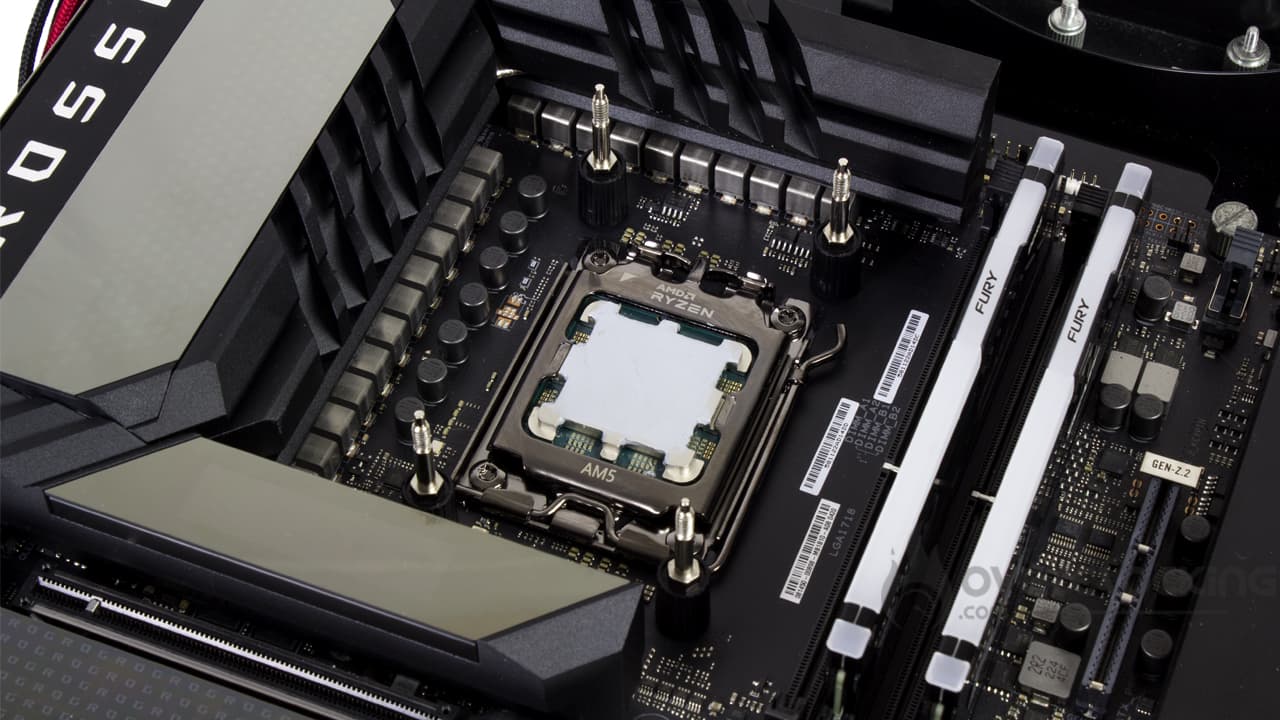
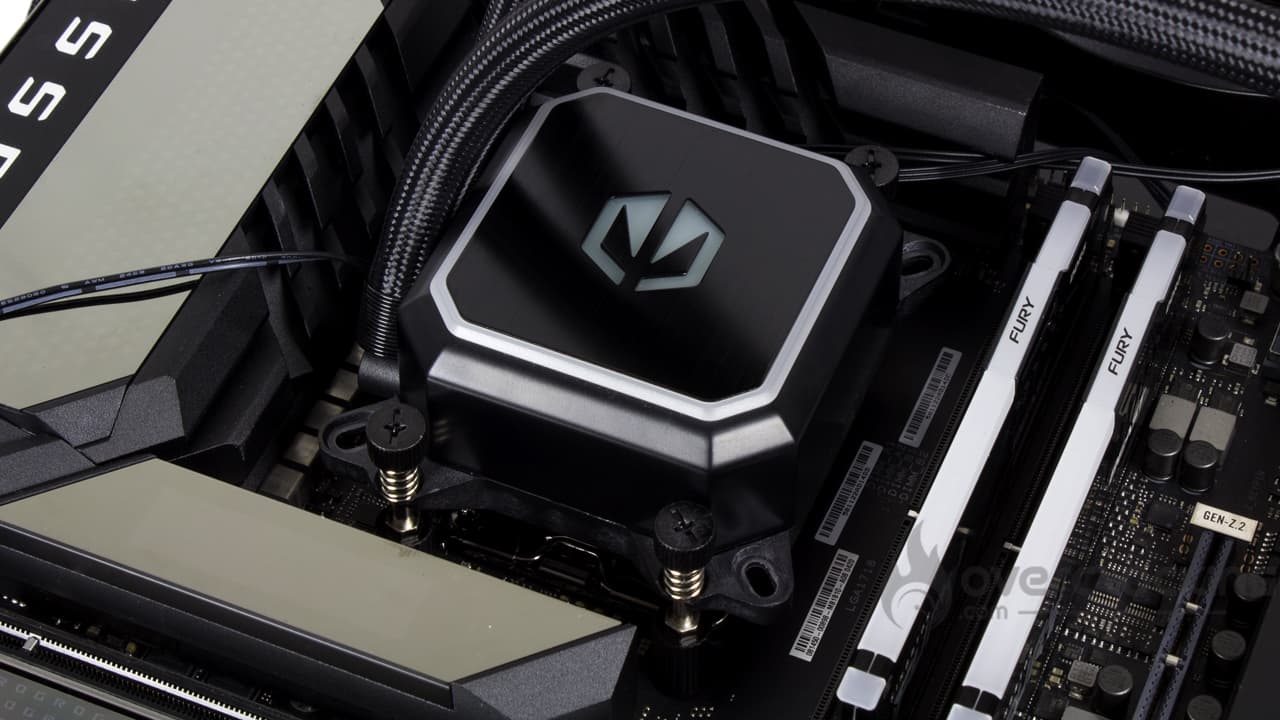
For mounting on AMD platforms, the first thing you’ll need to do is remove the original mounting arms from the motherboard. Once that’s done, you’ll need to place the mounting screws in the four corners of the socket. In this case, there is no difference between those for AMD and Intel mainstream sockets, as you will need to use the same ones: the one with the black plastic ring.

Next, you apply some thermal paste to the CPU and place the pump on top. All that’s left to do is screw it on, but before you do that, you’ll need to place springs on each threaded rod and then screw the whole thing on using black nuts. Of course, to distribute the pressure more evenly on the CPU, we screw in crosswise, at opposite angles.
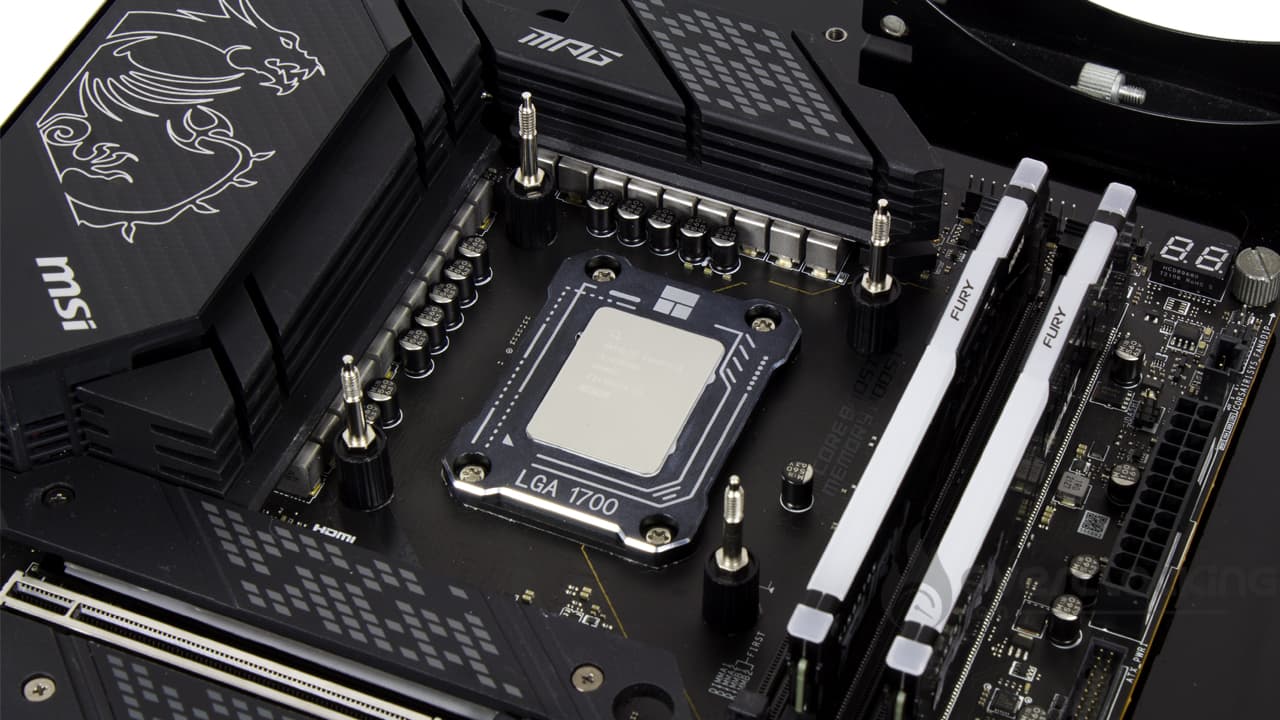
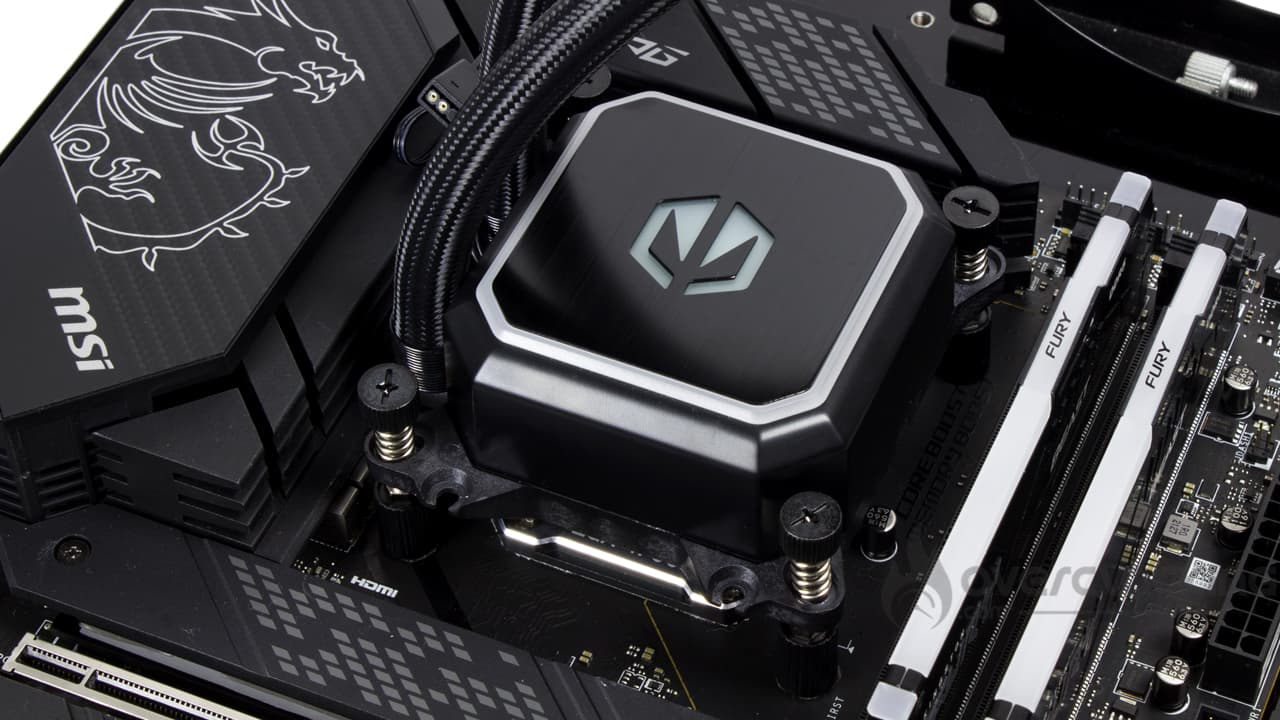
The procedure for Intel platforms is exactly the same. The only difference is that the backplate must be positioned on the back of the motherboard. Be careful, though, because depending on the socket, it may need to be placed at an angle, as is the case with the LGA-1200/115x.
All that’s left now is to connect the kit to our motherboard. In itself, this isn’t very complicated, as all you have to do is pull a PWM extension lead (supplied) to connect the fans to the motherboard. The same goes for the RGB, however, as all the fans are connected to each other and, ideally, the pump should also be connected to the fans, you end up running out of length. In short, with more up-to-date solutions like Corsair’s iCUE Link, for example.
[nextpage title=”Protocol”]
We’ll only be showing you the readings taken on our Ryzen 7 7900X consuming 105W and 170W. No 65W, as we don’t think this consumption is relevant for assessing the performance of AIO kits.
Here, we are now measuring the delta between the temperature measured on our CPU and the ambient temperature. Finally, the management of the fan speed is now entrusted to our motherboard. During the tests, we run the fans successively at 100%, 66% and 33%.

For the purposes of the test, we will compare the Navis F360 aRGB with other models in 240, 360 and even 420 mm:
- iCUE Link H170i RGB (Corsair)
- iCUE Link Titan 360 RX RGB (Corsair)
- Kraken Elite 360 RGB (NZXT)
- Light Loop 240 (be quiet!)
- Liquid Freezer II 240 (Arctic)
- MAG CoreLiquid i360 (MSI)
- ML240 Atmos (Cooler Master)
- Navis F360 aRGB (Endorfy
- Ryuo III 360 (ASUS)
[nextpage title=”Speed and noise”]
Fan speed :
So we’re starting our series of temperature readings from scratch. Let’s specify the fan speeds recorded during our readings (for 12V, 8V, 5V):

So we start by reading the fan speeds, and the least we can say is that they turn in accordance with the speed indicated on the data sheet. At full speed, the maximum speed is around 1850 rpm. With a PWM signal set at 66%, the mills fall back to 1450 rpm and end up at 800 rpm at 33%.
Noise :

When it comes to noise, it’s fair to say that the original shape of the Fluctus 120 aRGB seems to be paying off, since at full speed, the trio of fans generates just 38dB. That’s just ahead of Arctic’s Liquid Freezer II 240. At 66% and 33%, the ventilation will be very discreet with 32.5 dB and 30 dB. Roughly speaking, we’ve managed to reach the noise level of the Liquid Freezer II 360, or even less!
[nextpage title=”AMD CPU temperatures”]
105W processor :
Here, our CPU will run at 2.70 GHz constantly and on all its cores. We apply a VCore of 1,030 to obtain a power consumption of around 100 watts. This corresponds to the TDP of a Ryzen 7 7700X.

As far as temperatures are concerned, it’s a pleasant surprise that the Endorfy kit proves to be formidable on our Ryzen 9 7900X. As we can see, at full speed, it slips into second place with a delta of 32.9°C. At 66%, it doesn’t disappoint either. Finally, at 33%, it remains very efficient with a delta just over 40°C.
Processor at 170W :
Finally, we end with our 170W profile. Here the heat output is higher, and corresponds to the default TDP of the 7900X. Let’s see how our coolings fare!

With the increase in power consumption, the Navis F360 aRGB does not lose out at its highest fan speeds. However, at low speeds, temperatures tend to rise quite sharply. You get the feeling that you’re reaching the limit of what the fans can deliver.
Summary:
Broadly speaking, Endorfy offers us a very efficient AIO in terms of temperature. It manages to hold its own on our AMD processor against kits that are even bigger than it is. However, with its high power consumption, to get the best out of it, you should avoid running it at low speed.
[nextpage title=”AMD temperature-to-noise ratio”]
On these perf/noise ratio graphs, we remind you that the best position is as far down on the left of the graph as possible. For reading purposes, the point furthest to the left symbolises ventilation at 12V, the point in the centre ventilation at 8V and the point furthest to the right ventilation at 5V.
105W consumption :

With a power consumption of 105W, the Polish kit blows away all the competition, as you can easily see from the graph. At the same time, it has to be said that its low noise level is a particular advantage.
170W consumption :

At 170W, we find an almost similar situation, although at low revs, it starts to pull its leg as we can see. To get the best out of it, you’ll need to run the kit at mid-range at the very least. From there, you can get excellent temperatures while keeping noise levels down… Even if, in absolute terms, it’s not the noisiest kit we’ve ever tested!
[nextpage title=”Conclusion”]
We’ve come to the end of this test of the Endorfy Navis F360 aRGB. Are we dealing with a successful product? Let’s take a closer look!
Visually ok :
By opting for this watercooling system from Endorfy, you’re choosing a rather simple kit with a look that’s far from extravagant… Although, there is RGB lighting on the pump and fans. In any case, we didn’t notice any major problems with the finish. All that’s missing is a little logo on the sides of the radiator to make it look less empty.
Otherwise, out of the box, the brand has chosen to offer its kit partially assembled and wired. In fact, the fans are already in place on the radiator and they are connected to each other in series. All that remains is to fit the pump, screw the radiator to the box and complete the wiring.
Otherwise, as far as the bundle is concerned, it won’t be Christmas before time, since the brand will be supplying the accessories needed for assembly, and that’s all. There will be an RGB controller for older motherboards and a PWM extension lead for connecting the fans, but that’s about it.
Simple assembly:
Otherwise, fitting the pump is straightforward. In itself, the Polish brand is not revolutionising this stage and you will have to play with the backplate on Intel sockets and remove the original arms on AMD platforms. In short, nothing too complicated. However, the cabling may be a little more annoying in the sense that if there is a PWM extension lead for the fan power supply, you may be a little short on the RGB part since all the elements are connected to each other, which is not necessarily practical.
Surprising performance!
However, where the kit surprised us was in its performance. In fact, we weren’t expecting much, especially as it’s the first time we’ve heard of the OEM, Synergy Cooling. Be that as it may, on our Ryzen 9 7900X, it works rather well. In fact, we found it more efficient than some of Corsair’s larger kits, and the same goes for the new Kraken Elite. On the other hand, be careful not to be too greedy; to get the best out of it, avoid running the fan at low revs on large CPUs.
In any case, the fan remains silent, even at full speed. To give you an idea, the kit is less noisy than Arctic’s Liquid Freezer II 360 at full throttle! In any case, this combination of low noise and low temperatures makes the Navis F360 aRGB an excellent temperature/noise ratio!
A masterful bill!
Finally, at €130, the price is well within the acceptable range for a kit of this type. The only downside that could slow down its adoption is the fact that the brand is not well known. Unfortunately, Endorfy doesn’t have the same aura as Corsair, NZXT or MSI, which is a shame because the hardware is quite satisfactory.
Endorfy Navis F360 aRGB :
We like:
- The simple design
- Good overall finish
- The fan arrives mounted on the radiator and is partially wired
- The small RGB controller using the reset button on the casing
- Simple pump installation
- Silent operation
- Controlled temperatures on our Ryzen 9 7900X
- A very convincing temperature/noise ratio
- Well thought-out price tag
What we didn’t like :
- The radiator, which could do with a little logo (for aesthetic reasons only)
- The RGB fan cables are a little short
 In the end, we chose to award gold to Endorfy’s Navis F360 aRGB. This AIO is thermally efficient, acoustically silent and easy to install. While the design remains simple, the finish is good. What it might need is a little logo on the radiator to complete the look, and slightly longer RGB cables to simplify connection. But for €130, this is a very good reference!
Many thanks to Endorfy !

