

Corsair has launched a new range of watercooling kits with its Titan RX RGB Serie. With this new range, the brand offers us a number of customisation options, particularly for the pump cover, where it offers several alternatives to meet different needs. In short, the company oferred for us to test the iCUE Link Titan 360 RX RGB. We’ll see what happens!

Presentation:
Corsair offers us a range which includes a radiator in three different sizes:
- 240 mm for the smallest
- 280 mm for the intermediate model
- 360 mm for the largest
Of these kits, only the 240 mm and 360 mm versions are available in white. What’s more, this series doesn’t seem to benefit from a 420mm radiator… For the time being.
As the name suggests, this kit benefits from the brand’s famous iCUE Link ecosystem. Broadly speaking, this is a system for connecting several of the brand’s products via a single connector. This considerably reduces the number of cables in your installation. We put it to the test with the iCUE Link H150i LCD and iCUE Link H170i RGB.
Naturally, the brand emphasises the performance of its kit. To achieve this, the American company says it uses a pump that uses a three-phase motor, offering better flow while reducing noise levels. Finally, coupled with all this, we find a cold plate manufactured to offer the best possible contact with your processor.
The mounting kit has been further simplified for even faster installation. This time, the mounting screws are attached directly to the mounting lugs, limiting the number of components to be handled.
The brand also offers greater customisation with interchangeable pump covers to suit different needs and styles. The same goes for the RX RGB fans, with removable side panels to complete the look of your kit… And that’s without mentioning the aRGB lighting throughout.

In terms of price, this 360 mm kit is officially priced at €204.90, compared with €169.90 for 240 mm and €184.90 for 280 mm. It should be noted that there is no change in price depending on the colour. What’s more, it’s good to see the brand returning to more reasonable prices, even if there are products that are more rational in terms of cost.
[nextpage title=”The iCUE Link Titan RX 360 RGB”]
As for the packaging, there are no significant changes compared to the brand’s other products. It’s still a flat, elongated box in the brand’s signature black and yellow colours. Of course, we won’t go over the traditional illustrations and specifications on the front and back of the box.
Inside, we find a classic, but sufficient, moulded cardboard production. The various components of the AIO are carefully packaged individually. It’s worth noting that the radiator is over-packed in cardboard!
The radiator :
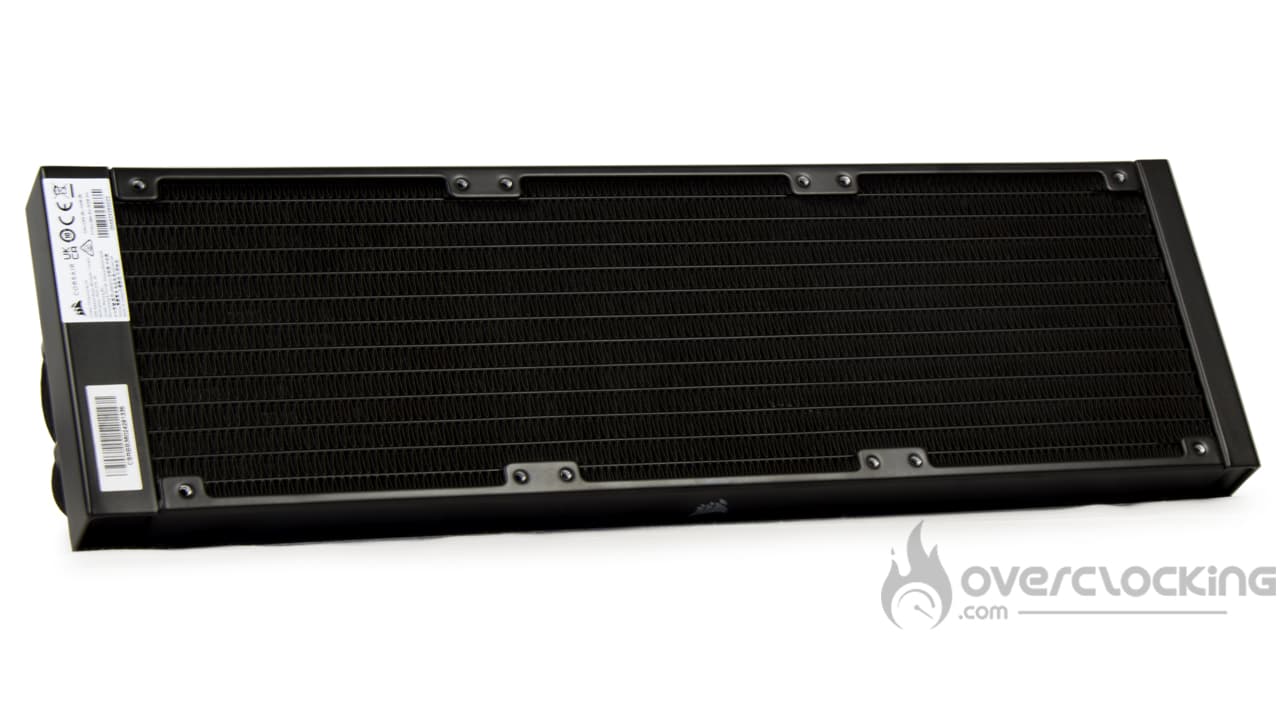
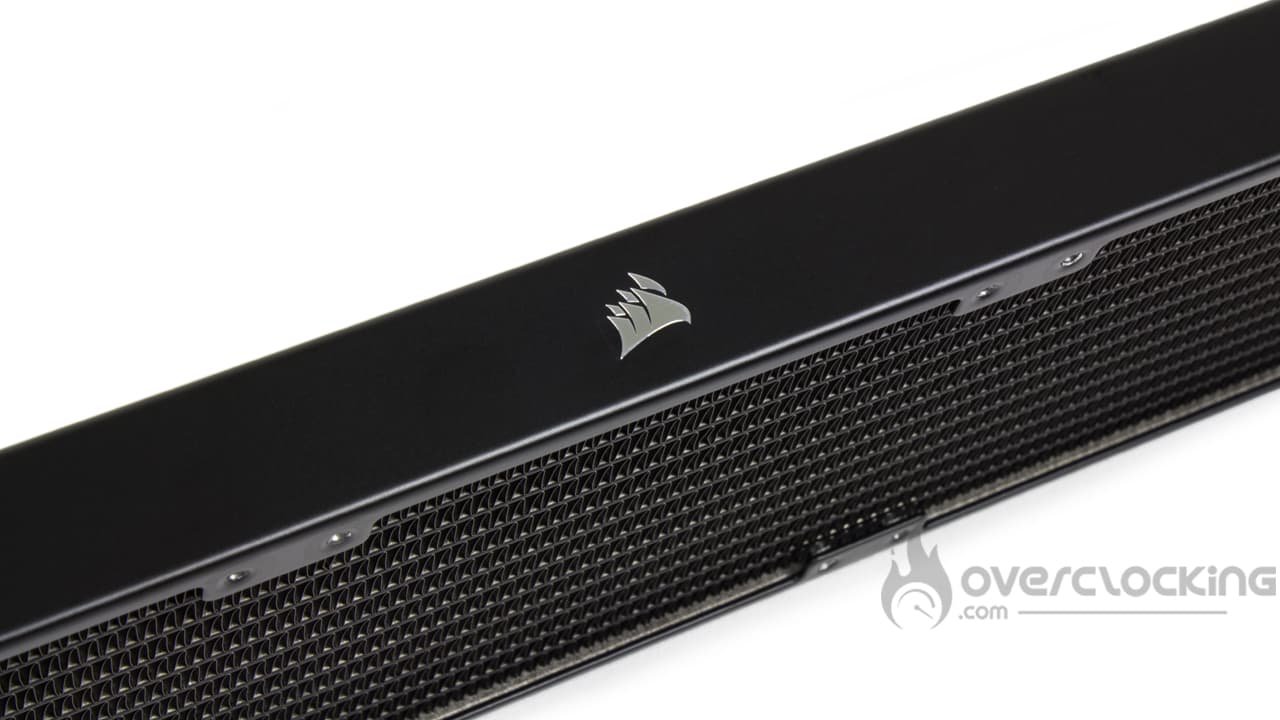
As far as the radiator is concerned, we’re once again treated to a very neat block from the brand. As you can see, the radiator is in an attractive, well-applied black. What’s more, the square shape, with no visible screws or rivets, makes for a rather classy unit, unlike what we find on Asetek Gen7 bases in particular. What’s more, there’s a small badge featuring the brand’s logo on the edge.
In terms of dimensions, the kit is not particularly original, measuring 396 mm in length, 120 mm in width and 27 mm in height. Unlike kits from Arctic, for example, you can easily fit it into a PC case without wondering whether the radiator fits or not!
To connect the radiator to the pump block, there are two hoses, each more than forty centimetres long. The finish is once again very neat, with an attractive, finely braided black sheath. However, it contrasts with that of the iCUE Link H170i RGB, which was rather loose and thick. On this model, the pump cables were hidden by this sheath.
The pump unit:
We now move on to the pump unit, which is 78 mm wide and 69 mm high. Once again, the design has evolved, and by default the cover features a Corsair logo held in place by a magnet system that can be rotated in 90° increments. Beneath this logo is a thick section of translucent plastic for aRGB lighting.
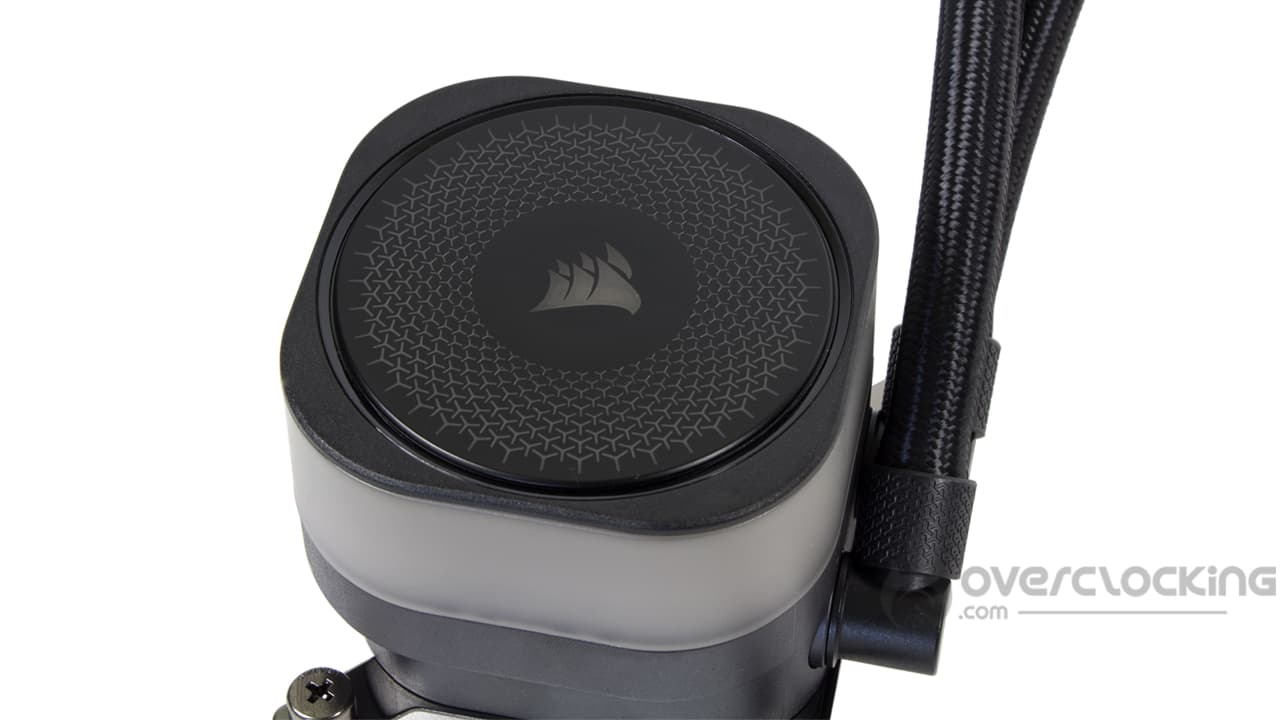
Although we would have appreciated it, the characteristics of the pump are not known. From our readings, we know that it operates at a maximum speed of around 3,000 rpm.
The cold plate is made of copper and measures 55 x 55 mm, enough to comfortably cover the IHS of Ryzen and Intel processors with socket LGA-1700. We also note that thermal paste is applied as standard, in the same pattern as the logo on the pump cover.
Finally, on the side, two 90° angled nozzles are also present and display this famous pattern.
Alternative bonnets:
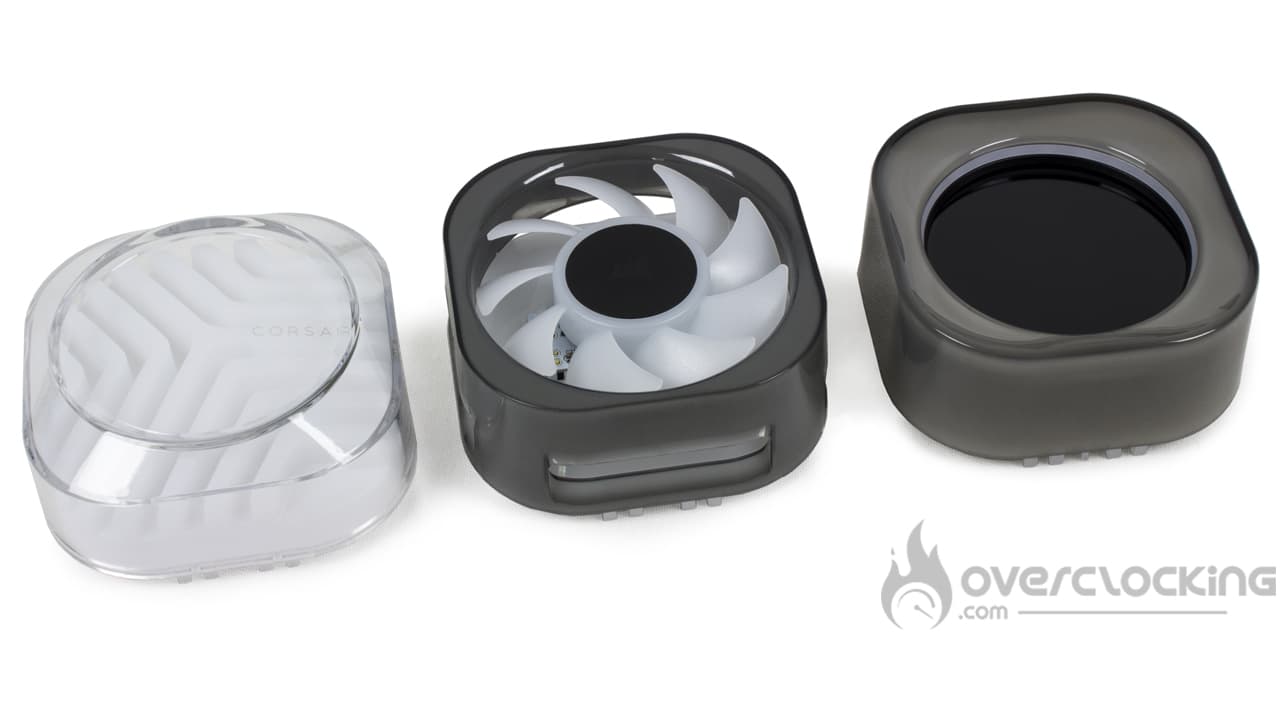
However, the special feature of this Titan RX series is the customisation made possible by the alternative pump cap. We’ve received them all, and you can see them above. From left to right we have :
- Groove: a cover that changes the design of the pump by focusing on aRGB lighting.
- VRM Fan: a cover featuring a fan that will help to cool the elements located around the socket: RAM and the motherboard’s VRM heatsink.
- LCD : a cover featuring a 2.1″ IPS LCD screen with 480×480 resolution. You can display data related to your system or customise it.
These covers meet different needs. When it comes to fitting, it’s simple: they simply clip onto the top of the kit’s pump and will require varying degrees of force to remove. We particularly struggled with the LCD screen on our side!
The price is €14.90 for the Groove cover, €29.90 for the VRM Fan and €99.90 for the LCD screen.
Compatibility :
As far as compatibility with sockets is concerned, Corsair gets straight to the point by making its AIO compatible with mainstream platforms only:
- Intel: LGA-1700 – LGA-1851
- AMD: AM5 – AM4
As we can see, the brand is abandoning Intel’s other LGA platforms other than the current models. On the AMD side, we are also losing support for HEDT such as TR4 and derivatives.
Fans:
As far as fans are concerned, we find some mills straight out of Corsair’s catalogue: the iCUE Link RX120 RGB.
These have classic dimensions, measuring 120 mm on each side and 25 mm thick. The frame is square in shape, but has translucent, removable side plates. One of these has a Corsair logo written all over it. Otherwise, there are rubberised silentblocks to limit parasitic vibrations as much as possible. On the reverse side, AirGuide technology is present, consisting of a total of nine separators to help channel the airflow. The fan blades are seven in number and have a fairly wide profile, as well as being translucent for better light diffusion.
However, we would highlight the support for iCUE Link technology, which features connectors integrated directly into the frame. Via a specific module, you’ll be able to fully control the speed of the fans and their lighting using Corsair’s iCUE software.
In terms of characteristics, the speed range is between 300 rpm and 1700 rpm. At full speed, the airflow will be 94.7 CFM, while the static pressure will rise to 3.75 mmH2O.
The :
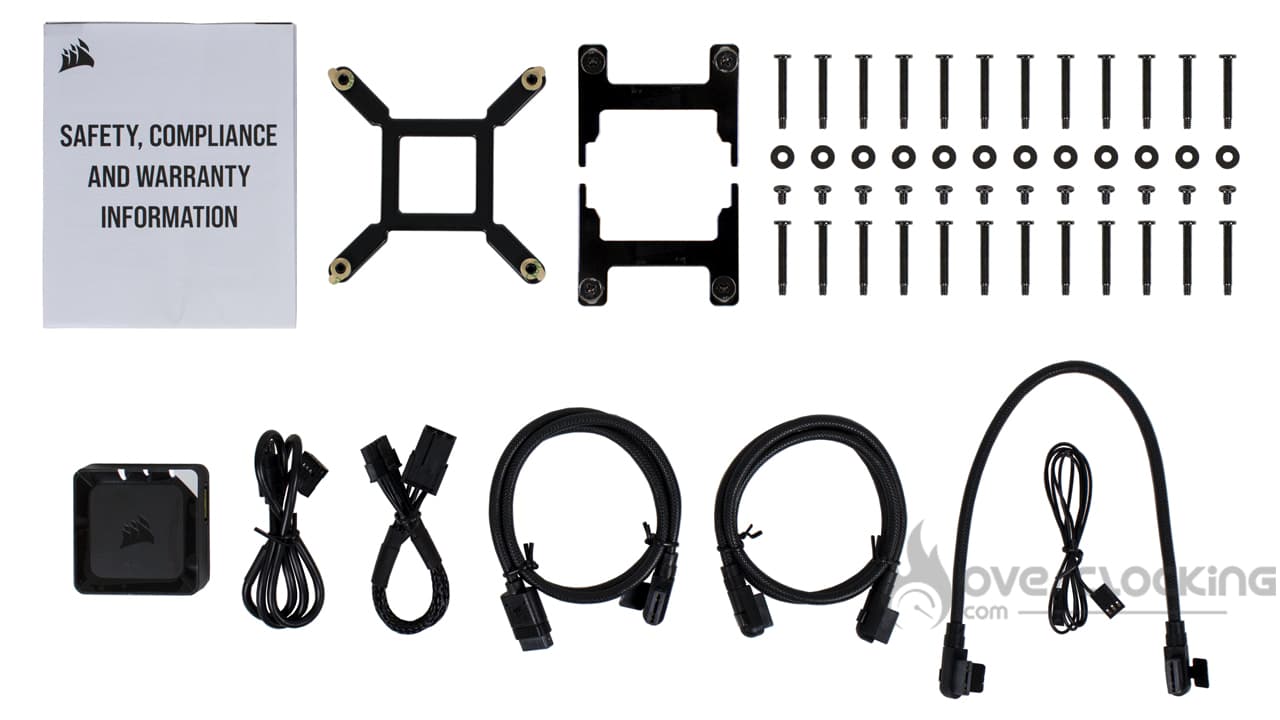
The bundle includes :
- A warranty guide
- A metal backplate for Intel platforms
- AMD mounting arms
- Screws and bolts for radiator and fans
- ICUE Link controller
- The necessary connectors, including :
- 50 cm USB cable
- 15 cm PCIe 6-pin power cable
- 60 cm iCUE Link cable, straight/angled
- 60 cm iCUE Link cable, angled/kinked
- 25 cm iCUE Link cable, angled/kinked
- 80 cm tachometer cable
The accessories section contains everything you need to assemble and connect your newly acquired kit. Note that a HUB is supplied, so if you want to complete your system with other iCUE Link components, you’ll be able to do so. The only constraint is that you can’t have more than 24 devices, which still leaves plenty to do.
All in all, it’s just a shame not to find a syringe of thermal paste. Don’t forget that the AIO retails for €205.
Roughly speaking:
Overall, Corsair offers us a very well finished watercooling kit with an attractive design. The iCUE Link part promises simplified assembly, especially as the fans are screwed onto the radiator as standard. Last but not least, we really appreciate the customisation offered by the alternative pump covers!
[nextpage title=”Installation”]
For installation, you’ll need to keep your AMD backplate, as Corsair doesn’t supply one. If you no longer have one, a quick look on eBay should enable you to find one easily.
Assembling the iCUE Link Titan 360 RX RGB:

Fitting the pump in this iCUE Link Titan 360 RX RGB kit is really very simple. In fact, on this model, the mounting screws are directly attached to the mounting arms. To switch from one platform to the other (Intel or AMD), all you have to do is swap the arms. The arms are simply inserted laterally into a groove around the pump. Note that Intel arms are fitted by default.
Next, on an Intel platform, you’ll need to remove the backplate supplied on the back of the motherboard, whereas on an AMD motherboard you’ll need to remove the arms surrounding the socket. Then all that’s left to do is position the pump on the CPU and screw it on. Here, as usual, you’ll need to work crosswise to maintain uniform pressure.
Once fitted and correctly wired, all that’s left to do is switch on the configuration. Above, you can see a rendering of the pump with the various covers. To find out more about connection/wiring, go here, as the principle remains the same.
[nextpage title=”Protocol”]
When it’s not one, it’s the other, and after having problems with our AMD platform, it’s now the turn of our Intel configuration to play up. We’re only going to give you the readings taken on our Ryzen 7 7900X, consuming 105W and 170W. No 65W, as we don’t think this consumption is relevant for assessing the performance of the watercooling kit.
Here, we are now measuring the delta between the temperature measured on our CPU and the ambient temperature. Finally, the management of the fan speed is now entrusted to our motherboard. During the tests, we run the fans successively at 100%, 66% and 33%.

For the purposes of the test, we’ll be comparing the iCUE Link Titan 360 RX RGB with other single-tower and dual-tower models in 120 mm and 140 mm:
- iCUE Link H170i RGB (Corsair)
- iCUE Link Titan 360 RX RGB (Corsair)
- Liquid Freezer II 240 (Arctic)
- ML240 Atmos (Cooler Master)
- Ryuo III 360 (ASUS)
[nextpage title=”Speed and noise”]
Fan speed :
So we’re starting our series of temperature readings from scratch. Let’s specify the fan speeds recorded during our readings (for 12V, 8V, 5V):
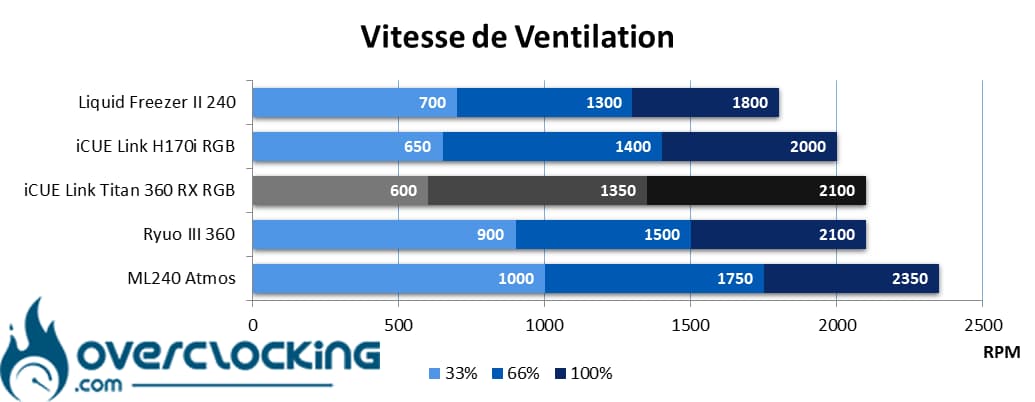
As far as fan speeds are concerned, this is a kit where the fans are quite fast at high speeds. At 2100 rpm, the speed is comparable to that of the ASUS Ryuo III 360. However, at low revs, the fan speed drops to the level of an iCUE Link H170i RGB. Finally, in between, at 66% speed, we’re at 1,350 rpm.
Noise :
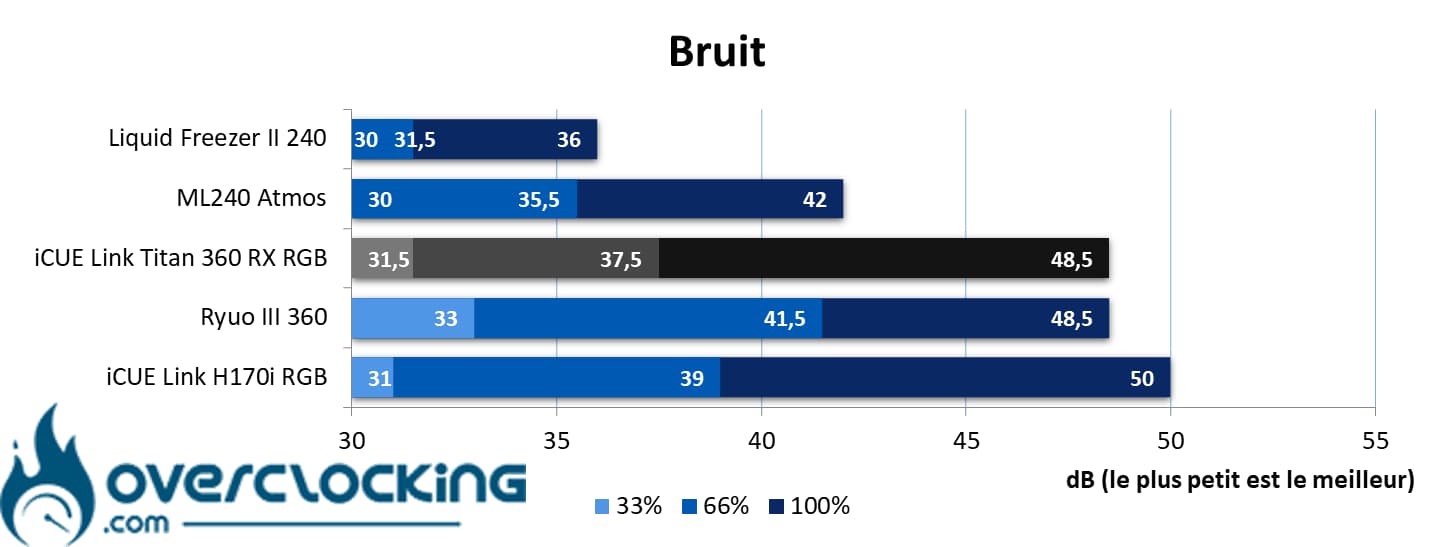
In terms of noise, with the fan running at full speed, Corsair’s kit is still audible at 48.5dB, putting it on a par with the ASUS kit. Nevertheless, it remains quieter than the H170i RGB and its 50 dB.
And if you want silence, at half speed it generates just 37.5 dB compared with 31.5 dB at 33% speed. However, it won’t be as quiet as a Liquid Freezer II 240 or an ML240 Atmos, its pump being noisier than the latter kit… But not as noisy as that of ASUS’ Ryuo.
[nextpage title=”AMD CPU temperatures”]
Processor at 105W :
Here, our CPU will run at 2.70 GHz constantly and on all its cores. We apply a VCore of 1,030 to obtain a power consumption of around 100 watts. This corresponds to the TDP of a Ryzen 7 7700X.
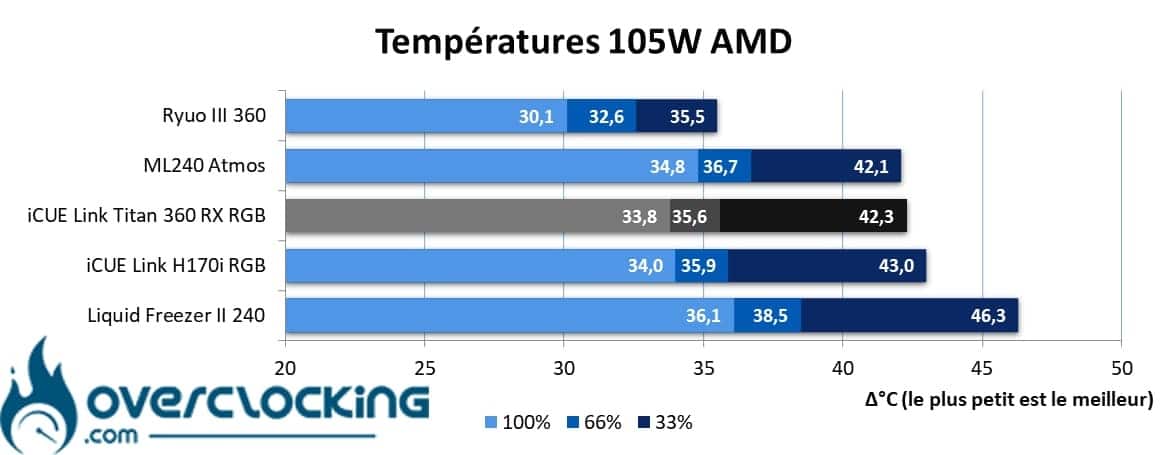
In terms of temperature, we have a kit that is positioned at the same level as the iCUE Link H170i RGB, a kit that is much larger since it is 3x 140 mm. However, it will maintain a slight lead as the fan speed decreases.
However, the situation isn’t perfect, as you can feel that at 600 rpm at low speed, the kit loses efficiency, as a 240 mm ML240 Atmos does just as well. Apart from the size of the radiator, the fans in the Cooler Master kit work much faster!
170W processor :
Finally, we end with our 170W profile. Here the heat output is higher, and corresponds to the default TDP of the 7900X. Let’s see how our coolings fare!
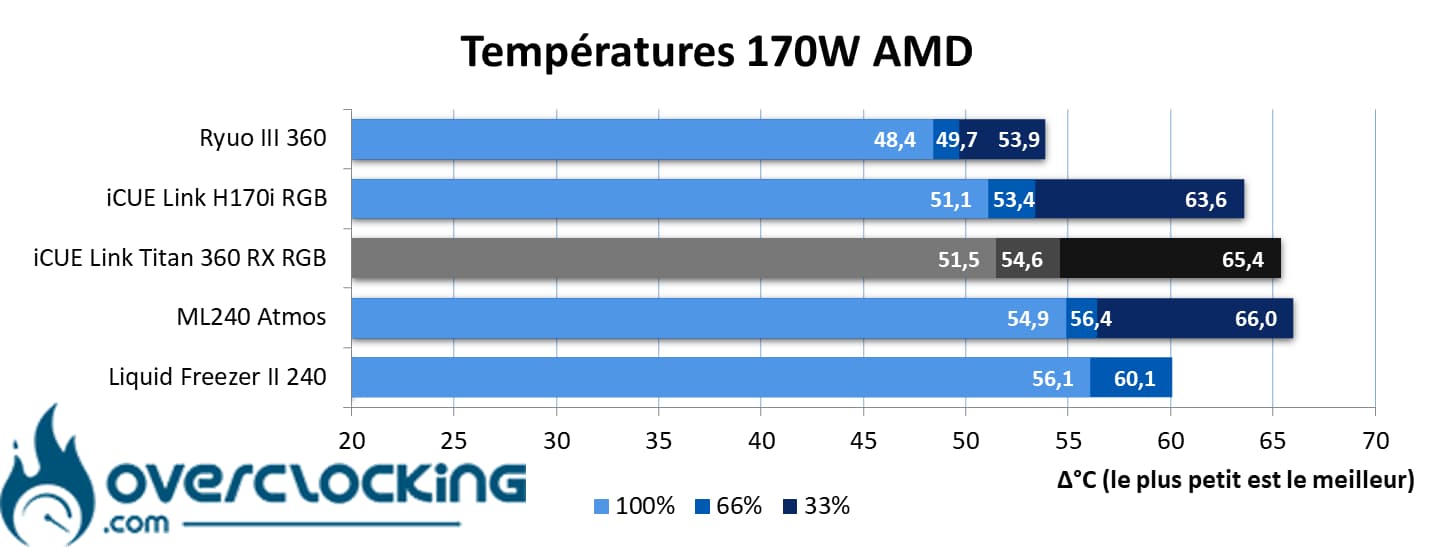
With even higher power consumption, our kit does not do too badly, but lags slightly behind its big brother, the iCUE Link H170i RGB. With this higher power consumption, the larger size of its heat sink seems to make the difference, especially at low speeds.
As for the ML240, it takes the liberty of titillating the Corsair kit thanks to the high speed of its fans with 33% PWM signal. As for the Arctic kit, sadly, it didn’t finish the test at low speed. In the end, of these five references, the Ryuo III proves to be the most efficient AIO.
Summary :
Broadly speaking, this is a fairly efficient piece of kit, except at low speeds where the 600 rpm of the fans is detrimental. Here, you should run the fans at higher speeds to gain in efficiency without being overly affected by noise.
[nextpage title=”AMD temperature/noise ratio”]
On these perf/noise ratio graphs, remember that it’s best to be positioned as far to the bottom left of the graph as possible. For reading purposes, the point furthest to the left symbolises ventilation at 12V, the point in the centre ventilation at 8V and the point furthest to the right ventilation at 5V.
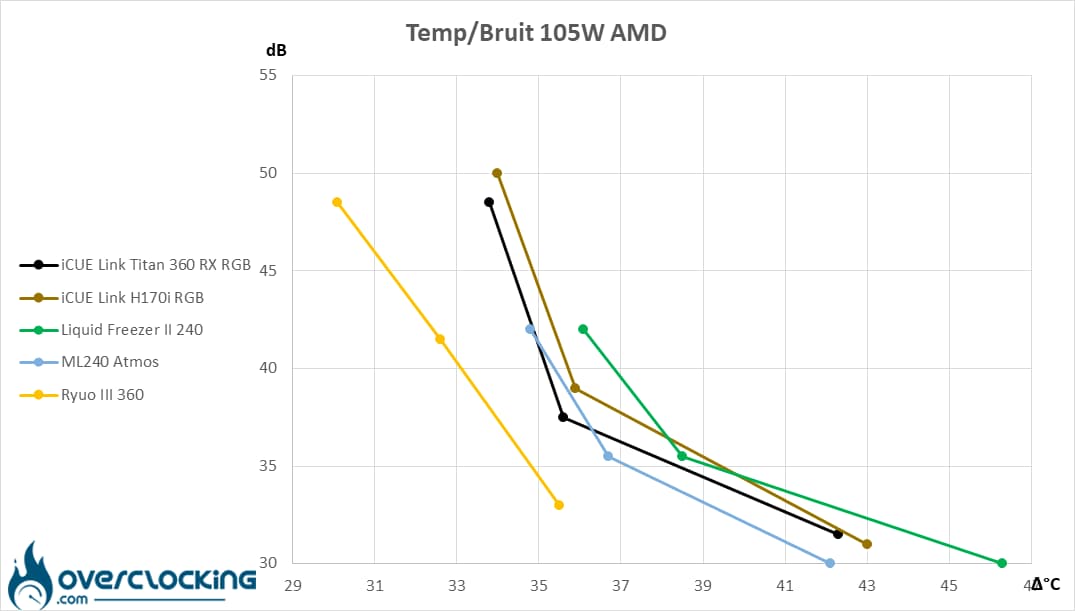
With our CPU consuming 105W, clearly the ASUS kit stands out from the rest of the group and has a clear lead. On the other side, we have our iCUE Link Titan 360 RX RGB, which plays elbows with the H170i, while the ML240 Atmos provides some fierce competition, especially given its format!
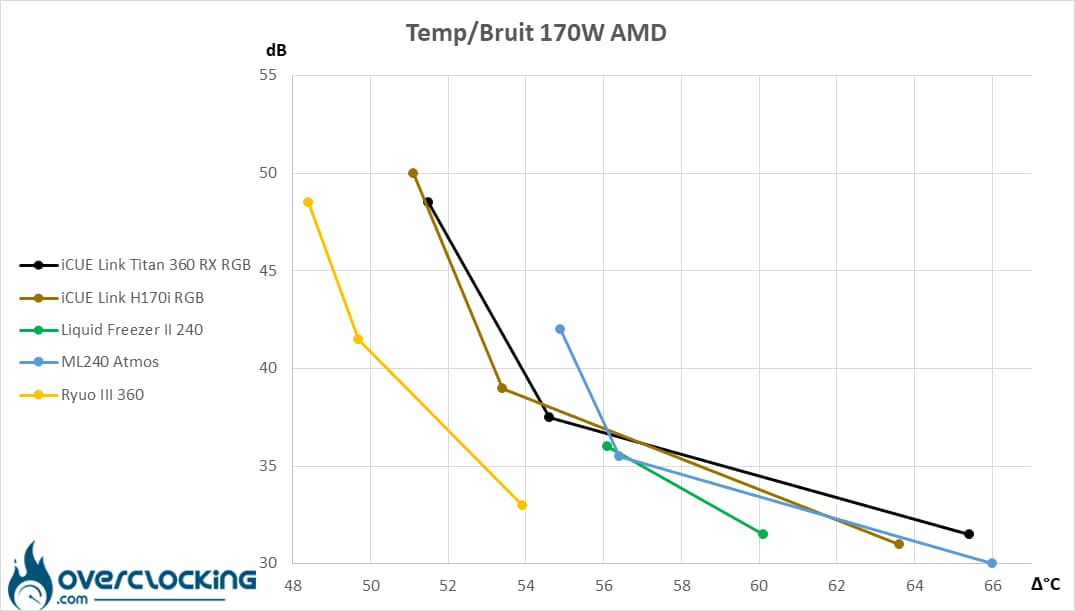
At 170W, the ML240 Atmos finds itself detached from the group at its highest speeds, and it has to be said that at high power consumption with a 240mm radiator, things get a little tense. However, at low speeds, it makes up for this with relatively fast-running fans, allowing it to hold its own against Corsair AIOs in particular. However, the Ryuo III 360 remains untouchable!
[nextpage title=”Conclusion”]
We’ve come to the end of this test of Corsair’s iCUE Link Titan 360 RX RGB. Are we dealing with a successful product? Let’s take a closer look!
A well-finished customisable kit!
With this new series, Corsair is offering us AIOs with undeniable qualities. From a design point of view, it’s already a success, with a polished look and a good level of finish. What’s more, you can go even further in terms of personalisation by choosing alternative covers to either change the design, cool down what’s around the socket or take advantage of a screen.
In addition, the iCUE Link system works very well and will considerably reduce the number of cables in your PC. What’s more, by opting for an AIO from this series, you’ll be able to connect up to 24 additional devices via the hub supplied.
As for the bundle, as is often the case with pre-applied thermal paste heatsinks, there are no extras. It’s a shame not to find a small syringe of paste on an AIO in this range.
Otherwise, on the assembly side, Corsair has further simplified its assembly mechanism, even if it means sacrificing support for older sockets. However, there’s no particular criticism of the ease of assembly – it’s done in a few moments. All that’s left to do is plug it in and it’s ready to go!
Very good performance overall!
In terms of temperatures, this kit is on a par with the iCUE Link H170i RGB, an AIO with a larger heat sink and a larger heat exchange surface. While these results are interesting, you’ll have to be careful at low speeds, especially when faced with 240 mm kits that are a bit on the angry side… Or run the three fans above the 600 rpm measured at 33% PWM signal. As it is, temperatures rise, penalising the temperature/noise ratio in these conditions. By making it run a little faster, at 900 rpm, it should be possible to gain a few degrees without getting an earful.
Noise levels are in line with kits of this size. For the sake of our hearing, we’ll avoid running it at full speed for too long, but for one-off benchmarks, it seems perfectly feasible, or just long enough to complete a quick rendering.
The bill is coming down!
As far as the bill is concerned, we were pleasantly surprised by the €205 claimed by Corsair for this version. Clearly, the price has come down, as the first kits in the series were already selling for around €300!
What’s more, the fact that additional covers are available means that users can choose the level of functionality they want, without having to pay a high price from the outset. However, this doesn’t stop the screen cover from costing €100, so expect to pay €305 for an iCUE Link Titan 360 RX RGB LCD cover!
Corsair iCUE Link Titan 360 RX RGB :
We like:
- Corsair’s meticulous design
- The fine finish
- The assembly kit, which is now even simpler
- The iCUE Link system, which reduces the number of cables in your installation
- The ability to extend your compatible equipment via the hub supplied with the kit!
- The option of changing the look or adding functionality via the covers on offer
- A much lower price tag than the previous series
What we didn’t like :
- Fits on fewer sockets than previous series
- The price of the LCD cover: €100!
- Performance drops off at low speeds
- The absence of a syringe of thermal paste on a kit in this range!
 In the end, we decided to give this Corsair kit a silver award. Clearly, we’re dealing with good equipment that looks good and can be customised. What’s more, the price tag is lower than for the first iCUE series. However, watch out for performance at low speeds, especially when faced with slightly angry AIOs, which can be just as effective with a smaller heatsink in these conditions.
Many thanks to Corsair!