
XPG, the performance arm of ADATA, is the latest manufacturer to pass through our hands. The latter generously sent us one of their latest cases, the Invader X (spotted at CES), an aquarium-style case with two glass panels meeting without a pillar. In fact, it’s the latest fashionable style, as it gives a clear view of the entire configuration. So, a conclusive first experience with the brand?

The Invader X exterior:
With a front-mounted glass pane joining a side panel also in glass, the case benefits from a sober, uncluttered appearance. This aspect is further enhanced by the absence of any visible pillar on the front panel, as can be seen here, giving a clear view of the entire machine. As you know, we’re very fond of sleek cases, and this one is quite convincing.
Otherwise, we’re dealing here with a case in mid-tower format. This translates into dimensions of 245 (W) x 475 (D) x 448 (H) mm. Clearly, this is the most compact case we’ve tested since the beginning of the year. It’s also the lightest, weighing in at 8.95 kg.
For the moment, it’s difficult to talk price, as this model is not yet available for sale in France. However, from what we can see here and there, it’s a case that’s officially on sale for around $170.
The control panel:
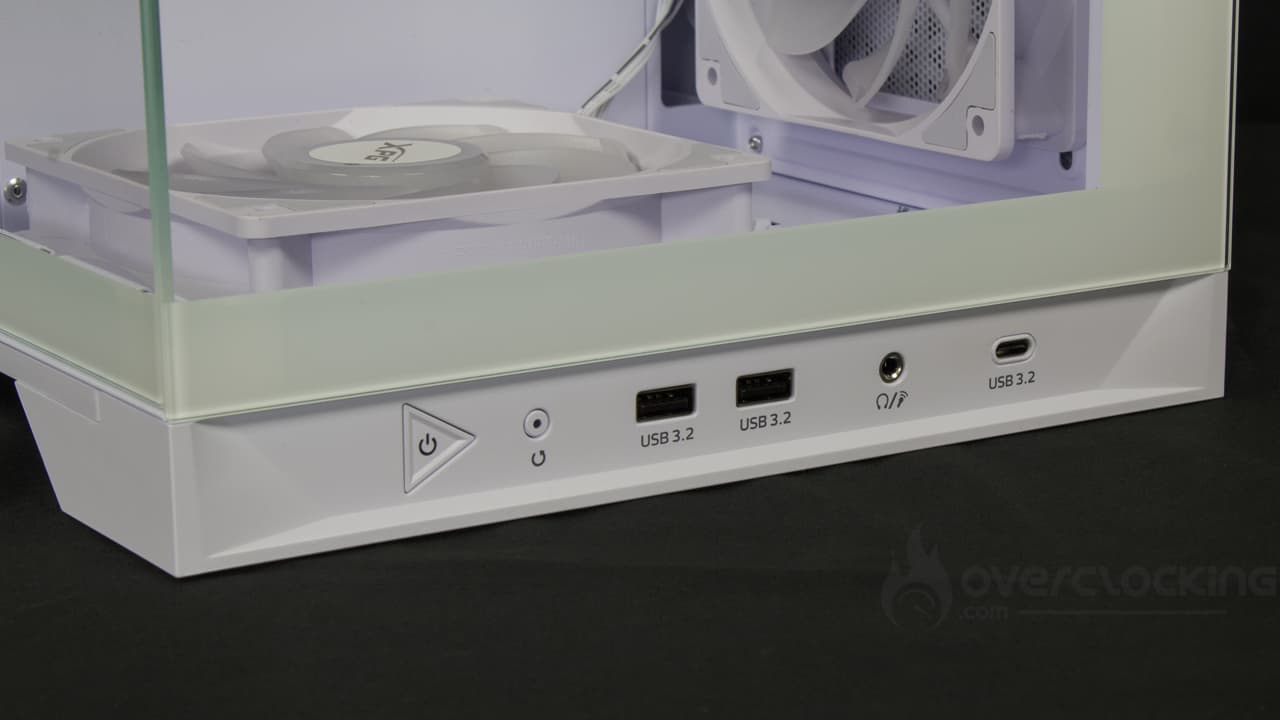
Given the glass front panel, it’s logical that the control panel isn’t located here. However, unlike other references, the control panel doesn’t migrate to the top, no, it’s present at the very bottom of the case! This includes!
- 1x power button
- 1x reset button
- 2x USB-A 3.2 ports
- 1x 3.5 mm headset jack
- 1x USB-C 3.2
The control panel is therefore functional and will allow you to connect more than two USB-A devices without breaking a sweat, for example. On the other hand, beware if you’re the type to put your PC on the floor, you may have to bend down quite a bit to plug in various devices.
The underside :
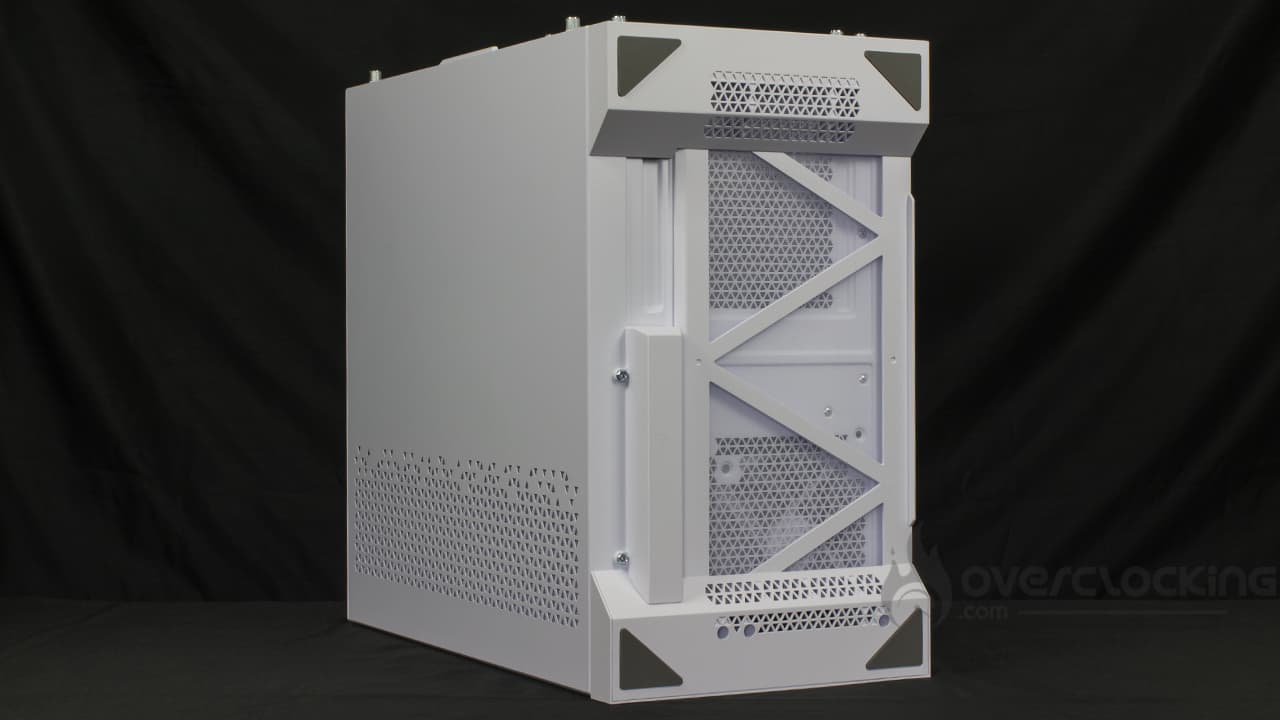
On the underside are two wide feet, each with two triangular rubber pads. Fortunately, the Invader X isn’t very heavy, so you’ll be able to turn it around easily without straining your back!
Otherwise, we note the presence of a long dust filter that can be removed from the side. This is always more accessible than a filter accessible from the rear, since depending on the space available, you won’t have to turn your configuration every which way.
Rear :
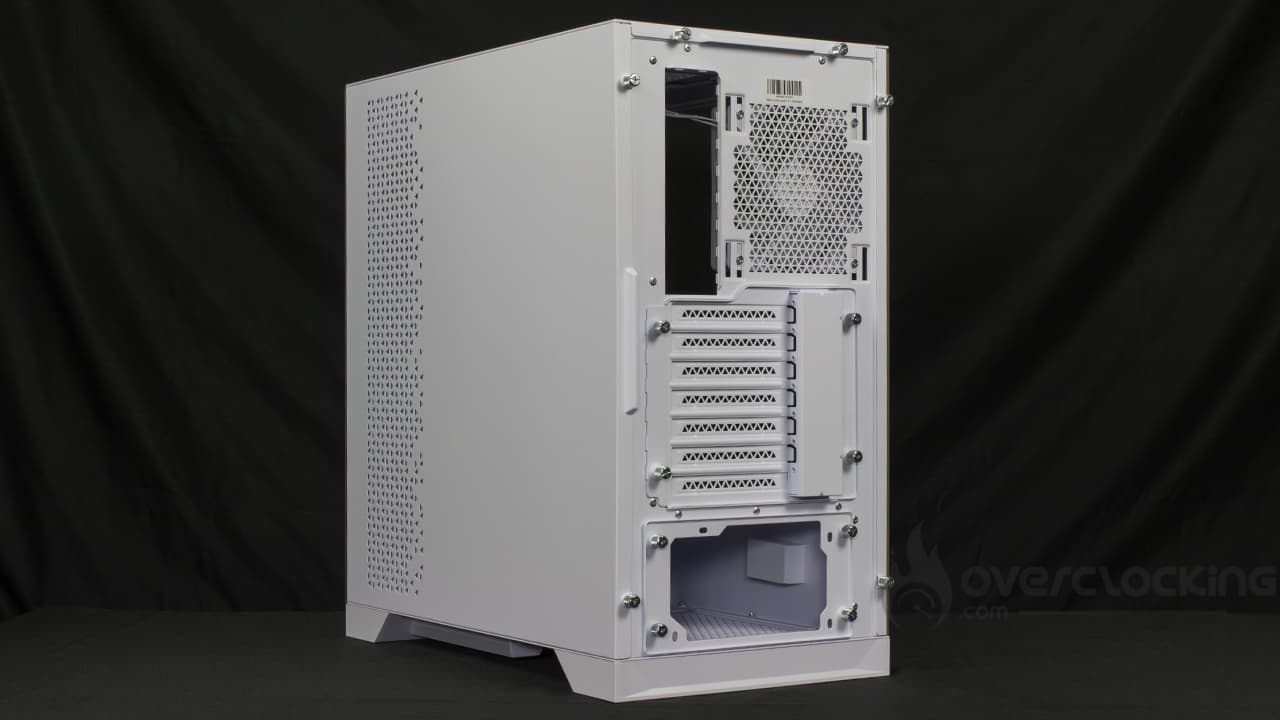
The rear of the case, apart from being perfectly classic, features a large number of hand screws. We’ll see what they’re for. In the meantime, we note that the I/O shield slot is at the top, right next to a fan slot. Underneath, we have our seven expansion slots, whose covers have to be ripped off, which is a shame. We finish with the power supply slot positioned at the very bottom!
The top :
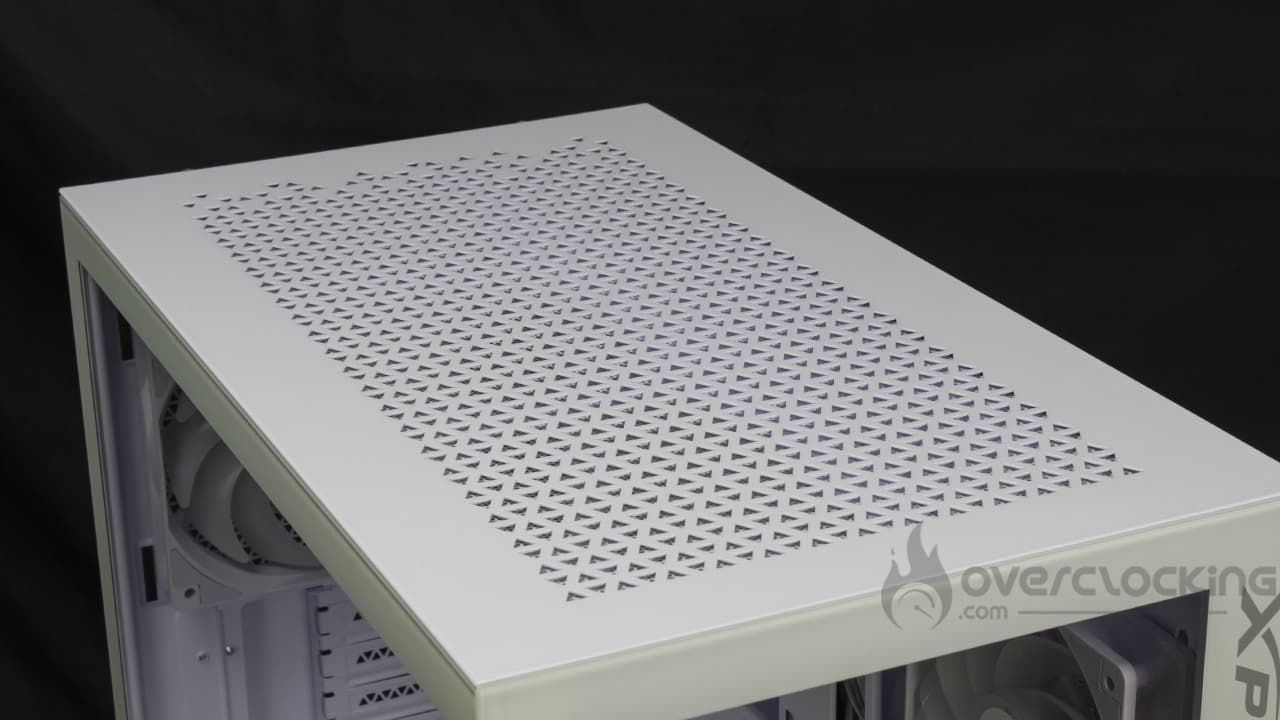
The top of the case features a ventilation grille with triangular patterns running its entire length, as you can see. It hides the fan slots, but we’ll come back to that later.
[nextpage title=”Inside the Invader X”]
Inside the Invader X:
The opening of the case is rather unusual in that, to remove the glass panel, you first have to remove the top part held in place by two hand screws. Next, two hand screws secure the side panel, which can then be removed by lifting. Clearly, a push-pin system would have been more suitable and would not have required dismantling the top part to open the case.
The chassis :


Cases compatible with MSI’s BTF and Project Zero motherboards are proliferating. As you can see, the motherboard tray of this model features additional openings for motherboards with reversed connectors.
Otherwise, this Invader X offers compatibility with ATX, micro-ATX and mini-ITX motherboards. As you can see, this model features numerous openings for cable routing. These are distributed over the top, bottom and sides of the motherboard tray.
At the rear, we’ll find quite a bit of space, particularly with a claimed rear space of 36 mm.
Storage slots :
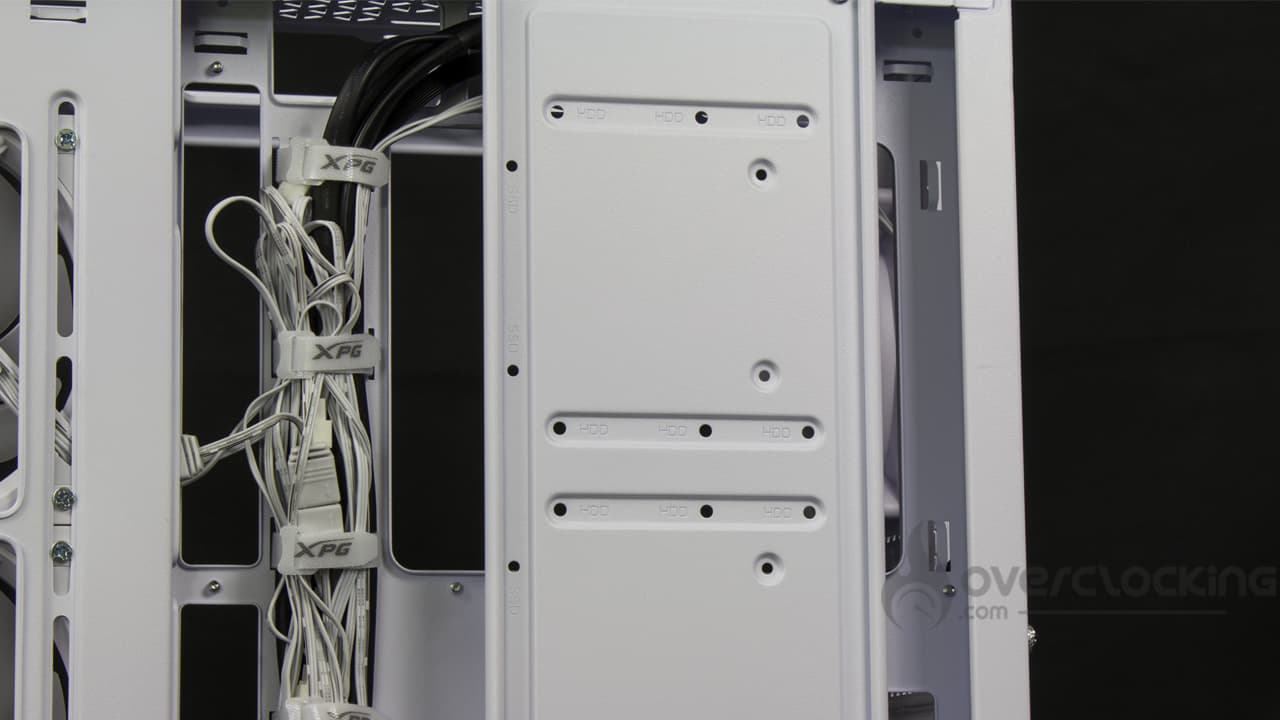
When it comes to storage, XPG goes straight to the point, offering a long board running the full height of the case. This is located at the rear of the motherboard tray, so you won’t see it. It allows the installation of three 2.5″ or 3.5″ storage units. What’s more, it’s removable and held in place by three Phillips screws.
Power supply location:
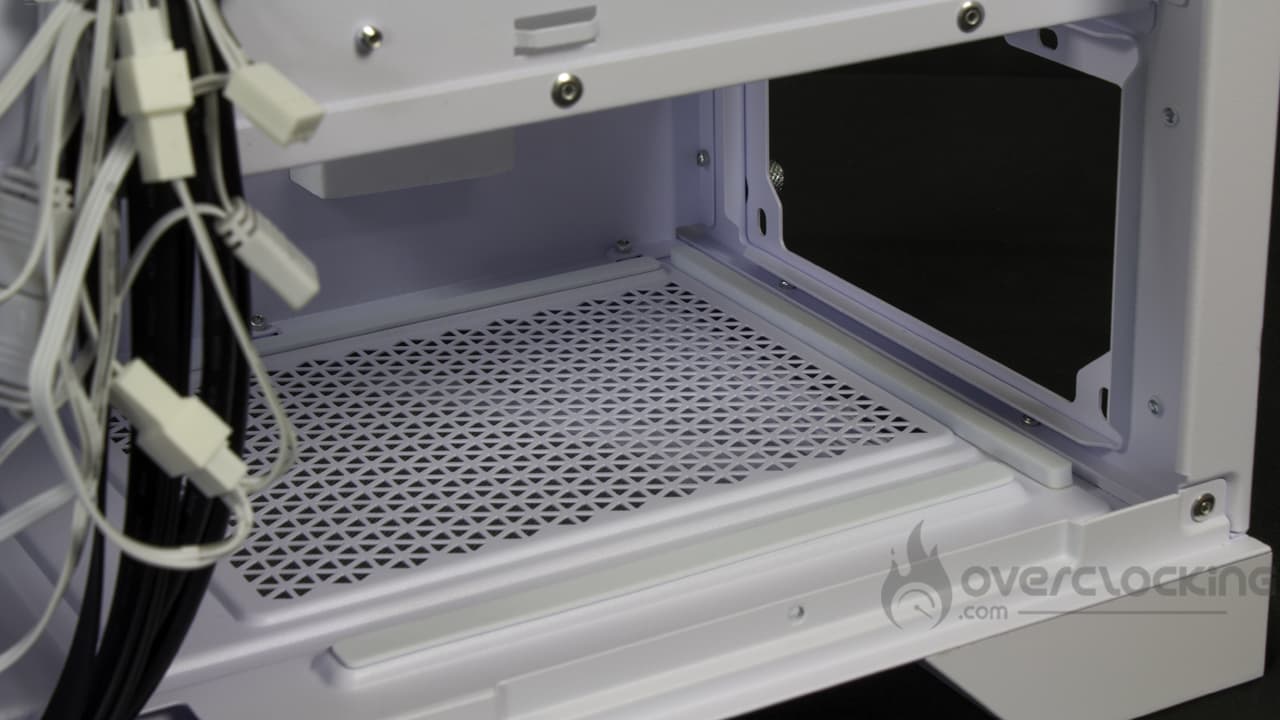
The power supply is located at the bottom of the case, under the cover. XPG takes care to equip its case with rubberized strips to limit the vibrations emitted by the PSU when the latter’s fan starts up.
The case can accommodate power supplies up to 240 mm in length, no more. Unfortunately, the cover is limited in length, so we won’t be able to “cheat” by removing a potential HDD cage mounted in the extension, for example.
Cooling options :
By default, two versions of the case are offered, this one, which arrives with full ventilation, and a second, with no fan supplied.
In our case, we find a case with a total of five 120 mm fans. Four of these feature inverted blades for greater style and performance. Three of them are mounted on the side of the motherboard slot, while the last one is located at the bottom. Finally, a last “classic” fan is mounted at the rear in extraction, where the other four are in suction.
If required, these can be completed by adding three additional 120 mm (2 x 140 mm) fans at the top. The power supply cover can also accommodate two 120 mm windmills. However, once installed, you won’t be able to fit a vertical support for the graphics card.
As for watercooling, this Invader X will allow 360 mm radiators to be mounted at the top, without condition. This is also possible on the side of the motherboard, but you’ll have to mount the graphics card vertically, at the risk of limiting its length to 270 mm. Finally, the rear is compatible with a 120 mm radiator.
Air-cooling cpu cooler mounting is also possible, especially as you’ll have 175 mm of free height. So don’t panic, a Dark Rock 5 can slide in easily.
The bundle:
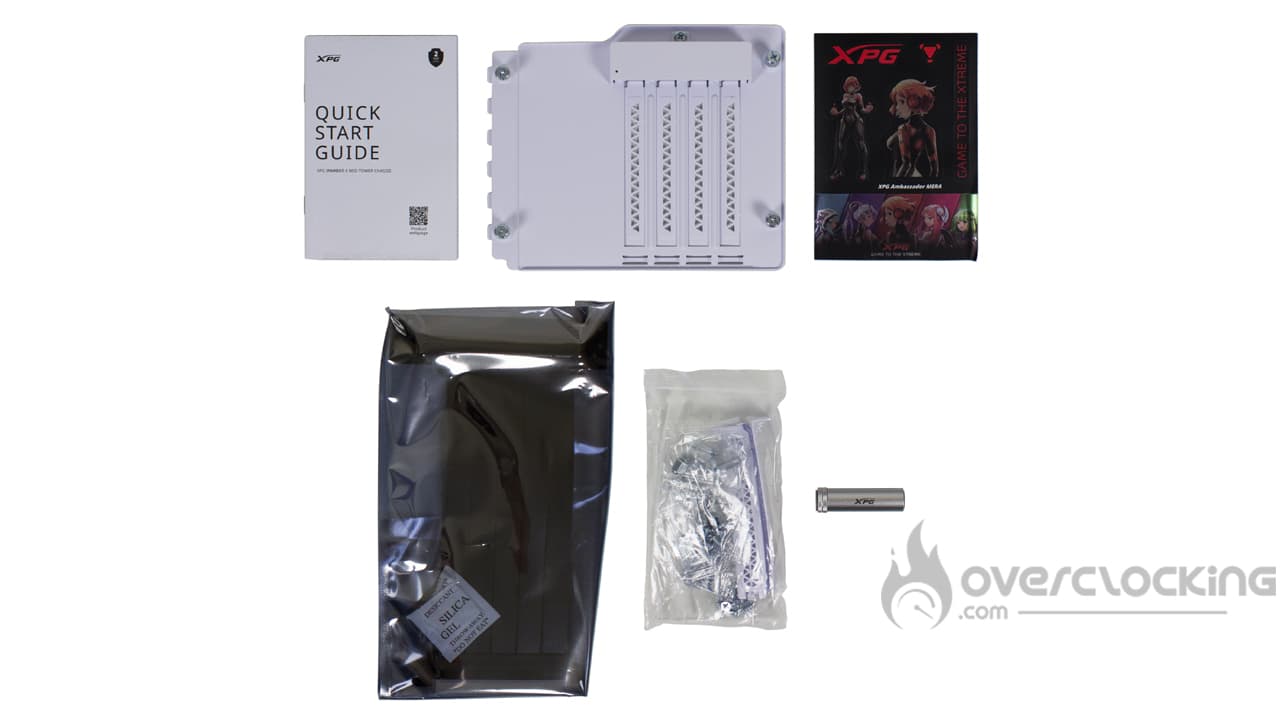
The following accessories are supplied with the case:
- A mounting guide
- A removable part with four vertical expansion slots
- A sheet of XPG stickers
- PCIe 4.0 x16 riser
- A bag containing screws and bolts
- Aluminum graphics card holder
We’re therefore dealing with a complete accessory section, with all the accessories needed to assemble our configuration. The brand even goes one step further with a vertical support and riser for mounting the graphics card. An aluminum bracket is also included. In short, we’re well taken care of.
The little details:


Once again, we’re dealing with a fairly basic case, but we’ll retain the fact that the power supply cover can accommodate two 120 mm fans.
Otherwise, behind the motherboard tray, we can see that Velcro strips are present to facilitate wiring. Nevertheless, with five aRGB fans fitted as standard, the latter already have their work cut out for them.
To sum up:
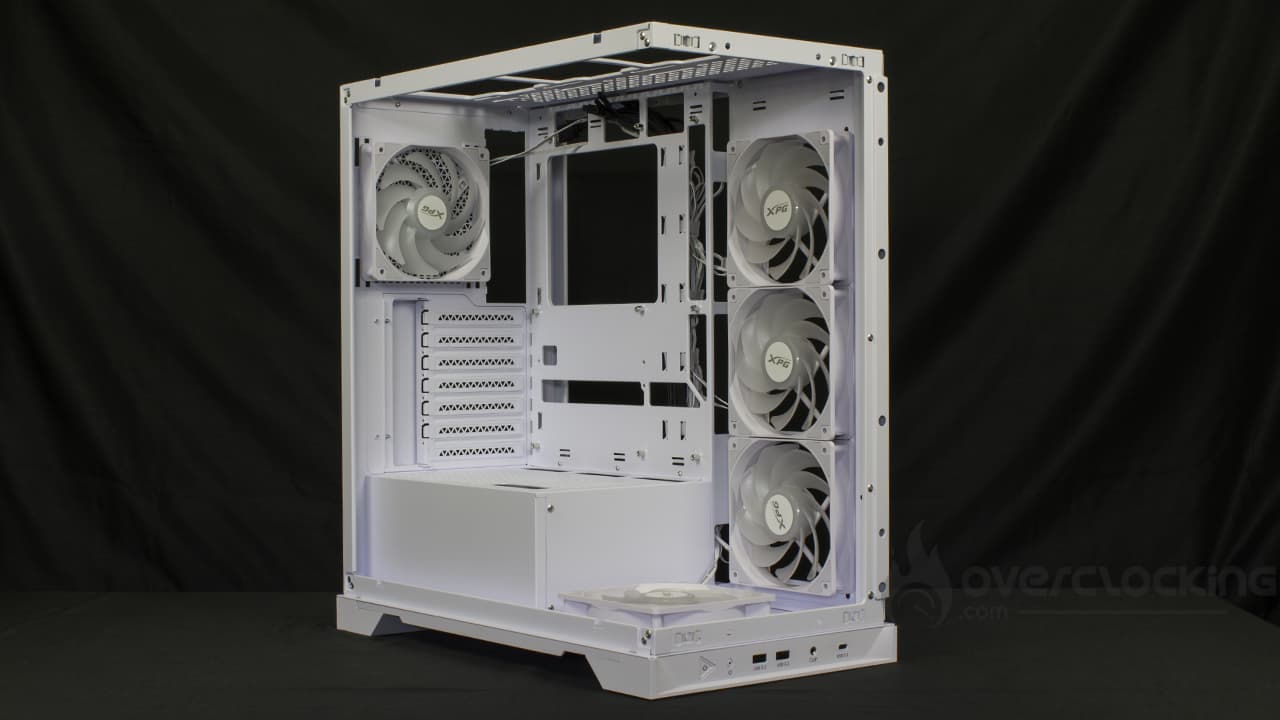
Broadly speaking, ADATA offers us a complete basic case with numerous fans. The accessories section takes things a step further, with horizontal and vertical brackets for graphics cards and a riser to go with them. It’s easy to understand why this model costs $170. A PCIe riser isn’t cheap!
[nextpage title=”Assembly”]
Assembly
We’re now ready to assemble our configuration inside this DeepCool Morpheus. Here are the components we’ll be using for assembly:
- Motherboard: NZXT N7 Z790
- CPU: Intel Core i5 14600KF
- Graphics card: ASUS ROG Strix RTX 3050
- CPU cooler: Noctua NH-U12A chromax.black
- Power supply: NZXT C1000 Gold
Power supply :


To install the power supply, you’ll need to remove the rear surround, held in place by four hand screws. Once removed, it must be screwed onto the power supply, which is then inserted into the case from the rear. All that’s left to do is screw the surround back onto the case, and you’re done.
Installing the motherboard :
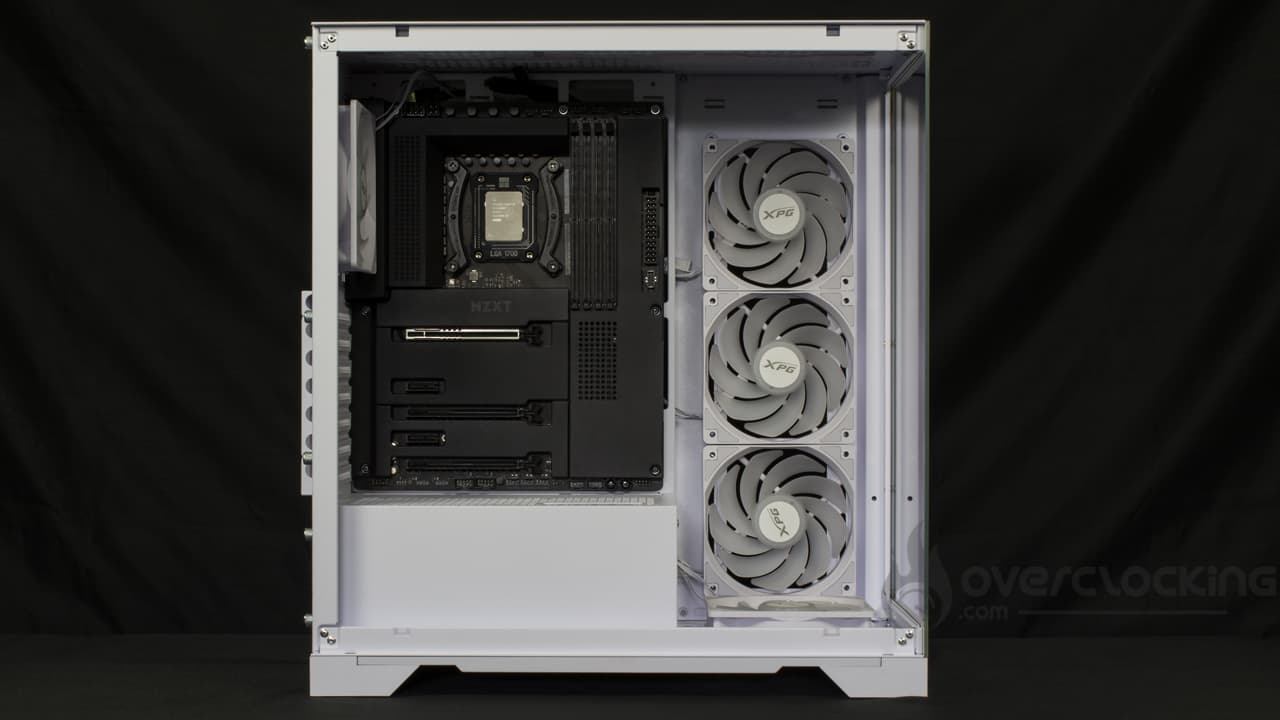
Once again, there are no unpleasant surprises when it comes to installing the motherboard, as all you have to do is place it in its slot. Nevertheless, don’t hesitate to pull a little on the rear fan cable, the latter being awkward in our case.
Cabling :
Control panel:
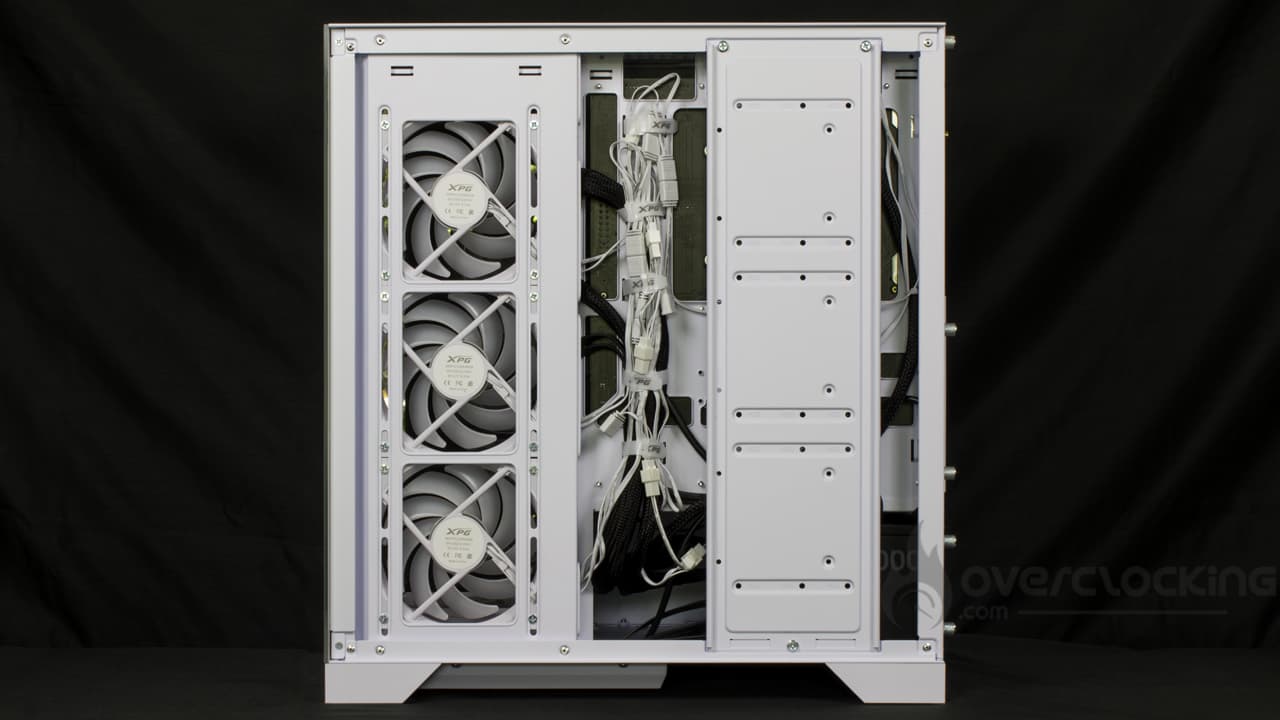
Since the case’s control panel is at the bottom, the cables will run from the bottom upwards. In practice, this makes little difference to the way we organize their passage. Once again, the F_PANEL andHD_AUDIO will connect to the motherboard via the lower openings in the power supply cover.
As forUSB 3.0 andUSB-C, the connectors will pass through the side openings in the board’s tray. In this case, we use Velcro strips to hold them in place, where nylon collars were used for other cables.
Motherboard, graphics card :
Without further ado, we continue with the motherboard cabling. Here, we run the 24-pinATX up the motherboard tray. The same goes for the 8-pin PCIe connector for our graphics card. All this will be secured using the Velcro strips provided.
On theEPS12V CPU side, as in many cases, the cable is routed from the rear of the case upwards until it finds its way to the motherboard. A small nylon collar is used to make the connection easier!
Installing the CPU cooler and graphics card :
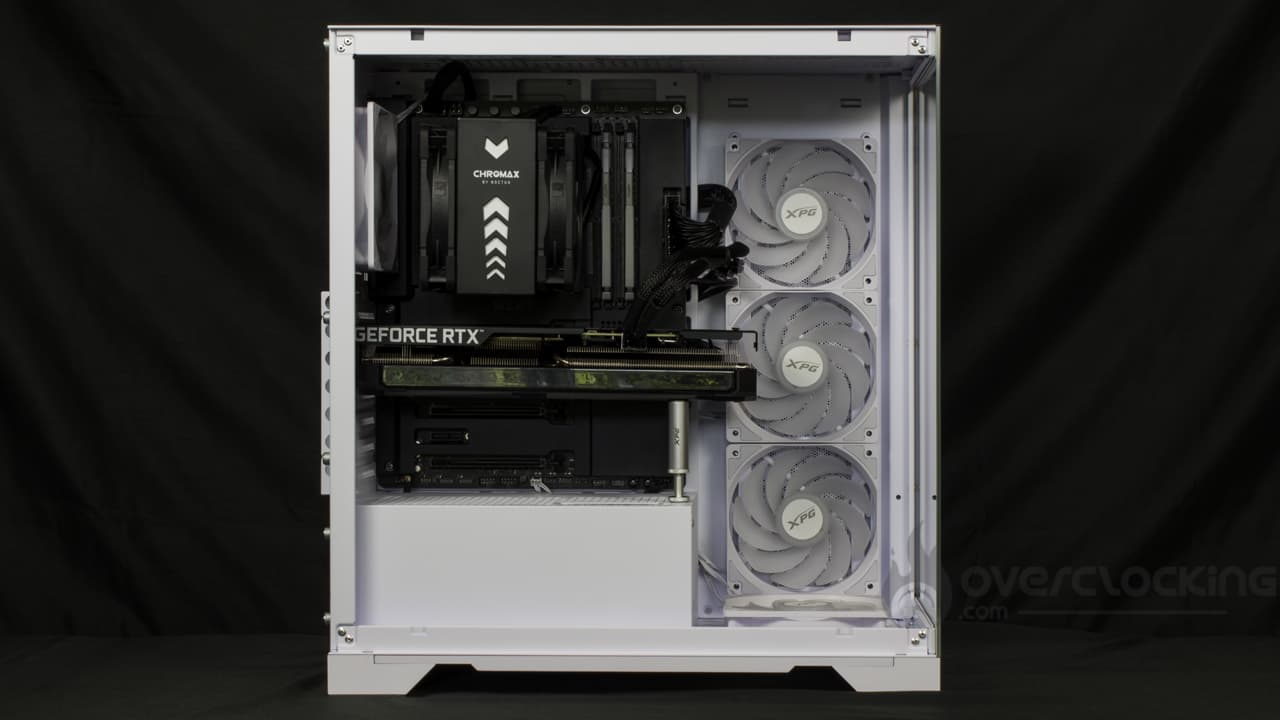
In order to install the cpu cooler, we’ll need to remove the plate for the storage units, since it’s positioned in front of the wide backplate access point on the motherboard tray. Once removed, access is unobstructed and the cpu cooler can be mounted without difficulty.
As for the graphics card, if you’re installing your GPU horizontally, as is often the case, you’ll need to clear the slots corresponding to the position of your graphics card. In this case, you’ll need to remove the covers, so don’t make any mistakes or you’ll end up with holes.
Once the card is in place, all that’s left to do is mount the graphics card holder. To do this, position it on the power supply cover and unscrew it until it touches the fairing of your card. All that’s left to do is to lock it in position with the small built-in ring.


Alternatively, vertical mounting is possible via the riser and vertical slots. All you have to do is put the assembly in place. To do this, remove the horizontal slots using four hand screws, and replace them with vertical ones. Next, screw the riser to the power supply cover using two spacers. Finally, we remove the slots corresponding to our CG’s location, then insert it into its PCIe slot, and that’s it!
Overall :
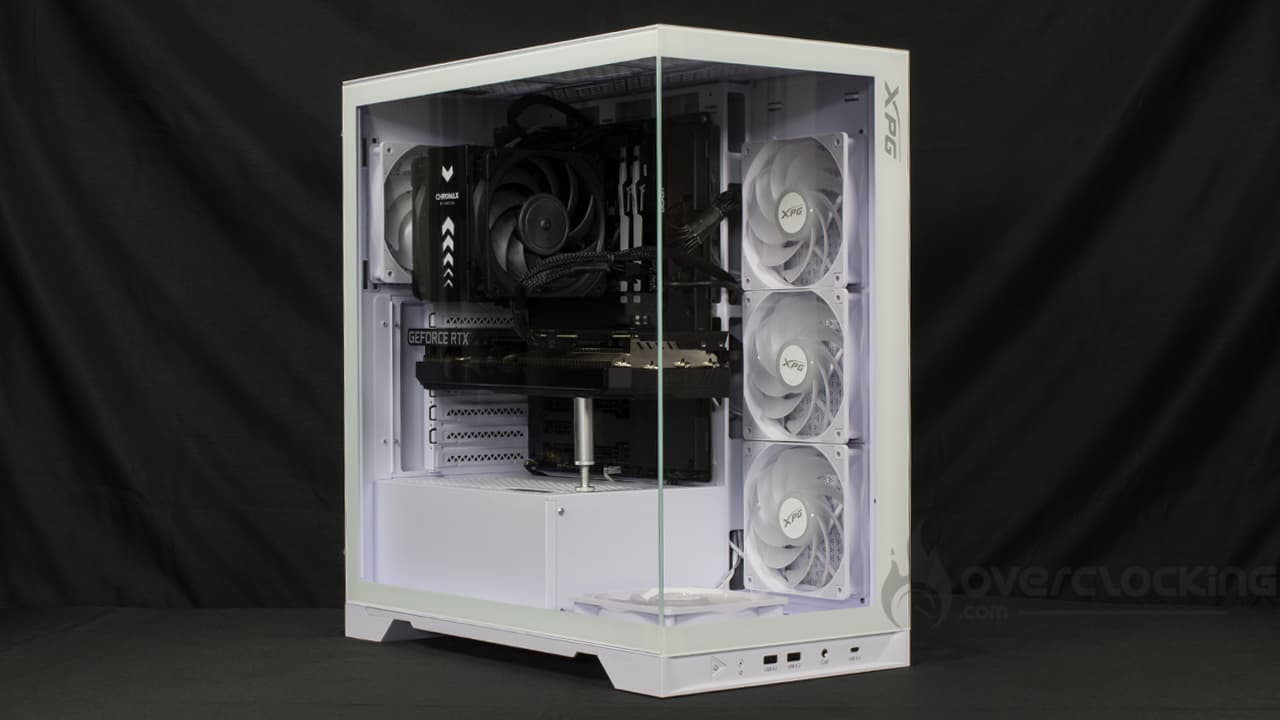
With its Invader X, XPG offers us a case in which it won’t be difficult to assemble a configuration. Even if the velcro strips, full of fan cables, can be frightening, there’s still plenty of room for the usual power supply cables. Nevertheless, you’ll still need to remove the storage unit plate before mounting the CPU cooler.
[nextpage title=”Protocol”]
We’ve updated our test protocol in order to test the qualities of our cases. We’ll be evaluating the performance of the different models according to three criteria:
- Insulation
- Original ventilation noise
- Air flow
Here, the configuration changes; you’ll find the details below. As for software, the CPU will run on PowerMax, while the graphics card will run on Furmark, both simultaneously. Note that CPU ventilation is forced to 50%, while graphics card ventilation runs at 50%.
In addition, in order to limit temperature variations linked to frequency/consumption variations, we clip the graphics card curve at 1800 MHz, the original boost frequency of the ASUS RTX 3050 Strix.
A warm-up period of 8 to 9 minutes is applied before two 2-minute averaging sessions. The tests are run one after the other, uninterrupted, so as to observe variations in component temperature as a function of case fan speeds. A delta is then applied: component temperature subtracted from ambient temperature. 
To add ventilation, we chose to integrate two Riing 14 red Thermaltake fans. Both Thermaltake fans are top-mounted and extractor fans. It’s silly, but that’s the only place we can add ventilation, the other slots being already occupied.
Configuration:
- Motherboard: NZXT N7 Z790
- CPU: Intel Core i5 14600KF
- Graphics card: ASUS ROG Strix RTX 3050
- CPU cooler: Noctua NH-U12A chromax.black
- Power supply: NZXT C1000 Gold
[nextpage title=”Tests”]
Tests
Airflow :
Additional ventilation takes the form of three fans, two Thermaltake Riing 14. The two 140 mm fans are located at the top of the case, for extraction.
CPU airflow, original ventilation then supplemented :
Let’s start with the CPU temperature. We’ll keep the front and top of our test case. Let’s see if the airflow is sufficient to influence the cooling of the Core i5 14600KF.

By default, XPG’s Invader X is rather limited in terms of CPU ventilation. As you can see, at full speed, our 14600KF is hotter than in other cases… At low revs, it’s on a par with a Morpheus. If other cases melt better, it’s worth remembering that the CPU cooler doesn’t benefit from direct airflow from the front panel, but from a less efficient cross-flow.
Even so, it’s possible to gain a little by improving the extraction of hot air. However, these gains are rather measured.
Original CPU ventilation airflow without facade or top :
In order to ascertain the limiting factor in the story (and by how much), we remove the top covers while removing the bottom dust filter. The aim here is to show the raw performance of the integrated ventilation..

Removing the case’s side panels (the one positioned in front of the fans) and top panel, we notice that temperatures don’t drop much. There are several possibilities: either the ventilation is asthmatic, or the panels do not restrict ventilation, or the positioning of the fans is not conducive to CPU cooling. In one case, it’s encouraging; in the other, the ventilation could do with some improvement, especially given the number of fans and their performance compared to the competition.
GPU airflow, original ventilation then completed:
We repeat the operation, but with measurements taken on the graphics card. Here, we test with original ventilation, then with added ventilation.

On our graphics card, things get more complicated: at low speeds, our RTX 3050 is ultimately the hottest card in our comparison. Fortunately, as we increase the fan speed, things ease off and the case holds up quite well. What’s more, by improving extraction, there’s a small gain to be made.
GPU airflow, original ventilation without front panel ortop:
We repeat the same test, but with the front panel and top panel removed. Let’s see how this affects card temperatures.

Removing the side and top panels produces significant gains at low speeds. Under these conditions, we gain 5.6°C on the delta, which is no mean feat. At full throttle, although more contained, gains of 4.6°C are up for grabs.
Insulation :
Here, we’re simply measuring the noise emitted by our configuration when running CPU cooling and GPU cooling at high speed.

The Invader X’s natural insulation is very good, as we can see. In fact, at 38 dB, it’s one of the most efficient cases, with only the Dark Base 701 ahead of it. Clearly, the glass front panel does a good job of undermining the noise, providing effective soundproofing without the need for insulating materials.
Original ventilation noise:
This time, we measure the noise emitted by the case’s original ventilation. To do this, the configuration is run in idle mode ( CPU and GPU ventilation at minimum), while readings are taken successively at 5V, 8V and 12V on the case ventilation.

As far as noise is concerned, things are going rather well: with the fan set to maximum, we record some 37 dB. Admittedly, this is not inaudible, but it’s a far cry from the 43 dB of a Dark Base 701, for example. And once again, by regulating the ventilation, you can have a very quiet configuration, provided you have discrete components too.
To sum up:
In actual fact, the XPG Invader X proves to be quite ok thermally, provided you don’t run the mills at low speed. In these conditions, without being catastrophic either, we’ve seen more efficient CPU and GPU cooling. Nevertheless, it has the advantage of offering good sound insulation and rather quiet fans, even if there are five of them!
[nextpage title=”Conclusion”]
We’ve now come to the end of our test of the Invader X from XPG/ADATA. So, good case or not? We tell you all about it!
A compact aquarium housing!
With its Invader X, XPG wanted to offer us a rather compact aquarium-type case. The gamble paid off, as it takes up less space than a NZXT H6 Flow, for example, while boasting a fairly conventional tower format.
What’s more, this model looks good and offers a highly satisfactory level of finish, although the PCIe covers need to be removed. Clearly, it deserves removable covers.
On the other hand, internally, we have a functional chassis offering cabling assistance. Likewise, the motherboard tray is compatible with Project Zero and BTF models from MSI and ASUS. Finally, the accessories section is complete, and the brand even supplies a PCIe riser and a vertical support for the graphics card. However, these items do add to the price!
Quite a few cables in the version with fans:
As far as mounting is concerned, we didn’t experience any particular difficulty, apart from the storage unit plate, which is right in front of the wide backplate access. In itself, this isn’t a problem, since it’s removable and all you have to do is remove it to proceed with mounting/cabling the configuration.
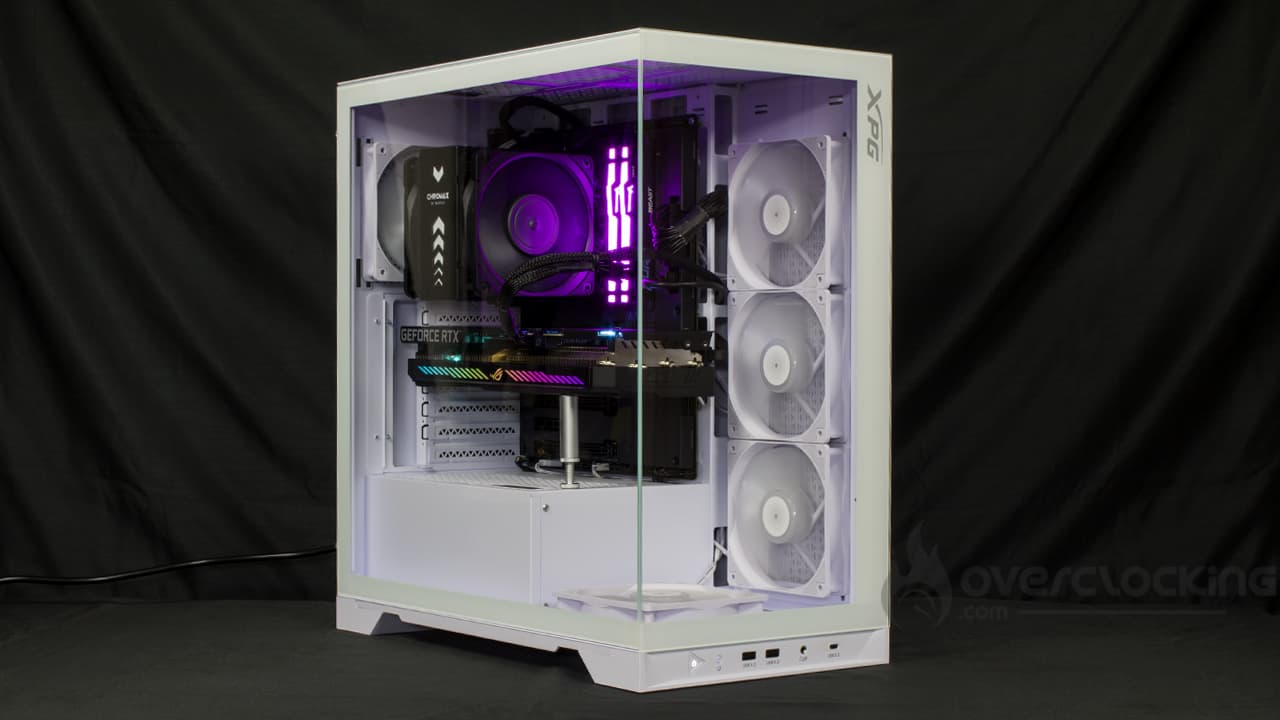
However, what can be more complicated to manage is the number of basic cables when the case arrives with its five fans. As we’ve seen, these alone almost completely saturate the Velcro strips used to hold the cables in place. Depending on your configuration, whether you have SATA or other storage, this can quickly become complicated. In our case, with an M.2 SSD , it does it pretty well.
Rather high temperatures :
Nevertheless, where the case falls short, in our opinion, is on the thermal front. Admittedly, the temperatures recorded are not catastrophic, but in the face of the competition, it finds itself in a tricky position… All the more so as it has more fans than its rivals, ouch. Nevertheless, it’s hard to say whether it’s the positioning of the fans or the fact that they lack pep that’s at the root of these results.
In any case, despite its fans, the ventilation system proves to be rather quiet. Admittedly, it will be heard at full speed, but in proportions that are far from alarming. We were surprised by the insulation’s efficiency, which is barely less than that of the Dark Base 701.
A high price in spite of everything:
Finally, it only remains to talk about the selling price, which is officially $169.99. This puts it squarely in the high-end sector. Unfortunately, the competition is fierce, and at this price we’re likely to prefer other references with more efficient ventilation in particular. Bear in mind that a PCIe riser is still expensive, even today (between €40 and €50 for a PCIe 4.0 model).
XPG Invader X:
We liked:
- The clear view of components offered by this model
- ASUS BTF and MSI Project Zero compatibility
- Complete accessory section, with the option of vertical CG mounting
- Dust filter accessible from the side of the case
- Five standard fans
- Velcro straps for cable management
- Discreet ventilation
- Effective sound insulation
We didn’t like :
- Impractical opening of the side window
- Asthmatic ventilation
- The rather high price: $170 officially
- Expansion slot covers to be torn off on a $170 case
 With this case, the XPG brand offers us an aquarium-type case with a successful design. However, it’s not without its faults, starting with the ventilation, which is at half-mast despite its five mills. On the other hand, the chassis remains functional, and there are a number of useful wiring aids… Although saturated or almost saturated out of the box. Otherwise, the Invader X stands out for its effective insulation and the PCIe riser supplied as standard with the vertical support that goes with it. Unfortunately, this adds to the price.
Many thanks to XPG!

