











Games that support DLSS 4:
A number of games are already DLSS 4-compatible on the day of the RTX 5080/5090 launch, and we’ve been able to get our hands on them in order to begin a series of tests and highlight the performance achieved thanks to DLSS 4. We’ll be coming back to the qualitative side of rendering in detail in the weeks to come. Of course, the upscaling principle here is to support our ROG Astral LC RTX 5090 against 2160p performance with graphics options at maximum, as well as ray tracing or path tracing if available.
To measure our FPS, we had access to a beta version of CapFrameX v1.7.5. This measurement tool is certainly one of the best and most intuitive when the game doesn’t have an integrated benchmark. If you’re interested, we’ll be back with a detailed article on how to use it.

Cyberpunk 2077:
In this well-known first game, and with the arrival of DLSS 4, we’ll be opting for ultra graphics options with path tracing enabled. Here are the graphics options available in Cyberpunk 2077. We have path tracing, DLSS in Performance mode and Frame Generation in x2, x3 or x4. The idea is to measure the differences in performance between DLSS OFF, one generated frame (x2), two generated frames (x3) and three generated frames (x4). It’s important to understand that you can choose the number of frames with Multi Frame Generation.

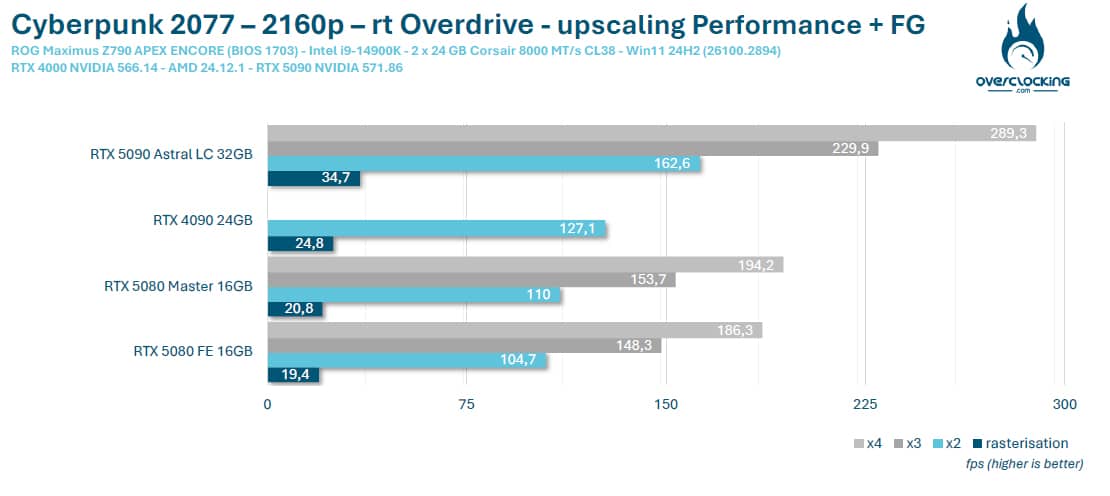
Here’s how our ROG Astral LC RTX 5090 performed against the RTX 4090 and RTX 5080.
Hogwarts Legacy: The Hogwarts Legacy
Hogwarts Legacy has no built-in benchmark, so we’ll be using CapFrameX to take our various readings. As far as graphics options are concerned, there’s no ray tracing in this game, but we have enabled ray reconstruction. As far as DLSS 4 is concerned, we have all the options at our disposal.

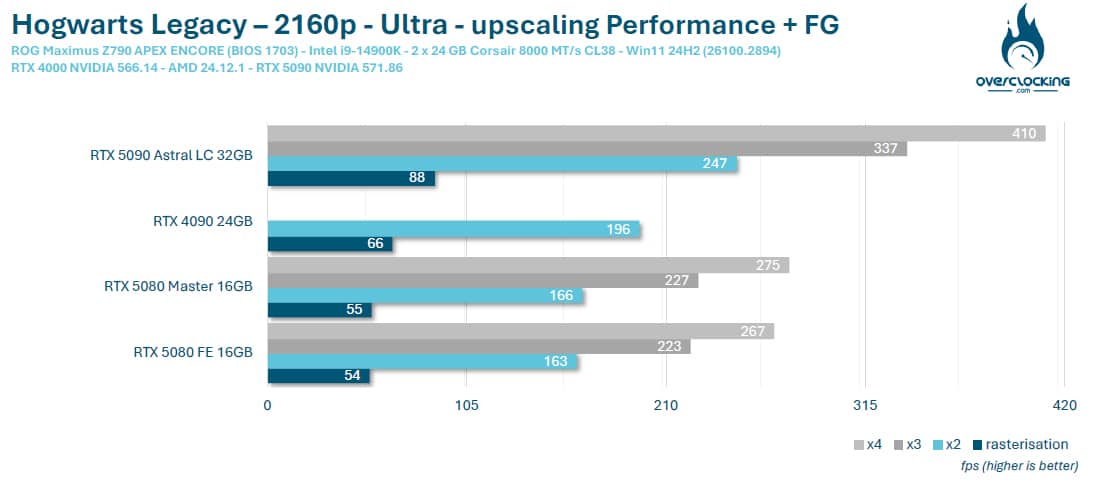
As far as performance is concerned, we start from an average of 88 FPS in 4K DLSS OFF and reach an average of 410 FPS in 4K DLSS Performance x4. Of course, the average may vary from one scene to another, so results will differ from one site to another, depending on the scene selected for reproduction.
Alan Wake 2:
From January 30, Alan Wake 2 will also benefit from the DLSS 4 option, as well as RTX Mega Geometry. But what is Mega Geometry? RTX Mega Geometry enables developers to offer up to 100X more triangles in ray tracing. RTX Mega Geometry will reduce CPU overload and increase ray tracing performance and image quality.
It’s off to the graphics options, and the least we can say is that Alan Wake 2 is surely one of the most comprehensive games to showcase NVIDIA technologies(ray tracing, path tracing, ray reconstruction, direct lighting, transparency, etc.). Naturally, we activated all these options.

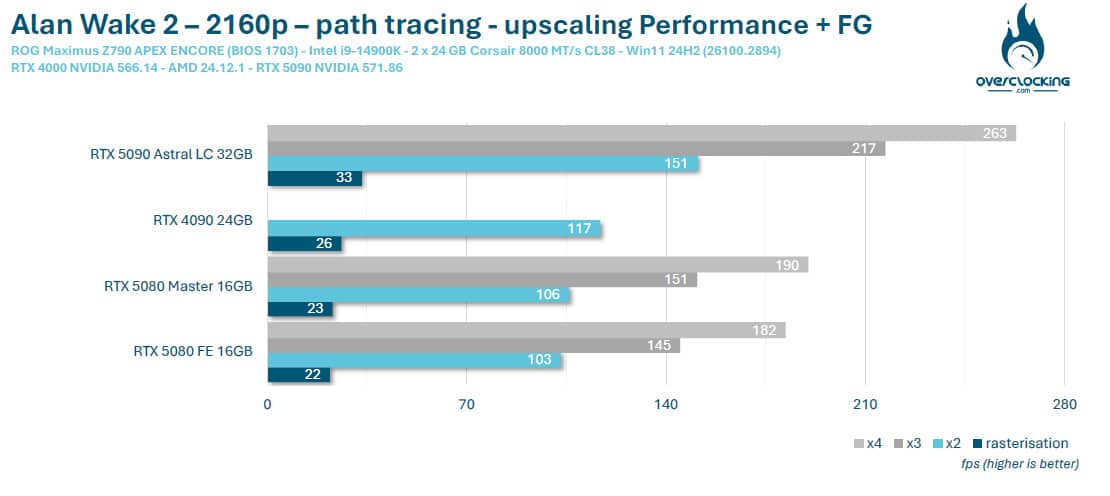
As far as performance is concerned, we start from an average of 33 FPS in 4K DLSS OFF and reach an average of 263 FPS in 4K DLSS Performance x4. Of course, the average may vary from one scene to another, so results will differ from one site to another, depending on the scene to be reproduced.
Star Wars Outlaws:
The third game with direct support, Star Wars Outlaws is quite demanding. No ray tracing in this game, so we’ll be using DLSS Performance in 2160p with Multi Frame Generation. We’ve also enabled ray reconstruction and NVIDIA Direct Lighting.

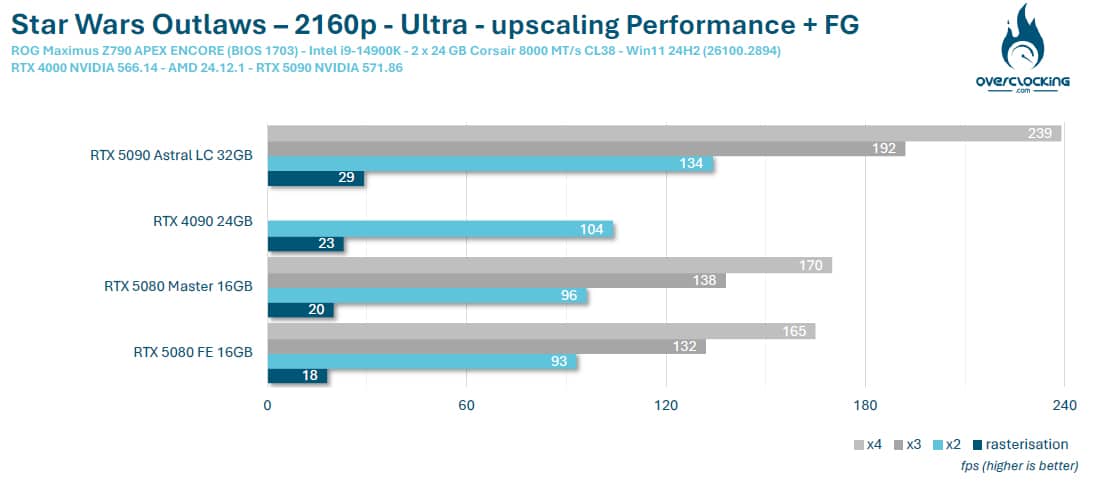
As far as performance is concerned, we start from an average of 29 FPS in 4K DLSS OFF and reach an average of 239 FPS in 4K DLSS Performance x4. Of course, the average may vary from one scene to another, so results will differ from one site to another, depending on the scene to be reproduced.
Dragon Age: The Veilguard
Finally, our last game on this panel: Dragon Age: The Veilguard. So here, no DLSS 4 available within the game’s graphics options. So we’re going to force DLSS using NVIDIA’s new application. To do this, launch the application and go to Graphics > Program Settings screen under Driver Settings.


This will enable you to make the following changes. First, in DLSS Override – Model Presets, select the ” Latest ” option to activate DLSS Super Resolution Transformer. Then go to DLSS Override – Frame Generation to choose between two or three frames, and finally, you can also make a change in DLSS Override – Super Resolution. We won’t touch this, as we’ll be choosing Performance in the game’s graphics options.

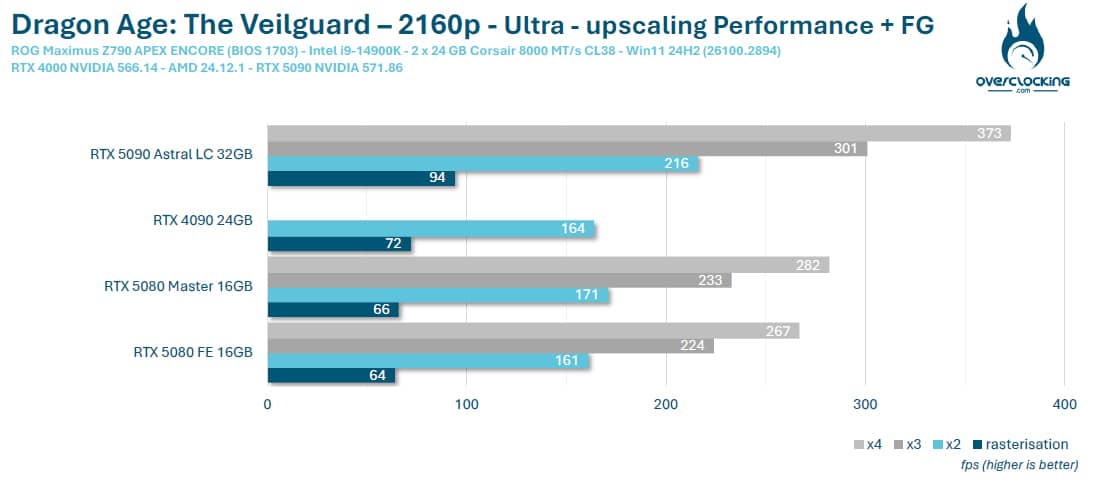
NVIDIA has provided a small in-game overlay so that we can check the settings we’ve chosen. No ray tracing here, just DLSS 4 Performance upscaling and Frame Generation.

Here, you can really appreciate the contribution of DLSS 4 and Multi Frame Generation when a game benefits from NVIDIA’s various technologies: ray tracing, path tracing, ray reconstruction, direct lighting, transparency,… . On the other hand, you’re under no obligation to activate DLSS if you don’t need it, and you can always opt for a single frame generation rather than three, since you can choose the number you wish to activate.