
[nextpage title=”Introduction: “]
After being announced by NVIDIA at CES 2025, we received a sample of the new NVIDIA RTX 5090 Founders Edition. We’d like to take this opportunity to thank NVIDIA for making this sample available to us. We haven’t had the opportunity to receive any RTX 5090 partner cards, but we can already tell you that we’ll be bringing you a test of the ROG RTX 5090 Astral Liquid Cooling at a later date. The new top-of-the-range model from the Greens will be available from January 30, priced at €2,349 for the Founders Edition. Partners will also be offering their own models, announced at CES 2025. So today we’re going to focus on the performance of the top-of-the-range model in this new generation, which has already been the talk of social networks for a few weeks now.
[nextpage title=”The NVIDIA RTX 5090 Founders Edition: “]
Architecture :
As a reminder, the cards in the “Founders Edition” series are unique models offered by NVIDIA. The main advantage of these cards is that they are offered at a “locked-in” price, which will not change in the coming weeks or months, unless the price goes down. NVIDIA‘s partners will also be offering their own models. Visually, NVIDIA has radically changed its design, moving to a 2-slot wide card that will be SFF-Ready. We’ll be coming back to this new design in more details later in this article.
This NVIDIA RTX 5090 Founders Edition benefits from the Blackwell architecture and retains a 4 nanometre engraving finesse, but switches to the TSMC N4P process, enabling greater transistor density and improved energy efficiency. This architecture features new 5th generation Tensor Cores and 4th generation Ray Tracing Cores. The 5th generation Tensor Cores will provide support for the FP4 (Floating Point 4 bits) format, which will double the computational performance of neural models while halving the memory footprint. We’ll be coming back to this development during our tests, in particular with the UL Procyon software that we’ve been using for several weeks now.
Of course, DLSS 4 support cannot be overlooked. This new NVIDIA RTX 5090 is NVIDIA’s new flagship, with 92 billion transistors and 21,760 CUDA Cores.


There’s something new on the memory front too, with 32GB of GDDR7 memory offering a 78% increase in bandwidth over the previous generation. This is where we need to remember that this NVIDIA RTX 5090 is also a card aimed at professionals. GDDR7 memory will have a visible impact in professional applications, such as video editing or 3D simulation.
As for the TDP, it is announced at 575 watts, which makes the design of this Founders Edition model even more ‘disturbing’. But let’s get on with discovering NVIDIA’s new packaging!
The Founders Edition bundle :
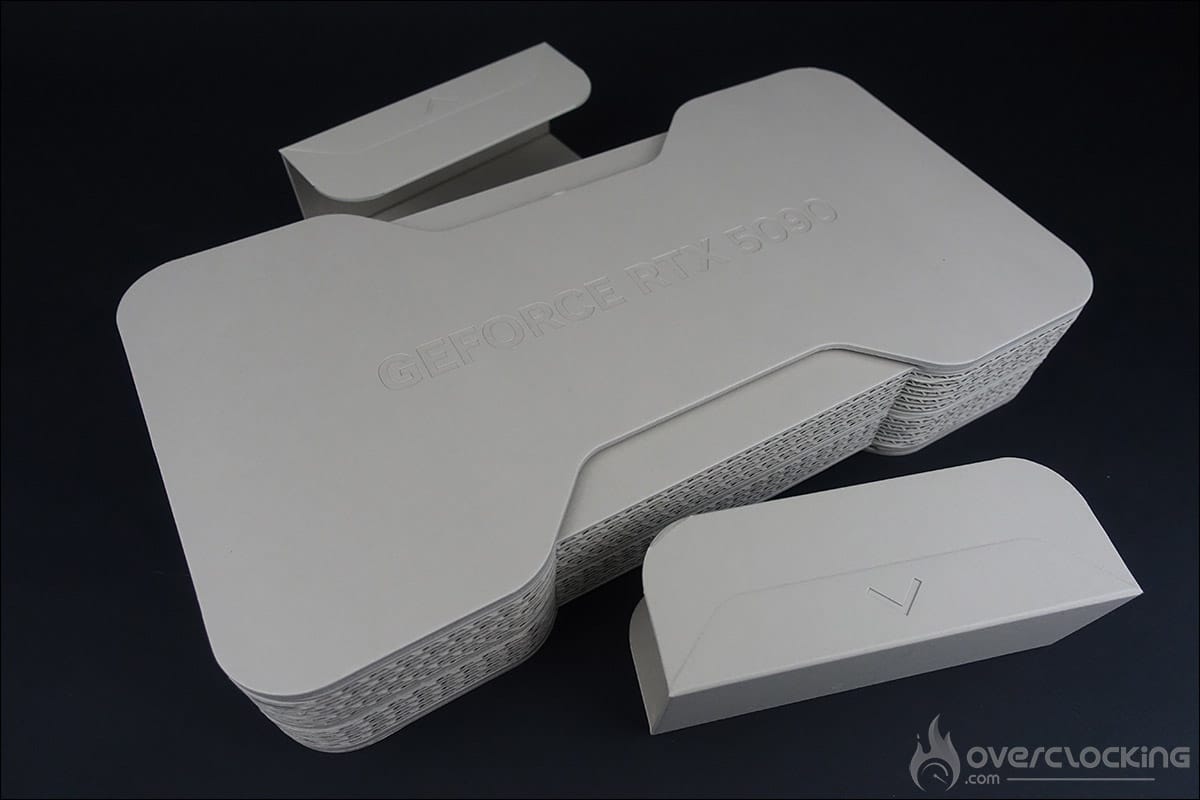
The first thing that strikes you is the size of the box, which is more imposing in terms of dimensions when compared to previous generation cards. Despite this, NVIDIA says it has halved the packaging of this NVIDIA RTX 5090 Founders Edition compared to the ADA Lovelace cards, because there’s a little surprise. As with the previous generation, the card arrives in a cardboard box, but here, this cardboard box is actually the packaging for our RTX 5090 FE, whereas with the RTX 4000s, the cardboard box was only a protection before we discovered the ‘real box’ of the graphics card (click here to remember).
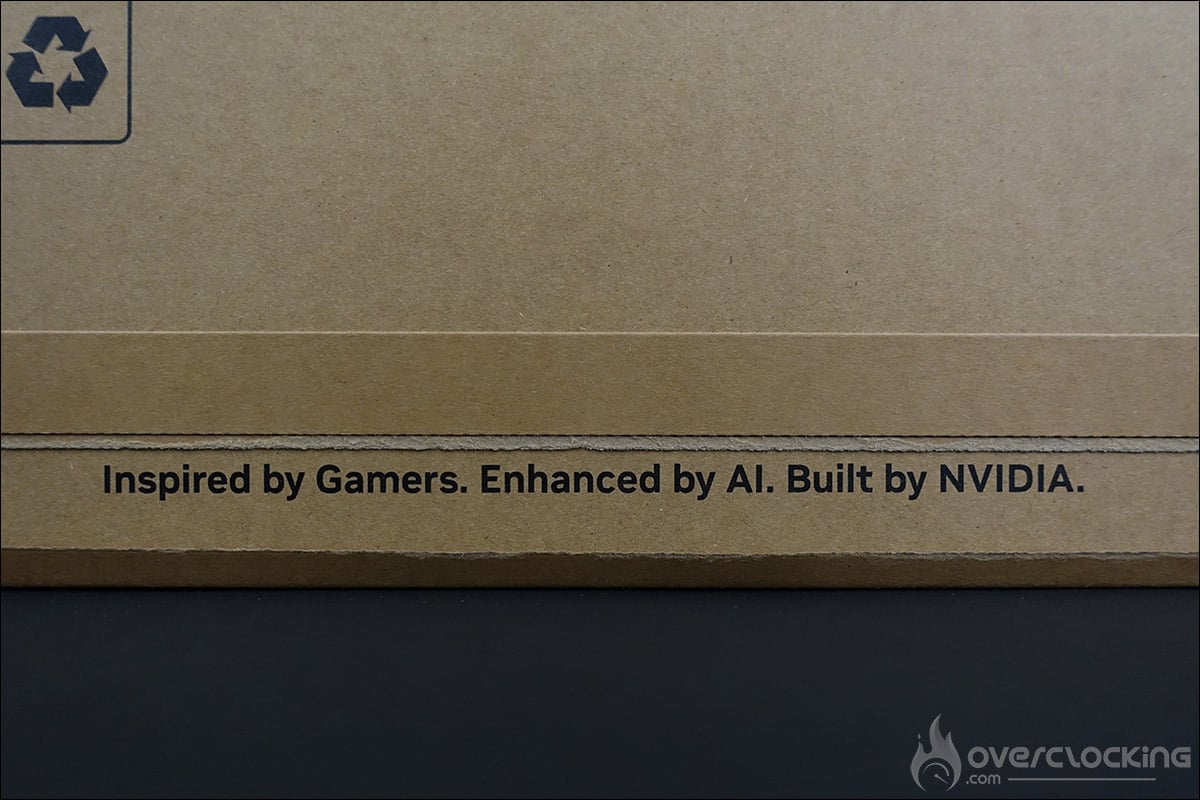
Ecologically, the first good point for the Greens, and you’ll see that this isn’t the only effort made, since there’s no plastic and the whole thing is made from paper fibres. The cardboard tab that seals the box reveals the following annotation: ” Inspired by Gamers. Enhanced by AI. Built by NVIDIA “. It says it all: gamers, artificial intelligence and NVIDIA.
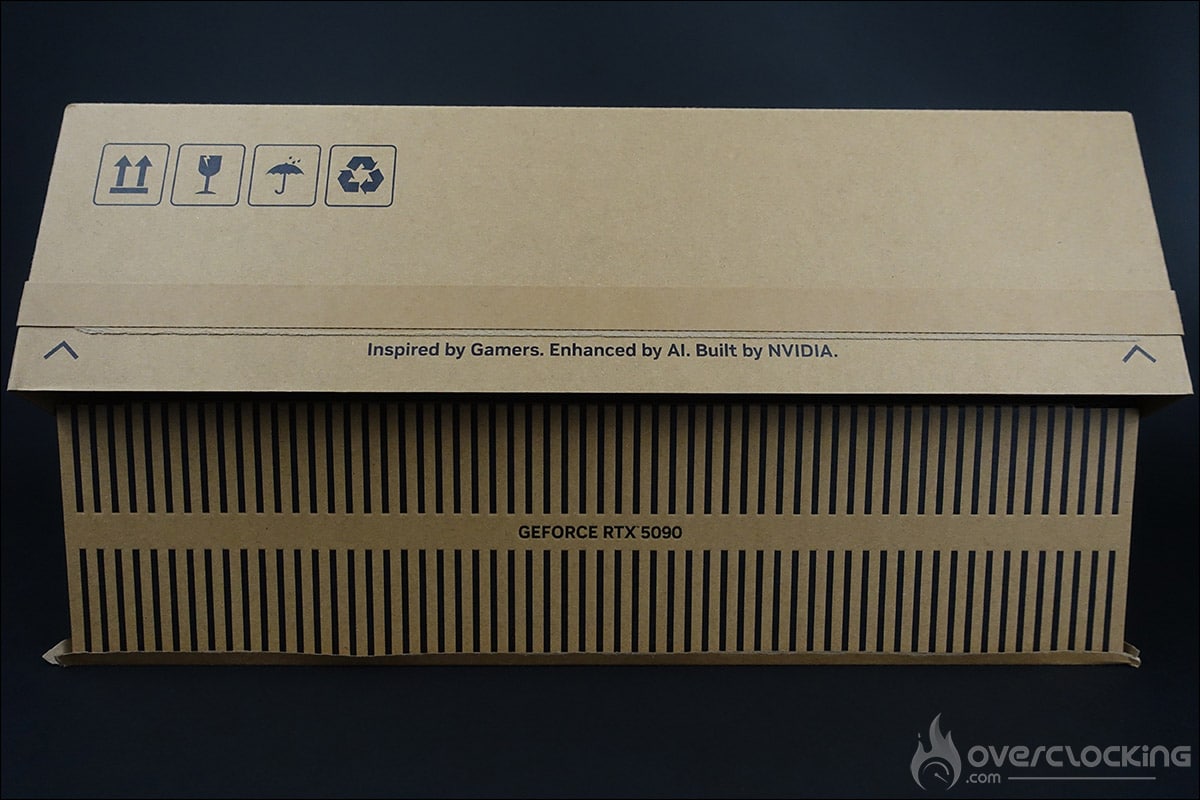
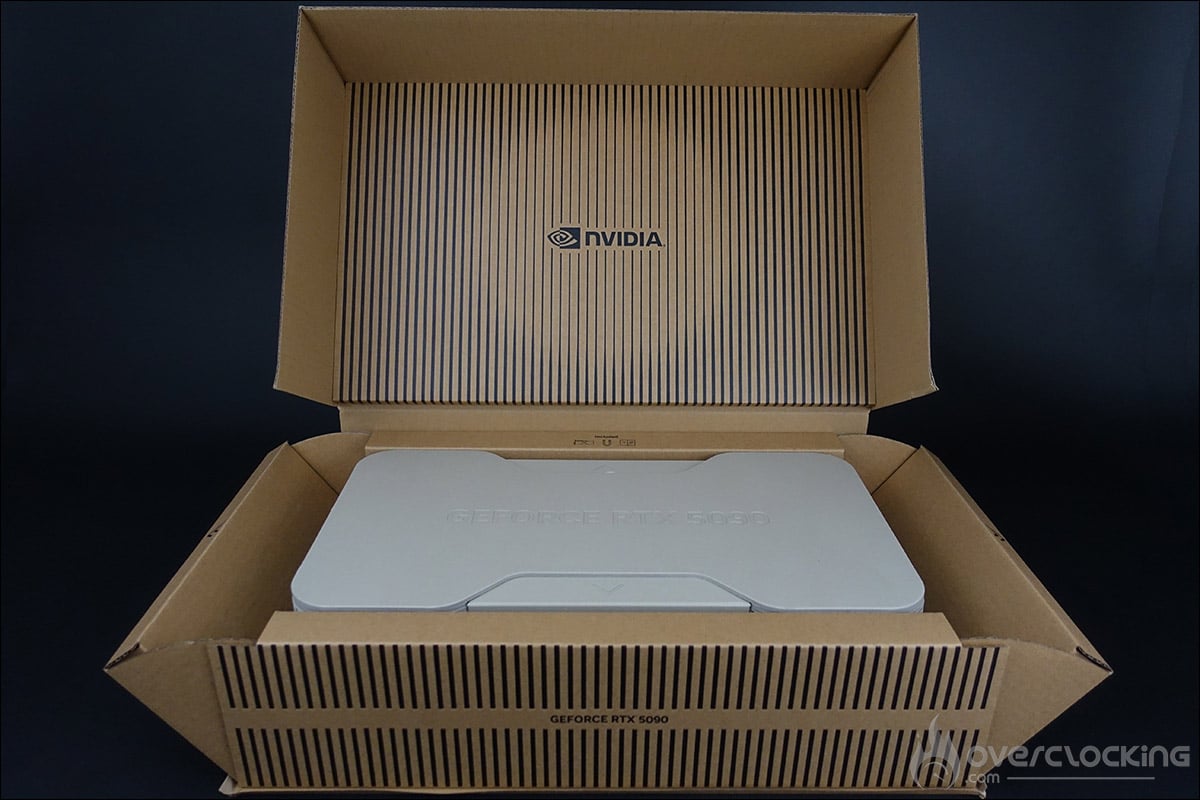
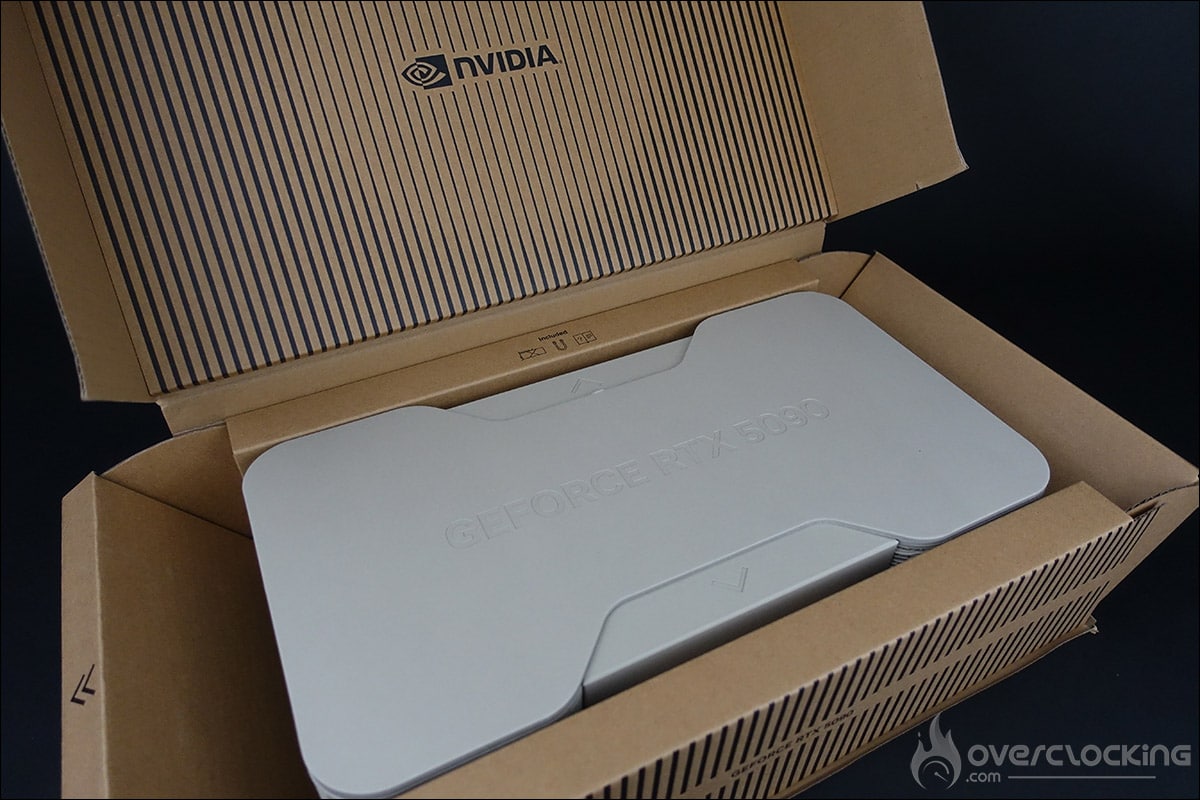
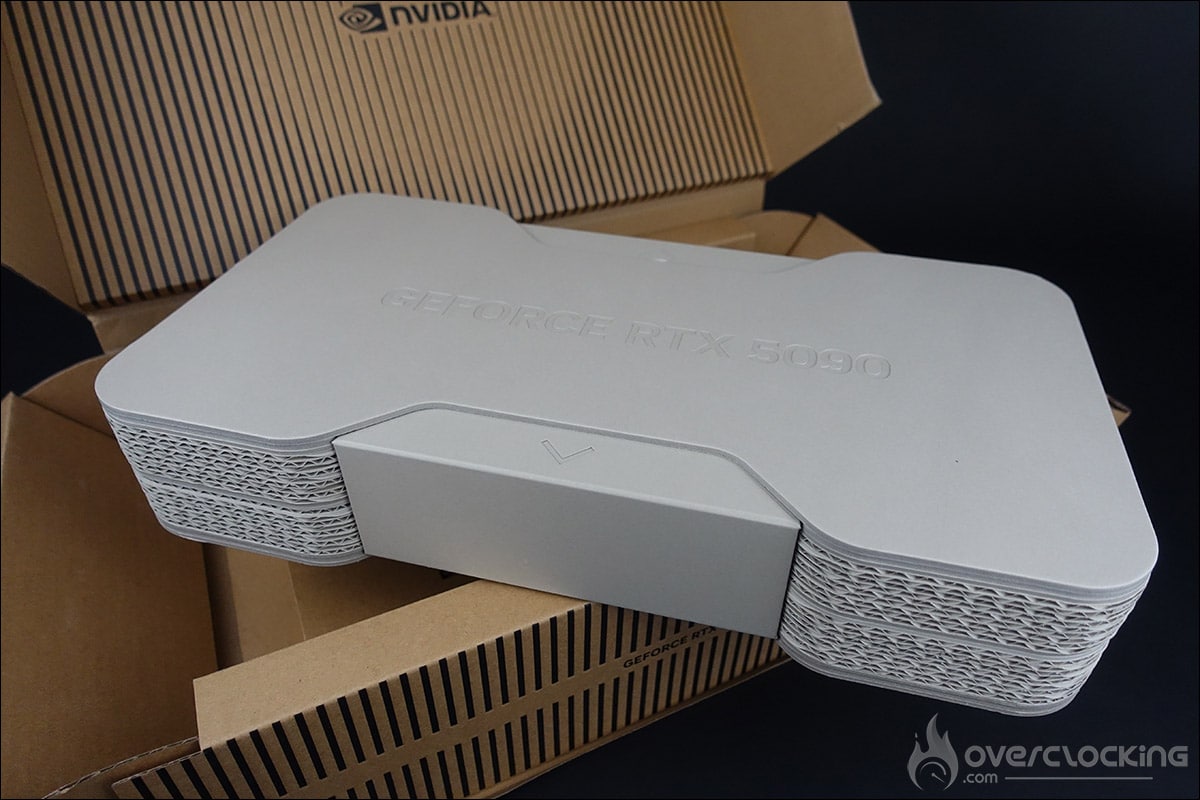
So what does this new box have in store for us? As usual, NVIDIA has taken great care with the packaging, offering a cardboard box in which to hide our copy of the NVIDIA RTX 5090 FE. It’s always very exciting to discover the new packaging offered by NVIDIA for the arrival of a new generation. The box opens from the front and conceals a second cardboard box in the centre, with the words “GeForce RTX 5090” engraved on the top.
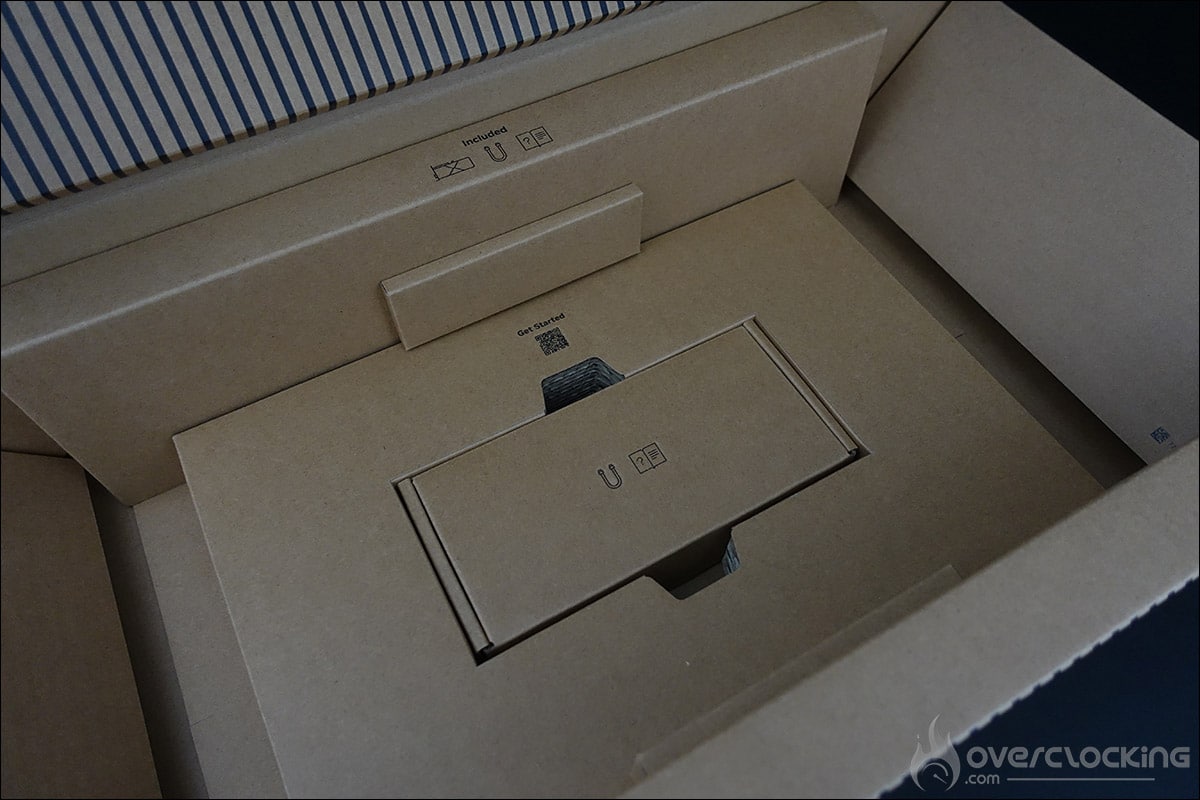
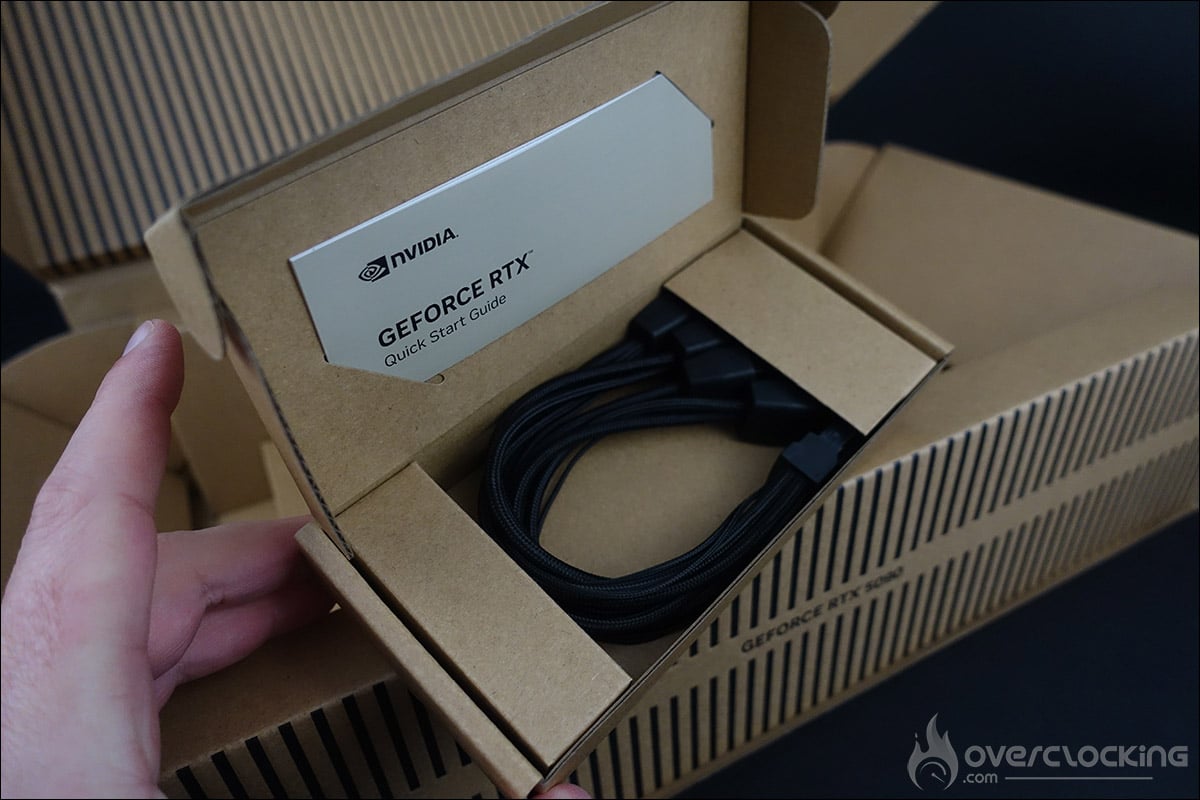
When this is removed, a small box is revealed, containing the card’s power adapter and a quick-start guide. Note that the adapter is a 4 x PCIe 8-pin model to be compatible with your power supply, if you don’t have the 12V-2×6 connector. NVIDIA recommends a minimum power supply of 1,000 watts.
To access and discover our NVIDIA RTX 5090 Founders Edition, all you have to do is slide out the top and bottom cardboard boxes, which hold the two sides of the box together. NVIDIA is therefore playing the eco-responsible card with the packaging of this Founders Edition, and we can only agree!
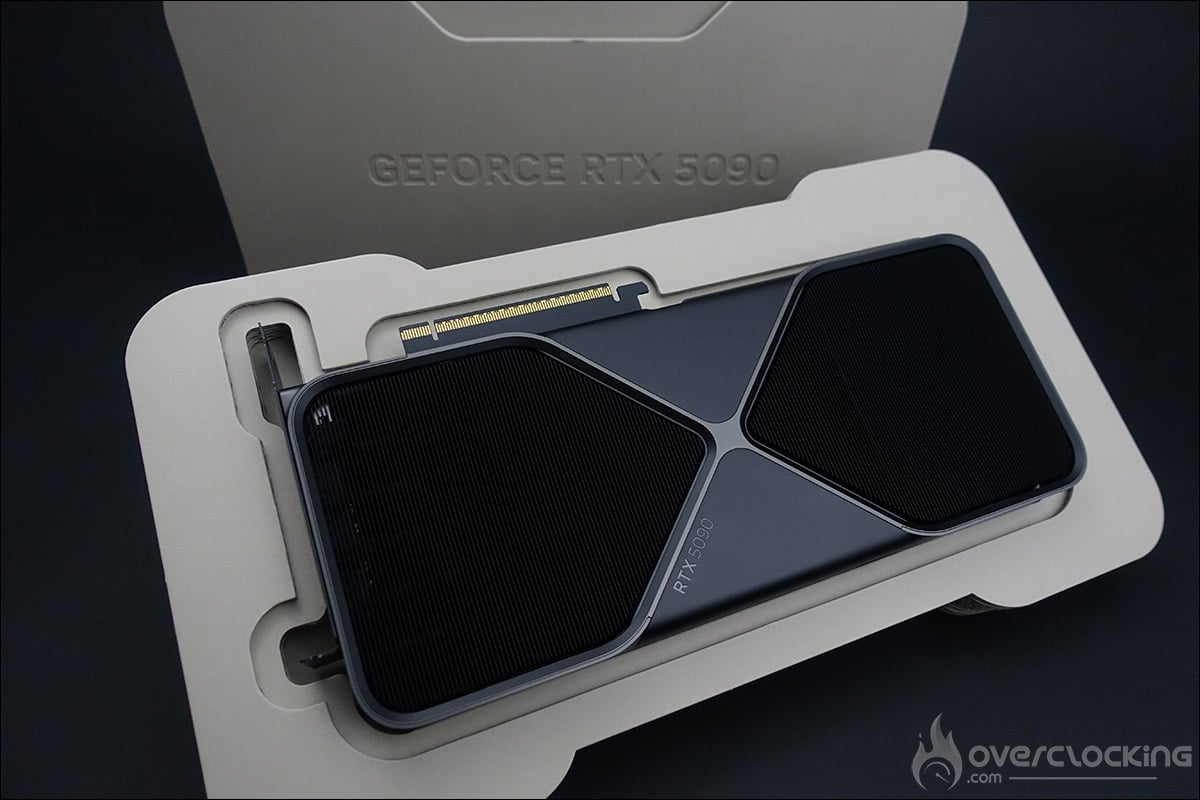
NVIDIA RTX 5090 Founders Edition:
The card is 304 mm long, 137 mm high and 2 slots (40 mm) thick, which means it can be labelled SFF-Ready. This means it can be inserted into a case compatible with the Small Form Factor for anyone who decides to design a compact configuration.
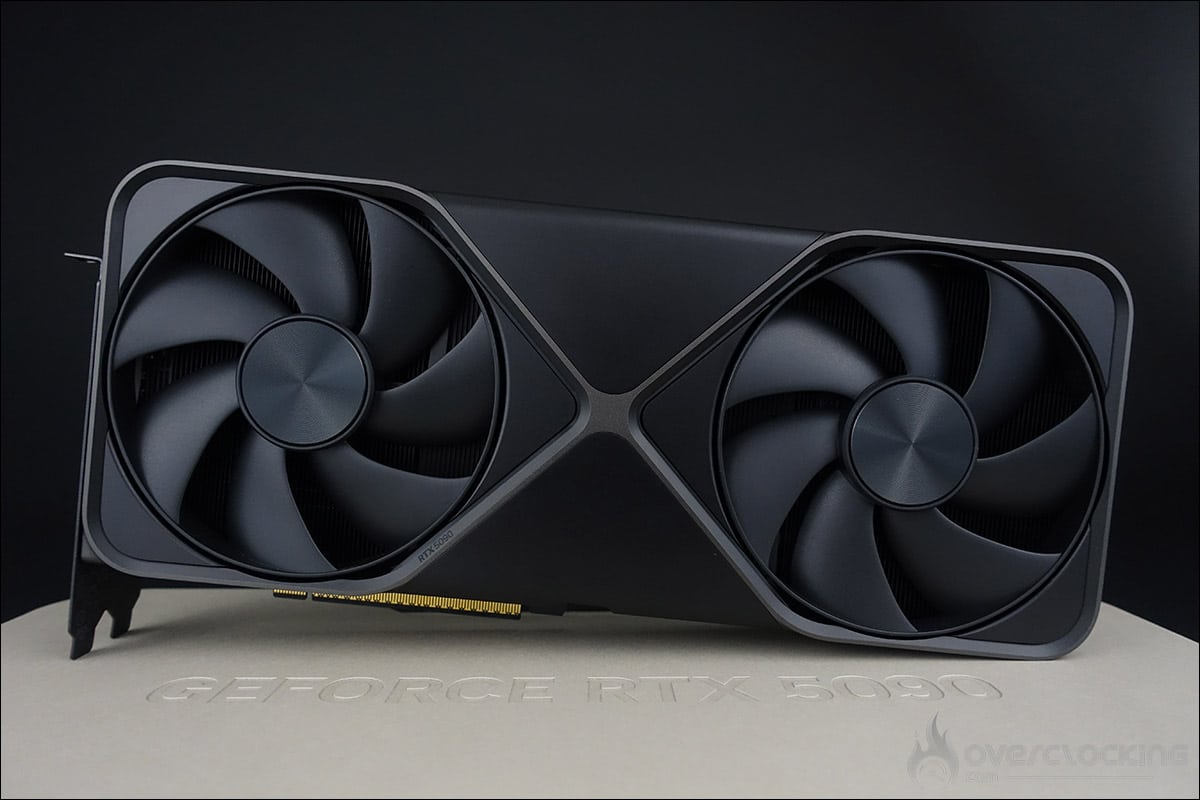
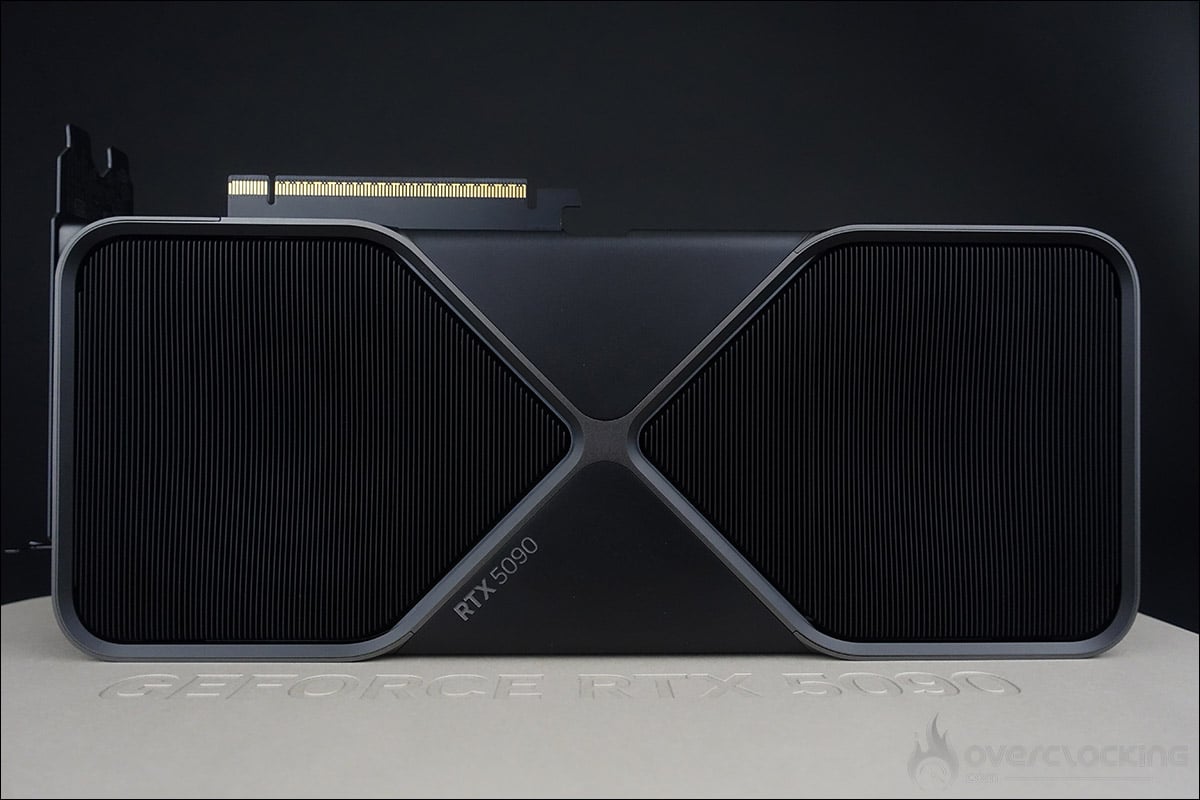
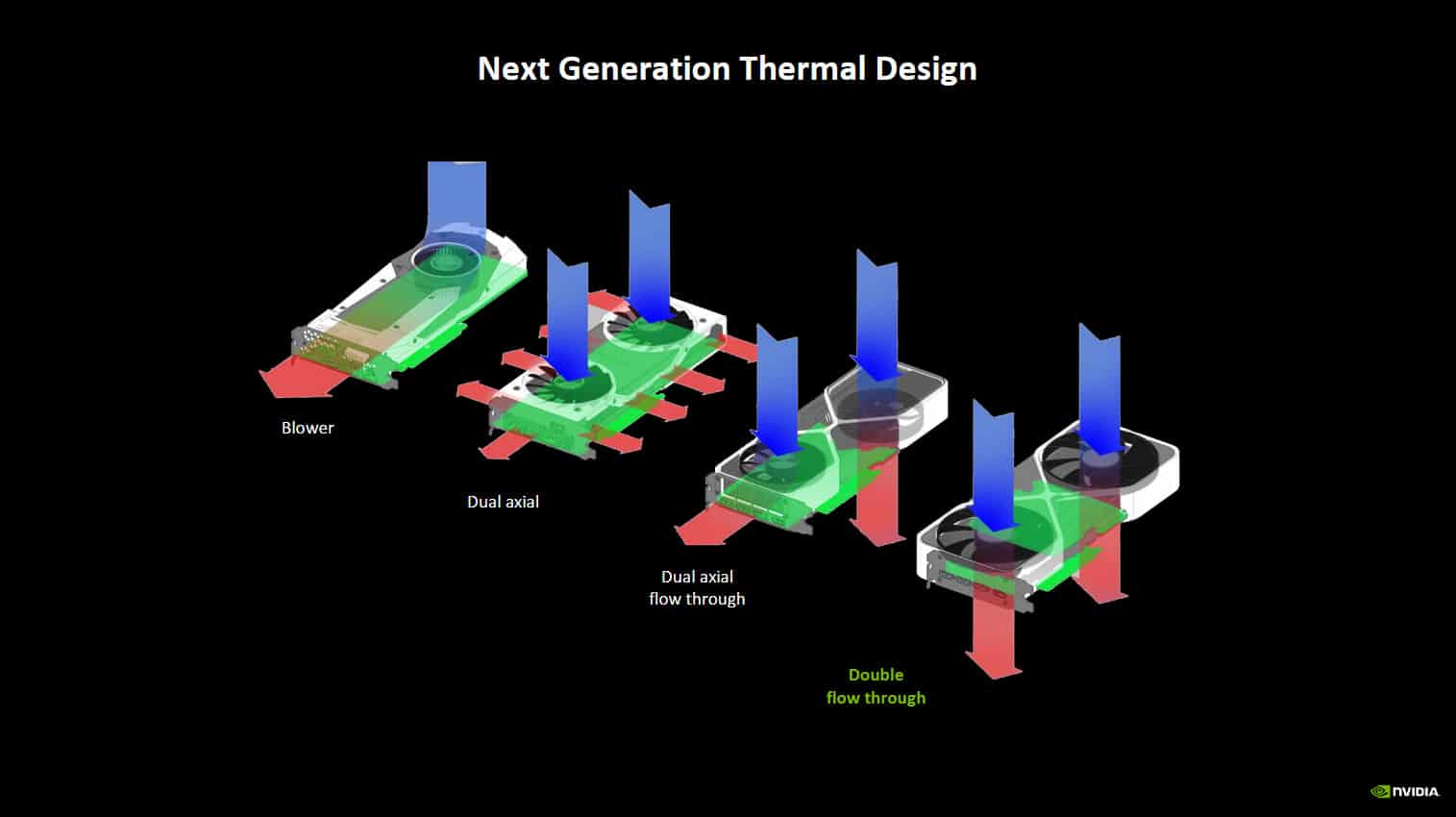
During the press presentation, NVIDIA went back over its new cooling system, which allows our NVIDIA RTX 5090 Founders Edition to be only two slots thick while still being able to dissipate 575 watts, which is, let’s face it, a technical feat. There are two 115 mm fans that draw in cool air from the bottom of your case, which is then evacuated by the fans at the top.
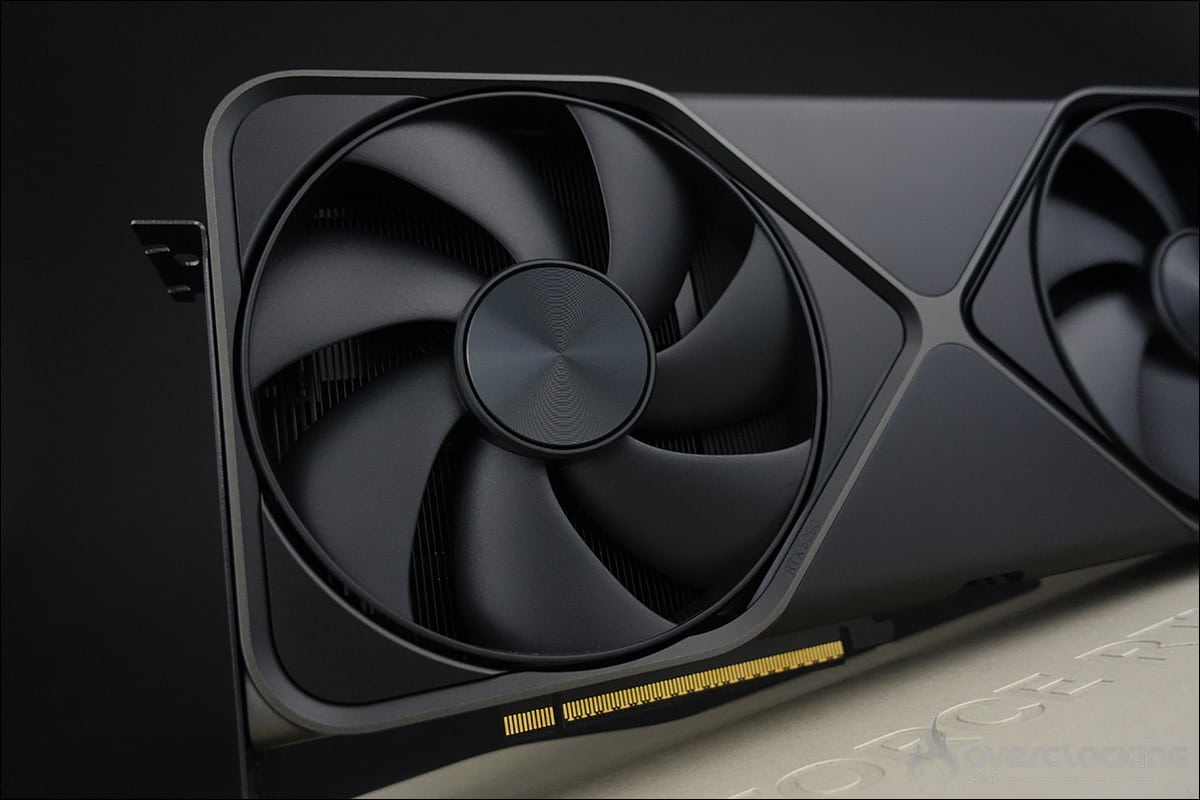
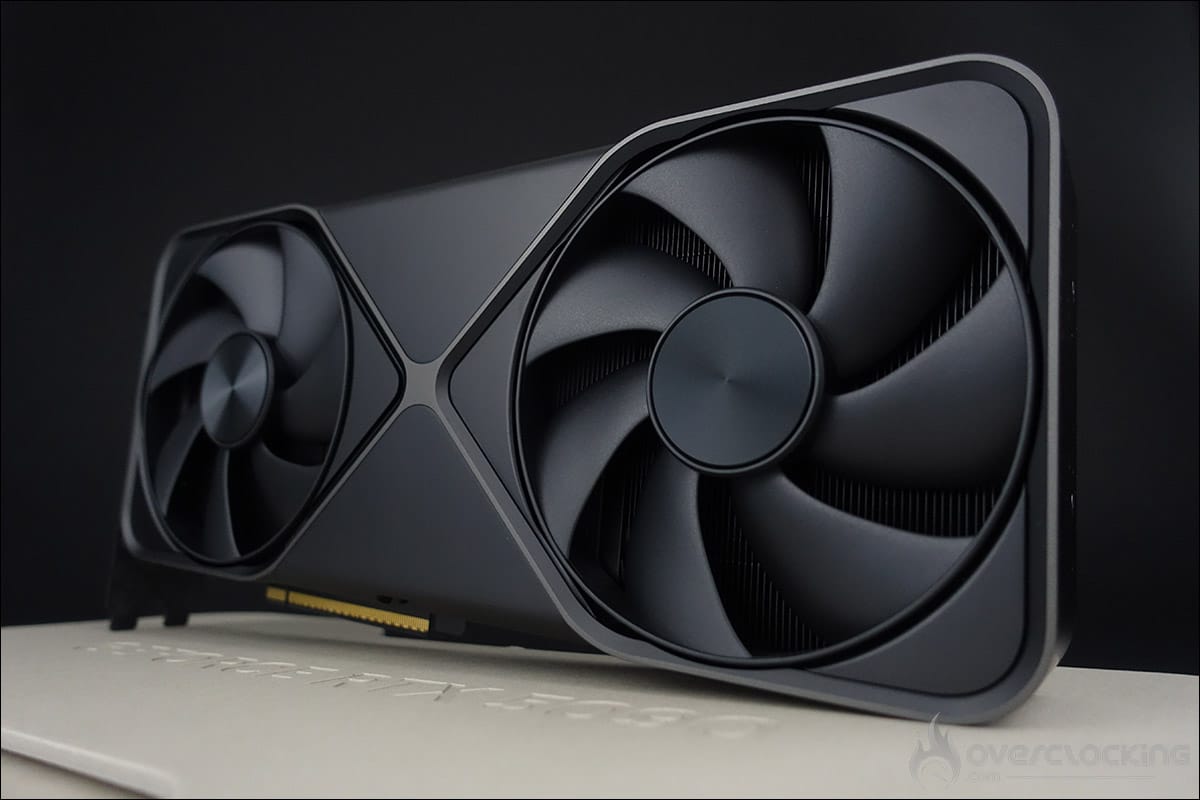
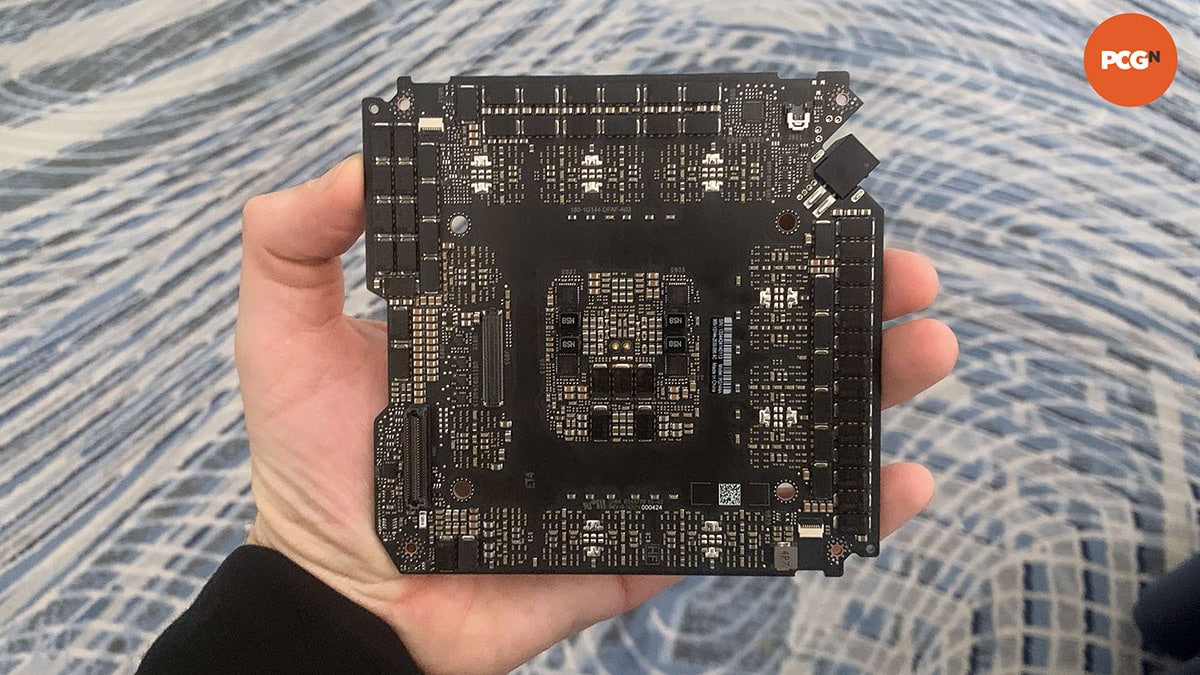
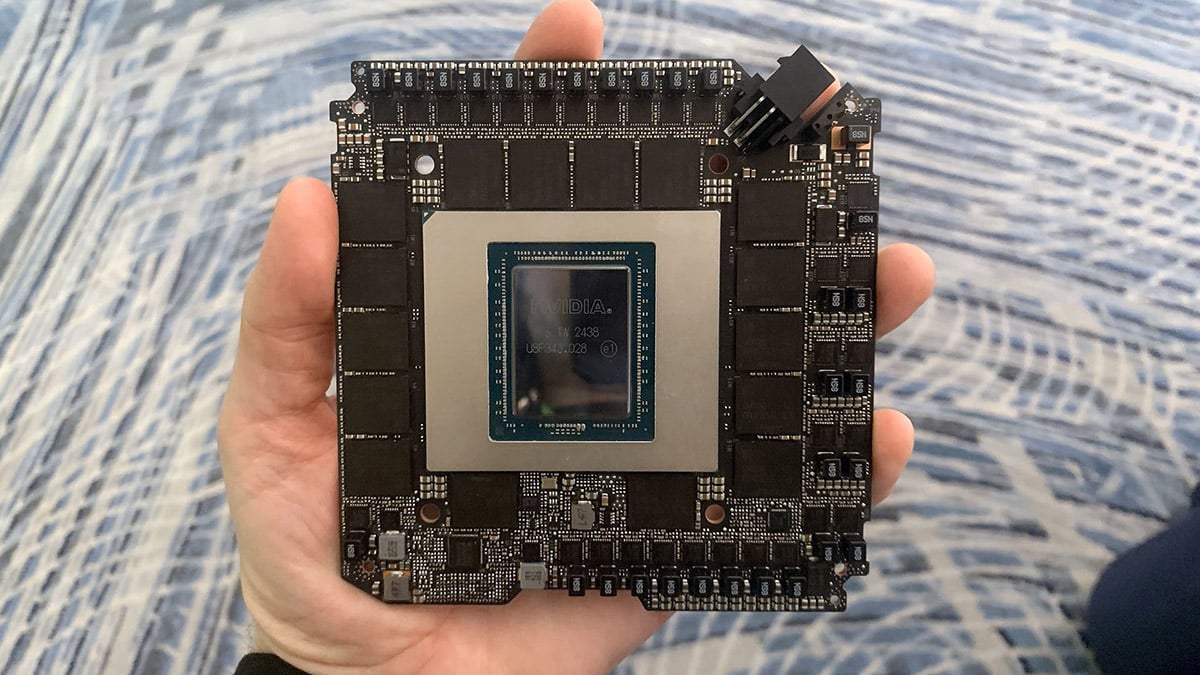
As we already hinted at in this brief, the internal design is made up of three elements: the PCB with the graphics chip, memory chips and power stages, a PCB with the PCIe Gen5 connector and finally a PCB in charge of the video ports linked by a flex cable to the central PCB. Our colleagues at PCGamesN were able to get their hands on this PCB.
NVIDIA also took the opportunity to look back at the first generations of Founders Edition cards to show how the cooling system has evolved. And so we come to our RTX 5090 Founders Edition, which benefits from what we call dual-flow cooling. The two fans blow the air directly through the heatsink.
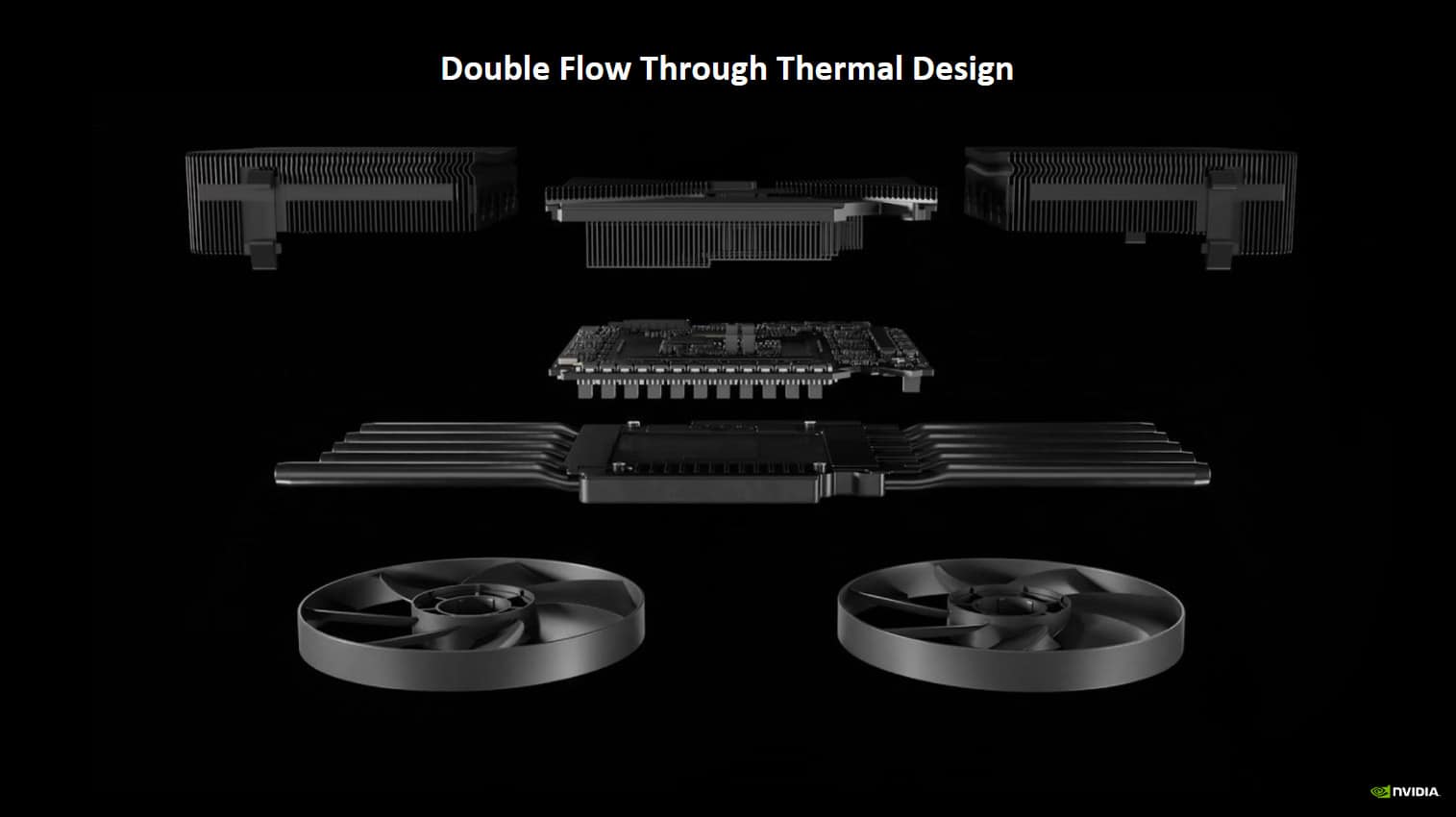
What’s important to understand is that the two fans blow on the heatsink through which the heat pipes pass, heat pipes which are inserted into the steam chamber responsible for dissipating the heat from the central PCB components. It’s not possible to see this in our photos, but as der8auer noticed, the fins of the heatsink gradually curve to optimise the airflow. As for the thermal paste, it has been replaced by liquid metal, which offers better heat exchange and saves a few degrees compared to traditional thermal paste. This new cooling system has therefore been completely redesigned and must have required many hours of testing.
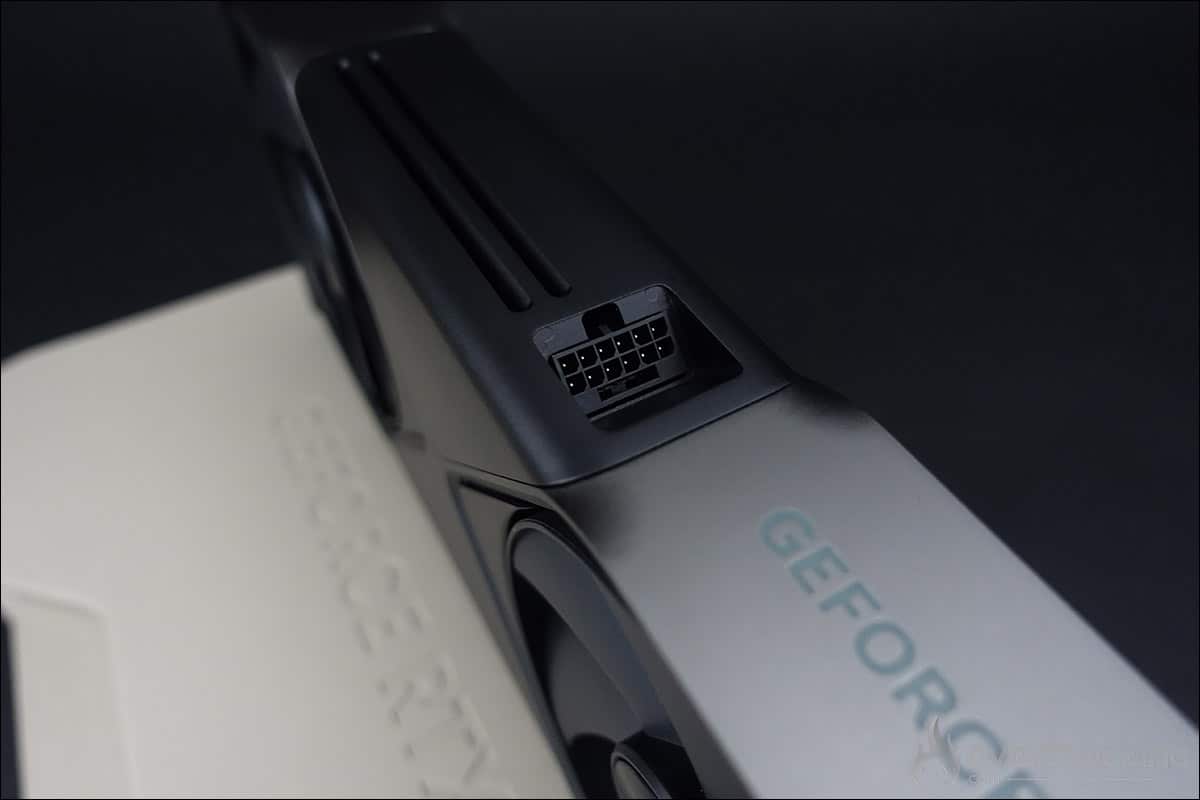
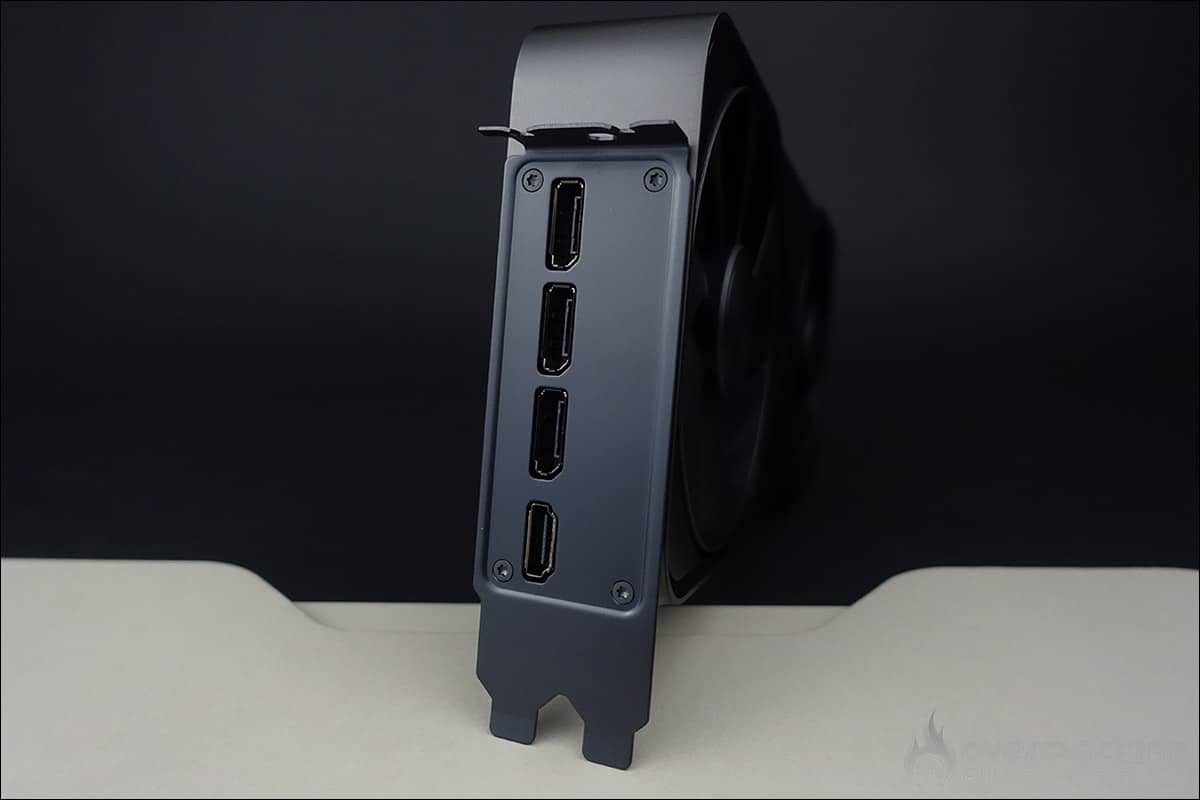
Finally, to power the card, there is a single 12V-2×6 connector, but you can use the 4 x PCIe 8-pin adapter supplied in the bundle by NVIDIA. Note that its position has changed compared to the previous generation. Aesthetically, it will be more difficult to hide the power cable. As for video connectors, you’ll get three DisplayPort 2.1b with UHBR20 and one HDMI 2.1b. NVIDIA has even gone so far as to offer a bracket in matt grey, rather than metallic.
[nextpage title=”Full of new technologies:”]
DLSS4: what’s new?
With the announcement of its new range of graphics cards, the GeForce RTX 5090, RTX 5080, RTX 5070 Ti and RTX 5070, it was also an opportunity for the Greens to announce the arrival of DLSS 4, the fourth generation of Deep Learning Super Sampling combined with Multi Frame Generation (MFG). As a reminder, the Blackwell architecture features new 5th generation Tensor Cores and 4th generation Ray Tracing Cores. It is these hardware innovations from Blackwell and DLSS that will enable MFG, which would have been technically impossible on the previous generation ADA Lovelace.
According to NVIDIA, Multi Frame Generation will deliver up to 8 times better performance in games such as Cyberpunk 2077 compared with raw image rendering. Up to 15 of the 16 pixels per frame are generated by the AI. It will also be possible to reach 240 FPS in 4K ray tracing, and to use path tracing in compatible games.

So what will this new generation bring compared with the previous one? The main difference lies in Frame Generation. Whereas with the RTX 4000, DLSS 3 was able to insert an additional frame between two native frames, DLSS 4 will be able to insert up to three, hence the addition of the term Multi FG. This means you can choose to generate a single image (x2) for the RTX 40 and RTX 50 series, two images (x3) for the RTX 50 series or three images (x4) for the RTX 50 series.


The AI will generate up to three images, which will increase the number of FPS, resulting in smoother gameplay and lower memory consumption thanks to the RTX Neural Shaders , which can be used to compress textures. This new AI model is 40% faster, uses 30% less VRAM and only needs to run once per rendered image to generate multiple images. The only downside is that these AI-generated images will add latency due to the creation process, but NVIDIA will be introducing Reflex 2, which we’ll come back to later in this article.
One thing is certain, NVIDIA is reaping the benefits of having jumped on the AI bandwagon very quickly and is now benefiting from its many years of research in the face of the competition. It’s important to realise that it’s no longer possible to increase raw performance by 25-30% with each generation of graphics cards – it’s the same problem faced by processors, for example. So it was NVIDIA’s choice to integrate AI into its cards in order to offer upscaling.

DLSS 4 is only compatible with this new generation of RTX 5000, but the other accompanying technologies will have a positive impact on previous generations. The RTX 5000 and 4000 will also benefit from the improved Frame Generation, with a gain of between 5 and 10% according to NVIDIA, and with lower memory consumption.
As soon as the RTX 5000s arrive, i.e. at the end of January, on the 30th to be precise, 75 games and applications will be compatible with DLSS 4 at launch, including Alan Wake 2, Cyberpunk 2077, Indiana Jones and the Great Circle, and Star Wars Outlaws.
The new ‘Transformer’:
DLSS 4 features an updated architecture for DLSS Ray Reconstruction, DLSS Super Resolution and DLAA. Previously, DLSS used convolutional neural networks (CNNs) to generate new pixels, and this has now been replaced by the new Transformer. This should offer greater stability, fewer ghost images, more detail on moving objects and smoother edges.

This could translate into the possibility of using a Performance mode for the DLSS, which would no longer be visually average, but could approach the Balanced/Quality mode on the previous-generation CNN model. Of course, this will have to be tested and compared in terms of image quality between the RTX 4000 and RTX 5000. It will also be relevant to compare the different DLSS modes in terms of image quality.


The new Transformer will offer improved image quality in Ray Reconstruction, such as the image on the left in Alan Wake 2 with the chain-link fence. The image on the right shows the improvement in detail between the CNN model and this new generation model.
Reflex 2 technology:
As we said earlier, Multi Frame Generation will allow you to increase the number of FPS, but will add latency because of the creation process. NVIDIA will therefore be offering its version 2 for Reflex, which we have already had the opportunity to present to you here. It’s especially in competitive games that these few milliseconds will really make a difference.


NVIDIA Reflex 2 will combine Reflex Low Latency mode with Frame Warp technology and will be compatible with all RTXs. The idea, of course, is to reduce latency, i.e. the time that elapses between the moment you click your mouse button and its appearance on the screen, by displaying a predictive image that is as close as possible to reality. Reflex 2 will be available in the coming weeks.
Override DLSS or the replacement for DLSS :
NVIDIA’s latest application, NVIDIA App, will allow games that have not yet been updated to the latest DLSS models and features to enable support via a DLSS override. The version of the app we will be testing is a press version, and the DLSS replacement options are available in the Graphics > Program Settings screen under Driver Settings.

We’ll of course be testing Override DLSS during our test of the NVIDIA RTX 5090 Founders Edition to see how easy it is to do. We’ve taken a first look at these new technologies, even if we haven’t gone into detail about everything the new RTX 5090 has to offer, including three 9th-generation encoders and a new 6th-generation decoder. The three encoders should logically accelerate rendering speed.
[nextpage title=”Technical specifications:”]
A quick trip to GPU-Z to check that the information read is correct. As you can see, this is not yet entirely the case. A new version of GPU-Z will almost certainly be posted on January 30, the day the RTX 5090 and RTX 5080 are launched. In the meantime, we can still learn a few things from our copy of the Founders Edition.
In terms of frequency, NVIDIA has announced a base frequency of 2017 MHz and a boost frequency of 2407 MHz for the RTX 5090 Founders Edition. The card has 32 GB of GDDR7 memory (1792 GB/s) on a 512-bit bus. This model features the base frequencies proposed by NVIDIA. Partners offering custom models will no doubt be offering factory overclocking on certain models.
Don’t forget that the GPU frequency could be higher in benchmarks, depending on the quality of your chip and the cooling system used.
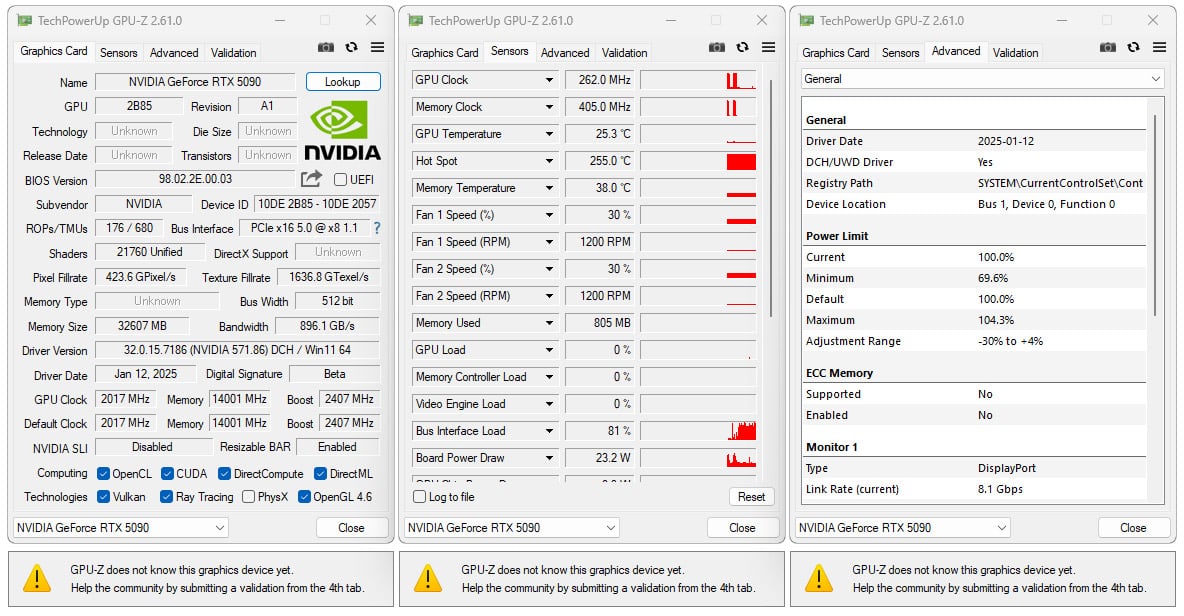
In fact, we ran a test under 3DMark Time Spy to observe the GPU boost frequency. We can see that it reaches the maximum frequency of 2872 MHz at certain times. The memory frequency remains unchanged, which is perfectly normal.

As far as temperatures are concerned, it climbs to 66.2°C and the memory to 78°C. At the time of this first test, it was 18°C in the lab. We’ll have to check the temperatures during our more in-depth tests. The fans are far from running at maximum speed and the card is fairly silent. As a reminder, we’re on a bench and not inside a case. Let’s get testing!
[nextpage title=”The test configuration: “]
As we said in the introduction, we’ve updated all our graphics using the latest drivers from NVIDIA, AMD and, of course, INTEL. We also took the opportunity to slightly modify our test configuration and add some new games to our protocol. So here we go again, with a new series of tests and graphics on this slightly modified configuration:
- Motherboard: ROG Maximus Z790 APEX Encore
- Processor : Intel Alder Lake i9-14900K delid
- Cooling system: EK-Nucleus AIO CR360 Direct Die D-RGB – 1700
- Memory: 48 GB Corsair Dominator Titanium 8000 MT/s CL38
- Graphics card: NVIDIA RTX 5090 FE, ASUS RTX 4090 TUF OC, NVIDIA RTX 4080 Super FE, NVIDIA RTX 4080 FE, AMD RX 7900 XTX and AMD RX 7900 XT
- SSD: Western Digital Black SN750 2 TB EKWB radiator
- Power supply: Corsair AX1600i
- Operating system: Windows 11 64-bit 24H2 (26100.2894)
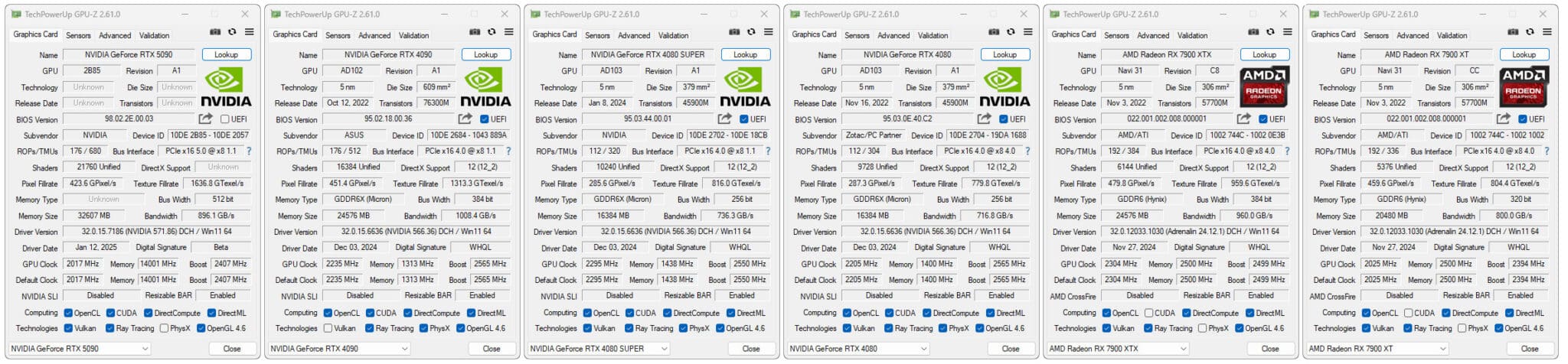
For this test, we used a fairly high-end configuration based on an i9-14900K delid processor and DDR5 memory. Depending on the definition tested, we used either an MSI Oculux NXG253R or a ROG Strix XG27UCS on loan from ASUS France.
Our test protocol:
All the cards are tested at stock frequencies and without any optimisation. For the various benchmarks, whether for synthetics or games, we will opt for 1080p, 1440p and 2160p resolutions depending on the card’s performance.

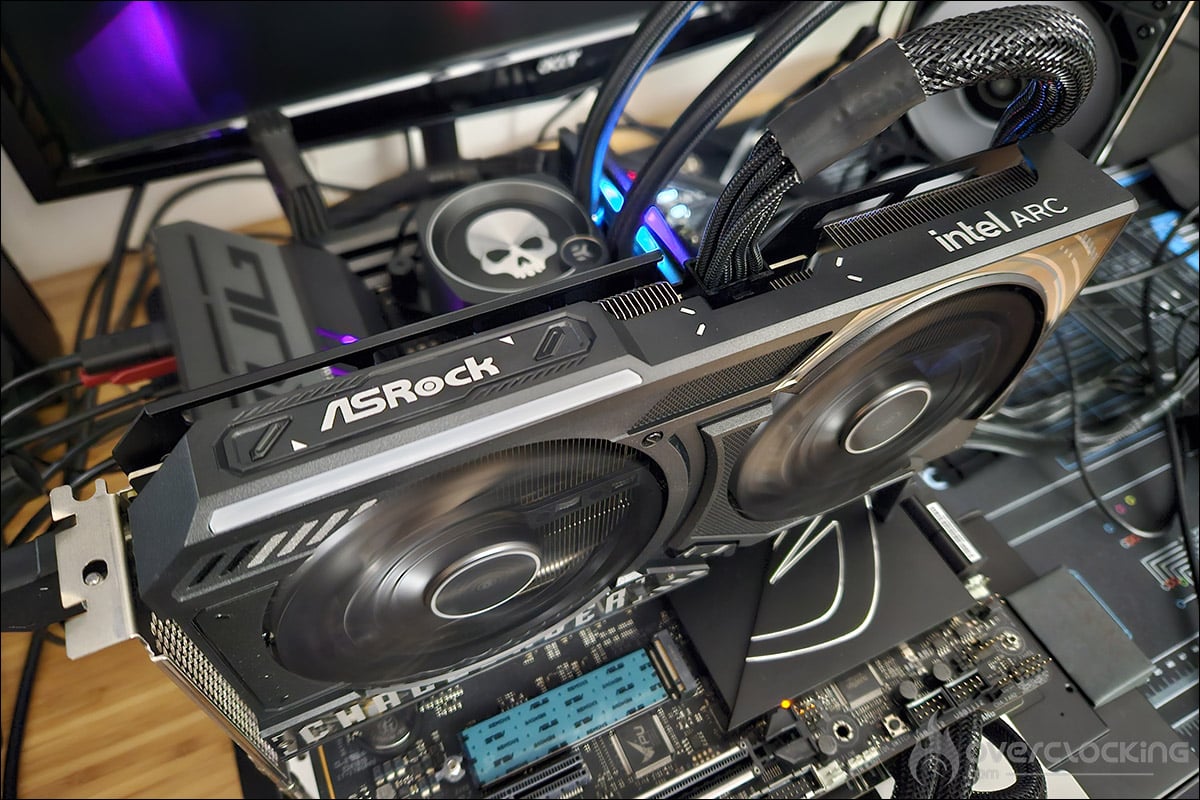
Here, with this NVIDIA RTX 5090 Founders Edition model, there’s no doubt about the definition: it’s going to be 2160p! We’ll be using DLSS Super Resolution in Performance mode, with image generation and ray tracing where available.

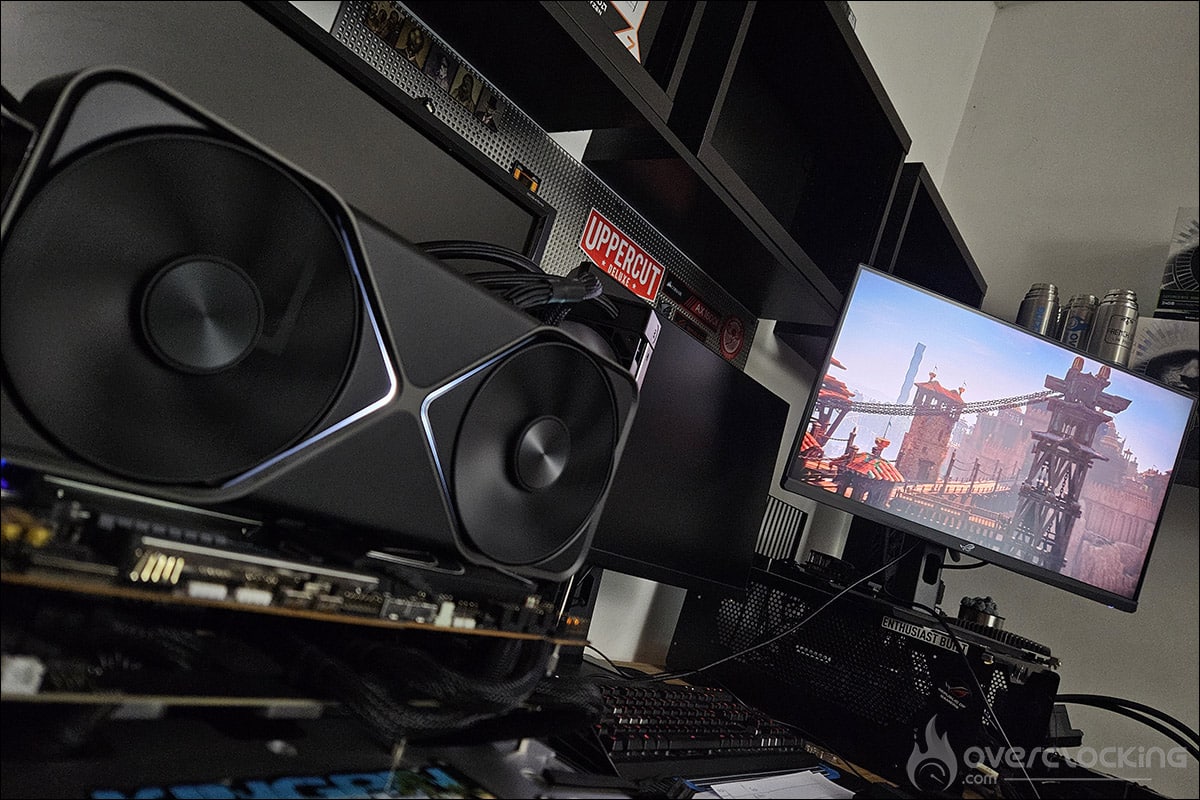
As you can see, we’re now running Windows 11 and we’ve activated the ReSize BAR in the BIOS, which can be seen in GPU-Z. Now that you know everything about our test configuration, it’s time to get started!
Notes :
Before we begin our tests, we wanted to highlight two comments that we read in NVIDIA’s reviewer guide. NVIDIA recommends using AMD’s Ryzen 7 9800X3D processor for the best experience. In fact, after our tests, this processor proved to be the best choice for gaming. As our protocol is built around the i9 14900K, it’s impossible to retest all our cards with this processor. But we will be bringing you the performance of the RTX 5090 with a 9800X3D CPU in the coming weeks.
Finally, NVIDIA recommends using a screen with a high refresh rate and high resolution, i.e. 4K at 240 Hz. The idea is to ensure that you can enjoy optimum game fluidity and clarity of movement.
[nextpage title=”3DMark benchmarks: “]
Our first series of tests will be dedicated to synthetic benchmarks. These are very often used for overclocking competitions , but are also very interesting for comparing different GPUs. So we’ll be focusing on benchmarks from the 3DMark series. For this new version of our graphics, and for the 3DMark tests, we have also isolated the GPU score. So you’ll find, where stipulated in the benchmark, the overall score and the GPU score.
3DMark Fire Strike and Fire Strike Ultra :
Let’s start with 3DMark Fire Strike, which is one of the most widely used benchmarks today. It consists of two graphics tests, a CPU test and a fourth test that combines GPU and CPU. Don’t forget to disable the demo, which makes no difference to the final score and (unnecessarily) prolongs the benchmark. The version used for these tests is, of course, the latest.


We’re starting our tests with the two Fire Strike and Fire Strike Ultra benchmarks, and to say the least, it’s off to a great start. While under Fire Strike our RTX 5090 takes first place, with a 6.2% gain in graphics score, it crushes the competition on the Ultra version with a 31% gain.
3DMark Time Spy and Time Spy Extreme :
The second test is 3DMark Time Spy. Although this one is run in 1440p, its main feature is that it uses DirectX 12. It consists of two graphics tests and a CPU test. As with Fire Strike, don’t forget to disable the demo. These first two benchmarks are provided by UL Benchmark.


We continue with Time Spy, where the results are still very high. We start with a 17.6% increase in Time Spy’s graphical score and a 32.7% increase in the Extreme version. There are going to be some changes in the scores on Hwbot.
3DMark Speed Way :
This is the latest benchmark from Ulbenchmark, and it’s great to be able to say that we’re going to have a good go at this Speed Way. It uses DirectX 12 and is set to 1440p by default. We haven’t changed anything, so we’re using the original benchmark.

In Speed Way, our sample of the day takes first place once again and very easily, with a score of 14444 points, leaving the RTX 4090 at 4278 points behind.
3DMark Port Royal :
This is a benchmark that we left out last year, but which you were keen to see again in our tests. It’s still widely used, particularly in the overclocking community . So we’ve decided to add it to our tests.

The findings remain the same, and even if the RTX 4090 was already performing enormously well, the new RTX 5090 comes in for a big slap in the face.
3DMark Steel Nomad :
The latest benchmark in the 3DMark suite, Steel Nomad will replace Time Spy as the most recent benchmark in the 3DMark suite. However, the good news is that it will be free for users who already have a key. The programme includes a test bench based on Microsoft’s DirectX12 API. However, there will be no ray tracing, but the scene will use an ‘extreme’ level of geometry and rasterised light.

Finally, the penultimate benchmark in the 3DMark series, Steel Nomad, which has just been released, still puts our NVIDIA RTX 5090 Founders Edition ahead of the pack, with a 54.7% gain over the RTX 4090.
3DMark NVIDIA DLSS :
We’ve added this benchmark here, which highlights the potential of DLSS, as it will now be compatible with DLSS 4, giving us the opportunity to test it with this NVIDIA RTX 5090 Founders Edition.

Finally, the last benchmark in the 3DMark series, the NVIDIA DLSS feature test will allow us to highlight, for the first time, the contribution of DLSS 4 technology. As a reminder, Frame Generation on the RTX 5000 can be selected as x2 (one frame), x3 (two frames) or x4 (three frames). This refers to the number of additional images that can be added between two native images.

Above are the parameters in the benchmark that allow us to choose the number of images generated.
[nextpage title=”Cinebench 2024 and V-Ray 6:”]
Following on from the 3DMark series of benchmarks, let’s tackle a series of tests for productive tasks. Even if this isn’t the primary function we’ll be attributing to the graphics card, we couldn’t do without offering you a small panel of tests, especially concerning AI, which is becoming more and more present.
Cinebench 2024 GPU :
This is a benchmark that we won’t be introducing again, as it’s used so often for our CPU tests, but here, with the 2024 version, it’s our graphics card that we’re going to put to the test. Please note that the version included in BenchMate will not work for this GPU test, so you’ll need to download the full version from the Maxon website.
No results in Cinebench 2024, which will no doubt need updating, as our NVIDIA RTX 5090 Founders Edition is not recognised. As you may remember from previous tests, Intel graphics cards are still not compatible with this benchmark either.
V-Ray 6:
A new benchmark to add to those we use to test our GPUs. The V-Ray 6 benchmark is produced by the Chaos company to enable users to quickly evaluate the rendering speeds for both your processor and your graphics card, which is why we’re adding it today. The great thing about this benchmark is that it’s free and can be downloaded directly by following this link. You can then compare your score directly with those below, or directly online on the Chaos page.
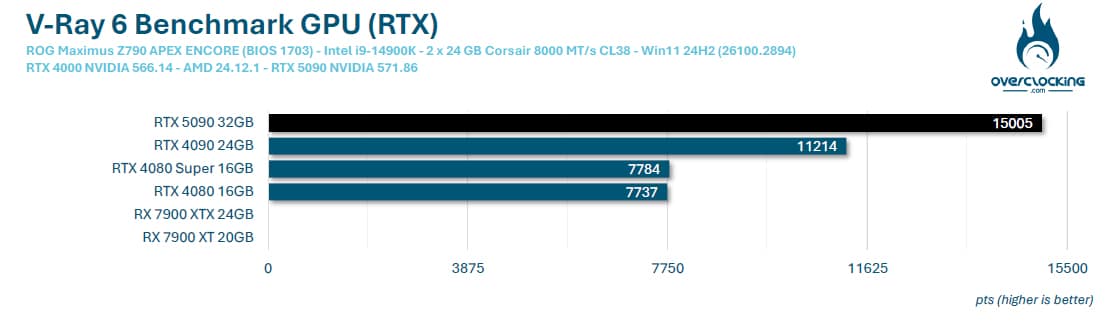
Here, for our tests, we’re going to opt for ‘RTX’ rendering rather than ‘CUDA’ rendering for NVIDIA’s RTX graphics cards. As with the 3DMark benchmarks, our RTX 5090 dominates.
[nextpage title=”UL Procyon AI Image / Text Generation:”]
UL Procyon AI Image Generation:
UL Benchmark not only offers its 3DMark benchmark suite but also, UL Procyon, to meet the demand for Artificial Intelligence evaluation. This benchmark was chosen for its ease of implementation. The benchmark will generate 4 x 4 images and provide us with a score as well as a result in the form of the time, in seconds, required to generate an image. The software supports several AI inference engines depending on the GPU used.
We will therefore use the benchmark in Stable Diffusion 1.5 (FP16) mode. It is intended for mid-range GPUs. The test will create 16 images at a resolution of 512 x 512 in batches of 4. There is a test called Stable Diffusion XL (FP16), where 16 images will be created, at 1024 x 1024, in batches of 1.
Unfortunately, our NVIDIA RTX 5090 Founders Edition is not recognised by the software and should be updated as soon as the cards are released. However, here are the performances of our other cards and we will update both graphics as soon as our RTX 5090 is supported.
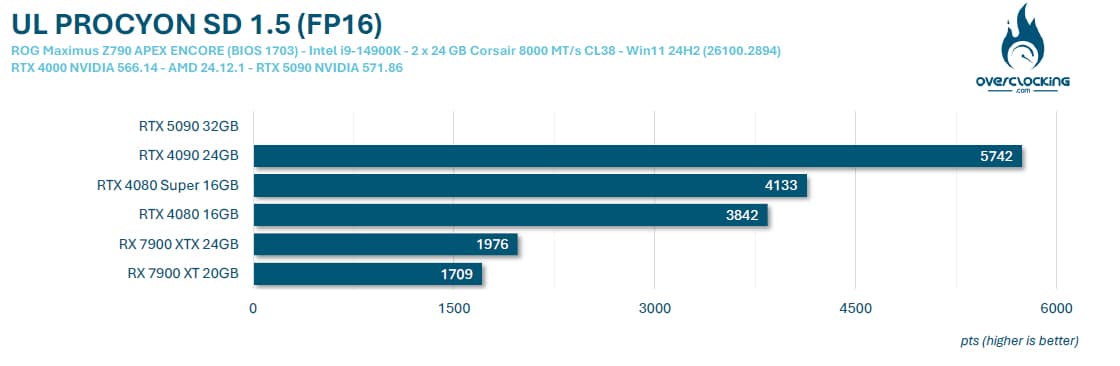

On the other hand, 5th generation Tensor Cores provide support for the FP4 (Floating Point 4 bit) format, which will double the calculation performance of neural models while reducing the memory footprint by half. This improvement is based on an essential compromise: FP4 uses less precision than traditional formats such as FP16 or FP32. However, for many deep learning models, this precision is sufficient to maintain reliable results while considerably reducing the load on memory and computing units. So we carried out the test with our RTX 5090 and here’s the result.
UL Procyon AI Text Generation:
The latest benchmark added to this test suite, AI Text Generation. The Procyon AI Text Generation Benchmark provides a more compact and easier way to repeatedly and consistently test AI performance with multiple LLM AI models. UL says it has worked closely with many AI software and hardware leaders to ensure that the benchmark tests take full advantage of the local AI accelerator of the systems used.


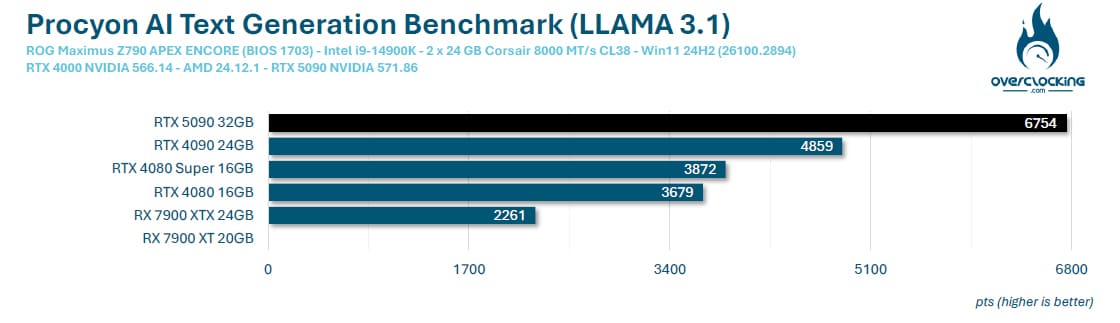
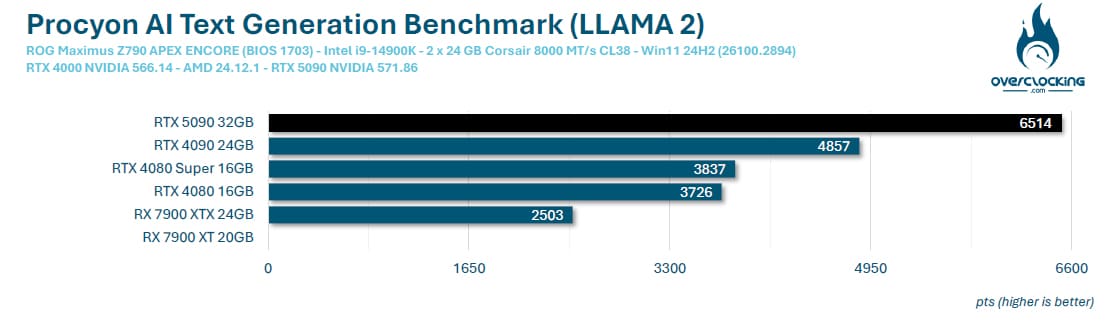
Our RTX 5090 Founders Edition is once again in the vanguard, mastering the subject perfectly. We can see that our two top-of-the-range AMD models are a long way behind.
[nextpage title=”2160p rasterisation gaming performance: “]
Let’s get on with the gaming tests. We’ve used all the graphics cards we thought would be interesting to compare with this NVIDIA RTX 5090 Founders Edition in 2160p definition. In the coming weeks, we’ll be offering a new type of article, retesting graphics cards from previous generations to find out what they’re still worth in 2025. Our games panel currently consists of 11 titles, and will be growing over the coming weeks.
We have chosen to use the benchmarks built into these different games.
Why have we done this? Quite simply to allow you to compare your results with ours if you also have a copy of one of these games. It’s a thought-provoking idea that will allow you to compare your results with ours. The number and titles selected have changed slightly, and will increase again over the coming weeks as we get our hands on new games.
What is rasterisation?
Before we start, a quick word about ‘rasterisation’, which is currently the subject of much discussion. Rasterisation is the evaluation of the performance of our graphics cards without using upscaling technologies . We choose a graphics quality, often the highest, and test it. The advantage of these tests is that we can quantify the gains made by the architecture between different generations. In our case, to be able to judge the gains obtained between the architecture of the RTX 4090 (ADA Lovelace) and that of the new RTX 5090 (Blackwell).
Borderlands 3 :
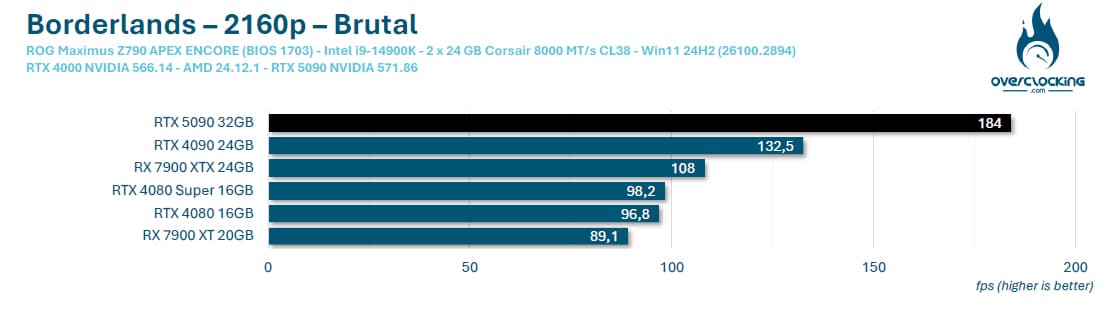
Let’s get on with the gaming part, starting with Borderlands 3. It’s an instant hit, with an average of 184 FPS and therefore a 38.9% gain over the RTX 4090.
Cyberpunk 2077:
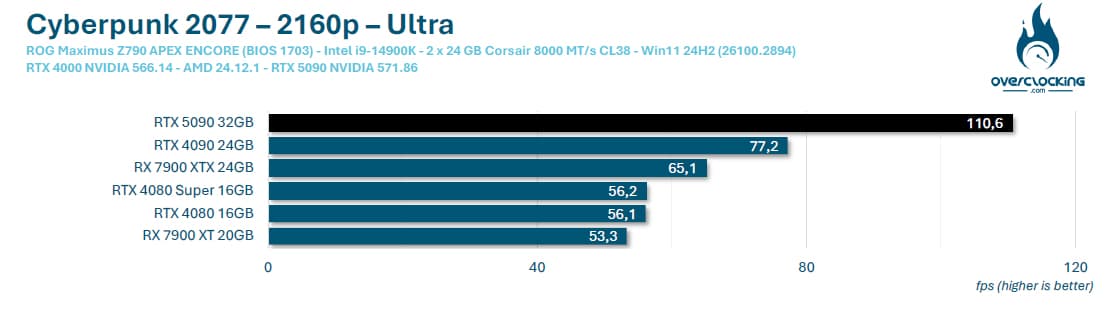
New game and same observation with Cyberpunk 2077. The 100 FPS mark is easily passed, with an average of 110.6 FPS.
COD Modern Warfare III:
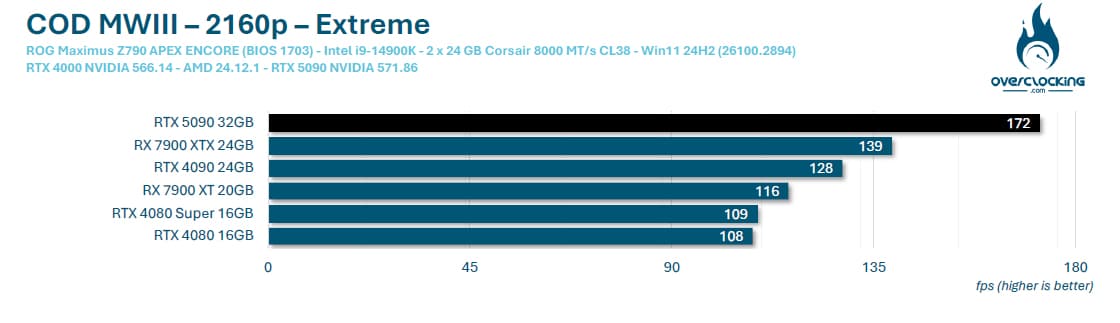
You don’t change a winning team, and our sample of the day is still well ahead. The gap is once again quite colossal against the RTX 4090, which is only in third place in this benchmark.
Forspoken :
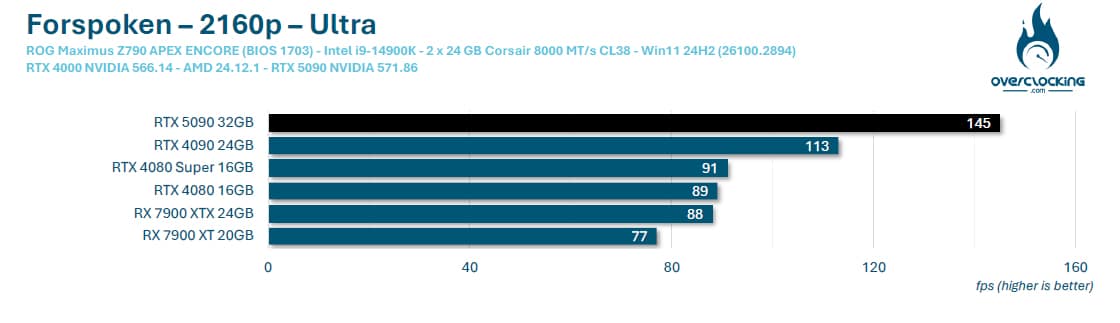
Forspoken is a fairly demanding game, and the RTX 4090 and RTX 5090 are the only two cards capable of breaking the 100 FPS barrier.
Horizon Zeron Dawn Remastered:
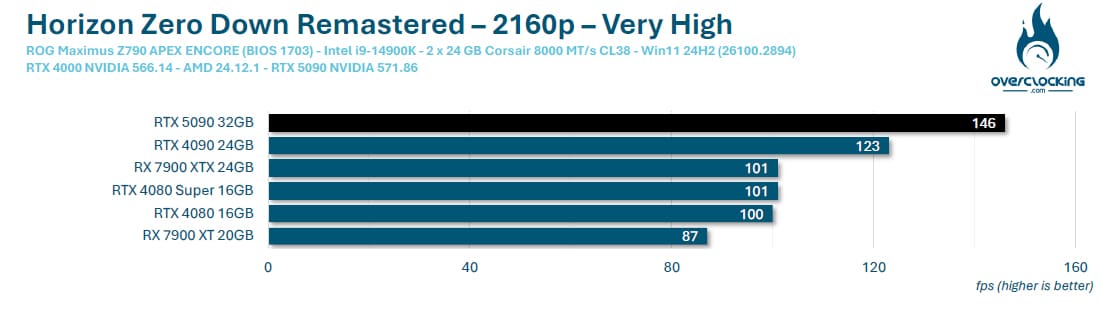
One of the new games we’ve added to our comparison, and one where the differences are smaller than usual. Here, there’s an 18.7% gain over the RTX 4090.
Shadow Of The Tomb Raider:
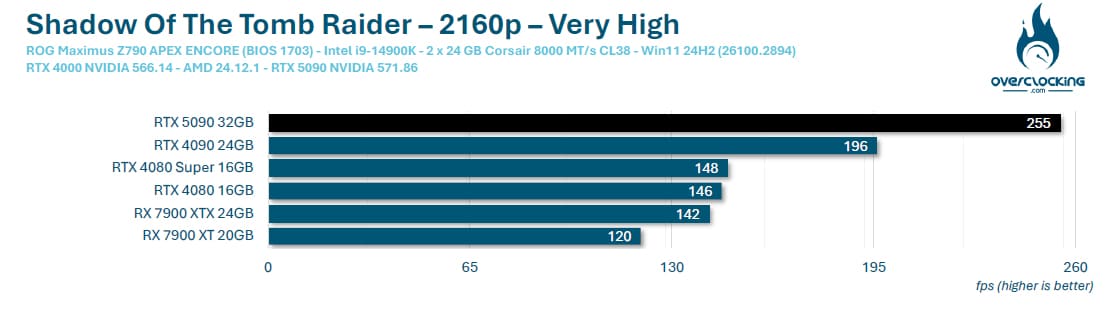
Shadow Of The Tomb Raider passes the 200 FPS mark with flying colours on our NVIDIA RTX 5090 Founders Edition.
Black Myth: Wukong Benchmark Tool :
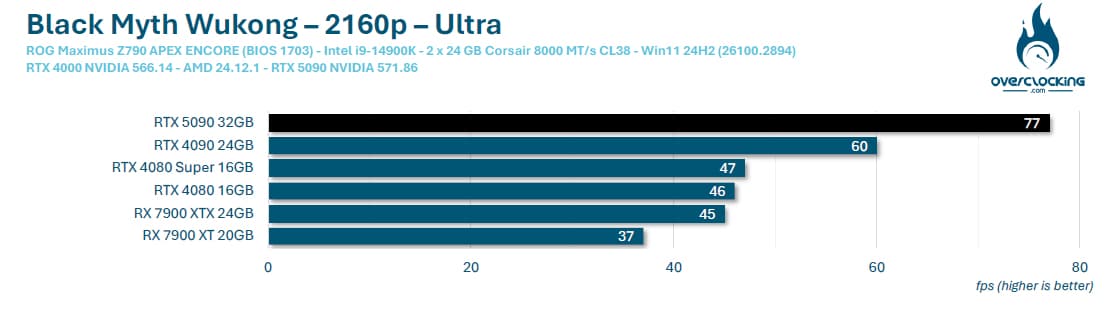
This new game also seems to be very greedy, and doesn’t do NVIDIA graphics cards any favours.
Far Cry 6:
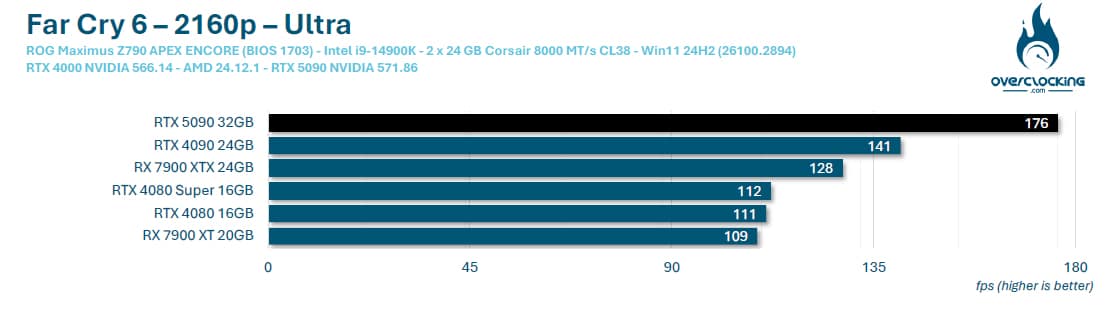 Performance is the same as ever for Far Cry 6, with the RTX 4090 and RTX 5090 topping the charts.
Assassin’s Creed Mirage:
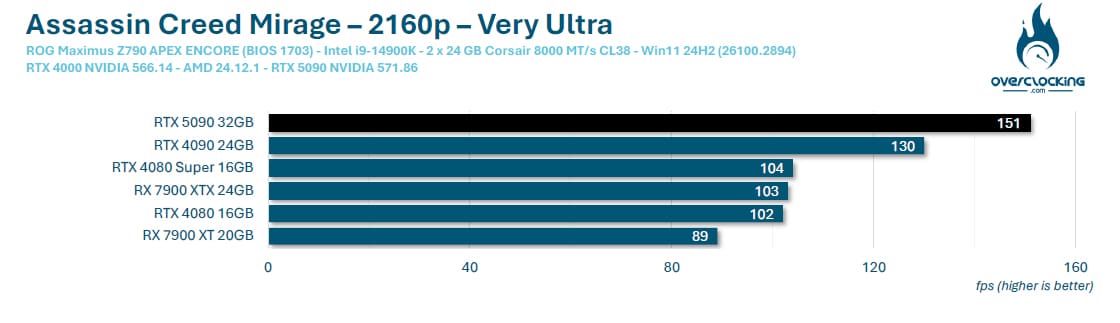
Here, it’s lower performance, but still first place for the RTX 5090.
Red Dead Redemption II:
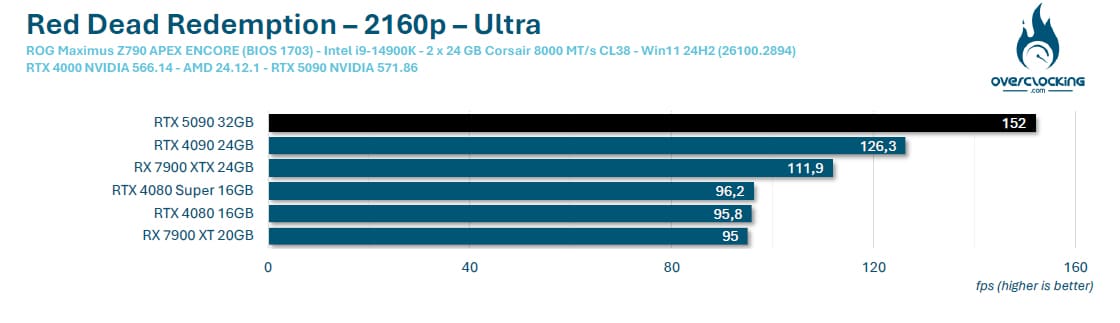
In Red Dead Redemption II, nothing changes and our RTX 5090 Founders Editions is ahead with an average of 152 FPS.
F1 2024 :
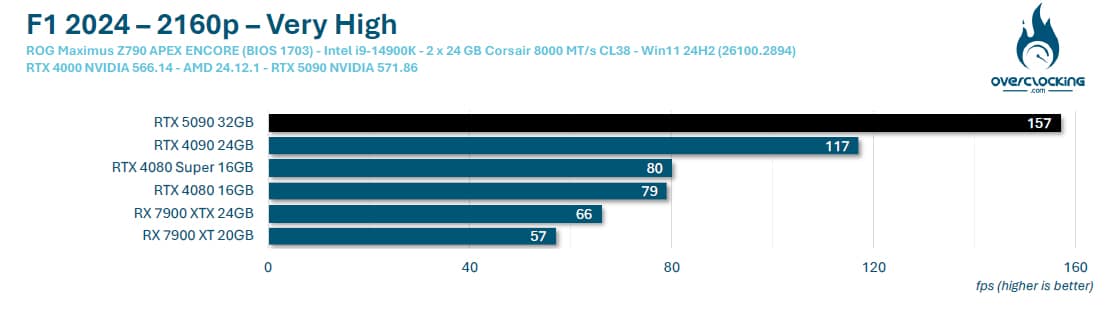
Last game and nothing will have changed during this series of 11 games, with an RTX 5090 logically dominating the older generation. Let’s calculate the average gains to get an idea of the difference between the two architectures.
Average for games in 2160p rasterisation :
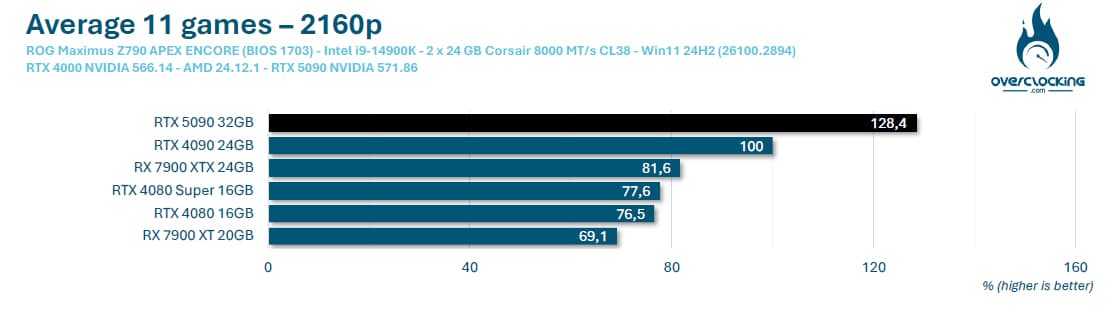
Let’s start with a logical observation: yes, our RTX 5090 logically performs better than the RTX 4090, and we come up with an average 28.4% gain over the previous architecture. There are two ways of looking at this, either to say that nearly 30% isn’t bad at all, or to say that it’s not enough given the gains, for example, that we noted between ADA Lovelace and Ampere. Well, yes, but… You mustn’t forget that between ADA Lovelace and Ampere, the engraving finesse improved (8nm to 4nm), the number of Cuda Cores was increased, the Tensor Cores and RT Cores evolved and increased in number, and it benefited from a much higher boost frequency.
Here, we’re using the same engraving finesse, which explains the lower gain, and unless the engraving finesse changes for the next architecture, we should end up with the same gain proportions. Is this a bad thing? Not really, and it would have been difficult to propose a greater gain in rasterisation in this situation, given that the TDP is already 575 watts. We’ll be keeping a close eye on how the rest of the RTX 5000 range performs against the previous generation.
NVIDIA has been working on AI for years, particularly with its upscaling, and continues to develop it, as we’ll see in the rest of our tests.
[nextpage title=”2160p gaming upscaling performance:”]
In this section, we’re going to test our graphics cards by activating ray tracing, if available, and upscaling depending on the graphics card used. As a reminder, there are currently three upscaling technologies . NVIDIA has DLSS, which can only be activated with NVIDIA cards. Depending on the generation of your GPU, you may or may not be able to take advantage of all the technologies offered by the Greens. At AMD, it’s FSR, which is also evolving and also benefits from Frame Generation for certain games.
Finally, Intel’s in-house upscaling is called XeSS, and with the arrival of this new generation of graphics cards, Intel has taken the opportunity to announce the arrival of XeSS 2, which will introduce two new features to compete with NVIDIA and AMD, who are already ahead of the game in this area. Intel will be offering Xe Frame Generation (XeSS-FG) and XeSS Low Latency (XeLL).
Today sees the arrival of DLSS 4, and in our comparative tests, only Cyberpunk 2077 is already compatible. On the next page, we’ll be showing you a selection of other games compatible with DLSS 4. Finally, it’s important to point out that some games don’t have ray tracing, but only an upscaling solution. We’ll make this clear in the games below. For 2160p definition, upscaling in either DLSS or FSR will always be in Performance mode.
Cyberpunk 2077:
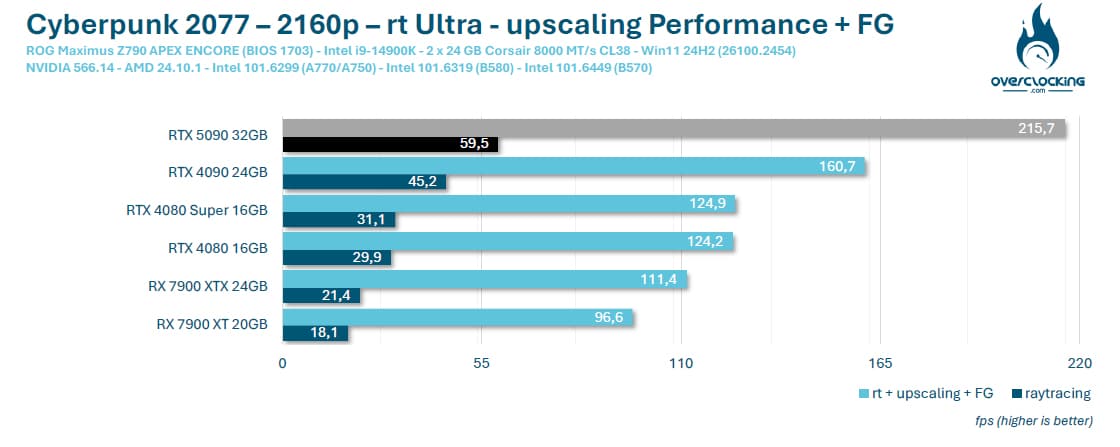
Here we go again, with Cyberpunk 2077 as our first game. It’s our NVIDIA cards that are in front, thanks to DLSS 3. Please note that here, for the purposes of comparison, DLSS 3 is used with our RTX 5090 Founders Edition. DLSS 4 will be discussed on the next page. Our sample of the day managed to achieve an average of 60 FPS in 2160p with ray tracing in Ultra mode! DLSS 3 enabled it to reach 215.7 FPS.
COD Modern Warfare III:
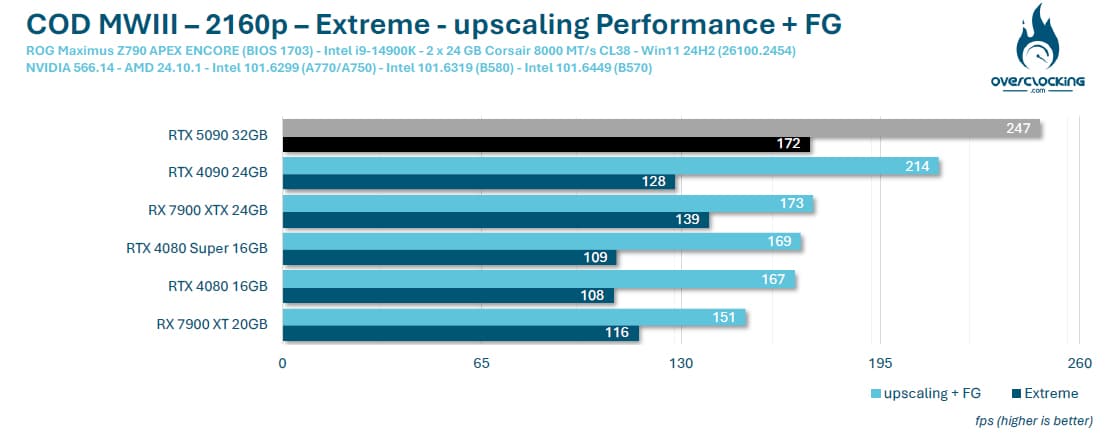
No worries in Call Of Duty Modern Warfare III, where upscaling still allows you to gain FPS, even if our RTX 5090 doesn’t really need it, with an average of 172 FPS.
Forspoken :
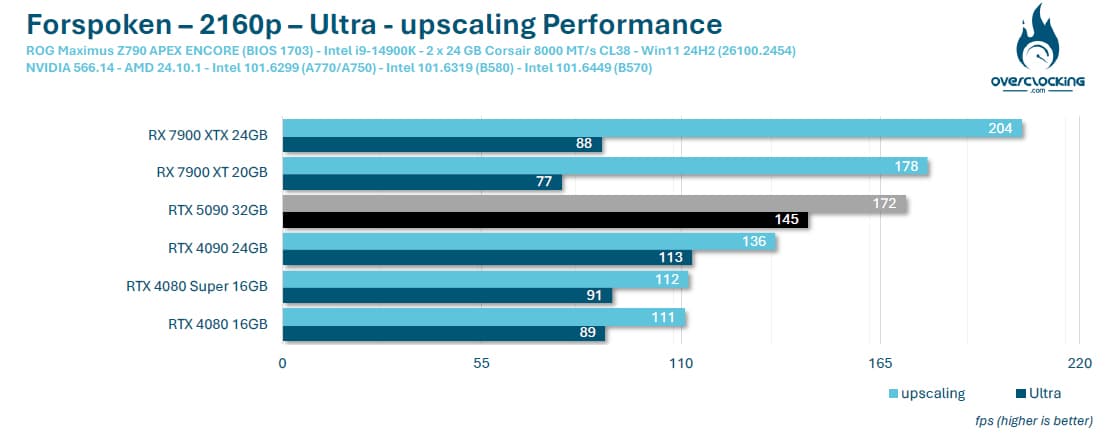
While the RTX 5090 is well ahead in terms of rasterisation, with an average of 145 FPS, it’s the AMD RX 7000 that benefits from upscaling. Of course, you’ll have to pay close attention to image quality, but as we said, there’s no need to resort to upscaling when you see the average we get.
Horizon Zeron Dawn Remastered:
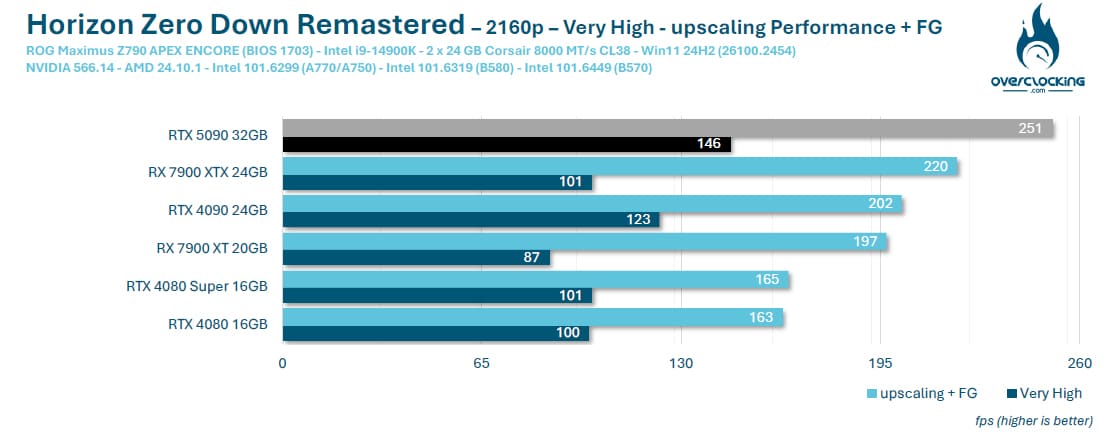
The same applies to Horizon Zeron Dawn Remastered, with our NVIDIA RTX 5090 far ahead in terms of rasterisation.
Shadow Of The Tomb Raider:
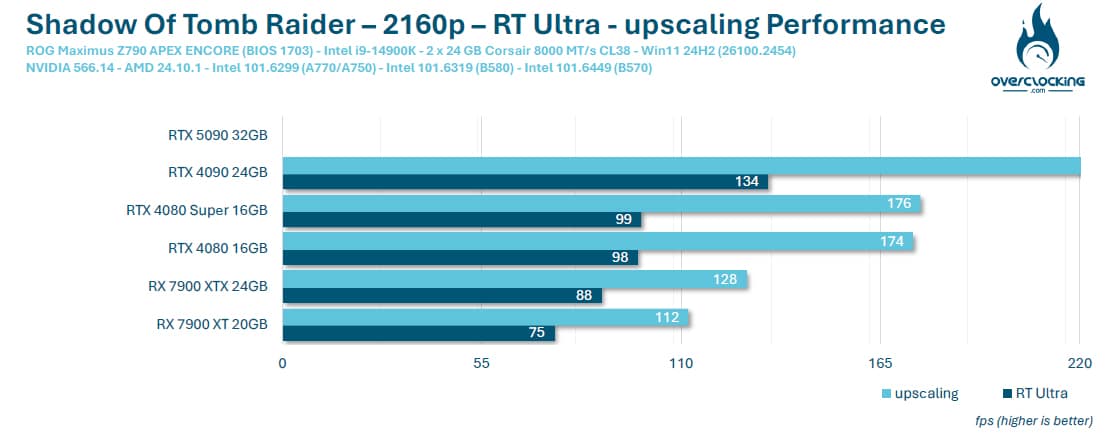
In Shadow Of The Tomb Raider, our sample of the day ran into a few problems. The benchmark launches, but after a moment it shuts down and we return to Steam with no error information.
Black Myth: Wukong Benchmark Tool :
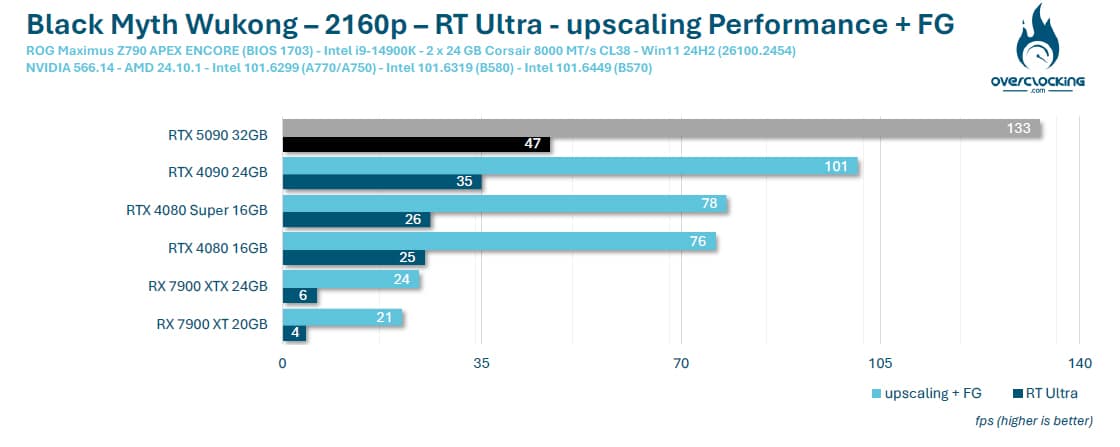
Here we go again with Black Myth: Wukong, a very demanding game that benefits from ray tracing. And it’s precisely in this type of case that upscaling is useful, as our average with ray tracing activated is 47 FPS, rising to 133 FPS when we use DLSS Performance combined with Frame Generation. This game will benefit from DLSS 4 in the near future.
Far Cry 6:
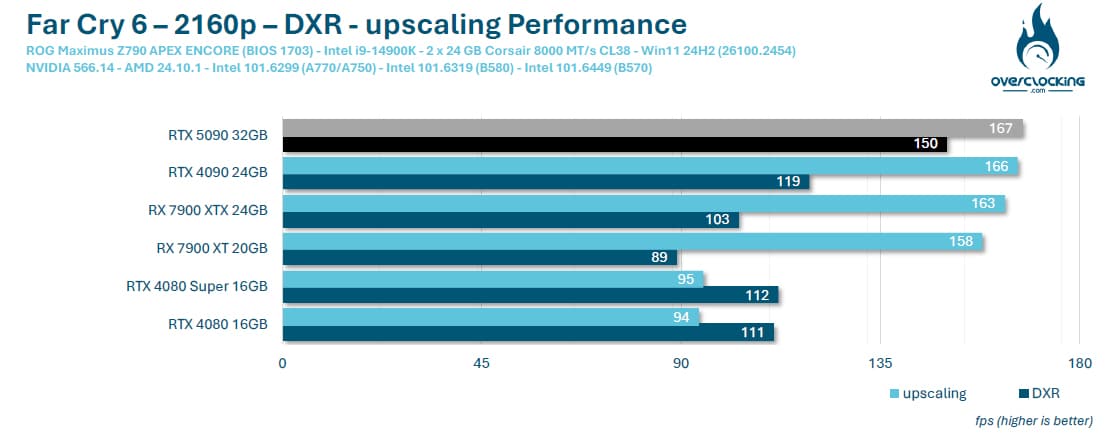
No DLSS here, we’re using AMD’s upscaling, which explains the very low gain between DXR and upscaling mode.
Assassin’s Creed Mirage :
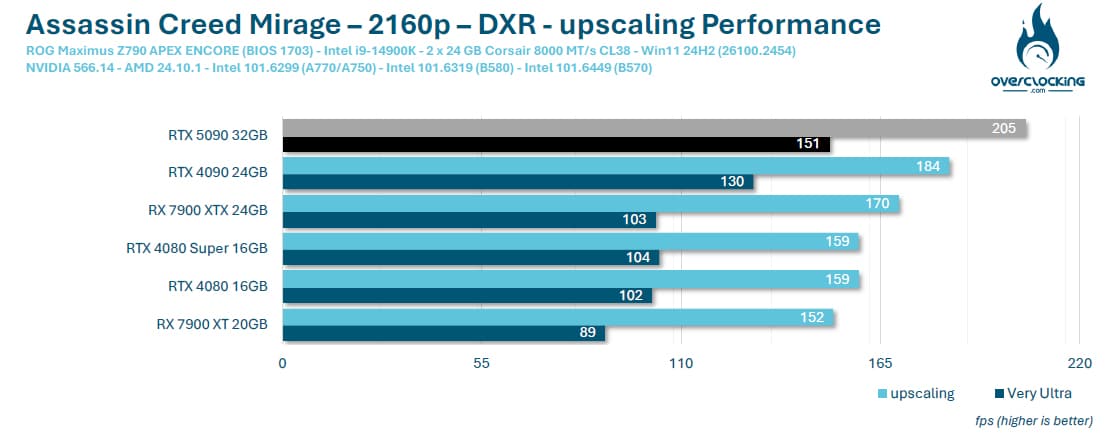
The same applies to Assassin’s Creed Mirage, with our sample in first place.
F1 24 :
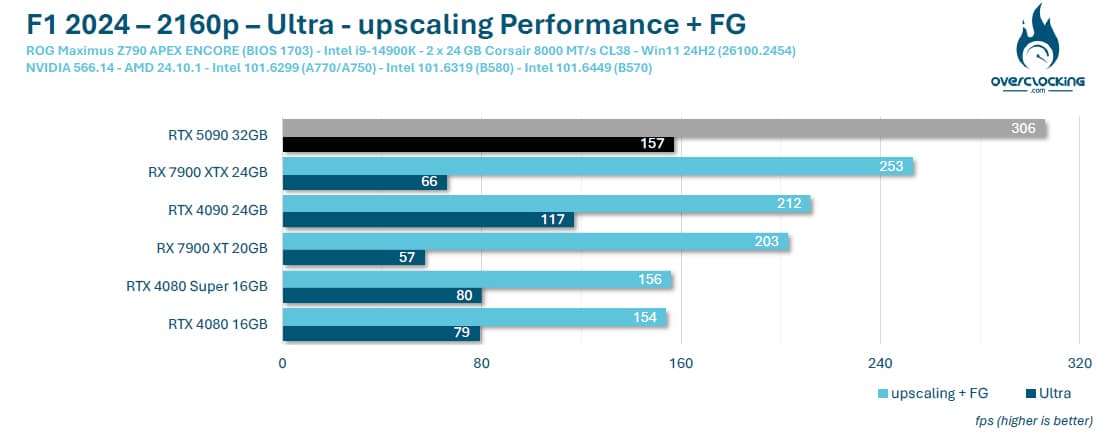
The last game on our test panel and the DLSS Performance combined with Frame Generation allows our model of the day to dominate the other cards.
What about upscaling with our RTX 5090?
In the end, it’s not necessary at all! The card performs so well in rasterisation that if the game doesn’t have ray tracing, there’s no need for upscaling at all . Once ray tracing is available, however, its use becomes necessary or even compulsory to take full advantage of 2160p definition. It will be necessary to compare the images offered by the different upscaling systems in order to judge their qualities and shortcomings, but that will be the subject of a later test. Let’s take a closer look at the performance that awaits us in games already compatible with DLSS 4.
[nextpage title=”Games that support DLSS 4:”]
A series of games are already compatible with DLSS 4, on the day of the launch of the RTX 5080/5090. We’ve been able to get hold of them in order to begin a series of tests and highlight the performance achieved thanks to DLSS 4. We’ll be coming back to the qualitative side of the rendering in detail in the coming weeks. Of course, the upscaling principle here will be to support our NVIDIA RTX 5090 against 2160p performance with graphics options at maximum and ray tracing or path tracing if available.
To measure our FPS, we had access to a beta version of CapFrameX v1.7.5. This measurement tool is certainly one of the best and most intuitive when the game doesn’t have an integrated benchmark. If you’re interested, we can come back to the details in an article on how to use it.

Cyberpunk 2077:
In this well-known first game, and with the arrival of DLSS 4, we’re going to opt for the ultra graphics options with path tracing enabled. Here are the graphics options available in Cyberpunk 2077. So we have path tracing, DLSS in Performance mode and Frame Generation in x2, x3 or x4. The idea is to measure the differences in performance between DLSS OFF, one generated frame (x2), two generated frames (x3) and three generated frames (x4). It’s important to understand that you can choose the number of images with Multi Frame Generation.

Here’s the performance we obtained between our ASUS RTX 4090 TUF OC and our NVIDIA RTX 5090 Founders Edition.
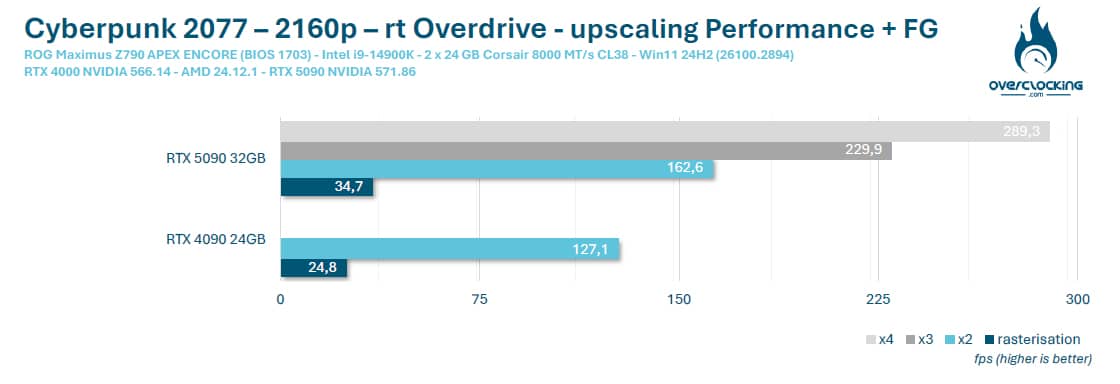
You can see the benefits of DLSS 4 with the ability to generate up to 3 images.
Hogwarts Legacy: The Hogwarts Legacy
Hogwarts Legacy doesn’t have a built-in benchmark, so we’re going to use CapFrameX to take our various readings. In terms of graphics options, there’s no ray tracing in this game, but we have enabled ray reconstruction. As far as DLSS 4 is concerned, we have all the options at our disposal.

In terms of performance, we’re starting from an average of 92.5 FPS in 4K DLSS OFF to an average of 428.4 FPS in 4K DLSS Performance x4. Of course, the average can vary from one scene to another, so the results will differ from one site to another, depending on the scene you choose to reproduce.
Above, a series of captures highlighting DLSS OFF, DLSS x2, DLSS x3 and DLSS x4. As mentioned above, we’ll be coming back to the graphics quality of the different modes and Multi Frame Generation in a separate article.
Alan Wake 2:
From January 30, Alan Wake 2 will also benefit from the DLSS 4 option, as well as RTX Mega Geometry. But what exactly is Mega Geometry? RTX Mega Geometry allows developers to offer up to 100X more triangles in ray tracing. RTX Mega Geometry will reduce processor overload and increase ray tracing performance and image quality.
Now it’s time for the graphics options, and the least we can say is that Alan Wake 2 is surely one of the most comprehensive games to showcase NVIDIA’s technologies (ray tracing, path tracing, ray reconstruction, direct lighting, transparency, etc.). So, of course, we activated all these options.

As far as performance is concerned, we start with an average of 32.4 FPS in 4K DLSS OFF to reach an average of 265 FPS in 4K DLSS Performance x4. Of course, the average can vary from one scene to another, so the results will differ from one site to another, depending on the scene you choose to reproduce.
A new series of captures highlighting DLSS OFF, DLSS x2, DLSS x3 and DLSS x4.
Star Wars Outlaws:
The third game to be supported directly, Star Wars Outlaws is quite demanding. There’s no ray tracing in this game, so we’ll be using DLSS Performance in 2160p with Multi Frame Generation. We’ve also activated ray reconstruction and NVIDIA Direct Lighting.

In terms of performance, we start from an average of 25.9 FPS in 4K DLSS OFF and end up with an average of 233.2 FPS in 4K DLSS Performance x4. Of course, the average can vary from one scene to another, so the results will differ from one site to another, depending on the scene you choose to reproduce.
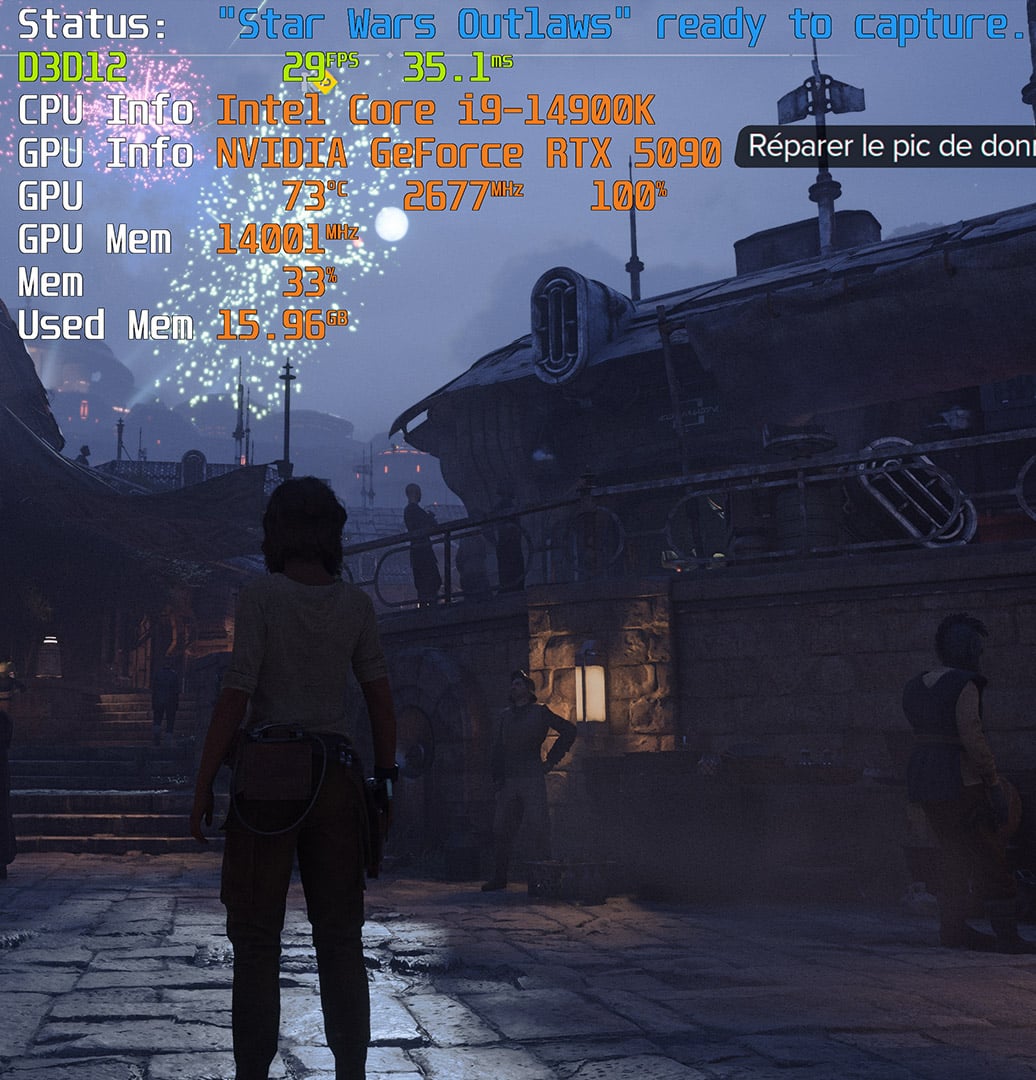
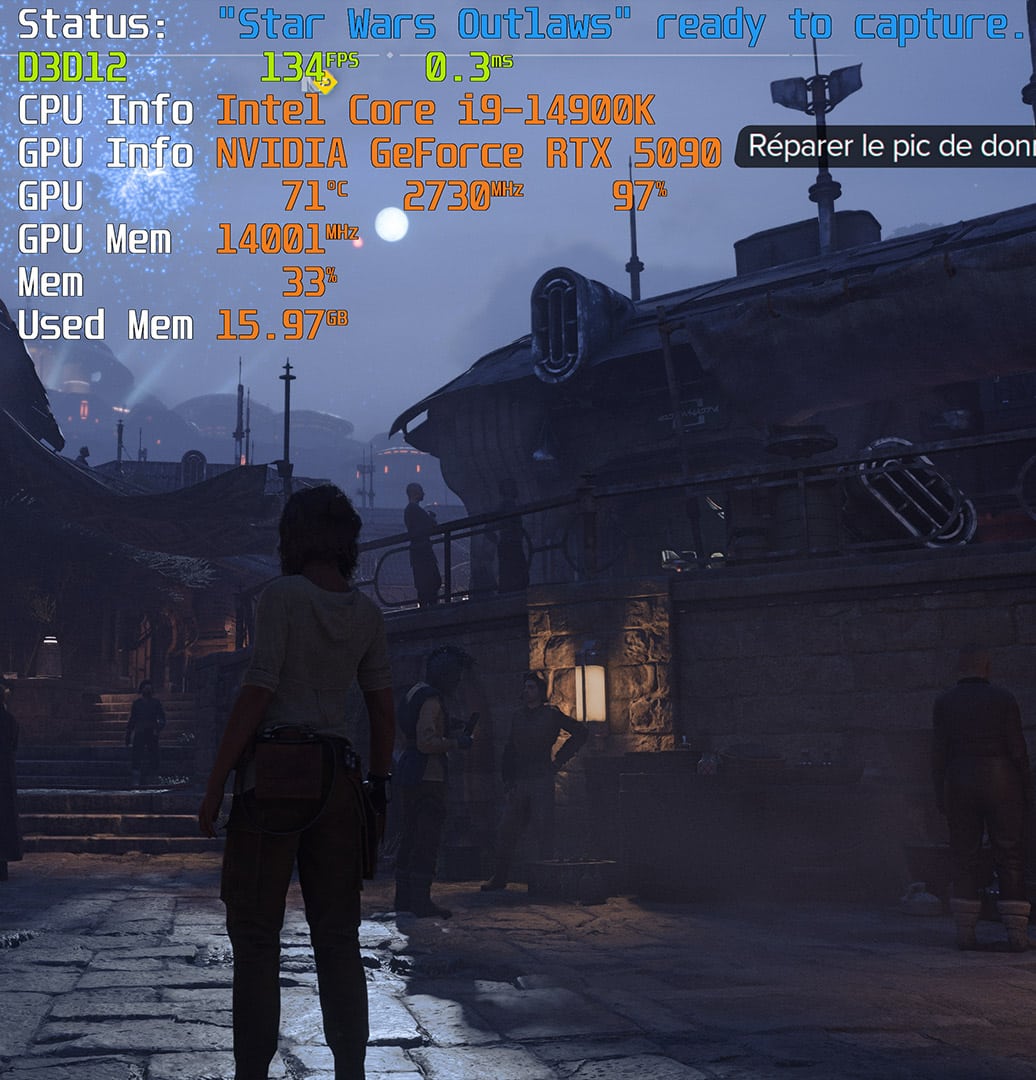
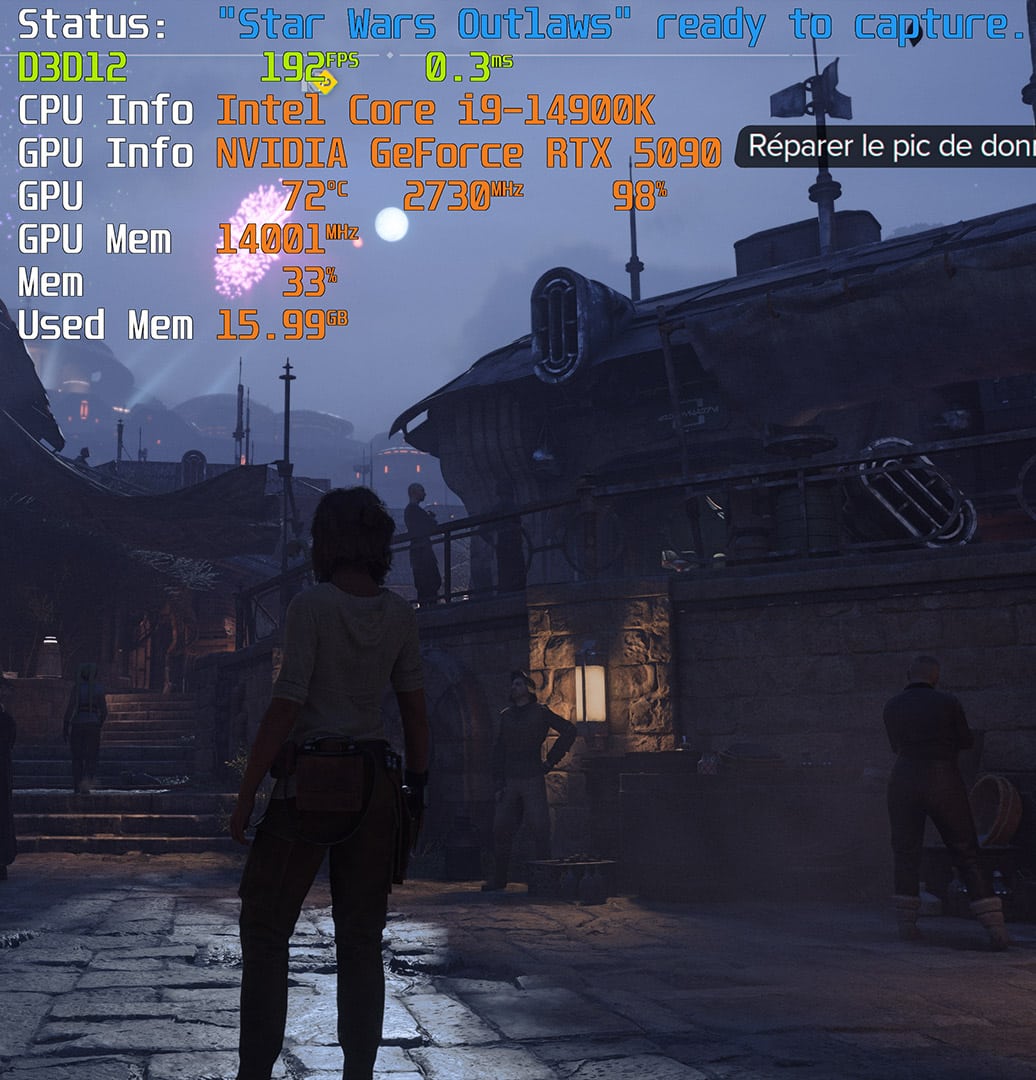
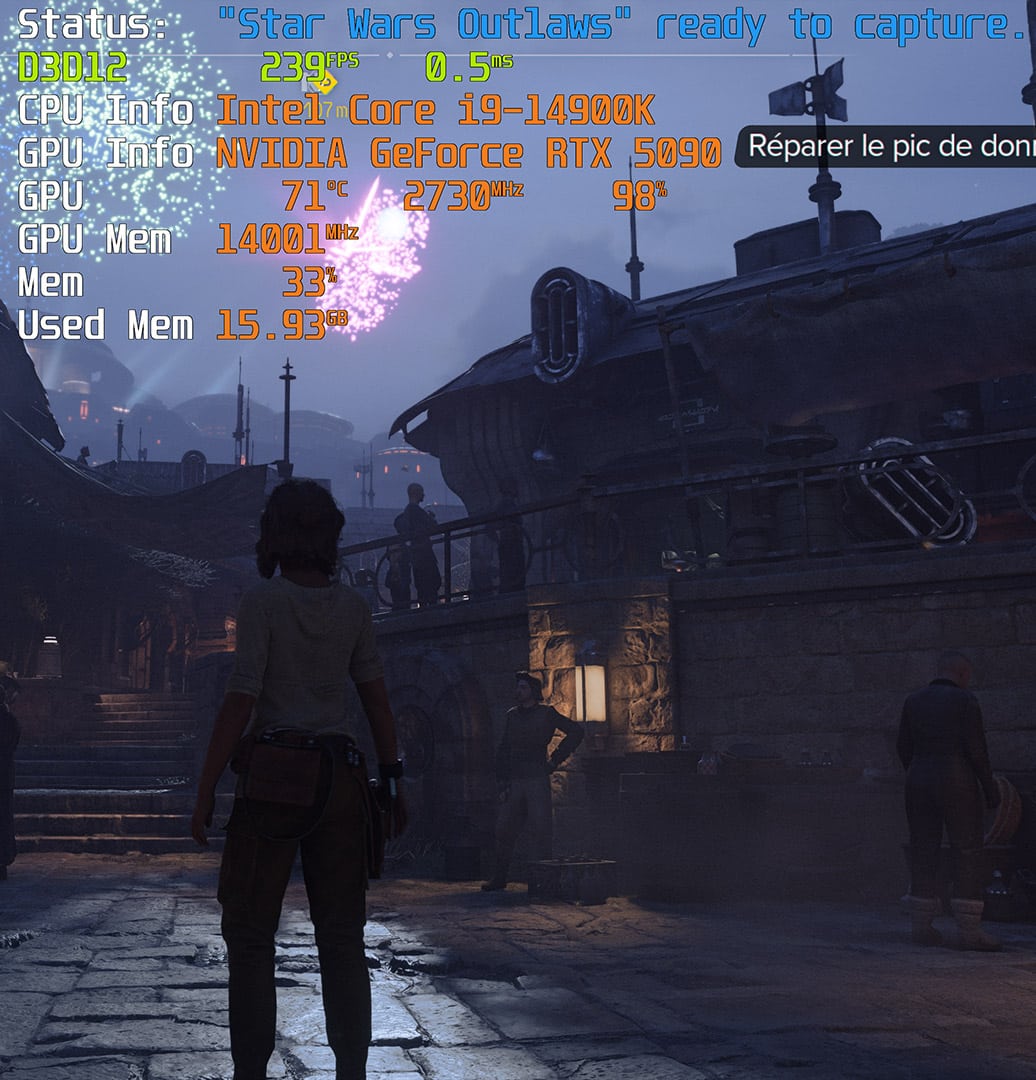
A new series of captures highlighting DLSS OFF, DLSS x2, DLSS x3 and DLSS x4.
Dragon Age: The Veilguard
Finally, our last game on this panel: Dragon Age: The Veilguard. So here, no DLSS 4 available within the game’s graphics options. So we’re going to force DLSS using NVIDIA’s new application. To do this, launch the application and go to Graphics > Program Settings screen under Driver Settings.


This will allow you to make the following changes. Firstly, in DLSS Override – Model Presets, select the ” Latest ” option, which will activate DLSS Super Resolution Transformer. Then go to DLSS Override – Frame Generation to choose between two or three images, and finally, you can also make a change in DLSS Override – Super Resolution. We’re not going to touch that, as we’re going to choose Performance in the game’s graphics options.

NVIDIA has provided a small overlay in the game so that we can check the settings we’ve chosen. There’s no ray tracing here, just DLSS 4 Performance upscaling and Frame Generation.

Here’s the performance we obtained according to our choice of parameters.
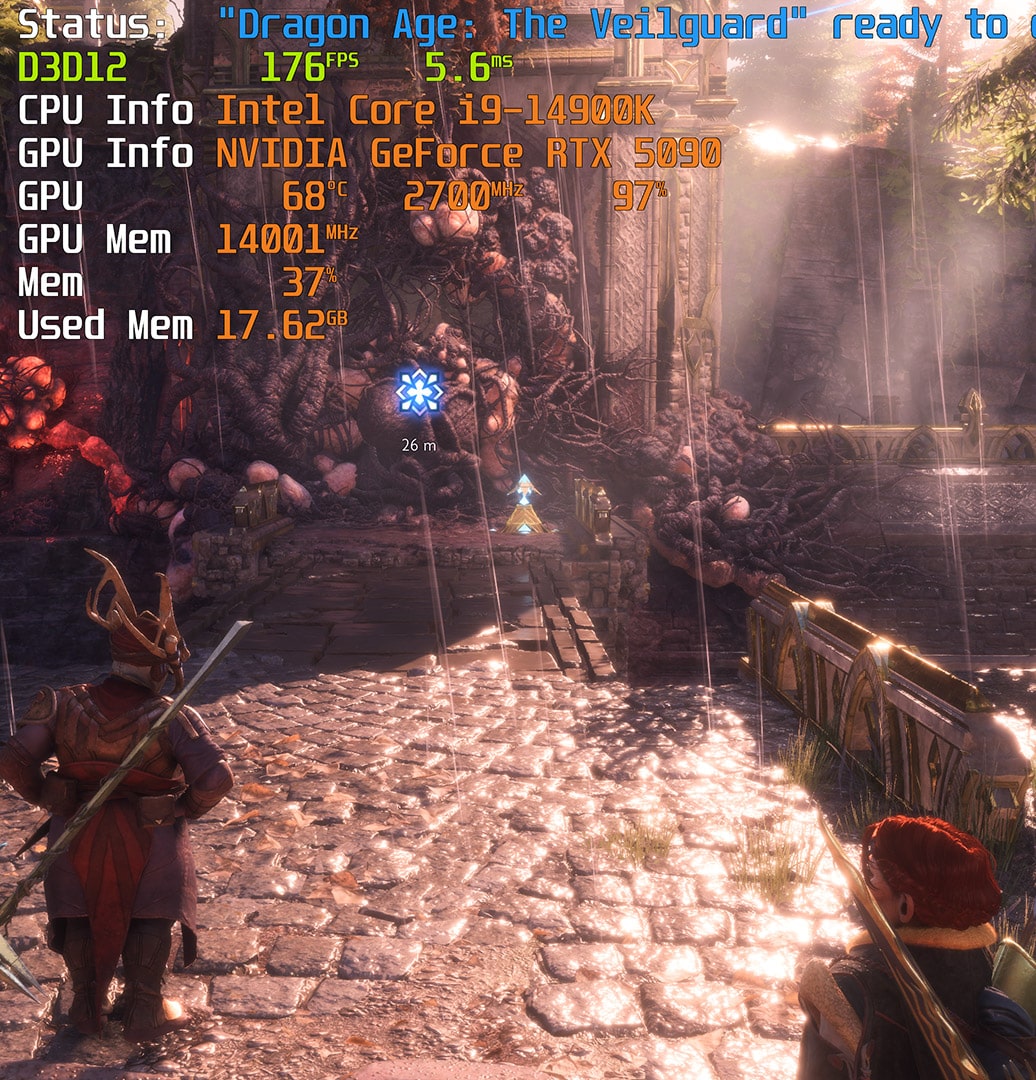
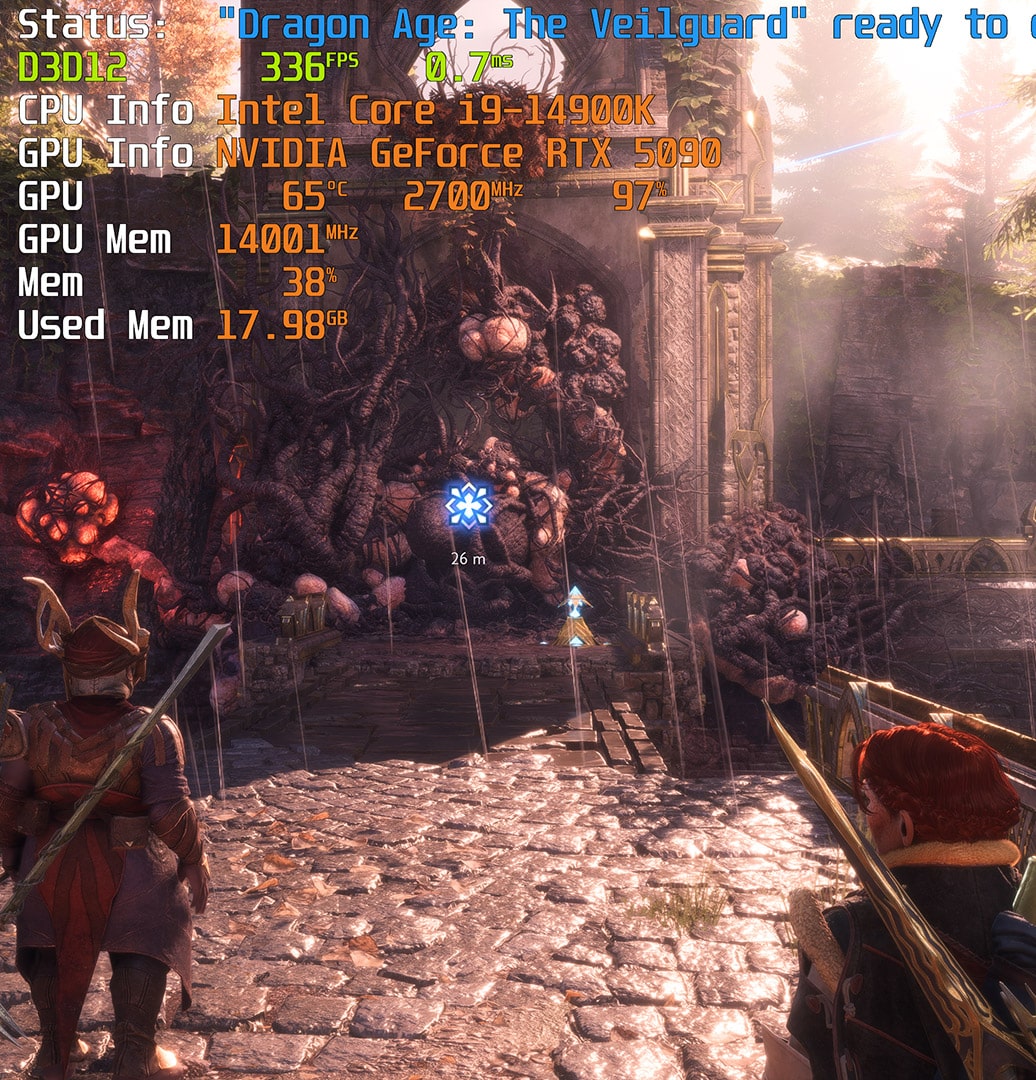
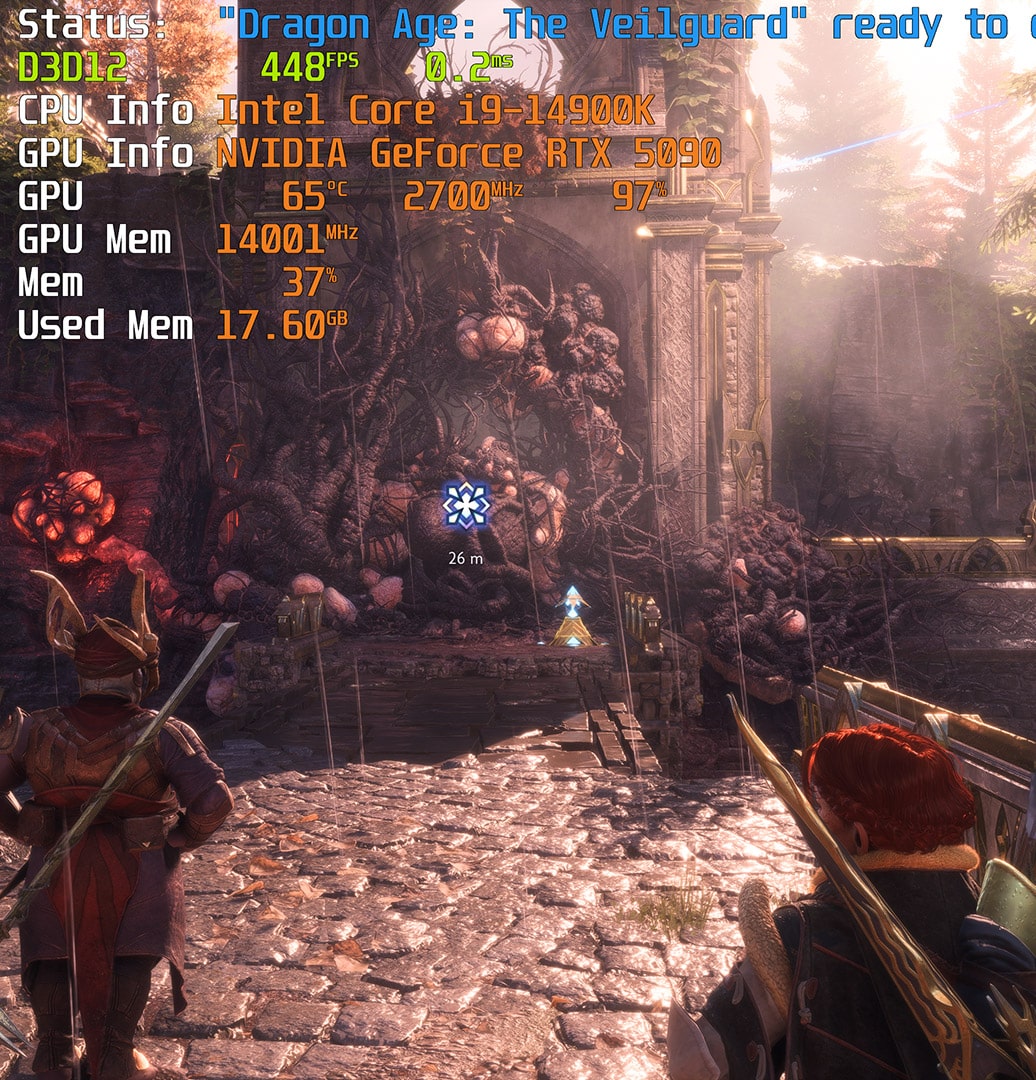
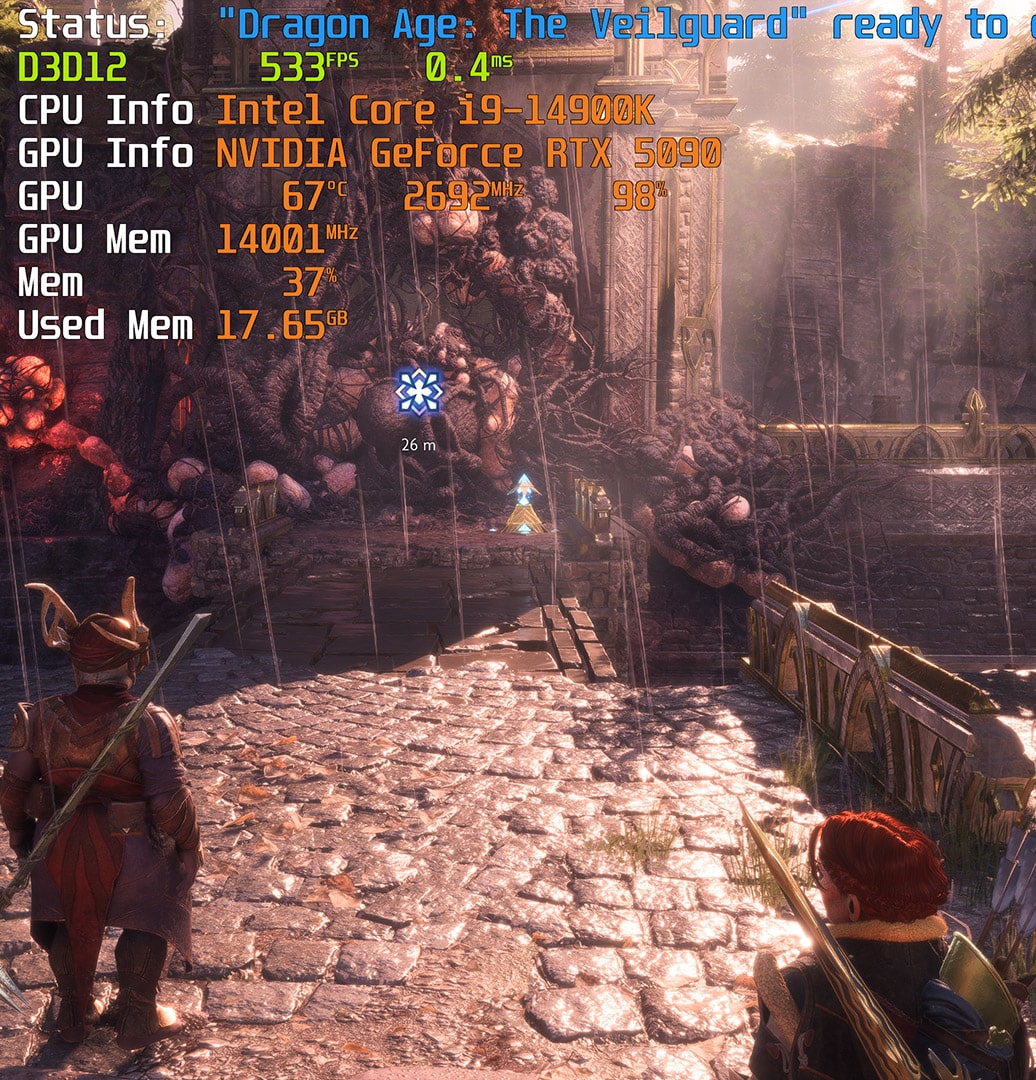
Here you can really see the benefits of DLSS 4 and Multi Frame Generation when a game takes advantage of the various NVIDIA technologies: ray tracing, path tracing, ray reconstruction, direct lighting, transparency, etc. … . On the other hand, you don’t have to activate DLSS if you don’t need it, and you can always opt to generate a single frame and not necessarily three, since you can choose the number you want to activate.
[nextpage title=”Energy consumption and efficiency:”]
We finally have the means to effectively monitor the power consumption of our graphics cards thanks to the Benchlab telemetry system. We’ll now be able to carry out a complete analysis of our graphics card’s total power consumption via the dedicated 3 x PCIe and 2 x 12VHPWR power cables. But that’s not all, because we also need to be able to measure the power supplied via the PCIe slot. So we’re going to use a PCI-E PMD adapter from the ElmorLabs shop. This will give us the overall power consumption of the graphics card under test, completely independently. Here’s a series of photos of our Benchlab installation, to which we’ll be devoting a dedicated test in a few weeks’ time.


These various readings will be taken via Benchlab’s dedicated application. The photos below were taken with the NVIDIA RTX 4060 Ti 8 GB FE graphics card to illustrate our power consumption readings.


To get the total power consumption, we’ll read the 12VHPWR Power consumption, which corresponds to the supply to the card via its 16-pin mini-connectors, and the EPS1 reading, which supplies the adapter. We export the readings, which are taken every 500 ms, and calculate the average power consumption in the Cyberpunk 2077 game in 4K rasterisation with the graphics options in Ultra and in 4K with ray tracing in Ultra, DLSS Performance x2 and path tracing.
Power consumption in Cyberpunk 2077 :

As you can see, the power consumption of our NVIDIA RTX 5090 Founders Edition literally explodes. We knew that on paper, NVIDIA announced a TDP(Thermal Design Power) of 575 watts for this new model compared with 450 watts for the RTX 4090, an increase of 27.7%. In our readings, we actually have our RTX 5090, whose average power consumption in 4K rasterisation is 558.99 watts, compared with 417.39 watts for the RTX 4090.
It’s hard not to make a direct shortcut with the 28.4% increase in rasterisation performance and this increase in power consumption. Unfortunately, with an identical engraving process, it was necessary to increase power consumption in order to increase performance. We’ve already seen this happen with CPUs. The good news is the reduction in power consumption when upscaling and the various NVIDIA technologies are activated. We’re down to 477.17 watts, which is logical but something AMD can’t achieve.
As a reminder, NVIDIA recommends a power supply of 1000 watts with an RTX 5090, and during this test we found an average of 775 watts for our entire configuration, with a peak of 856 watts. So the recommendations make perfect sense.
[nextpage title=”The final word:”]
So, what do we think of this RTX 5090 Founders Edition?
One thing’s for sure, there’s a lot to say. Ever since NVIDIA announced its new range of RTX 5000 graphics cards at CES 2025, there’s been a lot of tension on social networks between fans of the Greens and those who are not at all keen on this new architecture. We’re going to take a point-by-point look at the strengths and weaknesses of this NVIDIA RTX 5090 Founders Edition.
Performance:
We’d like to stress once again that the etching process remains identical to that used on the RTX 4000, and therefore the RTX 4090, so we shouldn’t have expected astronomical differences in pure rasterisation, as was the case between ADA Lovelace and Ampere. We found a 28% gain in rasterisation for our RTX 5090 compared to the RTX 4090 in 4K (2160p). This seems pretty decent to us and will enable this model to enjoy many games without the need for NVIDIA upscaling.
On the other hand, if you want to opt for ray tracing or path tracing, you’ll have to go through the DLSS box and take advantage of DLSS 4. Remember that DLSS 4 is only supported by the RTX 5000, but NVIDIA is announcing an improvement in Frame Generation for the RTX 4000, which could result in a gain of 5 to 10% according to NVIDIA.
DLSS 4 :
Highlighted by NVIDIA, DLSS 4 is the big new feature of this Blackwell architecture. Here again, some people, like myself, activate DLSS in certain games and others will never do so, oh God, never, not wanting to use ‘fake’ FPS. It’s true that these are additional images created by the AI, but as the name suggests, anything created by Artificial Intelligence will always have this ‘artificial’ side. Now we have to admit that it works well, even better than before. We would have liked to have been able to spend more time ‘playing’ with this NVIDIA RTX 5090, but the numerous tests to be carried out reduced our gaming time. As far as games with DLSS 4 are concerned, visually it’s very difficult to see any difference in quality when DLSS 4 is activated.
If you want to take advantage of ray tracing and path tracing, you can activate them while still enjoying 4K definition (2160p) and retaining a more than sufficient number of FPS. You also have the option of choosing the number of additional frames with DLSS 4. We’ll be coming back to the fluidity of the game once we’ve received a 240Hz 4K screen to see what impact it has.
A word about NVIDIA’s new DLSS Override application. This will allow games that have not yet been updated to the latest DLSS models and features to activate support via a DLSS override. We’ve tested this with Dragon Age: The Veilguard and it’s very effective!
Consumption :
As we expected, with a TDP of 575 watts compared to 450 watts for the RTX 4090, it explodes! No choice, NVIDIA also had to increase the TDP to support performance, a situation we’ve already encountered with CPUs. Despite this, NVIDIA has managed to come up with an RTX 5090 Founders Edition SFF-Ready, and it’s quite simply a technical feat. We invite you to take a look at this video from NVIDIA, which explains the design of this new cooling system. Temperatures are contained, as are noise levels. You will, however, need to design a configuration with good air circulation inside your case.
Price :
NVIDIA has announced an MSRP of 2349 euros for its Founders Edition model, compared with 1959 euros for the RTX 4090 FE when it was launched. This is a considerable budget, and one that is likely to have serious consequences for custom models. As was already the case with the RTX 4090, if you can indeed play with this RTX 5090, you shouldn’t forget its PRO side. It will also find its place perfectly in the configuration of a designer using AI tools. Remember that this model benefits from three 9th-generation encoders and a new 6th-generation decoder, all combined with 32 GB of GDDR7. NVIDIA is also continuing to develop Broadcast, including new AI-powered effects.
This Founders Edition is (again) likely to be one of the most interesting models to buy. The design is very good, the price will be the most affordable of the RTX 5090s and, for a few hundred euros, you can buy a waterblock if you want to integrate it into your liquid cooling loop. You’ll also benefit from FP4 support to facilitate the execution of generative AI.
Should you sell your RTX 4000?
Of course not! The RTX 4000 still has a lot of good days ahead of it. Since NVIDIA’s announcement of the RTX 5000, we’ve seen a lot of RTX 4090/4080 sales. Of course, you’re perfectly free to opt for an RTX 5090, as long as you want to buy the best available and enjoy the best performance on the market. This NVIDIA RTX 5090 remains a showcase and the flagship of the Blackwell range, but don’t forget that other models have also been announced. The RTX 5080 will arrive at the end of the month with an MSRP of €1190, as will the RTX 5070 Ti at €884 and finally the RTX 5070 at €649. These models could prove much more interesting for users with a slightly ageing configuration who want to take advantage of all the NVIDIA technologies. We are also preparing a series of new articles based on older graphics cards.
What should we learn from this new generation? It’s far too early to draw any initial conclusions, especially on the basis of the RTX 5090, which we don’t think is likely to attract the most gamers. The RTX 5080 seems to us to benefit from a number of advantages that we’ll be revealing to you at the end of the month. Thanks to NVIDIA France for making this Founders Edition copy of the RTX 5090 available.

