











Performance
Performance :
Disclaimer: for the performance section, I’ll be relying on the certifications and analysis of Cybenetics, a benchmark in the field. Rigorous power supply testing is out of reach for any conventional media, because it requires a specialised laboratory, specific measuring equipment and technical skills that are also specific.
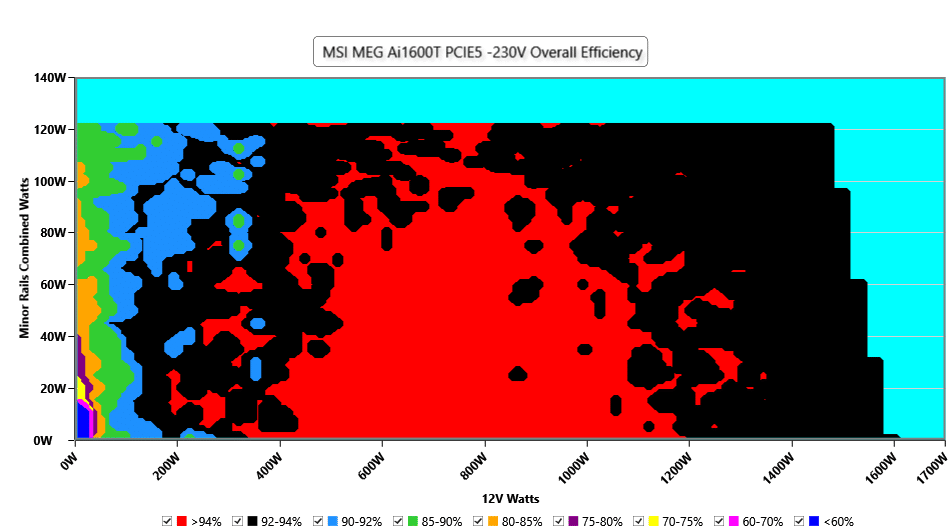
The colours indicate the efficiency of the power supply at different load levels:
? Red (>94%) = Very efficient (less energy lost as heat).
⚫ Black (92-94%) = Excellent efficiency.
? Dark blue (90-92%) = Good efficiency.
? Green (85-90%) = Correct, but not optimum.
? Orange (80-85%) = Less efficient.
? Violet (<70%) = Poor efficiency (significant energy loss).
Energy efficiency:
At 230V, MSI’s power supply offers excellent efficiency between 400W and 1000W, with the majority in the red zone (>94%), indicating optimum efficiency. Even between 1000W and 1200W, efficiency remains very high, reaching 92-94% (black zone). However, above 1200W, efficiency starts to gradually decrease, as shown by the appearance of the cyan and black zones. This means that the power supply dissipates more heat and loses more energy, a logical behaviour when it is heavily loaded.
At low loads (<200W), there are more blue and green areas (85-92%), indicating a loss of efficiency. This phenomenon is common on very high power supplies, as they are optimised for medium to high loads.
In conclusion: at 230V, this power supply offers exceptional energy efficiency, with an efficiency of over 94% between 400W and 1000W and competitive even at high loads (>1200W).
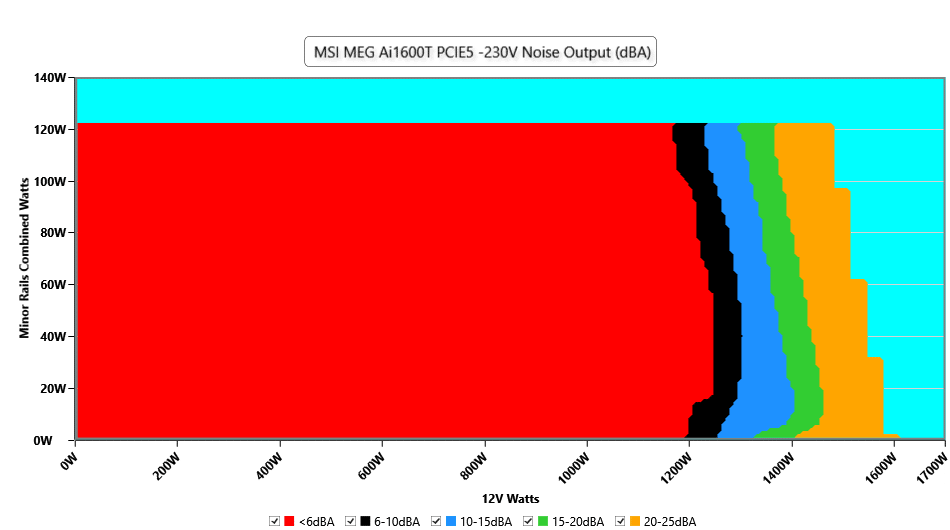
Colour scale in terms of decibel :
? Red (<6 dBA): total silence or almost inaudible.
⚫ Black (6-10 dBA): absolute silence, fans off or rotating very slowly.
? Light blue (10-15 dBA): very discreet.
? Green (15-20 dBA): slight fan noise, but almost inaudible in a closed case.
? Orange (20-25 dBA): audible but faint noise.
? Violet (25-30 dBA): ventilation well present, perceptible in a quiet environment.
Noise:
Up to 1100W, MSI’s power supply is completely silent (<6 dBA), as illustrated by the large red area in the graph. This means that the fans are either switched off or at minimum rotation, ensuring inaudible operation. From 1200W onwards, a slight increase in noise is felt, with the appearance of black and blue zones (6-15 dBA), but this remains extremely discreet. Even when the power supply reaches full load (1600W), the noise level does not exceed 25-30 dBA (green and orange zones), which remains remarkably quiet for a model of this power.
In conclusion: the power supply remains virtually inaudible up to 1000-1100W. Even at full load (1600W), the noise level does not exceed 30 dBA. I was able to confirm this in use with an RTX 5090 Suprim OC consuming 600 watts, kindly lent by MSI for the presentation of this power supply, as well as an i9-13900KS overclocked under nitrogen exceeding 400 watts. The power supply produced no perceptible noise. It’s quite impressive!
The rest :
Analysis of the tests reveals that the load regulation on the 12V rail is excellent, with a variation of only 0.38%, which ensures a stable and reliable power supply.
The regulation of the minor rails (3.3V and 5V) shows more marked variations than the main 12V rail, with a variation of 1.35% on the 3.3V and 0.68% on the 5V. The values are quite good and within the tolerances of the ATX standard. However, the voltage of the 3.3V rail is a little behind the competition
Full-load ripple at 230V is measured as follows:
- 12V ripple: 25.94 mV
- 5V ripple: 12.36 mV
- 3.3V ripple: 18.72 mV
- 5VSB ripple: 16.02 mV
These values are in line with ATX standards. The filtration is of good quality and effectively reduces ripples, guaranteeing a clean voltage for the components.
Of course, this MEG AI1600T PCIE 5 is equipped with all the necessary safety features to protect your configuration. The only downside, which is disappointing for a model of this calibre, is that there is no safety feature in case of fan failure. If the fan were to fail, the power supply would continue to operate without thermal protection, which could lead to overheating and potentially impact on its lifespan and reliability …