

Today, we’ll be reviewing the Corsair iCUE Link XG3 RGB Hybrid waterblock, which we’ll be testing on the NVIDIA RTX 4080 Founders Edition graphics card. As you can see from the photo below, the waterblock ‘s design is unlike any other. Where we’re used to seeing internal circuitry, here we’re faced with a fan. We can’t wait to find out what’s behind it. Later on, we’ll be testing the whole cooling loop, adding other components such as the XR5 360 NEO radiator, the XD5 RGB Elite pump/reservoir combo and the QX120 RGB fans.

Thanks to Corsair France for making this copy of the Corsair iCUE Link XG3 RGB Hybrid waterblock available. This model is available for purchase directly from the Corsair website at a price of $129.99 or 149.90 euros.
[nextpage title=”Waterblock Corsair iCUE Link XG3 RGB Hybrid:”]
This isn’t the first time we’ve had a Corsair waterblock model in our hands, and we’ve generally been very pleased with the performance/price ratio. We’ll see what happens today with the performance we’ll get from replacing the cooling system on our NVIDIA RTX 4080 Founders Edition. But first, let’s see what the Corsair iCUE Link XG3 RGB Hybrid packaging has in store for us. For the record, over two years ago we tested a Corsair Hydro X XG7 RGB 3080 waterblock on a ZOTAC RTX 3080 Trinity graphics card.
Unboxing our Corsair iCUE Link XG3 RGB Hybrid :
Faithful to its packaging, Corsair keeps its dress code with this iCUE Link XG3 RGB Hybrid waterblock . We’re faced here with the yellow and black box that Corsair has been sporting on most of its components for several years now. The front panel features a photo of the waterblock, showing the backlighting of the central fan. A QR Code is also available to check which graphics cards are compatible. Simply enter your GPU reference. Corsair currently offers three models: 4070/4070Ti – 4080/4090 – RX 7900XT/7900XTX.


The rear of the iCUE Link XG3 RGB Hybrid features all the latest innovations and highlights. Corsair also highlights its almost universal compatibility with RTX and RX graphics cards. When we open the box, we can identify a QR Code that will give us access to the quick installation instructions. It’s worth taking a look, especially to identify our waterblock ‘s input and output ports. Here’s the link to the quick installation guide. Corsair is therefore committed to saving paper, even if there’s still the warranty document, which in our opinion must be included with the product.


Next, we discover a cardboard sleeve containing the warranty rules. As a reminder, this waterblock comes with a 2-year warranty. Also included in the bundle is a 600 mm iCUE Link 90° cable. More on this below.


As you can see from the photos, the waterblock is perfectly protected by the plastic shell. There are also screws and bolts for installing the block. Let’s now take a closer look at the design of this iCUE Link XG3 RGB Hybrid.
A rather special Hybrid design:
As we said in the introduction, this Corsair iCUE Link XG3 RGB Hybrid waterblock is unlike any other. It bears the “Hybrid” designation because it will use your liquid cooling loop to keep the graphics chip and memory chips cool. The 65 mm fan is responsible for blowing air over the power stages of your graphics card’s PCB, in our case, the NVIDIA RTX 4080 Founders Edition. This fan features 18 individually adjustable RGB LEDs that illuminate the blades and outer ring. RGB backlighting is set via Corsair iCUE software.


We have to admit we’re very curious to see the cooling performance of such a solution. All current waterblocks use either thermal buffers or a radiator to keep the VRMs cool. The advantage of a solution of this type is also the waterblock’s fairly compact size.


As you’ll see from this photo, the liquid only circulates inside the base, keeping the cold copper plate in contact with the graphics and memory chips cool via pre-installed thermal pads. Note also that the waterblock base already has a pre-applied layer of thermal paste. The advantage of this solution is that it should guarantee quick and easy assembly! Finally, you can see the iCUE Link connector, which we’ll come back to in a moment.
The inner workings of the iCUE Link XG3 RGB Hybrid :
At the time of writing, we haven’t yet disassembled the waterblock to reveal its inner workings. This is because we have yet to test it with the entire Corsair component cooling loop, and we want to maintain “out-of-the-box” conditions, so as not to risk distorting performance.
The Corsair HUB iCUE Link:
To manage your iCUE Link XG3 RGB Hybrid waterblock, you’ll need an iCUE Link HUB (not supplied). This can be purchased on the Corsair website for $59.99 or 57.70 euros. This is an additional cost, as it will be essential for managing your waterblock and communicating with the iCUE software.


The advantage of this HUB is that you’ll be able to connect the various elements of your cooling loop to avoid too many cables. We’ll come back to this in more detail when we design the complete Corsair cooling loop.
[nextpage title=”Installation on our RTX 4080 FE: “]
As we mentioned during the unboxing, we chose an NVIDIA RTX 4080 Founders Edition to host this iCUE Link XG3 RGB Hybrid waterblock. Our choice fell on NVIDIA’s card in view of its proportions. It should become ultra-light once the block is in place. We’ll also be able to judge the cooling performance of such an imposing radiator. But let’s start with the trickiest part: disassembling this NVIDIA RTX 4080 Founders Edition.
Removing the cooling system :
Before we start disassembling the cooling system of our NVIDIA RTX 4080 Founders Edition, we wanted to highlight the difference in size between the two cooling solutions. The idea is to give you an idea of the size of the RTX 4080’s radiator.


Disassembling the card is not in itself very complicated, and will only take about ten minutes if you’ve already done it, since it’s no different from the other Founders Edition models. The first step is to remove the rear cover marked “RTX 4080”. To do this, carefully lift it from the HDMI side – it’s magnetically attached, but there’s also a small metal tab that you may need to press inwards if the cover doesn’t lift immediately.


Remove the 8 screws which are now accessible, then remove the back plate. This will reveal the rear of your RTX 4080’s PCB. This is where you’ll need to perform the 3 most sensitive tasks. You’ll need to remove two flat ribbon connectors. As a reminder, you need to lift the black part to unlock the retention system.


Next, you need to deal with the connector with the silver cover. You must first shift it to the left before lifting the black plastic connector upwards.


Finally, remove the four screws around the GPU chip and those holding the PCI bracket in place. We advise you to have a box ready to store all the screws, so as not to lose anything for future reassembly!
Installing the waterblock on the PCB of our RTX 4080 :
Nothing too complicated here either, as our iCUE Link XG3 RGB Hybrid waterblock already comes with pre-installed thermal pads and pre-applied thermal paste. For our test, as we always do, we’ll be using Noctua NT-H1 thermal paste. Don’t forget to remove the plastic film from the thermal pads before installing the waterblock . On the PCB, we’ve surrounded the chips of the power supply stage, which will be cooled by the airflow produced by the fan. There is therefore no contact between the waterblock and these chips.


The waterblock is attached to the graphics chip using the 4 screws in the block’s box. Don’t forget to respect the direction of flow when installing it on your cooling loop, otherwise performance could be affected.


When your cooling loop is installed, you’ll need to connect the iCUE Link cable to your iCUE Link HUB after installing the latest version of Corsair iCUE software.


So, isn’t there a big difference between before and after? Our NVIDIA RTX 4080 Founders Edition has just undergone a rather extraordinary weight loss. It remains to be seen whether the performance will still be there!


Let’s get down to the comparative tests between these two cooling solutions!
[nextpage title=”Tests and iCUE software:”]
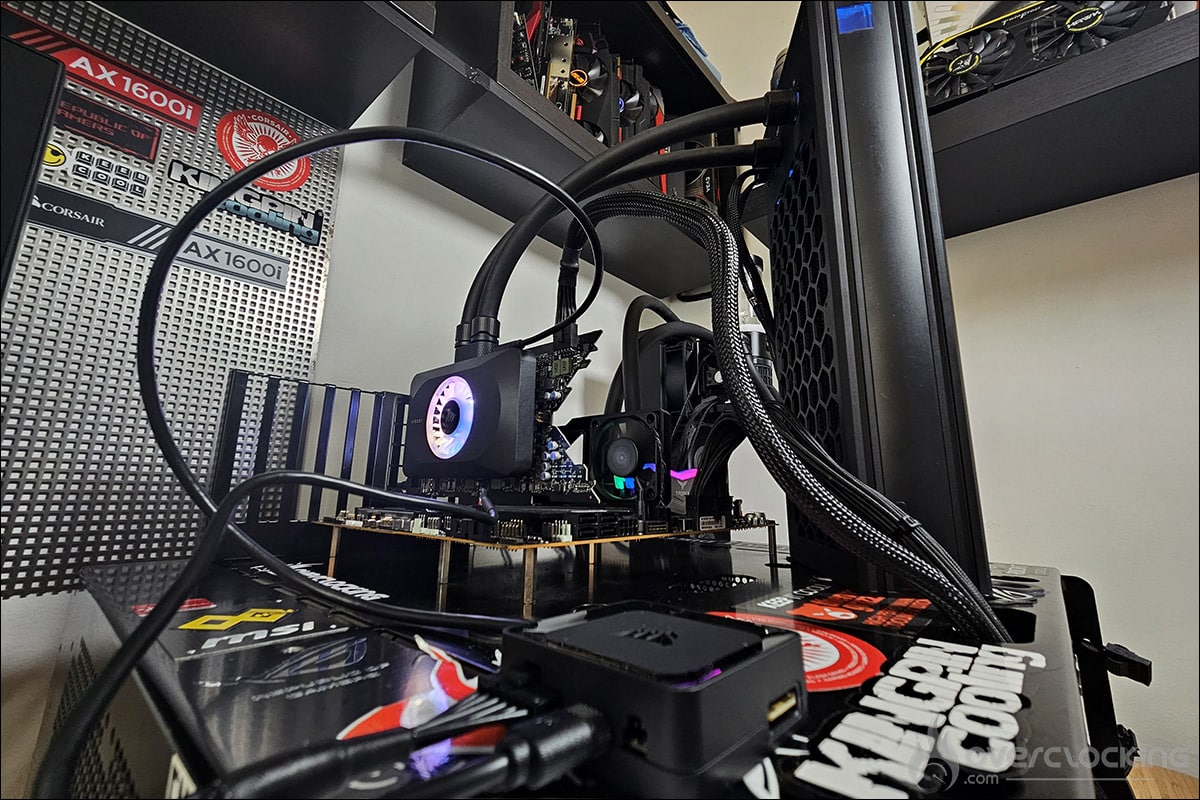
Now that our NVIDIA RTX 4080 Founders Edition is decked out with its iCUE Link XG3 RGB Hybrid waterblock and cooling loop, it’s time to get down to business and evaluate the gains in terms of temperature. Our tests took place outside the case, with the waterblock connected to our motherboard via the iCUE Link HUB. Here’s the complete configuration used for our tests:
- Motherboard: ROG Maximus Z790 APEX Encore (BIOS 0502)
- Processor: Intel i9 13900KS
- Memory : 32 GB Teamgroup Delta RGB 7200 MT/s CL34
- Graphics card: NVIDIA RTX 4080 Founders Edition
- GPU cooling system : Alphacool Eisbaer Extreme Liquid 280
- SSD : Western Digital SN850 NVMe SSD M.2
- Power supply: be quiet! Dark Power PRO 12 1500w
- Operating system: Windows 10


First, let’s open the application to see the various parameters it offers for setting up the iCUE Link XG3 RGB Hybrid waterblock.
Corsair iCUE software:
By default, as we can see, the fan remains idle as long as the GPU temperature does not exceed 50°C. Personally, as the VRMs are heatsink less, I started air circulation and therefore fan activation at 30°C.


There’s also a temperature alert system that can, for example, automatically switch off the PC if the temperature becomes too high. A safety feature to protect your components. We’ll come back to the iCUE software in more detail when we install the complete cooling loop with Corsair products.
Testing our iCUE Link XG3 RGB Hybrid block:
As far as our temperature readings are concerned, we ran three 10-minute test loops under 3DMark Time Spy with 5-minute intervals before running the following series again. The temperature in the lab was 19.6°C. The temperatures to be recorded via GPU-Z are those of the GPU, the Hotspot and the memory.
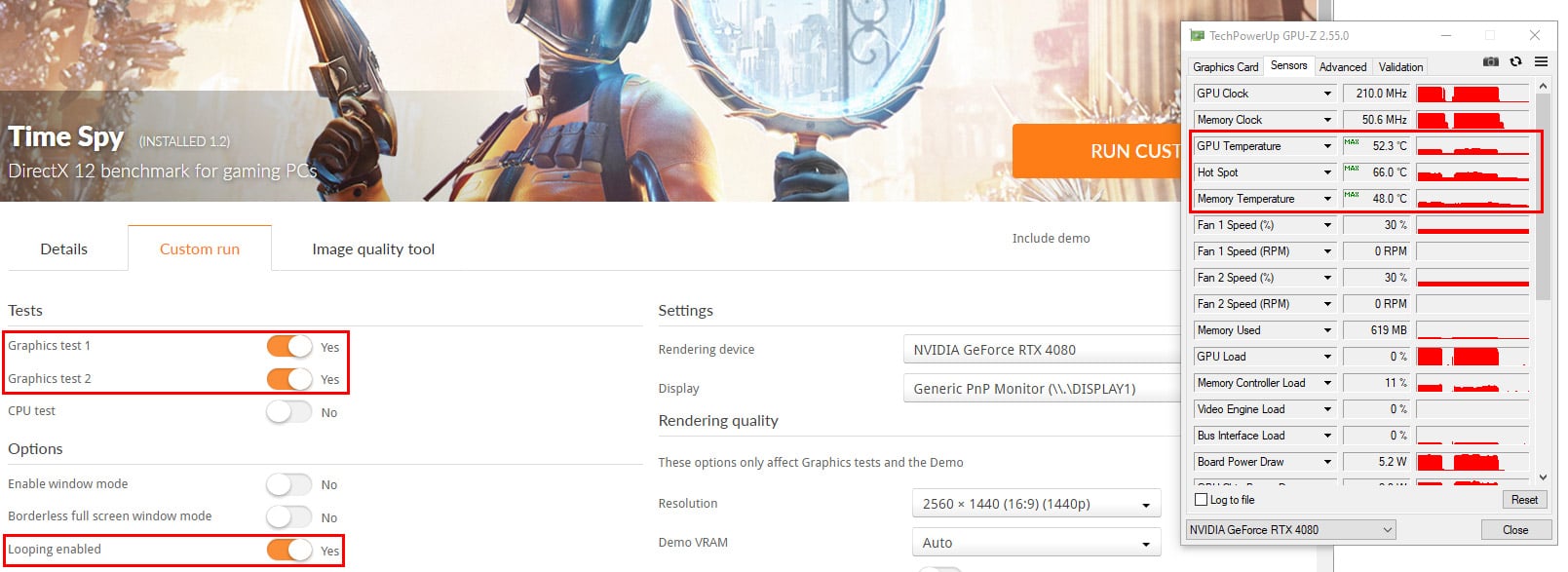
Here are the tables showing our results, with the evolution of temperatures according to the cooling solution. The green graphs represent the temperatures of the NVIDIA RTX 4080 Founders Edition, while the blue graphs represent the card equipped with the Corsair waterblock.
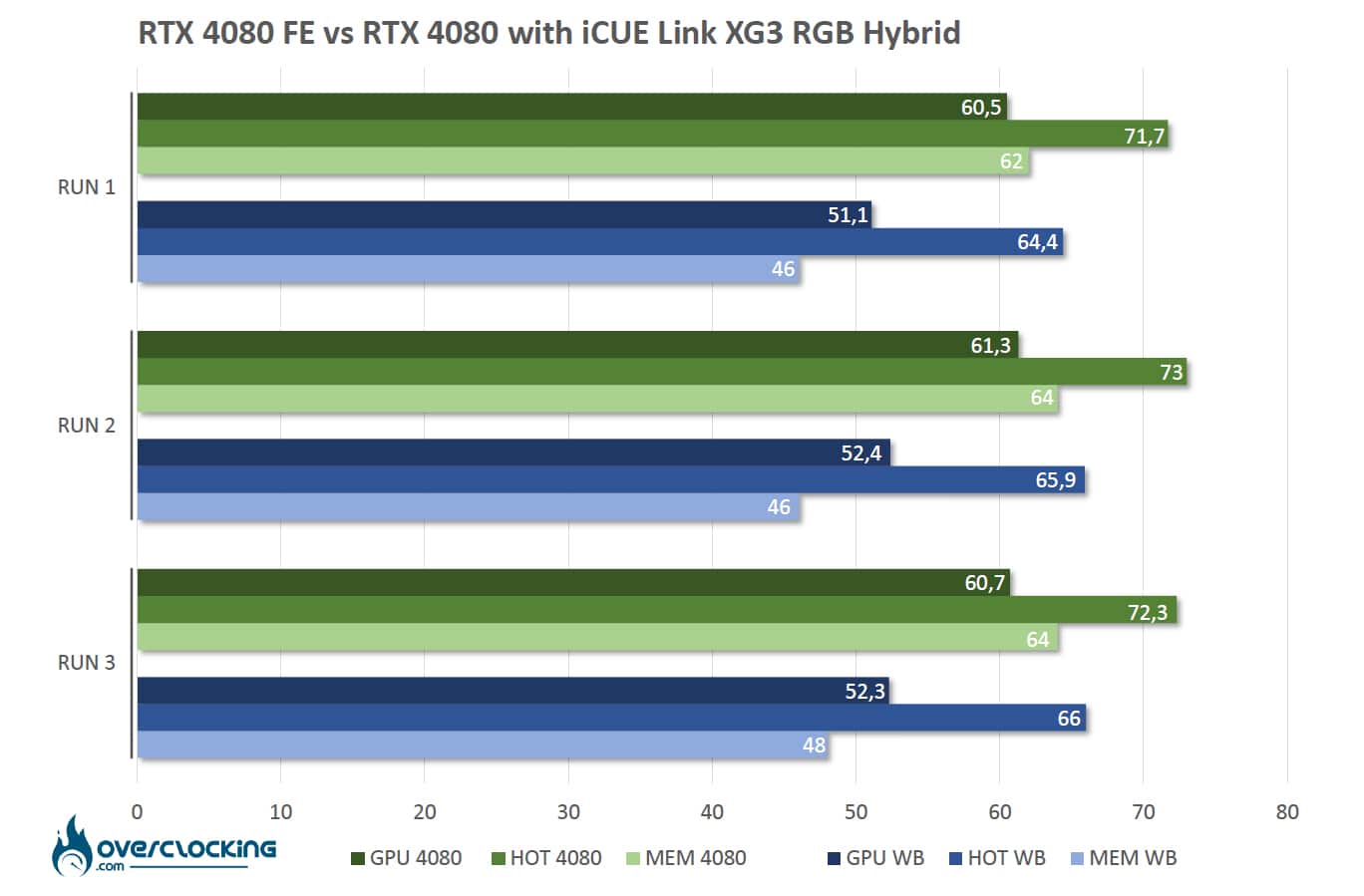
In terms of GPU temperature gains with the Corsair waterblock, we’re looking at an average of 8.9°C for the GPU, 6.8°C for the hotspot and 16°C for the memory. Performance is therefore very good, since the NVIDIA RTX 4080 Founders Edition’s imposing heatsink is already ultra-high-performance. The pre-installed thermal pads also do the job perfectly, and are of sufficient size for us to see a real gain in terms of temperature. Another positive point is that thanks to the Corsair iCUE Link XG3 RGB Hybrid waterblock, the graphics card has become compact and will fit into any configuration.
Finally, our biggest concern was the VRMs, i.e., the power supply stages. These seem to have no trouble being kept cool by the circulation of air from our waterblock fan! As a reminder, although by default Corsair leaves the fan at rest before a GPU temperature of 50°C, we chose to activate it from 30°C.
[nextpage title=”The last word:”]
To be honest, we had our doubts about the performance we were going to get from this Corsair iCUE Link XG3 RGB Hybrid waterblock. But we have to admit that it performed perfectly. The temperatures obtained are quite simply excellent, despite the fact that our NVIDIA RTX 4080 Founders Edition already has an oversized heatsink offering excellent temperatures.
Installation is a breeze and takes just ten minutes. Now, as we’ve said, use of this Corsair iCUE Link XG3 RGB Hybrid waterblock requires the purchase of an iCUE HUB in order to set it up. This represents an additional cost of $59.99 or 57.70 euros. Now, if you decide to design a full Corsair cooling loop, then this element is indispensable, as it will considerably reduce the number of cables. This is the subject of our next article, in which we’ll be installing a cooling loop made entirely of Corsair components.
Corsair iCUE Link XG3 RGB Hybrid waterblock:
We liked:
- Excellent cooling performance
- The atypical design of this hybrid waterblock
- The quality and finesse of the RGB backlighting and 18 LEDs
- Ease of installation
- Corsair’s choice of a quick online installation guide via QR Code
- Full software support to manage lighting, screen and alerts as required
- The possibility of upgrading your cooling loop thanks to the iCUE system
- Pre-installed thermal pads and thermal paste
- The compact format of the RTX 4080 with this waterblock
We wish :
- Not having to depend on the iCUE HUB for management
- A slightly lower price for a waterblock that uses aircooling for VRMs
 Corsair has bluffed us with this atypical hybrid waterblock, which ultimately delivers excellent performance. It’s easy to install and compatible enough to be used with many NVIDIA RTX 4000 series cards. Thanks to Corsair France for making this iCUE Link XG3 RGB Hybrid available. We’re now looking forward to assembling our complete cooling loop with the brand’s other accessories!