
Corsair really only offers aircooling fans once every 36 months. The last model to date was the A500, a resolutely high-end model. However, this model was launched in 2020, three years ago. So it was a long time before the brand came up with a new model, the A115. As you’ll see, it’s a high-end heatsink, but much more classic than its predecessor!

Presentation:
Broadly speaking, air cooling is not Corsair’s area of expertise. From time to time, the company launches a new heatsink, but nothing more. Let’s just say that the brand has no real established range, unless this changes in the coming months.
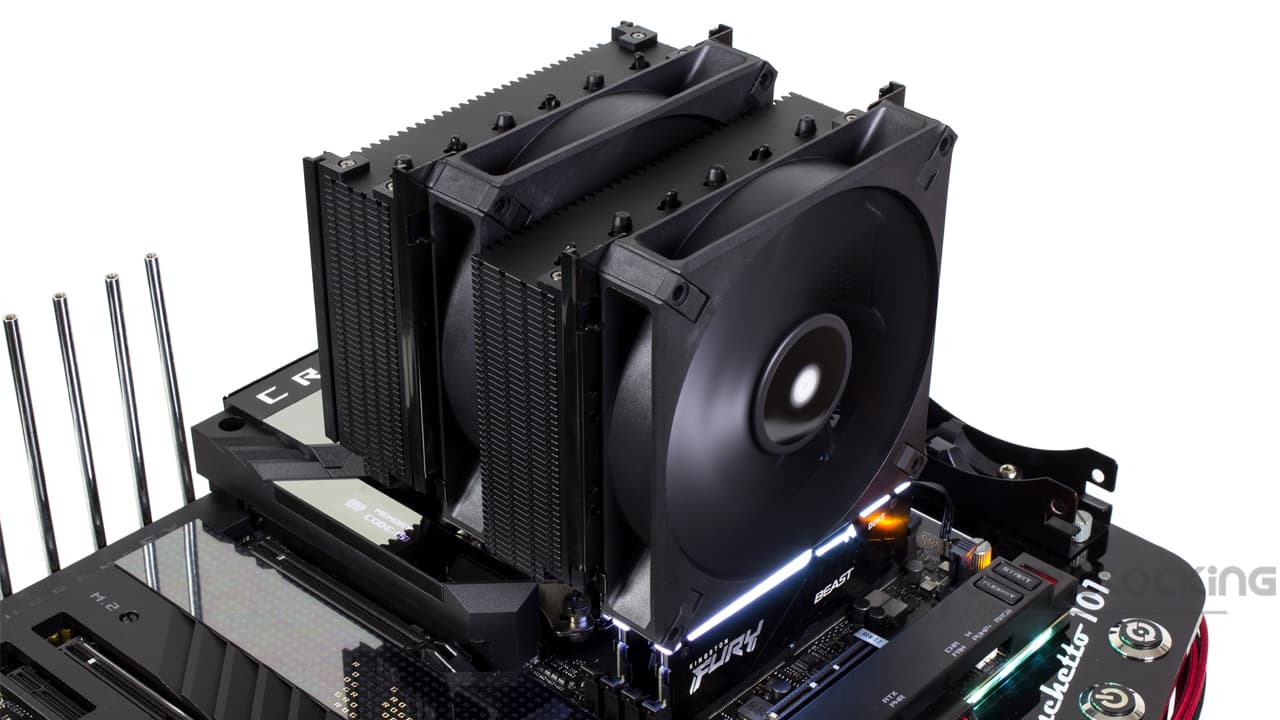
In any case, here we find an imposing model in double-tower format. Unlike DeepCool’s AK620, for example, this one is in a completely different league, as it’s a double 140 mm. The A115 is equipped with two Corsair A140 Elite fans. These fans are advertised as “high-performance” models. They feature AirGuide technology, with anti-vortex blades to channel the airflow.
In double-tower format, this fan features a total of six copper heat pipes meeting at a copper base. Coupled with a large number of aluminum fins offering a heat exchange surface area of 1.69 m², this heatsink is claimed to handle TDPs of 250W.
Finally, we can count on the presence of a thermal paste, the brand’s XTM70. All this will be coupled with a HoldFast 2. 0 mounting mechanism for fast, reliable mounting on current platforms such as the LGA-1700 or AM5.

We’d also like to highlight the rail-mounted fans, enabling rapid adjustment of fan height. The aim is to easily raise/lower the front fan on the fly, depending on the height of the RAM. Very practical, depending on your installation!
Corsair’s A115 is priced in line with the current trend for dual-tower heatsinks. The bill will therefore exceed €100, officially coming in at €114.90. In fact, with the €/$ conversion now in our favor, the European price has fallen below the American one.
[nextpage title=”The Corsair A115″]


In terms of packaging, we find the brand’s usual colors: yellow and black. Naturally, an illustration of the heatsink is featured on the front of the packaging, with a reminder of its functions/features on the back.
Inside, we find rather effective protection with black foam and cardboard over-wrapping. Everything arrived intact, not a single fin bent on the cooler, everything is spotless.
Radiator:
Weight and dimensions :
On unpacking, we clearly get a feel for the NH-D15. It has to be said that this model clearly shares the aesthetics of Noctua’s cooler, with its black color and black fans. On the other hand, it remains imposing, measuring 153 (W) x 155 (D) x 164.8 (H) mm, with fans in their lowest position. In terms of dimensions, it straddles the line between be quiet!’s Dark Rock and Noctua’s D15.
Be that as it may, watch out for the weight, as it weighs in at a hefty 1.59 kg. In fact, it’s the heaviest cooler we’ve ever tested. A D15 weighs in at 1.320 kg, compared with 1.29 kg for the Dark Rock Elite from be quiet!
The base :
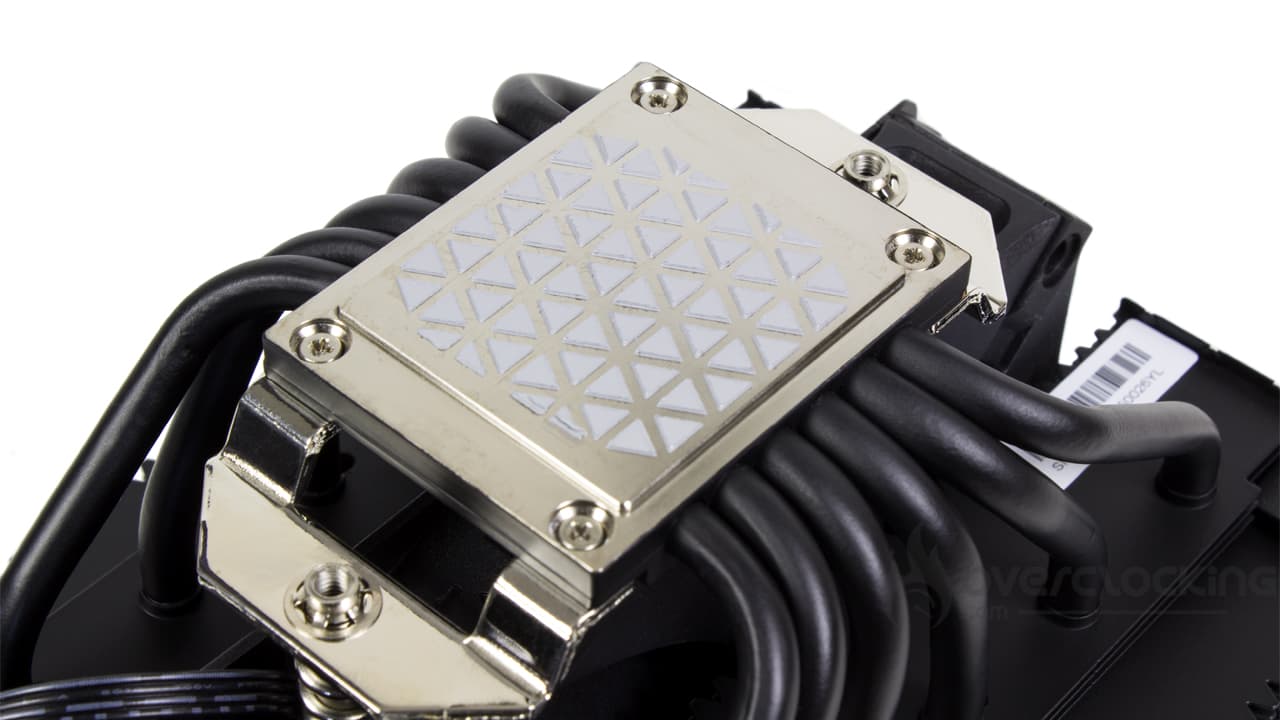
Under the heatsink, we’re dealing with a wide, nickel-plated copper base. Unlike the A500, the brand’s previous heatsink, there are no heatpipes in direct contact with the CPU. Corsair has opted for standard models, with six heatpipes each 6 mm in diameter.
In terms of dimensions, the base is a handsome 38×42 mm, enough to cover the whole of a recent Intel or AMD CPU. What’s more, the distribution of the heat pipes means that the entire CPU will be covered by them, leaving, in theory, no area uncovered.
As for the finish, there’s nothing to complain about either, since the machining marks are very fine. Couple this with nickel plating and you have a well-finished base. However, polishing does not go so far as to produce a perfect mirror.
Radiator:
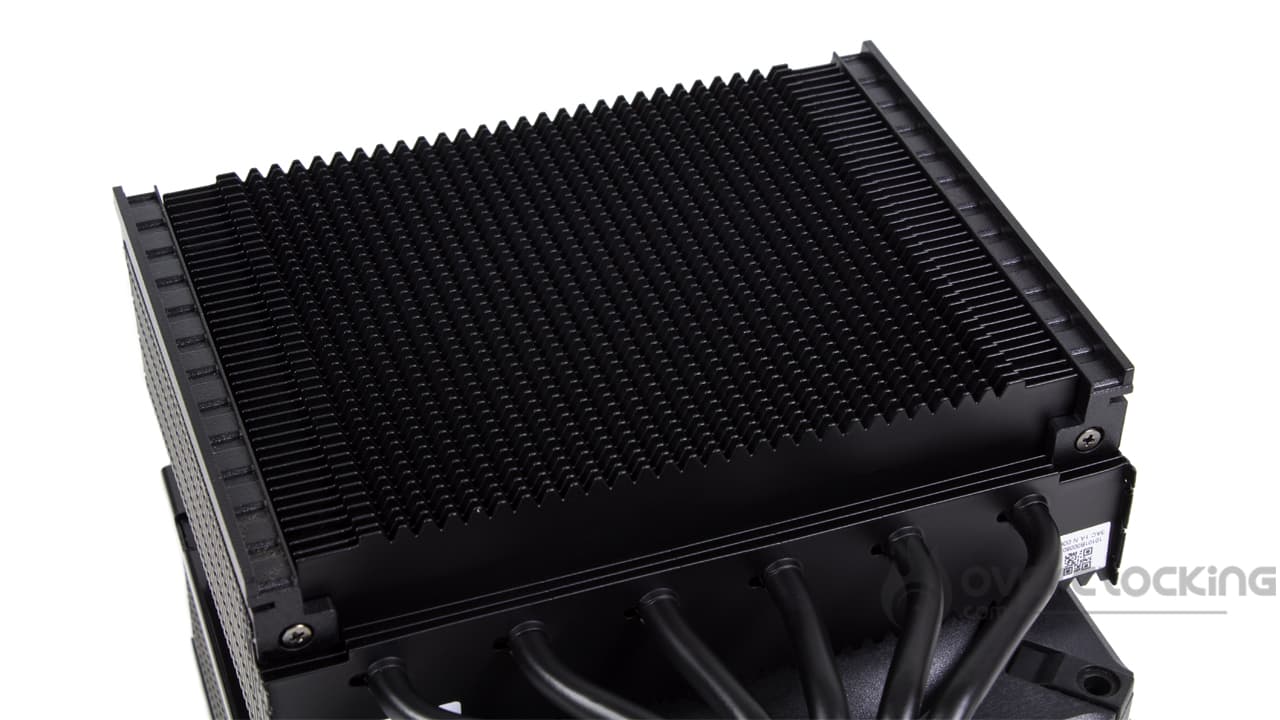
As we said, the aluminum fin block is a double-turn heatsink, so there are two stacks. Each of them has 45 fins, a number similar to the new be quiet! models. Here, we find a sawtooth-shaped cut-out, the aim being to maximize the heat exchange surface.
As with many double-turn models, the first three fins are shortened. Once again, the undisguised aim is to improve memory compatibility. But the best way to achieve this is to raise the fans mounted on the slides. The latter are screwed directly onto the fins. Note that the notches are much less hard and pronounced than on be quiet’s Dark Rock Elite. This makes them more pleasant and easier to handle.
The finish :
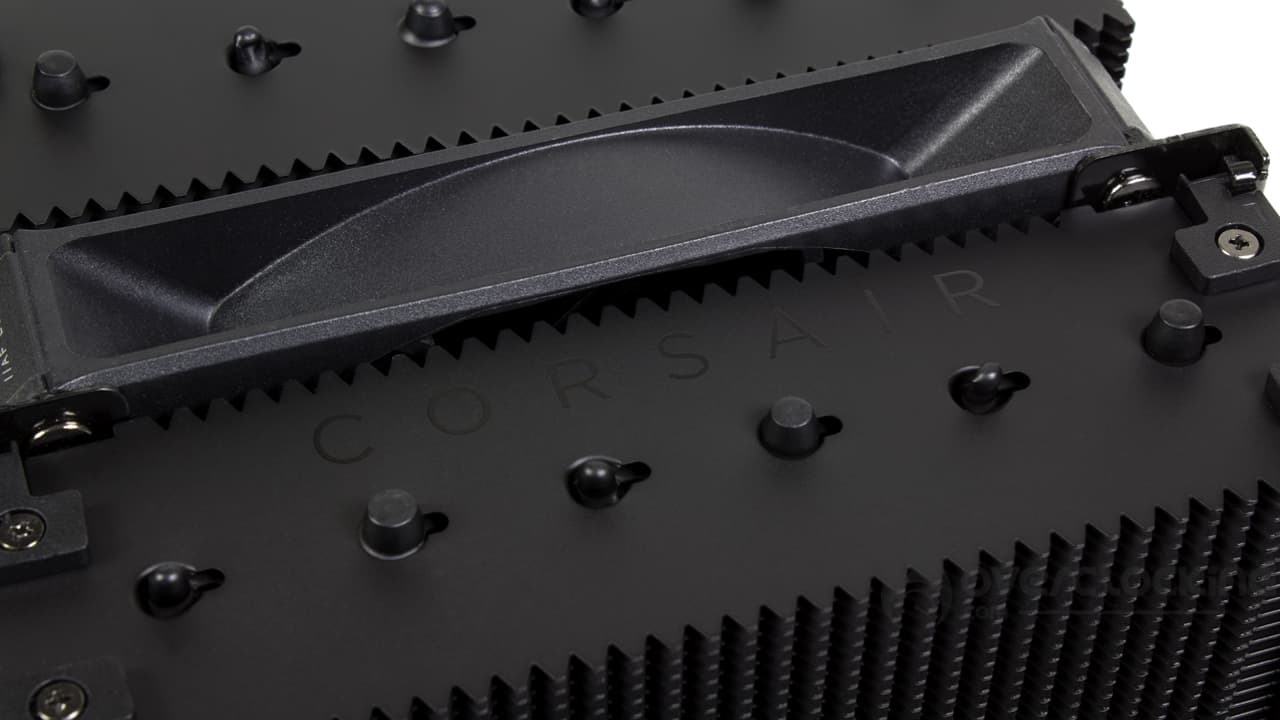
In terms of finish, this A115 benefits from a completely matte black coating, making it extremely discreet. However, the top remains disappointing. True, we have Corsair branding on the top, but we’re forced to admit that it’s too discreet. What’s more, in the face of the competition, the ends of the heat pipes remain visible, as do the screws on the adjustment rails. It’s a shame, given the price of this model.
Compatibility :
In terms of compatibility, Corsair indicates that its cooler can be mounted on the following motherboards:
- Intel: LGA-115x – LGA-1200 – LGA-1700
- AMD: AM4 – AM5
Once again, we find a heatsink that will only be compatible with mainstream motherboards. Here, there is no compatibility with AMD’s HEDT platforms. At the same time, this is understandable, especially when you consider that the brand’s smallest Threadripper has a TDP of 350W. At 250W, it’s easy to see why it doesn’t make the cut!
Fans:
As far as ventilation is concerned, the heatsink comes with a pair of mills well known to Corsair. And with good reason, since the brand offers us its AF140 Elite fans. These 140×25 mm fans are as classic as it gets.
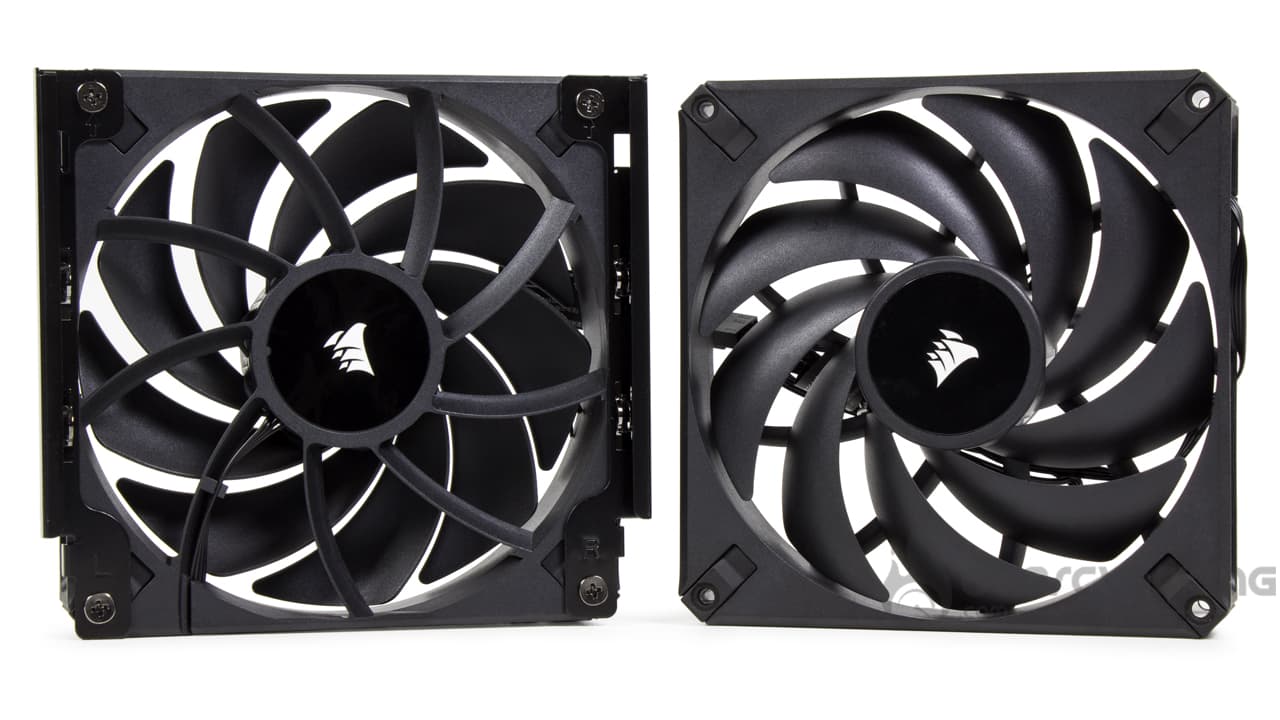
Physically speaking, they feature a total of nine rather thin, curved blades, in line with the current trend in this field. On the other side, the frame remains classic, with silentblocs at all four corners and a brand name reminder on the edge. At the rear, a total of nine blades are present, forming the AirGuide technology.
Finally, as far as the power supply is concerned, we have a flat black PWM cable measuring some sixty centimeters.
In terms of technical specifications, the fans will operate from 400 rpm to 1600 rpm. At full speed, they’ll be blowing hard, with airflow announced at 84.5 CFM, while static pressure will rise to 1.73 mmH2O.
The bundle:

The accessory section is housed in a small cardboard box and features :
- Warranty and safety guides
- PWM splitter for two fans
- Left and right slides and screws for front fan
- Hardware for mounting on AMD platform
- Hardware for mounting on Intel platform with metal backplate
The accessory section is basically straightforward. Once again, you’ll have to make do with pre-applied thermal paste. Again, a syringe of paste would have been welcome; as it is, in the event of reassembly, you’ll have to spend around ten euros for an extra syringe.
Roughly speaking:
In broad terms, Corsair’s new cooler promises to be imposing, and you’ll have to be vigilant about the space available in its case. While the overall finish is meticulous, we’re a little disappointed that the top section has clearly been left out of the picture. Compared to the competition, and even to the A500, we’re one notch below, which is a shame.
[nextpage title=”Installation”]
For installation, you’ll need to keep your AMD backplate, as Corsair doesn’t supply one. If you don’t have one any more, a quick look on eBay should make it easy to find one.
Assembling the A115 :
In layman’s terms, the A115 is assembled in much the same way as a Noctua cooler. Roughly speaking, you start by removing the original mounting lugs from an AMD motherboard, or by removing the multi-socket backplate from the back of an Intel motherboard.


Once this first step has been completed, you’ll need to screw spacers to the four corners of the socket. Be careful with the type of spacer you choose, as they are not identical depending on the platform. In any case, it’s simple: they’re stamped “1700” for the current Intel socket, when there’s nothing for the oldest motherboards. As for AMD’s, it simply wouldn’t screw onto the Intel backplate, due to a different screw thread.
The next step is to place the mounting arms directly on the spacers, then screw them on using hand nuts. Just pay attention to the direction of the nuts:
- Facing the CPU on AMD sockets
- Facing away from the socket on Intel platforms


Finally, all that’s left to do is place the fan tray on the CPU and screw it in place. To do this, you’ll need to remove the middle fan to gain access to the clamping screws. Of course, you’ll need to turn the fan on one side before screwing on the other. Otherwise, if pressure is applied to one of the two screws, it will not be possible to use the second.
[nextpage title=”Protocol”]
A small update to our test protocol. We’ve changed the software we used to stress our configuration. The same applies to the different profiles.
For test purposes, we’ll be comparing the A115 with other single-turn and double-turn models in 120 mm and 140 mm:
- A115 (Corsair)
- AK620 Digital (DeepCool)
- Assassin IV (DeepCool)
- Dark Rock Pro 5 (be quiet!)
- Dark Rock Elite (be quiet!)
- HX6250 (Jonsbo)
- MA824 Stealth (Cooler Master)
- NH-U12A chromax.black (Noctua)
- T120 RGB (NZXT)
[nextpage title=”Speed and noise”]
Fan speed :
We’re starting from scratch with our series of temperature readings. Let’s specify the fan speeds recorded during our readings (for 12V, 8V, 5V):
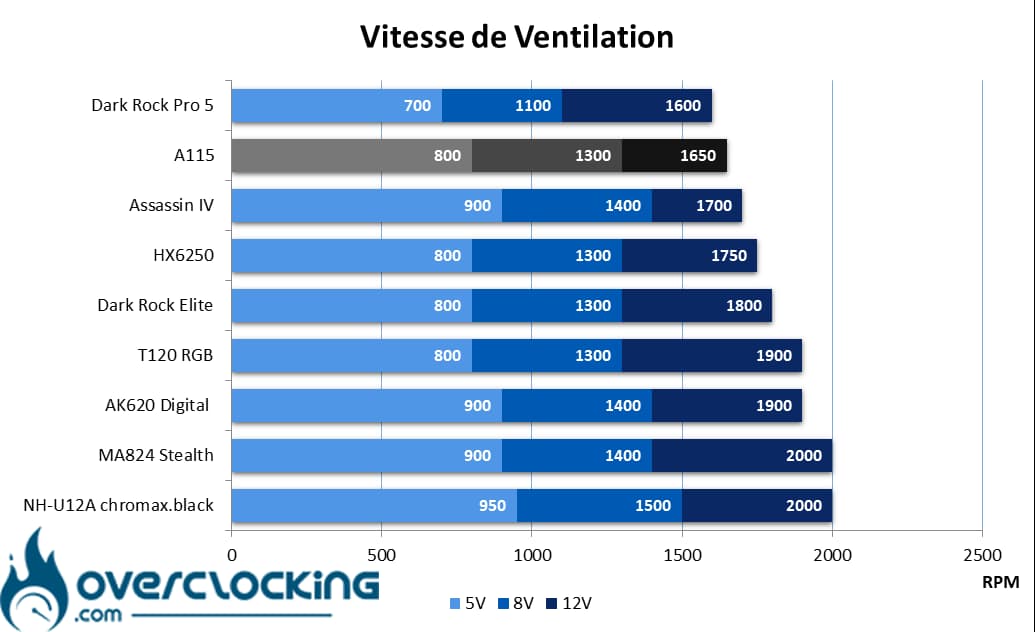
In terms of operating speeds, the fans supplied with this cooler are rather “slow” at full speed. In fact, at 1650 rpm, they are between those of the Assassin IV and the Dark Rock Pro 5 from be quiet!
On the other hand, at 1300 rpm, we’re in the mid-range at mid-range, and the same is true at low speed with their 800 rpm.
Noise :
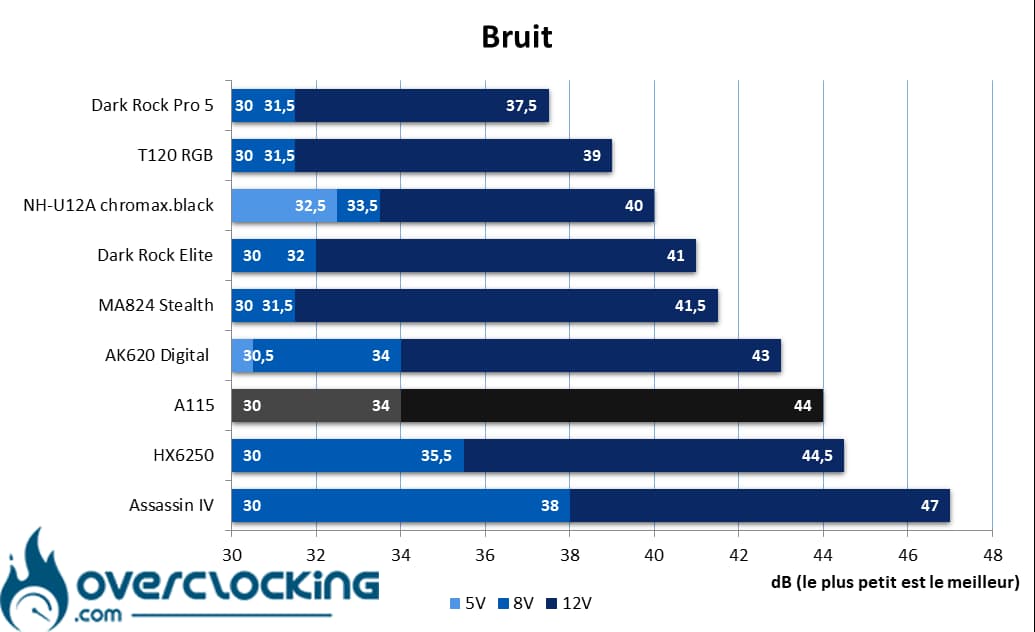
As far as noise levels are concerned, at full speed the heatsink is audible, but this has to be qualified. Indeed, at 44 dB, the A115 is on a par with Jonsbo’s HX6250, also a 140 mm cooler… Except that it has only one fan.
Finally, the regulation is a good thing to get some silence. As you can see, when these fans are running at 1300 rpm, this cooler generates just 34 dB, becoming inaudible at low speeds.
[nextpage title=”Intel CPU temperatures”]
Processor at 65W :
We start with the 65W profile, a rather low power consumption, especially when you consider the basic consumption of this 13600K. We’re here to simulate the power consumption of small processors with few cores or low power consumption. In theory, everyone should do well!
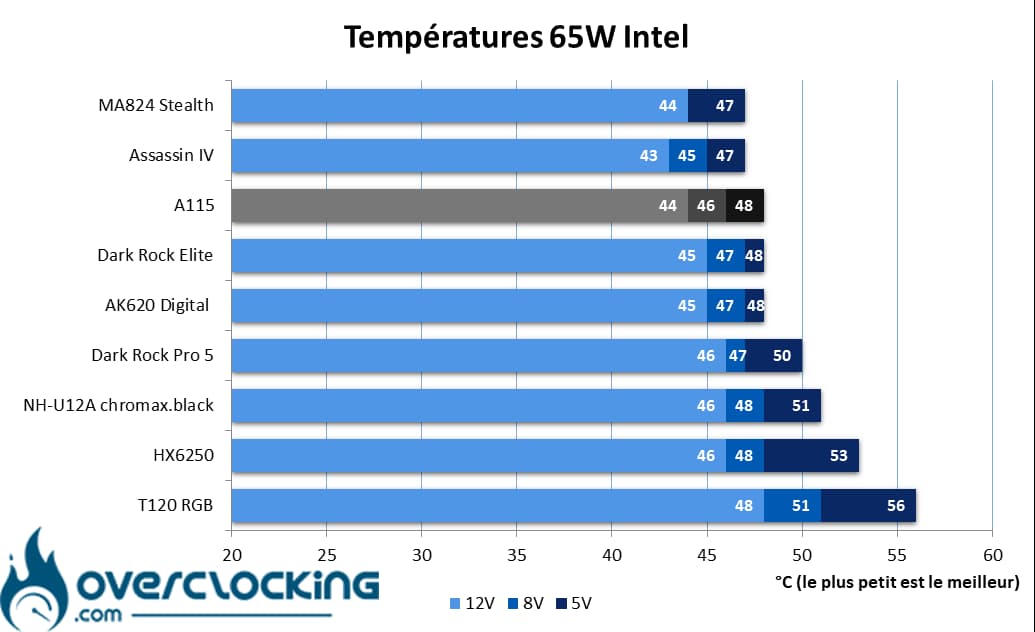
On our 65W consumption profile, the first thing we notice is that the cooler behaves quite well. As you can see, it offers top-of-the-range performance. At high speed, it rivals the MA824 Stealth, but is no match for the Assassin IV. Finally, at low speeds, it’s on a par with the big coolers from be quiet!
95W processor :
Here, we’re taking our readings on a Core i5 13600K, so power consumption reaches 95W. For this, both the P-Core and the E-Core operate at 3.5 GHz, while the VCore is set to 1.210V!
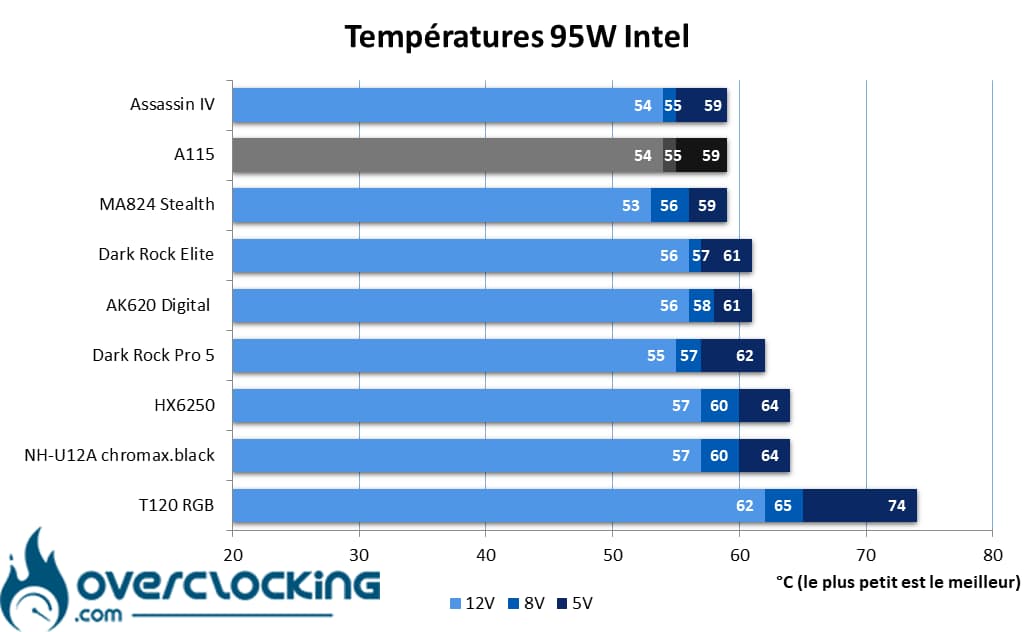
However, when we opt for such a large heatsink, it’s to mount it on CPUs that consume more power. Already, with a consumption of 95W, the A115 perfectly rivals DeepCool’s Assassin IV. We’re talking about the same performance. In this sector, only Cooler Master’s 53°C reference will do slightly better at full speed.
130W processor :
Finally, we end our series of readings with our Core i5 13600K, which consumes 130W. To achieve this, we push the frequencies a little further, as well as the VCore, which now rises to 1.270V!
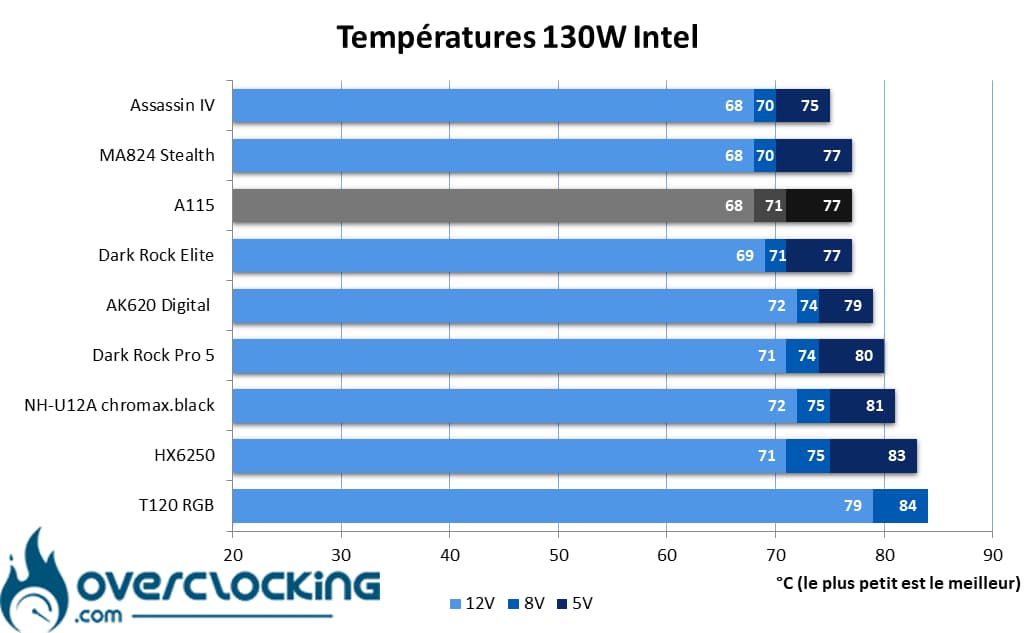
With a processor consuming 130W, the A115 still does very well. At full power, it ranks among the most efficient heatsinks in this comparison. In fact, it ties with the Assassin IV and MA824 Stealth. However, as the fan speed decreases, it offers similar performance to a Dark Rock Elite from be quiet!
Summary :
As we’ve seen, Corsair’s A115 delivers solid performance in terms of heat dissipation. Its performance puts it on a par with other high-end dual-tower fans such as the Assassin IV or Cooler Master’s MA824 Stealth.
[nextpage title=”Intel temperature-to-noise ratio”]
On these perf/noise ratio graphs, we remind you that it’s best to be positioned as far to the bottom left of the graph as possible. For ease of reading, the leftmost point symbolizes 12V ventilation, the central point 8V ventilation and the rightmost 5V.
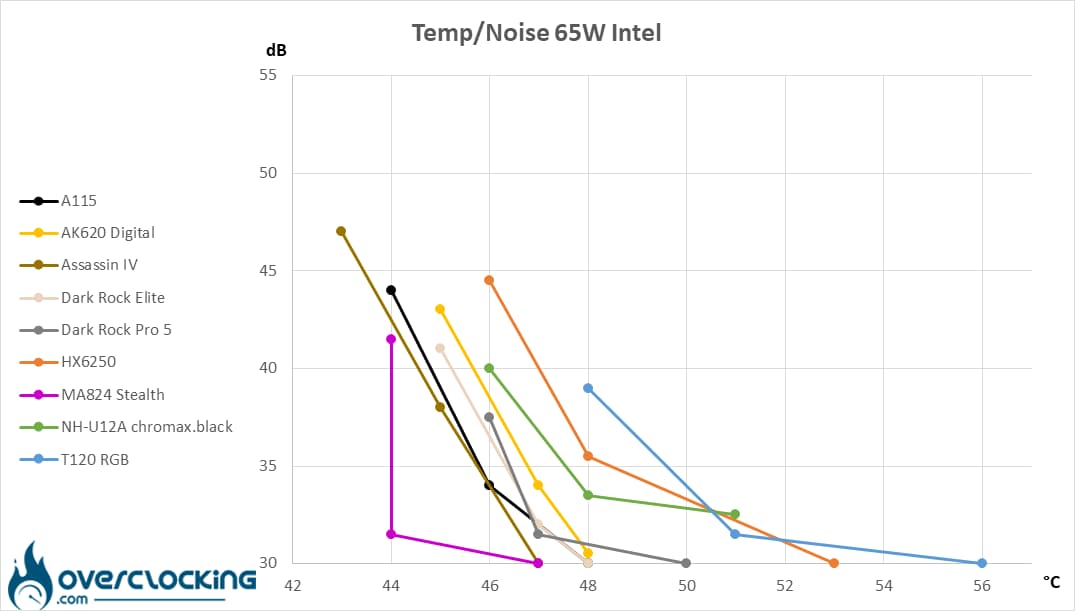
At 65W, we have a heatsink with a good temperature-to-noise ratio, as indicated by its position on the graph. This places it among the big double-tower heatsinks, leaving all single-tower heatsinks behind. However, the MA824 Stealth dominates the pack by a wide margin.
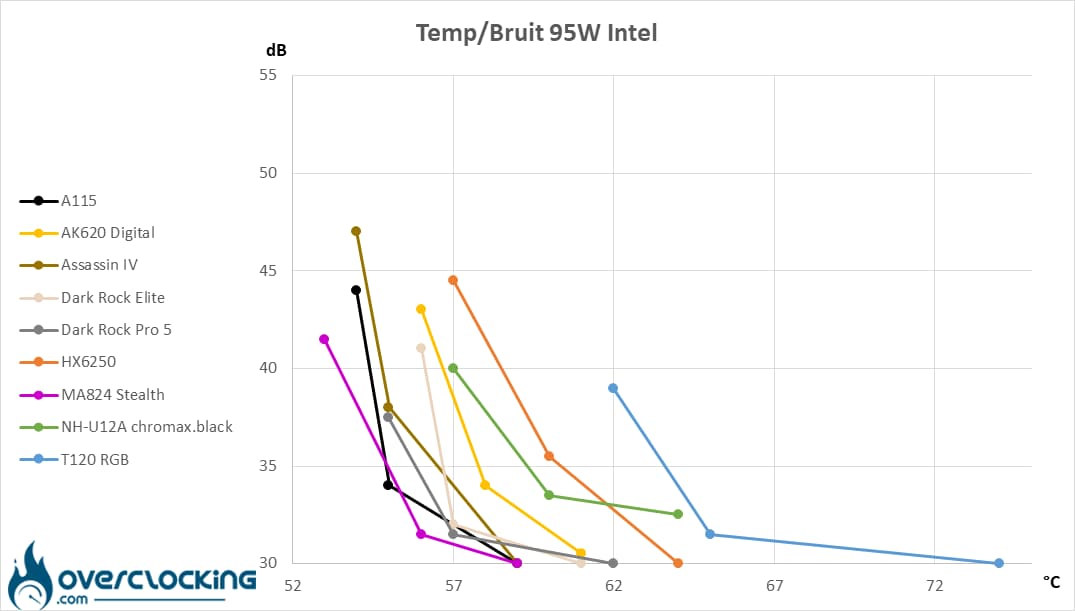
At 95W, Corsair’s heatsink is at home on our Core i5 13600K. Once again, the MA824 Stealth remains the best in our comparison, with the A115 a close second.
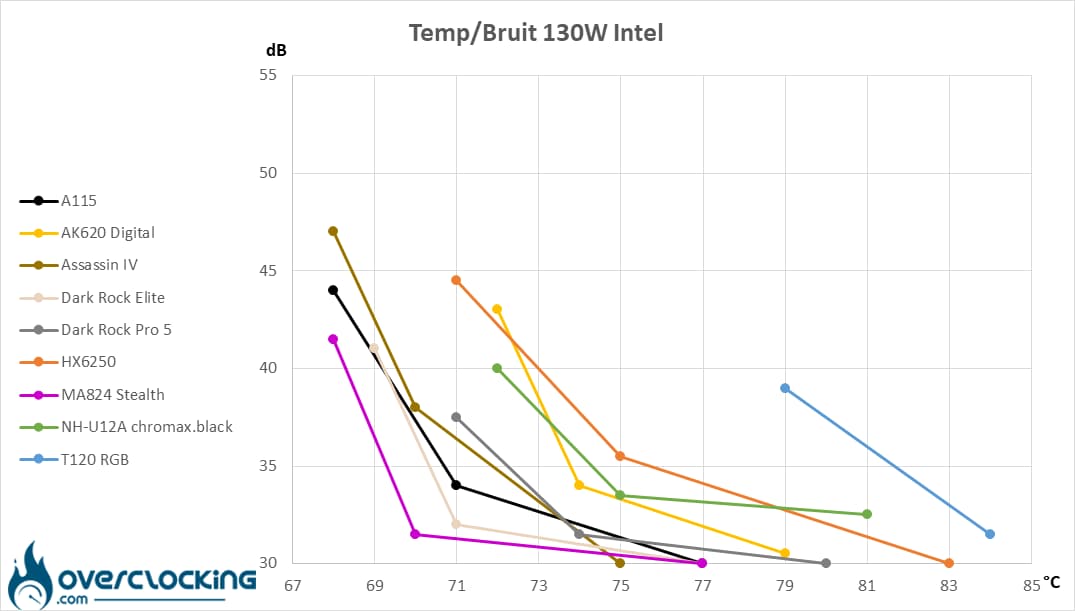
Finally, at 130W, the A115 delivers solid performance, although its temperature/noise ratio is slightly worse than that of the Assassin IV, which fares better in these conditions. In fact, the distinction between single- and double-tower coolers is quite clear!
[nextpage title=”Conclusion”]
We’ve come to the end of this test of Corsair’s A115. Are we dealing with a successful product? Let’s take a closer look!
Pay attention to dimensions!
When it comes to double-tower fans, there’s one thing you have to take into account: dimensions. The A115 is no exception to the rule, and at 164 mm it’s quite tall. So be careful, it won’t fit into every case.
However, it’s also a deep fridge, and will cover all your memory slots. Fortunately, the rail system for mounting the fans will allow rapid adjustment of their height… making it even more cumbersome in height. So, pay attention to the height of your memory modules.
Otherwise, the accessory part remains fairly classic, and Corsair won’t be supplying anything more than what’s needed for mounting. While a splitter for the fans is welcome, we regret the absence of a syringe of thermal paste… Or a screwdriver, supplied by all our competitors.
Ditto, the other aspect in which we were somewhat disappointed was the lack of a small upper part to mask the heat pipe end. As it is, these are visible, as are the tops of the fan mounting rails. A magnetic cover like on the A500 would have been perfect.
Assembly: Noctua-style -> simple!
As far as assembly is concerned, frankly, we didn’t encounter any particular problems, since the assembly kit is simple to use and set up. You’ll need to handle a backplate, four spacers, two mounting arms and four nuts. In just two minutes, the heatsink is mounted on its processor, nothing too complicated.
Great temperatures!
When it comes to performance, it’s clearly no match for the competition, as it rivals the biggest fans in the sector. Indeed, as we’ve seen, it easily rivals the biggest models currently on the market, even rivaling DeepCool’s Assassin IV.
As for noise levels, while they may seem high at full power, we mustn’t lose sight of the fact that this is a heatsink equipped with two 140 mm fans. Admittedly, at full speed it is audible, but less so than some 140 mm models equipped with a single fan.
As we’ve seen from its temperature-to-noise ratio, it’s not particularly affected by noise pollution.
Premium price:
The official price for the European market is €114.90. While this may seem high, it should be noted that, unfortunately, we’re in line with the prices of today’s biggest aircooling fans. Currently, an Assassin IV can be found for €110, compared with €108 for the MA824 Stealth or €120 for a Dark Rock Elite. Finally, given the temperatures obtained, the price seems right. However, if we add the “extras” such as the finish or the accessories… We’re still behind the competition.
Corsair A115:
We like:
- Sober, all-purpose visual appeal
- Simple assembly
- Ventilation mounted on rails for easy height adjustment
- Solid performance
- Rather controlled noise levels for a 140 mm double-tower heatsink
- Performance/price ratio equivalent to other large double-tower heatsinks on the market
What we didn’t like :
- The finish deserves more attention, especially on the top
- This model takes up a lot of space >160 mm high
- The fact that it covers all the memory slots, so the fan needs to be raised beforehand
- Lacks extra thermal paste
- And perhaps a screwdriver (supplied by competitors)
 All in all, Corsair’s heatsink offers solid performance, with a performance-to-noise ratio that rivals that of its most direct competitors. However, at €115 for the heatsink, it’s a shame to have a finish that leaves the heat pipes open to the air, or an accessory part that lacks a thermal paste syringe. Similarly, we would have appreciated a screwdriver (supplied by competitors). Last but not least, it remains imposing, but fan height adjustment is simplified. For us, it’s the silver award.
Many thanks to Corsair!

