
German brand be quiet! is delighting us today with the launch of a new series of all-in-one watercooling kits. The company is launching its AIO Pure Loop 2 kit series, following on from the first models we tested here. However, while the basic model remains unchanged, the brand is offering new fans in the company of its Pure Wings 3. For our part, we offer our conclusions on the 280 mm model.

Presentation:
With this series of kits, the brand offers us an AIO that comes in several radiator sizes. We start small with a 120 mm model, then work our way up to 240 mm, 280 mm and 360 mm for the largest. At a time when a number of manufacturers are throwing in the towel, the German brand continues to offer us a small radiator in 120 mm!
be quiet! claims serious performance for its AIO. The brand indicates that the kit will be able to maintain your processor at low temperatures, despite the use of demanding applications. What’s more, as this is the 280 mm version, we’re expecting something pretty solid, so we’ll see how it performs on our CPUs.
Otherwise, we find the brand’s new Pure Wings 3 fans. These are advertised as high-performance, since they are capable of generating high static pressure. Even so, noise shouldn’t be a problem, as the company claims they are silent.
Like the Pure Loop and Pure Loop 2 FX, the pump is “double decoupled”. In layman’s terms, this means that the pump is no longer located in the waterblock, but in the pipes. What’s more, to reduce the noise it generates, it is fully insulated, in a rubberized compartment. Its PWM-type power supply also enables us to adjust its speed to our needs.
As for the radiator, it still retains its filling port. Unlike other references in the sector, this is provided for by the brand that features it. So, if you run out of fuel, no problem, you can refuel without losing your warranty.

As for the invoice, be quiet! offers us an AIO in 280 mm at a price of €114.90. It’s a very attractive price, and comes dangerously close to a Liquid Freezer II of the same size. Let’s see how it compares!
[nextpage title=”The Pure Loop 2 280″]


As usual with be quiet! we find a sober packaging featuring the watercooling kit on the front. On the rear, we have, as always, a brief reminder of the kit’s main features, with detailed specifications on the sides.
Inside, the classic cardboard mold acts as protection, while the various components are packed in plastic bags… except for the radiator, which benefits from cardboard reinforcement.
The radiator:

The radiator is a classic block. It features an aluminum construction. It is a little larger than a 240 mm model, measuring 317 (W) x 140 (D) x 27 (H) mm. The thickness is therefore quite standard. However, being wider, it also offers a higher-than-average number of channels: 14 versus 12 for a 240 mm kit.
On the other hand, the finish is quite satisfactory, since the radiator is square in shape. The ” Pure Loop 2 ” branding on the edge is a reminder of the kit’s series. Otherwise, an attractive matt black paintwork finish is carefully applied, while the filler hole is located at the end of the radiator.


The connection to the waterblock is provided by two pipes measuring some forty centimetres in length. To ensure a high level of finish, we use an attractive black nylon sheath. As for flexibility, this is quite satisfactory and will not hinder installation in a housing.
The waterblock:
The visual appearance of the waterblock is in keeping with the other AIOs in this Pure Loop series. The upper part features a brushed aluminum section, while a translucent border surrounds it. The latter will be used to diffuse aRGB lighting, similar to that of the Pure Loop 2 FX.


In terms of dimensions, this waterblock measures 83 (W) x 94.5 (D) x 42 (H) mm. Nothing to clog up your memory slots, far from it. Underneath, we find a copper base. The base is gray in color, which is to be expected since be quiet! uses copper, but nickel-plated copper! Finally, we notice that it’s screwed to the rest of the block by a total of eight torx screws, but nothing a good Corsair screwdriver kit can’t unscrew.
The finish of the base is particularly meticulous, with a beautiful nickel plating and very fine machining. To the touch, it appears almost smooth, which is not the case. If you look closely, you can see the traces left by the manufacturing process.

However, as we said, this block has no pump, as the latter is taken from the kit’s tubes. As you can see, it will leave a massive protrusion at pipe level. Once again, not all its characteristics are known, but we do know that it will operate at up to 5500 rpm. Via its PWM power supply, it will be possible, if desired, to lower its speed to 4000 rpm.
Compatibility :
In terms of compatible platforms, be quiet! offers support for motherboards in :
- Intel: LGA-1100 – LGA-1200 – LGA-1700
- AMD: AM5 – AM4
Here, the German brand is only tackling mainstream platforms, since only the classic LGA-1000 and AM5/4 are compatible. Gone are the now-ancient LGA-2000s and the imposing Threadrippers!
Fans:
With a 280 mm radiator, this kit comes with two 140 mm fans. This time, we’re talking about new Pure Wings 3 fans. From a visual standpoint, we find some of the distinctive elements of the brand’s fans, such as the ribbed blades. However, unlike the second-generation Pure Wings, these are now more curved and, above all, wider.

As for the frame, we’re dealing with something basic with a square frame. However, there are no rubberized silentblocks to reduce any parasitic vibrations generated when the mill turns.
At present, the full specifications are not known, we just know that they will operate at 1800 rpm and that’s all. No information as to static pressure or airflow is communicated.
The bundle:

The accessory section is housed in a small cardboard box, so let’s take a look at what this Pure Loop 2 280 has to offer:
- Assembly instructions
- A warranty guide
- A bottle of liquid for topping up
- A syringe of thermal paste
- 2 -> 1 splitter
- Intel multisocket metal backplate
- Intel mounting arms and hardware
- AMD mounting arms and hardware
- Screws and bolts for fan and radiator mounting
The accessories section is therefore complete. In addition to the pump and heatsink mounting hardware, be quiet! also supplies the necessary fan and fluid connections. This is a welcome addition to extend the life of the kit.
Basically :
Broadly speaking, the brand’s kit is very similar to the Pure Loop 2 FX. The only real change is that the ventilation is based on Pure Wings 3 rather than Light Wings or Pure Wings 2, for example. We’ll have to wait and see what happens to the temperatures, but in the meantime, let’s see how it’s put together!
[nextpage title=”Installation”]
For installation, you’ll need to keep your AMD backplate, as Phanteks doesn’t supply one. If you don’t have one any more, a quick look on eBay should make it easy to find one.
Assembling the Pure Loop 2 280 :

When all’s said and done, assembly proceeds in exactly the same way as for the other two models in the series. On the Intel socket , the first thing to do is to prepare the backplate. To do this, screws are inserted through the backplate and held in place with rubber washers. The spacing of these screws will determine the destination platforms:
- Widely spaced : LGA-1700
- Closer together : LGA-1200/1100


Once the backplate is ready, you’ll need to place it on the back of your Intel motherboard. On the AMD side, we’ll start by unscrewing the original mounting arms. Next, we’ll install the spacers at the four corners of the socket, while on the AMD side, we’ll need to fit plastic washers. In all cases, we finish by screwing the mounting arms onto the spacers/washers.


Finally, apply a small dab of thermal paste to the processor before positioning the pump on the CPU. To screw it in, screw the top one in and the bottom one out. And now we’re ready to power the PC.
[nextpage title=”Protocol”]
A small update to our test protocol. We’ve changed the software we used to stress our configuration. The same applies to the different profiles. You can view our test method and the hardware of our test machine via this link.

For test purposes, we’ll be comparing the Pure Loop 2 280 with other models in 240 mm, 280 mm, 360 mm and even 420 mm:
- H170i Elite Capellix (Corsair)
- H170i Elite LCD XT (Corsair)
- Kraken 240 RGB (NZXT)
- Kraken Elite 360 (NZXT)
- Liquid Freezer II 240 (Arctic)
- Liquid Freezer II 280 (Arctic)
- Liquid Freezer II 420 (Arctic)
- Pure Loop 2 280 (be quiet!)
- Ryuo III 240 (Asus)
- Ryuo III 360 (Asus)
[nextpage title=”Speed and noise”]
Fan speed :
We’re starting from scratch with our series of temperature readings. Let’s specify the fan speeds recorded during our readings (for 12V, 8V, 5V):
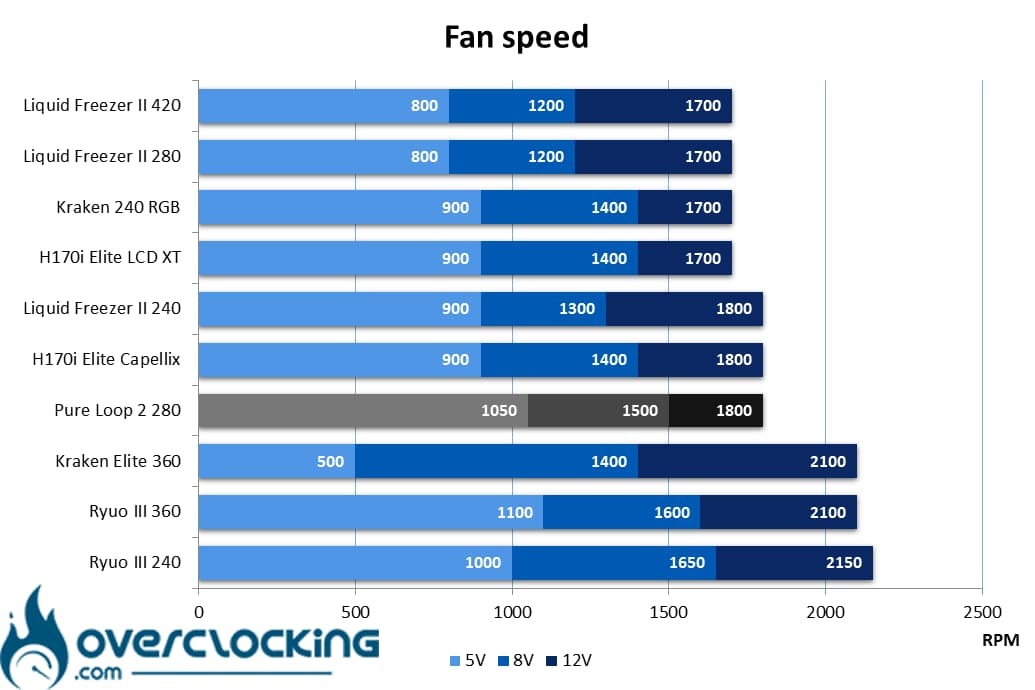
As you can see, the Pure Loop 2 280 has the fastest 140 mm fans in our comparison. Compared with the P14 of the Liquid Freezer II 420/280 or the ML140 RGB and AF140 RGB Elite of Corsair’s two H170i, the Pure Wings 3 are indeed faster… At least at low and medium speeds.
Noise :
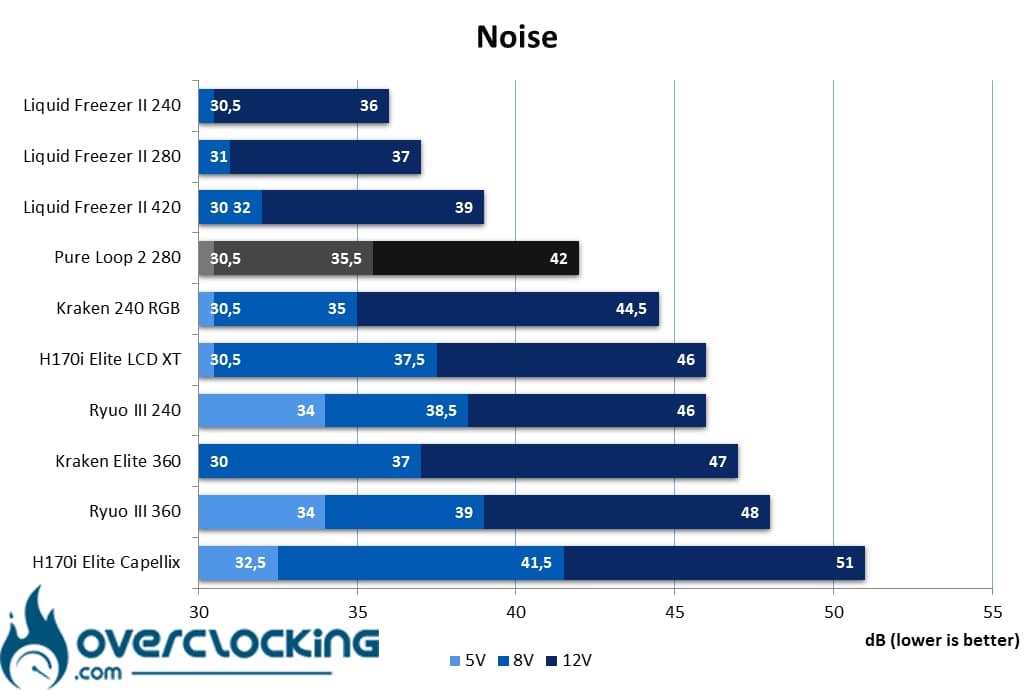
When it comes to noise emissions, the Pure Loop 2 280 holds its own overall. The 42 dB it generates at full speed are bearable, at least, much more than the noise emitted by Corsair kits! At low speeds, the kit is easy to forget, while at medium speeds it starts to become audible.
[nextpage title=”AMD CPU temperatures”]
100W processor:
Despite a more violent 100W profile, this still represents the least stressful phase of this protocol. It highlights the performance achieved with compact/entry-level heatsinks.
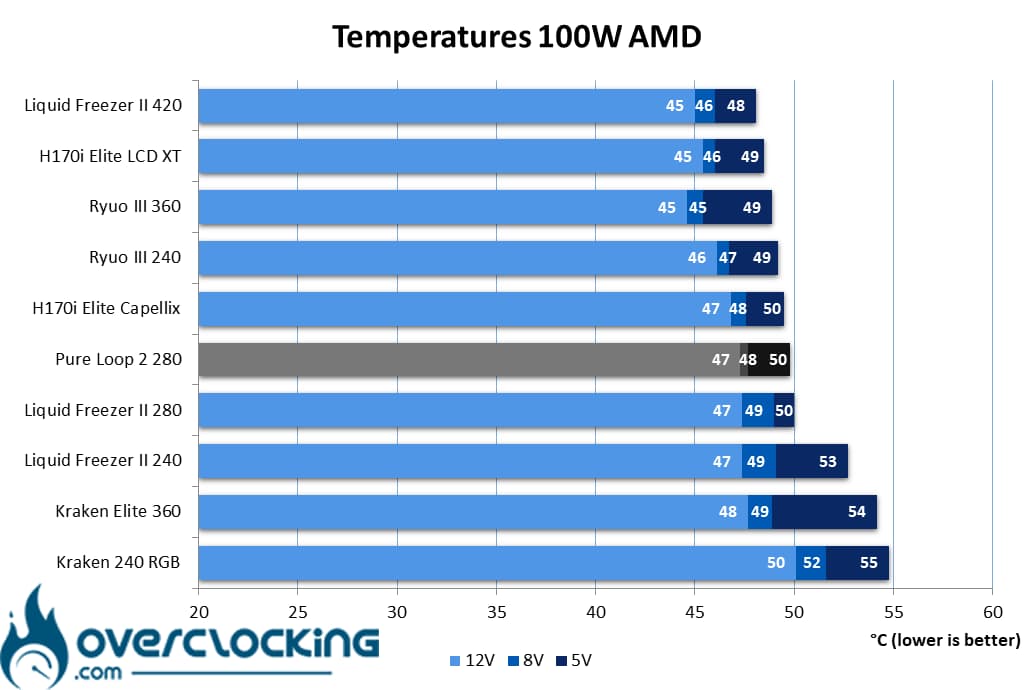
On our Ryzen 9 7900X, set to consume only around 100 watts, there were no particular heating problems overall. At low speeds, the processor’s temperature stabilizes at around 50°C, which is far from alarming. At full speed, we recorded 47°C, a temperature similar to that of the Liquid Freezer II 280 or the H170i Elite Capellix, for example!
Processor at 150W :
Here, our CPU will run at 3.90 GHz constantly and on all its cores. We apply a VCore of 1.246V to obtain a power consumption of around 150W. To simplify reading the graph, we may have rounded some values to the nearest integer.
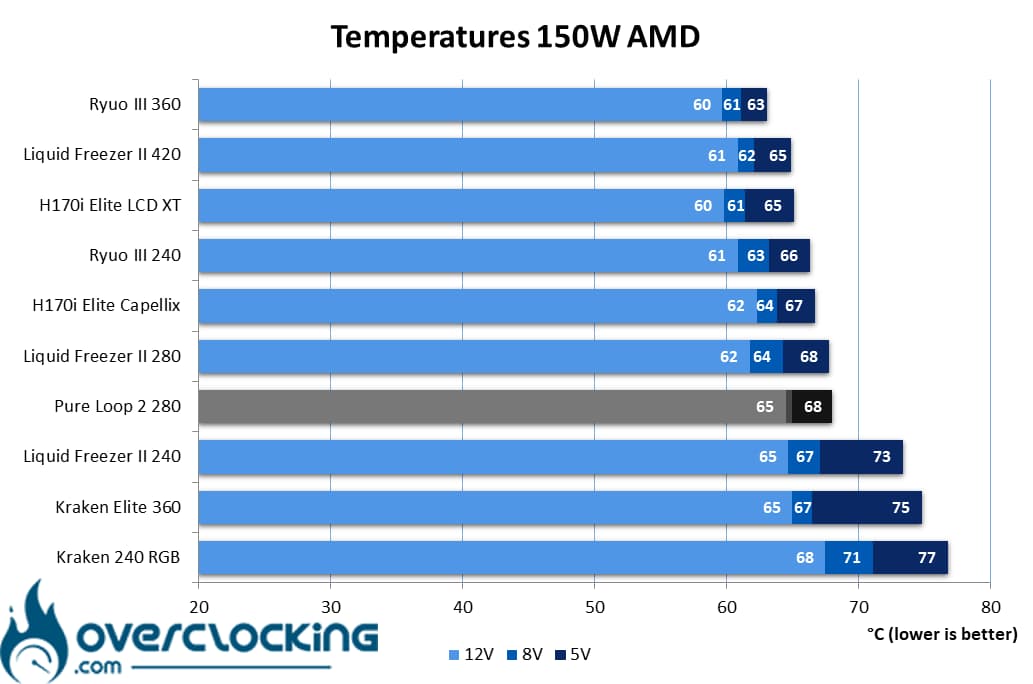
At 150W, temperatures rival those of the Liquid Freezer II 240 at its highest speeds. However, at medium speed, it performs similarly to Arctic’s 280mm kit, with less than 70°C recorded on our CPU!
200W processor:
Finally, we end with our 200W profile. Here, heat dissipation is higher. It has to be said that our CPU runs at 4.00 GHz on all its cores, with a VCore of 1.36V! Let’s see how our coolings fare!
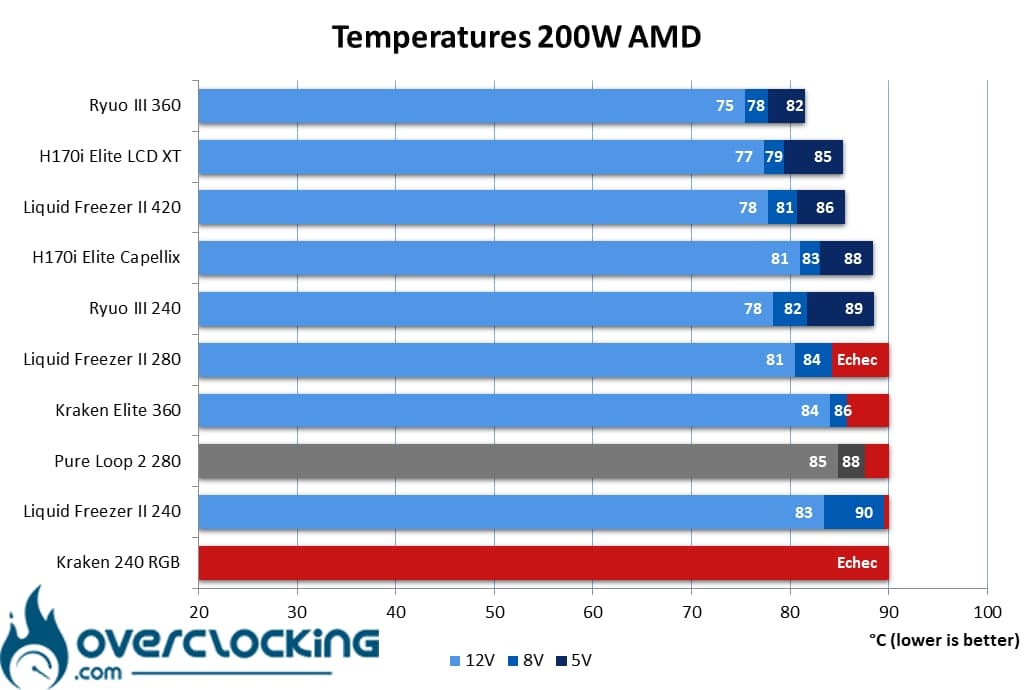
At 200W, unfortunately the kit is starting to reach its limits, as it can’t keep our Ryzen 9 7900X cool… Just like the 280mm Liquid Freezer II. However, compared to the latter, it fares less well at high and medium speeds, the fault of a thinner radiator perhaps?
Summary:
Overall, the Pure Loop 2 280 does its job on our AMD processor, but it doesn’t work miracles either. 200W of power consumption seems to be the limit you shouldn’t cross with this kit. So, if you’ve got a big CPU, you’ll probably need to run it at full throttle when your machine gets going!
[nextpage title=”AMD temperature-to-noise ratio”]
On these perf/noise ratio graphs, we remind you that it’s best to be positioned as far to the bottom left of the graph as possible. For ease of reading, the leftmost point symbolizes 12V ventilation, the central one 8V ventilation and the rightmost 5V.
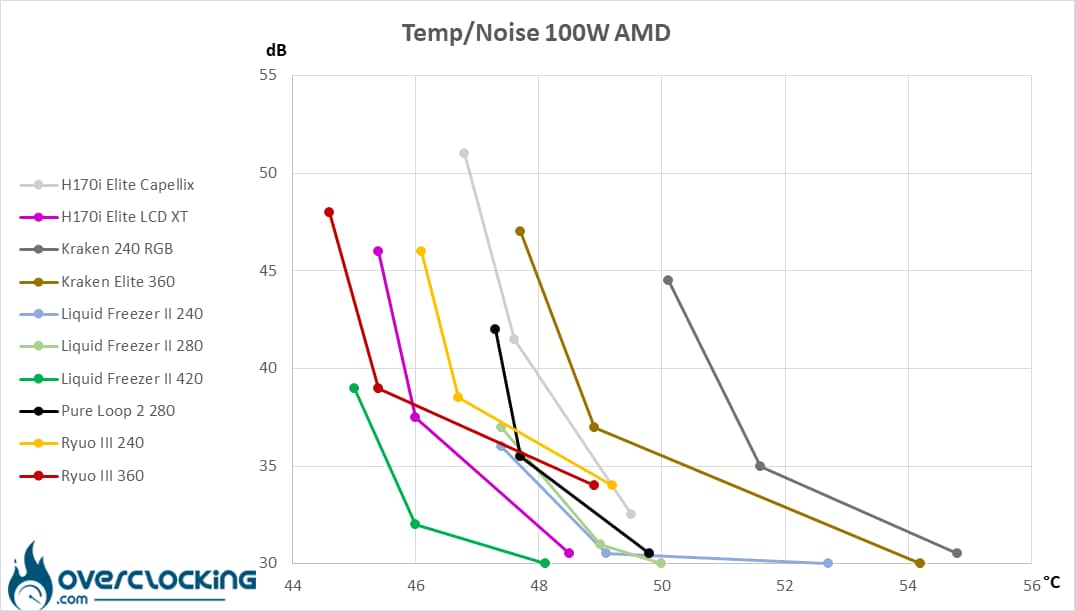
At 100W, it’s clear that the be quiet! AIO is putting its best foot forward. Noise is contained and temperatures kept under control. On a low-power CPU, it will prove as efficient as an H170i Elite Capellix. However, the Liquid Freezer II 240/280 are waiting for it!
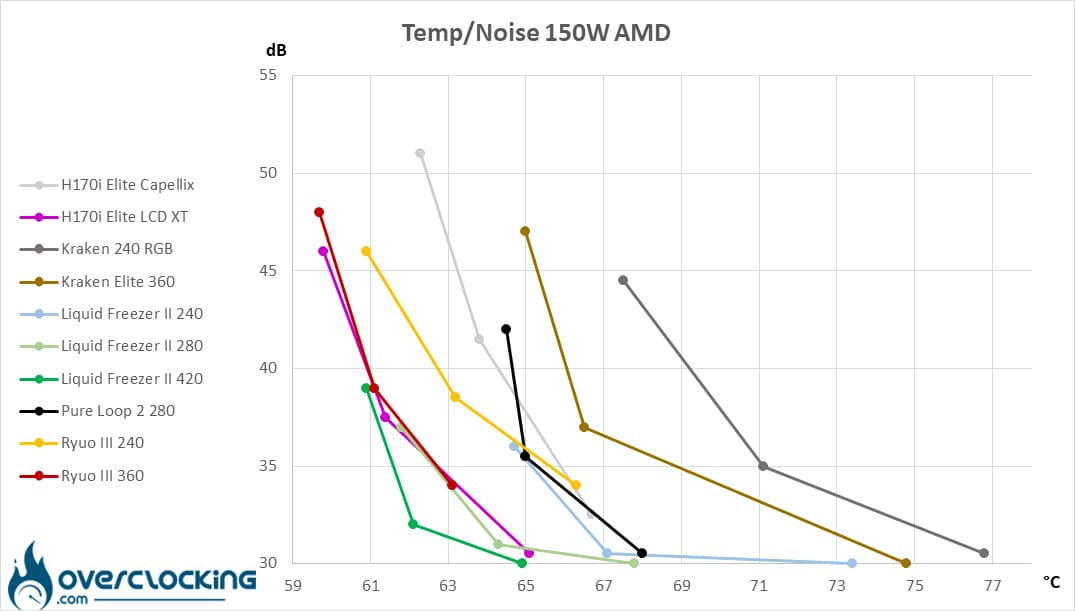
On our 150W CPU, the situation changes, with the Liquid Freezer II 280 taking the lead. Nevertheless, the Pure Loop 2 280 still boasts a better temperature-to-noise ratio than the Kraken in 240 mm and 360 mm. Likewise, the H170i Elite Capellix has a hard life, while the Liquid Freezer II 240 runs out of steam at low speeds.
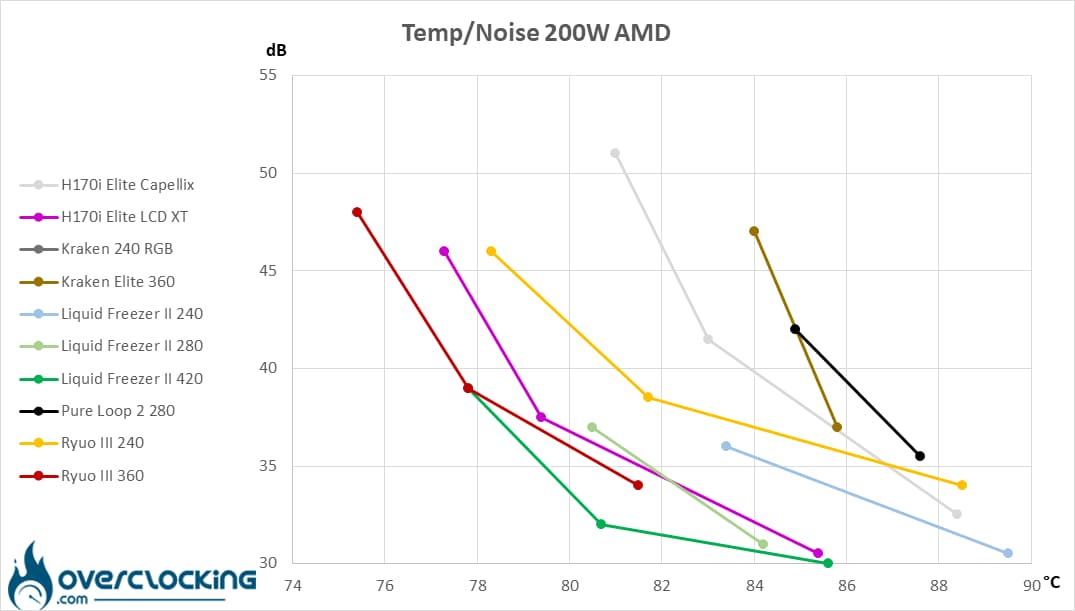
At 200W, the Pure Loop 280 is clearly reaching the end of its life. Indeed, it’s missing part of its curve, and what’s left doesn’t really put it forward… Well, at least there’s something left compared to the Kraken 240 RGB, which has completely disappeared from the radar.
[nextpage title=”Intel CPU temperatures”]
95W processor:
We start with the 95W profile, a fairly average consumption, especially when you consider the basic consumption of this 13600K. We’re here to simulate the power consumption of small processors with a reasonable number of cores. In theory, everyone should do well!
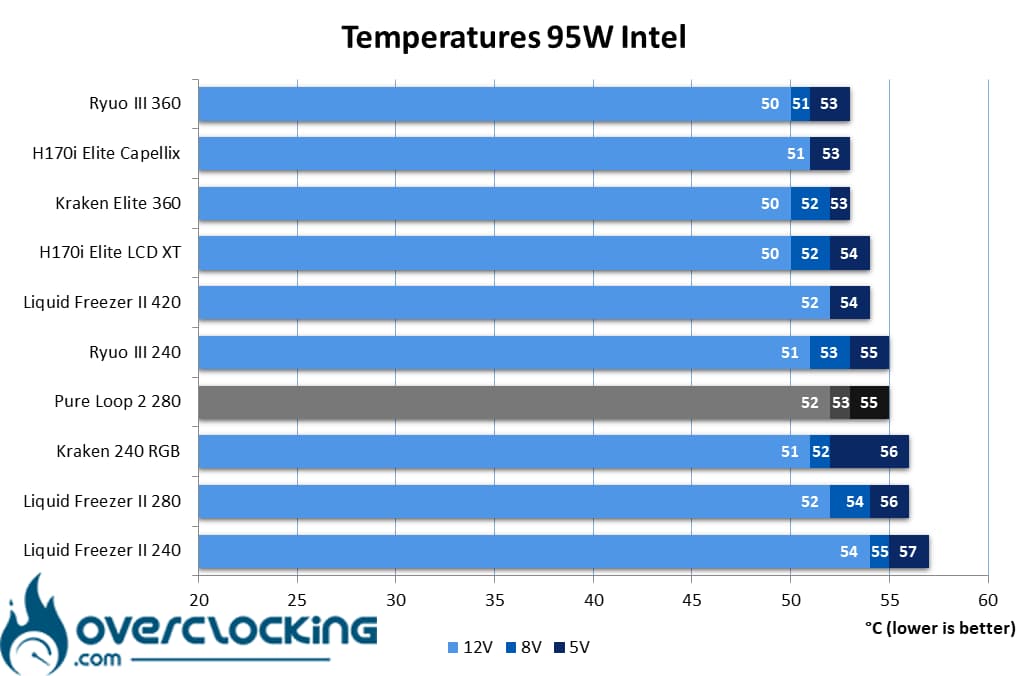
On our Core i5 13600K, the Pure Loop 2 280 is positioned at the same level as the two-fan kits. It performs slightly better than its Swiss rival, the Liquid Freezer II 280, at least at low and medium speeds. Otherwise, it’s all the same.
130W processor:
Here, we’re taking our readings on a Core i5 13600K, so power consumption reaches 130W. The P-Core runs at 4.5 GHz, the E-Core at 3.5 GHz and the VCore at 1.270V!
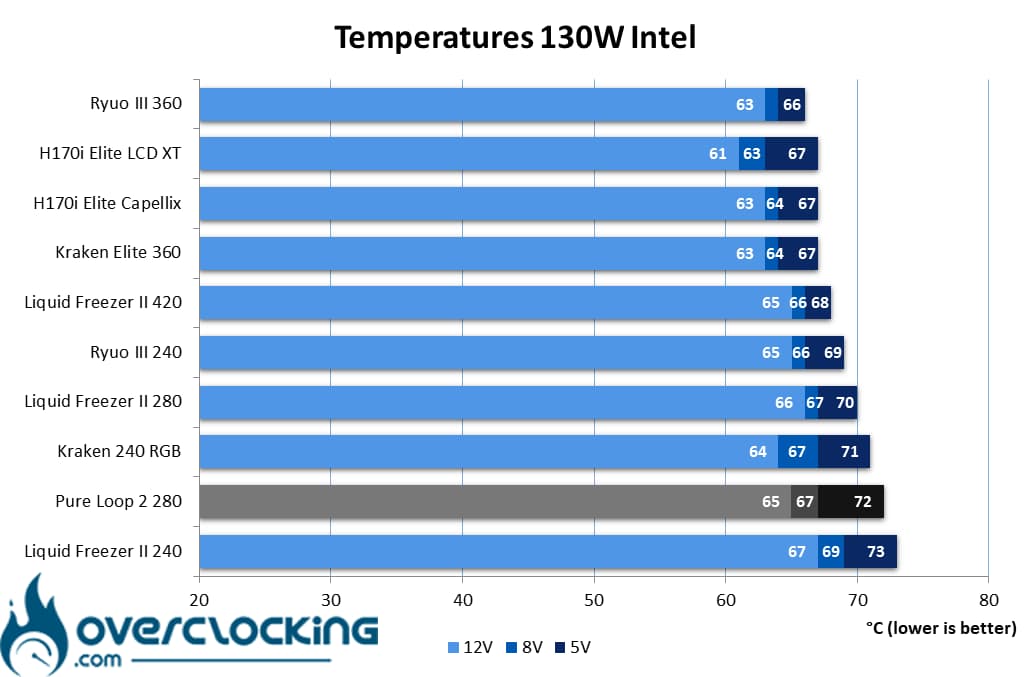
At 130W, the kit delivers pretty solid results at its highest speeds, but our Core i5 starts to catch heat at low speeds. As it stands, it does barely better than Arctic’s Liquid Freezer II 240.
130W processor:
Finally, we end our series of readings with our Core i5 13600K, which consumes 170W. For this, we push the frequencies a little further, as well as the VCore, which now rises to 1.350V!
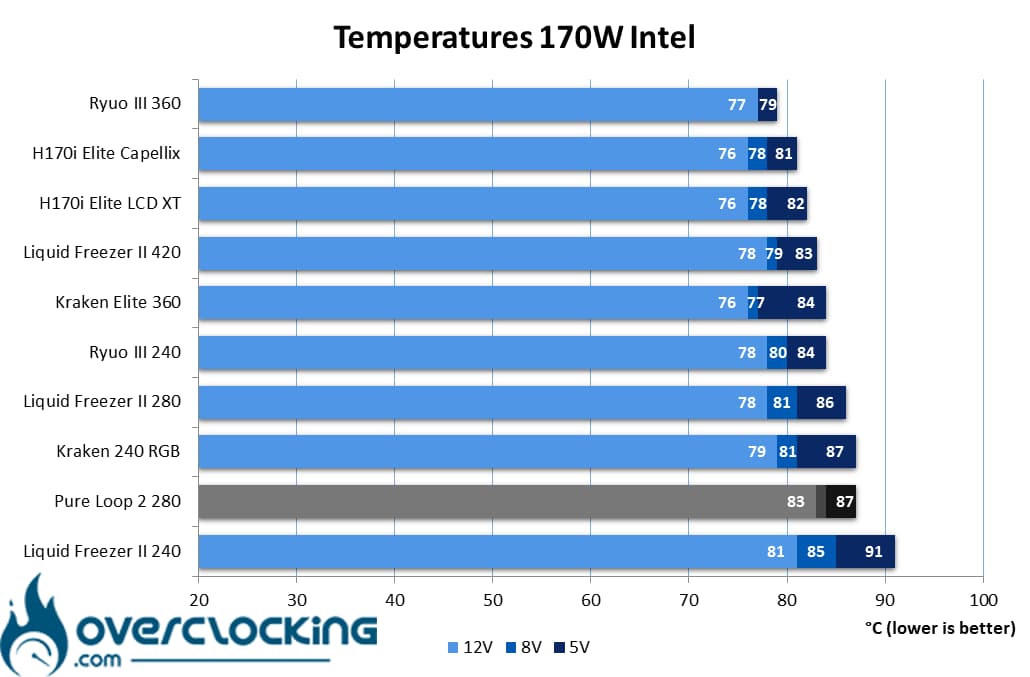
At 170W, be quiet!’s Pure Loop 2 280 shows similar results to NZXT’s Kraken 240 RGB at low speeds. At full speed, as well as at medium speed, the be quiet! kit falls completely behind Arctic’s Liquid Freezer II 280 – even the 240 mm does better.
Summary :
While the Pure Loop 2 280 did not do too badly on our Ryzen 9 7900X, the situation becomes more complicated on Intel’s Core i5 13600K. The German AIO flounders, especially at high power consumption!
[nextpage title=”Intel temperature/noise ratio”]
On these perf/noise ratio graphs, we remind you that it’s best to be positioned as far to the bottom left of the graph as possible. For reading purposes, the left-most point symbolizes 12V ventilation, the central one 8V ventilation and the right-most 5V.
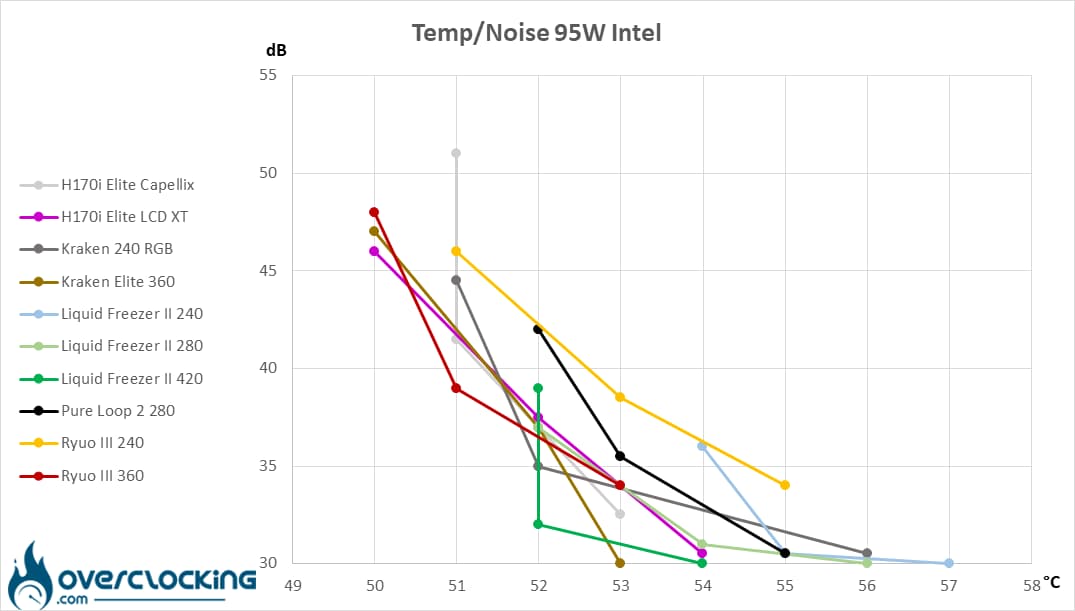
On a low-power Intel CPU, the Pure Loop 2 280 lags behind the Ryuo III 240 or Liquid Freezer II 240, although it’s no match for the latter. Here, you might as well opt for the Liquid Freezer II 280, which will do a much better job!
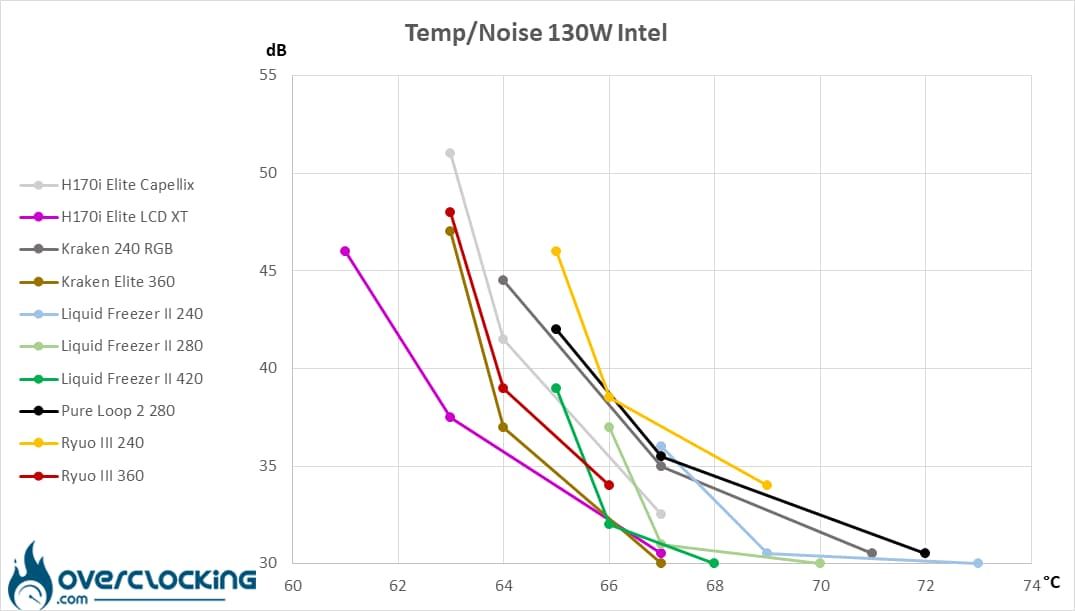
At 130W, our model of the day is starting to lag behind. As you can see, its curve is starting to lengthen considerably, a sign that at low speeds it’s gradually reaching its limits. However, it also outperforms the Kraken 240 RGB, while positioning itself aggressively against the Ryuo III 240. But don’t look any further, the Liquid Freezer II 280 is still out of reach.
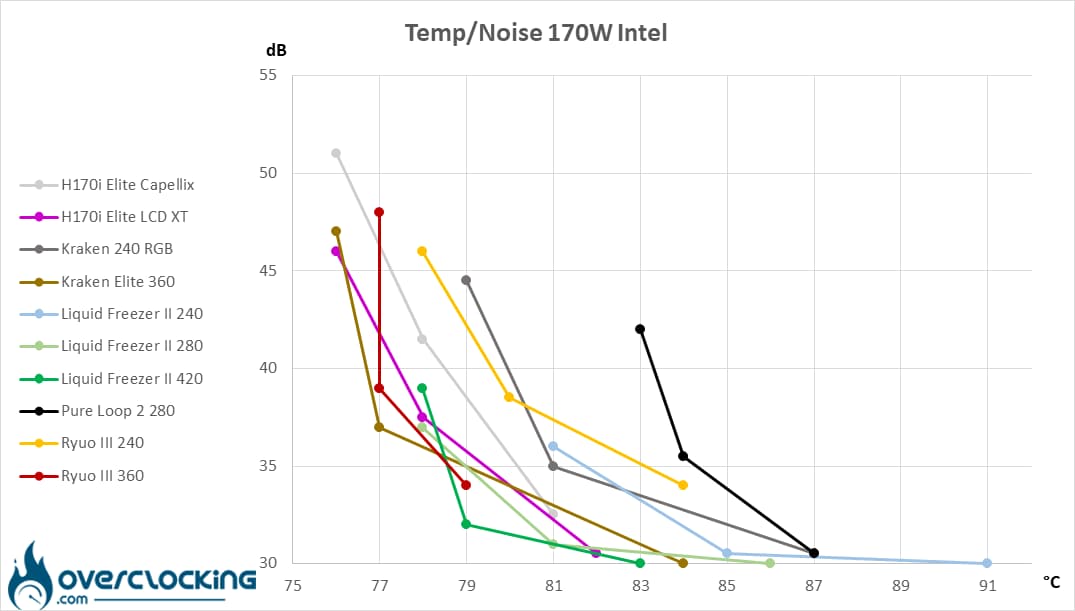
Even if the Pure Loop 2 280 manages to contain the heat imposed by our 170W CPU, we’re forced to conclude that it’s at the end of its tether, no longer able to compete with the competition.
[nextpage title=”Conclusion”]
We’ve come to the end of this test of the Pure Loop 2 280 from be quiet! Are we dealing with a successful product? Let’s take a closer look!
The same, but with new fans!
With this new generation of kit, don’t look too hard for novelties, as there are very few of them. In fact, the base remains the same as that of the Pure Loop 2 FX, while only the fans have evolved. Here, we find the brand’s Pure Wings 3 and that’s it. There are no changes to the pump or radiator. The visual aspect remains unchanged, apart from the presence of aRGB lighting on the waterblock.
On the bundle side, you’ll find everything you need to assemble and connect the kit. The splitter will reduce the number of fan sockets occupied on the motherboard, while the brand supplies everything you need to carry out maintenance yourself. Yes, there’s a bottle of liquid to top it up in case you run out of power. It’s nothing new, but it’s always handy.
What about performance?
In terms of performance, we’re back with a standard kit, which isn’t catastrophic, but it’s not exceptional either. On our AMD processor, it does rather well as long as power consumption doesn’t reach 200W. Once this limit is reached, however, the kit clearly shows its limitations, with temperatures so high that it is unable to keep the 7900X cool at low speeds.
On the Intel side, the situation is quite similar, since as soon as you reach 170W of consumption, the competition passes you by. All in all, on large processors, we’ll probably prefer its 360mm counterpart.
Fortunately, noise levels have been kept under control: there’s nothing worse than a noisy watercooler that doesn’t cool down. Here, it’s discreet from mid-range and inaudible at low speeds. What’s more, the pump won’t be heard at all. As you can see, its temperature/noise ratio isn’t ideal for power-hungry CPUs. In this situation, either turn up the fan speed, or upgrade to the next size up: the 360 mm.
Affordable price :
As for the price tag, as we said at the start of our review, be quiet! has positioned its AIO at around €150. In itself, this is a fairly aggressive price, only €5 more than a Liquid Freezer II 280. Compared to the latter, it tends not to stand up to comparison when it comes to high power consumption. However, it does have one major advantage: its reduced size, thanks to a 27 mm thick radiator. It will find its way more easily into your case!
be quiet! Pure Loop 2 280 :
We like:
- The radiator’s finish, as meticulous as ever!
- The filler port, potentially offering a longer service life
- Flexible hoses for easy installation
- Complete accessory kit
- Simple waterblock assembly
- The presence of RGB on the waterblock… For those who like it!
- Attractive pricing
We disliked :
- Flagrant lack of novelty apart from the fans
- Quickly shows its limits on CPUs with high power consumption
- The degraded temperature/noise ratio on high power consumption
 Once again we’re giving out a silver award, and this time it goes to the Pure Loop 2 280 from be quiet! With this kit, we find an AIO that will quickly show its limits on a power-hungry CPU with soaring temperatures… It’s always a shame to have rising noise pollution or a CPU that throttles for lack of efficiency. However, it’s priced aggressively, and the rest of the kit isn’t bad, especially as it’s not particularly noisy.
Many thanks to be quiet!

