
[nextpage title=”Introduction:”]
Last week we reviewed the new ROG RTX 5080 Astral, but didn’t get the chance to push it to its limits due to lack of time. This weekend, we had the opportunity to evaluate its overclocking potential using ASUS’ in-house software: GPU Tweak III. This is the latest version to date, received from ASUS and compatible with the new RTX 5000. Let’s find out more about this software and what we were able to achieve with the ROG RTX 5080 Astral.

Thanks to ROG France for making this copy of the ROG RTX 5080 Astral available to us.
[nextpage title=”ASUS GPU Tweak III software: “]
ASUS GPU Tweak III is a complete overclocking and monitoring software for graphics cards. It works with any brand of card, not just ASUS and ROG models, but be warned that some features specific to ASUS models may not be available. Installation is straightforward, and all you need to do is reboot your configuration. The version we tested is 1.8.7.3.

By default, the software opens with two windows. The one on the left is for monitoring, and the one on the right will allow you to overclock your graphics card. The monitoring options can of course be edited in the software options. So we’re going to concentrate mainly on the right-hand window without going into all the options offered by GPU Tweak III. That won’t be the subject of this report.

The software perfectly recognises our ROG RTX 5080 Astral graphics card and tells us the temperatures of the GPU and memory chips. The big new feature also involves monitoring the 12V-2×6 power connector. If the software notices a problem with the voltage on one of the connectors, it will tell you straight away. Here, all the lights are green – everything’s working perfectly!
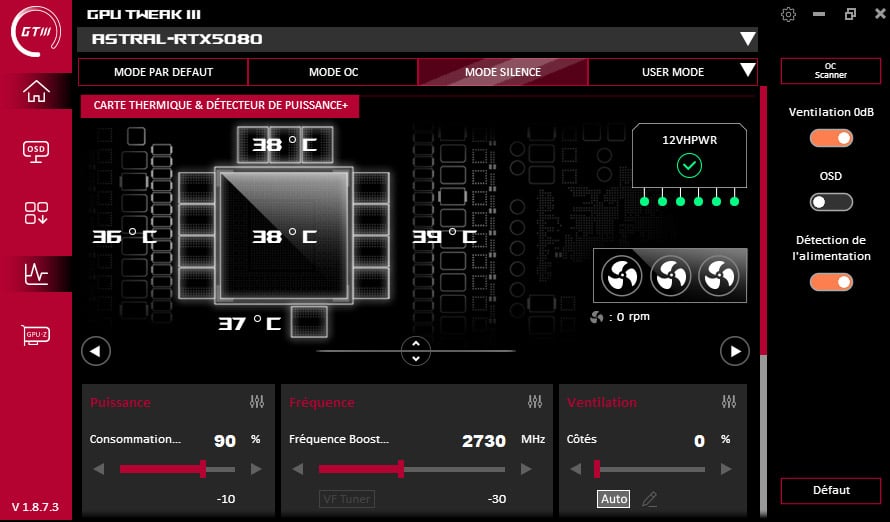
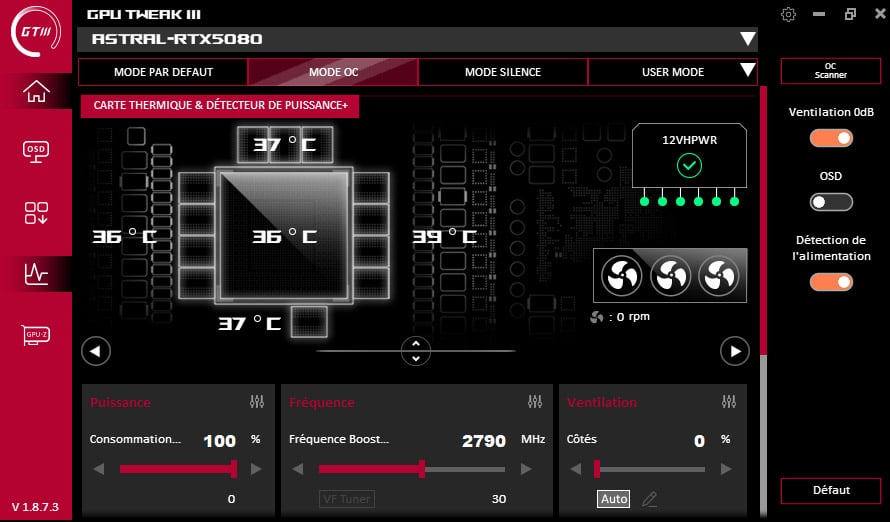
The default mode is the one that uses the characteristics of our card, i.e. a Boost frequency of 2760 MHz, memory of 1875 MHz and fans in AUTO mode. GPU Tweak III offers three other modes. OC mode will give you a gain of 30 MHz, i.e. 2790 MHz, and Silence mode, a frequency of 2730 MHz and a power limit lowered to 90%. Performance will therefore be slightly lower, but the temperature and noise levels will be lower. Finally, User mode lets you create your own profile. These modes work even if you have a non-ASUS card.
Note that the rear fan tends to be noisy and you can change its speed. Please note, however, that the ‘side’ fans are those on the left and right and that the ‘Centre and Rear’ fans are those positioned in the centre and those at the rear of the card.

Here – and we were very surprised – the power limit on our copy of the ROG RTX 5080 Astral is stuck at 100% with no margin. In the end, this won’t really have any effect on overclocking. To overclock our graphics card, we’re going to change the Boost frequency and then the memory frequency.
[nextpage title=”Overclocking the ROG RTX 5080 Astral:”]
Here we go with our copy of the ROG RTX 5080 Astral. The first step is to create a reference score, in other words, a score achieved from stock, without any modification to the card’s parameters. We chose Time Spy as our benchmark so that you can compare our results with the performance of your graphics card. Here we obtain an overall score of 32776 points and a GPU score of 34465 points. As you can see, the GPU’s maximum frequency has risen to 2977 MHz. Note that this doesn’t mean that the GPU is constant at this frequency, it’s just the maximum frequency at a given moment during the benchmark.
The TDP is 92.5% and the maximum power consumption given by GPU-Z is 370 watts. As far as temperatures are concerned, we’re on a benchmark table, with 62.1°C for the GPU and 62°C for the memory.

We’re not going to list all the stages we went through, but the idea is to find the maximum frequency of the GPU first and then that of the memory. We started by keeping the fans in AUTO mode. This enabled us to set the boost frequency to 3150 MHz in GPU Tweak III (max 3367 MHz) and the memory to 2250 MHz. If we continue to increase the memory frequency, it no longer seems to be taken into account.

Our total score climbs to 35,016 points (+6.8%) and that of the GPU to 37562 points (+9%). The temperature, with the fans in AUTO mode, remains at 64.3°C for the GPU and 62°C for the memory, while power consumption climbs to 401.1 watts with a TDP of 100.3%. We think that this ROG RTX 5080 Astral still has a lot left in the tank, so we decided to push the fans to 100% and raise the frequency to 3200 MHz.

It’s pretty frightening, but it passes under Time Spy and Speed Way, which will allow us to see the gain in ray tracing. The Time Spy score improves again, with the total score climbing to 35155 points (+7.2%) and the GPU score to 37718 points (+9.4%).

As far as Speed Way is concerned, our benchmark score was 9407 points and climbs to 10582 points, a gain of 12.5%. In game, with Cyberpunk 2077, we gained 6.5% in Ultra mode, 9% in Ultra ray tracing and 8.4% with DLSS Performance. So there’s still plenty of room to grab a few more FPS. See you this week to find out more about the ROG RTX 5090 Liquid Cooling!

