

Mounting your graphics card vertically is pretty cool. In this configuration, you can fully appreciate the design of the heatsink—which is definitely nicer when you have a sleek card like an MSI Suprim or an ASUS Astral, for example. However, aside from the constraints related to the case’s airflow, you’ll need to use a PCIe riser—an extension of the connector that the graphics card plugs into. And if the riser isn’t well-made, it can melt when it comes into contact with the card’s backplate —which is exactly what happened to RareSiren292 on Reddit with their TUF Gaming RTX 5090!
Thebackplate of a TUF Gaming RTX 5090 melted aPCIe riser!
Theriser was touching thebackplate!
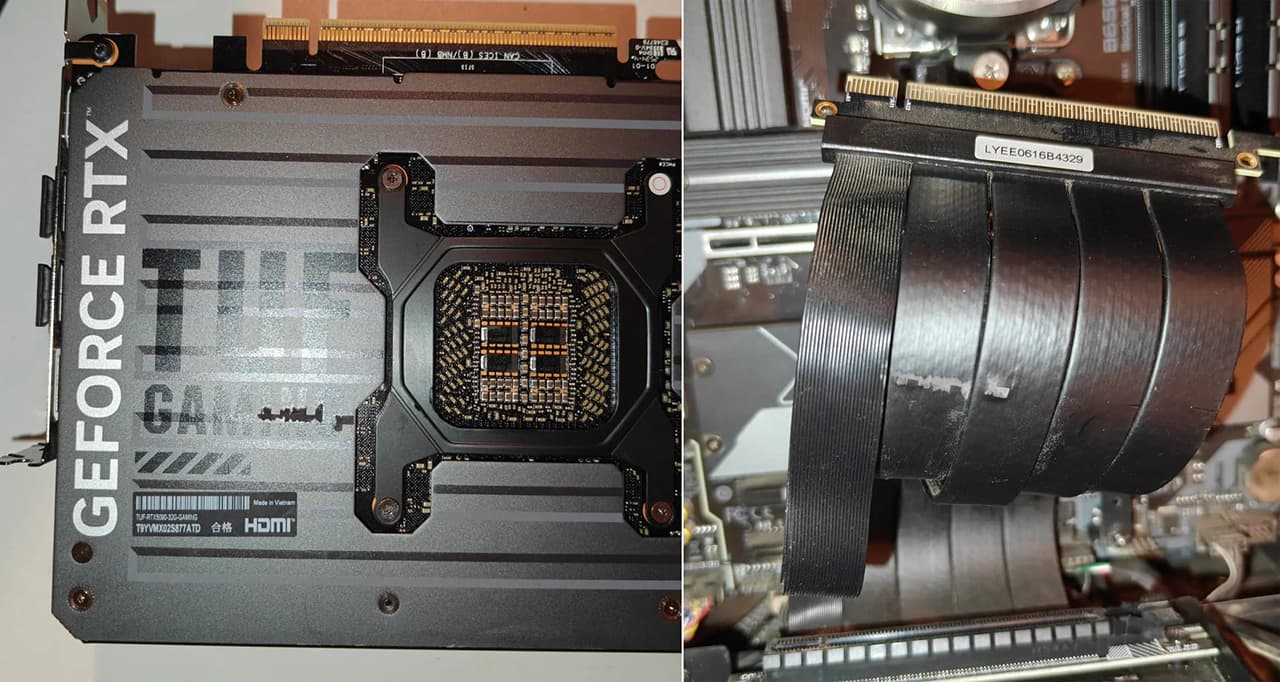
It was while cleaning their PC that the owner noticed that the riser—or rather, the heat from it—had melted onto the graphics card. In fact, due to how it was installed, the extension cable was in contact with the backplate of the graphics card—in this case, a TUF Gaming RTX 5090. Upon disassembly, the rubber insulation surrounding the cables remained stuck to the card; you can see a section of the cable missing and residue on the graphics card’s backplate.
As you can see here, the power delivery portion of the PCIe interface wasn’t affected, since the first pins are responsible for carrying the 75W of power supplied by the PCIe bus!
The riser must not touch the graphics card:
Logically, during installation, you must ensure that the riser does not come into contact with the graphics card’s backplate . Well, ideally, anyway—since depending on the graphics card model, the riser’s length, and the available space, this isn’t always feasible. But now we understand why, especially with high-power cards like the RTX 5090. That’s right—it’s a GPU that draws 575W of power, which is no small feat. On top of that, when you pair it with a cable that isn’t necessarily top-quality, the cheap materials—let’s just say—“stick to the pan.”