
[nextpage title=”Introduction”] Aquarium cases have invaded the market. Their trump card: a remarkable display of components through ever larger, sometimes curved or atypically styled windows. The legendary Lian Li O11 springs to mind, as does Phanteks’ NV range. But we eventually get tired of seeing them. Beautiful as they are, often practical thanks to their rear chamber, they’re everywhere. So we start looking for something different, something genuinely new. And we came across this chassis: the LiquidHaus ISO. Radical if ever there was one. What does it have to offer? Is it too extreme? Who is it aimed at? Let’s get into the details after several weeks with this oddity.
LiquidHaus ISO: meeting the chassis
 Can we still talk about a housing at this stage? Certainly not. We’re looking at a minimalist chassis that leaves no doubt as to its main field of application: watercooling ( ideally a custom one). But first it has to be assembled. The various parts that make up the structure arrive flat-packed in extremely protective packaging. We discover :
- the main L-shaped structure to support the radiator
- the power supply support
- the motherboard tray
- the graphics card brackets (two brackets are supplied, depending on GPU positioning)
- start button and support
- universal bracket for DDC watercooling pump
- optional 120mm radiator or fan support
- an adapted version of LiquidHaus’ BLK tube holder
- numbered plate for First Edition purchasers
- all screws and bolts
The bundle is absolutely complete, reflecting the months of work and testing carried out on this hand-crafted product. Nothing is missing to complete a first assembly.
All metal parts are hand-brushed stainless steel. Handcrafted, we said.

At this stage, we can see a lot of potential, but also some obvious constraints. What can ISO withstand? And where to start? Let’s continue our tour.
[nextpage title=”Hardware Support”]
LiquidHaus ISO : hardware support
Despite its minimalist appearance, the ISO can bear an impressive load. It relies on the structural rigidity of steel and a well thought-out weight distribution. As we shall see, the power supply plays a key role. But let’s start with constraints. Inherent to the concept itself, they are virtually unavoidable.
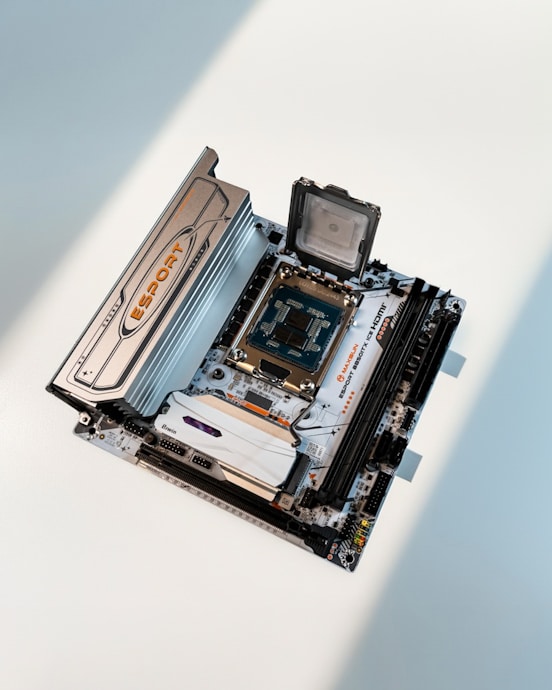
ITX motherboard
This is the ISO’s first and most important feature. It exclusively supports ITX-format boards, even though it looks nothing like an SFF case! And that’s not all. The motherboard must be positioned so that its I/O shield points downwards. An unconventional choice dictated by the installation of the graphics card, which we’ll explain in detail later.
 420mm radiator
The radiator is the centerpiece of the structure, and will play a key role in its final balance and rigidity. There’s nothing to prevent the installation of an AIO, provided the tubes are long enough. But LiquidHaus strongly urges the user to use a custom watercooling radiator. Indeed, the chassis and its accessories are a call for customization. Whatever the builder‘s decision, the radiator must be in 420mm format. It is possible to depart from this rule, for example by using a very wide 360mm radiator ( Aquacomputer models come to mind) or a 560mm monster. But be careful not to compromise the final balance, whether structural or visual. 420mm remains the best choice.
There’s no limit to thickness. Push-pull fan configuration is possible. The installation of reservoirs or components on the radiator is also conceivable.
ATX power supply
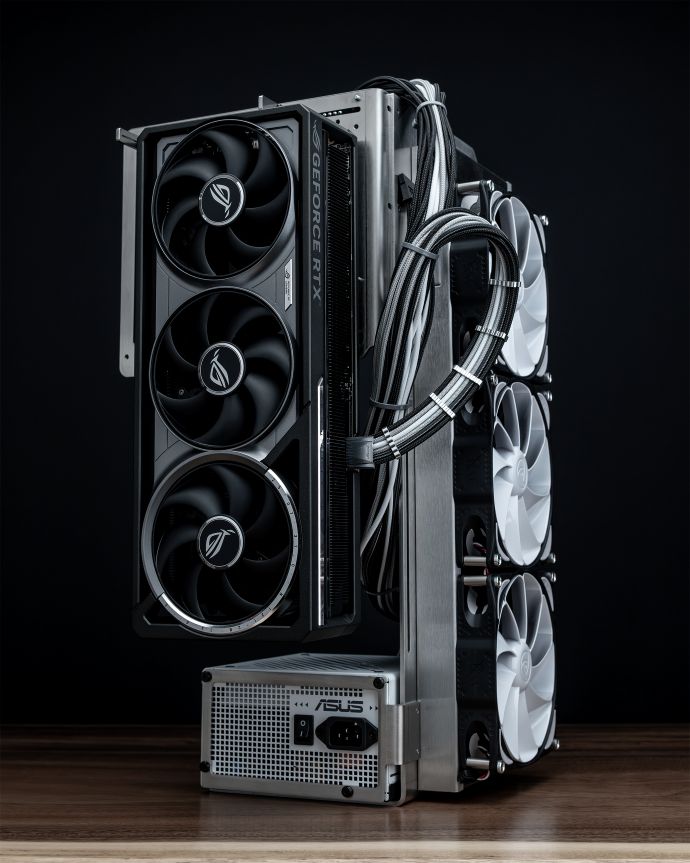
The ultimate must-have: the power supply. It completes the balance and must be in ATX format to counterbalance the weight of the taller parts. All lengths are supported, but for aesthetic reasons it’s best to stay under 180mm.
The graphics card, the centerpiece
No more constraints! No restrictions whatsoever. Neither in thickness, nor in length. In fact, the creators of this chassis have demonstrated this on several occasions by installing the gigantic ASUS ROG ASTRAL on it. The obvious configuration, and the one that will be adopted by the majority of users, is to install the card vertically on the right-hand side of the chassis. No riser required, impressive looks and good weight balance, what more could you ask for? However, one of the accessories supplied allows the GPU to be mounted on the back of the motherboard. You’ll need a particularly flexible riser in this case.
CPU cooling
Once again, there are no limits. Air or watercooling, anything is possible. From the huge Noctua NH-D15 G2 to the simplest waterblock , freedom is the keyword.
Reservoirs and pumps
As you’d expect, the focus here is on assembling a custom watercooling loop. As such, mounting options for components specific to this type of cooling have not been forgotten.
Let’s start with the back of the motherboard. The plate features multiple tapped holes for mounting pumps or reservoirs of all kinds. Above all, there’s a standard 140mm slot that can accommodate a reservoir, fan or even a radiator (more on this later).
The motherboard tray and radiator tray are fitted with rails on which we can install any of the accessories supplied. The combinations are virtually infinite. For example, a reservoir or component with a 120mm base can be attached to the dedicated (L-shaped) accessory.
The most practical accessory is the universal DDC bracket. The use of these small, high-pressure pumps makes sense in many ISO application scenarios.
Optional radiators
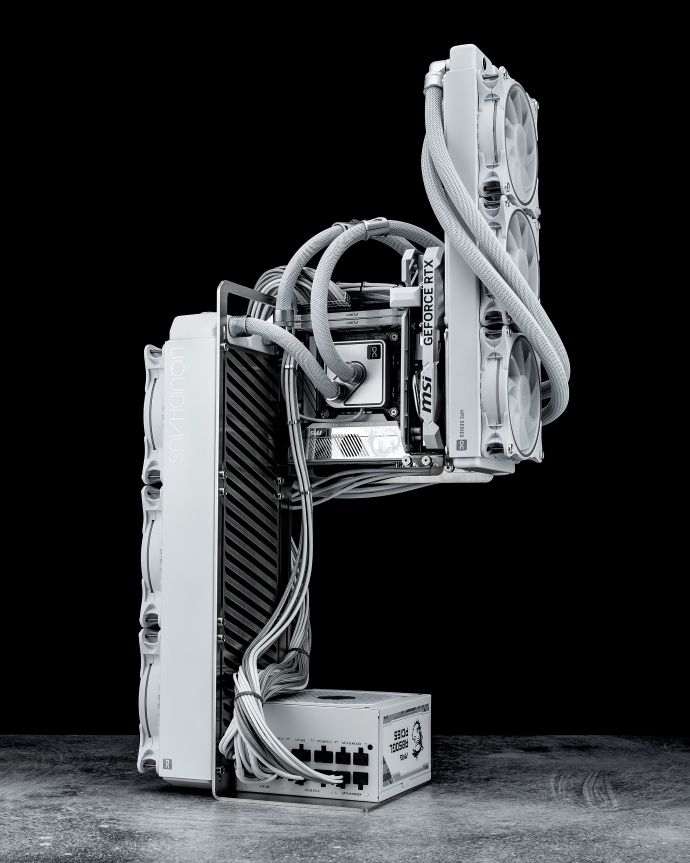
In addition to the main 420mm radiator, the ISO offers the option of adding more cooling surface. We mentioned above the 140mm centre-to-centre distance on the back of the motherboard (there’s nothing to prevent the use of 280mm or more radiators), but also the attachment for 120mm (or multiple). The example below shows the use of an additional 360mm radiator, and at the same time challenges the limits of overall rigidity.
 Cables
Cable management will be a challenge on this chassis. Both in terms of their extraordinary length and their visual prominence, cables should not be overlooked. LiquidHaus supplies the expected dimensions and offered a Cablemod discount code with the first series of ISOs.
- CPU: 46 to 50 cm
- GPU: 89 (90° connector) to 97 (straight connector) cm
- 24-pin ATX: 76 cm
Now it’s time for assembly. We decided to put the LiquidHaus ISO to the test with a terribly demanding configuration.
[nextpage title=”The configuration”]
LiquidHaus ISO : our configuration
The configuration chosen for the build was dictated by a desire for minimalism that seemed to match the chassis. But it is also intended to test its limits. The components will therefore be relatively sober but…heavy.
Motherboard: the little brand on the rise
We regularly talk to you about Maxsun, an up-and-coming Chinese brand that never ceases to innovate: it’s their Ms-esport B850i ICE that supports the configuration here. Behind this long-winded name lies an ITX model offering excellent value for money. It too will be pushed to its limits.
CPU: let’s be demanding
For the CPU, we turn to one of AMD’s top-of-the-range models: the Ryzen 9 9950X. The performance of this generation of processors is unquestionable, but we mustn’t forget that they heat up enormously. So, to ensure proper cooling, we’ve delidded it.
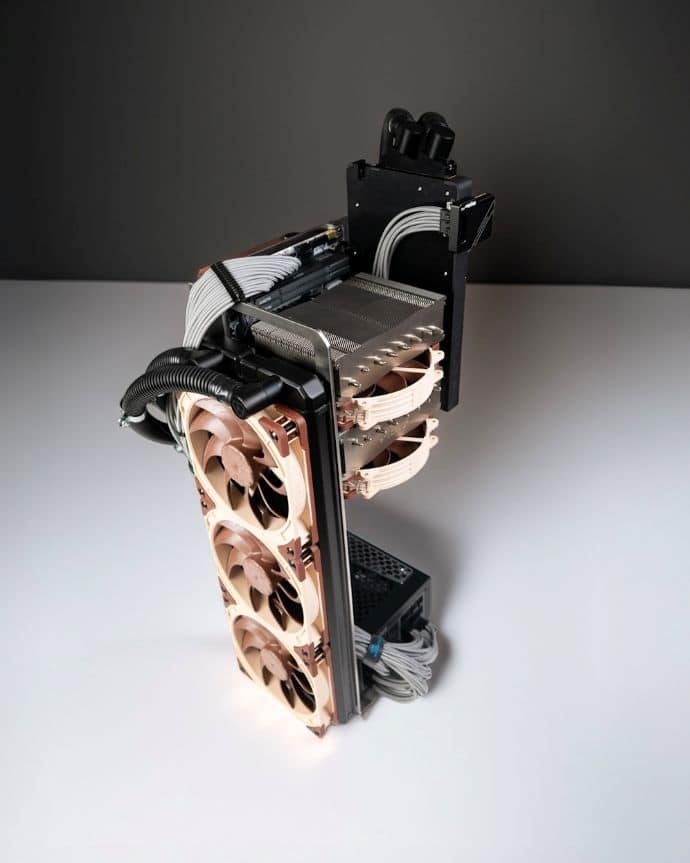
To cool it in absolute silence, we chose the Noctua NH-D15 G2 . To install the legendary direct-die cooler, a small mounting kit called NM-DD1 is required. This slightly lowers the mounting height to ensure good contact with the delidded CPU. Sold by Noctua for a few euros, it can also be 3D printed (the brand provides 3D files free of charge). We also recommend adding the Thermal Grizzly contact frame for ryzen 7000. On Ryzen 9000, light sanding of the frame is required to ensure perfect contact.
GPU: RTX 5090 and unique waterblock
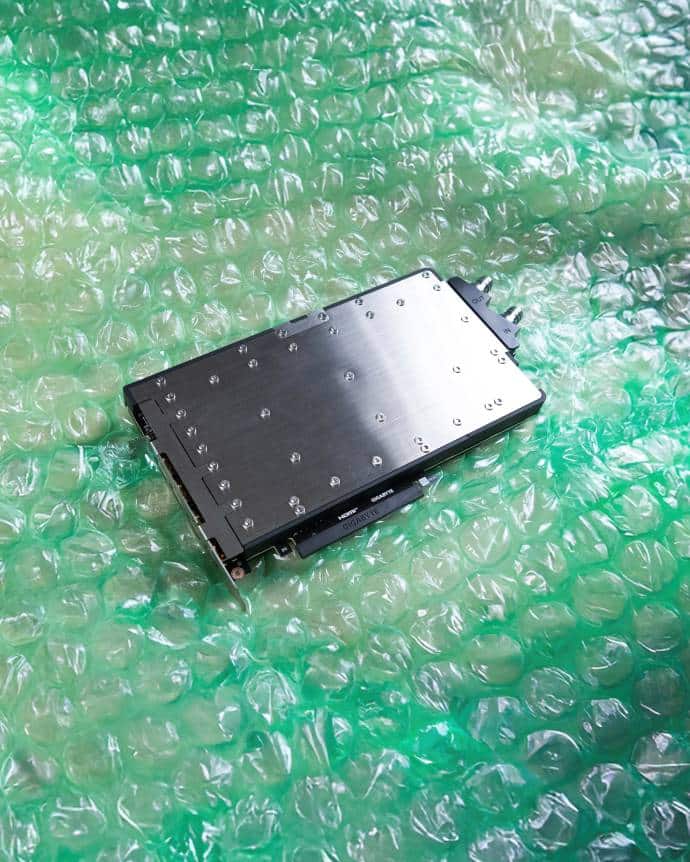
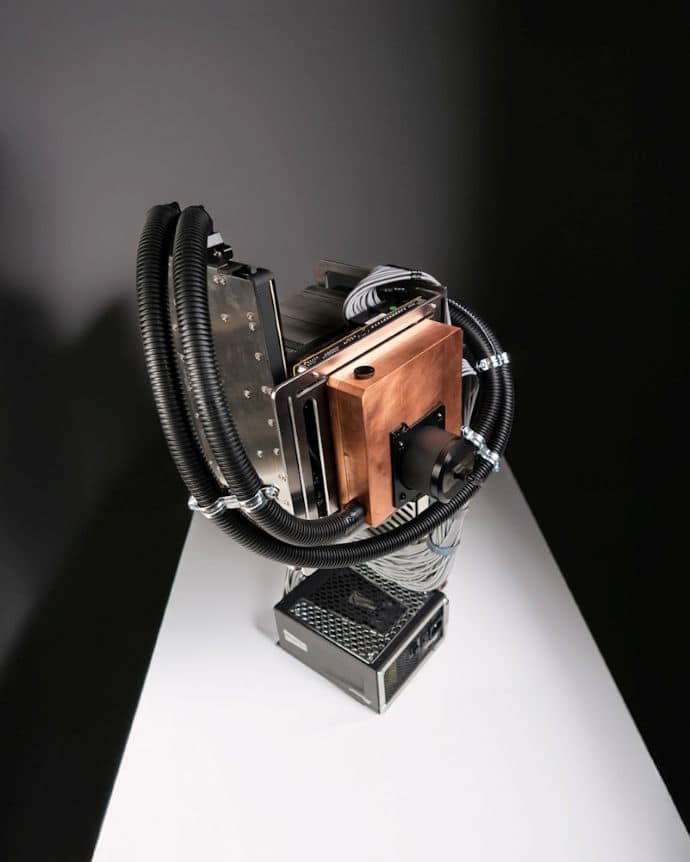
Let’s stay at the top of the range with a Gigabyte Nvidia GeForce RTX 5090. Here, it’s equipped with the very rare Comino waterblock. Made entirely of metal, it will weigh heavily on the final weight estimate of the assembly. What we have here is an exceptional piece which, while not to everyone’s taste, certainly exudes quality and performance.
Storage and memory
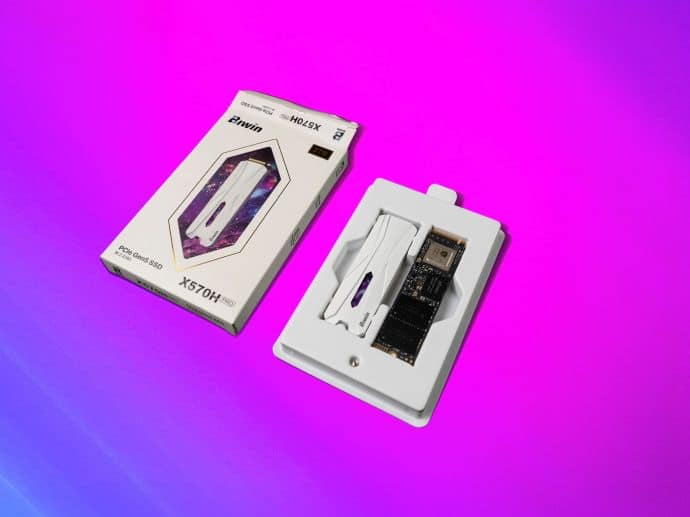
To complete the configuration, we’ve installed 32GB of KLEVV CRAS V 6000C30 RAM and a BIWIN Black Opal x570H Pro 2TB SSD.
Power supply
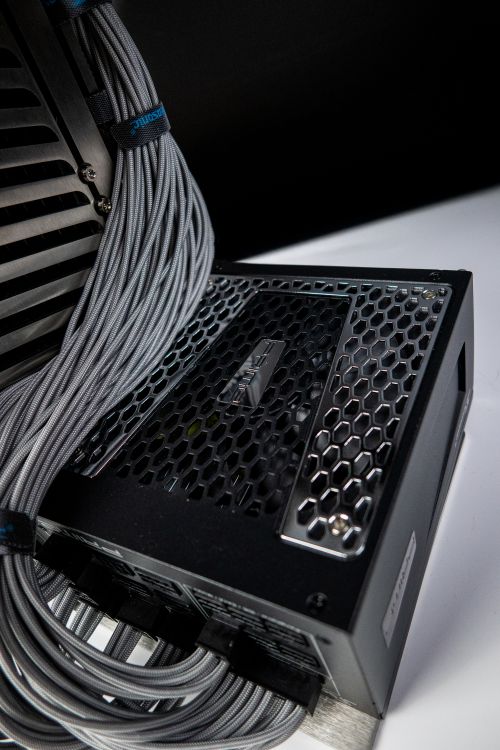
Once again, we put our trust in Seasonic with the Prime GX-1300 . Gold-certified, it offers comfortable power while maintaining ideal dimensions for the ISO’s visual balance. The superior Prime models, certified Platinum or Titanium, are considerably longer (210mm). The Vertex models would have had the perfect dimensions, but the final choice was based on the look of the Prime range.
Radiator: a sure bet
After many unsuccessful attempts, from an Aquacomputer radiator to a Monsta Alphacool (too imposing for the desired look), we finally settled on the HardwareLabs Black Ice Nemesis 420 GTS. It’s a high-performance radiator, provided it’s coupled with fans with good static pressure. It’s slim (30mm) and has a density of 16FPI (fins per inch). To accompany it: 3 Noctua NFA14x25 G2 fans.
Reservoir: the highlight of the show
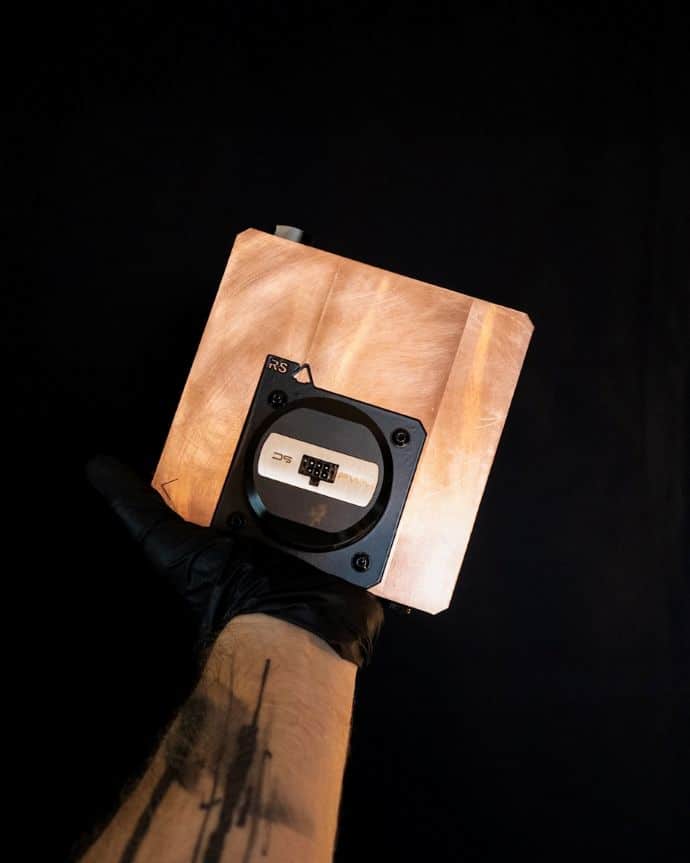
A crazy project that finally came to fruition thanks to a contribution from Redshift Project, the reservoir/pump combo used here is made entirely of copper! CNC-cut from solid, it consists of two half-shells. Tightness is ensured by a custom-made gasket. 4 tapped holes (M4) on the back allow installation on the ISO motherboard tray. It houses a D5 pump and features G1/4 inlet/outlet/filling ports. It’s a one-off. It’s incredibly heavy (approx. 4kg).
Thermal Grizzly is everywhere
There’s what you see: Thermal Grizzly fittings and the Wireview pro 12v2x6 adapter. And there’s what you can’t see, but which makes all the difference: the Ryzen contact frame and Conductonaut liquid metal applied (carefully) to the CPU, not to mention the German brand’s delid tool.
Cables: we chose MODDIY
Despite the Cablemod discount coupon kindly offered by the chassis’ creators, we chose MODDIY for this build ‘s cables. Their cables are more flexible than those of their direct competitors, and their production times are much shorter. The quality of the final product is beyond reproach. Excellent work.
[nextpage title=”The build”]LiquidHaus ISO: the build experience
Against all expectations, assembling a configuration on this chassis is remarkably simple. However, a precise order must be observed to ensure weight balance. And the first step is the radiator. Once this has been prepared (fans and any fittings in place), we lay it flat on the table and screw the main plate directly onto it.
Next, we attach the power supply. The system allows length adjustment according to the chosen power supply (about 1cm adjustment). At this stage, the tower is stable, except for the larger radiators.
So far, so good
Now for the motherboard tray! This is screwed directly onto the main bracket with 3 M4 screws. Before attaching the motherboard itself, don’t forget to install the accessories on the back of the tray. Once the board is in place, the screws will no longer be accessible. In our case, we install the custom-made 140mm copper reservoir. Despite the considerable weight, the chassis doesn’t flinch!
The next step is to prepare the motherboard. We install the Ryzen 9 9950X, a few drops of liquid metal, the Thermal Grizzly frame and the Noctua NH-D15 G2. Following Noctua’s instructions, we apply the 7mm offset (vertical offset) for the position of the aircooler. This offset is intended to ensure optimum cooling on AM5 and certain AM4 CPUs. What we don’t yet know is that this choice is going to complicate our lives in a few minutes’ time… Finally, don’t forget to plug in the CPU power cable, which will be inaccessible under the NH-D15 later on.
Trouble
We then delicately manipulate the motherboard to install it on its tray several dozen centimetres off the ground. The weight of the NH-D15 G2 and the presence of liquid metal make this a slightly stressful operation. And then…nothing goes as planned. The offset applied to the cooler causes it to come into contact with the radiator support. Impossible to install the motherboard. We have two choices:
- return the NH-D15 to its standard position, at the risk of losing some of its efficiency
- push the ISO to its limits
We obviously chose option 2. To solve the problem, we add 10mm standoffs between the radiator support and the motherboard tray. The NH-D15 ‘s integration is now perfect, but the force applied to the ISO (in several directions and in shear) is increased in a way not anticipated by its creators. It’s holding up just fine! To limit the risks, we still put the plate on 3 titanium screws. These 3 screws carry the reservoir, motherboard and graphics card…
Finally, it’s the graphics card’s turn. Our RTX 5090 takes its place without difficulty at the end of the chassis…which still doesn’t move an inch despite the metal waterblock, which is also very heavy. Impressive.
We allow ourselves a pause to breathe and admire the high-end components that seem to float in the air.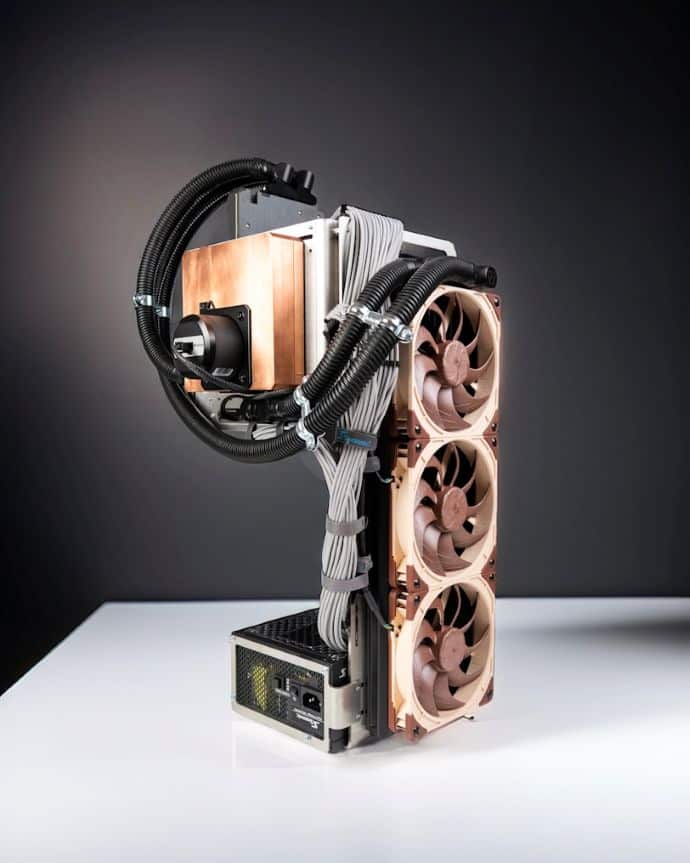
The finishing touches
Connecting the custom watercooling tubes then takes just a few minutes, thanks to the extreme ease of use of Thermal Grizzly fittings. We’ve talked about them in detail on the site: this range is perfectly designed and testifies to Joe Robey’s experience. Both for aesthetics and protection, we sheathe the tubes in automotive material. As only the GPU is under water, the loop is absolutely simple: reservoir -> GPU -> radiator -> reservoir.
We then connect the superb MODDIY cables and hide an Aquacomputer Quadro behind the 24 pins. This will allow us to manage fan and pump speeds. The Aquasuite software (associated with this Quadro controller) has access to GPU temperatures. We therefore choose not to install a coolant temperature sensor.
Everything’s installed, connected and working. Now it’s time to take a look at this chassis: its assets, its constraints, conclusion!
[nextpage title=”Verdict”]
LiquidHaus ISO: in use
It all starts with a few generic tests: OCCT, Cinebench, 3D mark benchmarks(port royal, time spy, extreme) and Uningine Valley. For the moment, the CPU and GPU fans follow standard ventilation curves based on the temperatures of their respective components. The pump is at 100%.
Unsurprisingly, the custom watercooling has no difficulty in keeping the RTX 5090 below 50°C, even when it absorbs 600W (read on the Thermal Grizzly Wireview Pro) for long minutes. The 420mm radiator and its dedicated D5 pump are oversized for all uses apart from advanced overclocking (in which case you’ll have to turn to more suitable cooling solutions). GPU temperature won’t be a worry, and we’ll be able to work on user comfort. Indeed, between the noise generated by the pump and the GPU’s pronounced coil whine, the noise level in an open chassis is unacceptable and, above all, unpleasant. Noctua fans, even when cranked up to 100%, retain the unaggressive profile for which they are renowned.
The surprise – in a good way – comes from the CPU. AM5 CPUs heat up fast and hard. We didn’t expect such impressive air performance. After two full hours at 200W in OCCT, the Ryzen 9 9950X peaks at 58°C at the hottest point. The difference between cores is less than 3 degrees. The NH-D15 G2 in live die works wonders in complete silence. More than satisfactory.
Real-life settings
Bechmarks give very satisfactory results, at the cost of considerable noise pollution. Let’s optimize our ISO for realistic use, with a mix of games (competitive and AAA) and photo/video editing.
For the CPU, nothing could be simpler. We take the standard ventilation curve based on CPU temperature and lower the average rotation speed to around 40%. We then apply an aggressive ramp as soon as the CPU temperature exceeds 60°C. This personal choice corresponds to a certain usage and will depend on individual preferences. It’s best suited to the wide temperature variations of Ryzen 9000 CPUs. In any case, the NH-D15 G2 will never really be a nuisance. Note that this setting is made in Aquasuite. The two Noctua fans are connected to the Quadro. Indeed, the Maxsun BIOS for the B850 series was particularly lacking in settings at the time we carried out this setup. The brand has just rolled out a major BIOS update, which we’ll be testing shortly. The new BIOS will be nothing like the one found on their Z890 series.
For the GPU, we’re applying an even more extreme ventilation curve. After several hours of in-game testing (Cyberpunk, Subnautica, Art of Rally, Valorant), we’ve found that the efficiency of the circuit and the thermal inertia of the liquid mean that the fans can be completely switched off in idle use and in certain applications. It’s likely that the metal structures of the waterblock and copper reservoir themselves contribute to heat dissipation. We therefore set the pump speed at 50% and implement a very gentle ventilation curve until the front fans stop.
Coil Whine
Once the settings are in place…it’s all you can hear. Of course, we can tolerate it during benchmarks, but there’s no way we’re going to put up with it in game. This unbearable noise is further amplified by the metal waterblock .
Nothing insurmountable though. We start by applying a well-balanced undervolting to the GPU. This drastically reduces coil whine, but it remains present in certain situations, mainly when the GPU is under-utilized. The most common case is competitive gaming. While it’s nice for the player’s ego to see his Valorant meter displaying 1000FPS, the practical gain is non-existent. So we set an upper FPS limit close to the screen refresh rate. And the machine is silent again! Noise appears only very rarely (for example, on the title menu of a AAA game, if we don’t also block FPS).
Conclusion
The final result is an unqualified success. The PC occupies only a 20cm square on the desktop, and is fitted with top-of-the-range components. After a few adjustments, the operating silence is impressive. Above all, the editing experience is enriching and accessible.
The ISO is a chassis unlike any other. It offers immense freedom, but also imposes firm constraints in terms of hardware.
We loved :
- the incomparable creative freedom
- the extraordinary look
- minimal desktop clutter…
- …even with the most high-end components
- ease of assembly, assembly experience
- solid structure
- ultra-complete bundle , accessories
But you have to accept :
- watercooling or nothing
- beware of noise pollution due to choice of components
- the look is not for everyone
- larger ATX power supplies are difficult to integrate
 In the end, all you want to do is dismantle your current configuration and start a new one! Because while it’s definitely not the universal chassis that will please everyone, the ISO is above all an invitation to creativity. The almost infinite possibilities it offers make you want to explore new avenues, to exploit other techniques or materials. Not to mention the emulation provoked by other builders’ productions . In the end, the building experience is more important than the finished product. It’s not easy to set about assembling a custom watercooling PC, let alone in the open air. But for those who want to, it could well be the best option! Easy to access despite appearances, it surprises in a good way. While we await a possible second batch, a few copies are still available on the LiquidHaus website.
The assembly presented here will be on display at Paris Games Week 2025 if you’d like to find out more.

