
The 60% format keyboards are really popular these days. After a successful K65 RGB Mini, Corsair tries again with a new reference. This time, we go upmarket with the K70 Pro Mini Wireless. A model that now goes wireless with a construction that makes room for materials more noble than plastic.
Presentation:
Technical Specifications:
The main advantage of the 60% keyboards is the space saving offered by these models. Indeed, with dimensions of 293 (W) x 109 (D) x 40 (H), we can’t say that this K70 Pro Mini Wireless is really bulky. Moreover, compared to a 104-key keyboard, this space saving is made possible by the removal of a large number of keys. We lose the numeric keypad, the navigation keys and the function keys. However, all this is accessible via shortcuts.

In terms of switches, Corsair always turns to the offer from the German Cherry. By default, the American company offers its mini keyboard with MX Red or MX Silver Speed switches. In both cases, we find a linear typing sensation more or less sensitive thanks to a shorter accent point on the MX Silver Speed. Nevertheless, if these do not suit you, you should know that the switches are hot swappable. They can be changed as long as you have the right pinout.
Regarding the materials, as we said, the K70 Pro Mini Wireless relies on a little more than plastic. Thus, Corsair offers us a model with a nice aluminum top plate sandblasted and anodized in black. The base on the other hand remains in plastic. Let’s not forget to mention the keycaps in PBT double injection. A model that promises to be very qualitative.
Internally, this model features a rather large memory of 8 MB. Depending on the weight of the profiles, Corsair indicates that we can store up to 50. Similarly, we find a battery type Li-Po offering a life of up to 32 hours with active backlight, 200 hours without. Finally, this model takes advantage of the N-Key Rollover and the integral anti-ghosting and via the AXON technology, the polling rate goes up to 8000 Hz.
Recommended System:
We quickly finish with the recommended system to fully enjoy this K70 Pro Mini Wireless. Thus, a Windows 10 and 11 system will be recommended for the installation of iCUE, the software of the brand. Otherwise, the keyboard is compatible with PC, MAC, console, Android and iOS via the Bluetooth connection.
[nextpage title=”Unpacking”]
Unboxing:
As far as packaging is concerned, Corsair retains its usual visual charter based on black and yellow… Although black predominates. Anyway, we have here an absolutely “smol” box, just like the keyboard itself. On its front, we have, of course, an illustration of the product once turned on with a brief reminder of its main features.


On the back, Corsair highlights some interesting points such as the fact that the switches are hot swappable or the material of the keys in PBT. Also, we learn that it is equipped with AXON technology allowing an ultra fast polling rate of 8000 Hz. Finally, we have a small table summarizing the different connection modes as well as the compatibility with the different platforms.
If we open the box, we find the K70 Pro Mini Wireless packed in a plastic bag resting on its accessory part. Too bad, unlike the K65 RGB Mini, we do not have a hard plastic shell to protect it from dust.

Bundle:
The accessories part proposed with this keyboard is rather complete since we find :
- A warranty guide
- A security guide
- ABS space bar and escape key
- A key switch puller
- A Keycaps puller
- The USB type C cable is braided

The Corsair K70 Pro Mini Wireless :
After having had a few 60% models in our hands, this K70 Pro Mini Wireless doesn’t really surprise us anymore because of its format. Nevertheless, when we unpacked it, its design and construction quality made a big impression. Indeed, the alliance between the aluminum layer plate and the rigid plastic base make it feel solid.
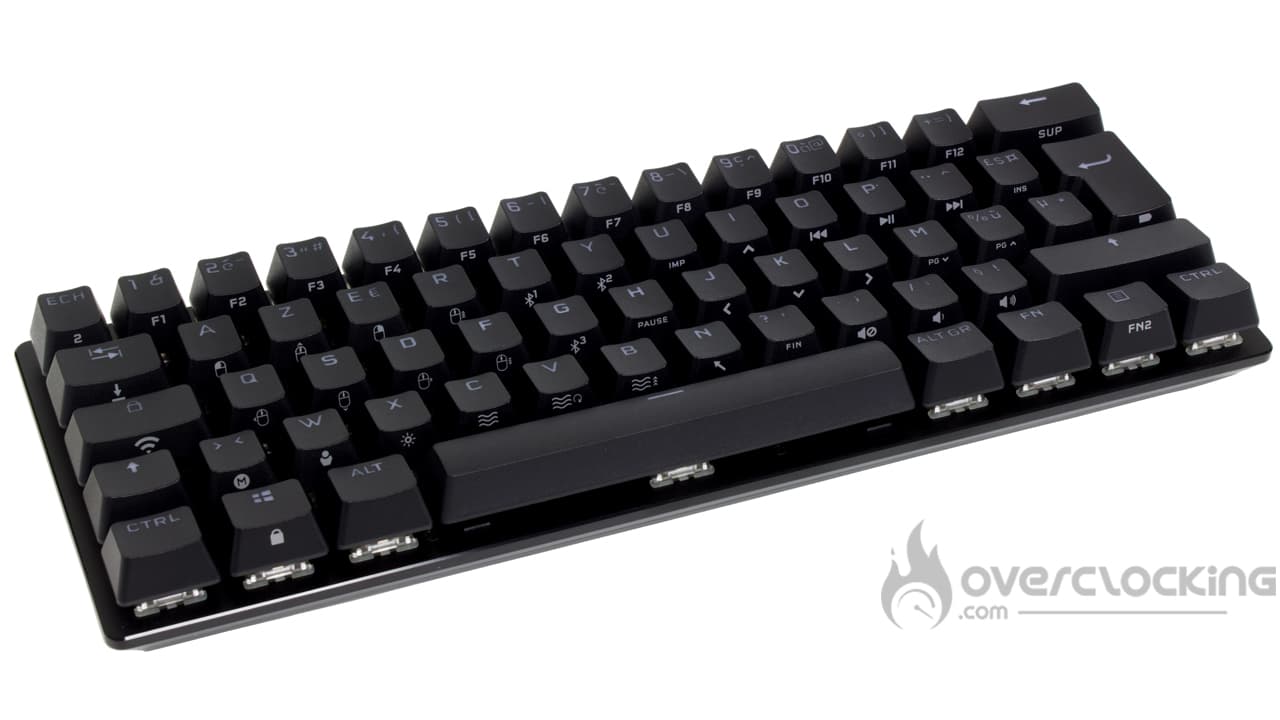
With this, it is with pleasure that we find keys in PBT, a rough material more resistant than ABS. Over time, the keyboard does not take on that shiny, dirty look unlike those with ABS keycaps . Moreover, the lettering will not fade either since we are dealing with double injection keycaps. In simple terms, the plastic of the lettering is injected into the plastic of the surface to form the characters.
Otherwise, we notice that the bottom row is said to be “standard”, this opens the choice of alternative PBT keysets. By the way, speaking of which, you should know that the brand also offers, via its website, complete and colored sets, in case you want to change them.


With this, we will find some small, discreet devices that contribute to the personality of the keyboard. In this, we think of the small inserts labeled “//K70” on the right and left sides of this model. Same thing on the back with a small Corsair logo.
What does it look like from the back?
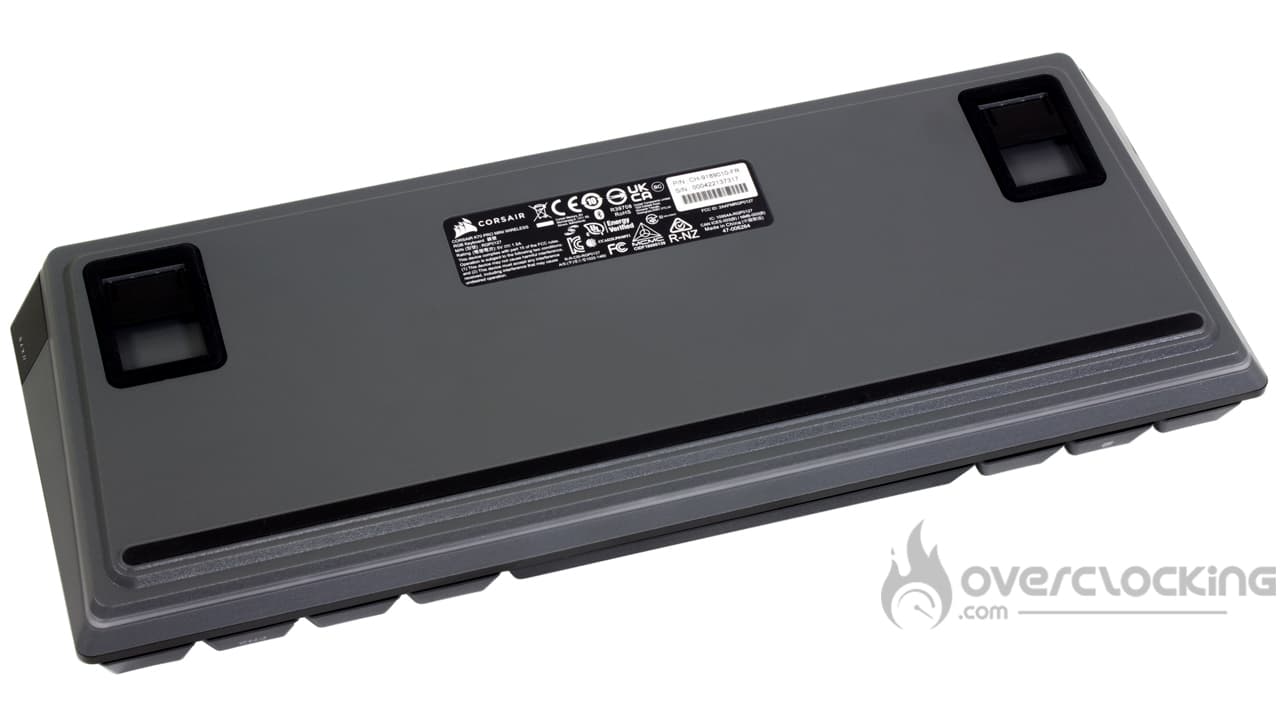
At the back, we are surprised to find a base with a different color than the one of the butt plate. As you can see, the base is gray while the top is black. A little contrast doesn’t hurt!
To ensure a good maintenance of the keyboard on its support, Corsair uses rubberized anti-slip strips. We find a long one, running across the width of this model at the bottom. Otherwise, two others are present around the legs on elevators, which offer only two levels of adjustment.
On the back


On the rear edge, we find some of the connectivity part of the keyboard. On the left, we have the switch to turn on the keyboard, the latter sliding laterally. Just next to it, we find the USB type C socket. Again, be careful with the sleeve of the different cables because not all of them will fit inside.
Finally, on the opposite side we have the USB support for the keyboard dongle so that it doesn’t get lost.
[nextpage title=”Test”]
Now let’s test this Corsair K70 Pro Mini Wireless. We put it to the test in almost all scenarios: video games, office automation, etc…
The K70 Pro Mini Wireless grip
In the end, what we’re going to say here doesn’t differ much from what we could say about the K65 RGB Mini, SK622 or other CK721. Since a lot of keys are missing in order to improve the compactness, as you can imagine, a lot of functions are doubled. Thus, whether it is multimedia functions, navigation functions or other, it will always be necessary to use a FN + something shortcut. Once again, it is a trick to take and surprisingly, you get used to it quite quickly.
However, the more traditional layout of Corsair ‘s keyboard can be harmful when compared to the SK622 which has kept its directional arrows. Honestly, I find it more practical for writing tasks. The same goes for the Delete key on the Cooler Master keyboard, which remains present. Here, on this K70 Pro Mini Wireless, we find ourselves having to make a combo based on FN + backspace.
Being wireless, this model includes a battery, but also an indicator of the charge of the latter. The witness in question is available via a shortcut FN + input that will flash this or that color depending on its charge level. Thus, a persistent green: full charge, then it will flash for a high charge. When the battery reaches an average autonomy, the diode will turn orange. Finally, in case of low charge, it will flash red to become pulsating red in case of critical charge.
Of course, this 60% size makes it easy to move around since the keyboard will easily fit in a laptop bag for example. The USB Type C cable makes the maneuver easier since you just have to detach it to take the keyboard. Just be careful with the cable sleeve as not all cords are compatible. With the original cable, no worries, my NZXT USB C cable does not allow to plug it in, the sleeve being too big..
Also be careful when you grab the keyboard since its beveled back edge does not facilitate the grip, the keyboard tends to slide easily… Especially with the raised legs folded down.
No need for software?
The other interesting aspect of this little keyboard is that it can totally do without software to function. Like Cooler Master’s models, you’ll be able to record macros on the fly. But that’s not all, since it will also be possible to change the lighting mode, etc. However, via iCUE, we will be able to go deeper and manage more profiles, without software, we will have to be satisfied with the profiles known as “Hardware”.
Bluetooth: easy to use!
Unlike the SK622 from Cooler Master, this little K70 Pro Mini Wireless is willing to connect to my main PC via Bluetooth. To do this, the handling is simple since it is necessary to put itself in pairing mode on one of the three profiles of the keyboard. To do this, we will hold the FN + T/Y/G combo for a few seconds until the key starts flashing blue. Then, via the Bluetooth settings of the PC, we will add the device, a small code to type and here is the keyboard connected. Note that this model signed Corsair allows a connection with three different devices. And if you want to switch back to 2.4 GHz, just press FN + TAB.
By the way, since we are here, let’s talk quickly about the autonomy of this keyboard which is very good. On our side, we measured a life of 26h30 with RGB lighting in fixed yellow by switching to the 2.4 GHz receiver. That makes us almost a week of work without having to plug in his keyboard, rather interesting!
The switches :
The choice of switches remains very classic since Corsair continues to supply from Cherry. Thus, our version arrives with the MX Red of the German brand and thus offer a linear typing sensation. As for the characteristics, they require a force of 45 g for the activation knowing that the point of accentuation is located at 2 mm on a total stroke of 4 mm.
Compared to the Gateron, which we particularly appreciated on the Function MiniTKL of NZXT, they are a little bit rougher on the way down. As for the noise, we can easily perceive the resonance linked to the spring, which we didn’t have with the NZXT keyboard.


However, if you don’t like the linear typing feel, you can always change the switches. To do this, we use the keyswitch puller and replace them with switches that suit us better. Be careful though, you’ll have to opt for three-pin switches and not five like the Gateron for example. At this level, we thank Corsair for opting for removable switches, it allows us to customize the keyboard to our liking. Personally, I would replace the MX Red with the MX Black, which are much harder and less sensitive.
Noise:
As far as noise is concerned, we have something quite controlled with a rather mellow sound. In any case, the noise is softer than what we could have had with the Function MiniTKL from NZXT, the non-custom version , equipped with Gateron Red switches.
However, one thing annoys quite quickly, but this is not Corsair ‘s fault since it comes from the switches themselves. Indeed, if you strain your ear a little, you will hear a metallic resonance. Yes, it’s the springs of the switches that emit this shrill sound. This noise is much less present than on the XTRFY K4 in Kailh Red, but more than on the NZXT keyboard equipped with similar switches.
The RGB:
The lighting part is rather convincing although it doesn’t stand out much. The keyboard’s faceplate being black, as well as the keys, the latter will not particularly bring out the lighting. However, since the keycaps are made of PBT double injection, the lettering will be illuminated unlike the NZXT custom keyboard.
Nevertheless, we can notice a little extra that takes the form of a small lighted border surrounding the base of the keyboard. This will project a soft glow on the desk or your mouse pad.


[nextpage title=”Conclusion”]
It’s high time to move on to our conclusion regarding the Corsair K70 Pro Mini Wireless. So, what did we think of it?
A step up from the K65 RGB Mini!
With its new Corsair K70 Pro Mini, Corsair is riding the wave of compact keyboards in 60%… And it must be said that many brands are involved. Anyway, the pirate is doing things right and offers significant improvements compared to its previous model: the K65 RGB Mini.
On the one hand, we have an improvement in the choice of materials with an aluminum faceplate. The keys remain in PBT double injection, which will ensure a longer life. However, this version gains in connectivity with the addition of a wireless mode in Bluetooth or 2.4 GHz. By the way, if you fear a low autonomy, it is not the case since we recorded more than 26 hours of life. Almost a full week of work!
Interchangeable switches
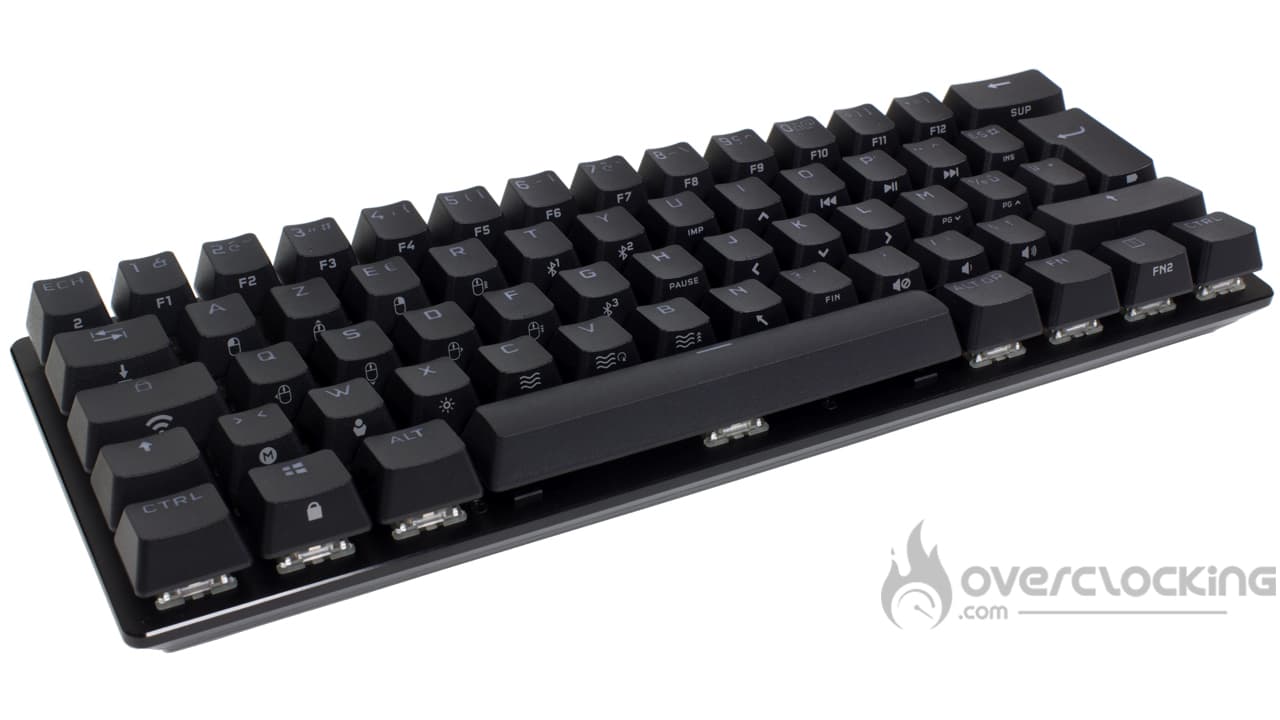
The other advantage of this model is its switches that can be removed or even changed. Corsair opts for a socket system similar to that of NZXT and its Function MiniTKL. We will be able to customize our keyboard and for some, this may be important when we see the basic equipment. Indeed, the brand only offers MX Red or MX Silver Speed, switches offering a linear typing sensation. It’s a pity, perhaps versions in MX Blue (clicky) or Brown (tactile) would have been welcome.
Especially since removable switches allow to easily lubricate them. This will correct the noise that the springs of the basic switches make. Because, without being catastrophic, the MX Red resonate quite a bit, especially if you compare them to the Gateron Red.
Price:
Finally, the cold shower will come from the selling price which is $179.90, ouch! This price places Corsair ‘s keyboard above the Rog Falchion from Asus, a keyboard similar in spirit. However, our model of the day has the advantage, especially in terms of removable switches, or the available Bluetooth connection. Clearly, opting for this Corsair K70 Pro Mini Wireless you offer the Rolls of compact keyboards, without entering the world of custom keyboards.
Corsair K70 Pro Mini Wireless:
We liked:
- The aluminum faceplate
- PBT keys for durability
- The compact format in 60%
- The removable USB cable
- The many possible connection modes: wired, Bluetooth, 2.4 GHz
- The removable switches
- The successful RGB part
- The possible management without software or with
- The battery life: more than 26 hours
We liked less:
- The very high price!
- Limited choice of switches: linear or nothing!
- The noise of the springs too present

For us, it will be gold for this new keyboard signed Corsair. Indeed, the brand manages to offer us a new reference in 60% convincing, even if you have to pay the price. For $180, we find a well built keyboard with a double injection PBT keyset still too rare on the market. Likewise, its removable switches, its numerous connection modes as well as its simplicity of use make it the Rolls of compact consumer keyboards.
Thanks to Corsair!

