
Today, we’re reviewing Microsoft’s Surface Go 4 tablet. This is a Windows 11 tablet with a 3:2 touchscreen format. This Windows touch PC format enables tablet use without the software limitations of Android or iPad OS systems. The Surface Go 4 is sold on the Microsoft website as being “for business”, so it’s not a product to be considered as competing with consumer tablets.
The Microsoft Surface Go 4 is available from $579 – €629 in its Intel N200 version, 64 Gb SSD and 8 Gb RAM. The version we’re testing here is priced at €869 with 256 Gb SSD.

Thanks to Microsoft for providing us with this copy.
[nextpage title=”The Microsoft Surface Go 4″]
The Surface Go 4 is a 10.5-inch tablet with a 1920x1280p IPS panel and a 60 Hz refresh rate. Intel’s N200 processor is accompanied by 8 Gb LPDDR5 RAM, 256 Gb UFS storage and powered by a 29 Wh battery.
We start with the unpacking of the device, this tablet comes in a minimalist box, inside we have the tablet. Below this, we have the 24W charger.


The charger is a 24W power pack using a special long connector that has to be plugged into the side of the device. The magnetic connector used here is rather difficult to fit if the tablet is flat, it would have been better to have a straight connector and not at 90°. Fortunately, the USB-C socket next to it also enables recharging.

Presentation
First of all, there’s the weight, with 521 g on the scales. The overall design is predominantly magnesium, and the screen is Corning Gorilla Glass 3. All in all, this Surface Go 4 exudes quality and performs well.


Let’s move on to audio. Here we have two audio zones on either side of the screen. The sound is acceptable and will allow you to enjoy media content without headphones.


Sound adjustment is performed on the edge, with dedicated buttons next to the power button. Unfortunately, there’s no button for quick mute.

Then there are the connectors, a minimalist solution with just 3 connectors if we exclude the charging port. So we have a single USB type C 3.1 port supporting charging, displayport and data. Then there’s a headset socket, and finally a connector for a Surface Type Cover keyboard. Connectivity is therefore very limited, and we would have liked at least a micro SD card reader.


As for the cameras, we have an 8 MP rear camera capable of filming in 1080p. The front camera is an FHD (30 fps @ 1080p) with infrared for Windows Hello, and is relatively acceptable for troubleshooting or video.


The various components
The configuration of this Surface Laptop Go 3 is based on an Intel Alder-lake platform. The CPU used (intel N200) is a low-power version, ideal for good autonomy.
Starting with the CPU, the Surface Go 4 is equipped with an Intel N200 with 4 E-core only, capable of running at 3.7 Ghz. For RAM, we’re talking about LPDDR5 chips for a maximum total capacity of 8 GB.
Let’s move on to the graphics card. Here, we’re on a 32 sp Intel UHD Xe 750 solution, an IGP that’s just powerful enough for video playback and office use.
For storage, we have a 256 Gb UFS (flash memory). Storage performance is therefore quite low.
As for the screen, we have a 1920x1280p IPS panel capable of 350 nits.

[nextpage title=”Test protocol”]
The test protocol has been revised to offer something more complete. As far as video games are concerned, we’ve chosen not to include them, given the performance and orientation of this machine.
We’ve also had to omit certain benchmarks due to compatibility concerns. First and foremost, the Geekbench, which caused a blue screen at launch. Rendering benchmarks on Davinci Resolve and Blender were also removed for lack of VRAM or power.
The protocol
- Screen measurements
- Autonomy and heating
- Synthetic CPU test
Cinebench R20
Cinebench R23
3DMark CPU Profile - Synthetic GPU performance
3DMark Timespy
3DMark Timespy extreme
3DMark Firestrike
3DMark Firestrike Extreme
3DMark Firestrike Ultra - Productivity performance
PCMark 10 Extented
PCMark 10 Applications test
[nextpage title=”Screen measurement with probe”]
Screen measurements
We begin our test with the panel, and in order to find out the colorimetric quality of this screen out of the box, we took measurements of the screen.
It was tested on DisplayCal according to 51 color patches, with the sRGB profile as the target.

As can be seen, the calibration is rather disappointing from the outset, with 6300K for the 6500K expected, which is rather cold. Delta E is just 1.83% on average and 5.06% at maximum.
In terms of brightness, the screen is capable of 350 cd/m², with a contrast ratio of around 1355:1.
We therefore have a good slab with a rather good factory calibration. It’s worth pointing out, however, that gamut coverage is not total, with blue extremes more than 4% off target.
[nextpage title=”Autonomy and heating”]
Autonomy
Battery life was measured using the PCMark10 integrated battery benchmark. The modes tested were video and productivity. Power management remained in normal mode. Screen brightness was set to 200Cd/m² without HDR, and sound was output via headphones plugged into the tablet’s jack.
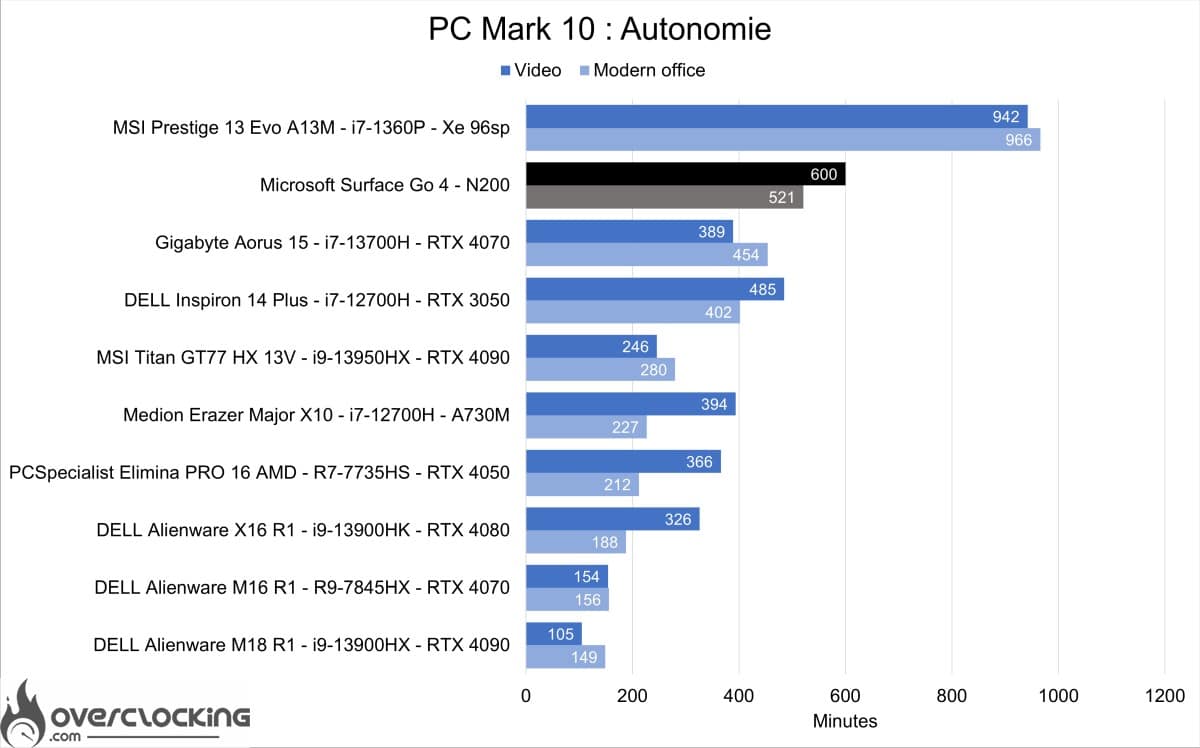
As can be seen, autonomy is 10 h for video playback, a far cry from the 12.5 h claimed by Microsoft. For a tablet, we’d have liked autonomy at least as good as the best laptop we’ve tested.
Heating
On Cinebench R23 after 10 min of stress. The CPU rose to 82°C during the test, while power consumption and frequency rose to 17 W and 3200 MHz. On the surface, the maximum temperature on the back of the device was 35°C.
[nextpage title=”Synthetic CPU performance”]
Synthetic CPU performance
Let’s take a look at what this machine has up its sleeve, starting with CPU and memory performance on a few synthetic benchmarks. Here, the N200 on this tablet has no real competition. But let’s see how it fares against the smaller CPUs.
Cinebench R20

We start with Cinebench R20, where the N200 completely lags behind, the multi score on 4 cores barely exceeding the single-core score of some CPUs.
Cinebench R23

Continuing with Cinebench R23, the N200 doesn’t work miracles here either.
3DMark CPU Profile

On the 3DMark CPU profile, the N200 once again struggles to deliver attractive performance.
The surface Go 4 may be a tablet, but it must be able to run without slowdowns. Intel’s N200 doesn’t deliver good enough performance for an acceptable user experience. Very often, the CPU is at 100% utilization for the slightest Windows update or antivirus scan, preventing the tablet from being used properly. It would have been preferable for Microsoft to offer the N300 version with 8 E-core or a Pentium 8505 with an extra P-core.
[nextpage title=”Synthetic GPU performance”]
Synthetic GPU performance
Now that we know the performance of the CPU part, we can move on to the GPU on a few synthetic benchmarks. The 32-sp Intel Xe IGP integrated in the N200 will be compared with other Intel IGPs of this generation. We shouldn’t expect top-level performance, given that this IGP has 3x fewer cores and a lower frequency than the Intel IGPs we’ve already tested, which were already underperforming.
3DMark Timespy

We start with 3DMark Time Spy, here the N200’s IGP displays a GPU score 4x lower than the lowest Intel IGP tested to date.
3DMark Timespy extreme

As with Time Spy, the same applies. Here, the N200’s IGP doesn’t shine in terms of performance.
3DMark Firestrike, Extreme and Ultra


On the various Firestrike Ultra models, the 32-sp Intel Xe IGP is once again the worst performer of all.
Given the performance of this tablet’s IGP, you can’t expect to play anything. Its use will therefore be limited to office work, so let’s see what happens on that front.
[nextpage title=”Productivity performance”]
Productivity performance
In this section, we focus on productivity performance. In other words, machine performance on software such as Microsoft Office.
PCMark 10 Extented

On PCMark 10, the Surface Go 4 lags far behind in terms of performance. Whether in terms of productivity (open office) or content creation.
PCMark 10 : application

The benchmark presented here uses the Microsoft Office suite to give us our machine’s performance on Word, Excel and Powerpoint. Here, the Surface Go 4 is more than half as good as the worst performer in our comparison. Just a short while ago, the little ECS Liva Q3H offered similar performance with just over 4400 points.
[nextpage title=”Conclusion”]
Conclusion
The Microsoft Surface Go 4 is a tablet designed for business use, if the Microsoft website is anything to go by. For personal use as a primary office tool, it clearly doesn’t live up to its price tag. For professionals, however, it could be an interesting tool for factory deployment on supply lines, for example, with lightweight software developed in-house for Windows. Alas, even for corporate use, the competition is tough, with many companies continuing to turn to Ipads offering greater performance and autonomy for a similar price. For any other use, it will be difficult to recommend this tablet when Android or Ipad OS solutions do better for less.
This Surface Go 4 manages to run the various office software suites, but not without difficulty. You won’t need to rely on this tablet as your main tool, but more as an accessory for your main PC in professional use.
On the OS side, we regret that Windows 11 is not yet up to the task of fully touchscreen use. Here, we’re limited to what we can do with a mouse, but with touch and without a keyboard, many of Windows’ own shortcuts and mechanisms are unusable. This greatly reduces the tactile experience, and it would have been preferable to have an even more streamlined interface with keyboard shortcuts in the form of tactile gestures. For this kind of use, haptic feedback and pressure sensors under the screen would have been a good idea.
As a reminder, the Microsoft Surface Go 4 is available from $579 – €629 in its Intel N200 version, 64 Gb SSD and 8gb Gb RAM. The version we’re testing here is priced at €869 for 256 Gb SSD.
Microsoft Surface Go 4
We liked:
- Build quality
- The cameras
- Magnetic charging socket
We would have liked :
- At least 8 more E-core or 1 more P-core
- Better autonomy
- A better price
- Windows 11 better designed for touch use
- Haptic feedback under the screen
 With the Surface GO 4, Microsoft offers a tablet that could have been interesting for office use. Unfortunately, its lack of power prevents it from becoming a versatile tool in a professional environment. Its performance will nonetheless be sufficient for certain production applications, such as custom Windows software.

