[nextpage title=”Introduction”]
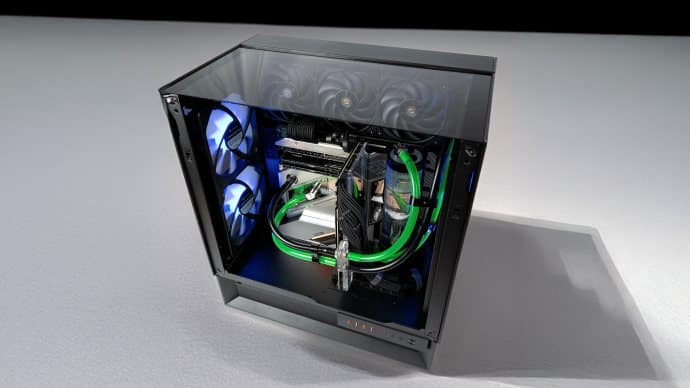
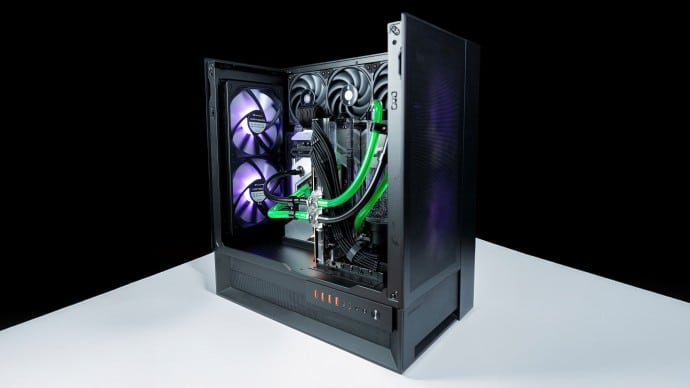
It’s fair to say that it’s an immediate eye-catcher. And yet, at first glance, the Cougar Omnyx appears to be a typical aquarium case. You have to take the time to look at it to understand just how cleverly it plays with rules. The discerning user discovers a multitude of daring choices which, when put together, make this Omnyx an atypical proposition. Whether it’s a real success or a show-off, let’s get into the details!
Cougar Omnyx : dating

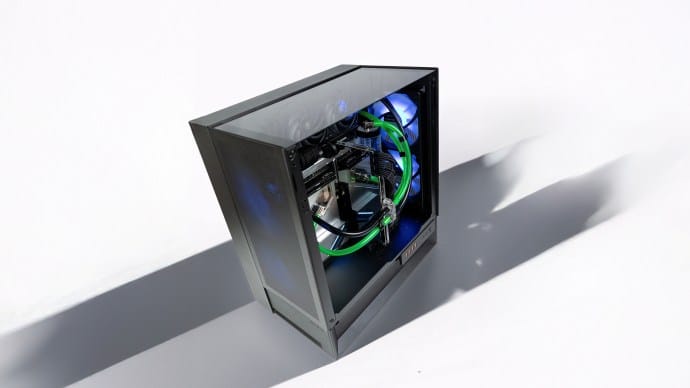
Unboxing the Omnyx reveals one of the largest mid-tower cases in the field: 300 x 520 x 470 mm, weighing in at 12kg. Adopting the dual chamber form factor, it is relatively large. However, its dimensions are harmonious, and the design of the lower part gives it a remarkable look. This lower chamber is one of the special features we’ll be describing in greater detail below.
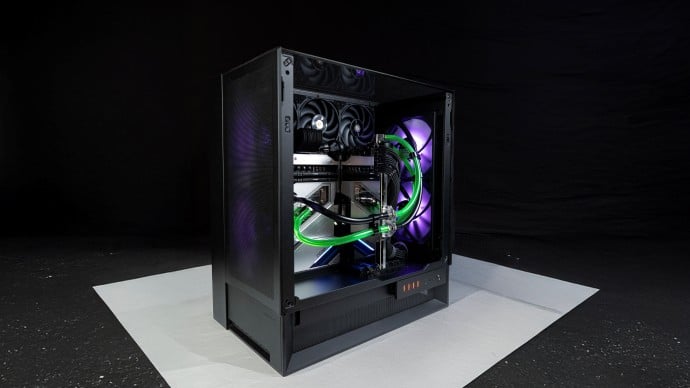
Perfectly symmetrical, the two sides of the chassis house a mesh grille and two 160 mm fans, dimensions that are atypical but guarantee impressive transverse airflow. In fact, two of the four fans are inverted to allow natural air circulation.

Panel removal
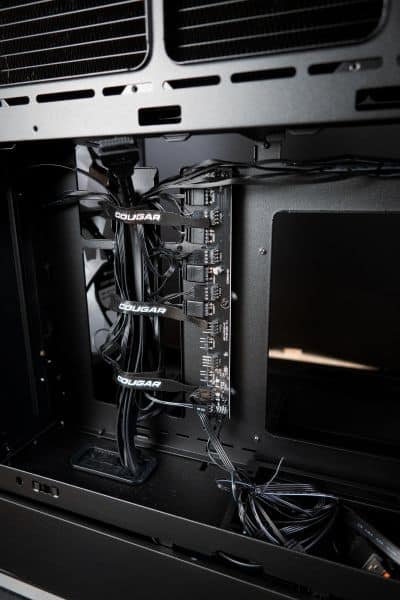
Opening the rear panel reveals the vertical power supply support and SSD/HDD mounts. The chamber seems large enough to facilitate cable management. We take this opportunity to note BTF compatibility. A fan and RGB hub complete the package. Build quality is excellent.
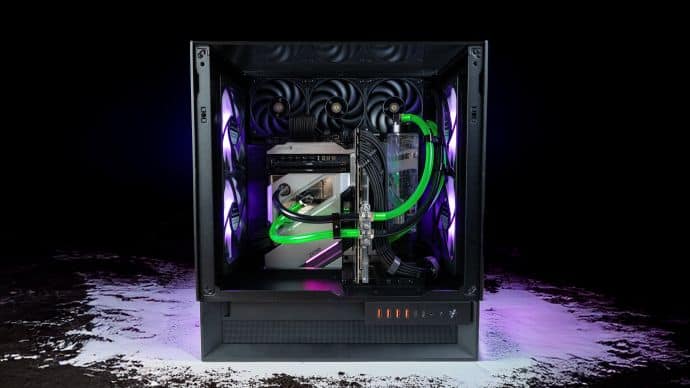
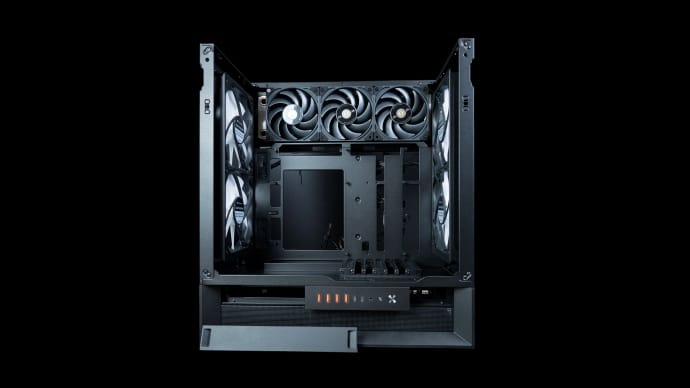
We then remove the two massive glass panels to gain access to an unusual main chamber. The motherboard sits sideways, I/O Shield down. Above it, a 360 mm slot can accommodate a radiator or fans. Finally, the graphics card sits vertically.
Then, we take a look at the case’s lower chamber. Semi-open, it enables the connection and management of motherboard and GPU output cables, as well as the connection of front ports. Magnetic covers are complemented by combs to facilitate cable management.
In addition to traditional screws and accessories, the bundle includes rails for converting 160 mm slots into standard 120/140 mm slots.
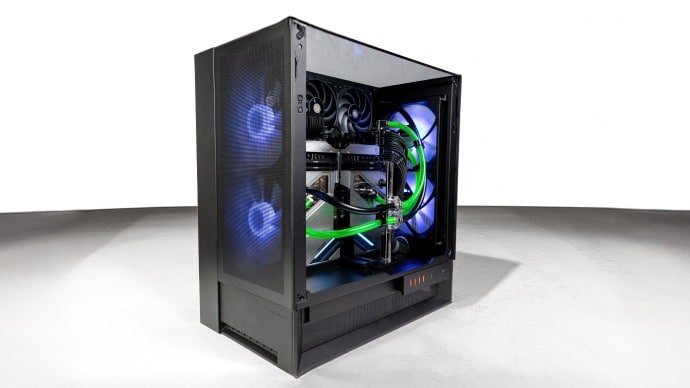
As the first look draws to a close, it’s clear that the Omnyx is an original choice. Summary :
- Downward orientation of I/O Shield motherboard and GPU
- GPU vertical
- Vertical power supply in the center of the rear chamber
- Semi-open lower chamber for cable management
- Symmetrical design
- 4 160 mm fans
Does this have any impact on the mounting experience and the case’s capabilities? Let’s take a look at the Omnyx‘s hardware hosting capabilities .
[nextpage title=”Hardware support”]
Cougar Omnyx: hardware support
With its medium-tower format, the Cougar Omnyx is expected to be extremely versatile, especially given its imposing size. There are, however, a few tricks imposed by its design. Let’s take a closer look.
Motherboard: E-ATX or almost
The chassis can accommodate (and offers standoffs for) all motherboards in ITX, micro-ATX, ATX and even E-ATX formats . But beware of the latter! With the same length as an ATX board, but wider, it will protrude upwards towards the 360 mm radiator support. The good news is that this does not in any way preclude fan installation, but it does make cable routing more difficult and detracts from the overall harmony.
Motherboards with inverted connectors are supported.
Fan support
As far as fans are concerned, let’s focus once again on the two huge 160 mm built-in fans. Already connected to the fan/RGB hub, they are ready for use. The hub can be connected to the motherboard. A button on the front panel controls the default RGB. The original fans can be replaced by more conventional 120 or 140 mm models. Three additional 120 mm fans can be added above the motherboard. The back plate is perforated to allow them to breathe easily.
Radiator support
Here, we love custom watercooling. That’s why we’ll be systematically examining the case’s appetite for this type of cooling. First, let’s talk radiators. We’ll be concentrating on potential custom radiators, but it goes without saying that AIOs can also be used. So, if a slot can support a custom radiator, it will be able to accommodate the vast majority of AIOs of the same dimensions. Custom radiators are generally larger than AIO radiators, especially in length.
By removing the 160 mm fans and replacing them with the rails supplied, 240 or 280 mm radiators can be used on either side. All models and thicknesses are compatible. However, thicker radiators may complicate connections at the top of the motherboard or interact with larger GPUs.
Above the motherboard, the 360 mm slot can accommodate a heat sink up to 45 mm thick (70 mm in total with fans). Beyond that, connecting the 24-pin and USB cables to the motherboard is complicated. However, depending on the orientation of these cables, and provided that E-ATX boards are avoided, a slightly thicker radiator can be installed. Beware of length! Impossible to exceed 405 mm. This excludes most X-flow radiators and EKWB’s Surface range.
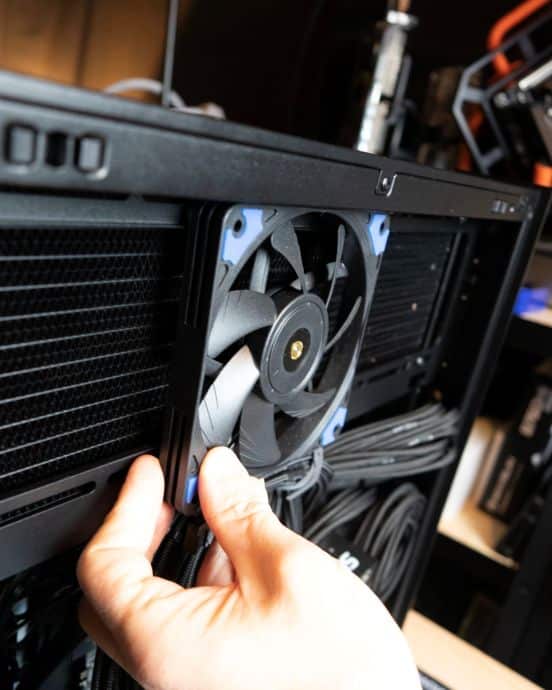
Last option not listed by the manufacturer: the rear chamber allows the addition of three 15 mm thick fans to obtain a push-pull on the 360 mm radiator. We’ll be testing this option.
CPU cooling
The case’s transverse airflow may encourage users to opt for air-cooled CPUs. At this level, we’re in the upper-middle range: up to 170 mm high. This barely accommodates the 168 mm of the Noctua NH-D15 G2.
Graphics card
The positioning of the graphics card here is highly original! It is installed vertically, with video outputs facing downwards. Cables are routed under the chassis by means of combs, like those on the motherboard. The Pcie slots can be oriented at 90°. The card can face the glass ( riser not included) or remain in the normal position to benefit from optimal airflow. Maximum board length is 380 mm. Thickness will depend on the radiators installed in front, but should not be a limiting factor. As an example, the Asus ROG ASTRAL RTX 5090 can be integrated without difficulty.
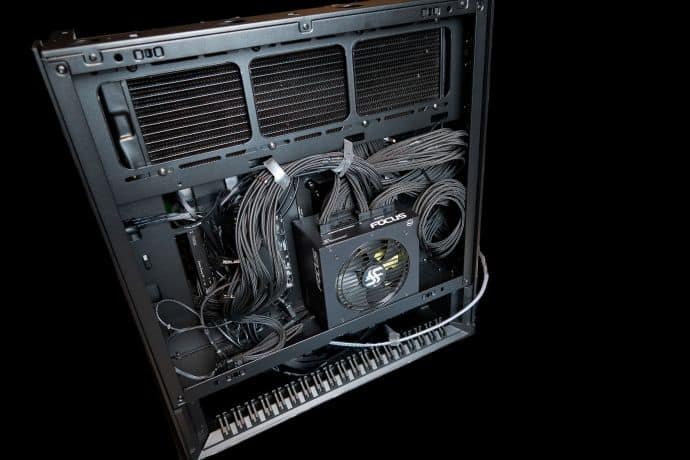
Power supply
Always with a view to centralizing and organizing cables under the chassis, the Omnyx requires vertical placement of the power supply. Installation is facilitated by a removable bracket. Note that this choice limits the length of the block to 200 mm.
Panels and customization
All panels can be quickly removed without tools. Most are even magnetic. A new feature from the manufacturer: side and top covers can be customized (options available on the Cougar website).
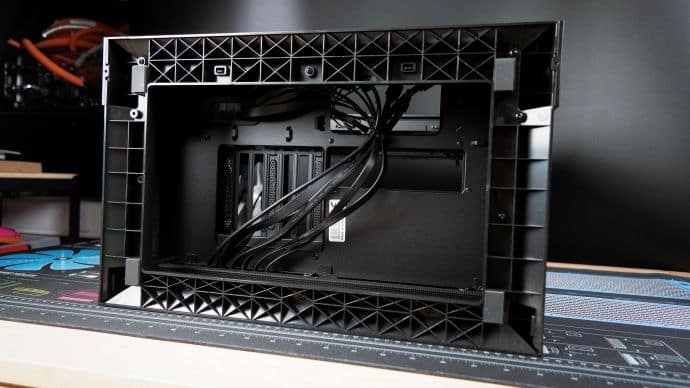
The bottom section, where all the cables will be located, features a well-thought-out comb system. This allows the cables to be directed and held efficiently. There’s plenty of space underneath the case to manage excess wire. A second, smaller group of combs can be positioned at the front or rear. Symmetry remains the priority. It can therefore be moved from one side to the other.
The I/O Module: symmetry as always
The input:output module groups :
- 4 USB 3.0 Type-A ports
- 2 USB 3.2 Gen 2 Type-C ports
Three of these are connected directly to the motherboard’s I/O port. The others are connected to the board via the usual ports.
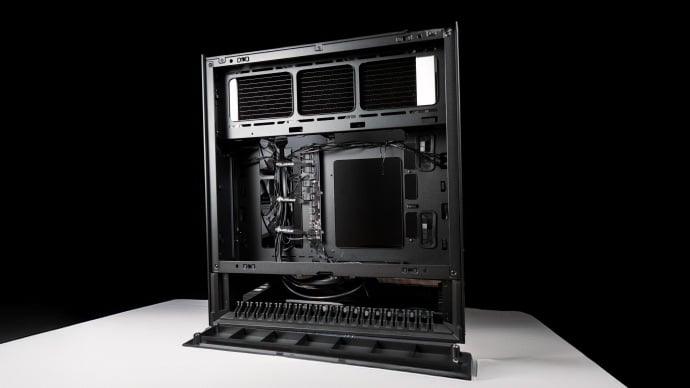
Here, Cougar takes the concept of symmetry to its logical conclusion. The I/O module slides from right to left without the need for tools. This makes the Cougar Omnyx absolutely ambidextrous. Whether installed on the right or left side of the desk, it preserves ease of use, cable management and component visibility.
What we have here is an extremely promising case, the result of daring choices. Let’s move on to the test configuration, which promises to be as atypical as the Omnyx itself.
[nextpage title=”The configuration”]
The configuration: self-imposed rules
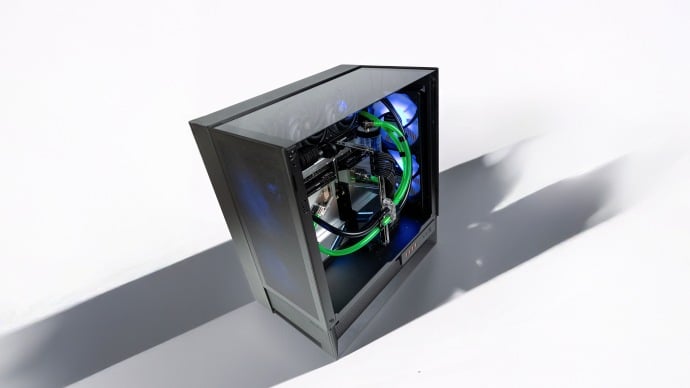
The Cougar Omnyx is big. As we saw earlier, hardware constraints are minimal. But we don’t like the easy way out! So we decided to assemble a complete custom watercooling configuration to test the chassis’ limits and get an idea of its capabilities in this field. But faced with such an original proposal, we also had to impose a few rules on ourselves in order to respect the product’s DNA as far as possible:
- Retention of the original 160 mm fans. Their visual impact and airflow contribution mean they must be retained
- Visual clearance for the 360 mm high radiator. This too is part of the case’s image
- CPU and GPU under water
The motherboard
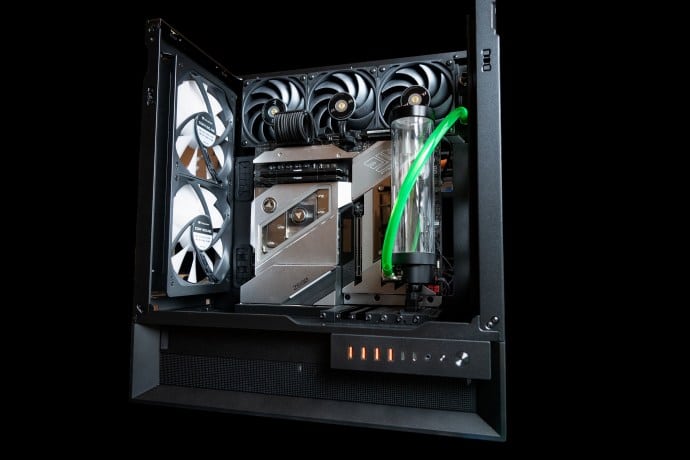
A natural choice for this configuration: the Asrock Z690 Aqua OC. Equipped with a monoblock for liquid cooling of the processor and power supply stages, this unusual board imposes its massive style on the configuration. It blends in well with the lines of the case, but its E-ATX dimensions make cable routing (especially 24-pin) tricky. We’re so taken by it, we’ll adapt.
The processor
Forced to use a single heatsink (by our choices above), we decided to limit ourselves to a mid-range CPU, sufficiently versatile without being too demanding. Our choice: Intel Core i5 14600KF. This CPU is well born and remains an excellent choice for many uses.
The graphics card: still going strong!
It starts to reach its limits when demand for VRAM increases. But its raw computing power still works wonders. We’re particularly fond of the ASUS STRIX GeForce RTX 3080. This model performs devilishly well at 1440p (Ray Tracing included), especially when properly cooled. In this respect, we equip it with a Phanteks G30 waterblock and mirror backplate. We’d like to take this opportunity to remind you that you don’t need the latest graphics card to have fun on the PC. Earlier-generation cards still have a bright future ahead of them, especially the high-end models of the time.
The power supply: a sure bet
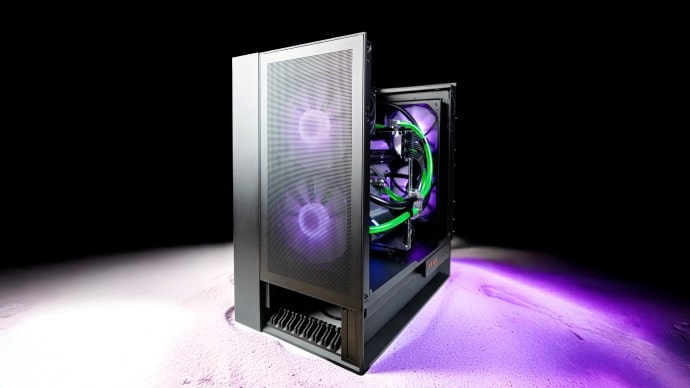
Nothing original here, but a robust and reliable choice: Seasonic Focus GX-1000. This power supply also has the advantage of being relatively short (140 mm). This facilitates rear cable management. It features a 0db mode that allows the fan to be switched off, a plus for the overall silence of the configuration. As always with Seasonic, it comes with a 12-year warranty.
Radiator and ventilation
Let’s talk custom! We’re only allowed a single 360 mm radiator. We remind you that the case can easily accommodate two additional radiators, but we’ve chosen to keep the 160 mm fans on the front and rear panels. Our choice: a HardwareLabs Black Ice Nemesis 360 GTS model. With a thickness of 30 mm and a density of 16 FPI, it should offer us sufficient performance. What’s more, it offers good efficiency with fans running below 800 RPM (if we’re aiming for silence at low load).
We’re equipping it with a pair of fittings and three Thermaltake Thoughfan EX12 Pro fans . They’re discreet, magnetically connected, devoid of RGB or any other fancy, perfect.
Tank and pump: Protium!
Setups equipped with Singularity Computers ‘ Protium range are proliferating in the workshop at the moment. The versatility and backwards-compatibility of the components make creating combinations incredibly fun. To make matters worse, the cylindrical look of the tanks is timeless. So we chose a Protium tank and a separate top pump from the same range. A D5 pump completes the package.
Time for assembly.
[nextpage title=”Editing”]
Cougar Omnyx: the editing experience
In spite of the few figures imposed by our choices, assembly in the Omnyx promises to be a breeze. The case has been well thought out.
Preparing the motherboard
A special feature of our motherboard of the day, and an endangered species: the Asrock Z690 Aqua features a monoblock. This central part provides liquid cooling for both the processor and the power supply stages. Access is gained by removing a few screws from the back of the board. Once the CPU and thermal paste are in place, all that’s left to do is screw the block back on, following the tightening sequence recommended in the manual.
Radiator and cables
Next, we attach the Thermaltake Thoughfan EX 12 Pro to the radiator. But we don’t install it in the case just yet! Before that, we make sure to run the main cables between the future radiator and motherboard slots. As we mentioned earlier, our E-ATX card will then block access to the passageway.
Once this precaution has been taken, we can easily install the 360 mm radiator. The rails allow us to position it in the best possible way, so that the fittings don’t come into contact with the front panel fans. We can see that the longest radiators (see hardware support) are to be avoided.
Motherboard installation
With the I/O shield facing downwards, we can screw the motherboard into the case and connect the various cables. No problem, provided you’ve taken the time to lay them out beforehand. At this point, we can even connect the case’s USBs to the board from the lower chamber.
Watercooling
Before turning our attention to the graphics card, we thought it best to fix most of the components of the custom loop . Based on Singularity Computers‘ Protium ecosystem, it consists here of a reservoir and a separate D5 pump/top pump assembly.
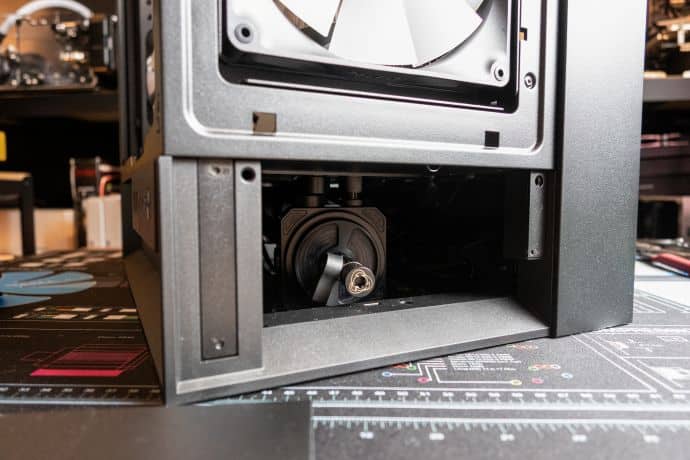
For aesthetic reasons, we didn’t want to place the pump in the main chamber. An obvious solution, widely used by users of dual-chamber housings, is to attach a DDC pump next to the power supply. But we want to take full advantage of the Cougar Omnyx ‘s atypical form factor, so we’re taking a different route.
The tank is first screwed onto an availablePcie slot fitted with bulkhead grommets. Then we connect the top pump to these same bulkheads from the lower chamber. The lower chamber installs perfectly. It’s firmly suspended and doesn’t touch the table beneath the chassis. The Protium top has multiple ports. We take this opportunity to install a drain valve at this low point: ideal for maintenance.
Finished already?
All that remains is to install the graphics card and complete the loop! Installation is extremely easy. Cougar is to be commended here. User experience is clearly at the heart of this case’s design. Once our RTX 3080 is in place, we fit it with fittings and connect the flexible hoses through which the coolant will circulate. With a touch of color, we used UV reactive hoses from Alphacool.
In order to leave the space in front of the motherboard clear, we’ve opted for a parallel loop between CPU and GPU. We see this empty space as part of the case’s identity, and an opportunity to showcase the Z690 Aqua.
A few minutes of waterproofing later, it’s time for benchmarks and games!
[nextpage title=”Verdict”]
Cougar Omnyx: in use
We fill our loop with DP Ultra coolant, then remove the air from the circuit. It’s ready to go!
A few tests
The challenge of using just one radiator was an ambitious one. So we began with a few generic tests: OCCT, Cinebench, 3D mark benchmarks (port royal, time spy, extreme) and Uningine Valley. Although not representative of real-world use, they do enable us to establish a reliable comparison with other customconfigurations.
The pump is set at 60%. Fans follow a standard ventilation curve.
The results are hardly surprising, but a little disappointing. When each component (CPU or GPU) is individually loaded, our loop ensures satisfactory dissipation. GPU results are particularly good, as they do not exceed 60°C after two hours under Uningine Valley.
On the CPU side, the results are mixed… Watercooling manages to keep it below 70°C even under prolonged stress testing, but is unable to block the occasional temperature spikes observed on processors of this generation during aggressive benchmarks. There are a few thermal throttling situations, which are quickly mastered but frustrating. And the situation worsens when CPU and GPU stress tests are combined. Action is required.Airflow is clearly not to blame. The 160 mm fans provide more fresh air than necessary. So we’ve reached the limit of our single radiator. Or almost.
Tweaking the loop
We mentioned it at the very beginning of this article: the rear chamber can (just barely) accommodate three additional 15 mm fans to switch the radiator to push-pull. We anticipated this and added three Noctua NF-A12x15. The addition takes just a few moments, thanks to the magnetic panel and pre-installed hub.
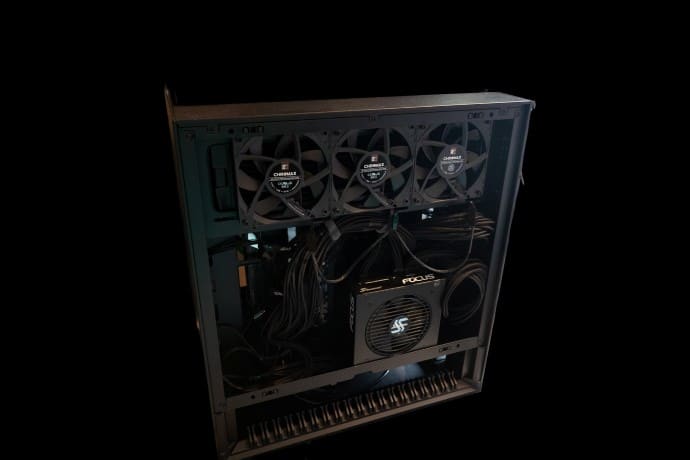
A clear improvement! Average temperatures are more or less the same, but thermal throttling is a thing of the past. Noise pollution remains imperceptible. The suspended pump is inaudible. We now need to add an Aquacomputer component to the loop to optimize fan management based on liquid temperature (and not CPU temperature).
In practice
With the tedious task of benchmarking behind us, it’s finally time to appreciate this build in its entirety. Because the Cougar Omnyx is a case for hardware enthusiasts. Even before starting up, we take pleasure in observing its atypical design and theabsence of visible cables, all hidden behind the box and neatly routed by combs.
Start-up brings a new satisfaction: silence. The case’s optimized airflow and the quality of the original fans do not disappoint. No wind tunnel effect, no parasitic noise. The RGB effects of the fans are in the very good average of what is being done. They don’t stand out from the crowd, but they’re effective. The good news is that they are directly controlled by a button on the front panel. There are enough options to dispense with dedicated software.
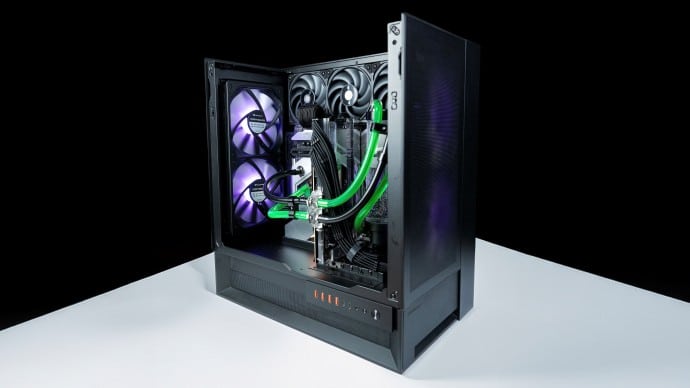
The gaming experience is excellent. We never reach the temperature levels seen above in stress tests. All components wisely remain below 60°C. This configuration is at ease in 1440p. You can activate Ray Tracing in Cyberpunk 2077 at high quality, while maintaining a refresh rate of over 60 FPS.
Not made for custom ?
We have to admit that this case is not ideal for custom watercooling. It can do it, and we’ve seen some very fine creations, but the investment doesn’t pay off. The extra cost compared with a simple AIO is simply not reasonable, given the temperatures obtained. A good compromise would be to limit yourself to a CPU loop.
Logically, users will turn to a 360 mm AIO. This will be enhanced by the glass surfaces and the original location of its radiator. For the graphics card, a large model with 3 slots (or more) will fit in perfectly. The GPU will benefit from the excellent transverse airflow and will also be superbly exposed.
Conclusion
 The Cougar Omnyx is a case that puts a smile on your face. It puts a smile on your face when you unpack it, as you discover the many subtleties and counter-measures offered by the manufacturer. It makes you smile during assembly, when the user experience is so fluid and pleasant. Above all, it gives on the desktop. Symmetrical and adaptable, it’s always well oriented. Its enormous fans stir up a significant flow of air without making themselves heard.
The custom watercooling experience itself is pleasant, but it’s clear that the Omnyx will prefer a more classic configuration. However, there’s nothing to prevent adding two radiators to the current loop. Perhaps for a V2 that would reluctantly part with 160 mm fans and replace them with banal 120/140 mm ones? However, the ideal configuration in this case is: 360mm AIO for the CPU, massive air-cooled GPU. This layout takes full advantage of the Omnyx‘s large volume andairflow.
Available for €179.99, the Cougar Omnyx is a real winner. It stands out in a category that has been going in circles for some time. It offers something different, and does so without sacrificing build quality or ingenuity.