
[nextpage title=”Introduction:”]
You’ll be getting not one, but two tests today, as AMD launches two models in its RX 9070 series. These new cards will be available for purchase this Thursday, March 6. So today we’ll be reviewing the ASUS TUF Gaming RX 9070 OC and this Gigabyte RX 9070 XT Gaming OC. These cards are eagerly awaited, firstly because of the delay of these references, which we were expecting in January, but above all because of their performance in the face of the new generation of RTX 5000s, which is struggling to convince. AMD has made its intentions clear: no ultra-high-end models, just mid-range cards.
In fact, it’s fair to say that there was a certain amount of excitement within the editorial team before starting these tests, to find out whether AMD was on the way to overshadowing Nvidia in 1440p and 2160p definition. Before getting down to business, AMD announced an MSRP of $549 for the RX 9070 and $599 for the RX 9070 XT. On the green side, prices are $549 for the RTX 5070 and $749 for the RTX 5070 Ti. Needless to say, this is an article that’s likely to keep you on the edge of your seat all the way to the end, especially as we’ve just received the MSRP prices in euros with €629 for the RX 9070 and €689.95 for the RX 9070 XT!

Thanks to Gigabyte France for making this copy of the Gigabyte RX 9070 XT Gaming OC available to us.
[nextpage title=”Gigabyte RX 9070 XT Gaming OC :”]
Architecture:
The AMD Radeon RX 9070 series graphics cards are built on the new AMD RDNA 4 architecture with new ray tracing and AI gas pedals as well as support for AMD FidelityFX Super Resolution 4, more traditionally called, AMD FSR 4. This should offer improvements in image quality over AMD FSR 3.1 upscaling.


AMD seems to have determined that $700 was the maximum price that gamers wishing to upgrade their configuration were willing to pay. This is a major factor that AMD has taken into account in order to offer these first two models in the AMD Radeon RTX 9070 series. The slide below shows where the RX 9070 series will be positioned in terms of price.


As far as prices are concerned, AMD is hitting hard, announcing the RX 9070 at $549 and the RX 9070 XT at $599. AMD France is quoting prices in euros from ????. It’s not hard to imagine the rivalry that’s about to set in against NVIDIA’s RTX 5070 ($549) and RTX 5070 Ti ($749).
Gigabyte RX 9070 XT Gaming OC:
As you can see from the photos below, the box of our copy of the Gigabyte RX 9070 XT Gaming OC is very much in the spirit of the series that Gigabyte usually offers. The packaging is quite compact, which is good news for the card’s size. Note that this RX 9070 XT model is smaller than the RX 9070 TUF also tested today. While the box benefits from a touch of green when it’s an NVIDIA model, here we’re usually entitled to red, for AMD, but it’s more discreet on the front panel.


On the rear, Gigabyte highlights the design of the cooling system and radiator. The opening is on the side where we find our graphics card perfectly protected in a block of foam. The bundle comes with installation instructions only. The idea is also to reduce costs on this entry-level model.
This is a ” custom ” board, i.e. with a PCB and cooling system specific to AMD’s partner brand, Gigabyte. There will be no AMD reference board, as with the RX 9070 and RX 9070 XT.
Cooling :
The Gigabyte RX 9070 XT Gaming OC features a cooling system consisting of three 90 mm fans. The design of this Gaming model is visually very pleasing, and features an RGB backlight zone on the top panel with a sliding plate. The dark gray color of the plastic casing will match any motherboard and any case. It’s simple and effective, just the way we like it.


Let’s start with the size of our sample of the day, which measures 288 x 132 x 56 mm and will therefore occupy a width of 3 slots. We can see straight away that Gigabyte hasn’t skimped on cooling, despite the relatively compact board.
The three Hawk fans have 7 blades and remain idle when the card is not in use, and vice versa, they become active again when the temperature requires it. Hawk fans feature a unique blade design inspired by the aerodynamics of the eagle’s wing. This design reduces air resistance and noise levels, resulting in increased air pressure. To reduce turbulence from adjacent fans and increase airflow pressure, fan rotation is alternated.


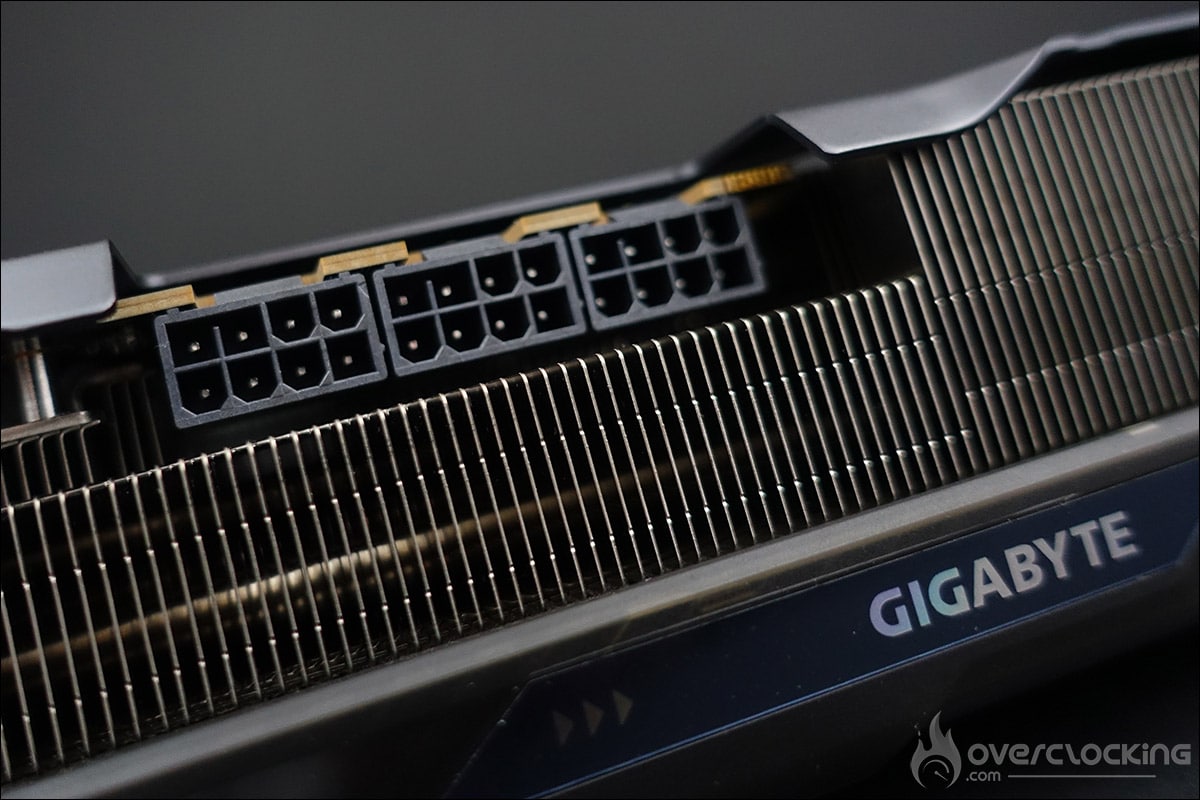
As you can see, hot air escapes through the top edge of the board, through the bracket and also through the aluminium backplate which is cut out at the end. In fact, the PCB is much shorter than the heat sink. The radiator ends at the PCB’s three power connectors.
As previously mentioned, the rear of the board is protected by an imposing grey backplate. Its role is to prevent the PCB from twisting, but it also acts as a heat sink, with the presence of pads between it and the PCB. We’ll be able to judge the temperature of the latter during our tests.


The card also features a dual BIOS: Pmode (performance) and Qmode (quiet). By default, Pmode is selected, and in our opinion, this is the best choice, even if the differences between the two BIOSes are virtually non-existent. As with top-of-the-range AORUS models, this Gigabyte RX 9070 XT Gaming OC also uses thermo-conductive gel to cool critical components such as memory chips and power supply stages. This highly deformable, non-fluid gel offers optimum contact for uneven surfaces and effectively resists deformation due to transport or long-term use, unlike traditional thermal pads. This is good news in itself, but what about once disassembled for reassembly?
Connectors :
To power our board, and this is excellent news, Gigabyte retains three 8-pin power connectors. We also know that, as far as memory is concerned, AMD is using GDDR6 instead of GDDR6X for both boards, mainly because the latter consumes less power and is incidentally less expensive.

This Gigabyte RX 9070 XT Gaming OC features one PCIe 5.0 port, two DisplayPort 2.1a and two HDMI 2.1b.
[nextpage title=”Technical specifications:”]
A quick trip to GPU-Z to check that the information read is correct. As you can see, it’s perfectly correct. Let’s see what we can learn from our copy of the Gigabyte RX 9070 XT Gaming OC.
In terms of frequency, GPU-Z announce a base frequency of 2520 MHz and a boost frequency of 3060 MHz for this Gigabyte RX 9070 XT Gaming OC. The card features 16 GB of GDDR6 memory (664.6 GB/s) on a 256-bit bus. This model features factory overclocked frequencies, as it is labelled “OC Edition”. This increase in frequency should enable some gains in terms of FPS.
Bear in mind that the GPU frequency may be higher in benchmarks, depending on the quality of your chip and the cooling system used.

In fact, we ran a test under 3DMark Time Spy to observe the GPU boost frequency. At certain points, the GPU reaches the maximum frequency of 3138 MHz. The memory frequency remains unchanged, which is perfectly normal.

As for temperatures, they rise to 51°C and memory to 80°C. At the time of this first test, it was 20°C in the lab. We’ll be checking temperatures during our more in-depth tests. The fans are far from running at maximum speed, and the card is fairly quiet. As a reminder, we’re on a bench, not inside a case. Let’s get testing!
[nextpage title=”Test configuration: “]
As we said in the introduction, we’ve updated all our graphics using the latest drivers from NVIDIA, AMD and, of course, INTEL. We also took the opportunity to slightly modify our test configuration and add new games to our protocol. So here we go again, with a new series of tests and graphics on this slightly modified configuration:
- Motherboard: ROG Maximus Z790 APEX Encore
- Processor : Intel Raptor Lake i9-14900K delid
- Cooling system: EK-Nucleus AIO CR360 Direct Die D-RGB – 1700
- Memory: 48 GB Corsair Dominator Titanium 8000 MT/s CL38
- Graphics card: ASUS TUF Gaming RX 9070 OC, Gigabyte RX 9070 XT Gaming OC, NVIDIA RTX 5070 FE, MSI Ventus RTX 5070 Ti, NVIDIA RTX 4070 Ti Super FE, NVIDIA RTX 4070 Ti FE, NVIDIA RTX 4070 Super FE, NVIDIA RTX 4070 FE, AMD RX 7900 GRE and AMD RX 7800 XT, RTX 5080 FE and RTX 5090 FE
- SSD: Western Digital Black SN750 2 TB with EKWB radiator
- Power supply: Corsair AX1600i
- Operating system: Windows 11 64-bit 24H2 (26100.2894)
For this test, we used a fairly high-end configuration based on a delided i9-14900K processor and DDR5 memory. For our tests, we used either an MSI Oculux NXG253R or a ROG Strix XG27UCS provided by Asus France, depending on the definition tested.
Our test protocol :
All cards are tested at stock frequencies and without any optimization. For the various benchmarks, whether synthetics or games, we will opt for 1080p, 1440p and 2160p resolutions, depending on the card’s performance.


Here, with this Gigabyte RX 9070 XT Gaming OC model, we’ll be testing two definitions, 1440p and 2160p, to get a full picture of the card’s performance. We’ll be using DLSS Super Resolution in Performance mode, with image generation and ray tracing where available, and similarly with FSR combined with Performance mode.
As you can see, we’re now running Windows 11 and have activated the ” ReSize BAR ” in the BIOS, which can be seen in GPU-Z. Now that you know everything about our test configuration, it’s time to get started!
[nextpage title=”3DMark benchmarks: “]
Our first series of tests will be dedicated to synthetic benchmarks. These are often used for overclocking competitions , but are also very interesting for comparing different GPUs. We’ll be focusing on benchmarks from the 3DMark series. For this new version of our graphics, and for the 3DMark test section, we’ve also isolated the GPU score. You’ll therefore find, when stipulated in the benchmark, both the overall score and the GPU score.
3DMark Fire Strike and Fire Strike Ultra:
Let’s start with 3DMark Fire Strike, one of today’s most widely used benchmarks. It consists of two graphics tests, a CPU test and a fourth test that combines GPU and CPU. Don’t forget to deactivate the demo, which makes no contribution to the final score and prolongs the benchmark ‘s duration (unnecessarily). The version used for these tests is, of course, the latest available.


We start our tests with the two Fire Strike and Fire Strike Ultra benchmarks, and to say the least, they get off to a pretty good start, especially in the Ultra version, where the ASUS TUF Gaming RX 9070 OC is ahead of the RTX 5070 FE and the Gigabyte RX 9070 XT Gaming OC is ahead of the RTX 5070 Ti.
3DMark Time Spy and Time Spy Extreme:
The second test is 3DMark Time Spy. Although this one is performed in 1440p, its main feature is that it uses DirectX 12. It consists of two graphics tests and a CPU test. As with Fire Strike, don’t forget to disable the demo. These first two benchmarks are provided by UL Benchmark.


We continue with Time Spy, where the results are even better! The ASUS TUF Gaming RX 9070 OC does as well as the RX 7900 XT and the Gigabyte RX 9070 XT Gaming OC, as well as the RX 7900 XTX. Competing RTX 5000 cards also lag behind. Time Spy gives an initial idea of in-game performance, so we should have our RX 9070 series in a good position against the competition.
3DMark Speed Way:
Ulbenchmark’s latest benchmark, and it’s nice to be able to say we’re going to benchmark this Speed Way. It uses DirectX 12 and defaults to 1440p. We haven’t modified anything, so we’re using the original benchmark.

In Speed Way, our Gigabyte RX 9070 XT Gaming OC lags behind and the RTX 5070 Ti is far ahead. On the other hand, it performs slightly better than the previous-generation RX 7900 XTX.
3DMark Port Royal:
Here’s a benchmark we left out last year, but which you may have wanted to see again in our tests. It’s still widely used, especially in the overclocking community. So we’ve decided to add it to our tests.

In Port Royal, things are looking up, and our Gigabyte RX 9070 XT Gaming OC does almost as well as the RTX 5070 Ti, leaving the RX 7900 XTX at over 2,400 points.
3DMark Steel Nomad:
The latest benchmark in the 3DMark suite, Steel Nomad will replace Time Spy as the most recent benchmark in the 3DMark suite. The good news, however, is that it will be free for users who already have a key. The program includes a test bench based on Microsoft’s DirectX12API. However, there will be no ray tracing, but the scene will use an “extreme” level of geometry and rasterized light.

Finally, the last benchmark in the 3DMark series, Steel Nomad, which has just arrived, our Gigabyte RX 9070 XT Gaming OC offers excellent performance, with a score of 7211 points, i.e. 11% more performance than the RTX 5070 Ti.
[nextpage title=”UL Procyon AI Image / Text Generation:”]
UL Procyon AI Image Generation:
UL Benchmark not only offers its 3DMark benchmark suite, but also UL Procyon, to meet the demand for Artificial Intelligence evaluation. This benchmark was chosen for its ease of implementation. The benchmark will generate 4 x 4 images and provide us with a score as well as a result in the form of the time, in seconds, required to generate an image. The software supports several AI inference engines, depending on the GPU used.
We’ll be using the benchmark in Stable Diffusion 1.5 (FP16) mode. It is intended for mid-range GPUs. The test will create 16 images at a resolution of 512 x 512, in batches of 4. There’s a test called Stable Diffusion XL (FP16), where 16 images will be created, at 1024 x 1024, in batches of 1.
The program having just undergone a major update, we had to replay all our cards, including the RTX 5000 series. The timing was too short to have time to retest them all, so it will be updated asap.
UL Procyon AI Text Generation:
The latest benchmark to be added to this test suite, AI Text Generation. The Procyon AI Text Generation Benchmark offers a more compact and easier way to repeatedly and consistently test AI performance with multiple LLM AI models. UL claims to have worked closely with many AI software and hardware leaders to ensure that the benchmark tests take full advantage of the local AI gas pedal of the systems used.


Performance has improved on the previous generation, but apart from the latest benchmark, the RX 7900 XTX is still ahead.
[nextpage title=”Gaming rasterization performance 1440p – 2160p: “]
Let’s get on with the gaming tests. We’ve used all the graphics cards we felt would be interesting to compare with this Gigabyte Gaming OC RX 9070 XT OC in 1440p definition. In the coming weeks, we’ll be bringing you a new type of article, retesting graphics cards from previous generations to find out what they’re still worth in 2025. Our games panel currently consists of 13 titles, and will be expanded in the coming weeks.
We have chosen to use the built-in benchmarks of these games.
Why do we do this? Quite simply to enable you to compare your results with ours if you also own a copy of one of these games. It’s a thought-provoking idea, and one that will enable you to compare your results with ours. The number and titles selected have changed slightly, and will increase again in the coming weeks as we get our hands on new games.
What is rasterization?
A quick word about “rasterization”, which is currently the subject of much discussion. Rasterization is the evaluation of the performance of our graphics cards without the use of upscaling technologies . We choose a graphics quality, often the highest, and test it. The advantage of these tests is that we can quantify the gains made by the architecture between different generations. In our case, this means being able to judge the gains obtained between the architecture of the new RTX 5000 (Blackwell) and this AMD RX 9070 series.
Borderlands 3 :


It’s time for the gaming section, starting with Borderlands 3. The Gigabyte RX 9070 XT Gaming OC gets off to a flying start, taking first place in 1440p. Logically, it falls back in the 2160p rankings, but remains ahead of the RTX 5070 Ti.
Cyberpunk 2077:


The same applies to Cyberpunk 2077, with no change in ranking for our Gigabyte RX 9070 XT Gaming OC in either 1440p or 2160p.
COD Modern Warfare III:


We’re not really changing the shape of our graphics, but we know that COD MWIII is more to the advantage of AMD cards. Here, our Gigabyte RX 9070 XT Gaming OC does even better than the RTX 5080 FE in 2160p.
Forspoken:


Forspoken is a fairly demanding game, and our Gigabyte RX 9070 XT Gaming OC achieves an average of 97 FPS compared with 98 FPS for the RTX 5070 Ti, putting the two cards neck and neck. In 2160p, the gap of one FPS remains identical.
Horizon Zeron Dawn Remastered:


One of the new games we’ve added to our comparison, and once again, our Gigabyte RX 9070 XT Gaming OC comes out on top, holding on to first place in 1440p and, once again, allowing itself to be ahead of the RTX 5080 FE.
Shadow Of The Tomb Raider:


Shadow Of The Tomb Raider easily passes the 200 FPS mark at 1440p. Things get more complicated at 2160p, where our Gigabyte RX 9070 XT Gaming OC falls slightly down the rankings.
Black Myth: Wukong Benchmark Tool :


This new game also seems to consume a lot of power, but the top three remain unchanged. In 2160p, it’s the reds that lag behind the NVIDIA cards.
Far Cry 6:


Performance is in the reds’ favor with Far Cry 6. In 1440p, we’re well ahead, and in 2160p, performance remains excellent, with a third-place finish for our Gigabyte RX 9070 XT Gaming OC.
Assassin’s Creed Mirage:


Well, you’re beginning to understand the song for 1440p definition. As our tests progress, we can easily imagine that our Gigabyte RX 9070 XT Gaming OC should perform better than the RTX 5070 Ti. In 2160p, the gaps will certainly be tighter.
Red Dead Redemption II:


Under Red Dead Redemption II, no changes in 1440p and similar performance for our Gigabyte RX 9070 XT Gaming OC in 2160p.
F1 2024 :


Our sample of the day remains the queen of 1440p definition, trailing the RTX 5070 Ti by a hair’s breadth in 2160p.
Monster Hunter Wilds:


We’ve added a new benchmark for this Gigabyte RX 9070 XT Gaming OC. The appearance of the two graphics remains unchanged.
Alan Wake 2:


The last game, Alan Wake 2, won’t disrupt the order of our graph, and represents the performance we’d expect from the average of our 13 games.
Average of 13 games in 1440p rasterization :


Let’s start with 1440p performance, where we’ve chosen the RTX 5070 FE as our reference model. We’ve therefore calculated the gains based on this model. In rasterization, our Gigabyte RX 9070 XT Gaming OC performs almost 30% better, for an MSRP of $599. We don’t yet know how much this Gigabyte RX 9070 XT Gaming OC model will cost. The other element is against the RTX 5070 Ti, where it outperforms by more than 8% at an MSRP of $749.
In 2160p, our Gigabyte RX 9070 XT Gaming OC is still a delight, maintaining higher performance than the RTX 5070 Ti. In fact, it performs almost as well as the previous-generation RX 7900 XTX, which had an MSRP of $999, i.e. $400 more!
[nextpage title=”Gaming performance 1440p – 2160p upscaling:”]
In this section, we’ll be testing our graphics cards by activating ray tracing, if available, as well as upscaling, depending on the graphics card used. As a reminder, there are currently three upscaling technologies . NVIDIA has DLSS, which can only be activated with NVIDIA cards. Depending on the generation of your GPU, you may or may not be able to benefit from all the technologies offered by the greens. For AMD, it’s FSR, which is also evolving and, for certain games, also benefits from Frame Generation.
Finally, Intel’s in-house upscaling is called XeSS, and with the arrival of this new generation of graphics cards, Intel has taken the opportunity to announce the arrival of XeSS 2, which will introduce two new features to compete with NVIDIA and AMD, who are already ahead of the game. Intel will offer Xe Frame Generation (XeSS-FG) and XeSS Low Latency (XeLL).
Finally, it’s important to point out that some games do not feature ray tracing, but only an upscaling solution. We’ll make this clear in the games below. For 1440p and 2160p definition, upscaling, whether in DLSS or FSR, will always be in Performance mode.
Cyberpunk 2077:


Here we go again, with Cyberpunk 2077as our first game. Our NVIDIA cards are in front. Please note that, for comparative purposes, only Frame Generation is used with RTX 5000s. Multi Frame Generation will be discussed on the next page. In 1440p, our Gigabyte RX 9070 XT Gaming OC is on a par with the RTX 4070 Ti Super, but benefits from a better FG. Note that if we had activated the MFG, the green card would have taken the lead at x3 and x4. In 2160p, the situation is virtually identical.
COD Modern Warfare III:


No worries in Call Of Duty Modern Warfare III, where upscaling still allows you to gain FPS, and even many, many FPS. We’ll come back to the quality of the various upscaling options when the new GPU launches have calmed down.
Forspoken:


The same is true of our Gigabyte RX 9070 XT Gaming OC, which passes rasterization very easily and upscaling boosts performance. Our sample is neck and neck with the RTX 5070 Ti in 2160p.
Horizon Zeron Dawn Remastered:


The same is true of Horizon Zeron Dawn Remastered, but the game is now compatible with FSR 4. We downloaded the update, which delivers excellent performance with our Gigabyte RX 9070 XT Gaming OC.
Black Myth: Wukong Benchmark Tool:


Ah, we’re back to a very demanding game with Black Myth: Wukong, which benefits from ray tracing. And this is exactly where upscaling comes in handy, as the Gigabyte RX 9070 XT Gaming OC barely manages 1440p and 2160p. The benchmark doesn’t seem to like AMD cards at all.
Far Cry 6:


There’s no DLSS here: we use AMD upscaling, which explains the very low gain between DXR and upscalingmodes.
Assassin’s Creed Mirage:


Our Gigabyte RX 9070 XT Gaming OC takes its place in 1440p and 2160p only in our rasterization tests. First place in 1440p and ahead of the RTX 5070 Ti in 2160p.
F1 24 :


The penultimate game on our test panel, FSR Performance combined with Frame Generation enabled our model of the day to achieve an average of 329 FPS at 1440p and 276 FPS at 2160p.
Monster Hunter Wilds:


Ninth and final game, and the same observation, with our Gigabyte RX 9070 XT Gaming OC, which ranks at the top in 1440p and still at the bottom in 2160p.
What about upscaling with the Gigabyte RX 9070 XT Gaming OC?
Our Gigabyte RX 9070 XT Gaming OC already does pretty well with upscaling, whether in 1440p or 2160p, except in the game Black Myth: Wukong. Upscaling is not really necessary in 1440p, but does boost performance in 2160p.
We’ll come back to this point later, but we wanted to highlight a remark in the RX 9070 review guide that particularly caught our attention. AMD recommends a minimum of 60 FPS before using Frame Generation, in order to maintain an optimal gaming experience and avoid the latency that could result. AMD suggests adjusting graphics settings, resolution and upscaling to achieve this 60 FPS before activating Frame Generation. This is a very important point, and we’ll be looking into it shortly.
[nextpage title=”Games that support DLSS 4:”]
A series of games are already DLSS 4-compatible, on the day of the RTX 5080/5090 launch. We’ve been able to get hold of them to start a series of tests and highlight the performance achieved thanks to DLSS 4. We’ll be coming back to the qualitative side of rendering in detail in the weeks to come. Of course, the upscaling principle here will be to support our ASUS TUF Gaming RX 9070 OC face at 1440p/2160p performance with graphics options at maximum, as well as ray tracing or path tracing if available.
To measure our FPS, we had access to a beta version of CapFrameX v1.7.5. This measurement tool is certainly one of the best and most intuitive when the game doesn’t have an integrated benchmark. If you’re interested, we can go into more detail on its use in a separate article. We wanted to see how our Gigabyte RX 9070 XT Gaming OC would perform against the Multi Frame Generation of the RTX 5000.
Cyberpunk 2077:


First of all, with ray tracing in Overdrive mode , all cards suffer. In 1440p, logically, the RTX 5000s, thanks to Multi Frame Generation, fare better, but it’s important to note that the Frame Generation on our Gigabyte RX 9070 XT Gaming OC still does the job, boosting the card’s performance to more interesting proportions in 1440p. In 2160p, it’s more complicated, even if the Frame Generation has passed the 60 FPS mark.
Hogwarts Legacy: The Hogwarts Legacy


The same is true of Hogwarts Legacy, where in 1440p rasterization, we managed to achieve an average of 76 FPS, which is already an excellent performance, so Frame Generation should offer a good gaming experience. For us, this is the minimum native FPS required before resorting to(Multi) Frame Generation. At 2160p, the average is lower, even if FG is there to raise the average.
Alan Wake 2:


Here, while rasterization performance puts our Gigabyte RX 9070 XT Gaming OC in first place at 1440p, it’s clearly NVIDIA cards that benefit from the best Frame Generation. At 2160p, unfortunately, this is too low to enjoy a good gaming experience.
Star Wars Outlaws:


All our cards suffer, and Frame Generation favors the reds in 1440p. This is clearly a typical example of what we’ll be testing over the coming weeks. How it feels to go from 44 FPS to 196 FPS in 1440p for our Gigabyte RX 9070 XT Gaming OC. The number of native and generated FPS seems to us to be very unbalanced. As you can see, we’ll have to take a closer look at the visual quality of the various upscaling modes, and at the in-game experience when Frame Generation or Multi Frame Generation is activated.
[nextpage title=”Energy consumption and efficiency:”]
At last, we have the means to effectively monitor the power consumption of our graphics cards, thanks to the Benchlab telemetry system. We will now be able to carry out a complete analysis of our graphics card’s total power consumption via the dedicated 3 x PCIe and 2 x 12VHPWR power cables. But that’s not all, as we also need to be able to measure the power supplied via the PCIe slot. So we’re going to use a PCI-E PMD adapter from the ElmorLabs store. This will enable us to measure the overall power consumption of the graphics card under test in a totally independent way. Here’s a series of photos of our Benchlab installation, to which we’ll be devoting a dedicated test in a few weeks’ time.


These various readings will be taken via Benchlab’s dedicated application. The photos below were taken with the NVIDIA RTX 4060 Ti 8 GB FE graphics card to illustrate our power consumption readings.


To obtain the total power consumption of this RX 9070 XT, we’ll record the 3x8PIN Power consumption, which corresponds to the card’s power supply via its 16-pin mini-connectors, and the EPS1 reading, which supplies the adapter. We export the readings, which are taken every 500 ms, and calculate the average consumption in the Cyberpunk 2077 game in 4K rasterization with graphics options in Ultra
Power consumption in Cyberpunk 2077 :
 Very good placement in terms of power consumption for our Gigabyte RX 9070 XT Gaming OC, which certainly consumes a little more power than the RTX 5070 Ti, but offers excellent performance.
[nextpage title=”The last word:”]
So, what do you think of this Gigabyte RX 9070 XT Gaming OC?
As you’ll have gathered, it’s all good, without a doubt. AMD has chosen to concentrate on mid-range cards, and this seems to have paid off, even if the performance is ultimately of a very high level. It’s a risky choice, but one that seems to have paid off, even if we had to wait until March for the cards to arrive. It looks like the gamble of offering cards under the $700 mark, as indicated on the slides, may well be the winning choice, especially if stocks are good and with the MSRP prices in euros we’ve just received from AMD France.
Since the RX 7900 XT and RX 7900 XTX, a persistent question has been: “Why is AMD offering two cards with fairly similar performance?”. AMD launches two cards, with a price difference of $50 and performance that varies by plus or minus 12%. In the end, the RX 9070 XT would have been more than enough. We still don’t really have an answer to this question.
Performance:
There’s no doubt about it. Our Gigabyte RX 9070 XT Gaming OC clearly has the upper hand over the recently launched RTX 5070 Ti. We consider this model to be a card dedicated to 1440p, but which can also cope perfectly with 4K definition. The idea is not to take too much advantage of Frame Generation in order to maintain a good gaming experience. Compared to the previous generation, the RX 7900 XTX remains very slightly more powerful, but with a launch MSRP nearly $400 higher!
For lack of time, we haven’t had a chance to evaluate its overclocking capabilities , but the memory already seems very flexible, and we should be in for some nice surprises too.
The MSRP price is very attractive, but…
AMD surprised everyone by announcing an MSRP of $549 for the RX 9070 and $599 for the RX 9070 XT! It was difficult to comment on these prices without knowing the performance. Now that they’ve been released, we’re thinking these are really excellent prices, especially since AMD France has given us MSRP prices of €629 for the RX 9070 and €689.95 for the RX 9070 XT!
The first regret is the absence of AMD reference boards. Had this been the case, it could have made a big impact, especially as the RTX 5070 Ti is not available as a Founders Edition, but only as a custom card. Now AMD can make room for its partners.
The MSRP of 689.5 euros for the RX 9070 versus 884 euros for the RTX 5070 Ti remains clearly in favor of the reds, given the performance of our Gigabyte RX 9070 XT Gaming OC. Now, neither AMD nor Gigabyte were able to provide us with the price of this Gaming OC model… so fingers crossed we don’t get a nasty surprise on March 6.
Finally, stocks! We have the impression that they should be substantial, since distributors were already receiving cards in January 2025. No doubt partners have had plenty of time to build up their stocks. And where the post-posted launch had led us to fear the worst, such as the need to update the cards’ BIOS following disappointing performance, we can tell you that this is absolutely not the case, since we received our sample of the RX 9070 XT on January 13, 2025. It had been waiting in its box ever since. We can well imagine that if stocks are high, scalpers will have very little interest in buying cards, which should prevent prices from skyrocketing – at least, once again, let’s hope so.
Should you sell your RX 7900 XTX?
Well, as was the case with the RTX 5000: “NO, your RX 7900 XTX will still do the job perfectly”. We chose this RX 7900 XTX model because the performance is quite similar, even if the launch price is quite different. On the other hand, an upgrade from a previous generation is entirely conceivable if prices are consistent.
Now, where AMD is likely to hurt is that, in the absence of RTX 5000 stocks, potential buyers are likely to turn to AMD if the cards are available and priced right. Once again, as we said in our introduction, we’ll know whether AMD has succeeded in its gamble on March 6, the day of the official launch and availability of the RX 9070! It remains to be seen how NVIDIA will react.
 Once again, Gigabyte has produced an excellent card, the Gigabyte RX 9070 XT Gaming OC. As with other Gigabyte Gaming models, we’re very satisfied with this series. Less exuberant than the AORUS series, this Gigabyte Gaming has everything to please: an efficient cooling system and a look that will suit most people. It remains to be seen what the price will be in stores on March 6, but if, as we hope, stocks are good, it’ll be banger!
Thanks to Gigabyte France for making this copy of the Gigabyte RX 9070 XT Gaming OC available.

