

Today marks the end of the NDA for Corsair’s new MP700 PRO SSD. This is an evolution, as the “PRO” name suggests, and will therefore offer even higher speeds than the MP700. Please note that these are PCI-Express 5.0-compatible models, so you’ll need a motherboard with a PCI-Express 5.0 connector to take full advantage of the announced speeds. Without it, your performance will simply be limited, and that would be a shame! Corsair will be offering its new MP700 PRO SSD either bare-metal, with aircooling or with a Hydro X series waterblock. It’s the air-cooled version we’ll be reviewing today.
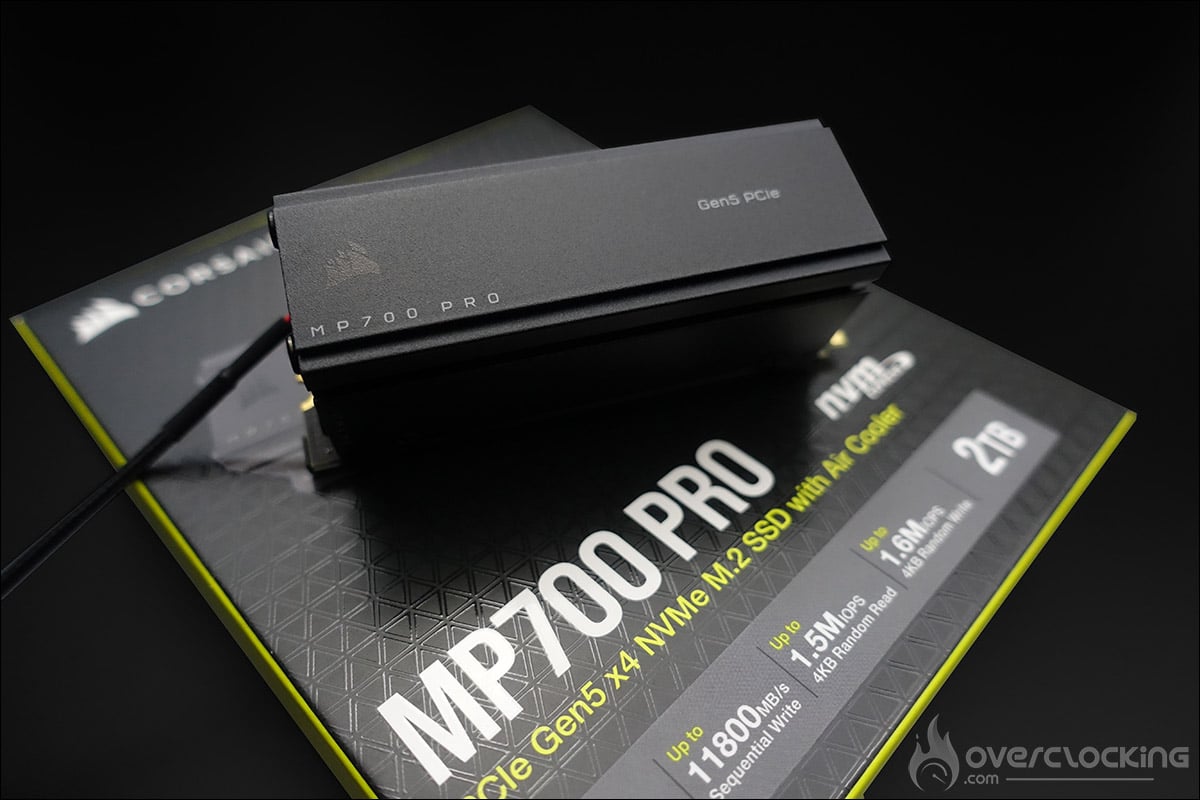
Thanks to Corsair for making this copy of the MP700 PRO 2 TB SSD available.
[nextpage title=”Corsair SSD MP700 PRO :”]
Unboxing the Corsair MP700 PRO:
The Corsair MP700 PRO is a PCIe 5.0 SSD in M.2 2280 format, using the NVMe 2.0 protocol. This is currently the most common format when you buy an SSD to integrate directly onto your motherboard. Corsair has announced two capacities available at launch, a 1 TB version and a 2 TB version. It’s this second model that we received in its ” aircooling ” version, i.e. with an active air cooling system. Corsair also plans to combine this new SSD with its in-house “Hydro X Edition” waterblock, which we’ve already seen on other models.


If you’ve read our latest reviews of Corsair’s liquid cooling loop, the packaging of this Corsair MP700 PRO will no doubt remind you of the components we tested. Indeed, the dominant colors of the box are black and yellow. There’s no need for installation instructions, as these are available directly online via the QR Code revealed when the box is opened.


The front panel shows a photo of the MP700 PRO, along with its main technical specifications and capacity. We learn that read speeds can reach 12,400 MB/s with up to 1,500K IOPS, and write speeds of 11,800 MB/s with up to 1,600K IOPS. These are the values given by the manufacturer, which we will verify during our tests.
When you open the box, you can see the Corsair MP700 PRO perfectly protected in a foam casing and already equipped with its cooling system.
An active cooling system :
Most PCIe 5.0 SSDs are equipped with an active cooling system, as they tend to generate a fair amount of heat. Our sample of the day is no exception, featuring an air-cooling solution. It features an imposing aluminum radiator topped by a cover that allows the air swept by the 20 mm fan to keep it cool.


Here’s our MP700 PRO SSD stripped bare, which, as we specified above, is in M.2 2280 format, corresponding here to dimensions of 22 x 80 x 3 mm versus 24 x 80 x 20 mm when the heatsink is installed.


To take full advantage of the fan, it will be powered via its SATA port.
What’s under the hood?
Let’s take apart the cooling system to reveal the SSD and the components used. We can see right away the presence of several thermal pads designed to optimize heat exchange between the SSD’s chips and the radiator.
As its main component, this Corsair MP700 PRO uses a Phison PS5026-E26 controller. This is the controller used on high-end PCIe 5.0 x4 models. This is the company’s current flagship product, supporting eight flash channels and NVMe 2.0, using an Arm Cortex design. By the way, right now, if you want top-level storage performance, you’ll have to turn to a Phison controller.


The four flash memory chips are 3D TLC NAND from Micron, each with a capacity of 512 GB. As this is the 2 TB version, there are two chips on each side; on the 1 TB model, there are only two and on one side only. The Hynix DDR4-4266 chip provides a total of 4 GB of DRAM memory for the SSD’s mapping tables.
Corsair MP700 PRO data sheet:
To conclude this presentation, here’s the full data sheet for Corsair’s two MP700 PRO SSDs, with 1 TB and 2 TB versions. At MSRP, the 1 TB model will be invoiced at 234.99 euros and the 2 TB at 384.99 euros. The warranty remains unchanged at 5 years.
[nextpage title=”Test protocol:”]
We’re going to take a slightly different approach to our usual SSD test protocol. The reason is simple: I’m not usually in charge. To test this Corsair MP700 PRO SSD, you needed a motherboard with a PCIe 5.0 slot, which is why I volunteered. To take full advantage of Corsair’s claimed throughput, you’ll need a motherboard built around either the AMX X670 chipset or the Intel Z790 chipset, making sure it has a PCIe 5.0 slot. The idea will be to judge the gains made by this new SSD compared with our current Samsung 990 Pro 1 TB, should you need to upgrade your configuration, for example.
Here’s the configuration we’ll be using for these tests:
- Motherboard: ROG Maximus Z790 APEX Encore (BIOS 0601)
- Processor: Intel i9-13900KS
- Memory: 32 GB Teamgroup Delta RGB 7200 MT/s CL34
- Graphics card: Galax GT 710 Fish
- Cooling system: Alphacool Core 1 CPU 480 mm EK radiator
- SSD: Samsung 990 Pro 1 TB and Corsair MP700 PRO 2 TB
- Power supply: be quiet! Dark Power PRO 12 1500w
- Operating system: Windows 11 64-bit 23H2


Our two SSDs, for testing purposes, will be inserted in the M.2 PCIe 5.0 x4 slot closest to the CPU and on the CPU’s PCIe lines. The heatsink used will be the original one present on our ROG Maximus Z790 APEX Encore motherboard for the Samsung 990 Pro and, of course, the original one for the Corsair MP700 PRO.
As a reminder, the Samsung 990 Pro 1 TB has a theoretical read speed of 7450 MB/s with up to 1400K IOPS and a write speed of 6900 MB/s with up to 1550K IOPS.
The Windows 11 version is the latest, 23H2. The idea is to carry out a “normal” installation, without any optimization, in order to be as close as possible to the use of the average person. Our installation is therefore limited to the OS and the various software programs we’ll be using.


A quick tour of the Corsair SSD Toolbox software to check that everything is perfectly recognized, and above all to check that there are no firmware updates . Everything seems to be in order, and we’ll be able to start testing, but it’s about time Corsair gave its software a facelift!
[nextpage title=”Our comparative tests: “]
As we specified on the previous page, this is not an SSD comparison, but rather a chance to judge performance if you decide to upgrade your PCIe 4.0 SSD to our sample of the day, Corsair’s MP700 PRO, which is PCIe 5.0. So we’ll be doing some tests to measure the gain between these two generations. Let’s start with two UL Benchmark tests.
Crystal Disk Mark:
Let’s start with the best-known and most widely used test, CrystalDiskMark version 8.0.4 x64. The idea is to be able to compare the results obtained with the data rates announced by Corsair for its MP700 PRO.


The data rates claimed by Corsair are perfectly correct for sequential reading. We find our data rates a little low in random playback, without having been able to determine where this might be coming from.
ATTO Disk:
This benchmark will test read and write speeds on files of various sizes, from 512 B to 64 MB. We’ll present you with a curve offering direct visualization of throughputs in each mode (read/write). This will enable you to visualize the behavior of the storage unit as a function of the size of the files handled. The version used is 4.00.0f2.


In this benchmark, write and read performance are again shown. We can measure the difference in throughput between our two SSDs of the day.
AS SSD:
AS SSD is somewhat similar to Crystal Disk Mark in that it runs various performance tests, but it offers much more. The benchmark offers several scores, including a read performance score, a write performance score, access time and an overall score. This is a benchmark that will be added to future SSD tests in our protocol.


In this benchmark, we find ourselves with an overall score of 10520 for the Samsung 990 PRO SSD and 12547 for our Corsair MP700 PRO.
Anvil Benchmark:
This software is also very useful for testing and comparing different disks. It offers a variety of data that enables us to cross-reference the results achieved in the other tests. As with the AS SSD benchmark, we obtain three different scores: a read score, a write score and an overall performance score.


Here too, it’s an overall score calculated on read and write performance. Our Corsair MP700 PRO is the clear winner.
3DMark Storage Benchmark :
3DMark’s benchmarks need no introduction, as they’re the ones we use to test our graphics cards. Here, we’re going to use the “Storage” benchmark, which, as its name suggests, is designed to test your storage solutions.


Here, too, it’s a score we get, with 3371 points for the Samsung 990 PRO 4.0 x4 against 4667 points for our Corsair MP700 PRO 5.0 x4.
PC Mark 10:
Naturally, we’ll be concentrating on the “Storage” benchmarks, opting for the “Quick System Drive Benchmark” and “Data Drive Benchmark” test series.


The final benchmark concludes this series of comparative tests, with our sample of the day once again in the lead.
Temperatures :
Using HWinfo software, we recorded operating temperatures during a loop of 3 CrystalDiskMark.


The temperature of our Samsung SSD reaches a maximum of 50°C, bearing in mind that it is covered by the imposing radiator of our ROG Maximus Z790 APEX Encore. In the case of the Corsair MP700 PRO, with its fan activated, the temperature reached 53°C. All in all, a very decent temperature, and the good news is that the fan is perfectly silent!
[nextpage title=”The last word:”]
So, yes, switching from an SSD 4.0 x4 to an SSD MP700 PRO 5.0 x4 wasn’t a big risk in terms of performance gains. But as we said, we don’t have any other 5.0 SSDs, so it was difficult for us to make a comparison. As you can see, performance has taken off thanks to the 5.0 standard, but don’t forget that you’ll need a compatible motherboard. If not, the SSD will work without a hitch, but with limited performance.
The Corsair MP700 PRO is very well designed, and the Phison E26 controller is always at its best. The aircooling system fitted to our sample makes itself felt. We were a little worried that this little fan would produce a lot of noise, but this was absolutely not the case. Now, if your motherboard has an original radiator covering the SSD slot, you can opt for the “naked” version, which will save you 20 euros.
Speaking of price, Corsair has announced an MSRP of 234.99 euros for the 1 TB model and 384.99 euros for the 2 TB. Faced with the competition from 5.0 SSDs, this price seems justified to us, since other brands are also in this price bracket, or even higher. Now, let’s be honest, if we look at the price of the 2 TB Corsair MP600 PRO XT, it’s priced at 169.99 euros, more than half the price of our sample du jour. We’ll have to wait for the 5.0-generation SSDs to become more widely available. So it’s hard to justify such a purchase unless you really need it for your day-to-day use. The majority of potential buyers are still likely to opt for the 4.0 model.
Corsair MP700 PRO 2 TB :
We liked:
- Excellent read and write performance
- The fastest SSD we’ve had in our hands in terms of raw data rates
- Use of the Phison E26 controller
- Efficient, silent cooling system
- 5-year warranty
What we didn’t like :
- Price too high compared to the equivalent M.2 2 TB 4.0 x4
- The indications on the SSD fairing were upside down when fitted to the motherboard
 Corsair’s 2 TB MP700 PRO is the fastest M.2 SSD in its catalog. It’s an SSD that’s perfectly suited to your Intel configuration, but also to AMD’s latest chipsets. Raw throughputs are excellent, reaching Corsair’s claims, but at what price. Unfortunately, this is the Achilles’ heel of our MP700 PRO, as its price is far too high compared to an equivalent 4.0 x4 drive.
Many thanks to Corsair for making this sample available.