

CrystalDiskInfo is a monitoring software specializing in SSD and hard disk monitoring. It gives the state of health of our storage media, indicating faulty sectors, used and free space, and so on. However, with the proliferation of counterfeit Samsung SSDs, hiyohiyo, the software’s developer, decided to add an interesting feature: fake model detection!
CrystalDiskInfo now detects counterfeits!
The software no longer lets fake Samsung SSD 990 Pro through!
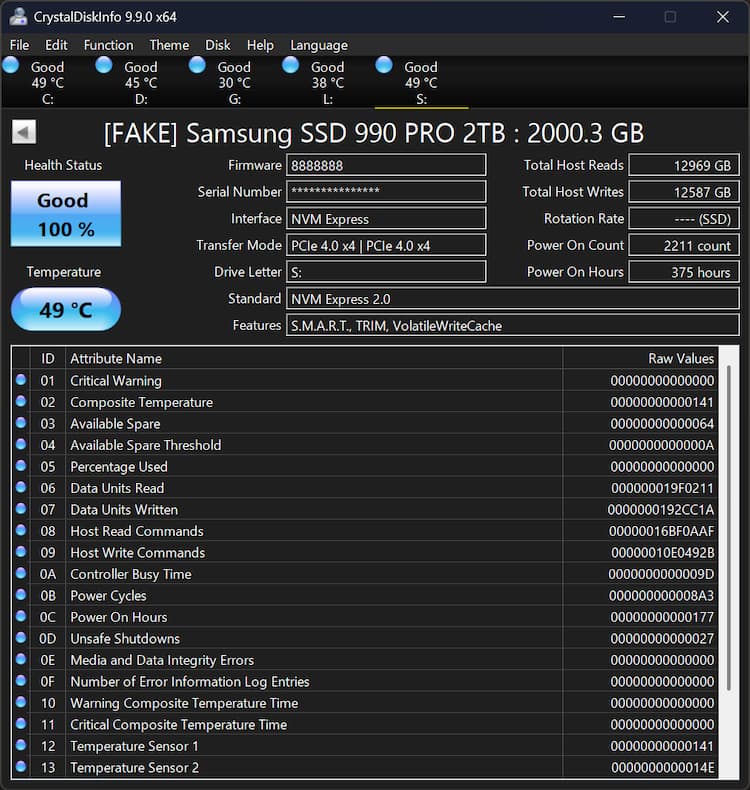
With the price of SSDs on the rise – prices have doubled in the space of just a few months – some people see an economic incentive to produce counterfeits. The most frequently reproduced models are the Samsung 990 Pro, which is now arriving on the European market. But don’t be fooled: these reproductions are increasingly convincing. The packaging is almost identical to the original, while the SSD itself even boasts solid performance on CrystalDiskMark. While from a visual point of view, if you don’t pay attention to the small details, there’s plenty to fall for.
But the CrystalDiskInfo software has been updated to version 9.9.0 and this version adds detection of fake Samsung SSDs via the addition of the extension “[FAKE]” in case of counterfeiting in front of the product name. Presumably, if the components detected do not correspond to those used officially by Samsung, the detection will indicate deception.
Be careful where you buy your SSDs!
Of course, to reduce the risk of ending up with a counterfeit in your hands, the best thing to do is turn to circuits endorsed by Samsung. Either buy directly from the brand’s online store, or from authorized dealers. In this case, avoid dubious marketplaces (Amazon, etc.) on the one hand, and on the other, it may be silly, but the second-hand market should also be avoided… Unless you have the opportunity to see the hardware in action on site and make sure everything’s running smoothly (and by the way, run a CrystalDiskInfo on the seller’s machine).
In the meantime, Samsung is tracking down and hunting down reproductions of its SSDs, that goes without saying.