
During our visit to Computex this year, we were able to visit the Thermaltake stand to see what’s new. Among the cases, fans, power supplies, etc., we came across the brand’s MineCube 360 Ultra aRGB Sync. With this kit, the brand unveils an innovative AIO concept whose pump cover features four screens! From now on, you’ll be able to present panoramic and original displays.
What’s more, we’ve just received one from the brand, and we’d like to test it out for you without further ado!
 Presentation:
At present, this MineCube 360 Ultra aRGB Sync is the only representative of its kind, since the kit is currently only available in 360 mm. Therefore, it will not be possible to acquire it in 240/280, or even 420 mm for the time being. It remains to be seen whether Thermaltake will offer other versions in the future. In the meantime, two colors are available: white and black. As you can see, the brand sent us a white copy!
Well, there’s no need to beat about the bush, since the number-one attraction of this kit is its pump cover, which was the talk of the town at Computex. It features four 3.95″ LCD screens, each with 720×720 resolution, so you can manage each one independently or apply a single visual to all screens. The choice is yours!
Otherwise, the kit comes with a trio of Swafan EX aRGB fans. These feature interchangeable blades. So, whatever the position of the radiator in your case or the configuration of your airflow, you’ll always have aesthetically pleasing fans (blades never visible). They also benefit from a frame connection system with magnetic connectors to limit the number of cables in the PC.
Aesthetics aside, the kit’s pump features a pump fan concealed beneath the screen unit. Its role will be to cool the elements located around the socket: RAM, motherboard VRM heatsink, etc. Otherwise, the pump block features a copper cold plate, but the brand doesn’t dwell too much on these elements. Instead, the emphasis is on the set of screens mounted on the pump.
 On the other hand, a kit of this scale is anything but cheap. The official price tag is $369.90. That’s right at the top end of the market. Besides, who can boast of offering an AIO with four screens?
[nextpage title=”The MineCube 360 Ultra aRGB”]
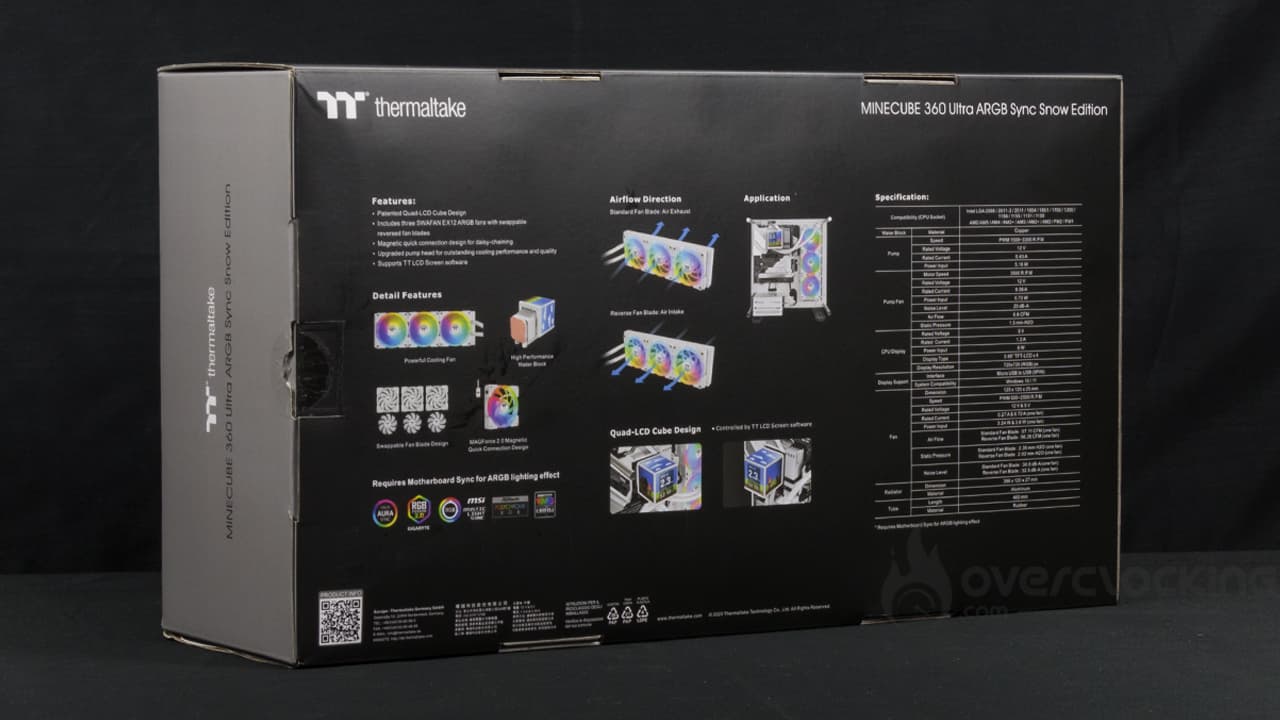
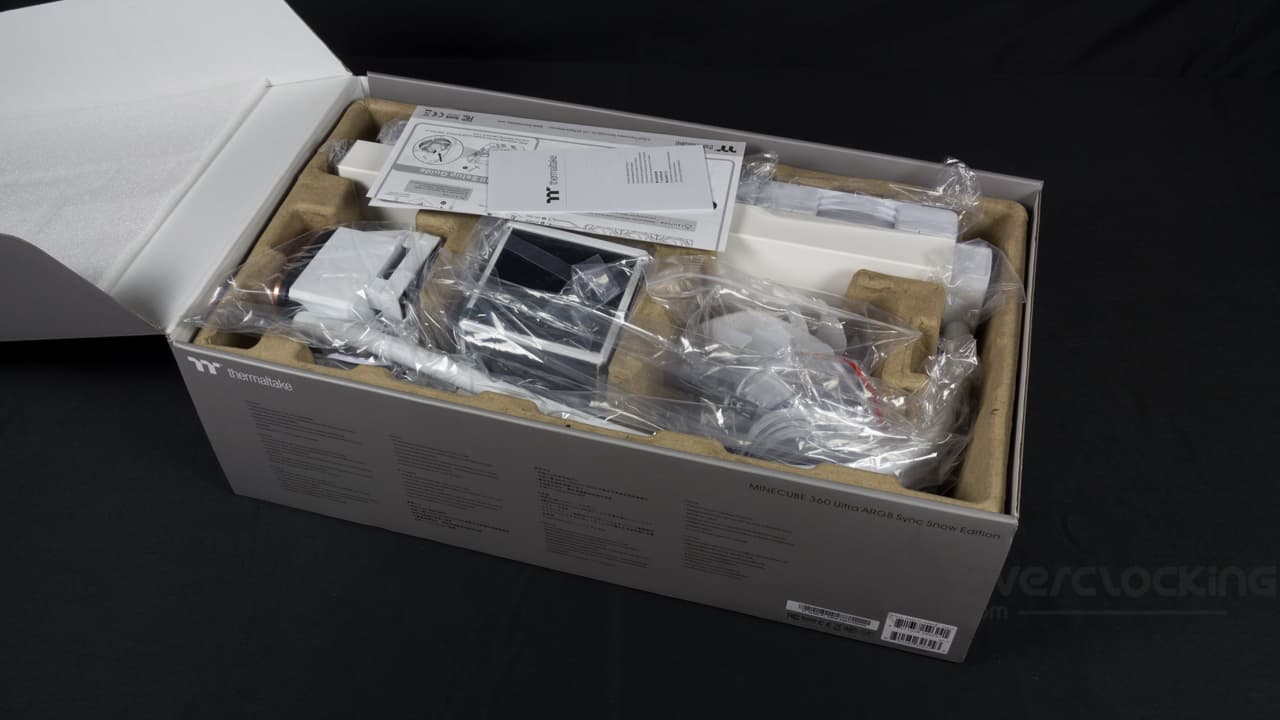
The packaging is classic, with a black and gray box featuring the kit and its functions/features on the back.
Inside, a cardboard mold and various plastic bags pack the AIO and its various components. In the meantime, it’s as efficient as ever, and everything arrives in good condition.
The radiator:
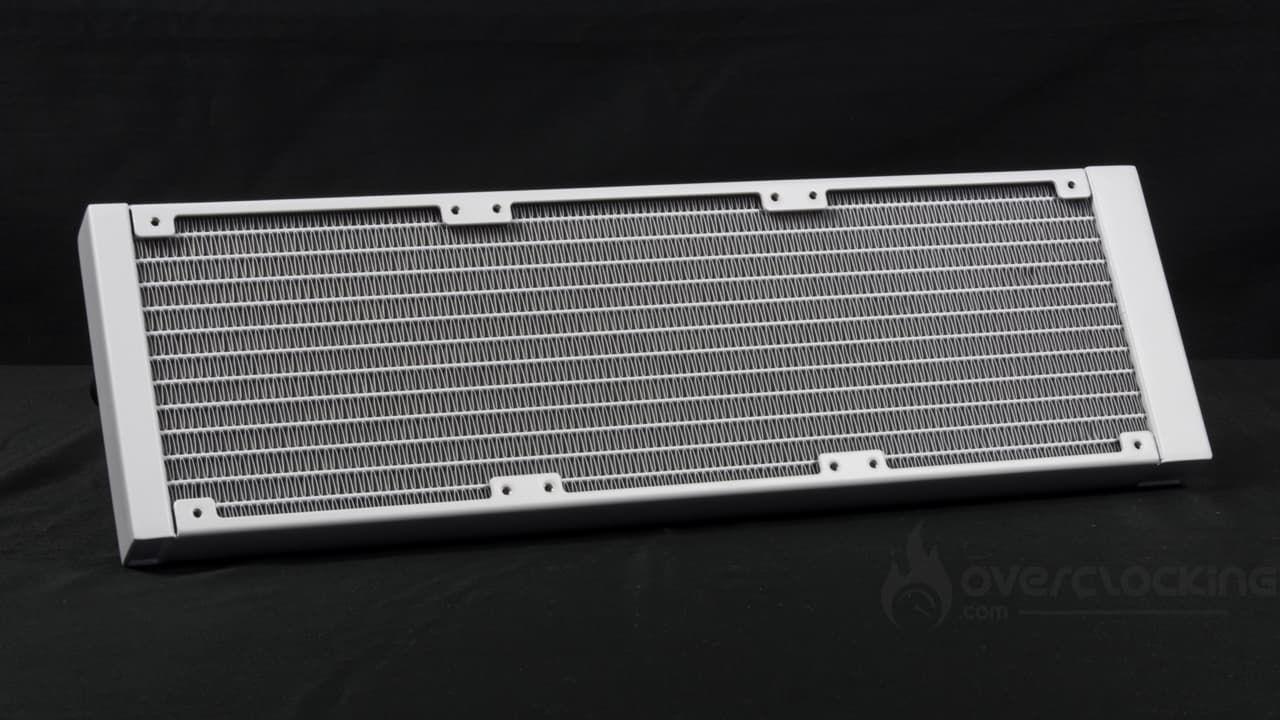 The radiator is completely standard, featuring a standard block in terms of dimensions, materials and construction. Indeed, this model is made of aluminum and measures 120 mm wide, 396 mm deep and 27 mm thick. Unlike an Enermax Liqmaxflo kit or an Arctic Liquid Freezer II, there are no unpleasant surprises during assembly… Especially at the front of a housing.
From a finishing point of view, there’s no particular criticism to be made here. The block has square corners and no visible rivets. The white coating is evenly applied and the fins do not stand out white. On the other hand, we would have liked to see a small logo on the side of the slices, to liven things up a little.
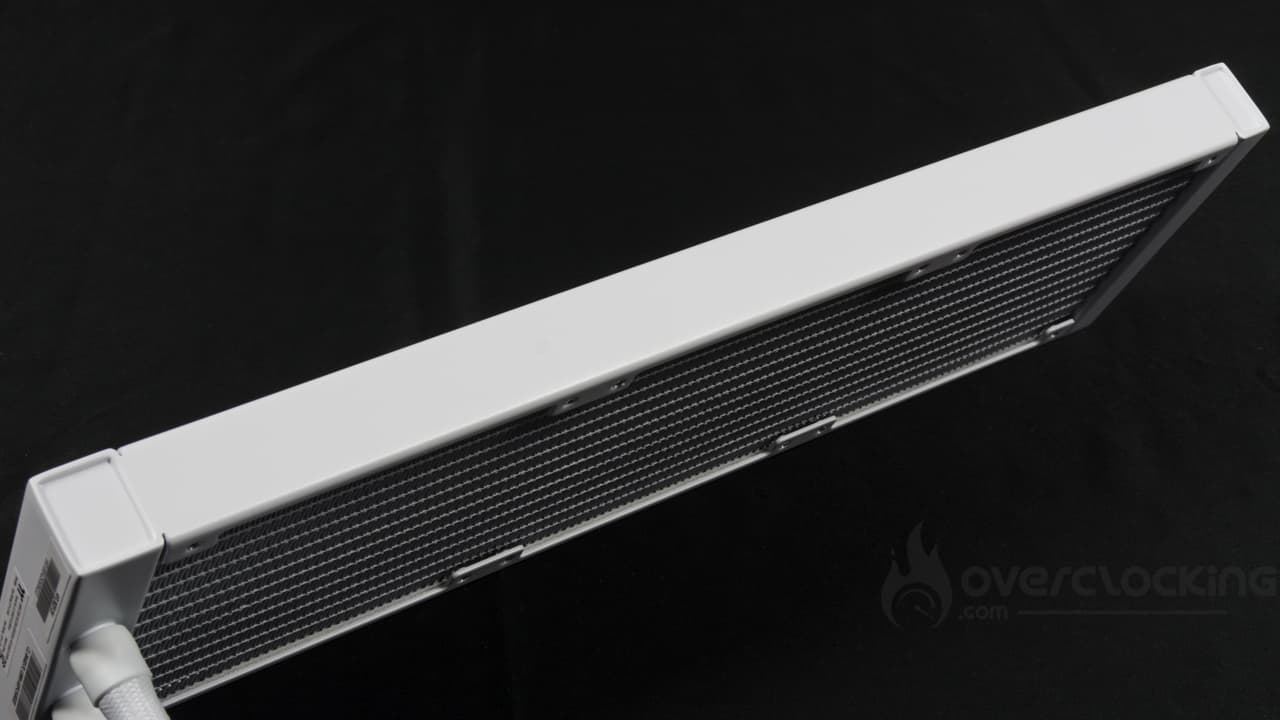 As for the Tubes, Thermaltake opts for two 46 cm-long models. That’s more than the usual 40 cm. Once again, there’s no problem with the finish, with the tubes featuring an attractive, finely braided nylon sheath.
The pump:
For its part, the pump unit, without the screen unit, offers quite reasonable dimensions, measuring 72 (W) x 72 (D) x 62 (H) mm… Approx. Once again, Thermaltake does not disclose the dimensions of its pump. However, when the display unit is fitted, things take a completely different turn. The unit is 88 mm square and 143 mm high. Clearly bigger than some air-cooling fans, a Pure Rock Slim 3 is less tall.
The pump cover then integrates four screens featuring a 3.95″ diagonal. Resolution is 720×720 px. However, the brand does not communicate on display frequency or brightness, for example.
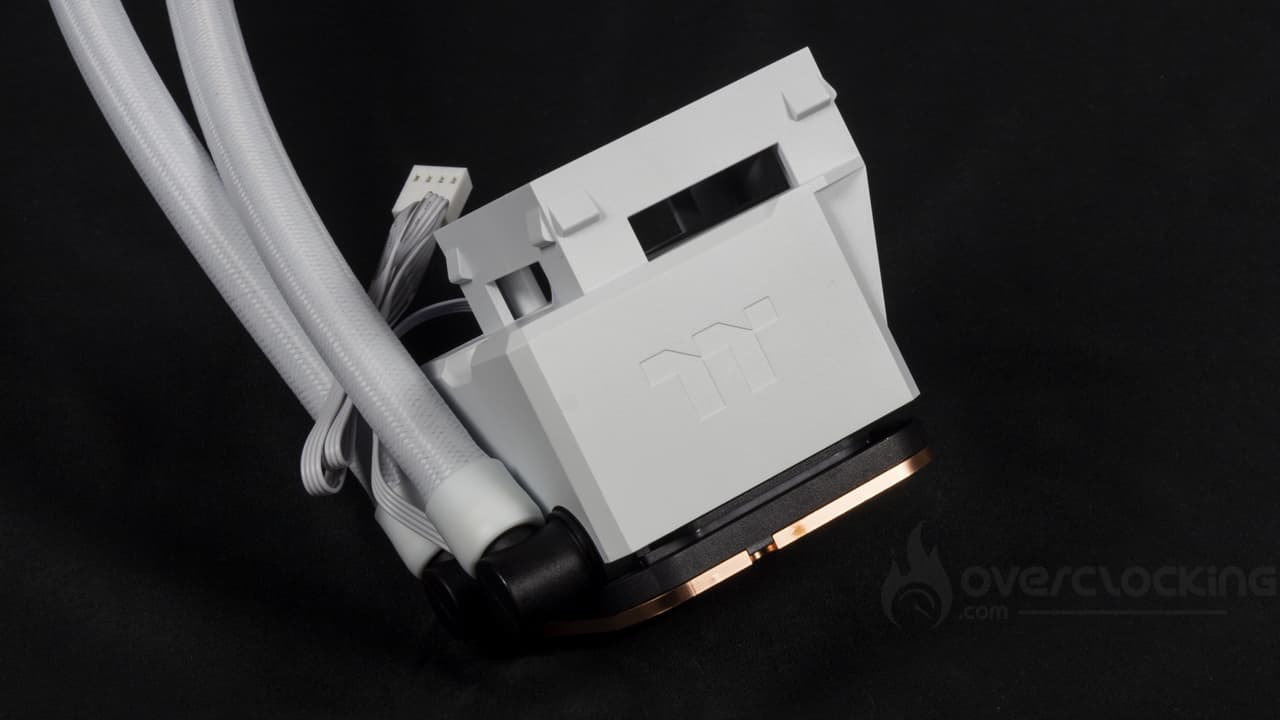
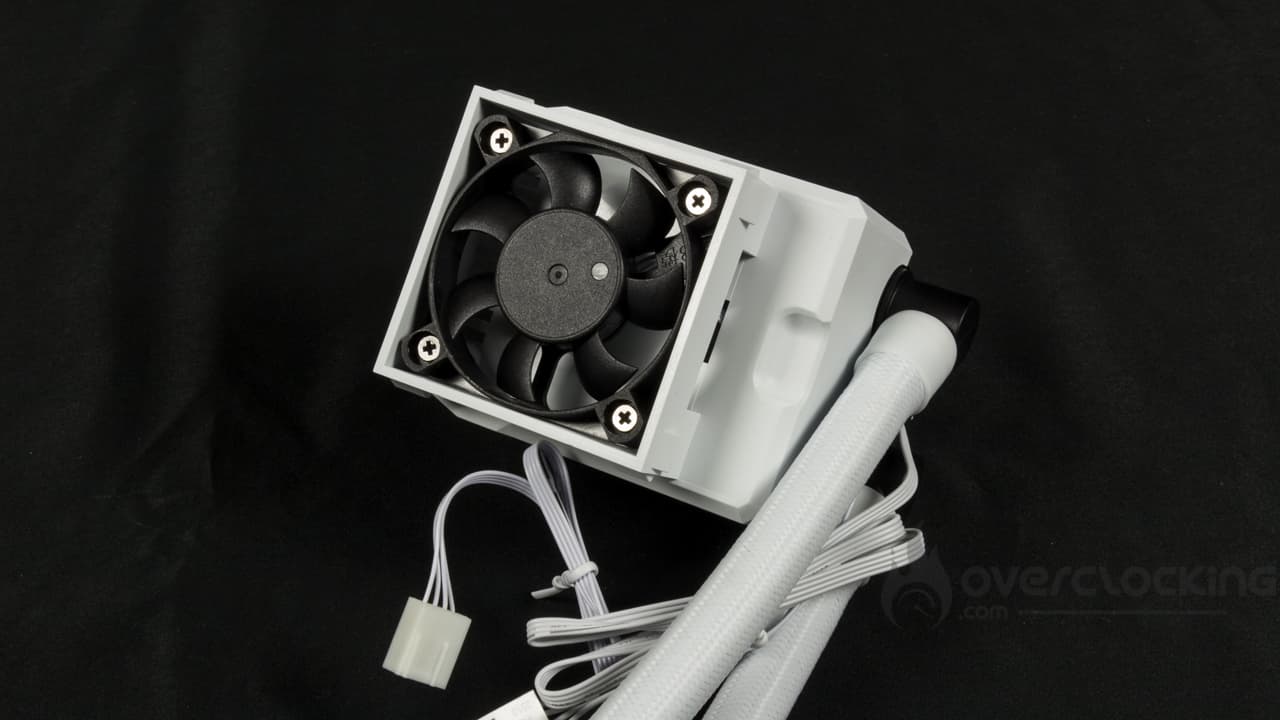
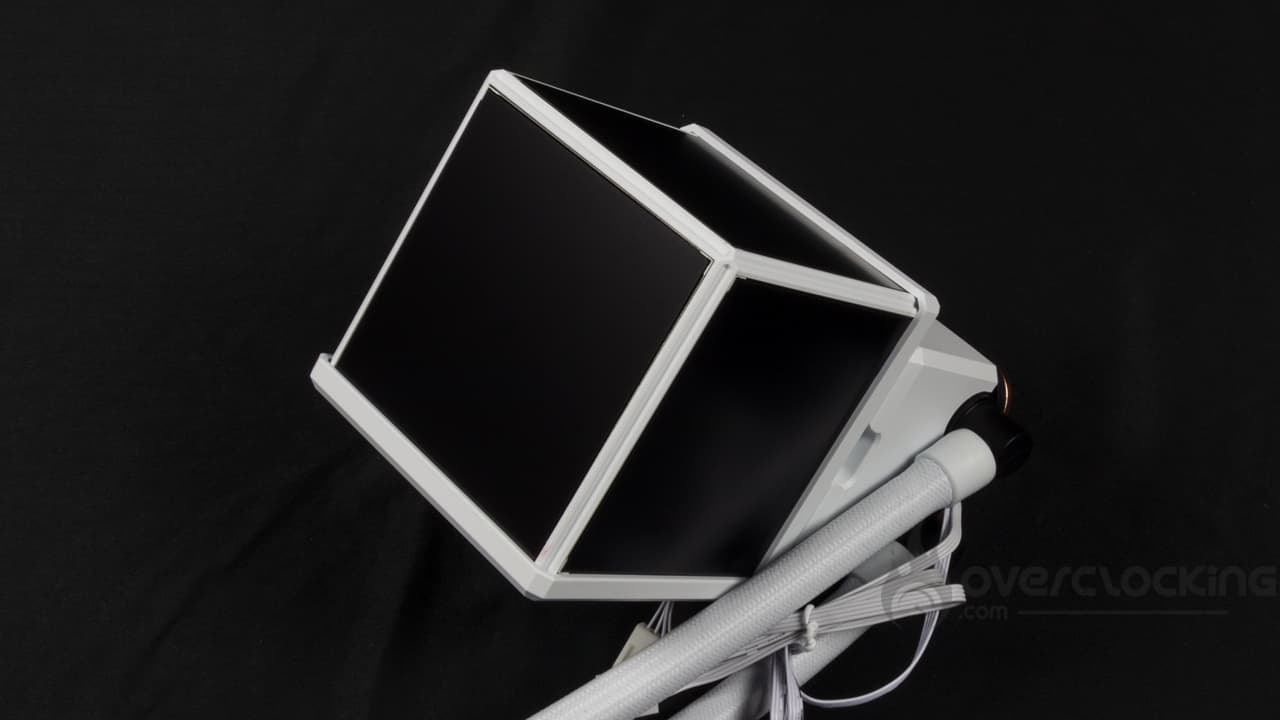
Without the screens, a small fan is present to cool the elements located around the socket. Memory and VRM heatsinks spring to mind. In all cases, this fan can reach 3500 rpm. At full speed, it will generate an airflow of 6.8 CFM and a static pressure of 1.5 mmH2O. It is powered by PWM and has its own cable.
The cold plate is, of course, made of copper. It is screwed to the rest of the block by eight Torx-head screws. The plate measures 60×65 mm and has been carefully treated. You won’t feel any traces of machining on your fingertips: it’s smooth and soft to the touch.
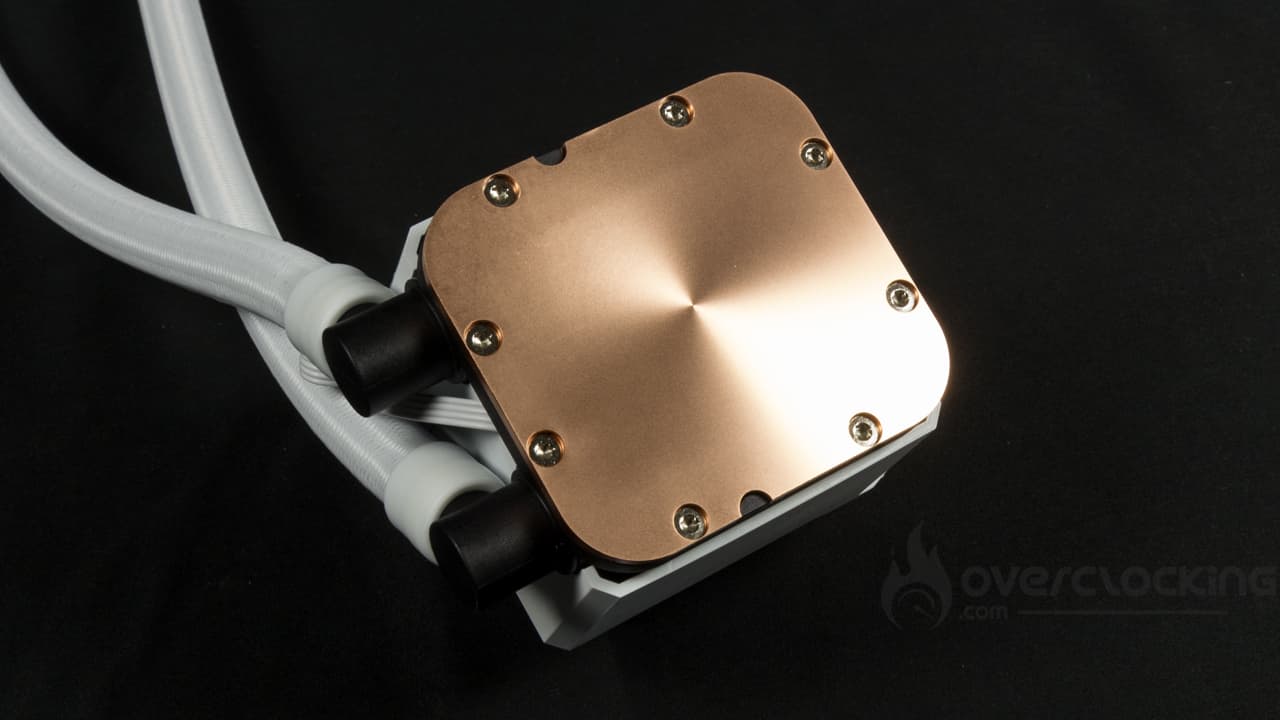 The pump benefits from a PWM-type power supply and boasts an operating speed of between 1500 and 3300 rpm. Once again, no precision is given as to flow rate, and the same goes for the water column.
On the other hand, beware of the number of cables, since once the screen block is in place, we end up with four connectors. There are already two PWMs for the pump and pump fan… But a SATA power supply and a micro-USB are also present at the screen output for powering and managing the latter.
Compatibility :
In terms of compatible platforms, Thermaltake offers support for :
- Intel: LGA-2066 – 2011 – 2011-3 – 1851 – 1700 – 1200 – 115x
- AMD: AM5 – AM4 – AM3 – AM3 – AM2 – AM2 – FM2 – FM1
Thermaltake offers excellent compatibility with current and past platforms. Special mention for AMD support, which goes all the way back to… 2006 (release of AM2). However, while compatibility with older Intel HEDT boards is included, there’s nothing for Threadripper motherboards, whose prerequisites are far more important.
Fans :
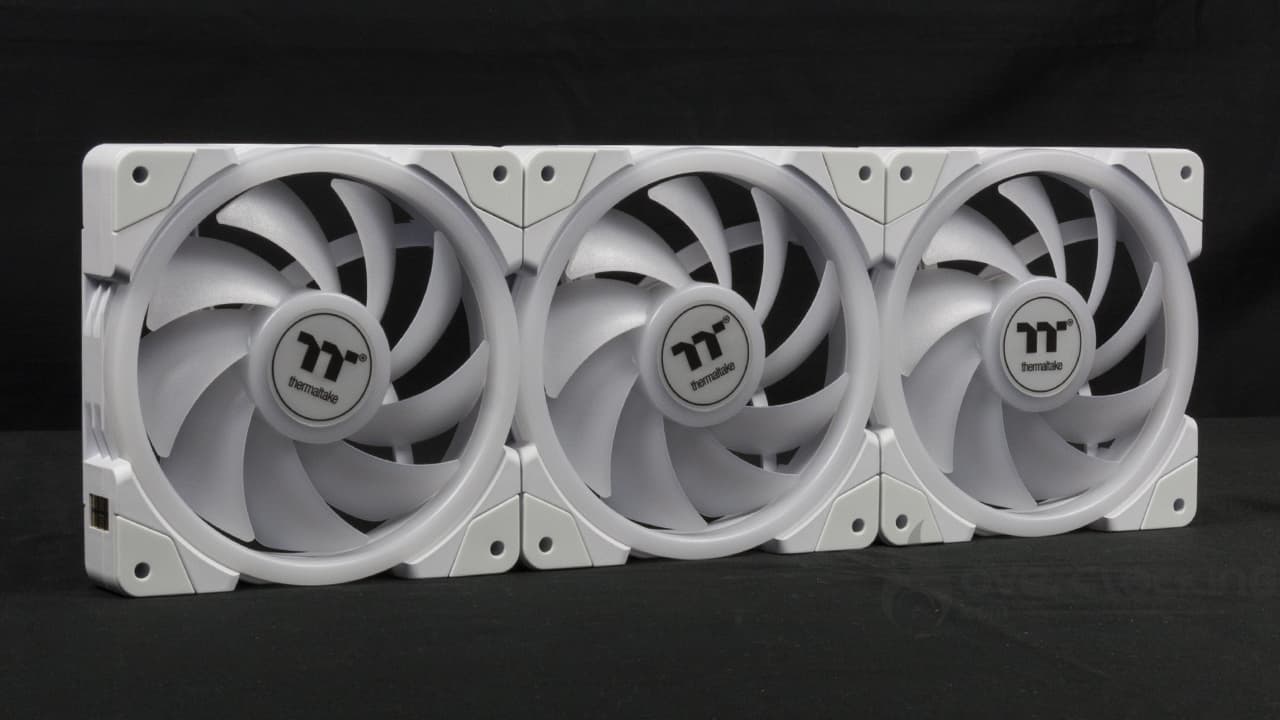
With this kit, ventilation is provided by a trio of Swafan Ex aRGB in 120 mm. As you can see, these have a rather massive appearance, reinforced by the presence of a thick frame and rather short blades. The latter, of which there are nine, are fairly thin and not very curved. Naturally, they are translucent to help diffuse the aRGB lighting. As for the frame, an imposing luminous ring stands out, while rubber silentblocks are present to attenuate vibrations.
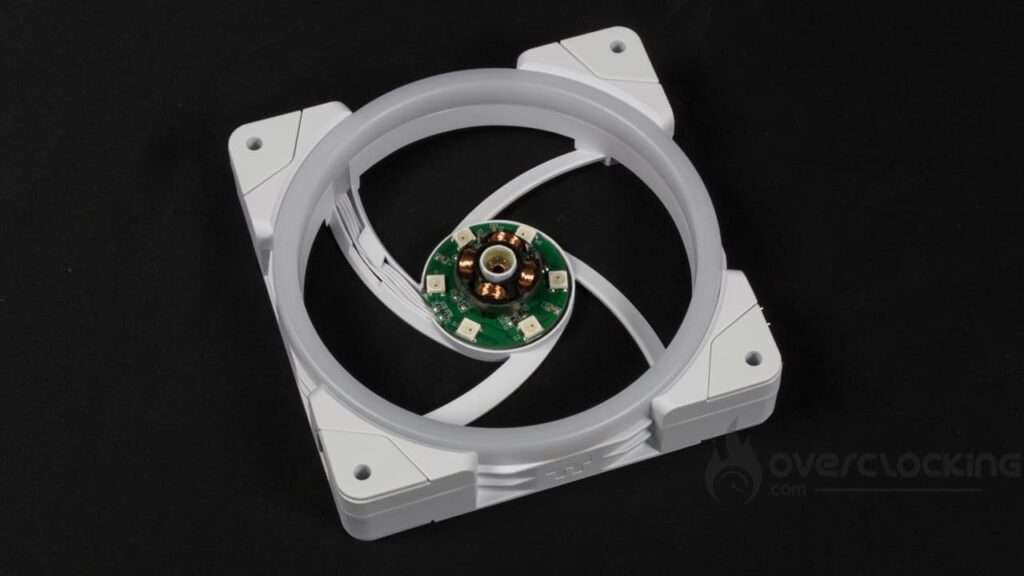
Another special feature is that fan connections are integrated directly into the frame. As a result, each mill has a pogo connector and contact pins for serial connection of the fans. Finally, a MagForce connector is present to connect the cluster to the motherboard.
Most importantly, Thermaltake supplies two sets of blades with its fans. There are classic blades fitted by default, and inverted blades. These are simply removed by turning the fan over and pushing on the blades. The new ones are inserted by inserting the shaft into the motor and pushing on it. At the very least, this guarantees simplified cleaning operations!
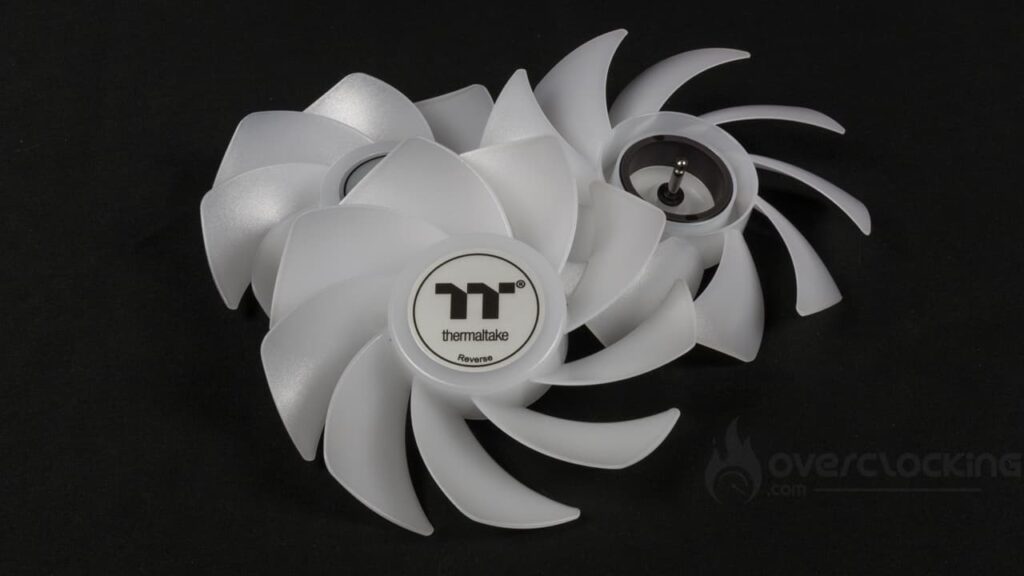
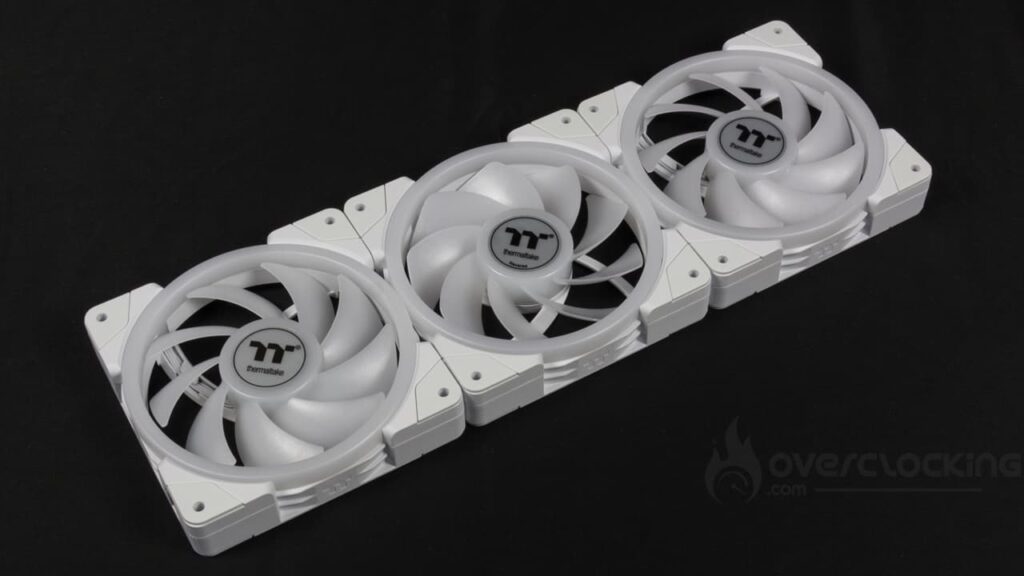
Thermaltake announces operating speeds of between 500 and 2000 rpm. The rest of the specifications highlight :
- Classic blades :
- Air flow: 57.11 CFM
- Static pressure: 2.39 mmH2O
- Inverted blades :
- Air flow: 56.26 CFM
- Static pressure: 2.02 mmH2O
Finally, the MagForce 2.0 connector ends in a PWM fan socket for connection to the motherboard for power and speed management. For aRGB lighting, there are two dedicated sockets, one male and one female, for serial connection to other equipment.
The bundle:
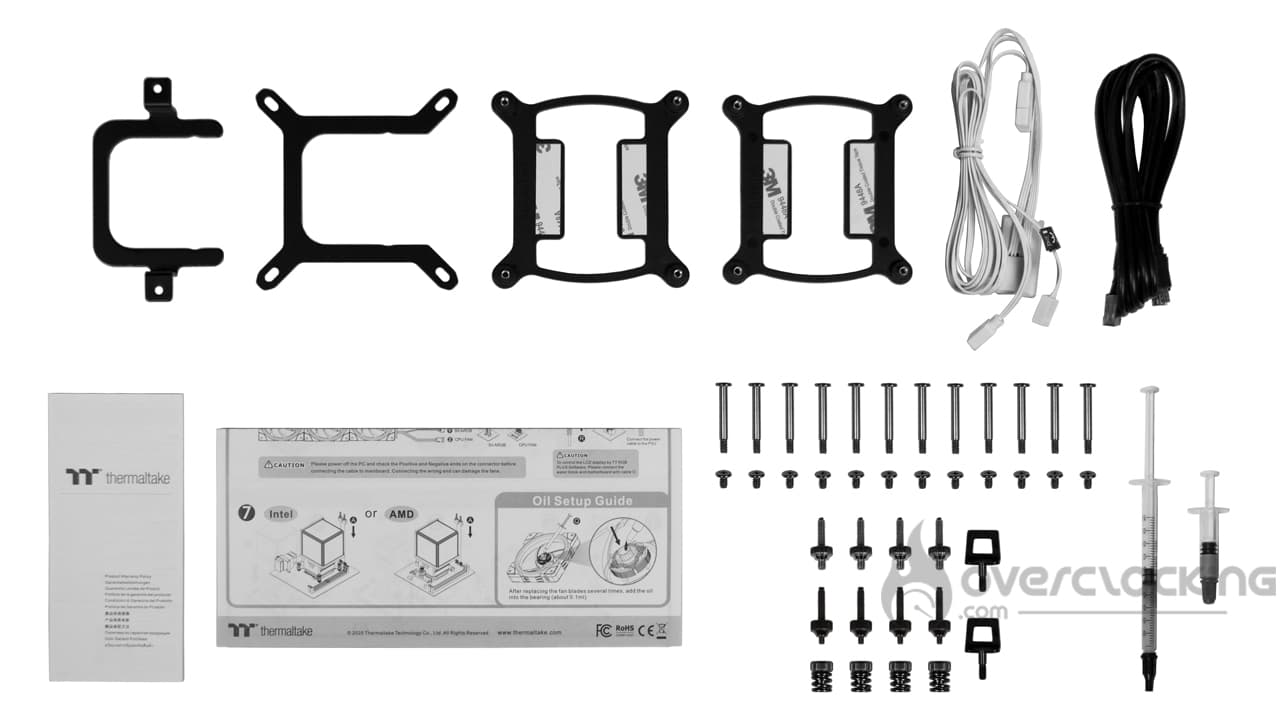
The accessory section is very comprehensive and features :
- AMD and Intel mounting arms
- LGA-1851/1700 and LGA-1200/115x Intel backplates
- Cable with MagForce 2.0 connector for fan connection
- USB cable for managing pump screens
- Warranty leaflet
- Assembly instructions
- Screws and bolts for fan/radiator/pump assembly
- A syringe of grease for the blades
- Syringe of thermal paste
The accessories section is complete, and Thermaltake supplies everything needed to grease the fan mechanics in the event of a blade change. Otherwise, you’ll find everything you need to deploy and operate the brand’s MineCube 360 Ultra aRGB Sync.
Roughly speaking:
In broad terms, the MineCube 360 Ultra aRGB Sync is an impressive piece of kit, especially its pump and numerous screens. Otherwise, the finish is flawless, and high-end fans are included. In short, we can’t wait to put it all together and power it up!
[nextpage title=”Installation”]
For installation, you’ll need to keep your AMD backplate, as Thermaltake doesn’t supply one. If you don’t have one any more, a quick look on eBay should enable you to find one easily.
Assembling the MineCube 360 Ultra aRGB :
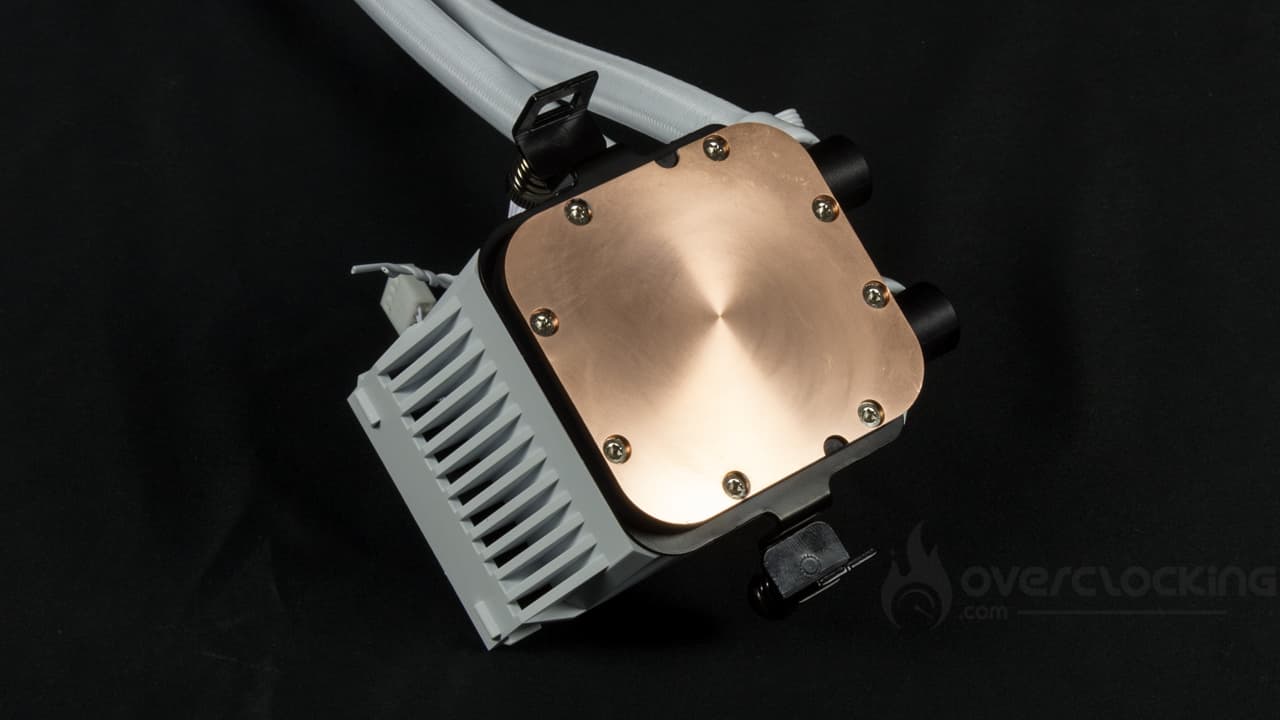
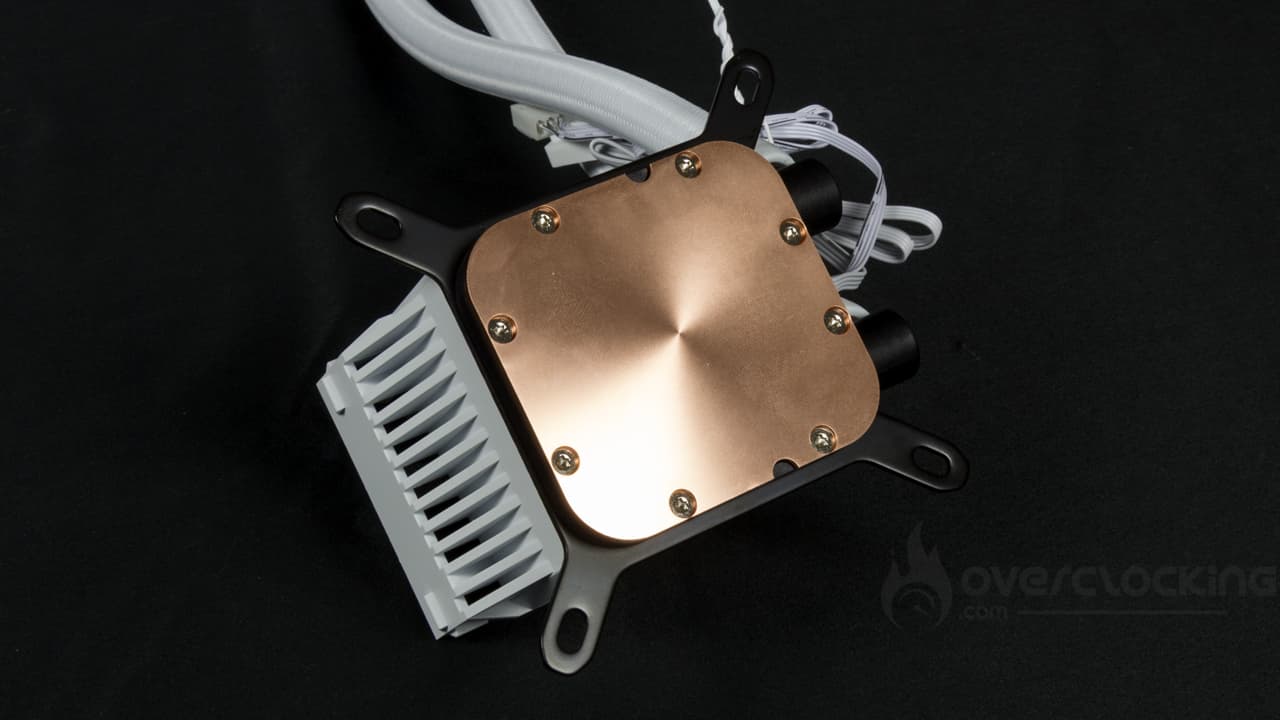
As far as assembly is concerned, the first step is to fit the right arms to your motherboard. To do this, simply insert them around the pump. The latter then has a dedicated groove. More specifically, if you have an AMD motherboard, you’ll need to start tightening the clamps. Be careful not to over-tighten, or you won’t be able to fit them onto the original AMD arms – a few turns will suffice.
Next, on the Intel side, you’ll need to position the correct backplate on the back of the motherboard, and then screw the spacers around the socket. The spacers for LGA-1000 sockets are black, while those for LGA-2000 are silver.
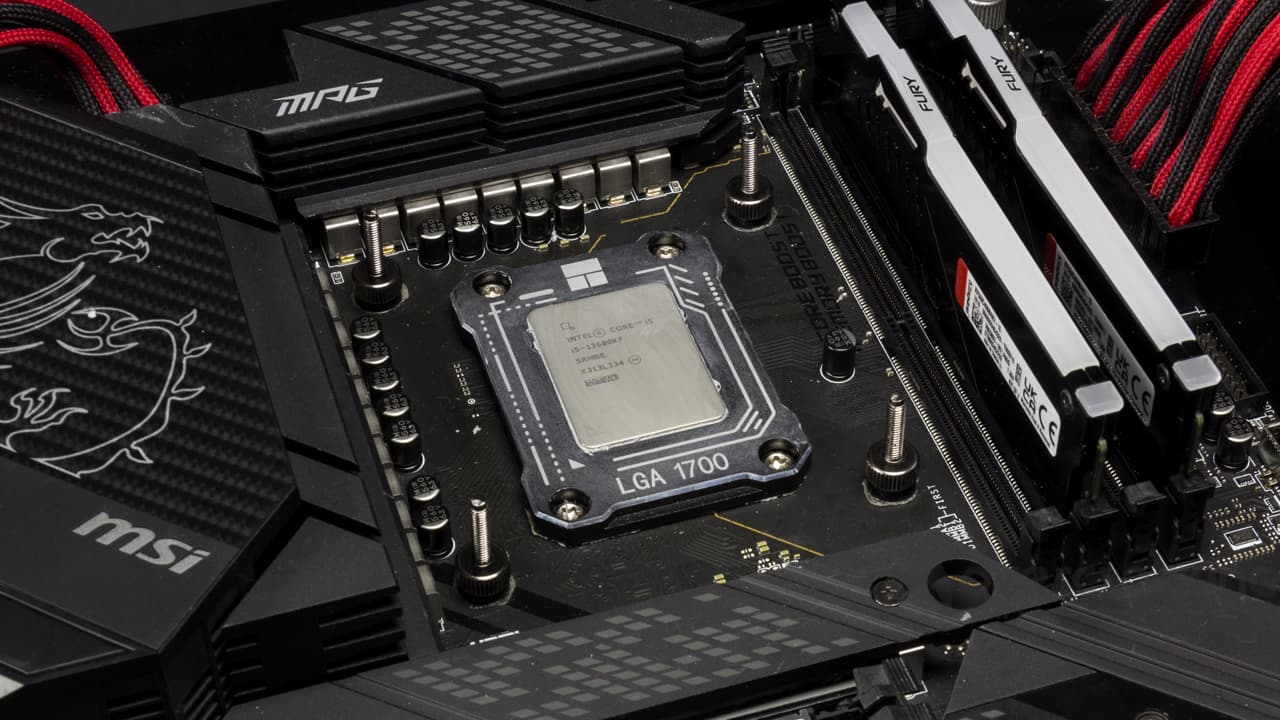
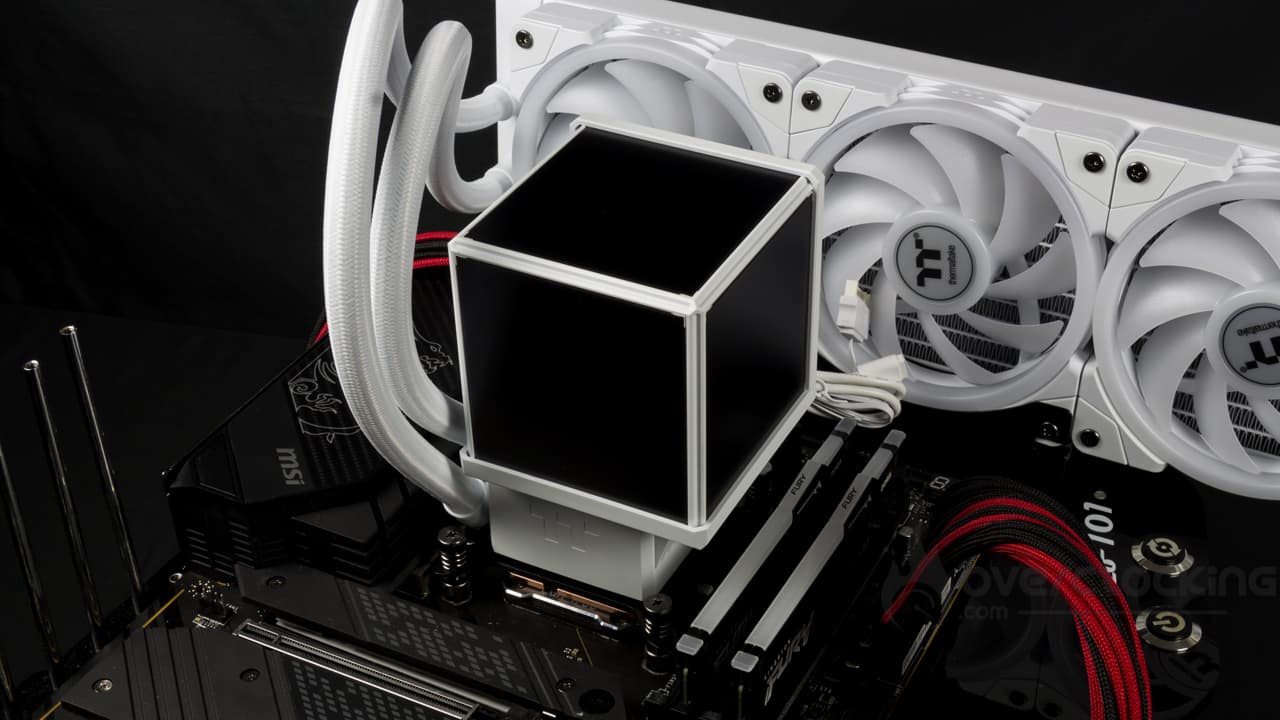
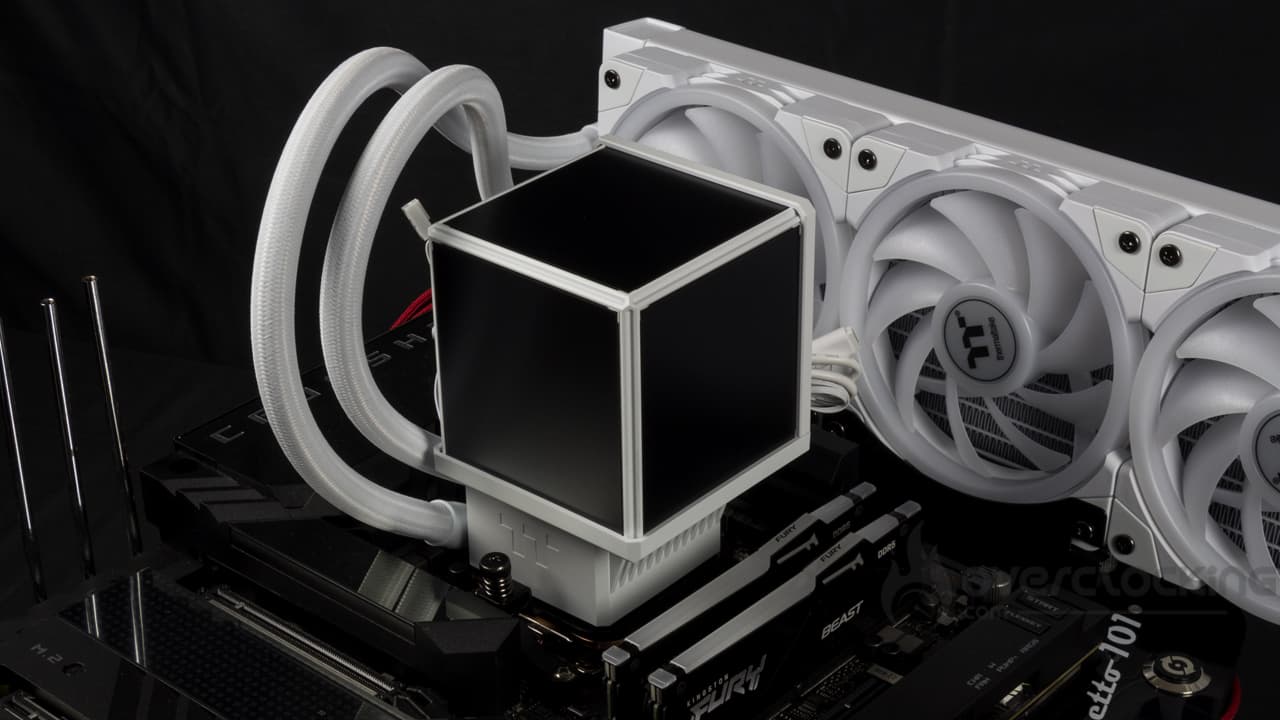 The next step is to position the pump on the CPU, having first applied thermal paste. On AMD platforms, you’ll need to tighten the hooks once they’ve been fitted into the motherboard’s original mounting arms. On Intel CPUs, screw the spring-loaded nuts onto the backplate spacers.
All that remains is to connect the kit. The fans benefit from a magnetic connector terminating in a four-pin PWM fan socket, as well as a dual aRGB male/female connector. On the pump side, we have two PWM fan sockets, one for the pump, the other for the pump fan. Finally, on the display side, a SATA socket is essential, while a micro-USB to USB 2.0 header adapter is required for connection to the motherboard.
The screen in action :
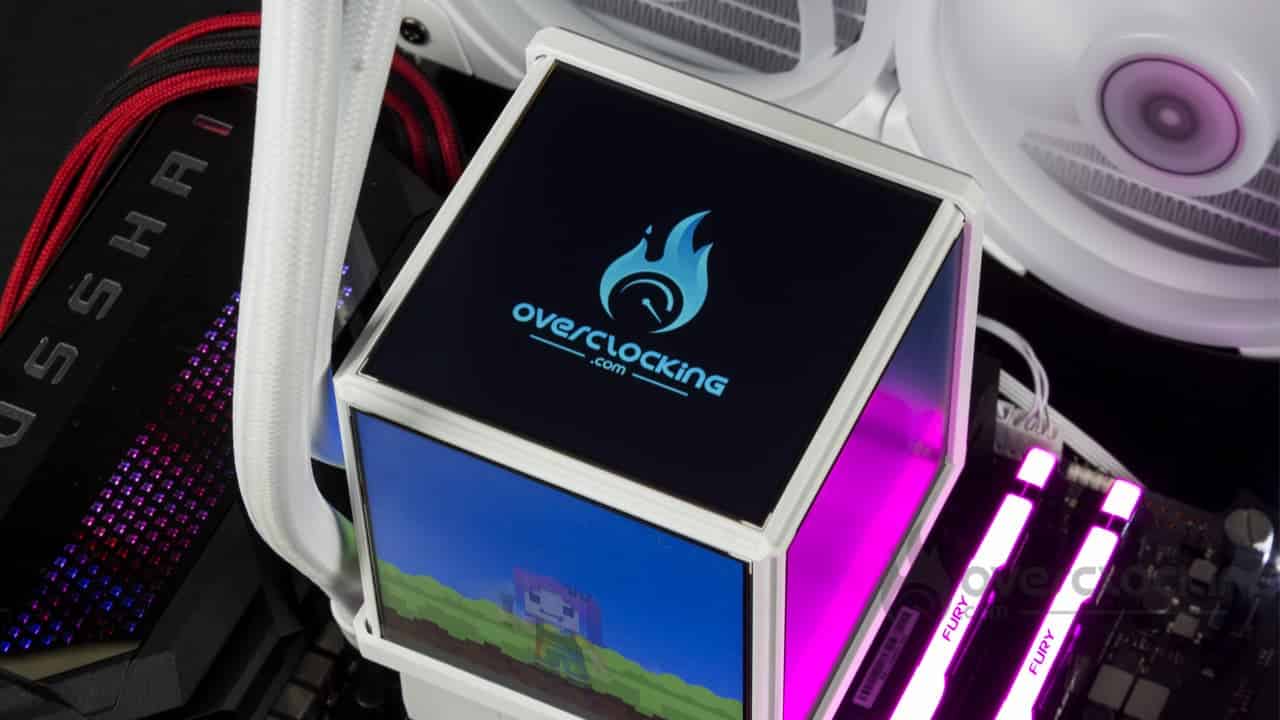 Truly, this screen block is very satisfying to look at, all the more so as Thermaltake offers some frankly sympathetic visuals by default like the Minecraft-themed one… The inspiration for which can clearly be felt in the AIO‘s name. Best of all, each screen can be managed independently, allowing you to display different things on each one. You can display a different visual on each one, or system information on each face with a different theme on each. In short, a permissive system that lets you customize your display as you wish.
[nextpage title=”Protocol”]
We offer you the readings taken on our Ryzen 7 7900X and i5 13600KF, consuming 105W and 170W for AMD and 125 and 170W for Intel. No 65W, as we don’t consider this consumption to be relevant for assessing the performance of watercooling kits.
Here, we now measure the delta between the temperature measured on our CPU and the ambient temperature. Finally, the management of fan speed is now entrusted to our motherboard. In the tests, we run the fans successively at 100%, 66% and 33%.

For test purposes, we’ll be comparing the Nautilus 360 RS LCD with other models in 240 mm, 280 mm, 360 mm and even 420 mm:
- iCUE H170i RGB (Corsair)
- LQ360 (DeepCool)
- Liquid Freezer II 240 (Arctic)
- MineCube 360 Ultra aRGB (Thermaltake)
- Nautilus 360 RS LCD (Corsair)
- Prime LC240 aRGB (ASUS)
- Prime LC360 LCD aRGB (ASUS)
- Pure Loop 3 LX 240 (be quiet!)
- Ryuo III 360 (ASUS)
- Silent Loop 3 420 (be quiet!)
[nextpage title=”Speed and noise”]
Fan speed :
We’re starting from scratch with our series of temperature readings. Let’s specify the fan speeds recorded during our readings (for 12V, 8V, 5V):
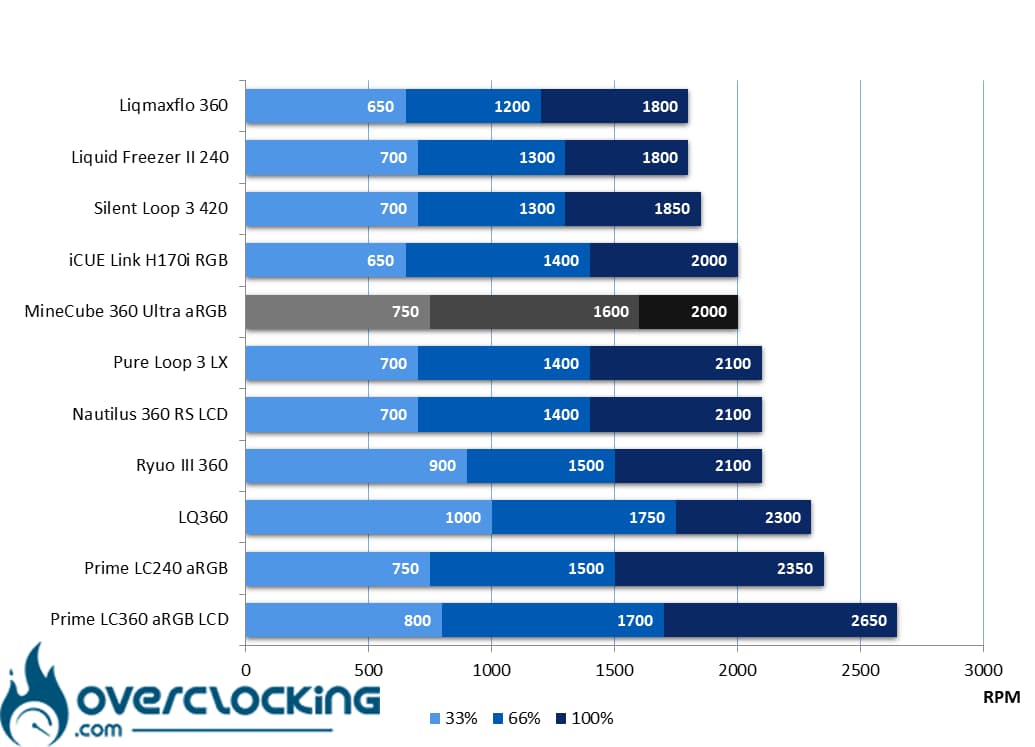 As far as operating speeds are concerned, the MineCube 360 Ultra aRGB runs at 2000 rpm at full speed. In itself, nothing surprising compared to its competitors. However, at 66% speed, 1600 rpm remains higher than average, while its 750 rpm at low speeds represents a certain normality.
Noise :
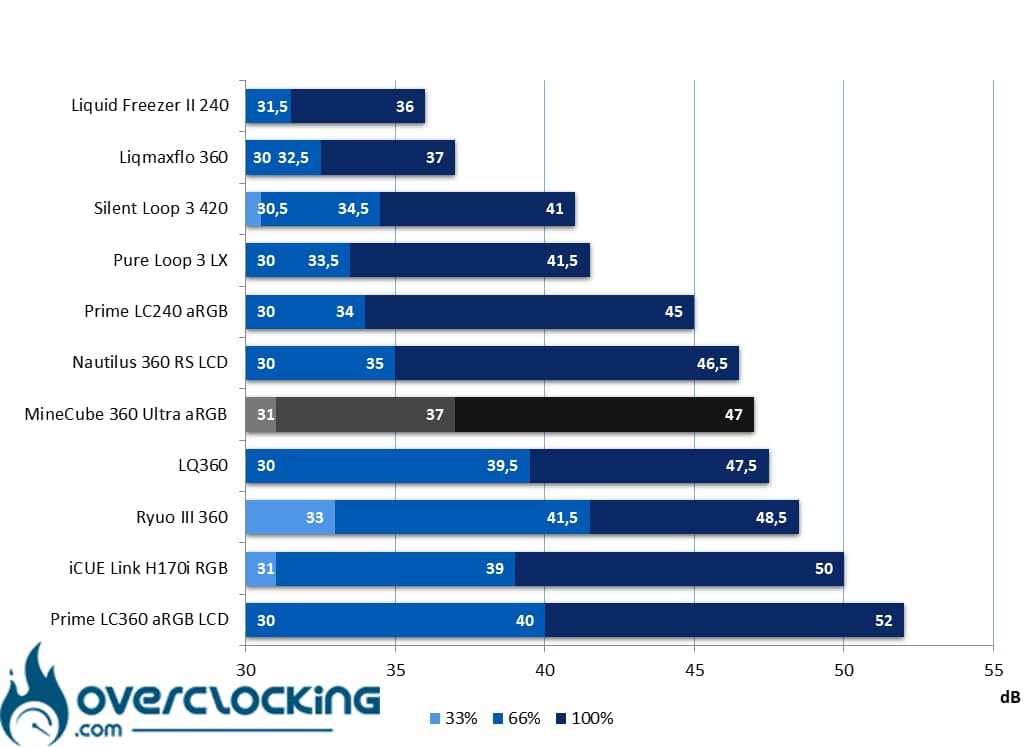 In terms of noise, the kit displays 47 dB at full throttle versus 37 dB at half throttle. At 33%, the noise level is 31 dB. In concrete terms, even if the values may seem high, the MineCube 360 Ultra aRGB doesn’t generate excessively unpleasant noise, although we would have appreciated more silence, especially at 66% speed.
[nextpage title=”AMD CPU temperatures”]
Processor at 105W :
Here, our CPU will run at 2.70 GHz constantly and on all its cores. We apply a VCore of 1,030 to obtain a power consumption of around 100 watts. This corresponds to the TDP of a Ryzen 7 7700X.
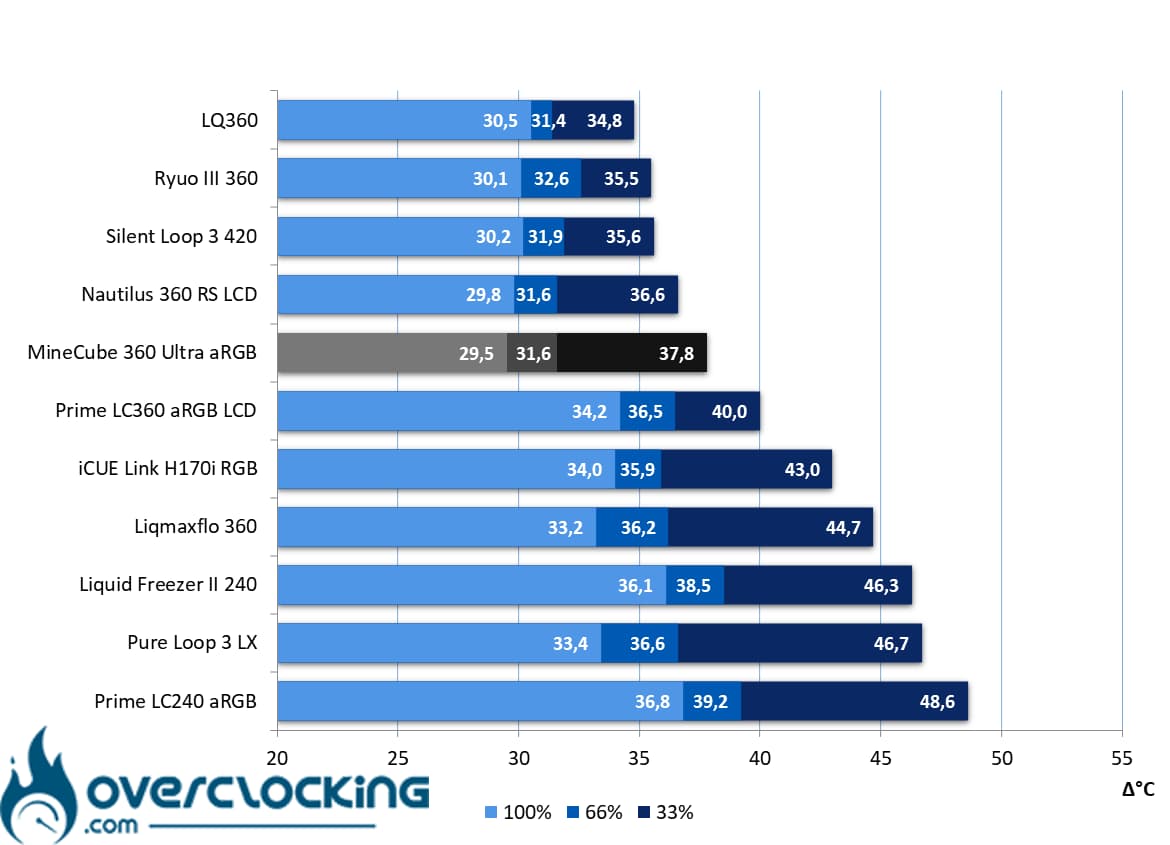 On our Ryzen 9 7900X, which consumes 105W, Thermaltake’s kit performs remarkably well, especially at 100% speed. As it is, it plays elbows with Corsair’s Nautilus 360 RS LCD… Ditto at 66%. At 33%, however, temperatures rise, placing it between the Nautilus and ASUS’s Prime LCD.
Processor at 170W :
Finally, we end with our 170W profile. Here the heat release is higher, and corresponds to the default TDP of the 7900X. Let’s see how our cooling fares!
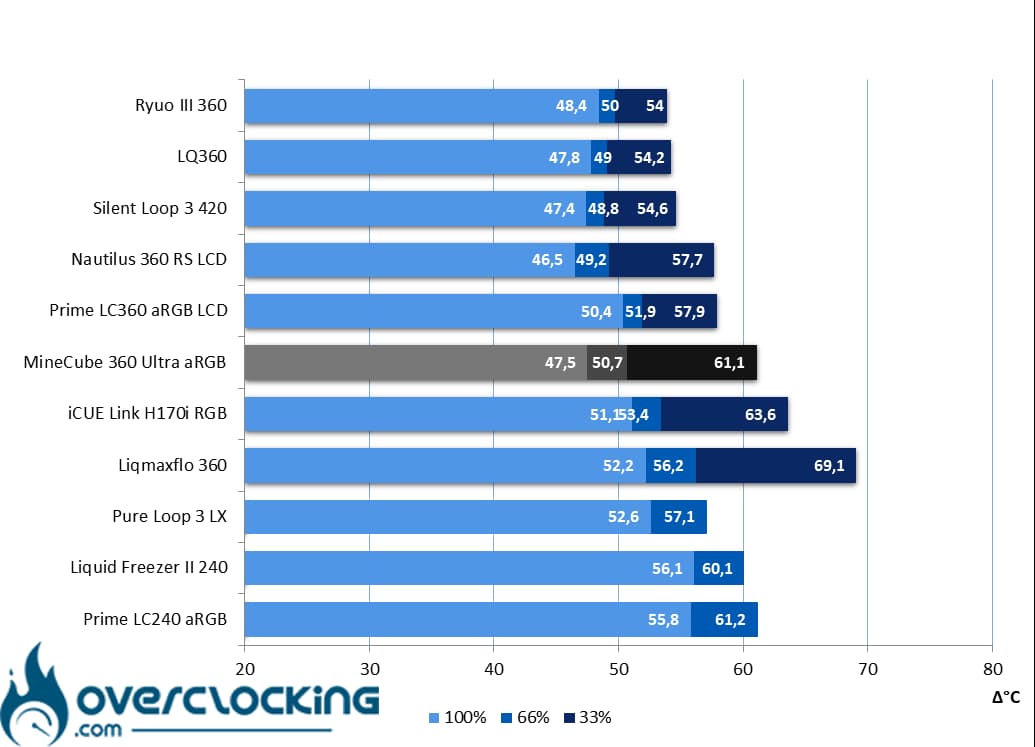 At 170W, the MineCube 360 Ultra aRGB is on a par with be quiet!’s Silent Loop 3 420 and ASUS’s Ryuo III 360 at higher speeds. However, at low speeds, the ASUS Prime LCD kit overtakes it.
Summary :
In broad terms, Thermaltake’s kit proves formidable when its fans are operating at their highest speeds. At low speeds, however, temperatures take off, and the kit is on a par with the more “standard” 360 mm AIOs .
[nextpage title=”AMD temperature/noise ratio”]
On these perf/noise ratio graphs, we remind you that it’s best to be positioned as far to the bottom left of the graph as possible. For ease of reading, the left-most point symbolizes 12V ventilation, the central one 8V, and the right-most 5V.
105W consumption :
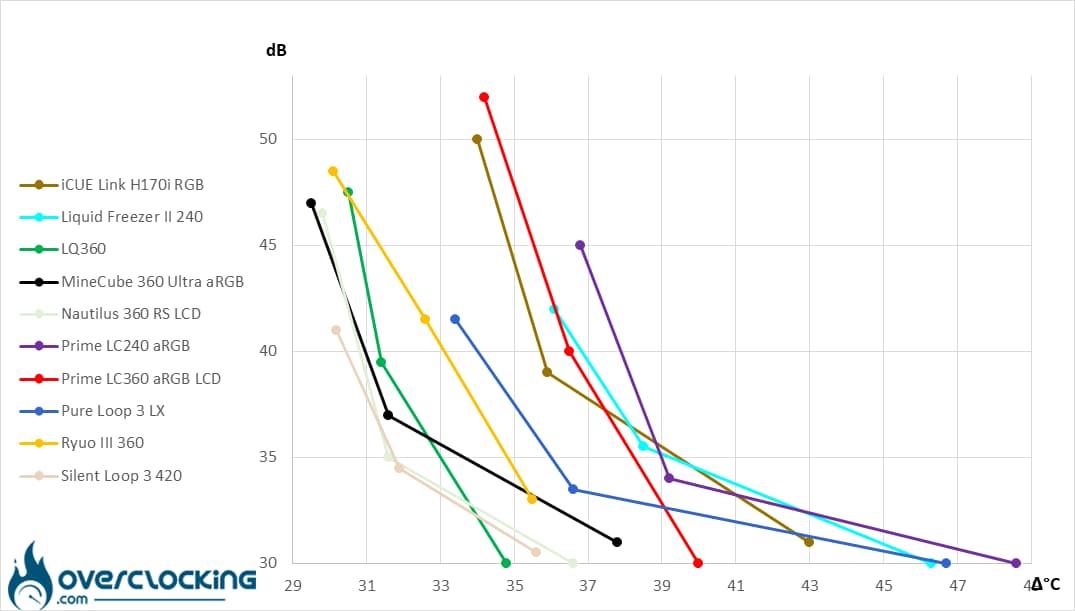 With a power consumption of 105W, Thermaltake’s MineCube 360 Ultra aRGB rivals Corsair’s Nautilus 360 RS LCD, while doing less well at low speeds.
170W power consumption :
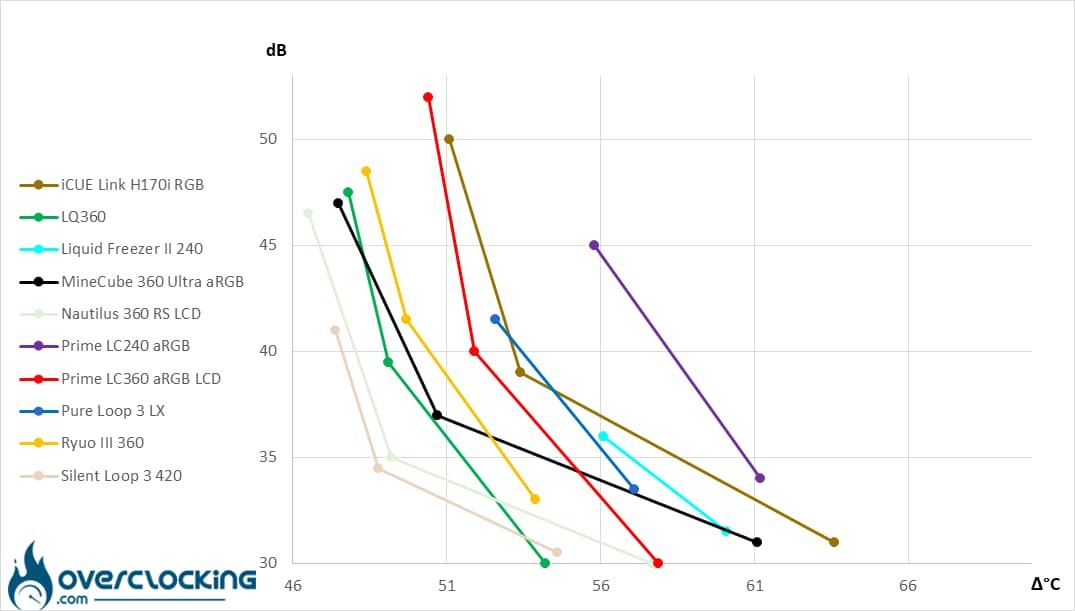 With a power consumption of 170W, the MineCube 360 aRGB LCD is on a par with DeepCool’s LQ360, a particularly efficient watercooling kit. However, the kit’s ventilation could do with a little more efficiency at low speeds. In these conditions, we prefer the Prime LC360 LCD from Asus.
[nextpage title=”Intel CPU temperatures”]
Processor at 125W :
Here, we’re taking our readings on a Core i5 13600KF, so power consumption reaches 125W. To achieve this, the P-Cores run at 4.5 GHz with the E-Cores operating at 3.5 GHz, while the VCore is set at 1.250V!
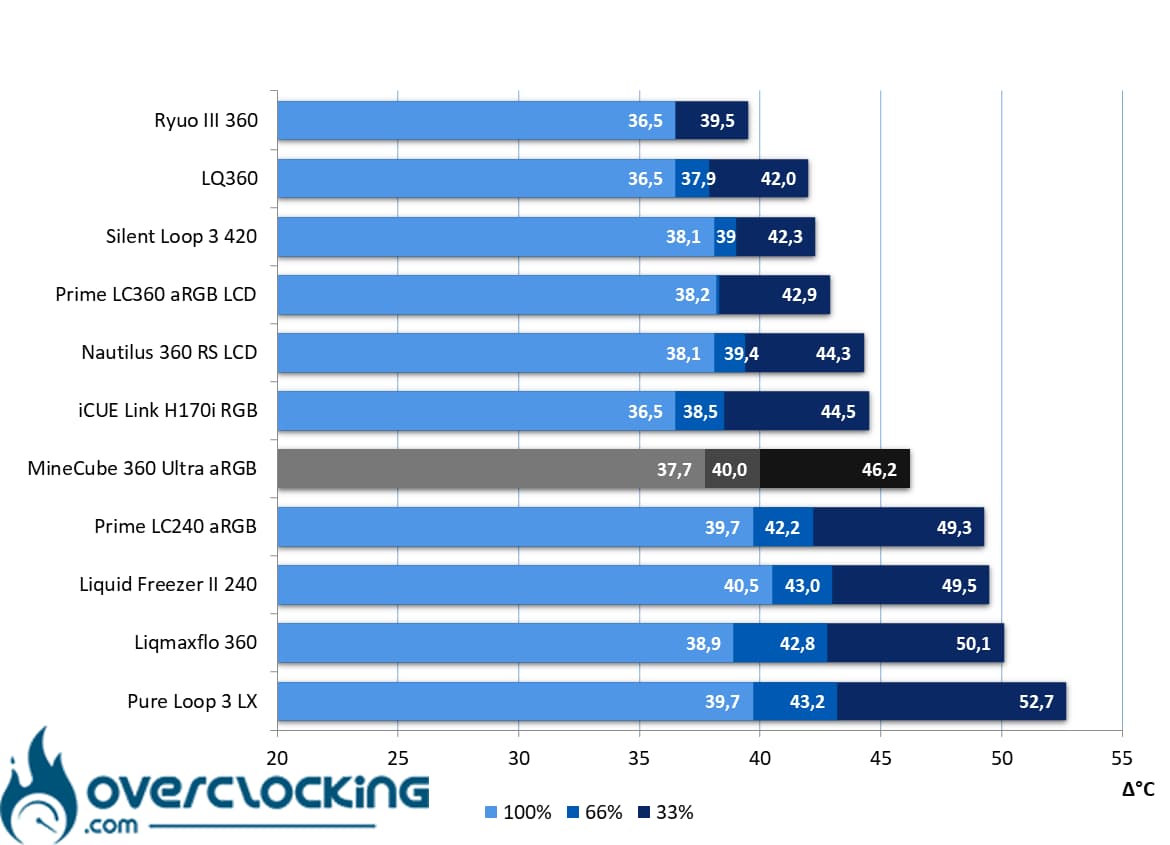 On our Intel CPU, which consumes 125W, the MineCube 360 Ultra aRGB positions itself aggressively at high speed, ending up doing as well as the ASUS Prime LC360 LCD aRGB at 66% and 33% PWM signal.
170W processor:
Here, we take our readings on a Core i5 13600KF, so power consumption reaches 170W. The P-Core runs at 5.00 GHz, the E-Core at 4.00 GHz and the VCore at 1.350V!
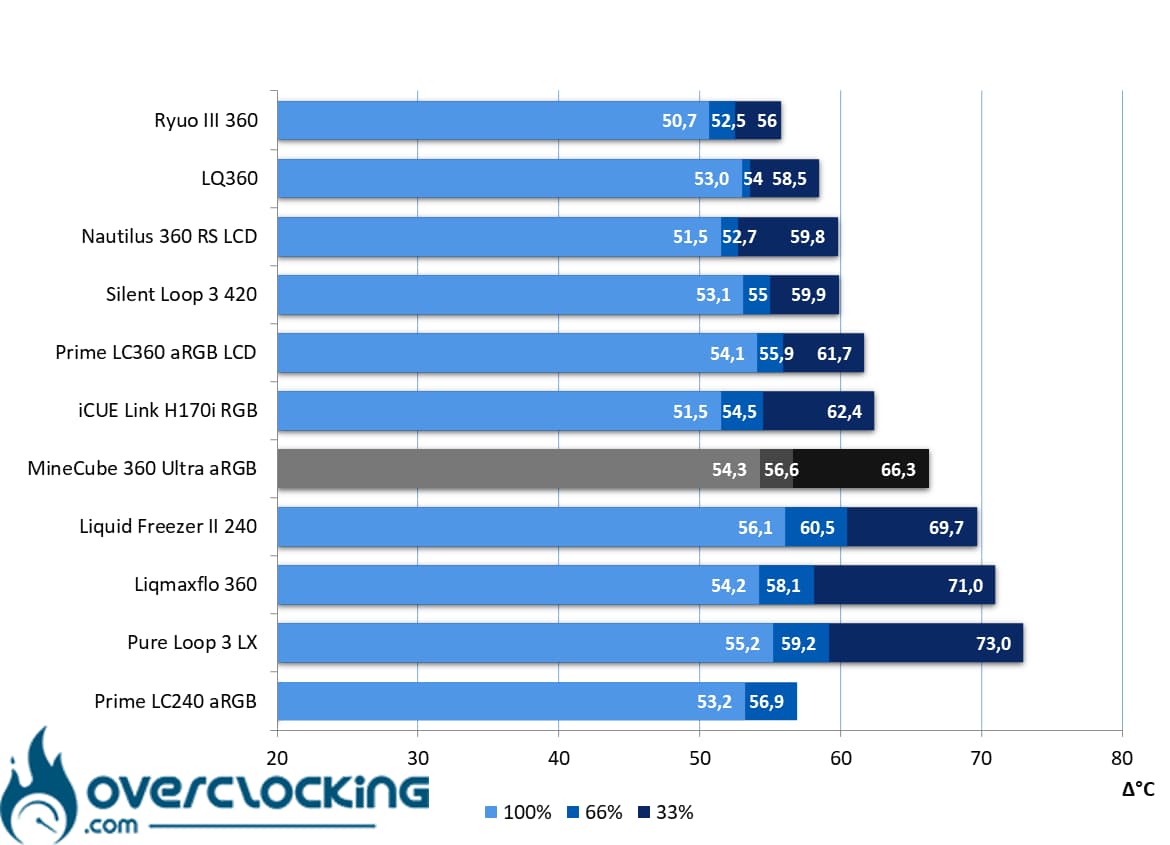 When consumption reaches 170W, Thermaltake’s kit is on a par with Enermax’s Liqmaxflo 360 at high speed, while it ranks ahead of a Liquid Freezer II 360 at low revs, but behind Corsair’s H170i RGB!
Summary :
On Intel processors, results are mixed, with a kit that holds up quite well at high speeds, but lags behind at low speeds, especially at high power consumption levels.
[nextpage title=”Intel temperature-to-noise ratio”]
On these perf/noise ratio graphs, we remind you that it’s best to be positioned as far to the bottom left of the graph as possible. For ease of reading, the leftmost point symbolizes 12V ventilation, the central one 8V ventilation and the rightmost 5V.
125W consumption :
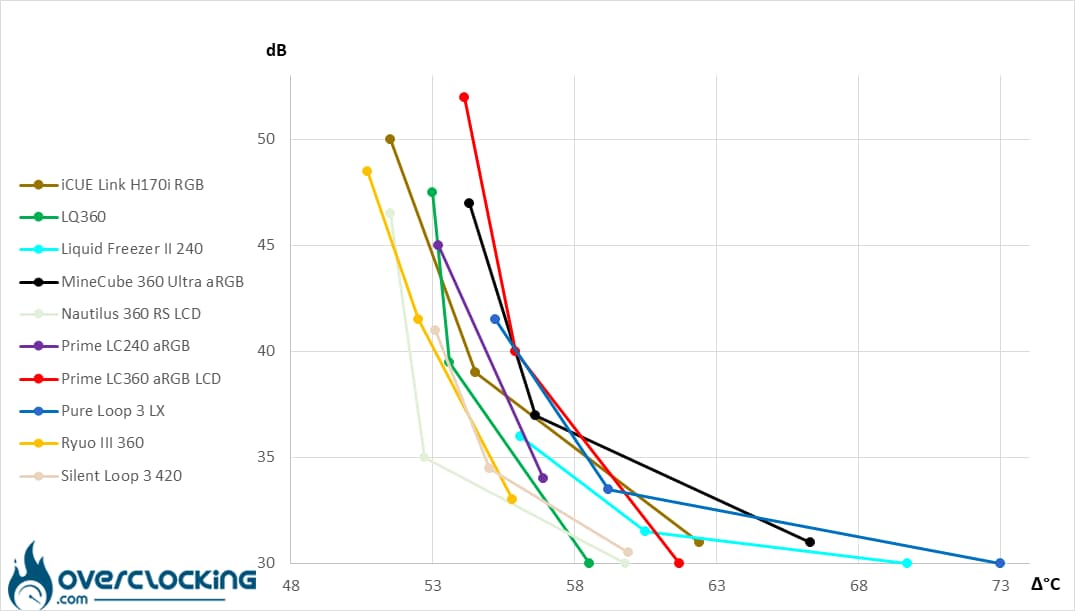 On 125W Intel CPUs, Thermaltake’s kit drowns in the mass of AIOs and doesn’t really stand out. It easily competes with 240 mm kits at low speeds, but doesn’t stand out at higher speeds.
170W power consumption:
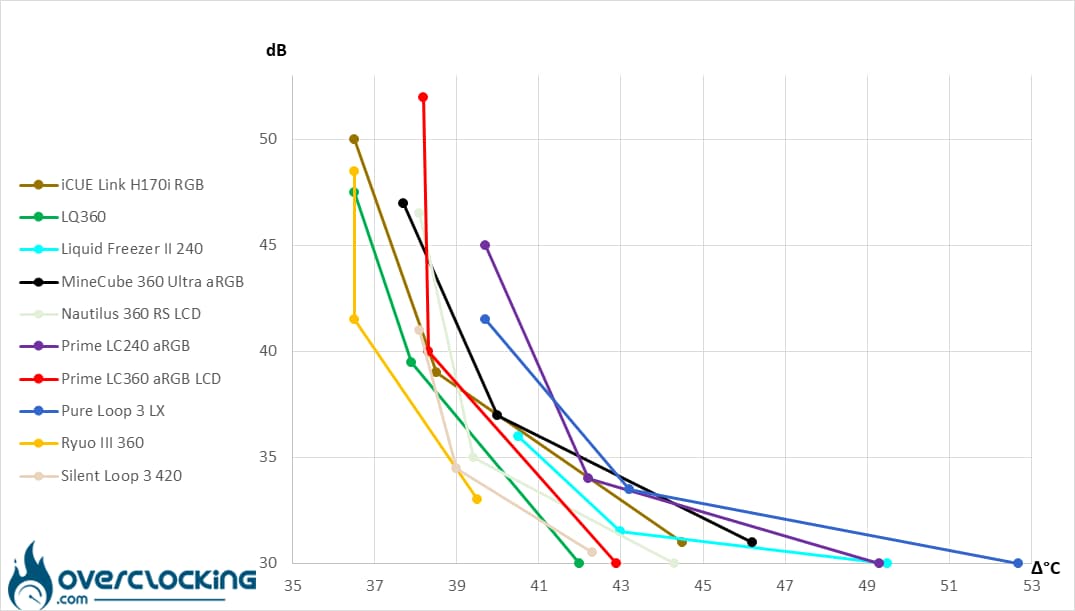 At 170W, we find a kit that easily dominates 240 mm AIOs like the Pure Loop 3 LX 240, Prime LC240 aRGB or Liquid Freezer II 240, however, it finds itself in trouble when compared to models equipped with three fans.
[nextpage title=”Conclusion”]
We’ve come to the end of this test of the MineCube 360 Ultra aRGB Sync. Are we dealing with a successful product? Let’s take a closer look!
Four screens on one pump!
Clearly, with this kit Thermaltake sets itself apart from the competition with an original concept: integrating four screens on a single pump unit. This means you can cover virtually every side of the MineCube 360 pump, and always have something to look at. Better still, the software lets you manage each screen independently or synchronize the display on each of them, while you can choose what to display where.
Beware, however, that this comes with a few drawbacks, not least in terms of size. In terms of height alone, the screen block is bigger than some aircooling fans.
Otherwise, the brand ticks all the boxes of a modern kit, with fans that connect in series in particular. Thermaltake goes a step further, supplying fans with interchangeable blades and everything needed for maintenance, such as grease for the bearings.
Assembly ok :
Mounting will pose no particular problem, as it’s the classic system for Intel processors. On the AMD side, the brand opts for an old-fashioned hook system. However, this ensures excellent compatibility with older AMD platforms, while assembly is a breeze.
Beware, however, as the pump’s imposing size poses a few challenges, especially when it comes to piping. Depending on the orientation of the pump, the hoses may come into contact with the screens, making assembly a little tricky.
More convincing on AMD sockets!
In terms of temperature/noise, we found this AIO more convincing on AMD processors. On our Ryzen 9 7900X, the latter offered a perfectly satisfactory level of performance, putting it on a par with the best kits when its fans were running at high speed. At low speeds, temperatures tend to rise more than on other 360 mm kits. On Intel processors, on the other hand, results are more mixed.
As far as noise is concerned, be careful not to push ventilation too high up the towers… However, the noise made by the fans is not the most unpleasant we’ve heard, unlike on other kits.
A price that reflects innovation:
Unfortunately, Thermaltake’s kit is not yet commercially available, but we do know its price: $369.90. It remains to be seen how this will translate into retail in France, but innovation comes at a cost, and that’s what Thermaltake is charging here. On the other hand, if you’re a fan of screens, you’re in for a treat.
Thermaltake MineCube 360 Ultra aRGB :
We like:
- The pump’s truly original design, with its four screens!
- Fans with interchangeable blades
- Inverted blades supplied with the kit
- Fans connected in series via magnetic connector
- Power-on performance!
- Complete accessories (grease for fans).
- Excellent compatibility with past AMD sockets
- Very good temperatures on AMD platforms
- Good temperature/noise ratio on our AMD CPU
What we didn’t like :
- The pump’s imposing dimensions!
- The pump’s size, which makes it difficult to position the pipes
- Only available in 360 mm
- Rather disappointing on Intel platform
- Elitist price, but justified by the concept


In the end, we choose to award silver to this Thermaltake kit. Admittedly, it’s an innovative kit (hence the double award), with a focus on the screens that have become so fashionable of late. However, the kit is not without its faults, and could be criticized for its lackluster performance on Intel CPUs, for example. The price will also be an obstacle, despite its elitist pricing. Otherwise, once powered up, the magic happens and you can have fun customizing it as you please. This is a kit we’d recommend for AMD CPUs!
Many thanks to Thermaltake!

