
Today, we’re reviewing Microsoft’s Surface Laptop Go 3 portable tablet PC. This is a minimalist laptop with a 3:2 touchscreen format. Its aim is to offer maximum autonomy for purely nomadic use, with the added bonus of touch functionality.
The Microsoft Surface Laptop Go 3 is available for €899 in its i5-1235U version, 256 GB SSD and 8 GB RAM. The version we’re testing here is priced at €1,149 with 16 GB RAM.
 Thanks to Microsoft for providing us with this copy.
[nextpage title=”The Microsoft Surface Laptop Go 3″]
The Surface Laptop Go 3 is a 12.4″ laptop, featuring a 1536x1024p IPS panel with a 60 Hz refresh rate. The processor is an Intel Core i5-1235U, accompanied by 16 GB of LPDDR5-4800 RAM, a 256 GB NVMe SSD and powered by a 40 Wh battery.


We start with the unpacking of the device, this notebook PC comes in a box with a very qualitative lid, inside, we have the notebook PC. Below this, we have the 39W charger.


The charger is a 39W power supply unit using a special long connector that must be plugged into the side of the device. We regret that Microsoft doesn’t use a USB Type C connector to recharge its Surface range. What’s more, on the Surface Laptop Go 3, this connector is rather poorly placed and difficult to access without lifting the laptop.
Presentation
To start with, we have the weight, with 1.13 kg on the scales, it holds perfectly in place and the screen can be opened with a single finger. The overall design is primarily anodized aluminum, and the screen is Corning Gorilla Glass 3. The base, meanwhile, is made of polycarbonate resin and aluminum with fiberglass. All in all, this Surface Laptop Go 3 exudes quality and offers top-of-the-range performance for its price.


We begin our tour with the keyboard, basic but pleasant enough to use. With the rigidity of the laptop, the keyboard is quiet and responsive. At the top right of the keyboard is a fingerprint reader.


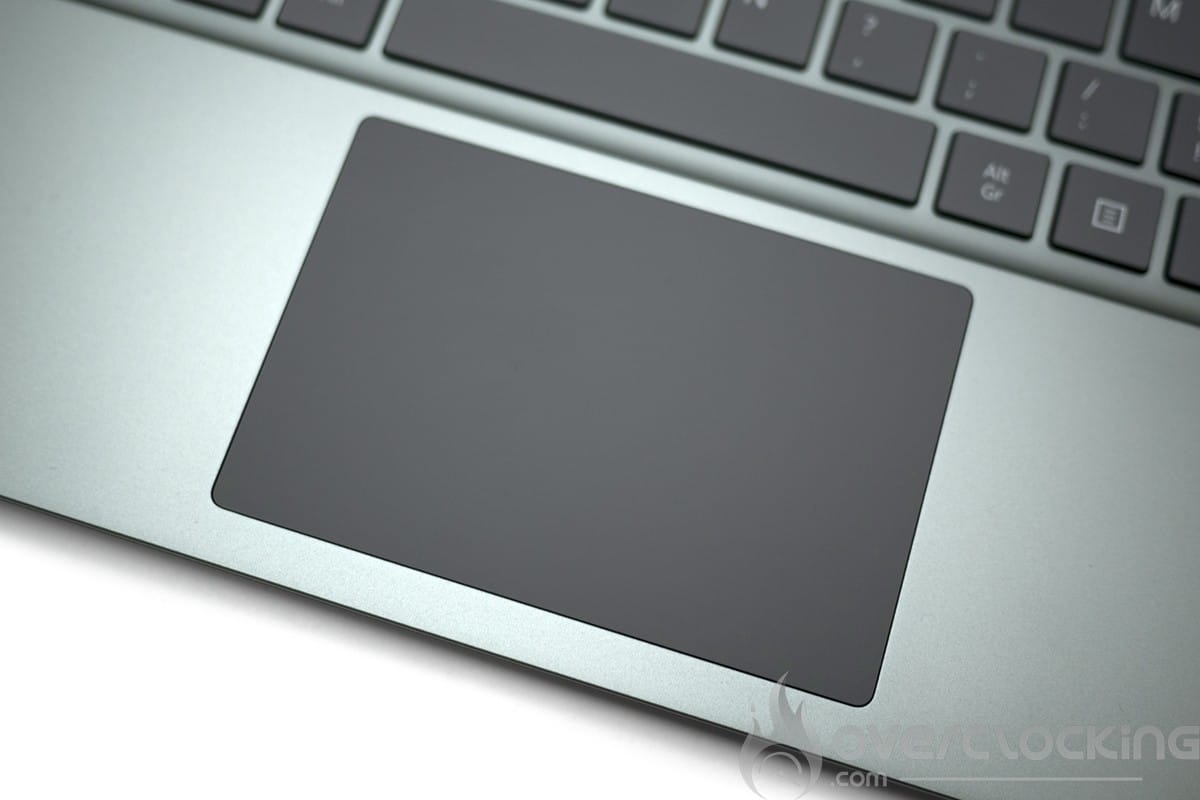
Moving on to the trackpad, this is extremely smooth and really pleasant to use. It’s large enough to use the laptop without a mouse. For efficient Windows navigation, you’ll need to choose this trackpad, as touchscreen navigation is not very optimized on Windows 11.
 As far as audio is concerned, there’s an audio zone above the keyboard under the screen, and that’s it.
Next, we come to the connectors, a minimalist solution with just 3 connectors if we exclude the charging port. So we have a USB type A 3.1 port and a USB type C 3.2 supporting charging, displayport and data. The final connector is a headset jack. Connectivity is therefore very limited, and we would have liked at least 2 USB type C ports and a micro SD card reader.


As for the camera, it’s an HD (30 fps @ 720p) without infrared, and is relatively acceptable for troubleshooting or videoconferencing.
[nextpage title=”Configuration overview”]
The configuration of this Surface Laptop Go 3 is based on an Intel Alder-lake platform. The CPU used (i5-1235U) is a low-power version, ideal for good autonomy.
The various components
We start with the CPU, motherboard and RAM, here on CPU-Z, we can see that the Surface Laptop Go 3 is equipped with an i5-1235U. For RAM, we’re talking about LPDDR5 chips for a maximum total capacity of 16 GB RAM, all running at 4800 Mt/s CL40. In this case, it’s impossible to change the amount of RAM after purchase, so you’ll have to choose carefully when configuring, but it’s hard to spend an extra €250 for just 8 GB. It’s about time they came up with more acceptable prices.

Let’s move on to the graphics card. Here we have an Intel Xe 80 sp solution, an IGP we’ve already come across on the PN64 from Asus. Don’t expect to do any gaming on it, or even rendering on a GPU.

For storage, we have a KIOXIA PCIe 3.0 x4. The performance of this WD SSD is rather disappointing, and this is likely to impact results in certain benchmarks and office use.

As for the screen, we’re on a 1536x1024p touch-sensitive IPS panel capable of 300 nits.
Disassembly, repair and upgrade
Disassembly involves removing 6 screws hidden behind the anti-slip pads, using plastic tools as found in ifixit kits. The battery must be disconnected for any modification or manipulation.

We’ve decided not to open this laptop, however, as we don’t want to risk damaging it without knowing exactly how it’s assembled. We’ll leave you with a step-by-step video from Microsoft explaining how to disassemble it.
From a modification point of view, after a few manipulations, we have access to a PCIe 4.0 x4 M.2 port in 2232 format.
[nextpage title=”Test protocol”]
The test protocol has been revised to offer something more complete. We now have software for autonomy measurements, as well as a thermal camera for surface heating measurements.
As far as video games are concerned, we’ve chosen not to include them, given the performance and orientation of this machine.
The protocol
- Screen measurements
- Autonomy and heating
- Synthetic CPU test
Cinebench R20
Cinebench R23
Geekbench 3
Geekbench 5
3DMark CPU Profile
Aida 64 - Synthetic GPU performance
3DMark Timespy
3DMark Timespy extreme
3DMark Firestrike
3DMark Firestrike Extreme
3DMark Firestrike Ultra
3DMark Speedway - Productivity performance
PCMark 10 Extented
PCMark 10 Applications test
Blender Benchmark
PugetBench Davinci Resolve
Tests were performed with Intel driver version 31.0.101.4953.
[nextpage title=”Screen measurement with probe”]
Screen measurements
We begin our test with the panel, and in order to find out the colorimetric quality of this screen out of the box, we took measurements of the screen.
It was tested on DisplayCal according to 51 color patches, with the sRGB profile as the target.

As can be seen, the calibration is rather disappointing from the outset, with 6500K for the expected 6500K, which is rather cold. Delta E is just 1.96% on average and 5.29% at maximum.
In terms of brightness, the screen is capable of 322 cd/m², with a contrast ratio of around 947:1.
The screen is therefore well calibrated, but shows some shortcomings in terms of brightness and contrast. It’s perfectly suited to office use and some photography.
[nextpage title=”Autonomy and heating”]
Autonomy
Battery life was measured using the PCMark10 integrated battery benchmark. The modes tested were video and productivity. Power management remained in normal mode. Screen brightness was set to 200Cd/m² without HDR, and sound was output via headphones plugged into the laptop’s jack.
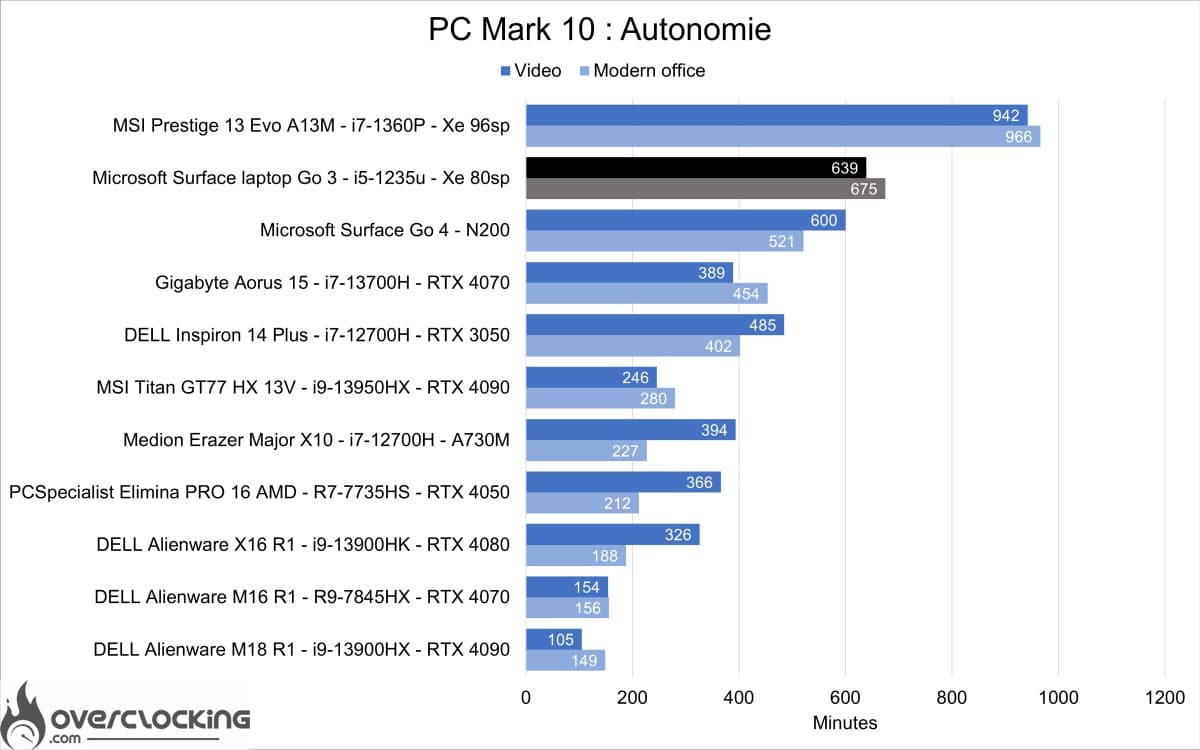
As you can see, we’ve got very good autonomy for a battery of just 40 Wh. Only the MSI prestige does better with its 72 Wh battery, and a 60 Wh battery could enable this Surface Laptop Go 3 to achieve the same results.
Heating
For heating, we used Cinebench R23. The CPU reached 94°C in the benchmark, with a consumption of 28 W and a frequency of 3300 MHz.
[nextpage title=”Synthetic CPU performance”]
Synthetic CPU performance
Let’s take a look at what this machine has to offer, starting with CPU and memory performance on a few synthetic benchmarks.
Cinebench R20

We start with Cinebench R20, here the 1235u displays rather low performance in correlation with its core configuration.
Cinebench R23

Continuing with Cinebench R23, here the 1235u remains unsurprisingly in the background.
Geekbench 3

On Geekbench 3, the 1235u still lags behind the Ryzen 7 5700u.
Geekbench 5

For Geekbench 5, the 1235u still lags behind, even if the gap is narrowing with AMD CPUs.
3DMark CPU Profile

On 3DMark CPU profile, this 1235u is well behind, performing almost twice as well as Intel CPUs with only 2 more Pcore.
Aida 64

For AIDA64, we’re mainly looking at RAM. Here, performance is rather disappointing in terms of latency, with over 150 ns. On the other hand, throughputs are quite high, particularly in write mode with over 71 Gb/s.
[nextpage title=”Synthetic GPU performance”]
Synthetic GPU performance
Now that we know the performance of the CPU part, we can move on to the GPU on a few synthetic benchmarks. Here, the IGP of the i5 1235u will be compared with that of the 12500H, both identical except for the lower frequency of 100 Mhz.
3DMark Timespy
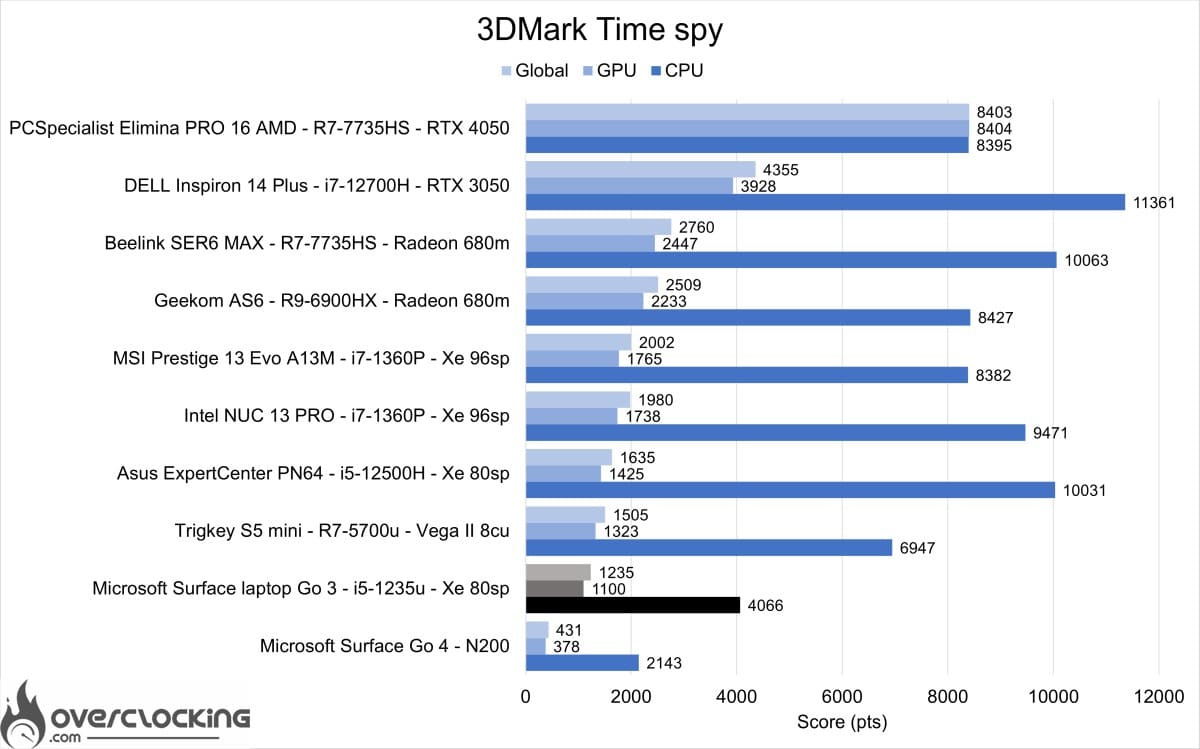
We start with 3DMark Time Spy, here the intel Xe 80 sp of this 1235u is 30% slower than that of the 12500H. This is a significant difference, even though the frequency difference on paper is only 8%.
3DMark Timespy extreme
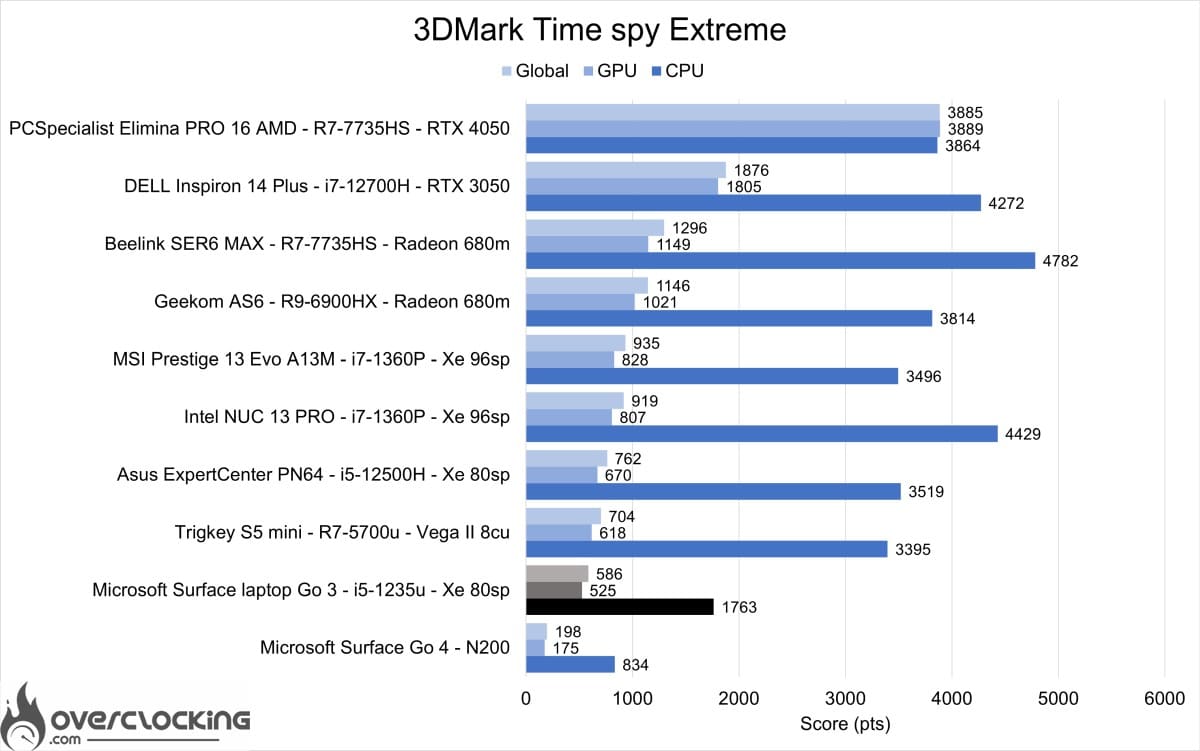
As with Time Spy, same observation. This discrepancy could potentially be due to the slower empty memory.
3DMark Firestrike, Extreme and Ultra
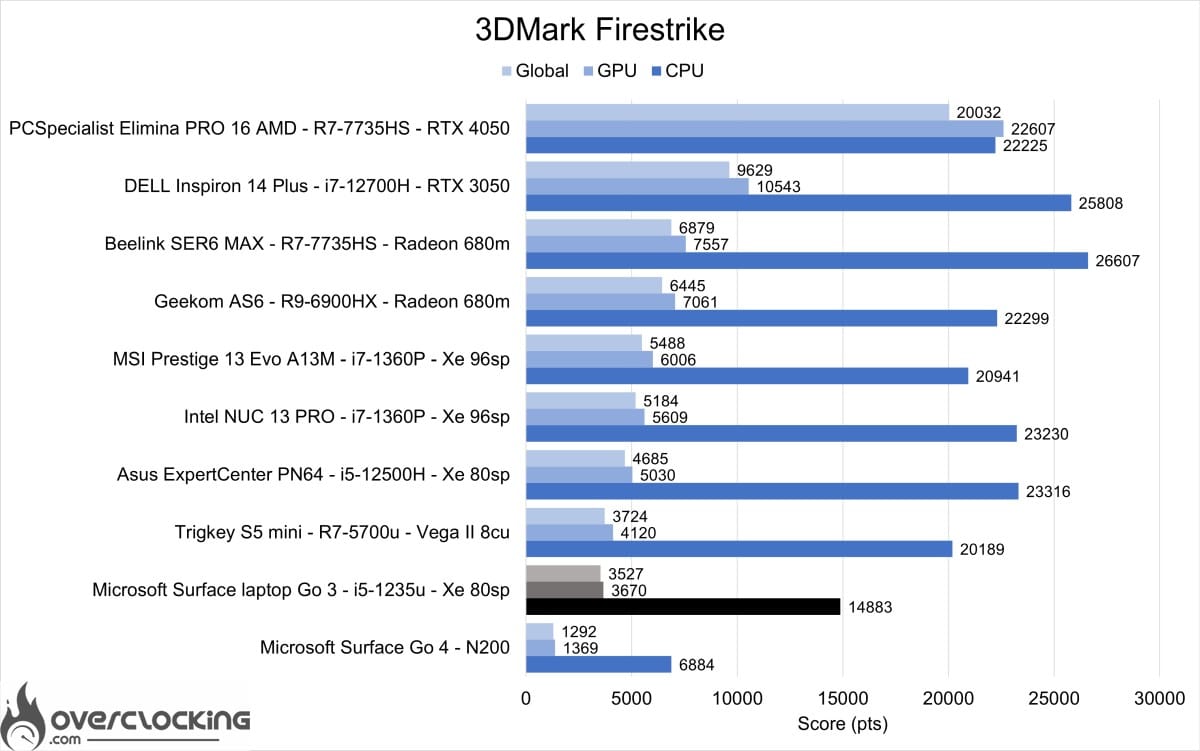


On the various 3DMark Firestrike tests, this IGP still lags behind, although it manages to outperform the Ryzen 7 5700u’s VEGA 8 on Firestrike ultra.
As expected, the 1235u and its IGP are not up to the task of demanding 3D. However, its performance could be sufficient for working on 3D software and playing low-power titles.
[nextpage title=”Productivity performance”]
Productivity performance
In this section, we focus on productivity performance. In other words, the machine’s performance on software such as Microsoft Office, Blender or DaVinci Resolve.
PCMark 10 Extented

On PCMark 10, the Surface Laptop Go 3 is rather disappointing, possibly due to the SSD not being fast enough for certain tasks.
PCMark 10 : application

The benchmark presented here uses the Microsoft Office suite to give us our machine’s performance on Word, Excel and Powerpoint. In this benchmark, the SSD plays a key role.
Blender

On Blender, the Surface Laptop Go 3 manages not to fall behind on the CPU benchmark. The 1235u performs almost as well as the 1360p of the much more powerful Prestige 13 Evo, but suffers from temperature.
PugetBench: Davinci Resolve

On Davinci Resolve, the Surface Laptop Go 3 once again achieves a respectable score against MSI’s Prestige 13 Evo.
We began our tests with the SSD, and in view of its performance, we knew that the productivity results would be less than stellar. Although it surprisingly makes up for it in content creation, the Surface Laptop Go 3 falls far short of its intended purpose: office automation.
[nextpage title=”Conclusion”]
Conclusion
Microsoft’s Surface laptop Go 3 is a portable PC with the potential to become a lecture hall staple on a par with the Macbook Air. However, it lacks the autonomy and high-performance SSD needed to achieve this. With just over 10h of autonomy, it could be difficult to get through a long day on battery power alone. Nonetheless, it’s a well-finished product with an exemplary finish.

As a reminder, the Microsoft Surface Laptop Go 3 is available for €899 in its i5-1235U version, 256 GB SSD and 8 GB RAM. The version we’re testing here is priced at €1,149 with 16 GB RAM.
Microsoft Surface Laptop Go 3
We liked:
- CPU performance
- Well-designed keyboard and trackpad
- Build quality
- Autonomy
We would have liked :
- A better SSD
- A bigger battery
 We’ve decided to award silver to Microsoft’s Surface Laptop Go 3, although it would have deserved gold had it been equipped with a better SSD or longer battery life. Its build quality and performance, however, make it a good laptop for study or office use.

