

After having tested last week the Teamgroup Delta RGB 7200 MT/s CL34 memory kit with A-die chips, today we are going to review another kit with these new Hynix A-die DDR5 chips. It is a kit from GSKill and bearing the reference Trident Z5 RGB 6800 MT/s CL34 that we will make you discover. This kit is already available in the US for a price of $299.99 on Amazon.

We also take this opportunity to thank GSKill for giving us the opportunity to review this kit with the new Hynix A-die chips. As a reminder, these are currently the chips with the best overclocking potential.
We take a look at the kits available to us:
Since this is an article where we are going to do comparative tests, we thought it would be interesting to review the different kits in our possession. You will be able to know in detail the characteristics of each of them. You can also take a look at the section where our latest memory kit tests are available and find the one that interests you.
- 32 GB Teamgroup Deltra RGB 7200 MT/s CL34 (Hynix A-die)
- 32 GB Kingston Fury Renegade 6400 MT/s CL32 (Hynix M-die)
- 32 GB Corsair Vengeance RGB 6400 MHz CL38 (Hynix M-die)
- 32 GB Teamgroup Delta RGB 6600 MT/s CL34 (Hynix M-die)
- 32 GB Corsair Dominator Platinum RGB 6600 MHz CL32 (Hynix M-die)
- 16 GB Kingston Fury Beast RGB 6000 MHz CL40 (Hynix M-die)
- 32 GB Corsair Vengeance 5600 MHz CL36 (Samsung)
- 32 GB Teamgroup Delta RGB 6400 MHz CL40 (Hynix M-die)
- 32 GB Dominator Platinum RGB 5600 MHz CL38 (Samsung)
- 32 GB Kingston Fury Beast 4800 – 5200 MHz CL40 (Micron)
- 32 GB GSKill Trident Z5 5600 MHz CL36 (Samsung)
So, a little comment on the choice of unit for the memory frequency. For several months now, manufacturers and many of our colleagues no longer use MHz to talk about the frequency of the memory. Either some use MT/s or Mbps. On our side, we will pass on MT/s at the moment while waiting to see what will become the new standard. Don’t hesitate to ask us your questions if you have any problems with the settings either in comments or on our social networks. You can also join our community on the discord. [nextpage title=”Packaging description:”]
Packaging Description:
The kit from G.SKill is delivered in a cardboard box with the usual color code in the spirit of the brand. One of the two grey bars can be seen on the front of the box thanks to the cut-out. We can see that they are enclosed and protected in a transparent plastic protection. On the back of the box is also a label that informs the future buyer of the characteristics of his memory kit. Two cut-outs, at the level of the labels, allow to have the confirmation of this information. Once the box is opened, we find our two modules perfectly protected in a transparent plastic shell. This “Trident Z5” series arrived with the arrival of the DDR5 memory kits.


The Trident Z5 kit is available in either gray or black. In addition, you will have the choice to choose a version with or without RGB backlighting. Our sample of the day is grey and has RGB backlighting.


There are three different versions at the moment with Hynix A-die chips in 6800, 7200 and 7600 MT/s. The Trident Z5 kit is available in either gray or black. In addition, you will have the choice to choose a version with or without RGB backlighting.
Features and cooling:
Our kit is clocked at 6800 MT/s, has timings of 34-45-108 and requires a voltage of 1.40 volt to operate. It is composed of two 16 GB strips for a total of 32 GB. We are here on a mix between grey and black.

The heatspreaders are made of aluminum. They are responsible for dissipating the heat generated by the eight-layer PCB and the memory chips. If you have already had a G.SKill Trident kit in your hands, you will quickly notice that G.KSill has kept the same spirit in the design of the heat sink.


On both sides, we find the name of the series. A label includes some of the characteristics of our kit. Regarding the price, this kit is currently available for 489.95 euros at LDLC. It is possible to find it cheaper elsewhere but the current difficulty is to find it in stock. On the upper part, we find the RGB backlight with the inscription G.Skill. To finish this presentation, you should know that the kit is XMP 3.0(Extreme Memory Profile) compatible. So do not forget to activate the profile directly via the bios of our motherboards. [nextpage title=”What’s new in DDR5: “] The arrival of the Z690 chipset coincides with the arrival of new DDR5 memory modules. The main change is an increase in frequency and a higher capacity. Be careful, let’s make things clear straight away, it is not possible to use DDR5 modules on a DDR4 motherboard and vice versa. Even though DDR5 also has 288 pins, the notches do not match and this is voluntary in order not to have disasters.
The arrival of the PMIC module:
The great novelty of DDR5 is the presence of a PMIC module(Power Manager Integrated Circuit). Its role is to regulate the power supply of the memory stick. There is therefore one per strip. This one will use the 5 volts of your motherboard and convert it to provide the necessary voltage to your kit. For example, if your kit needs 1.1 volts, each chip will receive 1.1 volts.  Previously, it was the motherboard that was in charge of doing this. In reality, this has an advantage but also a disadvantage. The advantage is that manufacturers no longer have to provide this control on the motherboard PCB. So, a financial gain. But unfortunately, there are two types of PMIC. One is locked and will only accept the default values of your kit, this is called secure mode. The other type of PMIC is modifiable and will therefore allow you to increase the voltage beyond 2 volts. Fortunately, Asus on its Z690 APEX, has already begun to circumvent the restriction of the secure mode to reach 1.435 volts. We talked about this in detail in the article dedicated to the APEX.


The other question is about the heat release of this chip as well as the additional cost for a DDR5 kit. Personally, we didn’t notice any extra heat release during our testing. As far as pricing is concerned, it will be higher and it will also depend on availability.
Higher frequencies and lower voltage:
So what’s changing? First of all, manufacturers seem to favor 16 GB strips and therefore dual channel kits in 2 x 16 or 2 x 32 GB whereas we are used to 2 x 8 GB for DDR4. The frequencies are also on the rise with kits that start at 4800 MT/s while the standard seems to be at 3200 MHz in DDR4 and which can currently reach 6600 MT/s. Finally, who says high frequencies says (much) more relaxed timings.


The voltage is also improved since it will be able to decrease to 1.1 volt for DDR5 against 1.2 volt for DDR4. We are talking about a voltage of 1.1 volt for DDR5 kits at 4800 MT/s. The voltage will be higher if the frequency increases as you will see below.
ECC (Error Correcting Code) compatible with DDR5
The DDR5 boards will be able to integrate the ECC(Error Correcting Code). Uh, yes? The idea of this module is to detect possible errors and analyze them before sending them to the CPU. Now, this module won’t be available on all boards since it will increase the price of the kit. As long as we are talking about the price, it should be unfortunately (much) higher.


XMP 2.0 (DDR4) and XMP 3.0 (DDR5), the changes:
We go from XMP 2.0 for DDR4 to XMP 3.0 for DDR5. What changes at first is the possibility for a manufacturer to offer three different XMP for its memory kit. These must be enabled in the BIOS.

The other big evolution is the possibility to register your own XMP. To put it simply, you can optimize timings and tensions and then write your own XMP. Once “burned” on your memory stick, you will have the possibility to choose this XMP within the BIOS. This is of course a function that we will come back to in detail in a dedicated article since it is something that is possible with iCUE. [nextpage title=”How to identify your memory kit: “]
Basic features:
You will tell me that it is quite easy since you just have to look at the references announced by the manufacturer. Yes, but this is not enough, especially if you plan to overclock it! Some information is given by the manufacturer, but you’ll have to dig or even remove the heat sinks to find out the others. On one side of the heatsink you will find the inscription “Trident Z5 RGB” and on the other, a label with the technical specifications of our example. This is what we will look at in detail. For example, in the case of our example of the day, here is the information we know.
- The brand: GSkill
- Model: Trident Z5 RGB
- Capacity: 2 x 16 GB
- Frequency: 6800 MT/s
- Timings: 34-45-45-108
- Voltage: 1 .40 volts
- Revision: October 2022
In order to get an idea of the overclocking potential of your kit, this information is insufficient and we will have to go further. Indeed, it is also very important to know the revision of the PCB as well as the model of the chips that equip your memory kit. Depending on this information, the overclocking performance of the kit will be very different.

To find this information, there is currently only one solution, disassemble the heat sinks. Indeed, currently, the Taiphoon Burner software does not support DDR5 kits. Moreover, there is no indication that this will be the case in the coming weeks.
CPU-Z always present:
Fortunately, our trusty CPU-Z software is still at work and allows us to verify this information, especially on the type of chips that equip our kit. Currently, there are three types of chips: Samsung, Hynix and Micron. Be careful, since from now on on the DDR5 kits, we can have either Hynix M-die or Hynix A-die.
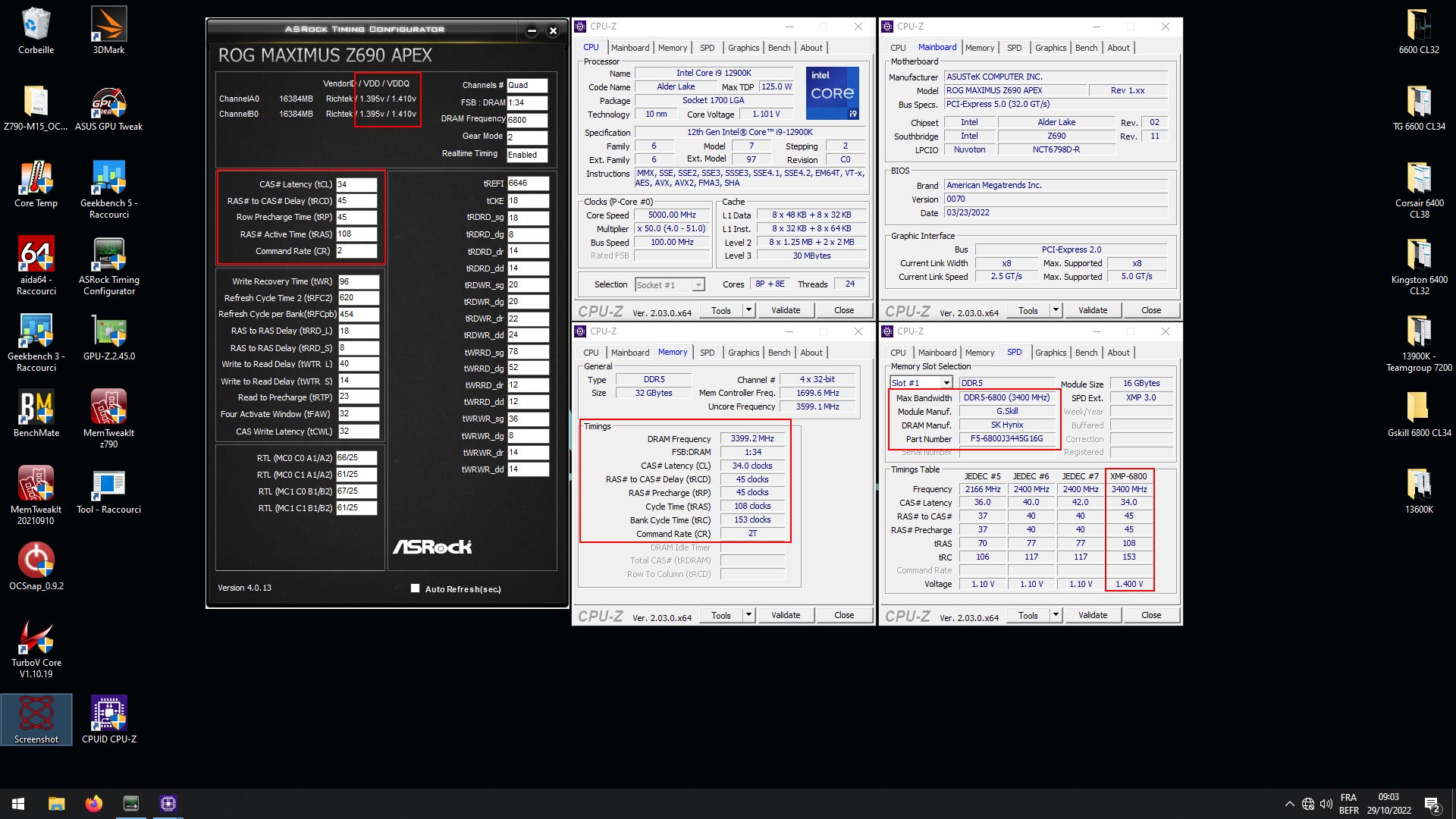 Our kit is perfectly recognized under Windows 10 and the different timings perfectly read. The memory chips that equip our kit are Hynix. They are the chips with the best overclockingpotential.
The PCB of our memory kit:
We will dismantle the heatsinks in order to observe the PCB and identify the chips. Be careful not to accidentally detach the chips from the PCB! The best technique is to heat the heatsink with a hair dryer before gently prying it off and being patient.

As a reminder, the design of DDR5 modules will also be different from DDR4 with the presence of a PMIC (power management integrated circuit) chip on board. The idea is to allow a better management of the power supply and therefore the stability of the system. Our kit therefore benefits from the Hynix A-die chips, of which there are 8. We are on a kit known as “SR” for single rank, meaning that all the chips are on a single side. On the other hand, we can find “DR” kits for dual rank with chips on both sides of the PCB. The Hynix chips have the reference “H5CG48AGBD 230A” and are 2GB versions. [nextpage title=”The importance of the XMP profile: “]
Setup within the BIOS:
We can’t say it enough, but the settings of your memory kit are not automatically set after you install it. If it is the case for your processor, it is not the case for your memory kit and a passage through the BIOS will be mandatory! You will be able to configure it manually, by choosing the right frequency, timings and voltage for your kit. For more convenience, we advise you to activate the XMP (Intel) or DOCP (AMD) mode in “AI Overclock Tuner” in order to set it up automatically. Without this, your performance will be impacted in all areas and you will end up with a kit that does not exceed 4800 MHz in CL40. We will therefore activate our XMP profile directly in the BIOS.


The Asus BIOS, both on the APEX and on the Crosshair models, benefit from memory profiles. They are good bases to overclock your memory kit. We will first use them in our overclocking tests. Our kit is now set up in the BIOS and will work with the manufacturer’s specifications.


As you have seen in the above captures, once the XMP profile is activated, the settings are automatically detected. The frequency goes up to 6800 MT/s, the timings are activated and the voltage goes up to 1.40 volt. [nextpage title=”Intel configuration test: “] Of course, this kit will only be tested on an Intel platform since AMD does not yet have motherboards supporting DDR5.
- Motherboard: ROG Maximus Z690 APEX edition 2022 and Z790 APEX for the OC
- Processor : Intel i9-12900K Alder Lake and i9-13900K Rocket Lake for the OC
- Memory : 32 GB GSKill Trident Z5 RGB 6800 MT/s CL34
- Graphics Card: MSI GT 710
- Cooling system : Optimus Foundation + 480 mm EK radiator
- SSD : Western Digital SN850 NVMe SSD M.2
- Power supply : be quiet! Dark Power PRO 12 1500w
- Operating system : Windows 10 64 bits
Aida 64 :
 It is a software able to provide you with a lot of information about your configuration but it has the particularity to have a memory benchmark. It will calculate the speed of reading, writing, copying and the latency of your memory kit. It is very often used to compare memory kits between them. It is an excellent tool if you want to compare the performance of your memory kit with those we have already had the opportunity to test. The version used for the tests is 6.50.2812 beta and we have taken the performance of the previously tested kits.
  The performance of this first test seems perfectly logical to us, with a second place which corresponds well to the frequencies of our different DDR5 memory kits. The throughput is 103640 MB/s. As a reminder, our best score in DDR4 was 61325 MB/s with the Corsair Dominator Platinum at 4800 MT/s CL19. So, as usual on an Intel platform, you will have to focus on frequency and tight timings.
  In writing, the same observation with a very high speed that reaches 91319 MB/s. The Corsair Dominator Platinum 4800 MT/s CL19 in DDR4 obtained 67251 MB/s. Once again, we note a logical progression between the different frequencies. The result is quite close to that of the Corsair 6600 MT/s CL32 kit because even though the frequency of the GSKill kit is higher, we go from a CL32 to a CL34.
  The findings are identical in copy with again a second place for our sample of the day. The Corsair Dominator Platinum 4800 MT/s CL19 in DDR4 had a copy speed of 57330 MB/s. As you can see, it is in reading and copying that DDR5 takes a very large lead over DDR4.
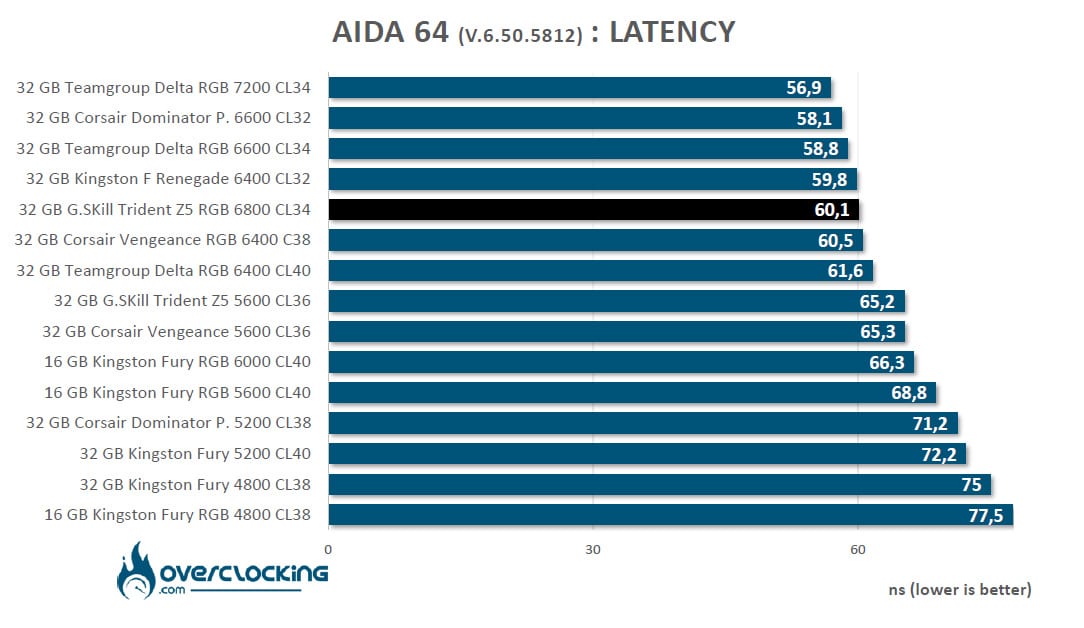 Finally, the latency. This is the value that all eyes are on because DDR5 is a bit behind. Our best DDR4 kit at this little game was the G.SKill Trident Z Royal Elite 4000 MT/S CL14 which obtained 41.4 ns. You’ll notice that the higher the DDR5 frequency, the narrower this gap becomes. Note that a DDR4 kit in 3200 MT/S CL16 has a latency of 50.3 ns. Here we get 60.1 ns for our GSKill Trident Z5 RGB 6800 MT/s CL34.
Geekbench 3.4.4 :
 It is a benchmark available in several revisions, version 5 having just been released a few weeks ago. It allows you to obtain two scores: one in single and the other in multi. Using this benchmark, we will focus on the performance obtained on the ” Memory Multi-Core ” score which allows to differentiate the memory performance. The version used for the tests is 3.4.4.
  For the Geekbench 3 benchmark, despite the fact that in single core the frequency of our i9-12900K is 5.2 GHz, we note a difference in score between the different memory kits. Our kit of the day takes the third place despite its frequency of 6800 MT/s. The reason is due to the less tight timings than on the Corsair kit. For the record, in DDR4, our best kit was the G.SKill Trident Z Royal 4400 MT/S CL16 with 5617 points.
  In multi core, the gap between our kits is less important. For your information, in DDR4, our best score was 48800. Of course, we have to take into account the DDR5 but also the performance brought by the Alder Lake CPU.
  As soon as we isolate the memory score, real differences are visible between the kits. Our kit of the day gets a score of 11286 points! This score allows us to see that what we gain with a higher frequency is lost on the other hand with more relaxed primary timings. In DDR4, our best kit obtained only a score of 7748 points. Once again we can see the huge advantage of DDR5 in combination with the Alder Lake processor.
Geekbench 5.2.5 :
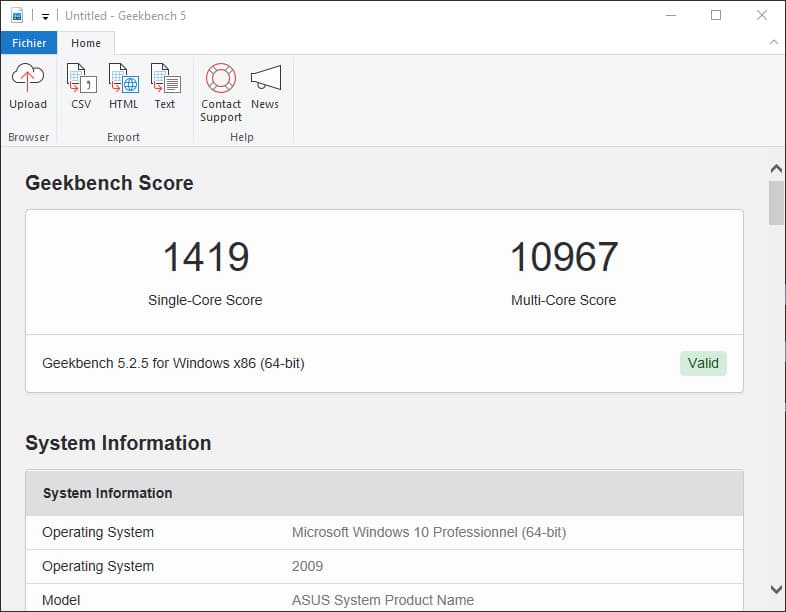 We decided to add this extra benchmark but why? The CPU benchmark uses new tests that more closely simulate the tasks that processors face in recent applications. Geekbench 5 also increases the memory used in the benchmark to better reflect the impact of this parameter in the CPU results. For now, we will keep both since version 3 is still widely used.
  While in Geekbench 3 we had a difference in single core, here in version 5 the performance is pretty much the same and it is our kit of the day that takes second place with a total of 2029 points.
 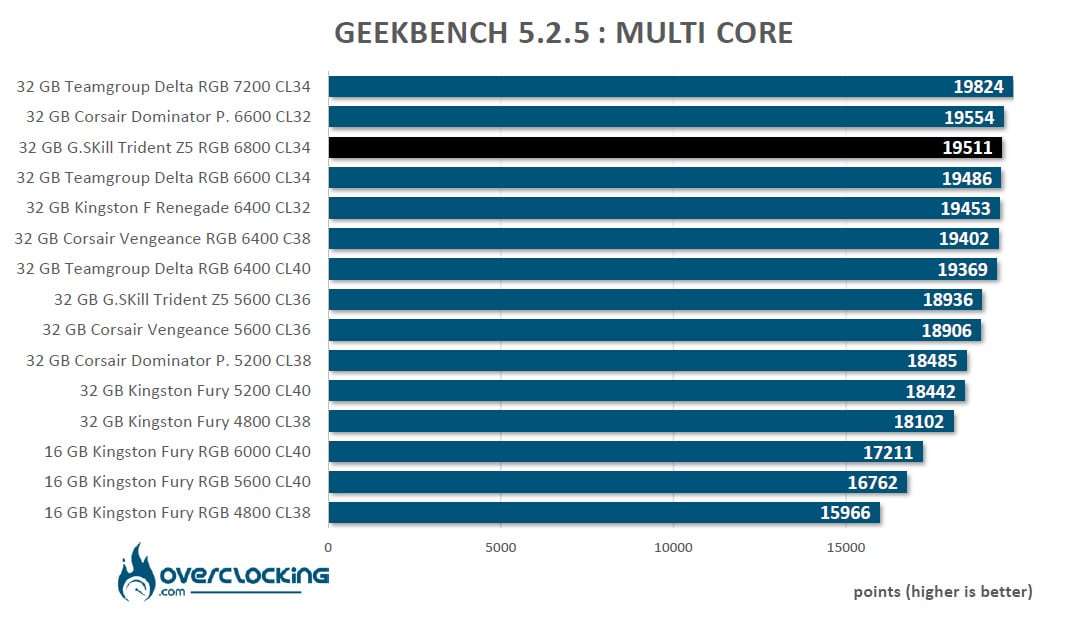 Finally, the last score of our benchmark series with a total of 19511 points for our GSKill Trident Z5 RGB 6800 MT/S CL34 kit. Still to give you a benchmark score in DDR4, our best score was 11179 points. In short, as you can see in this series of tests, our sample of the day performs well but despite its 6800 MT/s frequency, the more relaxed primary timings do not always ensure it the second place in our rankings. [nextpage title=”Overclocking on our Z790 APEX: “]
Choosing your DDR5 kit based on memory chips :
As was already the case with DDR4, if you want to clock your memory, some brands will have better potential. Currently, the kits announced by the various brands have either Micron, Hynix or Samsung chips. The latter two brands will be the most interesting. Our Teamgroup Delta RGB 7200 MT/S kit is equipped with Hynix chips as you can see. But be careful, there are Hynix M-die chips, the first ones that came out, but especially today Hynix A-die chips that allow to go up in frequency more easily. A small but important note: our ROG Z690 APEX is a “new version” of 2022 which eliminates the problems encountered with memory overclocking above 6600/6800 MHz.
DDR5 “key” voltages:
For memory overclocking, there are 5 key voltages. These are the voltages that will have an impact on the overclocking and therefore on the frequency rise or the tightening of the timings. These are the CPU System Agent Voltage (SA), the DRAM VVD Voltage, the DRAM VVDQ Voltage, the Memory Controller Voltage and the IVR Transmitter VVDQ Voltage. Here is where these voltages are located in the BIOS of our ROG Maximus Z690 APEX.


Beware, depending on the type of memory chips (Micron, Hynix and Samsung), the balance between these different voltages is different. Don’t panic, we will come back to this in our guide on overclocking Alder Lake and DDR5. If your PMIC module is not locked, by activating ” High DRAM Voltage Mode “, you will have access to voltages up to 2 volts. Let’s go for the overclocking of this DDR5 from GSKill.
Step 1: Change your processor and motherboard
Why? Simply because the IMC(Integrated Memory Controller) on my 13900K is much better than the one on my 12900K. Now integrated into the processor, the IMC allows for more direct and faster RAM management than when the memory controllers were on the motherboard. As with overclocking, there is a “lottery” and some processors benefit from a better IMC that allows them to handle higher memory frequencies. Since in overclocking we are going to increase the frequency, especially with A-die chips, we might as well take the best CPU at this little game. We will also do a performance test with the XMP profile and our i9-13900K in order to have a basis for comparison for our overclocking results. You will also see that we will disable the E-core at some point in order to be stable in higher frequencies.
Step 2: APEX profile at 7600 MT/s CL36
The ROG Maximus Z790 APEX motherboard has a profile at 7600 MT/s which we will also use to test the next kits. To do this, go to the BIOS in the “Extreme Tweaker” section and choose “Memory Presets”. There, you will find a whole series of memory profiles and notably the famous Hynix 7600 MHz.


It is therefore him that we will activate for our test. Attention, if the timings and the voltages are automatically modified, it is not the case of the memory frequency. So you should not forget to choose 7600 MHz.


We did our tests with this profile and it was perfectly stable. We’ll talk about performance a little further down when we summarize the performance of this GSKill Trident Z5 RGB 6800 MT/s CL34 kit.
Step 2: 8000, 8200 or even 8400 MT/s?
We have set up a series of profiles that will allow us to test the kits with Hynix A-die chips. We will see if they are capable of holding these frequencies. We have three profiles to test at 8000, 8200 and 8400+. Of course, the voltages and timings will be different for each of these profiles. The 8000 profile passes without any problem as well as the 8200 MT/s profile. If the 8400 MT/s profile arrives in the OS, it did not prove to be stable enough and did not allow us for example to finish an AIDA64 memory or a Geekbench 3.


Below is the capture in Windows 10 of the 8400 MT/s frequency. It would surely be possible to find some stability for benchmarks by releasing some timings. Increasing the voltage does not improve anything because then impossible to reach in the OS.

Here is a table that shows the different scores we obtained at these different frequencies under AIDA64 and Geekbench 3.4.4 by comparing to the stock frequencies. 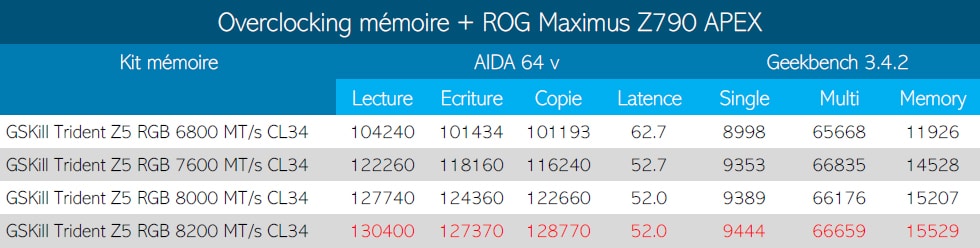 The overclocking potential of this kit is excellent since we can easily reach 8200 MT/s in benchmarks while the base frequency is, remember, 6800 MT/s. [nextpage title=”The last word: “] GSKill offers with this Hynix A-die an excellent DDR5 kit even if the increase in frequency has been reflected in the price. This GSKill Trident Z5 RGB kit is currently sold for $299.99 on Amazon. But against the competition of other Hynix A-die kits, this is an excellent price. This is due to the fact that it is clocked at “only 6800 MT/s”. The interest of this kit is especially its potential for overclocking which allows it to become ultra-interesting since if the IMC of your processor allows it, to you the 7600/7800 MT/s stable in H24. We would be curious to test a 7600 MT/s version to see if the overclocking potential of these versions is superior to that of our 6800 MT/s. One thing is for sure, in order to be able to hold a 7600 MT/s XMP, the Hynix A-die memory chips have been further sorted. Now, don’t forget that the IMC of your processor is also to be taken into account and that it might not accept to boot with a too high original profile. We hope to tell you more about this in the coming weeks. This GSKill Trident Z5 RGB kit is an excellent choice if you want to buy the Hynix A-die and with a frequency of 6800 MT/s, it is probably the most affordable kit available.
GSKill Trident Z5 RGB 6800 MT/s CL34:
We liked:
- The look of the heatsinks with an aesthetically pleasing RGB even if we prefer the black ones
- The quality of finish of the memory modules
- The most powerful DDR5 kit that we have had in our hands!
- The excellent overclocking potential of the Hynix A-die chips and the BIOS of our APEX
- A voltage of 1,40 volt which is still very correct
- The lifetime warranty
We would have liked :
- More availability, difficult to find them in stock
 GSKill offers with this Trident Z5 RGB at 6800 MT/s CL34, a very interesting kit with the new Hynix A-die memory chips. The performance is good and the overclocking potential is very good. If you want even better performance without overclocking, you can go for a 7200 or 7600 MT/s version depending on your budget. A special thanks to GSKill for making this kit available to us and we are waiting for the 7600 MT/s version.