
Last month, Alphacool presented a new series of all-in-one watercooling kits, the Ocean T38. The brand generously sent us a 360mm model. We will see, during this test, what this model is worth. But before getting the configuration warmed up, let’s have a look at the presentations to see what we are dealing with!

Presentation:
With this Ocean T38 series, the brand offers us a very complete series since it includes no less than five references of various sizes. We start very small with a model equipped with a 120 mm radiator. Then, we go up in size with 240 mm and 280 mm. Finally, we end with references equipped with three fans with versions in 360 mm and 420 mm!
With this series, the brand puts everything to offer a series with an unbeatable performance/price ratio. For this, we find an aluminum radiator, quite thick despite everything. The latter is 38 mm thick, which offers good temperatures despite everything.
On the ventilation side, we find, in our case, a trio of Core fans focused on performance. They are capable of reaching 2500 rpm, which generates a significant air flow and static pressure.
For the pump, we find a copper base allowing an optimized flow. The pump itself benefits from a PWM type power supply and will operate from 2500 rpm to 3500 rpm.
Finally, it will be installed on all the recent sockets on the market such as the AM5 and the LGA-1700. Finally, we will note the presence of a small touch of RGB at the pump. The goal is to bring a little customization and a little light to the set which is quite dark.  Nevertheless, where Alphacool clearly stands out is in the selling price of its AIO. Indeed, the brand applies a very aggressive positioning with a model in 360 mm charged less than 100€. On the store of the brand, we find at 85,98 € excl. VAT .Otherwise, some european shops like Alternate already references this model at 88,90 € incl. VAT.
[nextpage title=”The Pure Loop 2 FX 360″]
Unboxing


Regarding the packaging, Alphacool opts for a very sober visual based on printed cardboard. On it is a representation of the pump and the radiator with some dimensions here and there. But, unlike other brands, there is no reminder of the detailed characteristics.
Inside, it’s the usual recipe with a cardboard mold enclosing each element of the watercooling kit. The fans benefit from a little cardboard overprotection when the rest of the elements are packed in individual plastic bags!
The radiator:
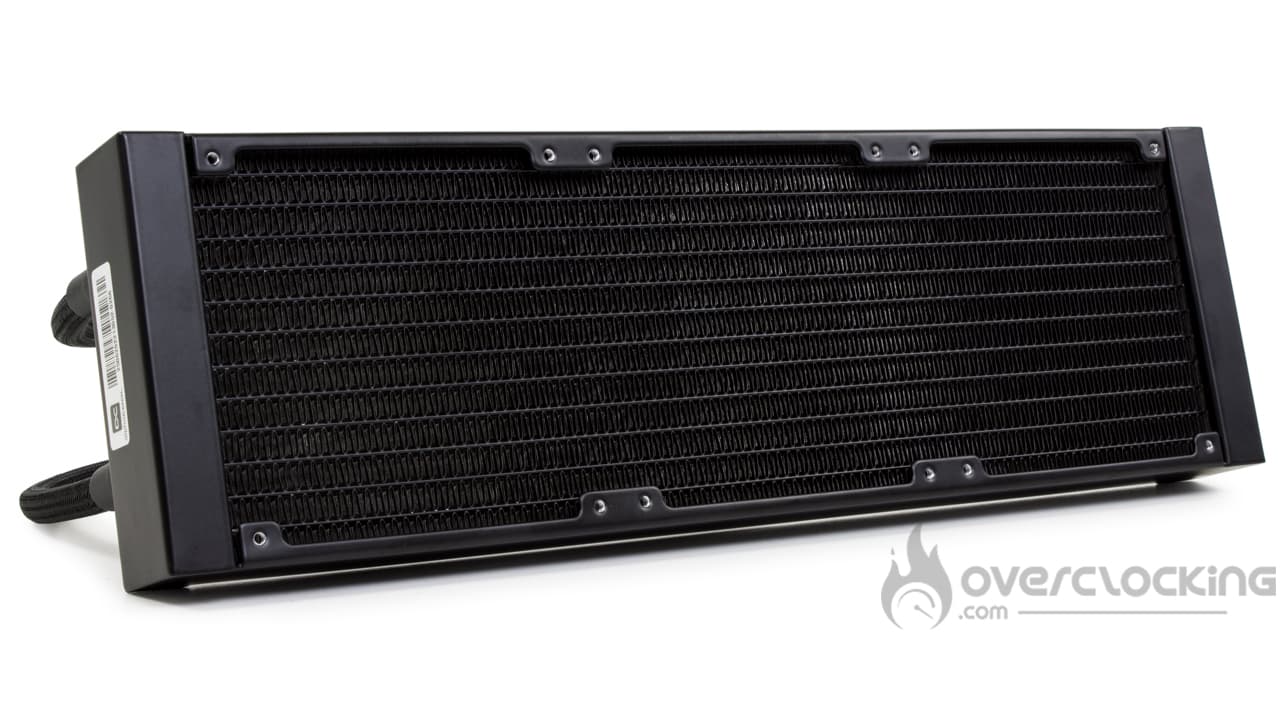
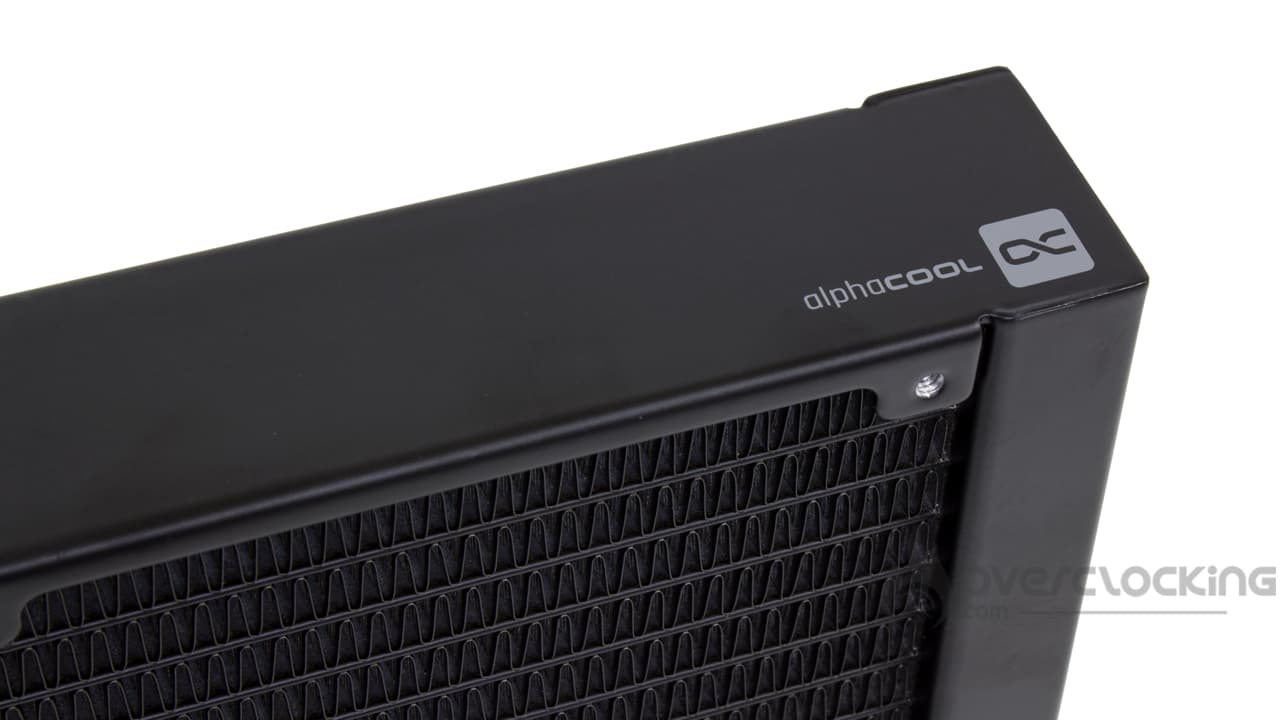
With this Ocean T38 series, we have the right to a radiator quite similar to what we can find at Arctic. This model offers a neat finish with a very elegant square shape. On the sides, we find a small Alphacool logo painted directly on the sides.
Nevertheless, what they have in common with the Swiss brand’s radiators is their significant thickness. The latter is increased to 38 mm in order to maximize performance. Moreover, Alphacool communicates on the fin density which is 19 fins per inch. A density rather low compared to what we usually test. But the goal is to maximize the airflow through them.
Otherwise, as we told you, the manufacture is aluminum. And the other dimensions are 397 (L) x 12 (W) x 38 (H) mm.
To connect the pump and the radiator, we find two FEP pipes with a total length of 40 cm. These also have a rather coarse nylon sheath. On the other hand, we can’t say that the tubes are very flexible.
The waterblock:
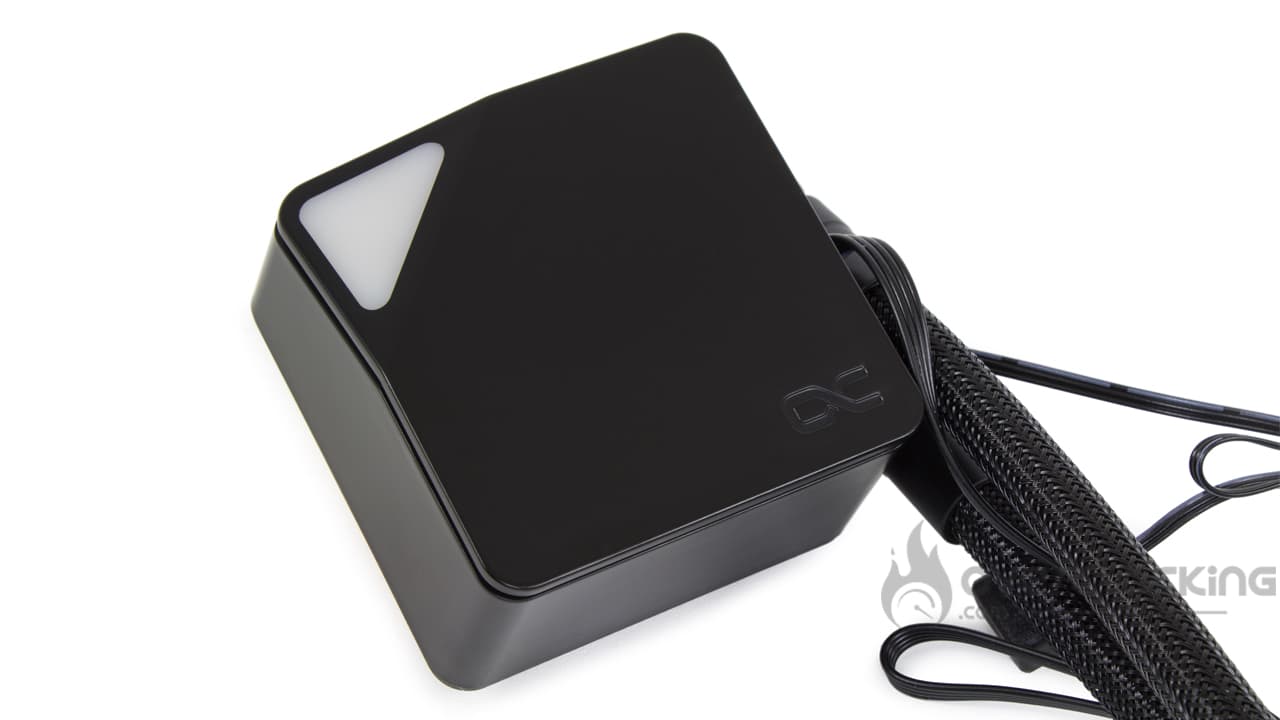
The pump block has a rather sober and refined design. The latter benefits from a black plastic shell that will mark the fingerprints. As you can see, the whole displays a logo ” Alphacool” and a translucent triangle. Via the latter, we can enjoy an RGB lighting. On the other hand, the assembly is not necessarily the most precise, the plastic tends to crack.
Under the pump block is the cold plate which is made of copper. The latter is screwed to the rest of the hull by a total of ten Torx screws. The finish is excellent to say the least, since the copper base has a very pleasant sandblasted finish. The dimensions are 5.8 cm x 5.2 cm, enough to cover the IHS of any AM5 or LGA-1700 processor
As far as features are concerned, Alphacool announces that its pump will operate from 2500 rpm to 3500 rpm via a PWM power supply. Unfortunately, nothing is said about the flow rate or the water column, which is a shame for a manufacturer specialized in this field.
 Finally, on the connector side, we find a four-pin PWM fan plug for the power supply. As well as a second aRGB male/female connector to control the lighting via your motherboard.
Compatibility
With the Ocean T38, Alphacool ensures a near-exemplary compatibility since the majority of recent platforms are compatible:
- Intel : LGA-1100 – LGA-1200 – LGA-1700 – LGA-2000
- AMD: AM4 – AM5
Right out of the box, the kit is therefore perfectly compatible with the LGA-1700 platform from Intel. The same goes for AMD’s AM5 . However, there is nothing about TR4 cards and derivatives.
The fans
For its part, the ventilation will be provided by a trio of Core fans in 120 mm. These fans remain quite basic in their presentation. They have an entirely black frame, just like the blades. Moreover, the frame has no anti-vibration device. We can clearly feel that the brand has done everything to keep the price down.
Speaking of the blades, they are quite thin and not very curved. There are also nine of them. The frame, on the other hand, has a worked shape at the level of the anchoring points, but that’s all. Finally, the connectivity is simple with a single PWM connector with four pins at the end of a black and flat cable of 40 cm.

In terms of features, the fans will run from 0 RPM to 2500 RPM. At full speed, the airflow will be 62.8 CFM while the static pressure will reach 2.13 mmH2O. Beware of the noise that may be present, often, beyond 2000 RPM, it is difficult to find quiet fans … Or at least not very noisy.
Bundle:
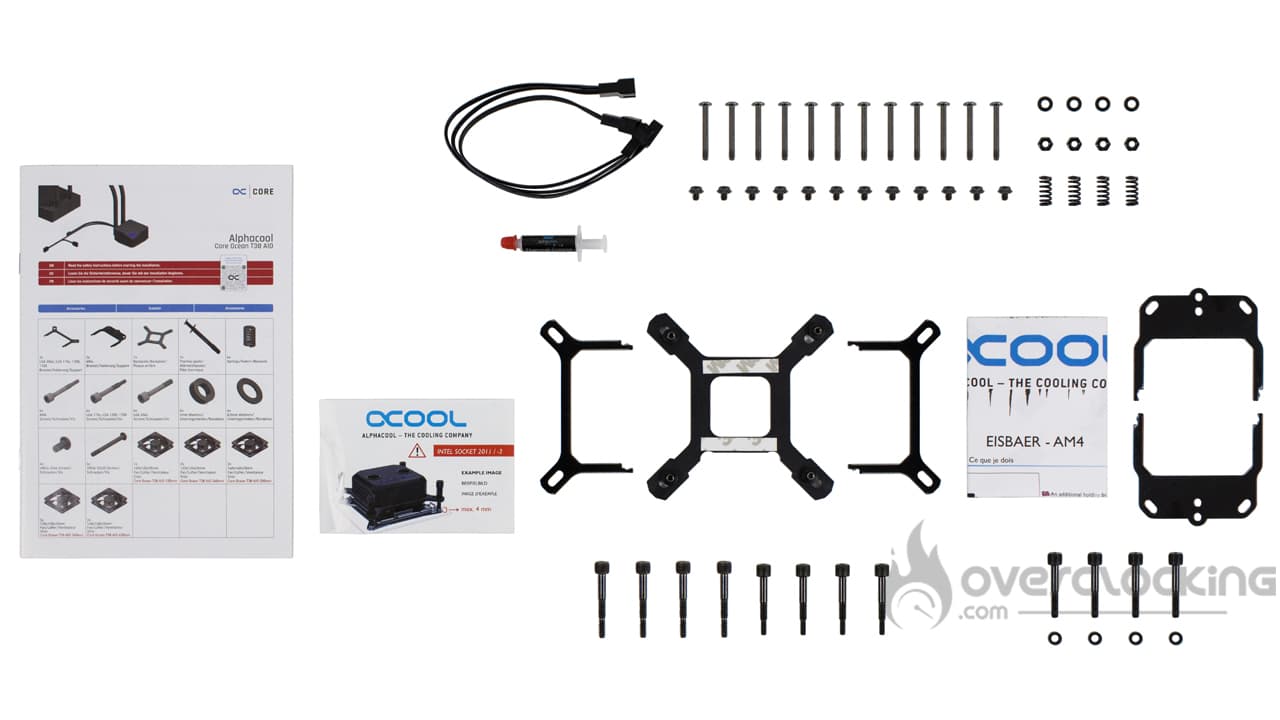
As for the accessories, we find something complete since the brand offers :
- An assembly manual
- A splitter allowing to connect three fans on a single plug
- A small syringe of thermal paste
- Screws and bolts for the assembly of the fans and the radiator
- The screws for the assembly of the pump
- Detailed instructions for each type of AMD and Intel platform
- Steel mounting arms for Intel and AMD
- A plastic backplate for Intel sockets
- Screws and bolts corresponding to the different sockets
The accessory part is thus complete by offering all the elements necessary for the assembly of the Ocean T38. The splitter allowing to concentrate the three fans in a single plug is very practical and will save a good part of the connectivity on your motherboard. On the other hand, despite the years, it’s still a shame to find this old plastic Intel backplate whose elements separate as soon as you handle it a little too much.
Overall:
Overall, with this Ocean T38, we feel that Alphacool did everything to lower the price. Some elements look very good like the radiator while others are not so good. We think of the rather coarse pipes or the rather cheap fans. The plastic of the pump is not the most pleasant and will tend to crack when handled. Nevertheless, let’s remember the very aggressive positioning of less than 100 € for a 360 mm kit with RGB lighting. You can’t have everything at this price!
[nextpage title=”Installation and RGB”]
For the installation part, you will have to keep your AMD backplate, the manufacturer does not provide one. If you don’t have it anymore, a little tour on eBay should allow you to find one easily.
Preparation of the screws and the pump:


The first thing to do when assembling the Alphacool kit will be to prepare the pump. To do this, you will have to put the mounting arms around it. Depending on your motherboard, it will not be the same arms to install: cross-shaped for an Intel board, against the extended model in case of AMD platform.
The assembly is simple, you will have to clip the arms around the pump, a groove is present for the guidance.


Next, you will have to prepare the screws. For this, you will have to choose the right screws that will depend on your motherboard. In Intel, it is enough to thread a spring and a small washer when with an AM4 card, you will have to add an additional plastic washer.
And we mount!


The final assembly is still simple to do since you will have to add the plastic backplate to the back of your Intel motherboard. Be careful not to manipulate it too much since the screw threads of the backplate tend to come off quickly. Nevertheless, once in place, you can put a small amount of thermal paste on the CPU and install the pump. To do this, you’ll have to insert the screws (spring + washer) into the mounting arms and screw everything in place.
On the AMD side, it’s the same thing, you’ll just have to remove the original mounting arms to free the screw threads.
[nextpage title=”Protocol”]
Small update of our test protocol. Indeed, we changed the software we were using to stress our configuration. The same goes for the different profiles.
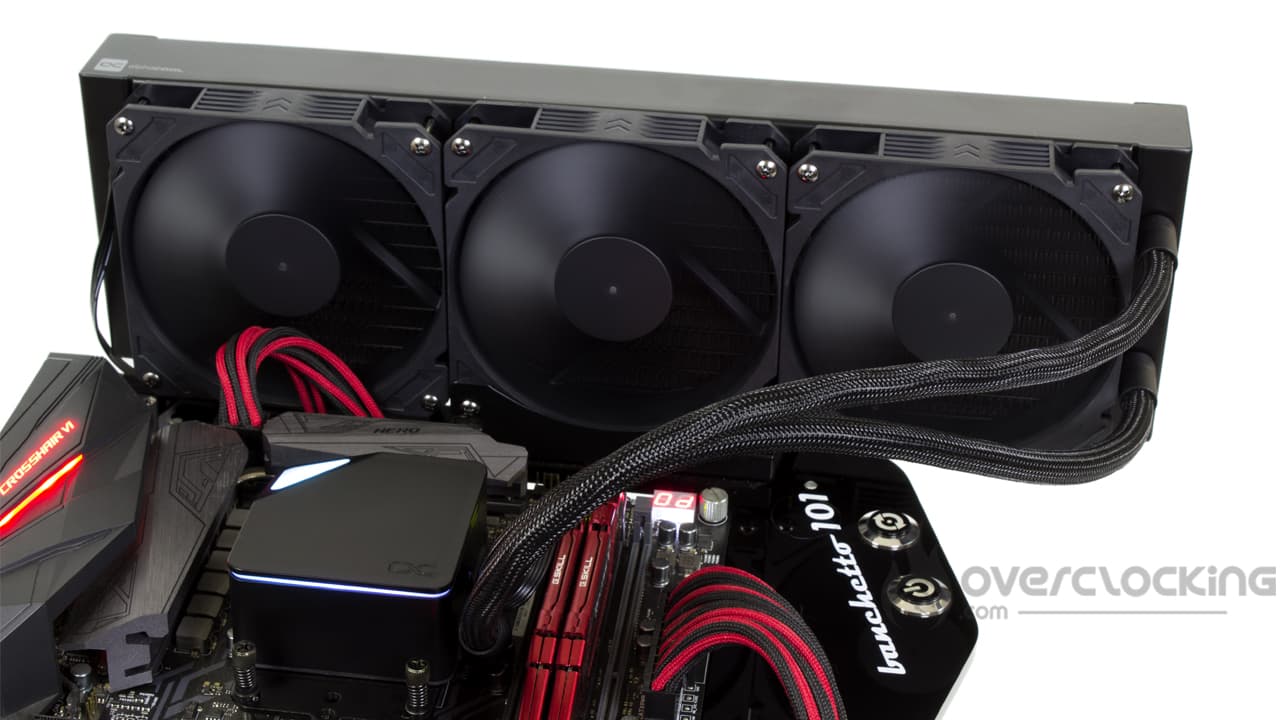
The wiring of the fans is not supported by our Rhobus, so we set the ventilation manually via the bios of our motherboard. They will operate respectively with a PWM signal of 30%, 50% and 100%.
- H170i Elite Capellix (Corsair)
- Kraken X53 (NZXT)
- Liquid Freezer II 240 (Arctic)
- Liquid Freezer II 360 RGB (Arctic)
- Liquid Freezer II 420 (Arctic)
- MasterLiquid ML240 Illusion (Cooler Master)
- MAG CoreLiquid C240 (MSI)
- Ocean T38 360 (Alphacool)
- Pure Loop 240 (be quiet!)
- Silent Loop 2 FX 360 (be quiet!)
[nextpage title=”Speed and noise”]
Fan speed :
So we start our series of temperature readings. Here, we start from scratch. Let us specify the fan speeds recorded during our readings (for 12V, 8V, 5V):
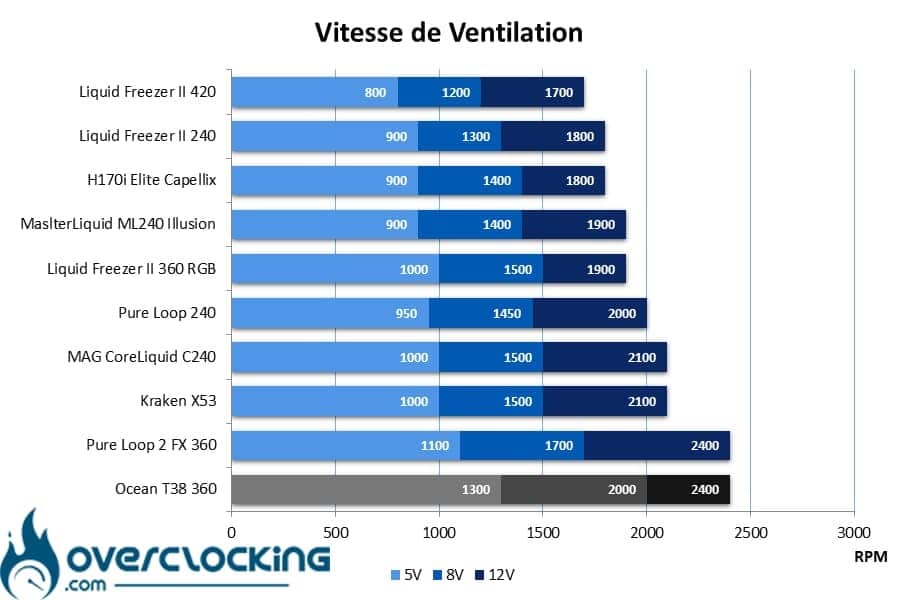
Clearly, the Core fans are capable of running at high RPM. As we can see, at full speed, we read 2400 rpm, with the Pure Loop 2 FX 360, the Ocean T38 is the fastest kit in our comparison.
At “8V”, the speed doesn’t even decrease that much since we go to 2000 rpm. Finally, at low speed, we find 1300 rpm, the fastest fans in our comparison.
Noise :
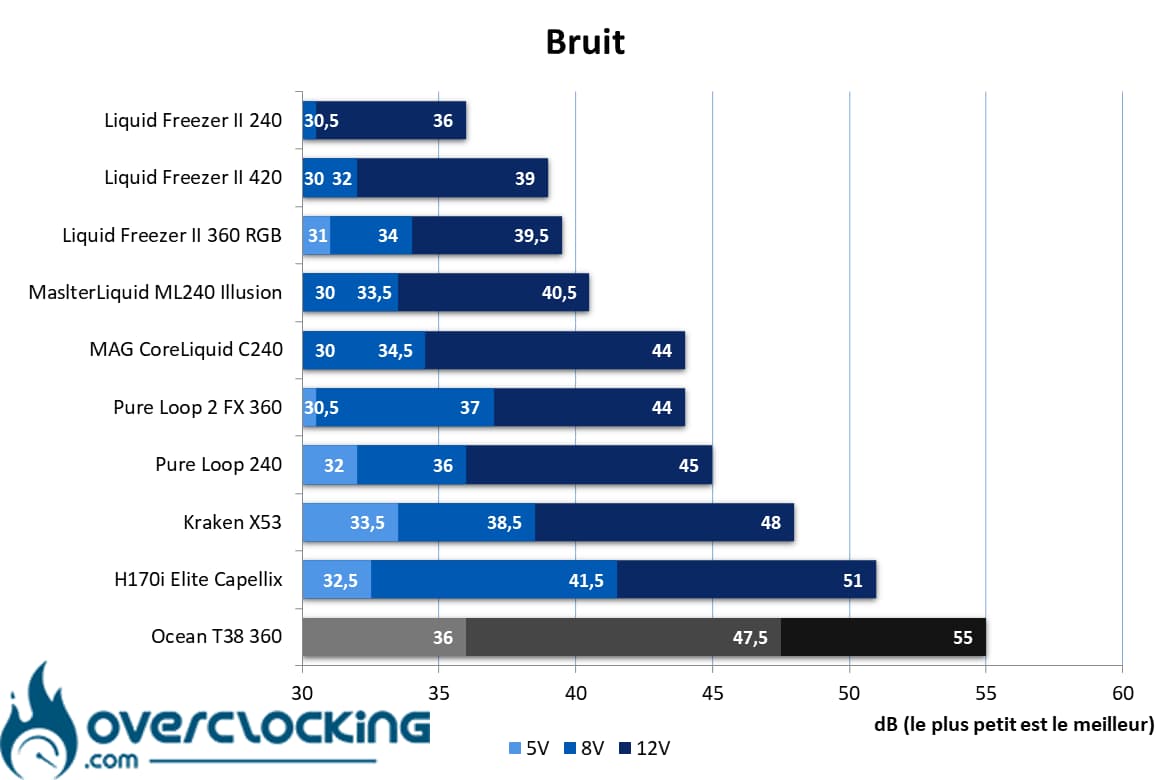
Of course, the noise quickly becomes very very present since we read 55 dB at full volume! Even when we were outside the room where we took our readings, we could hear it quite loud!
Reducing the fan speed brings a gain, but it’s not huge either, since it’s 47.5 dB. At low speed, things are more bearable with 36 dB… But it is not exceptional either. To have a fully silent kit, don’t hesitate to set a custom curve from the bios of your motherboard.
[nextpage title=”Temperatures”]
Processor at 65W
Despite a more violent 65W profile, this last one still represents the least stressful phase of this protocol. It allows to highlight the performances obtained with compact/entry-level heatsinks. These results are only indicative for the largest heatsinks (AIO, large dual tower heatsink, etc.).
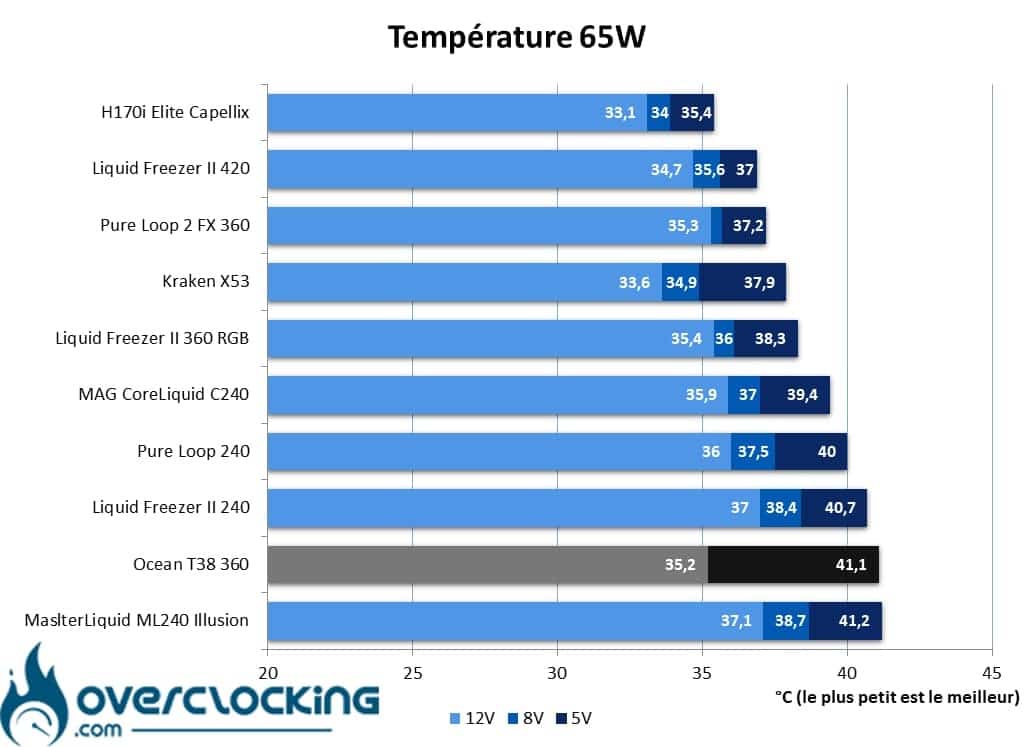
On our 65W profile, there are some things to say. Indeed, when the pump and the fan are running at full speed, we read 35.2°C. A respectable score that puts theOcean T38 on a par with Arctic’s Liquid Freezer II 360 RGB. Moreover, at mid-range, we did not notice any difference in temperature.
However, at low RPM, the temperatures increase significantly with 41.1°C of readings. As you know, at low speed, we regulate both the ventilation and the pump. Obviously, reducing the speed of these two elements is detrimental to temperatures where other models do better.
Processor at 95W :
Here, our CPU will run at 3.90 GHz constantly and on all its cores. We apply a VCore of 1.375V to obtain a consumption of 95W approximately. To simplify the reading of the graph, we may have rounded some values to the nearest integer.

In 95W, we find the same phenomena: well controlled temperatures at high and mid speed. On the other hand, at low speed, the whole thing flies away and gets close to a Pure Loop 240. It’s a pity because at high speeds, the temperatures rival a Liquid Freezer II 420.
125W Processor:
Finally, we finish with our 125W profile. Here the heat release is more important, let’s see how our coolings do!
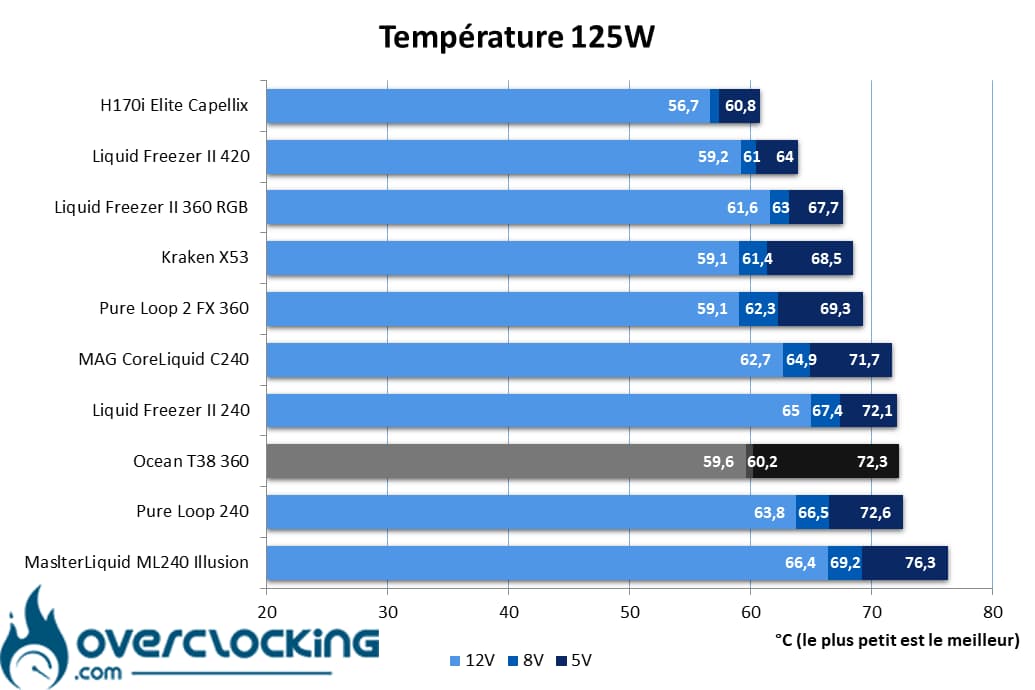
In 125W, the story repeats itself with rather good temperatures on the highest speeds but which collapse at low rpm.
Summary
Overall, we can say that the Ocean T38 does very well as soon as its fan is running at 2000 RPM, higher, there is no real gain to be had. On the other hand, if you decide to reduce the speed of the pump and the fans, there may be a problem. Indeed, temperatures tend to rise quickly. So, if you want to be quiet, you will have to let the pump run at full speed so that you can reduce the fan speed without having a big impact on the temperatures.
[nextpage title=”The temperature to noise ratio”]
On these perf/noise ratio graphs, we remind you that it is best to be placed as far to the bottom left of the graph as possible. For the reading, the left most point symbolizes the 12V ventilation, the one in the center the 8V ventilation and the right most point the 5V ventilation.

Very clearly, we are dealing with a very noisy watercooling kit, as its high position on the graph shows. Moreover, at 65W, we notice that there is no point in running it at full speed. In these conditions, the only thing you get is more noise.

At 95W, the situation is not so good either. The noise is much too present and by reducing the speed of the fans, it seriously clashes with the competition… The Pure Loop 2, however in 240 mm, does much better… And what about the Arctic kits, exemplary on noise.

In 125W, once again the noise is too present and the Ocean T38 is put to shame by its competitors. We’ll have to do some serious work on the ventilation to make it drinkable against the other models.
[nextpage title=”Conclusion”]
We now come to the end of this test of the Alphacool Ocean T38. So, what is this model worth? We take stock.
Catastrophic noise..
We will start this conclusion with the biggest black spot of this watercooling kit : the noise ! It’s simple, with the proposed fans, namely the Core, forget any notion of silence. Following our test protocol, the ventilation was audible at all levels, even at low rpm. However, we have had noisy watercooling kits, but here..
To run silently, no choice, you’ll have to create a custom ventilation curve via the bios of your motherboard… Or even change the fan. As it is, it is not pleasant to use.
Good temperatures at high speeds!

Fortunately, when the fan and pump are running at their highest speeds, temperatures are very good. The Ocean T38 is even able to compete with the Liquid Freezer II 420, even though it is much bigger than it. Nevertheless, as soon as we reduce the pump and fan speeds (in accordance with our protocol), the temperatures are worthy of a small 240 mm kit.
As you can see, the temperature/noise ratio is catastrophic. As it is, it is the worst ratio of our selection. Too bad.
Catastrophic temperature to noise ratio, ok, but the rest?
For the rest, Alphacool offers a kit with a rather wise design and pass everywhere. Nevertheless, we feel that the brand has tried to make savings at all costs. Between a coarse sheath, basic fans and a light plastic pump, it is not the most careful construction we have seen. On the other hand, we find a nice thick radiator.
Finally, the accessory section remains complete and offers everything you need to assemble and start up the kit. It’s just a pity to find the same Intel backplate whose elements fly away as soon as you handle them a bit too much.
But at least it’s not expensive…
Finally, this kit will be interesting only by its very aggressive price. As a reminder, it can be found for less than 90 € incl VAT, no info for the US yet. At this price, we could be tempted to buy an Ocean T38 if the noise does not put you off. Otherwise, unless you want to change the fans, we can only recommend the Arctic alternative. Sure, it’s a bit more expensive, but it’s still quiet in all circumstances and temperatures are controlled at all speeds.
We like:
- The price, less than 90 €
- A complete range with all sizes of radiators
- The complete accessory part, with the splitter for three fans
- The presence of RGB for that price range
- The measured temperatures at high speed
We liked less:
- The finish is not always top notch
- The fans are too basic, no rubber silentblocks in particular
- The Intel backplate is a bit cheap
- The noise is much too present and at all speeds
- Temperatures that soar at low speeds
- The temperature and noise ratio is completely out of line with the competition
 Unfortunately, the Ocean T38 won’t get away with anything special. Indeed, if Alphacool manages to offer us a very aggressively priced kit, unfortunately, that’s not all. In use, we find this model too noisy at all levels. If the temperatures are good at high speeds, it is not the case at low speeds. Finally, to have silence, a change of fan is not to be excluded and it will be necessary to add to the sum already paid… You might as well switch to a competitor’s kit in these cases.
Many thanks to Alphacool !

