
[nextpage title=”Introduction”] NZXT continues to expand its product line. Over the past year, we have seen a microphone, a keyboard, a mouse and now it is the turn of NZXT monitors to join our tests. Indeed, we had in our hands the Canvas 27Q, the smaller of the two new monitors, the other being the Canvas 32Q. The 27″ is the ideal size for serious gamers. This size, combined with the multitude of other features the 27Q boasts, give it the potential to be a formidable competitor in the mid-range monitor market. Starting at 449 € for the black model with stand and 469 € for the white model, the NZXT Canvas 27Q is reasonably priced compared to the competition. Where NZXT really shines is that you can order your screen without a stand, or with a single or double arm, a first. This is the advantage of selling your monitor online only.

Canvas 27Q specifications:
- IPS panel
- A QHD resolution (2560×1440),
- A P3 color coverage that reaches 94% (according to our tests).
- A contrast of 3000:1
- A viewing angle of 178
- A refresh rate of 1ms
- A frequency of 165Hz maximum
- Freesync Premium, G-Sync Compatible
- Anti-glare coating
- VESA 100x100mm
- 2 USB 3.0 ports
- 1x DisplayPort 1.2
- 2x HDMI 2.0


Design
The NZXT Canvas 27Q has a very sober design, we are far from the gaming look. No RGB LED. The construction is overall very solid. 


Ergonomics
The mounting system is solid, the foot is stable and adjustable in height, as well as the tilt, and allows the monitor to be placed vertically. Finally, there is also a VESA 100 mounting system. Also, you have access to a small USB hub under the screen.


 The OSD is simple, the presets are numerous. Everything is controllable with the nipple on the back of the screen. Bonus, we have the possibility to control everything via the CAM application of NZXT.


NZXT arms
As an option, the single or dual screen arms are very neat, with all metal construction. They will still be more expensive than many of the options available on Amazon, but the NZXT option is a good in-between, between Amazon’s lower price points and the Ergotron arms.


[nextpage title=”Test Methodology”]Test Methodology
We want our monitor tests to be as objective as possible. Therefore, we do not use subjective remarks for our scoring. The scores are derived from numerical analyses. We use Datacolor’s SpyderX Elite probe to evaluate display quality. And we use a custom-made probe to test input lag at the screen’s maximum refresh rate. These results add extra utility to our tests, allowing us to more accurately compare features. For the tests, we don’t touch the screen’s default settings. We just adjust the brightness for the test of it, as the vast majority of buyers will change the defaults little or not at all and do not have a calibration probe. This also shows how much time the brand spends making the screen look good out of the box.
[nextpage title=”Backlight leakage”]As far as backlight leakage is concerned, nothing noticeable with the screen on a black background in a room with as little light as possible. The result is good. The panel does not suffer from light leakage at all. The darker blacks in the center are due to my reflection. On the picture, we have strongly increased the contrast to show the uniformity of the blacks. To the naked eye, the differences are hardly noticeable.
 Please note that this subjective observation is not taken into account in our rating system, which is intended to be as objective as possible.
[nextpage title=”Viewing angle”]Being an IPS panel, the viewing angles are generally very good. The Canvas 27Q is no exception to the rule and does very well.


 Please note that this subjective observation is not taken into account in our rating system, which is intended to be as objective as possible.
[nextpage title=”Ghosting”]For this test, a certain methodology must be applied, you can do the tests yourself on your screen by following these instructions.
Overdrive
NZXT has included 3 levels of overdrive in the OSD menu. The differences are not obvious. The response time is ok without being great, with obvious blur.
 Attention: this observation considered as subjective is not taken into account in our rating system, which wants to be as objective as possible. [nextpage title=”Color range & accuracy”]
Color range / Gamut
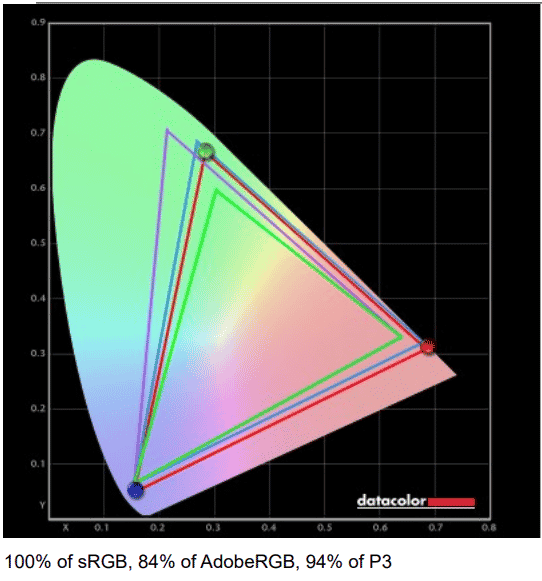
The gamut is the set of colors that a device can display. Note that any score above 90% P3 is excellent. A high refresh rate and adaptive sync are nice features to have, but don’t sacrifice gamut and color either. The sRGB coverage is 100%, AdobeRGB 84%, DCI-P3 94%, an excellent score.
Color Accuracy
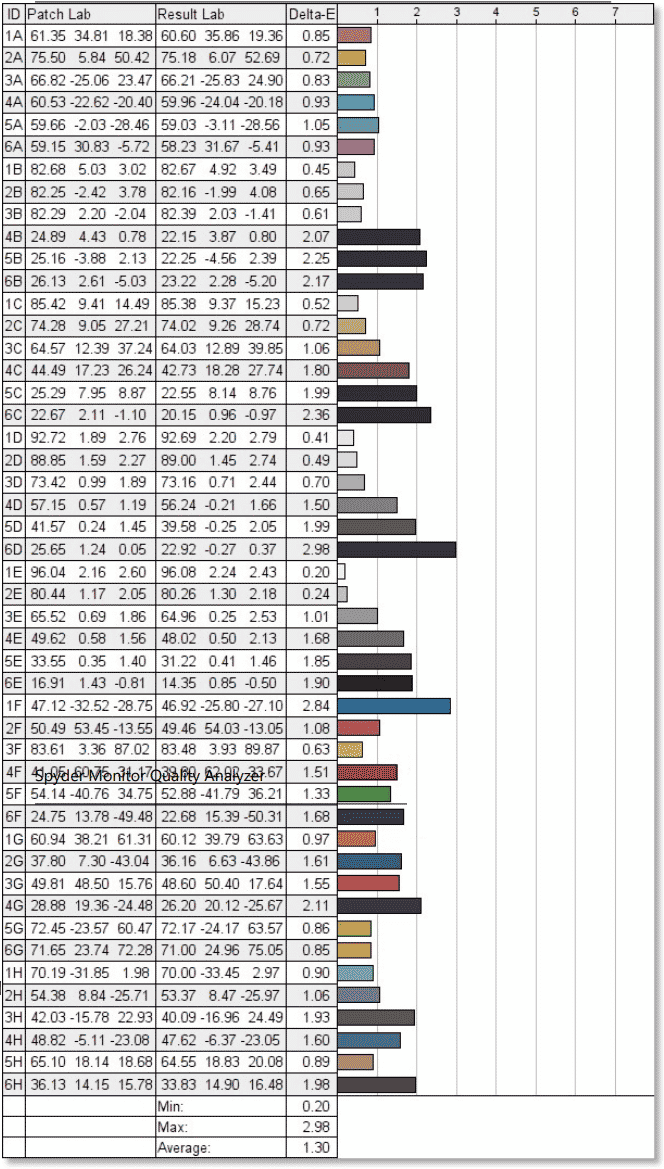
For this measurement, we want a Delta-E as low as possible. An average Delta-E of less than 2 is considered good. The average score of the NZXT Canvas 27Q is 1.30 which ensures good colors.
[nextpage title=”Color uniformity / Luminance”]Color uniformity
Uniformity varies for tiles of the same production, so always take its values for a trend. We generally want a color variance of less than five on a 24/27 inch display. The Canvas 27Q gets a mixed score, with heavy color degradation at the bottom of the screen, above 6.

Luminance uniformity
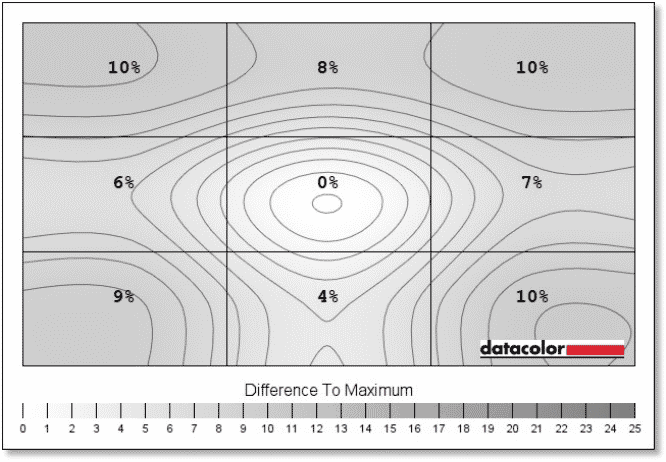
Luminance uniformity is generally expected with a maximum score around 10%, but the larger the screen the more difficult the task. The NZXT Canvas 27Q shows a maximum of 10%. This is a good result.
 [nextpage title=”Brightness levels and contrast ratio”] We measured 388.9 nits using the screen’s default settings, which is more than the 300nits announced by NZXT, and it’s the first time that the error is in this direction. As for the whites, they are very well calibrated. IPS panels are known for their black problems and their high contrast. We note a contrast of 1060:1 (well below the 3000:1 announced) and a black level of 0.37 to 388.9 nits which remains an average score for an IPS panel.

[nextpage title=”Input lag”]The input lag measurement is very different from the refresh rate measurement. Input lag is the time it takes for the video signal to enter the video port (HDMI/DisplayPort) and display the image on the screen. Few manufacturers communicate on this value, which is however crucial for the player. A refresh rate of 1ms is useless if the input lag is high. It is important to note that the more pixels to display, the higher the input lag. So it will be hard to find very good results on a 4K screen. Another important information, all the pixels are not displayed at the same time, the refreshment is done from top to bottom. So, we will find a much better response time at the top of the screen than at the bottom. We make 3 measurements (top, center, bottom) and calculate the average for our rating.
Rating:
- 5 stars – Less than 4ms lag – excellent, e-sport display
- 4 Stars – 4ms to 8.33ms – equivalent to the frame shift of a 120Hz refresh rate monitor – good for competitive gamers
- 3 stars – 8.33 to 12.33 ms – more than one frame lag at 120 Hz refresh rate – good for most gamers
- 2 stars – 12.33 to 16.66 ms – less than two frames at 120 Hz refresh rate – good for most gamers, not recommended for FPS
- 1 Star – More than 16.66 ms – equivalent to more than 2 frames at 120 Hz refresh rate – noticeable lag in everyday use, not optimal for fast games
The NZXT Canvas 27Q gets a good score (4 stars) with 0.6 ms at the top of the screen, 4.1 ms in the middle and 8.3 ms at the bottom. So, we have a very good responsiveness here, which will make this screen a good choice for competitive FPS gaming.
[nextpage title=”Conclusion”] You can find the NZXT Canvas 27Q on their website at 409 € without support. Even though NZXT is one of the latest entrants in the monitor market, the company takes care of its products. The Canvas 27Q has a unique style with its choice of color and stand. The NZXT Canvas 27Q deserves to be on your list for your next gaming monitor.

NZXT Canvas 27Q
We liked:
- The sober design
- Excellent input lag
- The OSD menu and NZXT CAM
- The choice of supports
We liked less :
- The sharpness of the images
- HDR failbard
- The color variation at the bottom of the screen
 In the end, we choose to award gold to the Canvas 27Q. This new kid on the block from NZXT hits the nail on the head in a very competitive market. NZXT seems to be very serious and we now regret not asking to test the Canvas 32Q.