
[nextpage title=”Introduction:”]
Following the tests of our three RTX 5060 Ti models, the ASUS TUF Gaming RTX 5060 Ti OC, the MSI RTX 5060 Ti Gaming Trio OC and the PALIT RTX 5060 Ti Infinity 3, we decided to take our analysis a step further by comparing their overclocking potential and their cooling systems. The idea is to see if there are any differences between these three models.
@overclocking.com 3 RTX 5060 Ti 16 dans les mains #unboxing #pc #gaming #nvidia
[nextpage title=”Our three RTX 5060 Ti:”]
Different boost frequencies for the RTX 5060 Ti :
Let’s start by looking at the characteristics of our three models of the day. While the characteristics of the graphics chip are the same, they differ in terms of Boost frequency. The ASUS and MSI models benefit from factory overclocking, meaning that they have a higher boost frequency than the PALIT model. We can see this by running GPU-Z, which will give us some valuable information.


So we have our PALIT model with a boost frequency of 2572 MHz, the MSI model with 2647 MHz and finally the ASUS with 2662 MHz. So there is a difference, which should be noticeable in the tests… But in the end it’s very slight, as we’ll see in the first benchmarks.
The Power Limit :
Another key element to highlight is the ‘ Power Limit ‘, the box we have highlighted in the ‘ Advanced ‘ tab of GPU-Z. But what is this Power Limit? Our three models have a TDP of 180 watts, which means that when the card reaches this TDP, performance will be at its maximum. If the card were to exceed 180 watts when overclocking, it would automatically ‘throttle’ itself in order to maintain its TDP by reducing the frequency, for example, in order to stay within the limits. The margin offered by certain models allows this TDP to be exceeded. The PALIT model has no room for manoeuvre and will therefore remain at 180 watts. The MSI model has an additional margin of 22%, meaning that the card can go up to 219.6 watts, and the ASUS model has an additional 30% to reach 234 watts.
Let’s get on with our tests to determine the potential of each model.
[nextpage title=”Overclocking: the benchmark score”]
As usual, we started by testing the card at its original frequencies using 3DMark Time Spy, to see what gains had been made. It’s important to have a reference score with GPU-Z open so that you can measure several values. Note that the fans are in AUTO mode and that we haven’t touched the fan curve. So let’s see what our three models have in store.
As far as the configuration is concerned, here it is. Please note that our OS is not at all optimised and that it is intended to be as close as possible to a ‘normal’ installation. As far as the benchmarks are concerned, we have only modified the frequencies and voltages, without making any other optimisations that would improve the gains in terms of points.
- Motherboard: ROG Maximus Z790 APEX Encore
- Processor : Intel Raptor Lake Refresh i9-14900K delid
- Cooling system: EK-Nucleus AIO CR360 Direct Die D-RGB – 1700
- Memory: 48 GB Corsair Dominator Titanium 8000 MT/s CL38
- Graphics card: ASUS TUF Gaming RTX 5060 Ti OC, MSI RTX 5060 Ti Gaming Trio OC and PALIT RTX 5060 Ti Infinity 3
- SSD: Western Digital Black SN750 2 TB EKWB radiator
- Power supply: Corsair AX1600i
- Operating system: Windows 11 64-bit 24H2 (26100.2894)
STEP 1: performance at original frequencies
We launch a first run with 3DMark Time Spy to see how our cards behave. The idea, of course, is to have a reference score to measure the gain throughout this overclocking session. We chose 3DMark Speed Way because it doesn’t last long and will give us an idea of our card’s potential fairly quickly.
We’re going to start by keeping an eye on three values: the score obtained on Speed Way, the maximum frequency of our Boost frequency and the power consumption recorded in GPU-Z.


We’re going to focus on the GPU score first and not the overall score. Our PALIT’s score is 16116 points, followed by the MSI with 16283 points (+1%) and the ASUS, with 16401 points (+1.8%). As we can see, despite factory overclocking for two of the models, the scores are very close. If we look at the maximum boost frequency during the benchmark, we find 2820 MHz for the PALIT, 2872 MHz for the MSI and 2880 MHz for the ASUS.
GPU-Z also shows us the power consumption during this Time Spy, with 181.3 watts for the PALIT model, 178.4 watts for the MSI and 174.8 watts for the ASUS TUF. We can also see that the cooling systems of the TUF Gaming and Gaming Trio models perform better than those of the PALIT. Now let’s get on with overclocking!
[nextpage title=”Time for overclocking:”]
We’re going to explain the various stages of our overclocking on the ASUS TUF Gaming RTX 5060 Ti OC using the GPU Tweak III software, the latest version of which is available by following this link. We’re not going to go into a detailed explanation of the GPU Tweak III software, but rather the parameters that we’re going to modify, even though the software is very easy to get to grips with. Once we’ve reached the card’s limits, we’ll try repeating the same settings with the MSI and PALIT.
The first step will be to push the Power Limit value to its maximum, i.e. 130% for the TUF model.

The score improves insignificantly, since we go from a GPU score of 16401 to 16448 points. So we’re going to push the boost frequency on our ASUS card without delay.

After a series of tests, we were able to achieve a stable Boost frequency of 2950 MHz. The GPU score rose from 16401 points to 17557 points, a gain of 7%. In terms of power consumption, GPU-Z indicates 212.7 watts, or a TDP of 118.2%. So there’s still room for improvement.
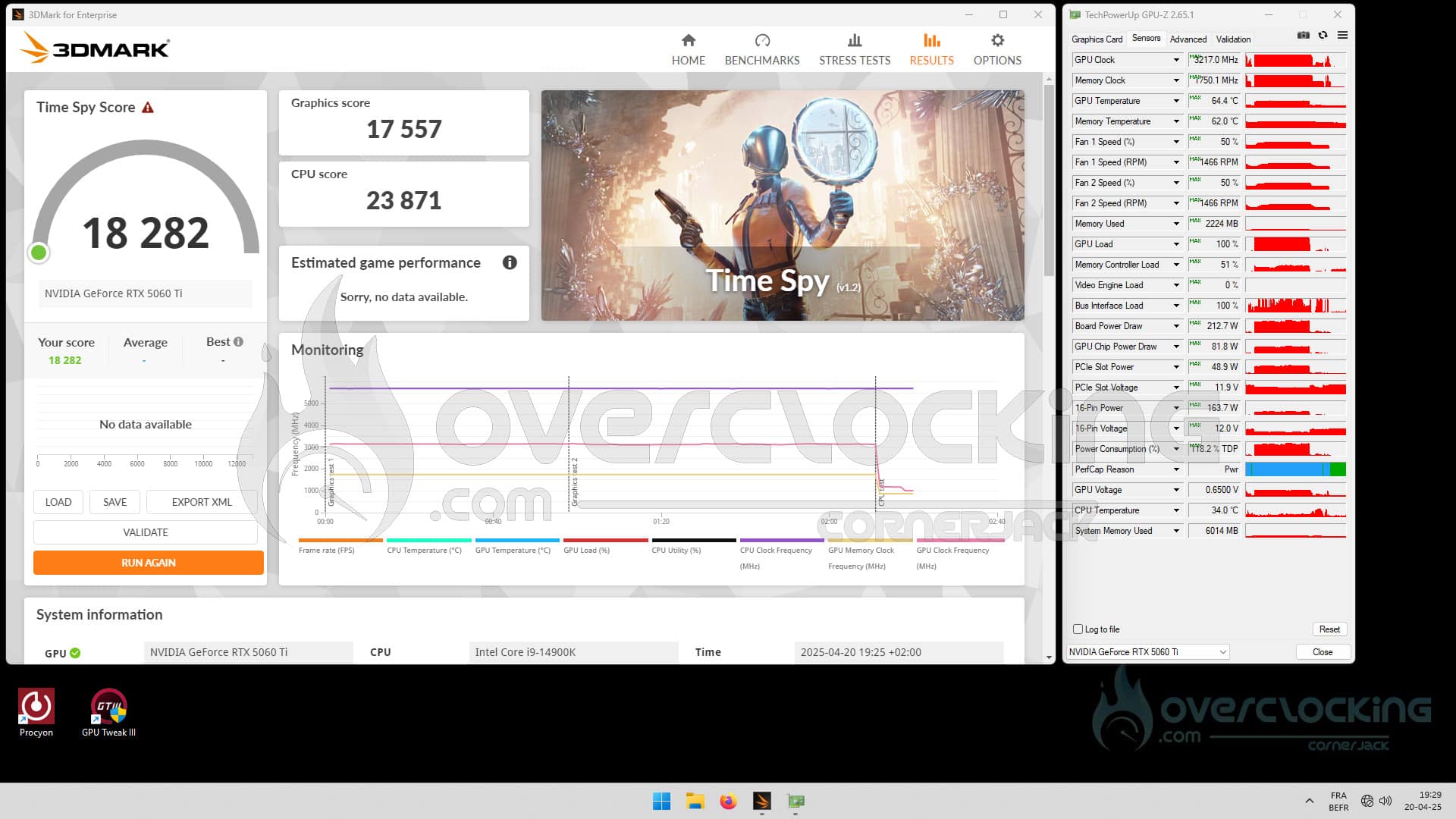
But of course that’s not enough for us, so we’re going to overclock the memory frequency. The idea is to push it from 1750 MHz to 2125 MHz, which seems to be the barrier imposed by the NVIDIA drivers. Even if we raise this frequency further, the score will no longer improve.
The GPU score climbs again, reaching 18184 points, a total gain of 10.9%. The maximum boost frequency is close to 3217 MHz, and power consumption rises to 218.3 watts. Now that we know the potential of this ASUS TUF Gaming RTX 5060 Ti OC, let’s move on to our other two cards.
The PALIT RTX 5060 Ti Infinity 3 and the MSI RTX 5060 Ti Gaming Trio OC:
The MSI again proved to be slightly more docile, with the best GPU score of 18,372 points and an overall score of over 19K.
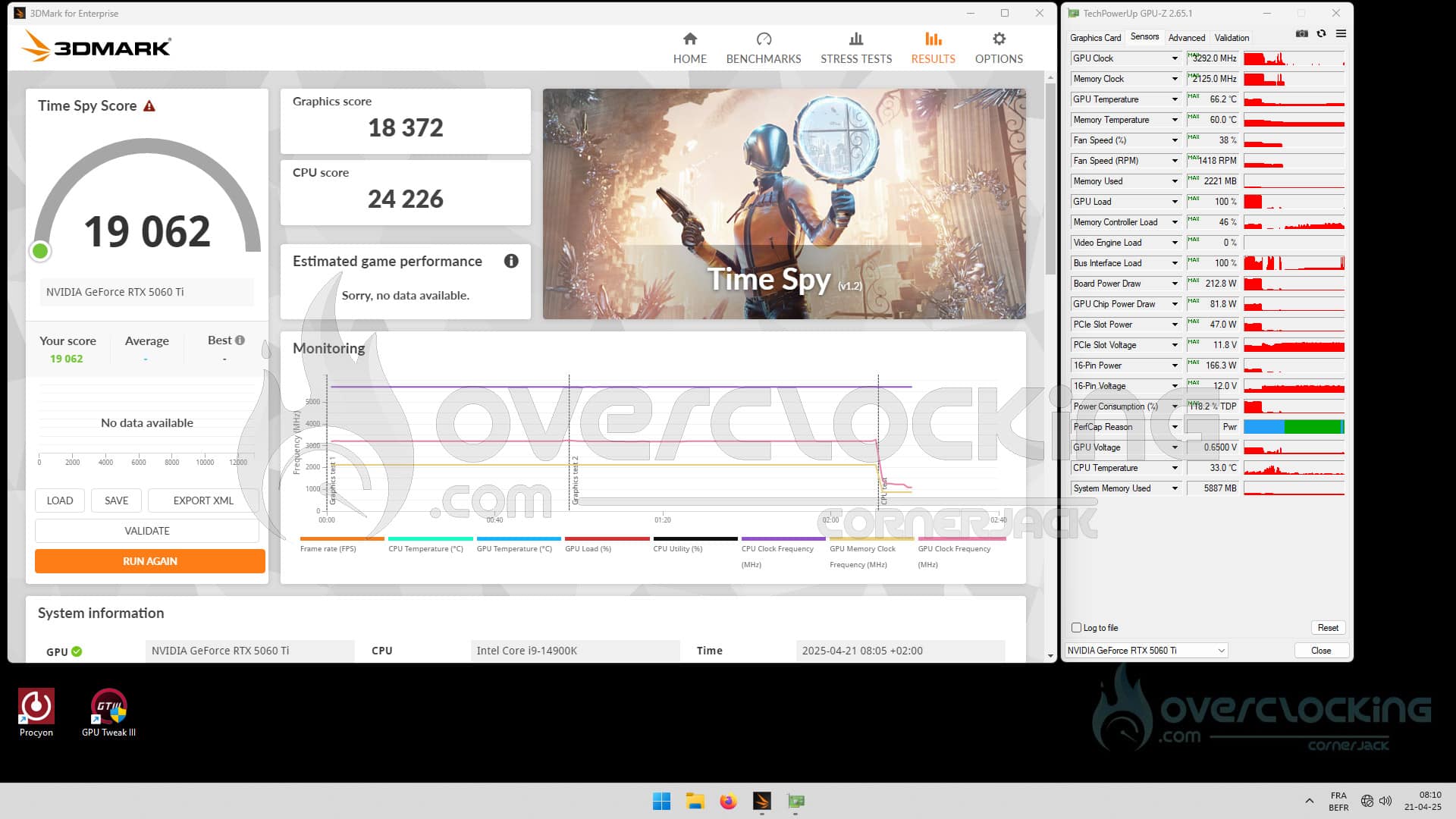
The PALIT is slightly behind the other two models, with a GPU score of 17773 watts. In the end, the absence of a Power Limit didn’t do it any harm, thanks to its 8-pin connector and PCIe port, which allows up to 225 watts of power consumption. We also suspect a slightly different BIOS, which could explain why the card is not limited.

As far as the temperatures of the graphics chip and memory chips are concerned, the cooling system on our ASUS TUF Gaming proved to be the most efficient, but also the most imposing. Our MSI’s cooling system also managed perfectly, with a difference of 1.7°C, while the PALIT model’s system was able to cope with a difference of 4°C.
This mini-file allows us to confirm all the good things we thought about the PALIT RTX 5060 Ti Infinity 3. It ‘should’ be available at the MSRP price of 449 euros, but unfortunately, it seems to be unobtainable at the time of writing. The ASUS TUF Gaming RTX 5060 Ti OC was advertised at €599, but ended up costing around €650, as did the MSI RTX 5060 Ti Gaming Trio OC at €620. With prices like these, it’s impossible for us to recommend them to you, and we’d advise you to look out for models close to MSRP prices, or to go upmarket and look for a Founders Edition RTX 5070 if you want to stay with NVIDIA, or turn to AMD’s RX 9070.

