
Today, we meet again for the test of a new case. However, it is a model of a rather particular format since it is a case called: “HTPC”. Typically, it is the kind of box that we choose to integrate directly into the TV cabinet of his living room. So we’ll see what the Grandia GD11 from Silverstone offers, released in mid-2022. Let’s go !

Grandia GD11 exterior:
The first thing you’ll notice about this model is its format. Indeed, it is similar to what a medium tower case can offer, but lying on its side. This translates into dimensions of 440 (W) x 399 (D) x 176 (H) mm. These are dimensions to take into account before putting it in your TV cabinet. Personally, it would not fit in mine, a Hemnes from Ikea. Nevertheless, the empty weight is not communicated.
In terms of design, we find a rather sober case with a front in two parts. The top of the latter is made of metal mesh to let the ventilation breathe while the lower part displays a brushed and anodized aluminum edge. The logo of the brand is also present in the middle. We will also note the presence of a small lasercut around the various elements constituting the control panels.
The control panel :


By the way, since we are there, let’s talk about this control panel. This one is distributed between the left and the right of the facade. It provides :
- A power and reset button
- Two status LEDs
- A headphone jack
- One USB-C port
- Two USB-A 3.0 ports
In short, the connectivity is similar to what was offered by the Sugo 15. At least Silverstone doesn’t give in to the minimalism trend and offers something functional with its two USB-A.
The bottom:

The bottom part of the case doesn’t offer much of anything exceptional apart from its four feet. Moreover, those located at the front of the box are much more worked than those positioned at the back. Since the box must be placed in a TV cabinet, the goal is to harmonize the look with the different amplifiers of a Hi-Fi/home cinema installation.
The back :

However, it is at the back that we find the most to say. Indeed, on the left, we can see the location of the power supply. This will be installed vertically and we can also see the opening for its fan on the left panel.
Then, at the bottom, we have the I/O Shield slot of the card with two slots for small fans just above. Finally, we end with the seven vertical expansion slots for daughterboard mounting.
Top:

Finally, the top doesn’t feature much in particular as the panel is solid. A simple square grid is present at the back, on the left.
[nextpage title=”Inside the Grandia GD11″]
To get inside this Grandia GD11, you just have to remove the single top panel screwed to the case. Unfortunately, the screws are not captive, you’ll have to be careful not to lose them. On the other hand, once removed, the panel leaves a large access to the inside of the case.
The chassis:
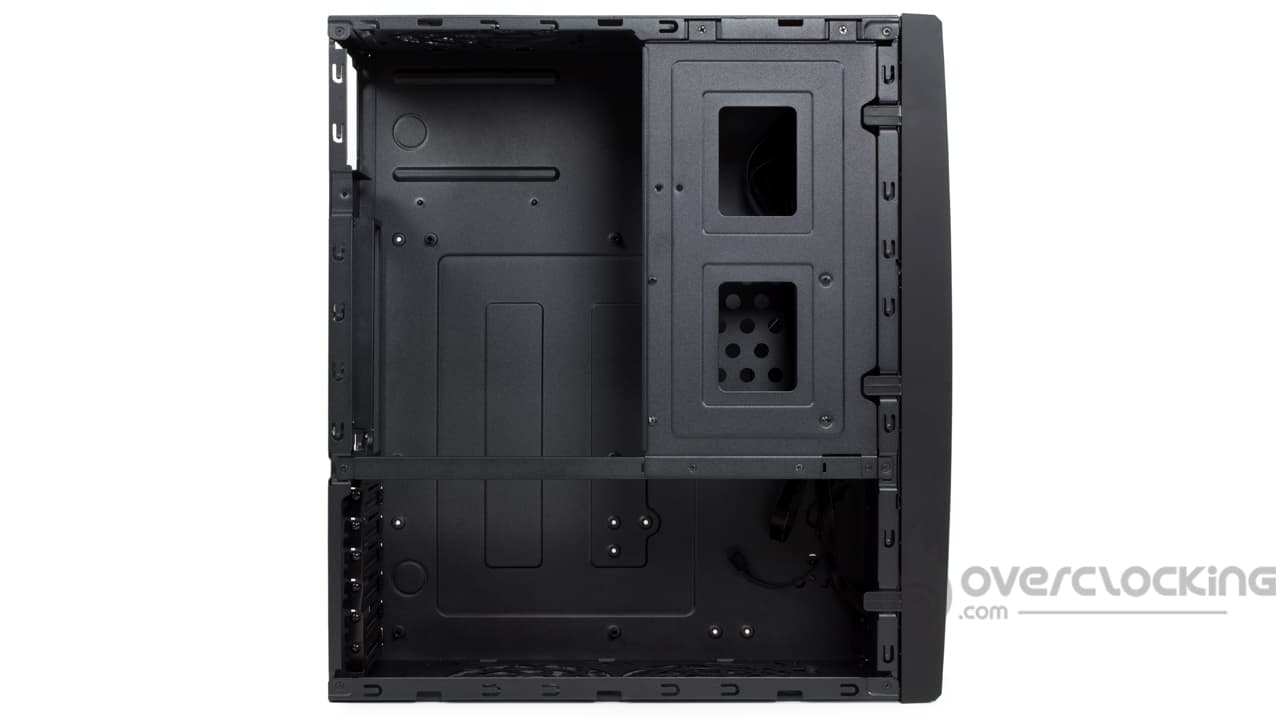
Clearly, the interior of this Grandia GD11 changes from what we are used to see. Indeed, as soon as we open it, we arrive on the motherboard tray and that’s all. Here, there are no cable passages or anything else. Moreover, at the top, we can see the power supply slot with the motherboard slot just below. In the upper right corner, the hard disk cage is present. Fortunately, it is removable in order to free up more space during assembly.
The storage slots :
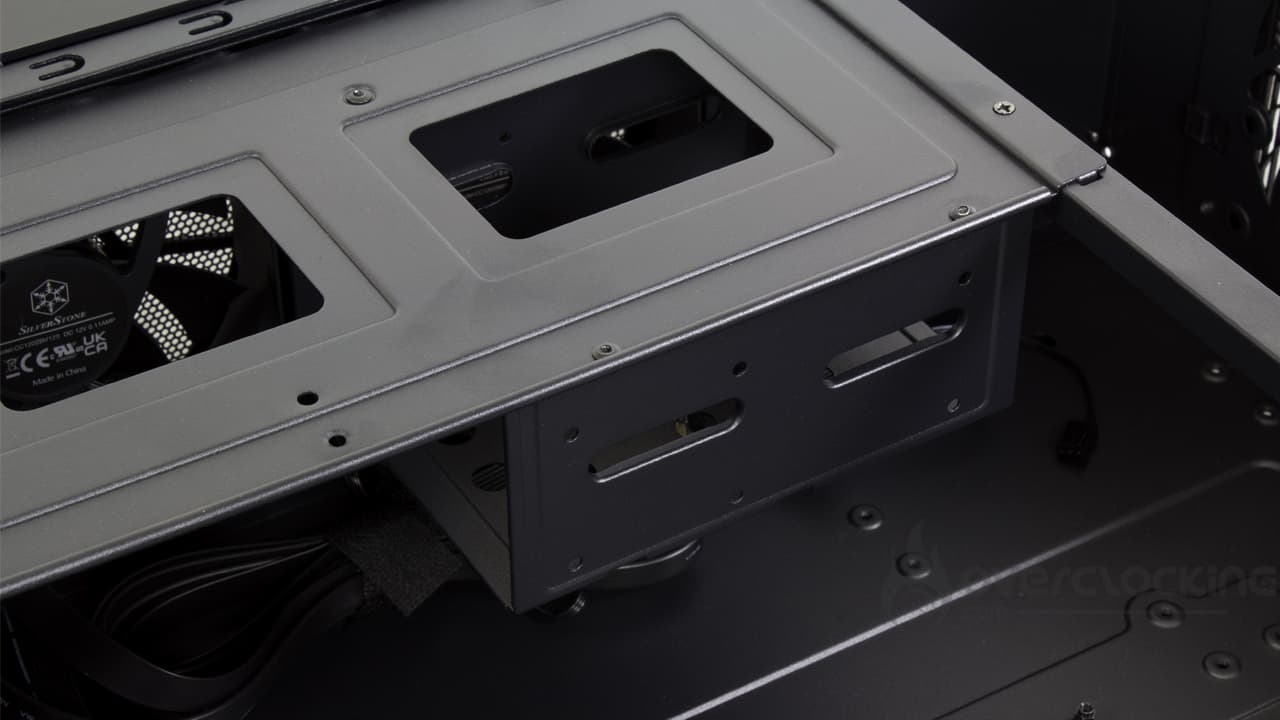
From the ground up, the case arrives with fairly few slots for storage. As standard, it offers a two slot hard drive cage in 3.5″ only. As you can see, it is made of steel and does not offer any basket or anti-vibration device. Moreover, it is held in place by a total of five cross-headed screws that will have to be removed to gain access. In short, it’s not the most practical system we’ve seen.
If you want to install a 2.5″ storage device, you’ll have to add an extra basket, fortunately, provided in the accessories section.
Power supply location:
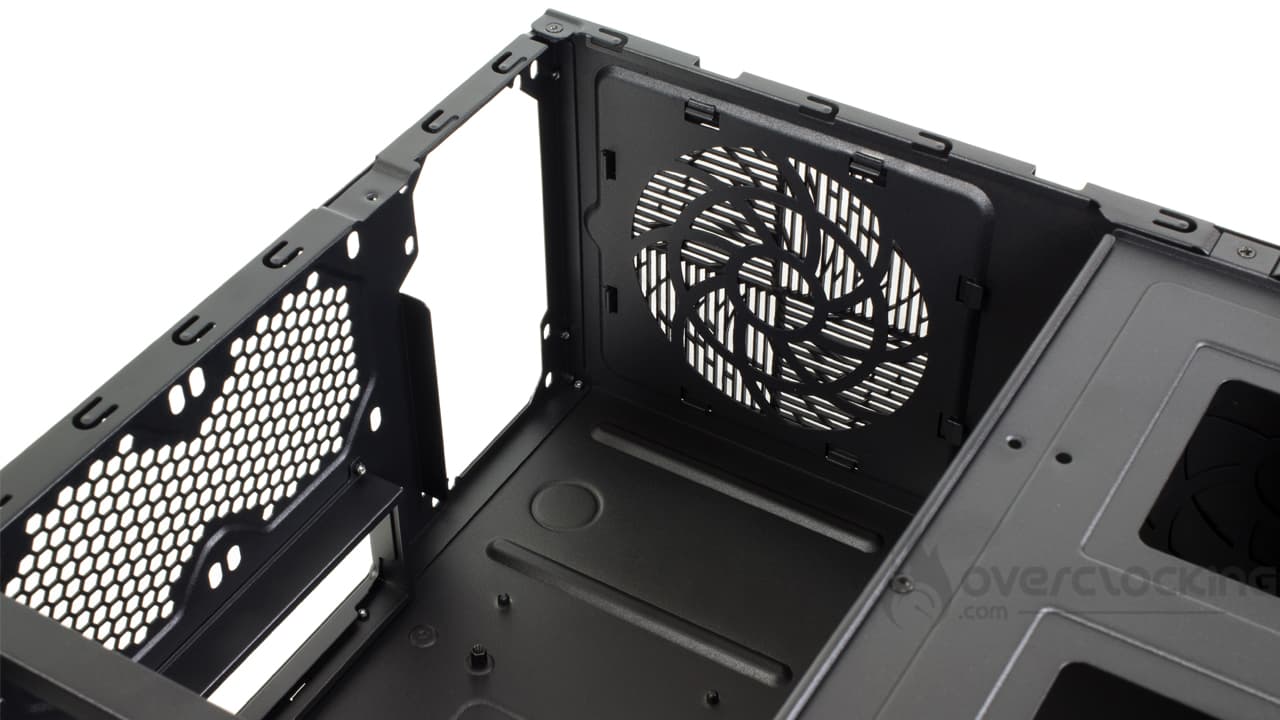
For kicks, the power supply location remains just as basic as the HDD cage. Once in place, the block will rest on two grooves molded directly into the steel of the case. Here, there are no foam/rubber pads in order to limit vibrations as much as possible. Moreover, considering the use, it is quite surprising that this aspect has not been more carefully considered. On the other hand, we have a lot of space for our block since 350 mm are available for it!
The cooling possibilities :
As standard, the Grandia GD11 is a case that integrates two 120 mm fans in front. Nevertheless, if we wish, we can add up to five fans. On the left side, the case offers two 120 mm slots against one on the right. Finally, at the back, above theI/O shield of the card, we have two small 80 mm slots.
Obviously, the case will be severely limited as far as watercooling is concerned. Silverstone’s datasheet only mentions compatibility with 240mm radiators at the front. And if you want to switch to aircooling, the situation is not much better since we have only 146 mm height for a cpu cooler. This forces us to opt for either a top flow model or a 92mm tower model.
The bundle:
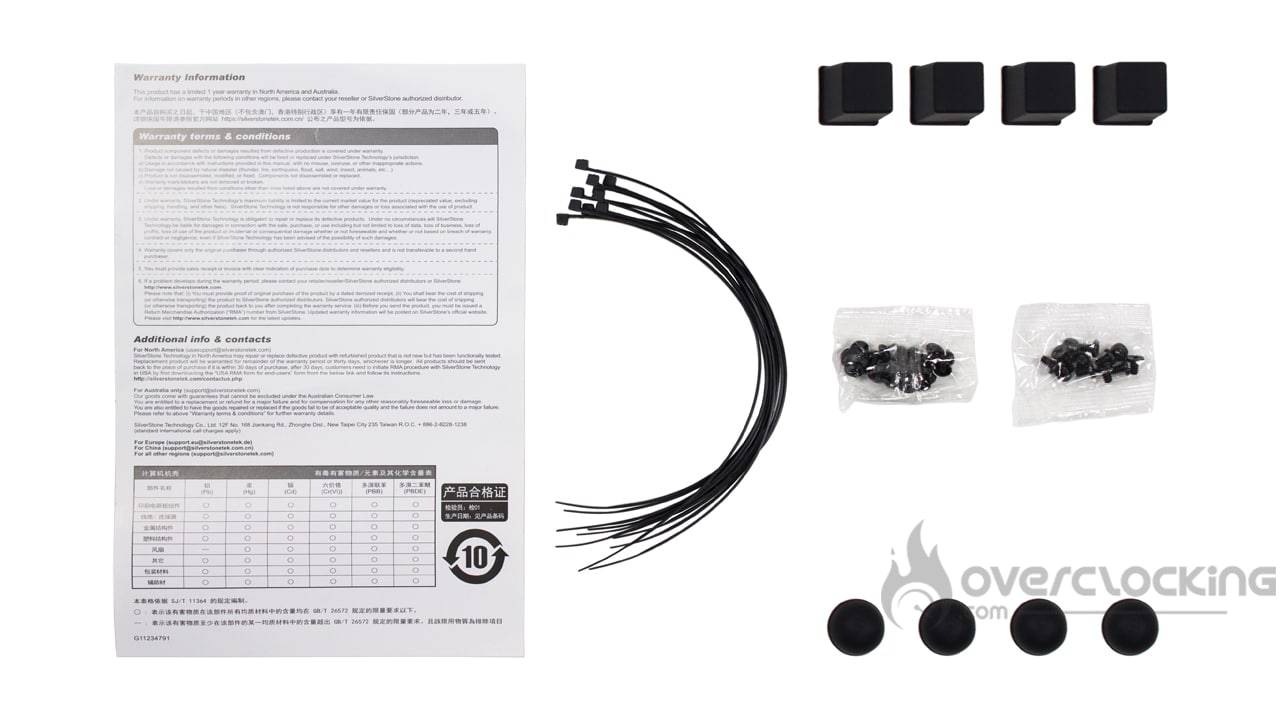
As for the accessories part, what do we find?
- A guarantee guide
- Nylon collars
- The screws and bolts
- A 3.5″/2.5″ hard disk basket
- 120mm fan filter
In fact, the accessories section offers everything you need to mount a configuration inside the Grandia GD11. As a little extra, we find a 3.5″/2.5″ storage support as well as a filter for a fan, occupied by a cover by default.
The small details :


In the “small details” section, it’s sad to say, but there is not much to highlight as this model remains simple after all. Except for the two fans on the front and the various dust filters present everywhere, there are few things that are out of the ordinary… If, the velcro strips used to fix the cables in the bottom of the case.
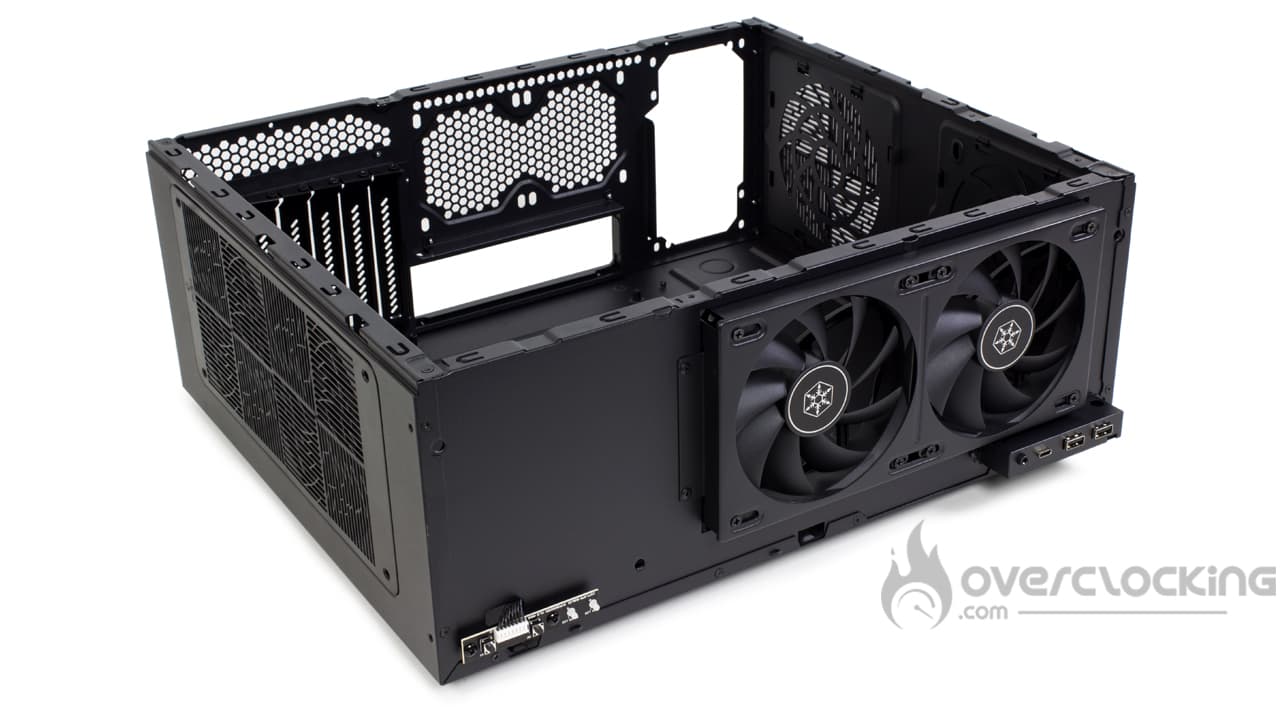
After removing the front panel, we also wonder why the brand did not create an additional opening to install a third fan. This would also have allowed the installation of a 360 mm radiator.
In summary:
Overall, we have a case with an original internal layout, conditioned by its function as a HTPC case. However, for a reference used to host a multimedia configuration, we do not understand why Silverstone did not work more on the silent aspect of its case. The storage part as well as the power supply would deserve to gain silent blocks in order to limit vibrations for example… All the more so as in the age of the all SSD we would have appreciated more 2.5″ slots. Concerning the ventilation, a third slot in 120 mm would have been possible in front.
Otherwise, we find a case clearly oriented HTPC because of its format and its general aesthetic.
[nextpage title=”Installation”]
Mounting
We now move to the assembly stage of our configuration inside this Grandia GD11 from Silverstone. Here are the components that will be used for the assembly:
- Motherboard : Asus Crosshair VI Hero
- CPU: AMD Ryzen 7 1700X
- Graphics card: ASUS HD 7970
- Cooler: Cryorig C1
- Power supply : NZXT C1000 Gold V2
Power supply:
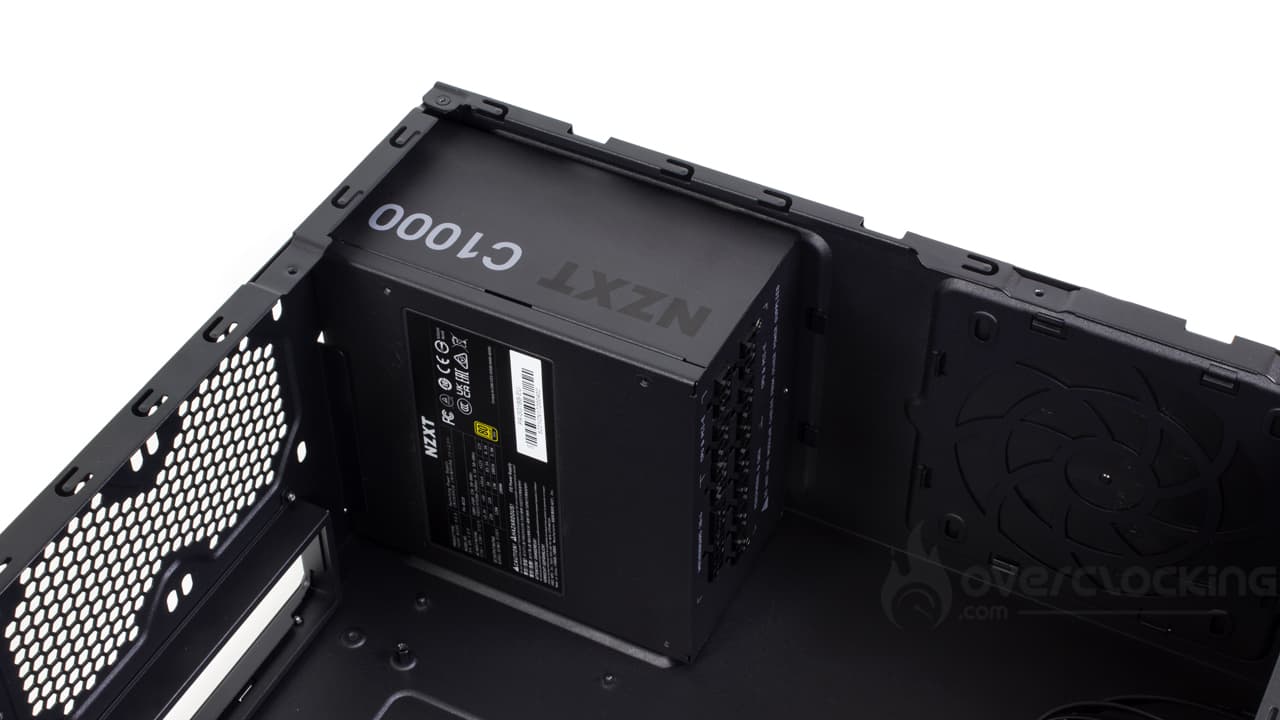
The assembly of the power supply is done in a classic way by depositing the block on its place with a fixing which is done by screwing the block by the back. In the operation, we will pay attention to the orientation of the fan, the latter must be turned towards the outside, on the filter side.
In addition, to facilitate the assembly of the block, do not hesitate to remove the storage slots. This way, the whole motherboard tray is easily accessible.
Storage:


For the storage, we will have to remove the various supports to attach our various hard drives/SSDs. By the way, the mounting is done in the traditional way: four screws and a good old Phillips screwdriver. However, before putting everything back in place, we can only advise you to finish assembling the motherboard, the graphics card and the cabling.
Installation of the motherboard :
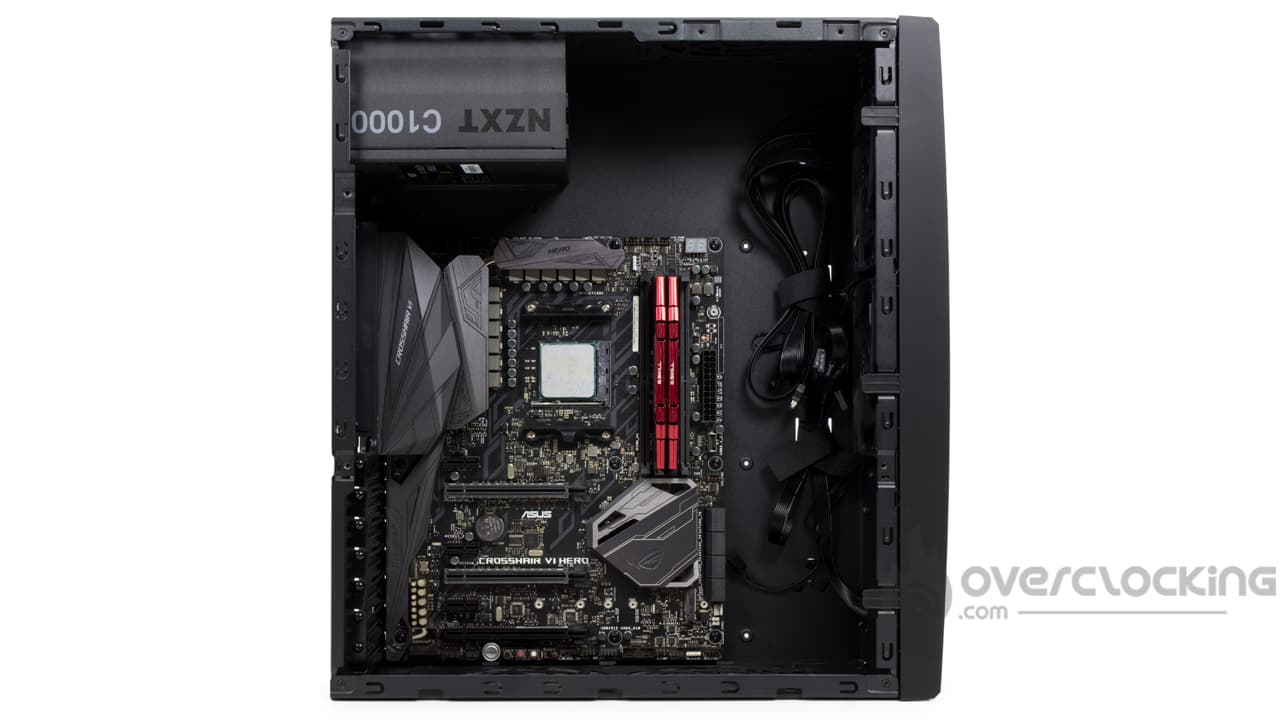
If you have a motherboard in ATX format, be aware that you will need to add a total of three spacers. Fortunately, Silverstone provides the necessary to install them on the motherboard tray.
Once the spacers are in place, we’ll drop the motherboard into its slot, and then screw it to the case via its nine mounting points. Again, for the assembly of this component, we can only advise you to remove the various supports for front storage units.
The cooler, graphics card :


Before proceeding with the cabling, we move on to the assembly of the graphics card and the CPU cooler. Given the location of the storage units, it is clearly better to remove the various baskets beforehand.
For the CPU heatsink, as this Grandia GD11 does not have backplate access, the first thing to do is to mount the CPU cooler, or the AIO pump before installing the motherboard. In our case, we used a Cryorig C1.
As for the graphics card, it’s not very complicated since you just have to free the slots corresponding to the card’s location. Once the card is mounted on its PCIe slot, all that remains is to screw it to the case with its bracket.
Cabling:
The control panel:
For the cabling, we start by setting up the control panel connectors. In general, it is not very complicated since the cables will run along the front panel before being dispatched to their respective ports on the motherboard. To make things easier, we’ll use the two Velcro strips on the front of the case to help with the wiring.
On the other hand, the Grandia GD11 would deserve to have a cable for the HD audio a little longer. For the connection to our Crosshair VI Hero, it turned out to be a bit tight. 5 cm to 10 cm more would have been perfect!
Motherboard:
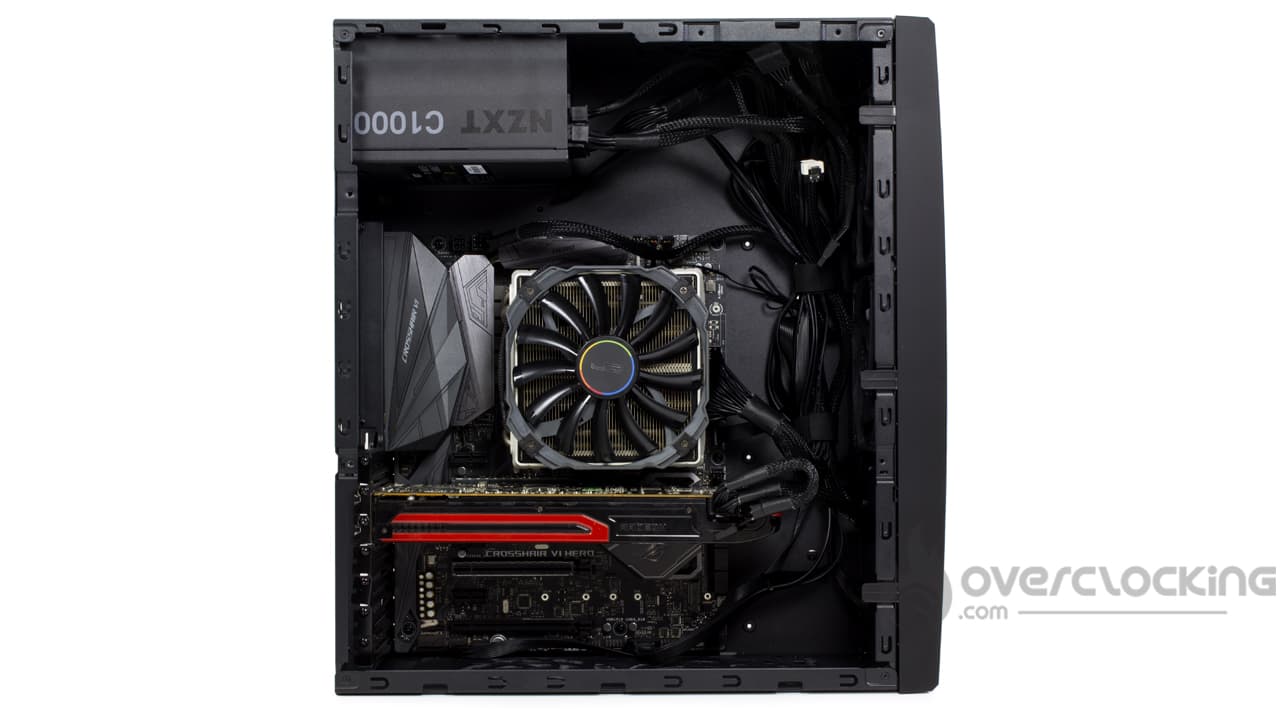
Now we move on to connecting the motherboard and for this we will need to add the 24-pin ATX and EPS12V strands to our C1000 Gold V2 power supply from NZXT. Routing them is not very complicated. Again, we run the Grandia GD11 through the front and exploit the velcro strips. Just that in theEPS12V it will only be attached by the first velcro before going along the top of the motherboard.
Graphics card:
As for the graphics card, same observation: we add a PCIe strand to our power supply. Again it will go through the velcro brands on the front of the case before being connected to the graphics card.
Storage:
For storage, things get a little more complicated. During the wiring process, we found it more convenient to plug in our HDD/SSD combo before putting everything back together. Fortunately, the various storage slots are close together, so it is possible to connect all the media with a single SATA cable. The excess cable can then be stored behind the front panel, on the right of the latter.
As for the data cables, once again, there is no secret as they will run along the front panel before being connected to the motherboard. In fact, to make things easier, it’s better to connect them first to the motherboard and then to the hard disks/SSDs than the other way around.
Once everything is connected, you can finally put the HDD/SSD baskets back in place.
Overall:
Overall, the assembly goes pretty well, we’ll just make sure to remove the storage slots to make it easier. As for the cabling, you should not hesitate to use the two Velcro strips on the front. They are a precious help to better arrange and fix the cables!
[nextpage title=”Protocol”]
We have updated our test protocol in order to test the qualities of our cases. Thus, we will evaluate the performances offered by the different models according to three criteria:
- Insulation
- Noise of the original ventilation
- Air flow

Concerning the addition of the ventilation, we choose to integrate a single fan in 120 mm. Why only one? Simply because the other slots are condemned by the cpu cooler. Thus, the chosen mill is a Silent Series R2 from Fractal Design. We will install it above the motherboard in aspiration.
Configuration:
- Processor: AMD Ryzen 7 1700X
- Motherboard: MSI B350i Pro AC
- Graphics Card: ASUS HD 7970 reference
- Cooler : Cryorig C1
- SSD : Kingston HyperX 3K 120 Go
- Hard disk : Seagate Barracuda 2Tb
- Power supply : Corsair CX650M
[nextpage title=”Tests”]
Tests
Airflow :
Additional ventilation comes in the form of two Silent Series fans from Fractal Design, placed on the left side of the case in the intake.
CPU airflow, original ventilation then supplemented:
We start first with the temperature of our CPU. We keep the front and the upper part of our test case. Let’s see if the airflow is sufficient for the good cooling of the Ryzen 7 1700X.
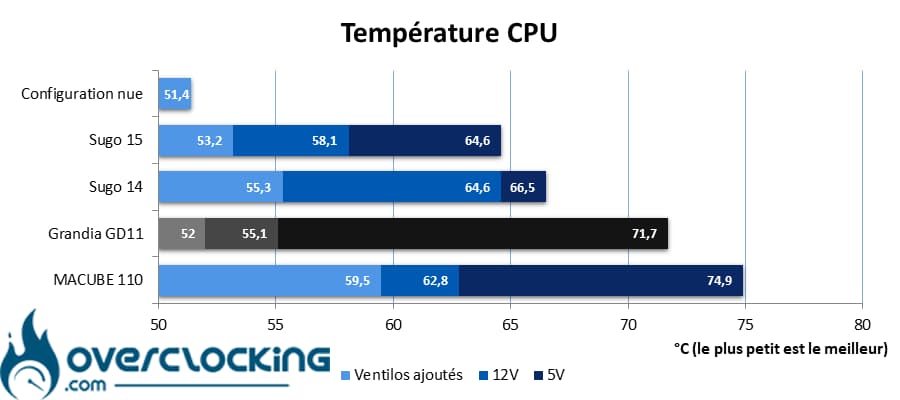
Let’s go for a new series of readings. Here we focus on the temperature reached by our processor. On this subject, it shows 55.1°C when the ventilation is running at full speed, which allows it to easily compete with the two Sugo from the same manufacturer. On the other hand, things get much more complicated at low speed with 71.7°C. Since we have mounted a top flow cooler, it is not impossible that it struggles to capture the airflow brought by the two fans.
In any case, adding two fans in the intake is not a bad idea. Of course, we notice a slight improvement at full speed, but we imagine that it will be especially beneficial at low speed.
CPU airflow original ventilation without front panel or top :
In order to ascertain the limiting factor in the story (and how much), we remove the top as well as the front of the case. The goal here is to show the raw performance of the integrated fan.
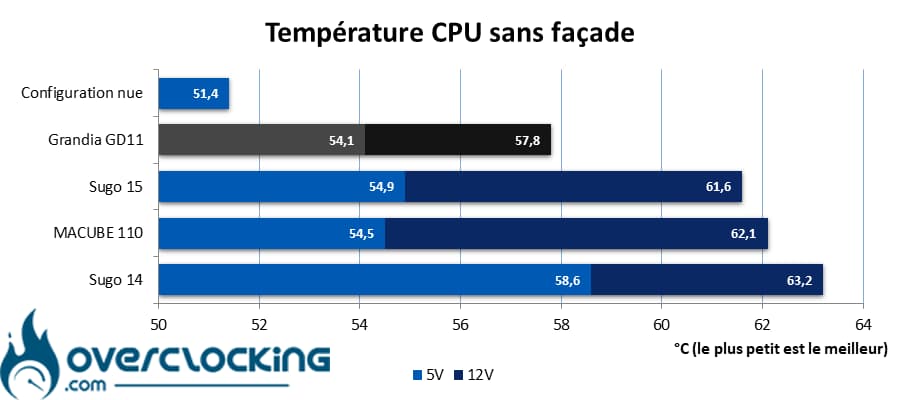
By removing the front panel, we have some gains as well. However, if they are not huge at full speed: 1°C at all, it is at low speed that things change. Indeed, in these conditions, we gain 13.9°C. The fans are not fast, so removing the mesh on the front seems to do the trick.
GPU airflow, original ventilation then completed :
We repeat the operation, but with measurements made on the graphics card. Here, we test with original ventilation and completed ventilation.
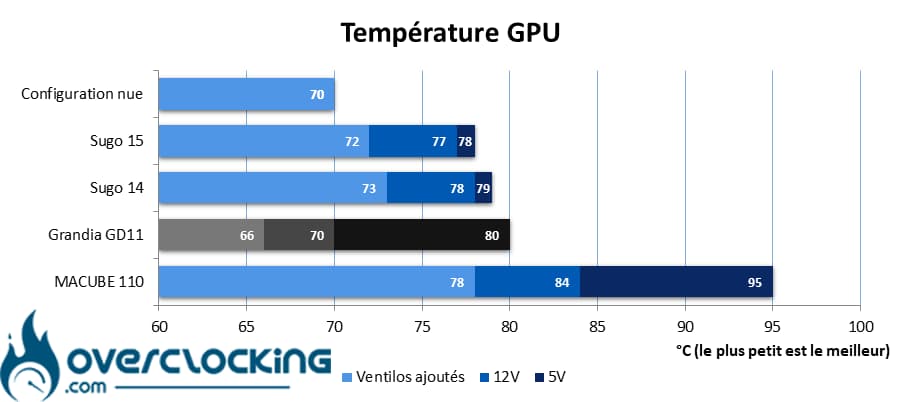
On the graphics card, the situation is not catastrophic, far from it. With the basic ventilation at low speed, our reference HD 7970 stabilizes at 80°C. By pushing the ventilation, the card drops to 70°C, so we find a more efficient ventilation than in the Sugo 14 and Sugo 15.
Nevertheless, one of the things you should do urgently after buying a Grandia GD11 is to add some fans on the left side. Your card will clearly thank you since by doing so, our model stabilized at 66°C.
GPU airflow original ventilation without front panel or top:
We do the same test again, but remove the front panel and top of the case. Let’s see how this will affect the temperatures of the card.

Without the front panel, we have a situation quite similar to that of our CPU. Meaning that the gains are significant at low speeds, but quite small at full speed.
Insulation:
Here we simply measure the noise emitted by our config when running CPU cooling and GPU cooling very fast.

As far as insulation is concerned, we stay on something quite classic with 54.5 dB measured. Remember that a radial fan makes noise, especially at high speed and that today’s custom cards are much quieter.
In any case, for a case whose primary use will be the playback of multimedia content, we would have appreciated a better sound insulation.
Noise from the original fan:
This time, we measure the noise emitted by the original ventilation of the case. To do this, the configuration runs in idle mode ( CPU and GPU ventilation at minimum) while the readings are taken successively at 5V, 8V and 12V on the case ventilation.
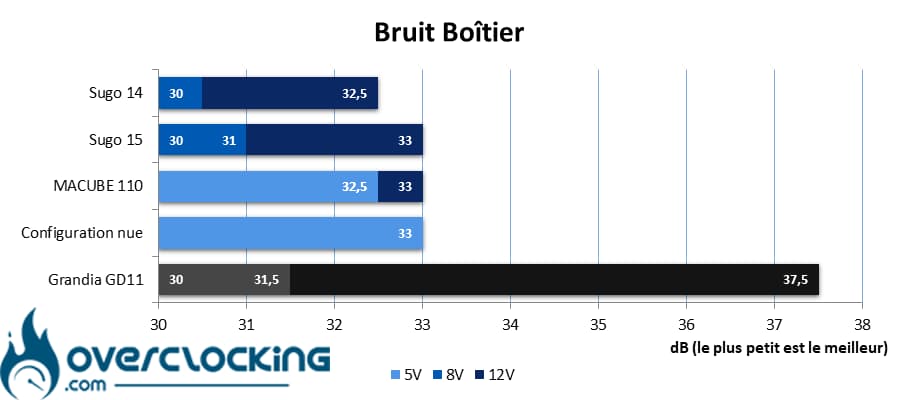
Basically, the 120mm fans are audible when running at full speed. You should not hesitate to muzzle them to obtain silence, which is feasible from mid speed. Fortunately, at low speed, we do not hear them at all!
In summary:
Roughly speaking, the Grandia GD11 is a case that does pretty well thermally. With its two front fans at full speed, it keeps our components cool. On the other hand, at low speed, it’s a bit more delicate, especially for the processor which will tend to heat up quickly, especially with a top flow fan. The solution would be to migrate to a 240mm AIO and add two fans in suction on the left side. This way, we get a properly cooled CPU and graphics card.
[nextpage title=”Conclusion”]
We are now at the end of our test on the Grandia GD11 signed by Silverstone. So, good little case or not? We tell you everything!
A box that fits in your TV cabinet!
With this Grandia GD11, Silverstone’s project is to offer a box that can be slipped into your TV cabinet. For this, we find a model rather low, but particularly stretched. Moreover, it has a sober and classy look with Hi-Fi type feet, mesh and a little bit of aluminum to better fit in the middle of the amps of your installation.
In addition, the control panel remains functional with its two USB-A and single USB-C. Silverstone did not give in to the fashion of minimalist panels with a single USB-A in particular.
Simple to mount, but with anti-vibration devices!
Despite its format out of the box, the Grandia GD11, is not a model where it will be difficult to mount its configuration. If we take care to remove the front storage slots, we have a clear access for all components. You’ll simply have to mount the storage last.
By the way, speaking of storage, it’s a pity that Silverstone doesn’t offer an anti-vibration device, both for the power supply and for the storage. Also, a little regret about the 2.5″ compatibility which is not at its best since it would have been possible to add a compatibility for one or two 2.5″ SSDs in the 3.5″ cage.
However, this Grandia remains one of the few cases on the market that can accommodate a watercooling kit in 240 mm while being able to be installed in a TV cabinet.
What about performance?
As far as cooling is concerned, we can’t complain about the two 120mm fans on the front panel. At least, at full speed, because at low speed, it’s a bit more asthmatic. For this, we can only advise you to mount an AIO in 240 mm, with the radiator at the front. And to cool your graphics card, opt for two exhaust fans on the left side.
As for the noise, don’t look for soundproofing because it’s not designed for that. Its mesh facade and numerous openings mean that it will not isolate any better than its competitors, but not worse. Finally, the basic ventilation can be audible when pushed to the limit. Fortunately, by muzzling it a little, we find something very quiet.
A premium price?
Now it’s time to talk about the price at which this case is found in the market. As we can see, we can get our hands on it for a price around 180 €. This is still expensive, we will find more affordable boxes offering better compatibilities. However, they won’t fit in a TV cabinet while having the capacity to host muscular configurations with a big CPU and a big GPU.
In ITX, we have much more compact, but often these configurations are limited by the size of the heatsink. And those allowing the installation of an AIO in 240 mm do not fit in a TV cabinet.
Silverstone Grandia GD11:
We liked:
- The design in line with the Hi-Fi environment it relates to!
- The compatibility with an AIO in 240 mm
- the big clearance for the power supply
- The good compatibility with the graphic cards…
- … And well ventilated with the fans on the left
- Its functional control panel : 2x USB-A + 1x USB-C
- The wiring is not very complicated
- The good cooling performance at high speed
We liked less:
- The lack of a vibration dampening system
- The audio cable is a bit short
- The lack of a third fan slot on the front, although there is room for one
- The lack of a 2.5″ slot
- The price remains high despite everything
 In the end, we choose to give the Grandia GD11 from Silverstone the silver award. Of course, it is still quite expensive and not free of defects, but it keeps its promises. In a case that fits in a TV cabinet, you can assemble a very muscular configuration with good cooling and a look that allows it to take place next to your Hi-Fi amps, something that mid-tower and ITX cases do not allow because of limitations regarding the cooling system.
A big thank you to Silverstone !

