

Today marks the end of the NDA for 14th-generation processors. Yesterday we already had the opportunity to present the press kit we received from Intel France, which contained a copy of the i9-14900K and i5-14600K processors. Good news, since we also had the opportunity to get our hands on the i7-14700K, which certainly offers the biggest difference from its counterpart, the i7-13700K. This is clearly a refresh of the Raptor Lakes, and with the exception of the i7-14700K, the differences with the 13th generation are minimal. Today, we’ll be testing these three processors in a series of benchmarks, but not yet in gaming. Many things have changed in recent weeks, notably AMD’s support for high-frequency memory kits. So we’ve updated our configurations and will be bringing you a test with the AMD Ryzen 7800X3D, 7950X3D and Intel i9-13900KS and i9-14900K in the coming days.
As always, this new generation is not accompanied by the arrival of new chipsets. Here, as with the processors, we’re on a refresh of the Z790 chipset, where the brands have updated some of their motherboards to add Wi-Fi 7 support. For today’s test, we received a copy of the ROG Maximus Z790 APEX Encore. This is the refresh, version 2, replacement of the ROG Maximus Z790 APEX. We tested this board yesterday with 13th-generation processors.
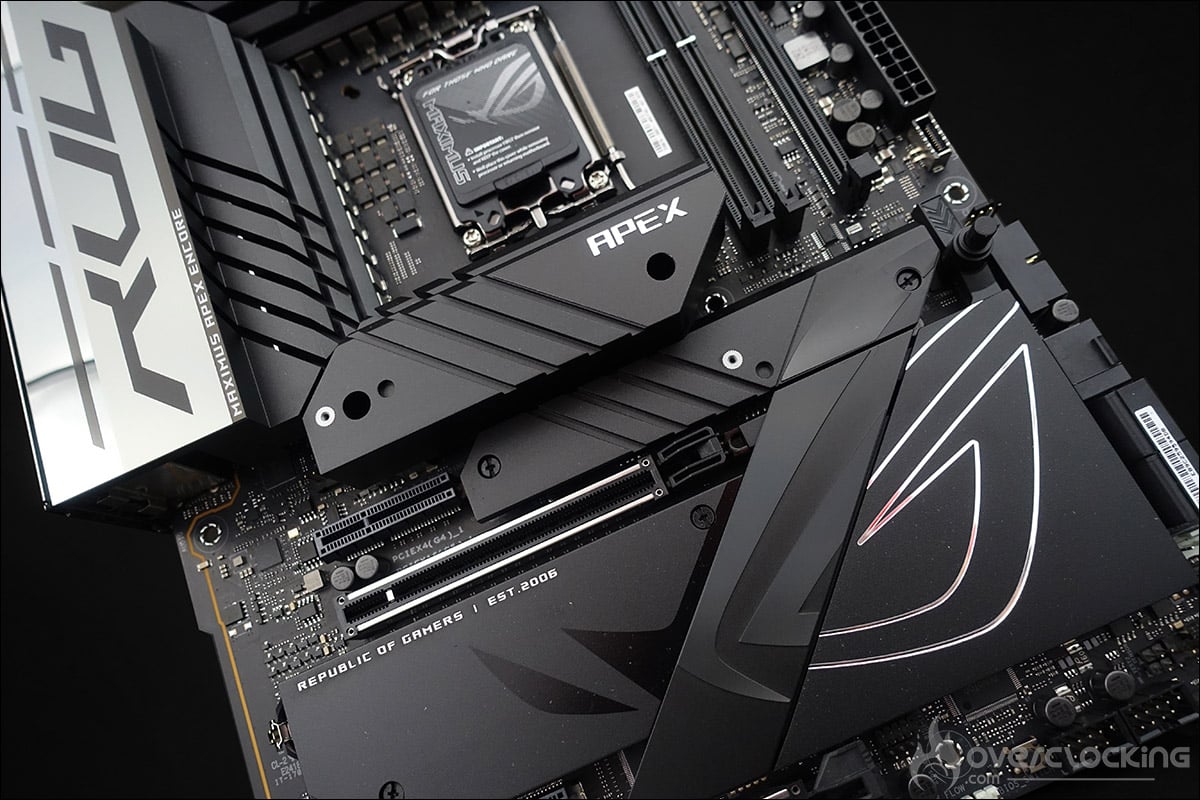
Thanks to Intel and Asus for making the processors and motherboard available.
[nextpage title=”The Intel 14th generation press kit: “]
Before getting down to the nitty-gritty of our tests, we wanted to take a look at the components in the press kit we received from Intel. As a reminder, we received a press kit containing a copy of the Intel i9-14900K and i5-14600K processors. We were also able to get our hands on the i7-14700K. To test them, we’ll be using the ROG Maximus Z790 APEX Encore motherboard, which we already presented to you yesterday with the 13th generation processors and which will benefit from an article dedicated to overclocking in the coming days.
The Intel press kit:
This one follows the same color code as the one we received for the launch of 13th-generation Raptor Lakes. The box is smaller, measuring 150 x 305 x 55 mm. It opens from the front via a magnetic flap, and conceals two boxes containing a copy of the Intel Core i9-14900K processor and the Intel Core i5-14600K.


The i7-14700K processor isn’t included in this press bundle, but we did manage to get our hands on one, because as you’ll discover, it’s this model that brings the most interest to the 13th generation.


Let’s take a closer look at the features and frequencies of these new 14th-generation processors.
[nextpage title=”Raptor Lake architecture: “]
With Raptor Lake, Intel retains a “hybrid” architecture, mixing two types of cores. P-Core and E-Core are still used. We’ll see that on this 14th generation, Intel has made a few changes, either in terms of frequencies or the number of E-Cores. These cores have different roles, of course. The first, the Performance cores , are designed to perform tasks requiring computing power, while the second, the Efficient cores, are more suited to office automation or background tasks. Now, both types of cores will work together, depending on the task in hand.
What can we expect from this new generation?
Let’s start with Intel’s official chart, which gives an overview of the features of these 14th-generation processors. You’ll find the first “K” and “KF” models.

For our part, we’ve taken the information posted by Intel and re-created a new table to highlight the differences between the 13th and 14th generation Raptor Lake processors.

As you can see, for the i9-14900K and i5-14600K, Intel has increased the P-Core and E-Core frequencies, resulting in a slight performance gain over the previous generation. As for the i7-14700K, this is where there’s a real difference, as this 14th-generation processor gains 4 E-Cores and higher operating frequencies. We’ll see during our tests, but here we should see a real gain in performance.
[nextpage title=”Frequencies reached:”]
As with every new processor test, our first concern is to check whether the advertised frequencies are actually achieved. To do this, we’re going to use the Cinebench R23 benchmark. Two scenarios will be used: a single-core benchmark and a multi-core benchmark. The idea is to be able to judge the frequency achieved and compare it with what Intel has announced in its slides.
It’s worth remembering that the Boost frequency in the bench is different for each processor. As Intel points out, Max Turbo frequency refers to the maximum frequency attainable by one of the processor cores running a single-core workload. This frequency varies according to several factors: the load, the cooling system and therefore the temperature of your processor. It’s important to keep this in mind, and that’s why we’re reposting the table from the previous page here, before starting our tests.

First, we leave everything in AUTO in the BIOS except the XMP profile, which we load, and we make no other changes in the BIOS.
Testing with the i9-14900K :
Here we go with the toughest of processors, the i9-14900K. As you can see, we opened several windows to check frequency and temperature. The options in our BIOS were left in AUTO, but we’ll come back to this in the power consumption section, as it has a significant impact on consumption.


In single-core mode, cores #4 and #5 can be seen alternating at a frequency of 6000 MHz, in line with Intel’s claims. The temperature of the two cores alternating at 6.0 GHz is 65/66°C. When the 24 cores of our i9-14900K are called upon, the frequency is fixed at 5.7 GHz on the P-Core and 4.4 GHz on the E-Core. The temperature of the hottest P-Core is 90°C, while that of the E-Core is 78°C. Strangely enough, we only reached a frequency of 5.7 GHz for the P-Cores, whereas according to Intel’s documentation, we should be maxing out at 5.7 GHz.
Testing with the i7-14700K :
Here we go with the i7-14700K with the same BIOS settings as above.


In single-core mode, cores #4 and #5 can be seen alternating at a frequency of 5600 MHz, in line with Intel’s claims. The temperature of the two cores alternating at 5.6 GHz is 53/54°C. When the 20 cores of our i9-14700K are called upon, the frequency is fixed at 5.5 GHz on the P-Core and 4.3 GHz on the E-Core. The temperature of the hottest P-Core is 90°C, while that of the E-Core is 75°C.
Testing with the i5-14600K :
Let’s conclude our frequency tests with the i5-14600K model.

Here, there’s no difference between single and multi frequencies, since it will always remain 5.3 GHz. Temperature is around 68°C for P-Core and 57°C for E-Core. Let’s move on to our various tests.
[nextpage title=”Cinebench, Geekbench and CPUZ benchmarks:”]
As we said in the introduction, we’re (once again) busy updating all our graphics using the latest chipset drivers from Intel, AMD and now, of course, INTEL. The idea, of course, is to regularly update our test graphics so as to be consistent with OS, BIOS and chipset updates. The gaming part of our tests will arrive in the days to come with the new BIOS and chipset.
- Motherboard: ROG Maximus Z790 Extreme
- Processor: Intel Raptor Lake i9-13900K, i7-14700K and i5-14600K
- Memory: 32 GB Teamgroup 6000 MT/s in 30-38-38-96
- Graphics card: NVIDIA RTX 3070 Ti
- Cooling system : ROG Ryujin II 360 from Asus
- SSD: Western Digital Black SN750 2 TB EKWB radiator
- Power supply: Corsair AX1600i adapter 12VHPWR 600W
- Operating system: Windows 11 64-bit
Let’s start with a CPU benchmark staple, the Cinebench series. We’ve opted for Cinebench R15, for the R20 version, which is also increasingly used, and finally for Cinebench R23, the latest to date. Scores will be given in Single core and Multi core. By this we mean that the benchmark tests performance on a single processor core and then on all available cores.
To do this, we’re going to use Benchmate, which has just been updated to version 10.12.2 and can be downloaded here. The advantage of Benchmate is that it already contains a whole series of benchmarks, and what’s more, it’s recognized and certified when you want to encode your results on the Hwbot site.
As a reminder, before you start reading these results, be sure to take a look at the previous page to understand the operating frequencies of these non-X Ryzens.
Cinebench R15 Single Core and Multi Core:
A benchmark widely used by overclockers to compare processor performance. It also allows you to judge the optimizations of your OS and memory kit by setting a frequency and trying to score as many points as possible. Even if it’s a little less used today with the arrival of R20 and R23, it remains a benchmark for comparing CPUs, since it was one of the first benchmarks used by the community.

For all the single-core tests we’re going to run, we should see very similar performance between the i9-13900KS and the i9-14900K, since the 6.0 GHz frequency is identical for both processors. As for the other two processors, the i7-14700K and i5-14600K, we’ll see a slight gain as frequencies increase slightly.

In multi-threaded mode, the results should also be similar, but the most striking difference will be for the i7-14700K, since in addition to having slightly higher frequencies, it also gains 4 additional E cores compared with the i7-13700K! And this first multi-threaded test confirms that the biggest difference between these 3 14th-generation processors is indeed for the i7-14700K.
Cinebench R20 Single Core and Multi Core:
Cinebench R20 offers similar tests to the R15 version with SingleThread and MultiThread. Freshly launched in March 2019, it offers a more complex benchmark than the R15 version, which had become a little too easy for CPUs with many cores. Cinebench R20 requires eight times more computing power than the R15 version, and four times more memory. It’s already more akin to a stress benchmark, since it forces your CPU to be stable for the duration of the benchmark.

The same applies to the Cinebench R20, where our i7-1400K benefits from the greatest gain thanks to these 4 extra E-Cores.

In multi-core mode, it’s the number of cores and their frequencies that speak for themselves. Once again, we can see that the 13900KS and the 14900K are not far apart.
Cinebench R23 Single Core and Multi Core:
How does this new version differ from its predecessors? First of all, it’s more realistic in terms of the score obtained according to the processor used. As a reminder, Cinebench only tests the capabilities of your processor in single or multi-thread mode. But the main difference is that, by default, the benchmark lasts 10 minutes! MAXON’s idea with Cinebench R23 is to offer a benchmark that provides a certain stability in terms of temperature and boost frequencies. We’ll be testing the fast version here.


With the R23 version of Cinebench, there’s no change in the organization of our graphics, with the i7-14700K pulling out all the stops.
Geekbench 3.4.4 Single Core and Multi Core:
This is a benchmark available in several revisions, with version 5 becoming increasingly popular in recent months and often used for CPU performance leaks. It provides two scores: one single-core and one multi-core. The versions used for testing are 3.4.4 and 5.2.5. Please note that to take full advantage of these two benchmarks, a license is required, and we’re running the bench in 64-bit mode.


The graphics are all the same, with the hierarchy remaining unchanged. We can already imagine that you’ll have to take prices into account to find out which processor is the most interesting.
GeekBench 5.2.5 Single Core and Multi Core :
The latest version of the GeekBench software, it is becoming increasingly widespread and used by journalists. Like the version above, it lets you test memory and processor performance. We decided to add this extra benchmark, but why? The CPU benchmark uses new tests that more closely simulate the tasks facing processors in the face of recent applications. Geekbench 5 also increases the memory used in the benchmark to better reflect the impact of this parameter on CPU results.


The new king is, of course, the i9-14900K, which continues to top our charts. The i5-14600K also continues to outperform the i5-13600K, while the i7-14700K benefits from the additional 4 E-Cores.
CPU-Z 17.01.64 Single Thread and Multi Thread benchmark:
A new benchmark we’ve just added, as it’s increasingly used by brands to highlight processor performance. To use it, simply download the latest version of CPU-Z, currently 2.0.2. Then go to the “Bench” tab to check single-thread and multi-thread performance. The benchmark version we used is 17.01.64.


The first series of tests is complete and there’s nothing special to report on this latest benchmark, which once again respects all the findings we made earlier.
[nextpage title=”Synthetic benchmarks:”]
Let’s start with a series of synthetic tests we use regularly. We’ve opted for the CPU scores of the benchmarks in the 3DMark series. The idea is to isolate only the CPU score by creating a custom test.
Here are the results for Fire Strike and Time Spy. In Fire Strike, for both the “standard” and “ultra” versions, the physics (CPU) test is identical. As a result, you’ll only see the Fire Strike score. For Time Spy and Time Spy Extreme, on the other hand, the tests are different, so you’ll get both scores. These scores are of great interest to overclockers, enabling them to choose the platform offering the best performance for breaking the most records.
Fire Strike CPU score:
Let’s start with 3DMark Fire Strike, one of the most widely used benchmarks today. It consists of two graphics tests, a CPU test and a fourth test combining GPU and CPU. Don’t forget to deactivate the demo, which adds nothing to the final score and prolongs the benchmark’s duration (unnecessarily).

It was to be expected that there would be no surprises in the 3D Mark tests, since this 14th generation benefits from higher frequencies than the 13th generation and four extra E-Cores for the i7-14700K.
CPU score in Time Spy :
The second test is 3DMark Time Spy. Although this one is performed in 1440p, its main feature is that it uses DirectX 12. It consists of two graphics tests and a CPU test. As with Fire Strike, don’t forget to disable the demo. These first two benchmarks are provided by UL Benchmark.

Same as above for the Fire Strike test.
CPU score at Time Spy Extreme :
The second test is 3DMark Time Spy. Although this test is performed in 2160p, its main feature is that it uses DirectX 12. It consists of two graphics tests and a CPU test. As with Fire Strike, don’t forget to disable the demo.

We finish with the CPU score under Time Spy Extreme and once again, no surprises.
[nextpage title=”Power consumption: “]
As far as the power consumption tests are concerned, we didn’t modify anything and wanted to know how our configuration would react by default. Basically, we installed the CPU and loaded the XMP profile. Then we carried out our various readings and benchmarks.
For power consumption, we used the Cinebench R23 benchmark. This is a multi-threaded benchmark. The idea is to measure the average power consumption of our different processors. Please note that we’re talking about the overall power consumption of the configuration. At present, we’re not yet in a position to measure CPU consumption independently and correctly, but we’re working on it. We still have a few points to optimize before we can be fully convinced of the accuracy of our readings.

If our tests showed an increase in performance with this new generation, we had to assume that it would pay off at some point, and now is the time. There’s no secret about it: this 14th generation uses the same architecture as the 13th, with higher frequencies and consequently higher power consumption. Of course, it’s our i7-14700K’s that’s going through the roof, since in addition to higher frequencies, the addition of 4 E-Cores also weighs in the balance.
[nextpage title=”The last word:”]
The i9-14900K, the new king of benchmarks, but at what price?
So, what are we to make of this 14th generation from Intel? Well, as you’d expect, there’s no revolution under the sun. The word ” refresh ” takes on its full meaning here, because that’s exactly what we’re entitled to expect from this 14th generation. We’re even entitled to ask ourselves if it was really necessary? Indeed, even if our i9-14900K becomes the new king of most benchmarks, its performance is (too) close to that of the i9-13900KS. In fact, the two processors are almost identical, but we’ll wait for our gaming tests to find out for sure. Now, it remains to be seen how this i9-14900K will stack up on the price front, as stocks of 13th-generation processors should not be empty just yet.
Now, this performance comes at a price, in terms of power consumption, which exceeds 500 watts for our complete multi-threaded configuration, and temperatures that are even more complicated to control. Today, such a processor requires a liquid cooling solution, but we find it hard to believe that a basic 240 mm AIO can still keep this chip cool inside a case. If you already own a 13th-generation i9, we see no reason to migrate to this 14th generation. In fact, we’re preparing an article for you in the next few days, designed to bring down the temperature of this high-end processor.
The i7-14700K, a surprise with the addition of 4 E-Cores :
On paper, this is the processor we found most interesting, as it boasts 4 additional E-Cores and higher frequencies than the previous generation. Unsurprisingly, performance is much better than that of the i7-13700K. In fact, it’s now closer to an i9-14900K than to its little brother, the i5-14600K. The unknown factor is, of course, its price in Europe, since if it were to be very close to the i7-13700K, it would become much more attractive. As with the i9, power consumption increases by over 20% due to the extra cores and higher frequencies.
The i5-14600K, the choice of reason?
It certainly is. If you don’t yet have a Raptor Lake processor and are planning to change your configuration, this i5-14600K may be a better choice than the i5-13600K, since performance is slightly higher.
Consumption, meanwhile, does not increase significantly. Whether or not the i5-14600K is more attractive than the i5-13600K will depend on price.
The final word:
As you’ll have gathered, we weren’t thrilled with this 14th generation, which is only logical since it’s a refresh. It’s hard to recommend these processors if you’re already equipped with a 13th-generation CPU, especially as the socket on future motherboards is also likely to change. Now, if you’re switching to the LGA-1700 socket for the first time, then take a look at the price differences between these two generations of processors and opt for the best performance/price ratio. We’ll be bringing you a brief update in the next few days when the processors hit the stores, to help you make the best choice.
Finally, as we’ve said, we’re busy redoing all our tests on our upgraded platforms in terms of OS, BIOS and drivers. It’s a time-consuming job, since we’ve also decided to add new benchmarks. The gaming part will arrive early next week, so we’ll know if this i9-14900K can take first place from the AMD Ryzen 7800X3D processor?
Thanks to Intel France and Asus France for making the processors and motherboard available.