

Unveiled last January at CES, the AMD Ryzen 7000X3D range of processors officially arrives this February 28th 2023. In fact, the announced range is composed of the Ryzen 7 7800X3D, the Ryzen 9 7900X3D and the Ryzen 9 7950X3D but it is finally the last two mentioned that will land first. We will have to wait until April 6 to get our hands on the Ryzen 7 7800X3D.
With this new series, AMD targets directly the gamers. Indeed, the complex and heavy nature of video games very often allows a processor “boosted” by an L3 cache to take over. This is what we will try to see by comparing these performances in games with the Ryzen 9 7950X but also and especially with the Intel i9-13900KS released a few weeks ago.

Thanks to AMD for providing us with a copy of this Ryzen 9 7950X3D.
[nextpage title=”A little reminder:”]
While we thought we would only have one CPU, it is actually three processors that will be launched in February with the Ryzen 9 7950X3D and 7900X3D as well as the Ryzen 7 7800X3D. If the first two will be available from February 28, we will have to wait until April 6 to see the 7800X3D. To put it simply, this series of processors 7000X3D benefits from a “3D V-Cache” which is materialized by the addition of 64 MB of L3 cache.
These processors are mainly intended for gaming and competitive games such as e-sport in 1080p and 1440p. The idea is to ensure a maximum of FPS or in any case, the maximum of FPS in a constant way. AMD aims to offer the best performance, especially against the next i9-13900KS.
The series consists of three CPUs: the Ryzen 7 7800X3D with 8 cores/16 threads, the Ryzen 9 7900X3D with 12 cores/24 threads and the Ryzen 9 7950X3D with 16 cores/32 threads. The 7800X3D comes with a base frequency not yet defined by AMD as well as a Boost up to 5.00 GHz. The 7900X3D has a base frequency of 4.40 GHz and a Boost up to 5.60 GHz. Finally, the top of the range represented by the 7950X3D operates at 4.20 GHz and a Boost that can flirt with 5.70 GHz.


They come in a box quite similar to the Ryzen 7000X and do not have cooling solutions like the non-X Ryzen 7000. This is quite logical since it will be necessary to opt for an AIO type cooling as advised by AMD.


On the price side, if we base ourselves on the prices in dollars, the Ryzen 9 7950X3D would be sold at the same price as the 7950X, the Ryzen 9 7900X3D would be sold at 50$ more expensive than the 7900X and finally, the Ryzen 7 7800X3D would be available at 449$. You should know that currently, the Ryzen 7950X is around $565 in the US 650 euros thanks to a decrease started by AMD a few weeks ago. It remains to be seen if the Ryzen 7000X3D will be displayed directly on these new prices.
A little reminder about the architecture :
If you haven’t yet read our article regarding the testing of the new Ryzen 7000X, now is the time to check it out. The new Ryzen 7000X see the amount of L2 cache doubled, from 512 KB to 1 MB of L2 cache per core, compared to the previous generation (Ryzen 5000). On the other hand, there is no change in the amount of shared L3 cache memory, which remains at 32 MB per CCD. Here is a representation of the internal architecture of a Ryzen 9 7950X.

If we calculate the amount of L2 and L3 memory for our 7950X, we are at 16 MB of L2 since 16 cores + 2 x 32 MB of L3 (CCD0 + CCD1), which gives us a total of 80 MB. If you do the same calculation for the 7900X, you get 76 MB.


If we look at the specifications of the Ryzen 9 7950X3D, we have the original 80 MB of the processor + the 64 MB of L3 cache (3D V-Cache), which gives us a total of 144 MB. The 7900X3D will go from 76 to 140 MB (L2+L3) and the 7800X3D from 40 to 104 MB.
We now know how this “3D V-Cache” is implemented. Knowing that the 7800X3D has only one CCD, the 64 MB are therefore implemented on it. The Ryzen 9 7950X3D and 7900X3D also have a similar integration, which means that only one CCD benefits from the “3D V-Cache” technology and the other one is without it. When the cores are used for gaming, it is the CCD with the “3D V-Cache” solution that is used. The idea is to reduce the TDP and also to save money. We will see how this works in practice in games and in multitasking benchmarks.
[nextpage title=”The test configuration:”]
Preparing your configuration for the Ryzen 9 7950X3D:
We received a lot of instructions, not always obvious for the common man, to prepare our OS and our configuration to test this Ryzen 9 7950X3D. Some of our colleagues turned to AMD and asked if this would be within the reach of future Ryzen 7000X3D buyers? We share with you here the answer of AMD France.
“We have received feedback that, based on the user guide for the press, the configuration process for end customers can be difficult. At launch, AMD will publish a blog post with simple steps to get ready for X3D processors. The process should be very similar to any other upgrade or configuration of a freshly assembled PC: update the system BIOS and chipset driver.
This is the only mandatory step.
Run all Windows and Microsoft Store updates – including the Xbox Game Bar application. Windows and Microsoft Store updates are enabled by default. Make sure Windows Game Mode “Settings > Games > Game Mode” is enabled.
Game mode is enabled by default in Windows 11, but it’s worth checking. Reboot and wait a few minutes for the scheduled tasks to run at login. Clients will need to update the BIOS and chipset driver, but all other software will be updated automatically over time.”
For our part, we used the latest BIOS for our ROG Crosshair X670E Gene motherboard, namely BIOS 0922 which supports AGESA in version 1.0.0.5 patch C. For the rest, we followed AMD’s recommendations and used the latest chipset driver compatible with Ryzen 7000X3D.

The different test configurations :
All the results that you can discover in the following pages have just been updated during the month of September. We have replayed all the processors at our disposal in order to have results realized with the latest BIOS from the manufacturers as well as the latest drivers, especially for the chipset, whether it be the Z690 or the X570.
The question of the memory kit:
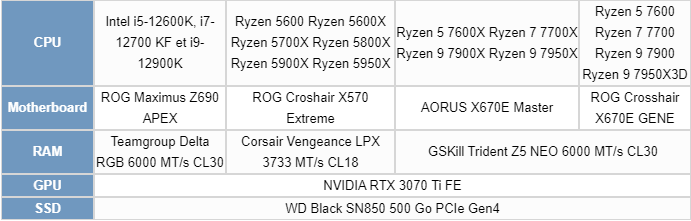
Yep, which memory kit should we use for our comparative tests? This is a question we asked you on our Discord. Whether it is for DDR4 or DDR5, we are on memory kits composed of two 16 GB strips for a total of 32 GB. For our tests using DDR4, it is a Corsair Vengeance LPX kit clocked at 3733 MHz in 18-22-22-42. For the AMD platform in DDR4, the FCLK is 1866 MHz in order to keep a 1:1 ratio. The rest of the BIOS settings are in auto mode.
For DDR5 on the Z690 platform, we used our Teamgroup 6400 MT/s CL34 kit which we set to 6000 MT/s in 30-38-38-96. Why this choice? The kit delivered by AMD for the tests on the X670E chipset is a GSKill Trident Z5 NEO 6000 MT/s in 30-38-38-96. So we have two kits with almost identical performances on the two platforms AMD X670E and Intel Z690.
Here is a summary table of the four configurations we used for these comparative tests. Each test is of course carried out several times to ensure the accuracy of our results.
Finally, as far as the operating system is concerned, we chose Windows 11, which is the latest version. You should know that we have noticed that for benchmarks, overall the results are always slightly better under Windows 10.
[nextpage title=”The frequencies reached?”]
As with every new test concerning processors, our first idea is to check if the announced frequencies are really reached. To do this, we will use the Cinebench R23 benchmark. Two cases will be used: a single core bench and a second one in multi core. The idea is to be able to judge the frequency reached and thus, to compare with what was announced by AMD in its slides.
Remember that the Boost frequency in bench is different depending on the processor. Be careful, as AMD points out, when we talk about maximum Boost frequency, it is the maximum frequency achievable by one of the processor’s cores running a workload in single core(mono-thread). The maximum boost varies according to several factors: the load, the cooling system and therefore the temperature of your processor. This is a notion to keep in mind. Here are the maximum frequencies that we should reach on a single core during our run under Cinebench R23.
First step, we leave everything in AUTO in the BIOS except the EXPO profile which we load in order to have a frequency of 6000 MT/s in 30-38-38-96 for our memory kit. We don’t make any other changes in the BIOS.
Test with the Ryzen 9 7950X3D:
Here we go with our Ryzen 9 7950X3D. As you can see, we opened several windows to check the frequencies as well as the temperatures.

In single core, we can see that core #11 reaches a frequency of 5725 MHz which is slightly higher than the 5.7 GHz announced by AMD. The reason for this is most likely the cool temperatures brought on by our liquid cooling. Note however that with our Ryzen 9 7950X we reached 5825 MHz with the same cooling system.

When the 16 cores of our Ryzen 7950X3D are used, the frequency varies according to the CCD. On CCD 0, the frequency stabilizes at 4875 MHz and on CCD 1 at 5075 MHz. This is again much lower than with our 7950X with one CCD at 5100 MHz and the other at 5325 MHz. On the other hand, while we were at 91°C with the 7950X, we are only at 76°C here.
[nextpage title=”Cinebench, Geekbench and CPUZ benchmarks:”]
Let’s start with a staple of processor benchmarks, the Cinebench series. We chose Cinebench R15, the R20 version, which is also more and more used and finally Cinebench R23, the latest one. The scores will be given in Single core and Multi core. This means that the benchmark tests the performance on one of the processor’s cores and then on all the available cores.
To do this, we will use Benchmate which has just been updated to version 10.12.2 and can be downloaded here. The advantage of Benchmate is that it already contains a whole series of benchmarks and moreover, it is recognized and certified when you want to encode your results on the Hwbot site.
As a reminder, before you start reading these results, make sure you take a look at the previous page to understand the operating frequencies of these non-X Ryzen.
Cinebench R15 Single Core and Multi Core:
A benchmark very much used especially by overclockers in order to be able to compare the performance of processors between them. It also allows you to judge the optimizations of your OS as well as your memory kit by setting a frequency and trying to score a maximum of points. Even if it is less used today with the arrival of R20 and R23, it remains a reference to compare CPUs between them since it is one of the first benchmarks used by the community.

We were expecting an improvement in single thread performance with the Ryzen 7000 and we have to admit that this is indeed the case. The Ryzen’s are in first place with a third place for our 7950X3D.

In multi-thread, the observation is slightly different and it is logical. It is mainly the total number of cores that will determine the score as well as their frequency. Our Ryzen 9 7950X3D is behind and this is quite logical because of its lower boost frequencies than the 7950X.
Cinebench R20 Single Core and Multi Core:
Cinebench R20 offers similar testing to the R15 version with SingleThread and MultiThread. Freshly landed in March 2019, it offers a more complex benchmark than the R15 version which had become a bit too easy for CPUs with many cores. Cinebench R20 requires eight times more computing power than the R15 version, and four times more memory. It can already be more like a stress benchmark since it forces your CPU to be stable for the duration of the bench.

The same is true for Cinebench R20, where our 7950X3D is just behind the 7950X. Note that the arrival of the new Raptor Lake processors has changed the top three.
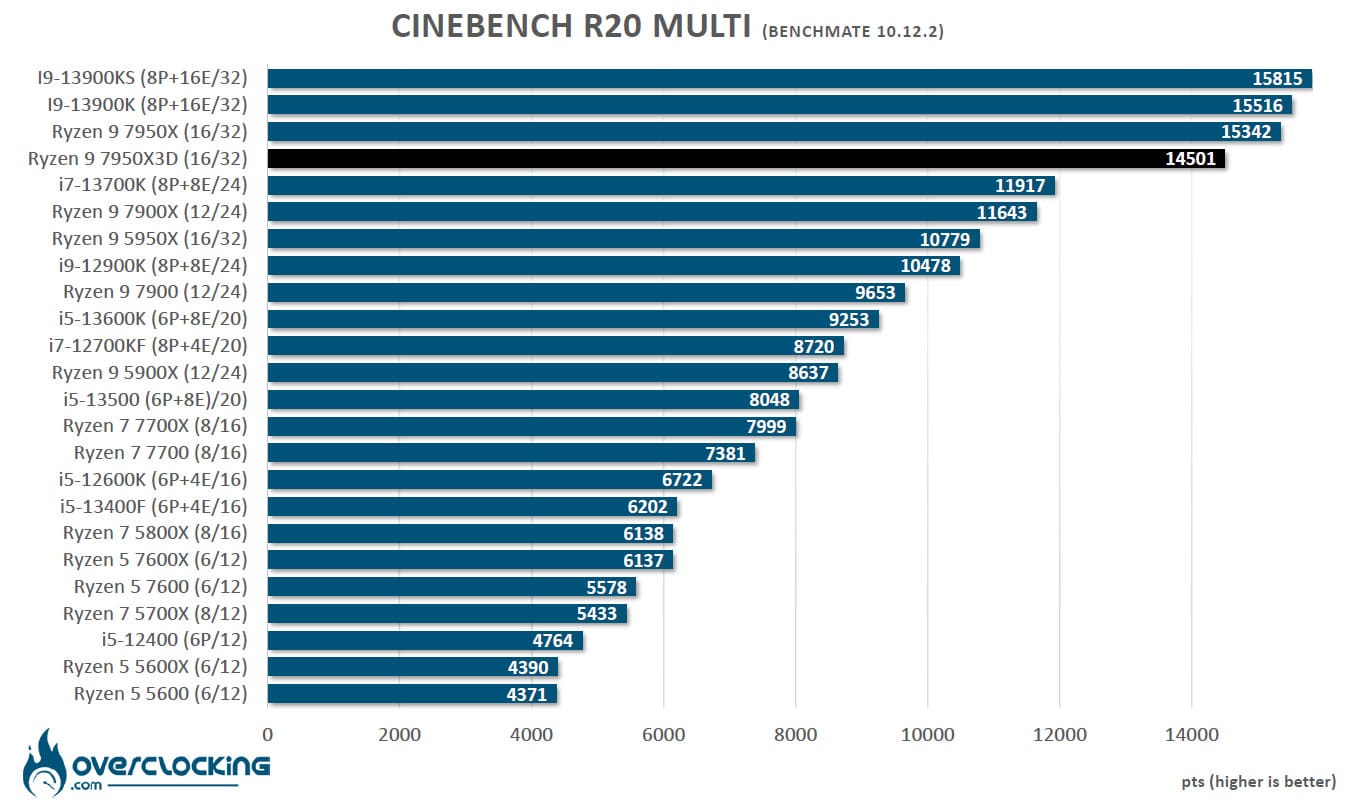
In multi, it is the number of cores that speaks once again. We are on a graph that looks like the one of Cinebench R15. Note that it is the Raptor Lake i9-13900KS that now dominates this graph. We will publish its test in the coming days.
Cinebench R23 Single Core and Multi Core:
How does this new version differ from the previous ones? First of all, it is more realistic when it comes to the score obtained depending on the processor used. As a reminder, Cinebench only test the capabilities of your processor in single thread or multi thread. But the main difference is to propose a benchmark which by default will last 10 minutes! The idea for MAXON with Cinebench R23 is to propose a benchmark which will allow a certain stability in term of temperature and Boost frequencies. We will test here the fast version.

First small surprise since our sample of the day is confronted with the Ryzen 9 7900X with an almost identical score.
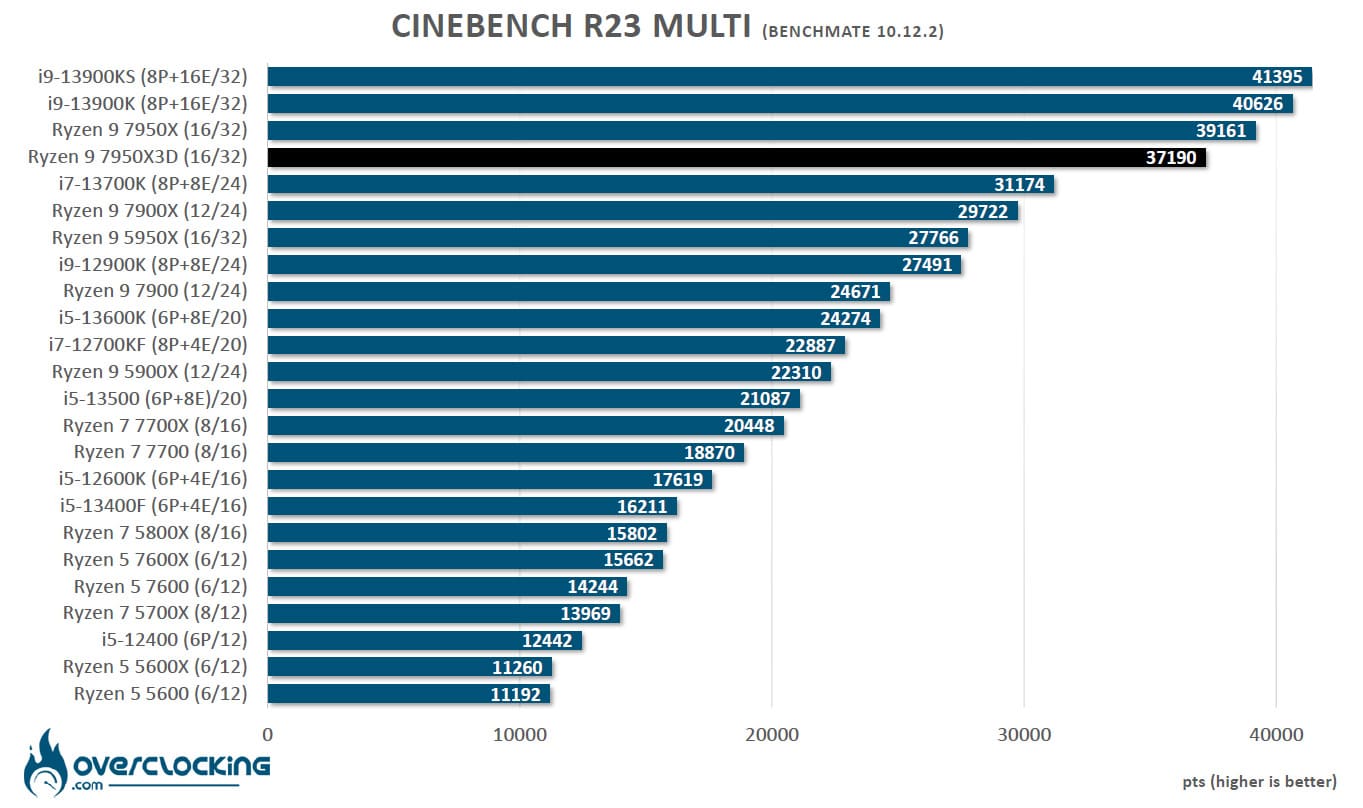
In multi, we do not change the profile of the graph with scores once again convincing and reflecting the number and frequency of operation of the cores for our Ryzen 7000X.
Geekbench 3.4.4 Single Core and Multi Core:
This is a benchmark available in several revisions, version 5 is more and more used in recent months and is also often used for CPU performance leaks. It allows to obtain two scores: one in single core and the other in multi core. The version used for the tests is 3.4.4 and 5.2.5. Please note that in order to take full advantage of these two benchmarks, a license is required and we perform the bench in 64-bit.

The score obtained under Geekbench 3 in singlecore is very surprising since it comes just behind the Ryzen 5 7600X. It is quite surprising and can be translated by a less good support of this old benchmark on the 7000X3D processors. We’ll see what happens on Geekbench 5.
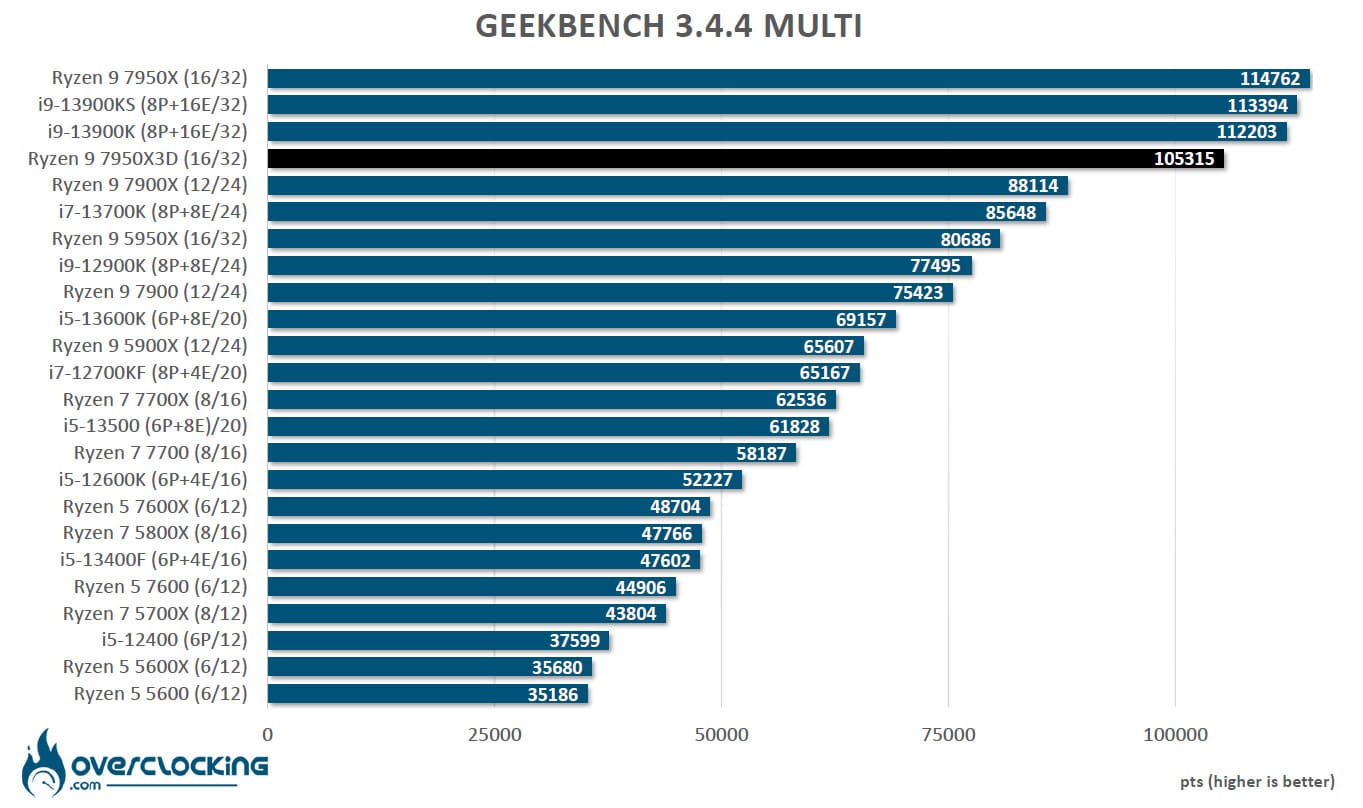
In multicore, the graphics become consistent again even though the Ryzen 9 7950X3D performs nearly 9% worse than the Ryzen 9 7950X.
GeekBench 5.2.5 Single Core and Multi Core:
The latest version of the GeekBench software, it is becoming more and more widespread and used by journalists. It allows, like the version above, to do memory and processor performance tests. We decided to add this additional benchmark but why? The CPU benchmark uses new tests that more closely simulate the tasks that processors face with recent applications. Geekbench 5 also increases the memory used in the benchmark to better reflect the impact of this parameter on the CPU results.
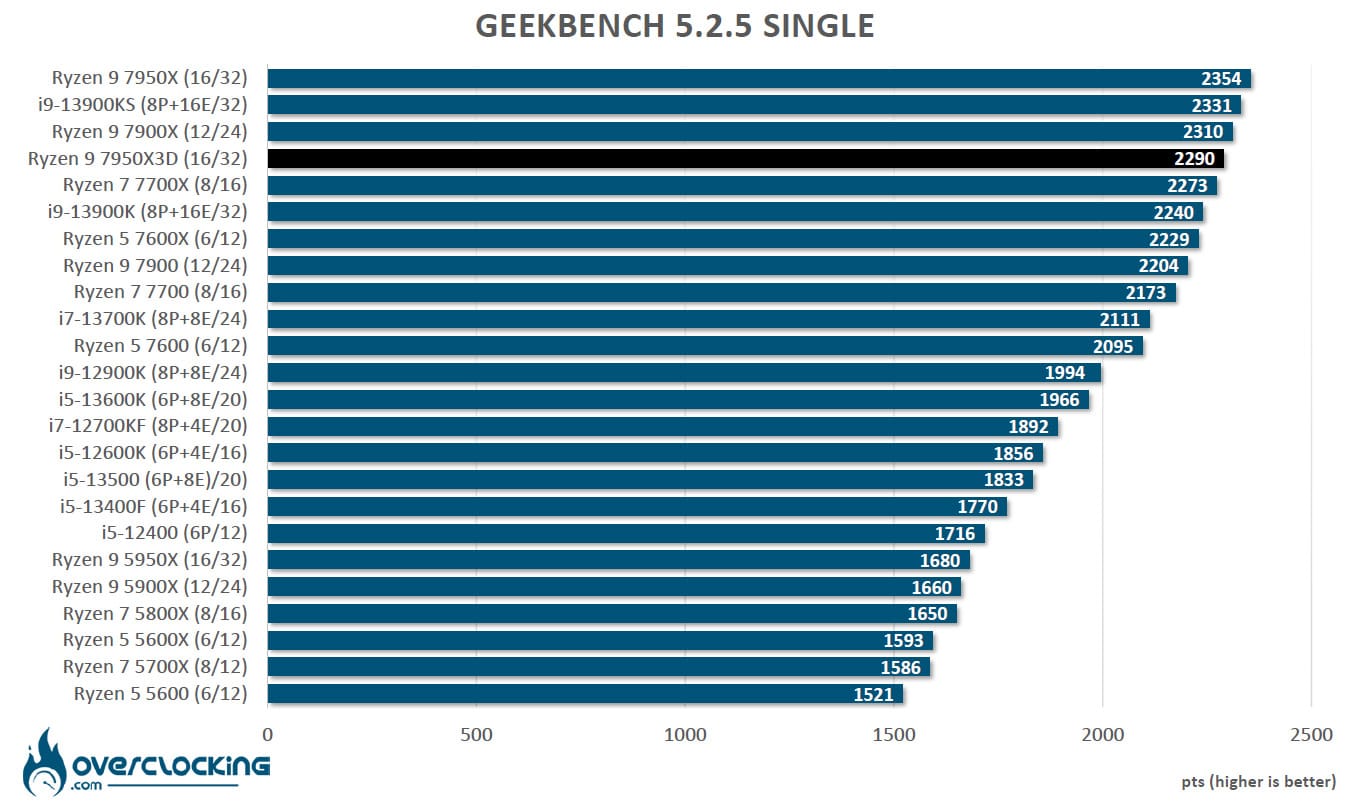
Performance is more consistent than on Geekbench 3 even though our 7950X3D is still behind the 7900X. We already had the thought that this was not the latest version of Geekbench 5 and it is correct. But this one was not available at the time of updating our graphics, so we are still on this version 5.2.5. Geekbench 6 has just been released and we may integrate it in our tests soon.

In multi-threaded mode, our sample of the day takes up a place that corresponds to its potential, which is still limited by its frequency compared to the 7950X.
CPU-Z 17.01.64 benchmark in Single Thread and Multi Thread :
New benchmark that we have just added since it is increasingly used by brands in order to put forward the performance of the processor. To use it, nothing could be easier, just download the latest version of CPU-Z which is currently version 2.0.2. Then go to the “Bench” tab to check the performance in single and multi thread. The version of the benchmark that we used is 17.01.64.

Same observation as in Geekbench3, the single score is catastrophic and even incomprehensible. We are convinced that this is a bug with our 7950X3D.

Finally, we find a table that respects a little more the number of cores and the most recent generations of processors. This first series of tests allows us to highlight that our Ryzen 9 7950X3D is a bit behind the 7950X in multithreaded tasks because of lower frequencies!
[nextpage title=”Synthetic benchmarks:”]
Let’s start with a series of synthetic tests that we use regularly. We have chosen the CPU scores of the 3DMark benchmarks. The idea is to isolate only the CPU score by making a customtest.
Here are the results obtained in Fire Strike and Time Spy. In Fire Strike, whether it is for the “standard” or the “ultra” version, the physics test (CPU) is identical. Therefore, you will only find the score of Fire Strike. On the other hand, for Time Spy and Time Spy Extreme, the tests are different, so you will get both scores. These scores are very interesting for overclockers to choose the platform that will offer the best performance in order to break a maximum of records.
CPU score in Fire Strike:
Let’s start with 3DMark Fire Strike, which is one of the most widely used benchmarks today. It consists of two graphics tests, a CPU test and a fourth test that combines GPU and CPU. Don’t forget to disable the demo which doesn’t add anything to the final score and prolongs the benchmark(unnecessarily).

It is once again a penalizing score obtained by our Ryzen 9 7950X3D which is on par with the Ryzen 9 7900X. If you’re looking to do 3DMark benchmarks, look to the 7950X if you’re choosing an AMD processor.
CPU Score at Time Spy:
The second test is 3DMark Time Spy. Although this one is done in 1440p, it has the particularity of using DirectX 12. It consists of two graphical tests and a CPU test. As for Fire Strike, don’t forget to disable the demo. These two first benchmarks are proposed by UL Benchmark.
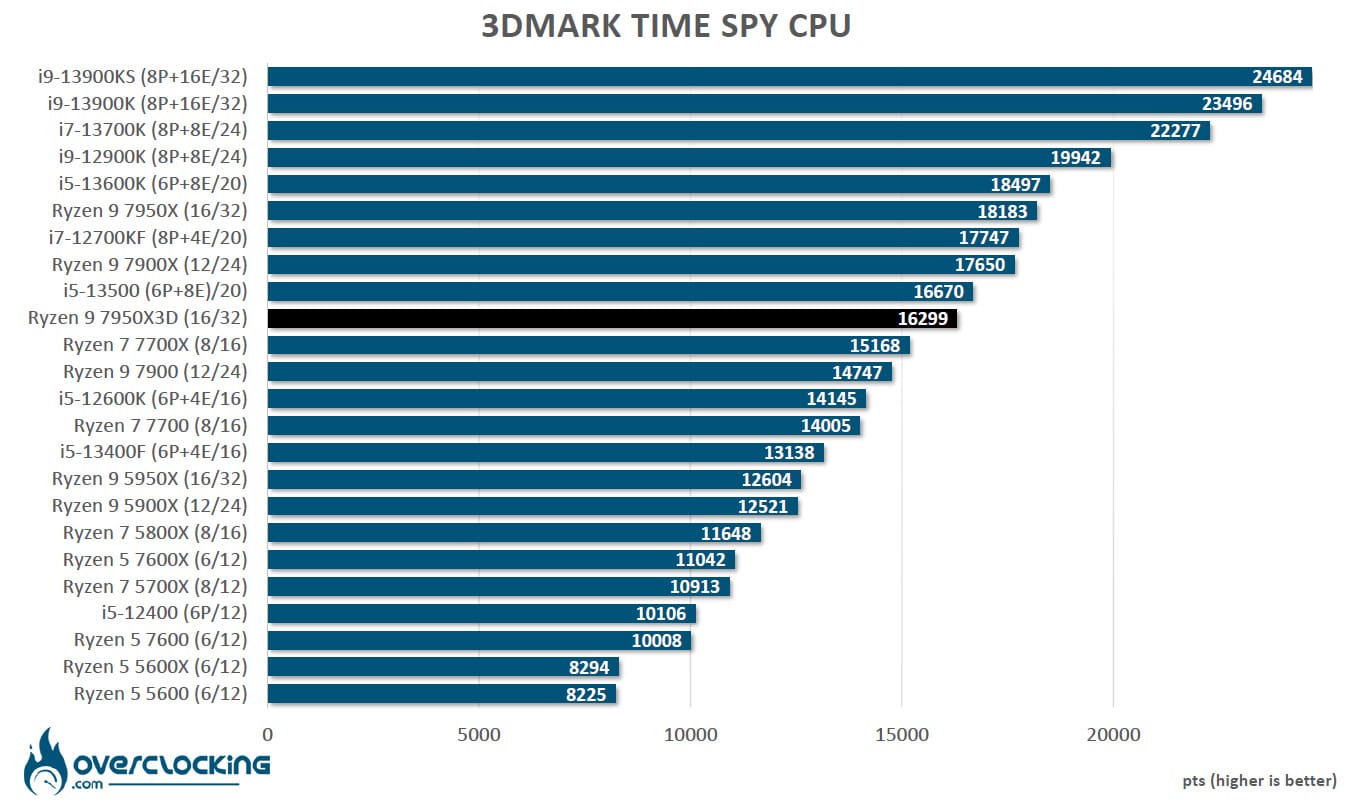
Same observation as before with a score that plummets even more and that is not even at the level of the Ryzen 9 7900X.
CPU score at Time Spy Extreme:
The second test is 3DMark Time Spy. Although this one is done in 2160p, it has the particularity of using DirectX 12. It consists of two graphical tests and a CPU test. As for Fire Strike, don’t forget to disable the demo.
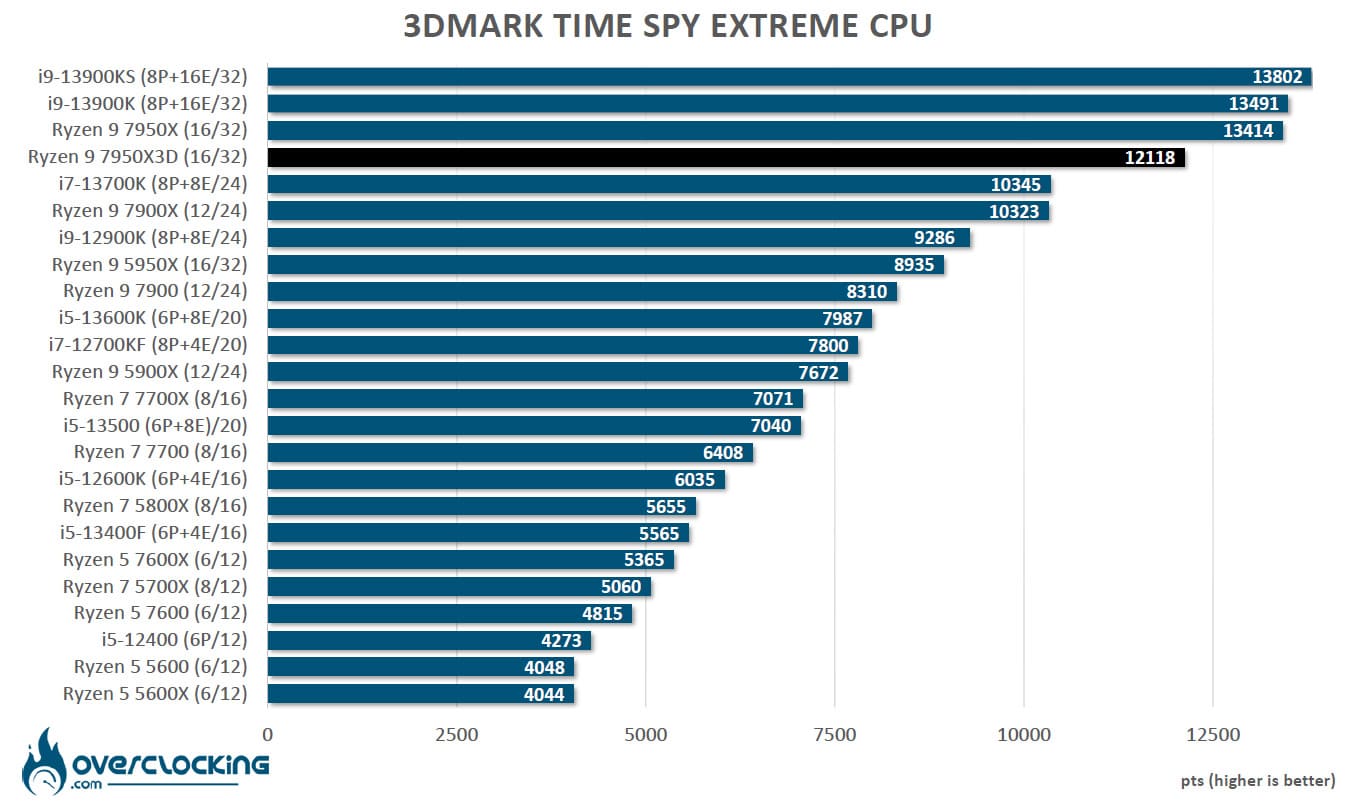
Finally, it is only on the “Extreme” version of Time Spy that our Ryzen 9 7950X3D finds the place it deserves. As you can see, this is not a processor made for 3DMark benchmarks.
[nextpage title=”AIDA64 Benchmark: “]
So, for this test which will be done with the AIDA64 software, I will compare the two platforms, AMD and Intel, since I used the same kit at the same frequency and with the same timings.
AIDA has just seen its beta version evolve to 6.85.6336. It can be downloaded directly on the site but in order to benefit from all the results, you will need a license.
AIDA 64 :
It is a software capable of providing you with a lot of information about your configuration but it has the particularity of having a memory benchmark. It will calculate the speed of reading, writing, copying and the latency of your memory kit. It is very often used to compare memory kits between them. It is an excellent tool if you want to compare the performance of your memory kit with those we have already had the opportunity to test. The version used for testing is v6.75.6121 beta.

We know that since the launch of Ryzen 7000X and DDR5, there is a “bottleneck” in terms of throughput that is not as good as Intel. This problem does not really seem to have a solution for AMD. So yes, it climbs against the Ryzen 5000 combined with DDR4, but it is far behind what the Alder Lake and Raptor Lake offers.
Some motherboards have options in the BIOS to increase performance by automatically tightening timings and subtimings.

When writing, the performance is already better and the graphic is more balanced than the previous one.

The same is true for copying, where throughputs are improving for our Ryzen 7000X, but they are still not at the level of what the Alder Lake and DDR5 combination offers.

We end on a positive note with a latency that is around 58.5 n/s. We will not hesitate to come back to the performance in AIDA64 if the next BIOS solve or improve these scores.
[nextpage title=”Power consumption: “]
As far as power tests are concerned, we didn’t modify anything and we wanted to know how our configuration would react by default. Basically, we installed the CPU and loaded the XMP profile. Then we did our various readings and benchmarks.
Regarding the power consumption, we used the Cinebench R23 benchmark. We are here on multi thread. The idea is to measure the average consumption of our different processors. Be careful, this is a global consumption of the configuration. Currently, we are not yet able to measure independently and correctly the CPU consumption, but it is in progress. We still have some points to optimize in order to be fully convinced of the accuracy of our readings.

We end on a positive note since the total power consumption of our PC has nothing to do with that of the 7950X. We go from an average of 383.2 watts to 272.9 watts, which is really much better even if we are still above that of the 5950X. The lower performance can also be explained by the lower TDP. It is clear that even if the i9-13900KS is often at the top of the benchmarks, its consumption is close to 500 watts and we are on a benchmark that only uses the whole processor cores and not at all the graphics card.
[nextpage title=”Gaming performance 1080p:”]
So, you’ll tell us, but what’s the point of testing two such high-end cards, NVIDIA’s RTX 4090 and AMD’s RX 7900 XTX, in 1080p definition when they are both intended for 2160p. Simply because this is the only way to be able to highlight the differences between the processors. You can see this on the next page after taking the time to read these first results. You should know that this 1080p definition is very popular with professional gamers who are looking for the maximum FPS combined with the lowest latency. Now, let’s face it, the majority of gamers with such cards play in higher resolutions.
The ROG STRIX RTX 4090 OC in 1080p:
We will start our first series of gaming tests with a copy of the ROG Strix RTX 4090 OC, which we will offer a full test and much more in the coming weeks. The configurations are identical except for the i9-13900KS, which we tested on an APEX Z690, since all our games are installed on the latter. Finally, you can find all our graphics card tests by following this link.


No doubt, it is the Ryzen 9 7950X3D that occupies the first place in almost all our tests. It is 6.8% ahead of the i9-13900KS and 16.3% ahead of the Ryzen 9 7950X. Let’s not forget that we are on a 1080p definition.
The RX 7900 XTX in 1080p:
Let’s move on to the AMD side of things with a copy of the RX 7900 XTX reference card that we had the chance to review. It will be interesting to see if the combination of an AMD GPU with an AMD processor has an impact on the performance of the different processors.


Well, the situation changes if we combine an AMD graphics card with an AMD processor. If the Ryzen 9 7950X3D remains the king, the gaps have melted and especially with the Ryzen 7950X since it is only 8%. The principle of Smart Access Memory seems to be very profitable. The i9-13900KS is also very close and the gap is only 3.9%.
[nextpage title=”Gaming performance 2160p:”]
Let’s move on to the 2160p definition which should be the one used by most owners of high-end graphics cards, provided of course that you have a 4K compatible screen. As a reminder, we tested the 1080p definition since it allows us to highlight the differences between the different processors.
So we did the same series of tests using the same graphic parameters on the same series of games. We won’t offer you each graphic independently since the two performance summaries will be sufficient. Let’s start directly with the ROG RTX 4090 Strix OC.

As you would expect, the gaps are narrowing considerably and our three processors are almost equal in this definition. Now you can see why we had to go to 1080p in order to highlight the differences.
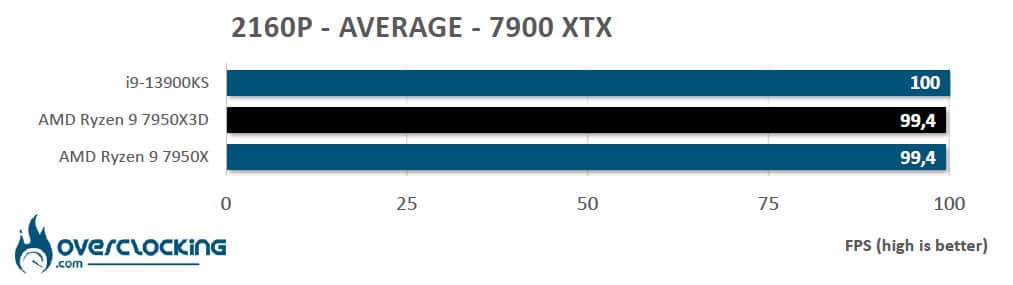
And when we combine these processors with an AMD card, it is finally our i9-13900KS that comes out the best, well, by a hair. So if you have a high-end AMD card, you can choose the cheapest processor of the three.
[nextpage title=”Overclocking: “]
A lot of information has been circulated when the Ryzen 7000X3D processors were announced concerning overclocking. The most optimistic spoke of the possibility of overclocking the CCD not having the “3D V-Cache” and the most pessimistic of a complete limitation of overclocking. So what about it and do we have access to manual modifications at the level of the different cores? Let’s get straight to the point, you can go directly to the next page and read the conclusion.
Indeed, AMD has simply reduced the notion of overclocking to the strict minimum, as shown in the two screenshots below. Manual overclocking is not possible and access to voltages is locked.


So, thank you AMD who offers us the possibility to activate the Curve Optimizer and the Precision Boost Overdrive. We let you discover the gains obtained under Cinebench R23 and which materializes by an increase of 2,3%. We didn’t have time to dive into the BIOS to see what we could do on our side but to be honest, the gains are almost non-existent.
[nextpage title=”The last word:”]
Here we are at the end of this review of the new range of AMD Ryzen 7000X3D processors, even if at the moment we have only reviewed the Ryzen 9 7950X3D which seems to be the least interesting of the range, especially at the price where it is likely to land. Let’s talk about the price, which at the time of writing this conclusion, we still haven’t received. Based on the current price of the Ryzen 9 7950X, which is around $565 in the US and 650 euros in Europe, we are afraid that the price of the Ryzen 9 7950X3D will be much higher, which will put it in a very uncomfortable situation compared to its version without a 3D V-Cache.
There is no doubt that AMD’s objective was to offer the most powerful processor for competitive gaming and this is perfectly achieved. Our various gaming tests have shown us that it is the best choice for 1080p definition whether you have an NVIDIA or AMD graphics card. Note, however, that the differences are much smaller against the 7950X and i9-13900KS when the GPU is an AMD model. AMD also improves with this model the power consumption and therefore the temperatures but having made the choice to propose frequencies boosts less high than the 7950X. We can only congratulate AMD on this point.
These lower frequencies in single or multithreaded result in less interesting performances than the 7950X in most benchmarks. We had hoped to see this 7950X3D at the same level as the 7950X with a notable gain for gamers but unfortunately this is not the case. Overclocking could have allowed our 7950X3D to mitigate this performance loss but it is almost completely locked in. Competitive gamers will certainly find a real interest in this new king but who actually plays at 1080p when they have a high-end processor and graphics card?
To conclude, AMD has fully succeeded in its gamble but has not totally convinced us and it seems difficult to find a real interest in this 7950X3D model for most users, especially at the price where it is likely to be available in France. On the other hand, we are impatiently waiting for the Ryzen 7 7800X3D which will have a different architecture with a single CCD and a much more competitive price! Unfortunately, we will have to wait until April 6 to see it. See you at the beginning of April with this 7800X3D model that could change our minds!