
After a first test of the Dell Inspiron 14 plus laptop, we test today its gaming alternative in the Alienware range with the X14. It is a laptop even thinner than the Dell Inspiron 14 plus that offers extra power at an interesting price.
The Dell Alienware X14 is available at prices around $2.200 or 2.400 € for the i7 12700H and RTX 3060 version. This same version was on sale a few days ago on the Dell website for a little over €1,700.

Thanks to Dell for providing us this copy.
[nextpage title=”Unpacking and accessories”]
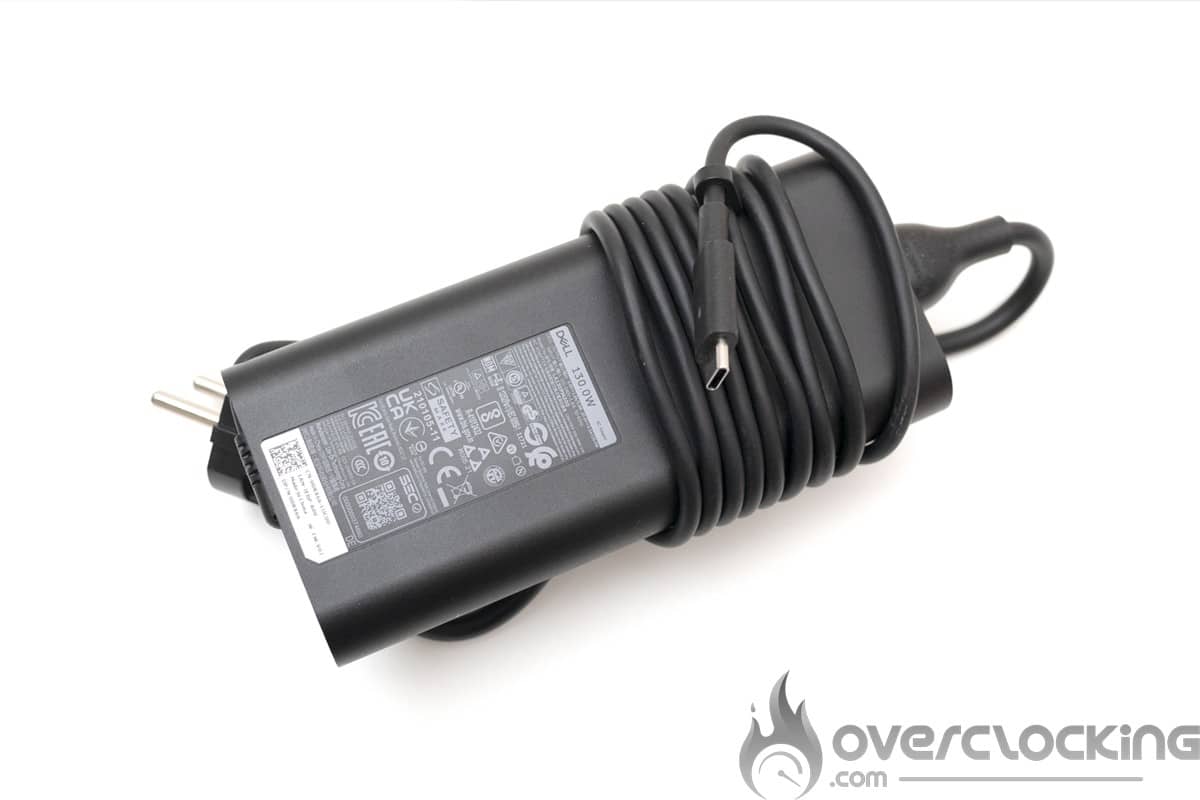
We start with the unpacking of the device, this laptop comes in a box type suitcase, inside we have a box in which is the laptop. Underneath it, we have the 130W USB type C charger.

The charger is a 130W power supply using a USB type C connector that will have to be connected to the right USB type C socket of the laptop.
[nextpage title=”Specification “]
Technical characteristics
Let’s go to the technical specifications, they are available on the Alienware X14 page. You will have to change the configuration to get the specifications corresponding to the model you want.
| Model | Alienware X14 |
|---|
| Processor | Intel Core i7-12700H Alder Lake-H 45W |
| Graphics | NVIDIA RTX 3060 max-Q 60W |
| Memory | 16 Go LDDR5-5200 |
| Display | 1920*180 16:9, 14”, 144 Hz, IPS |
| Storage | 1 To NVMe WD SN810 (1 slot PCIe 4.0) |
| Connectivity | 2x Thunderbolt™ 4 (with charging technology) |
| 1x Type-C USB 3.2 Gen 2 (with charging technology) | |
| 1x Type-A USB 3.2 Gen 1 | |
| 1x Lecteur de carte Micro SD | |
| 1x HDMI (HDMI 2.1) | |
| 1 x Jack Audio Combo | |
| Webcam | HD (30 ips @ 720p) |
| Battery | lithium-ion, 80 Wh |
| Network | Intel AX211, Bluetooth 5.2 |
| Dimensions | 321,5 x 262.77 x 14,5 mm |
| Weight | 1.84 kg |
The Alienware X14 is a 14 inch laptop, with a 1920x1080p IPS panel with a 144 Hz refresh rate. We find as processor an Alder Lake i7-12700H from Intel and a GPU RTX 3060 max-Q from Nvidia, accompanied by 16 GB of RAM LPDDR5-5200, an SSD NVMe of 1 TB and powered by a battery of 80 Wh.
Presentation
To begin with, the Alienware X14 is completely white on the outside and black on the inside, the feeling is very good. The screen hinges allow for one-handed opening and the overall design is quite harmonious for a gaming laptop.

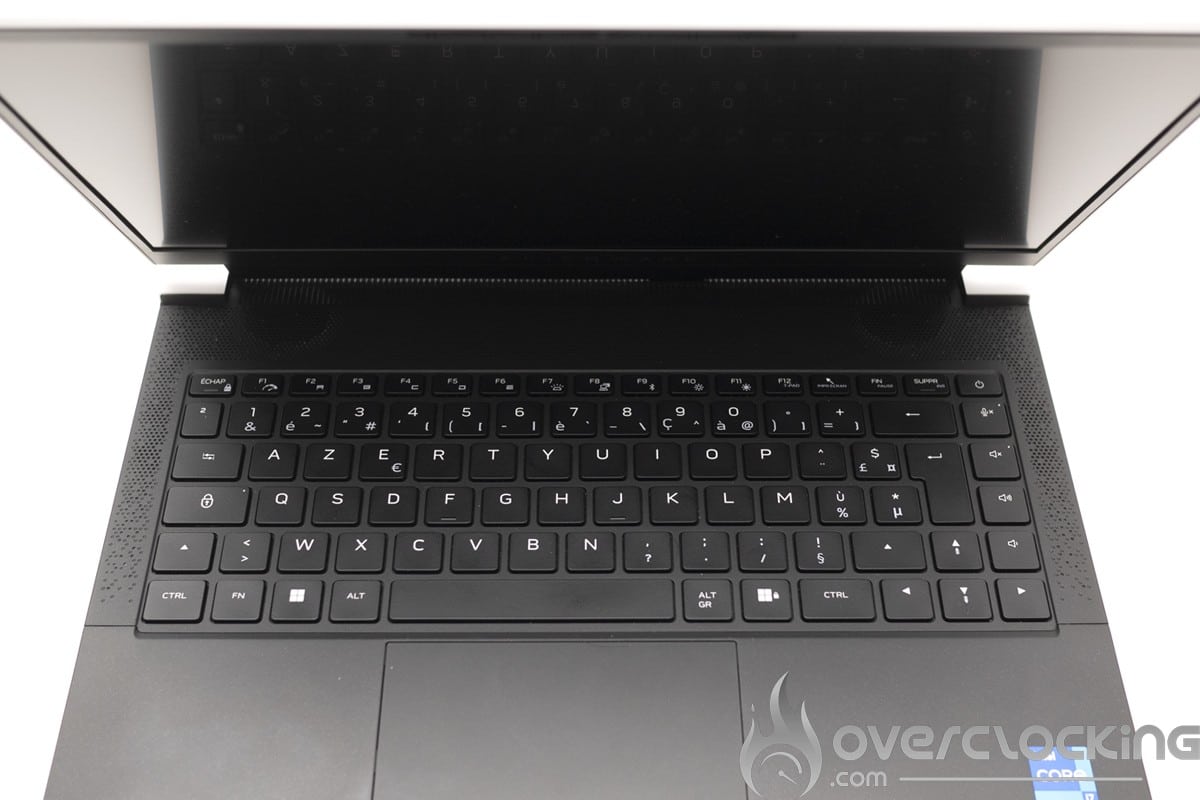
We start the tour with the keyboard, quite pleasant to use even if the keys are a bit stiff. Here, the media and sound control keys are on the right side of the keyboard, which can lead to false manipulations. No fingerprint reader on this model, which is not a bad thing in itself but we would have liked this feature.


We now move on to the trackpad, the latter is extremely smooth and really pleasant to use. Its size however leaves something to be desired… We would have preferred a bigger one with a reduced audio part.


Let’s move on to the audio part. Here, we have a large audio part on the upper part of the keyboard which overflows a little on the sides. The sound is rather good but not more. And, except for playing video or other media, the use of headphones on this kind of machine is more than recommended (it blows hard).

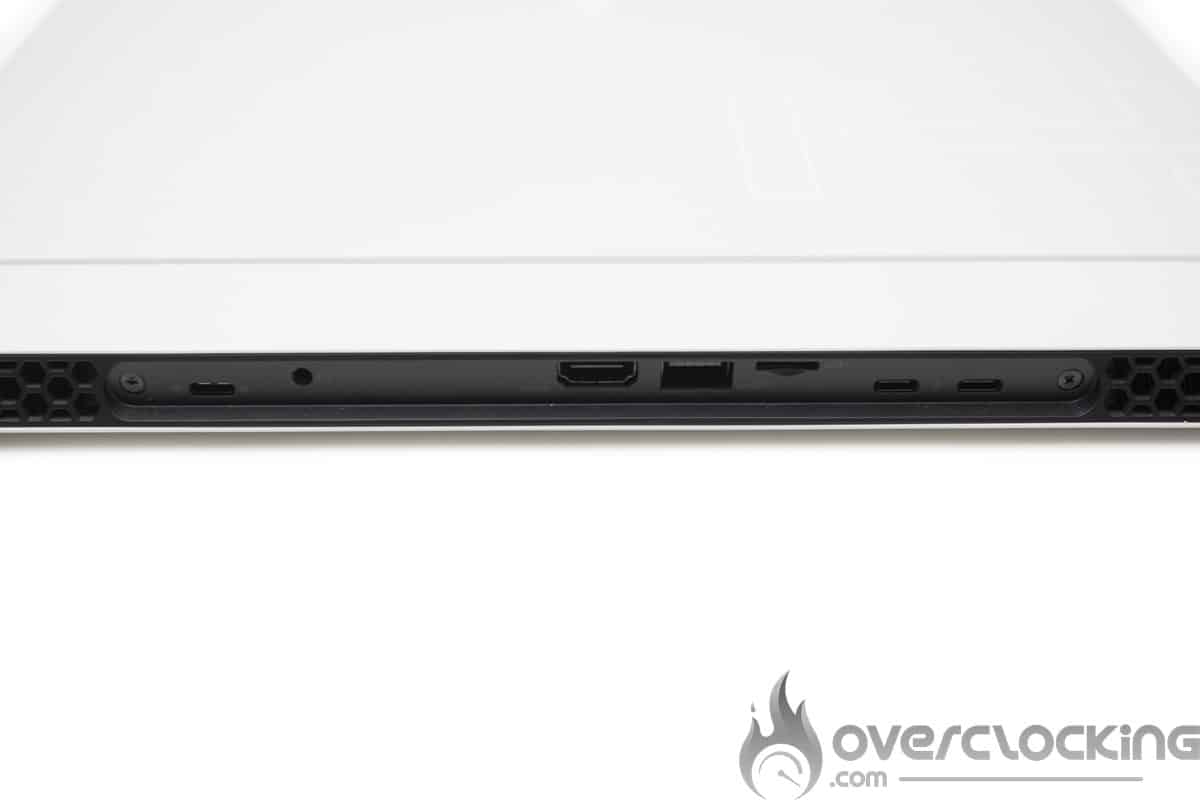
Then we have the connectors, we are here on a relatively complete solution but also poor. With only one USB type A port, you will have to juggle with peripherals or buy a docking station. Moreover, the latter are only placed at the back of the machine, a bit annoying in use. As for the rest, we have two Thunderbolt 4 ports, an HDMI 2.1 port, a micro SD reader and a USB type C port. So we have here a laptop that is quite complete for a nomadic gaming use but that would need a USB type A HUB for everything that is headset, keyboard and mouse.
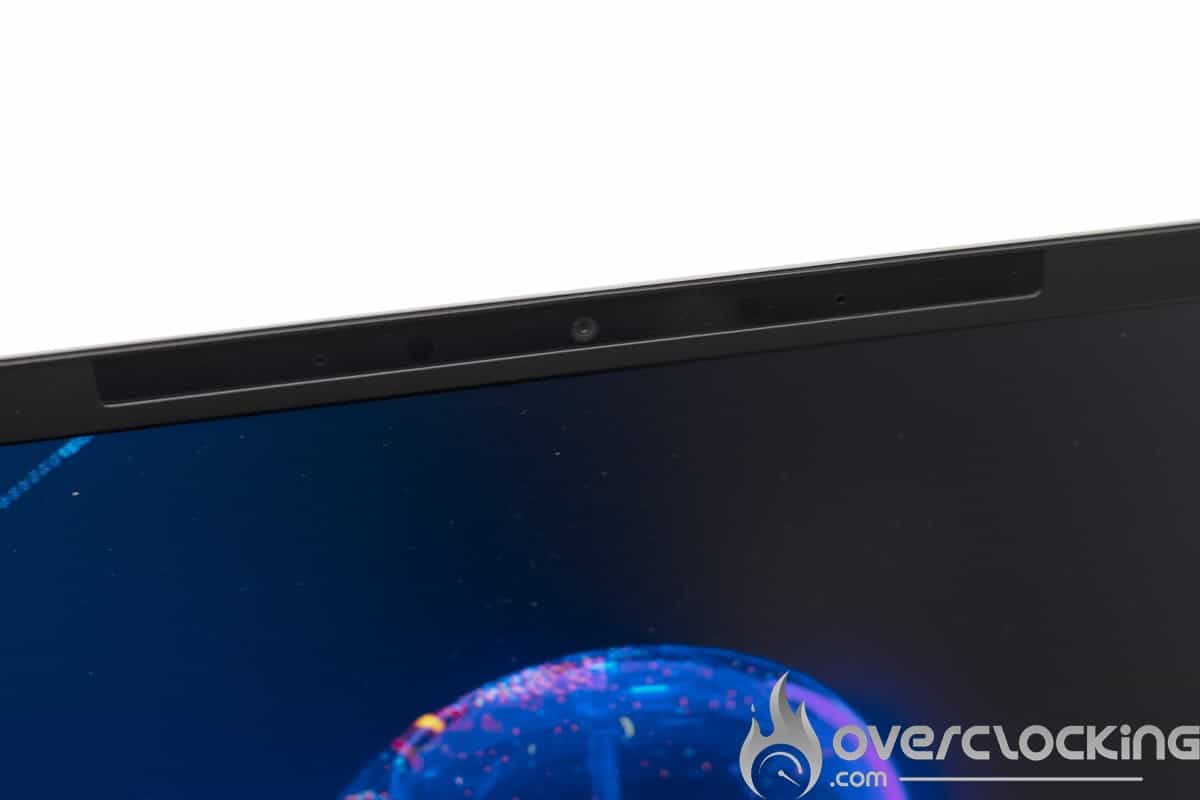
As for the camera, it doesn’t offer anything great, rather disappointing even. Do not expect to stream with it.
Disassembling the device
The disassembly of the device is done via six cross-shaped screws on the bottom of the device. Among these six screws, two are attached to the cover, so that the cover can be removed by unscrewing them, ingenious. Once the cover is removed, we can see that the SSD and the Wi-Fi card are easily accessible for replacement. The cooling system is unusual and will need to be checked for possible maintenance.


[nextpage title=”Screen measurement with probe”]
Screen measurements
We now move to the test of the panel and in order to know the colorimetric quality of this screen out of the box, we have made some measurements of the screen.
This one has been tested on DisplayCal following 51 color patches with the sRGB profile as target.
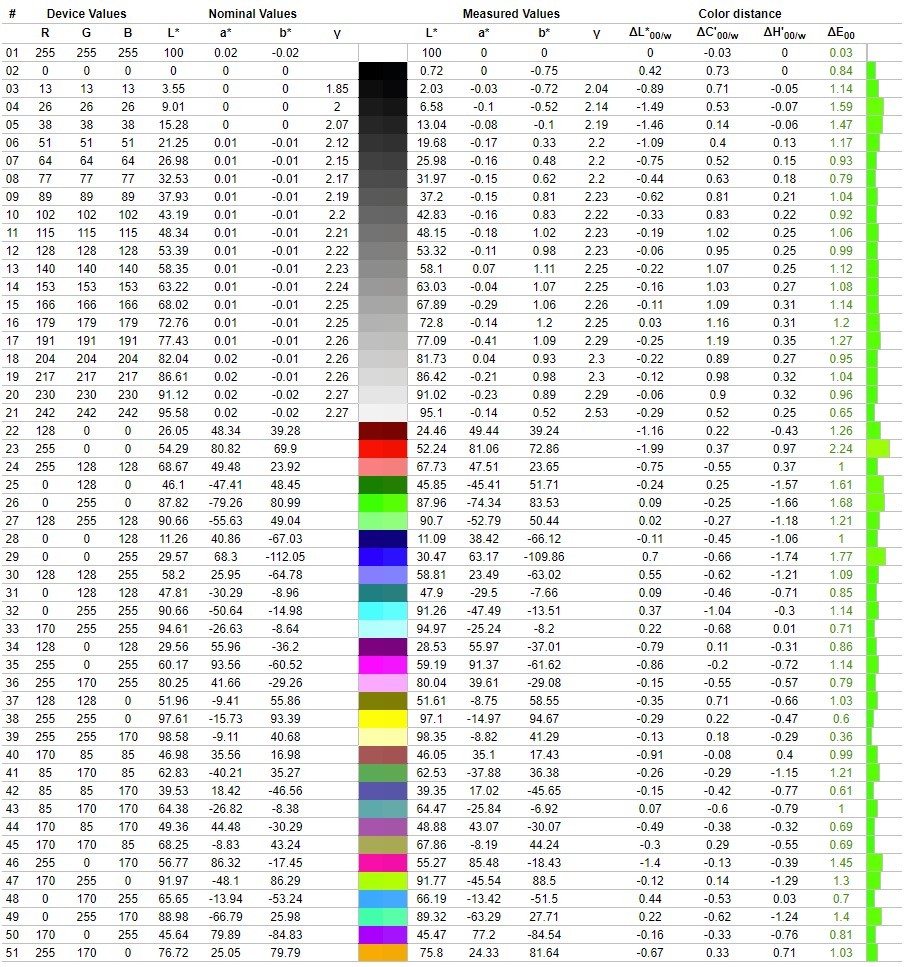
As we can see, the calibration is excellent, we have 6200K for 6500K expected, which is in the specs. The delta E is contained to less than 1.05% average deviation and 2.24% at the maximum.
As for brightness, the screen can go up to 424cd/m² with a contrast ratio around 1237:1.
The gamut is :
- 96,8 % of sRGB
- 68,9 % of Adobe RGB
- 71.6% DCI P3
As for the reflectance of the screen, we have a matte slab, a good choice for use in bright environments. The grain is very low or even invisible, the sharpness is also very good for photography.
[nextpage title=”Protocol”]
All benchmarks will be done in the highest performance mode available (bios and Windows), to get an idea of what the machines are worth at their maximum. As for the drivers, we will mention and use the latest official versions available.
The basic definition will be 1920×1080, but other resolutions can be added depending on the laptop’s screen. We will put the highest graphic presets available on each game as well as the average presets.
About the synthetic tests:
- CPU
- Cinebench R23/R20, Geekbench 5, 3Dmark CPU Profile.
- GPU
- TimeSpy, TimeSpy Extreme, Fire Strike, Fire Strike Extreme.
- Memory
- AIDA64.
On the video game side with the games: we choose popular licenses, but especially have ” in game benchmark” to allow a better representation and reproducibility of performance. This also allows you to compare your results with ours without difficulty.
- Anno 1800 (DX12)
- Shadow Of The Tomb Raider (DX12)
- Call of Duty Modern Warfare II (2022)
The RTX 3050 driver used is 526.86.
[nextpage title=”Synthetic performances”]
Synthetic performance
The Alienware X14 is equipped with an Intel Alder Lake processor, the i7-12700H which is an H version, aimed at heavy applications. However, it requires a better cooling and the autonomy can be impacted.
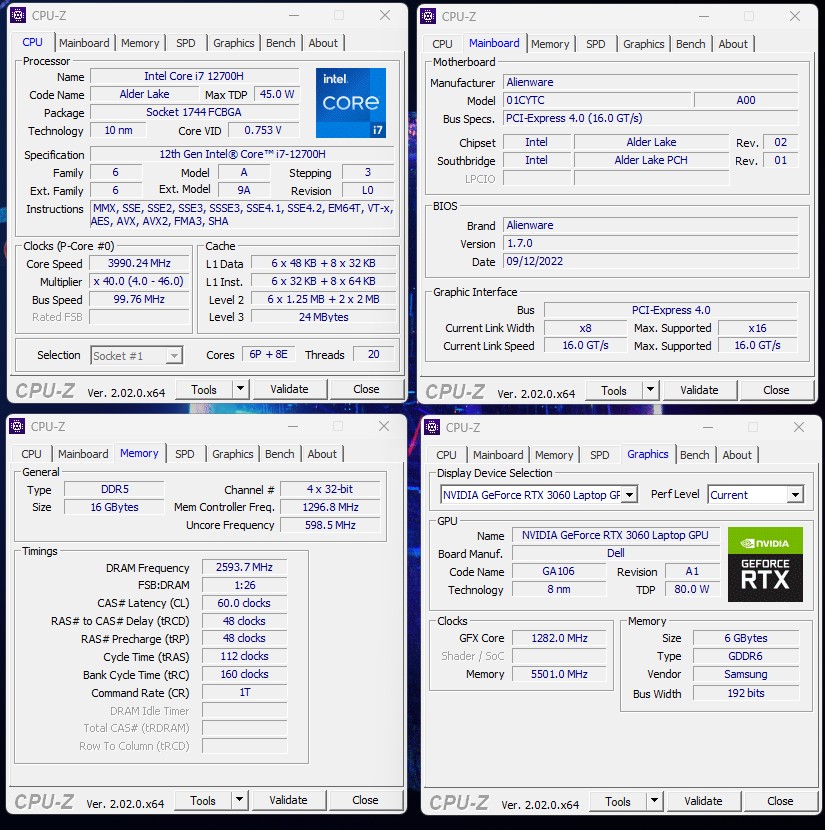
It has 6 performance cores boosting to 4.7 GHz and 8 efficiency cores at 3.5 GHz. The PL1 of the processor is 45W with a PL2 at 115W.
Cinebench R20 and R23

On cinebench R20, the 12700H gets a score of 6295 points in multi-core and 666 points in single-core. In comparison, only the X17 R2 from Alienware equipped with the same chip manages to do better thanks to its better cooling. We took the opportunity to investigate the difference with the DELL Inspiron 14 plus which also has an i7 12700H. The difference would come from a power limit of 90W on the Dell against 115W on the Alienware.
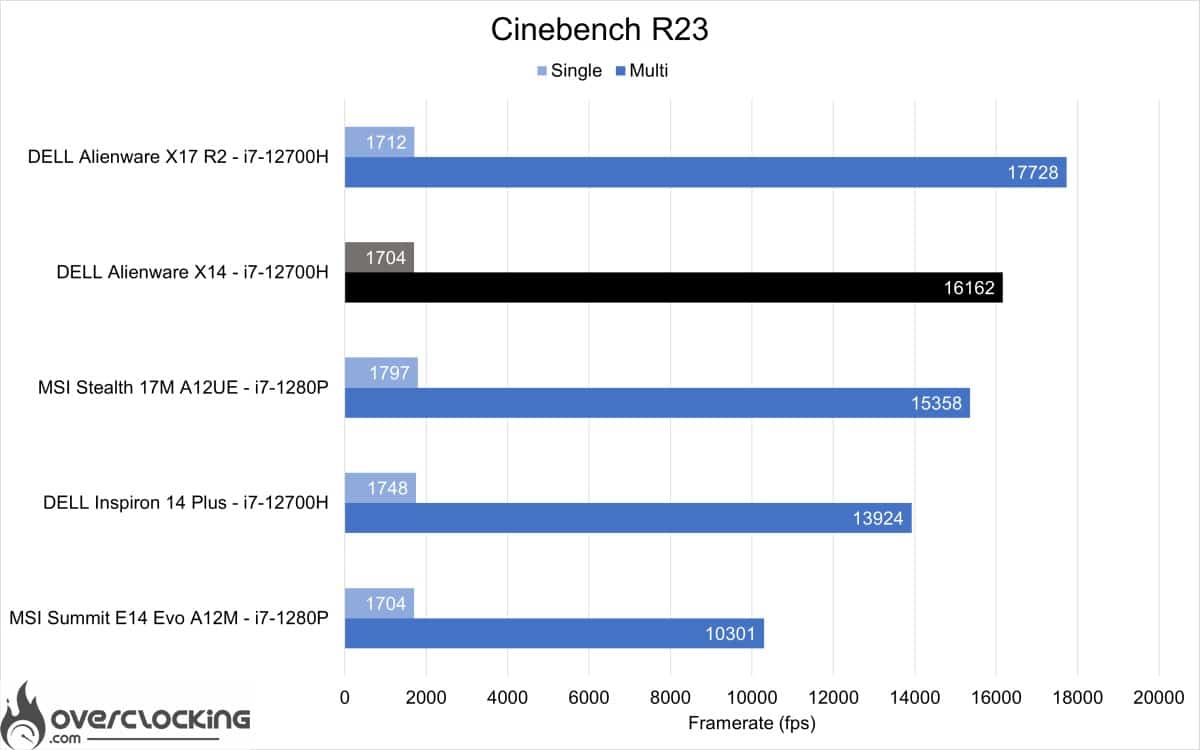
With the R23 version, we are on 16162 points in multi-core and 1704 points in single-core.
On both benchmarks, we are above the 1280P of a 17″ gaming laptop for a very low price and a similar configuration. The 12700H and 1280P use the same core configuration but the 12700H has a higher PL. Although limited by the heat, this Alienware X14 does pretty well on the CPU side.
Geekbench 5

In geekbench 5, the processor rises to 1715 points in single-core and 12639 points in multi-core. Here too, just like Cinebench, we notice a gap on the multi-core. However, it remains slightly behind the Alienware X17.
3DMark CPU

On 3Dmark CPU, we are on 970 points in single-core and 7009 in multi-core.
AIDA64

In terms of RAM and latency, the LPDDR5-5200 in gear 2 goes up to over 103 ns. This is due to the rather slack memory timings with a tCL of 60. The proposed data rates are about 74 GB/s for writing and copying and 64 GB/s for reading. Quite high throughputs thanks to the 5200 Mt/s of this LPDDR5 memory.
The processor shows very good performance despite the restrictions of the formfactor in terms of cooling. A cooling that seems to be behind the Dell Inspiron 14 plus, needs to dissipate 115W against 90W on the Dell.
3DMark Fire Strike


On Fire Strike and Fire Strike Extreme, the RTX 3060 max-Q performs very well considering the limited cooling of a 14-inch device. Considering the noise generated by so much power to dissipate in such a small space, it will not be necessary to use headphones. A use that does not correspond very well to a mobile workstation type of use.
3DMark Time Spy


Then, on Time Spy and Time Spy Extreme the gap remains the same with the RTX 3060 powering the Stealth 17M.
Just like the CPU part, this Alienware X14 is a real power pack in a chassis not really adapted to so much heat release. However, it will manage to perform heavy tasks without difficulty, provided that you wear headphones (even open headphones cover the noise well).
[nextpage title=”Performance Gaming”]
Performance gaming
Now let’s talk about gaming performance with this RTX 3060 max-Q.
Shadow of the tomb raider
Shadow of the tomb raider integrated benchmark results. In medium and ultra quality, in 1080p and DX12.
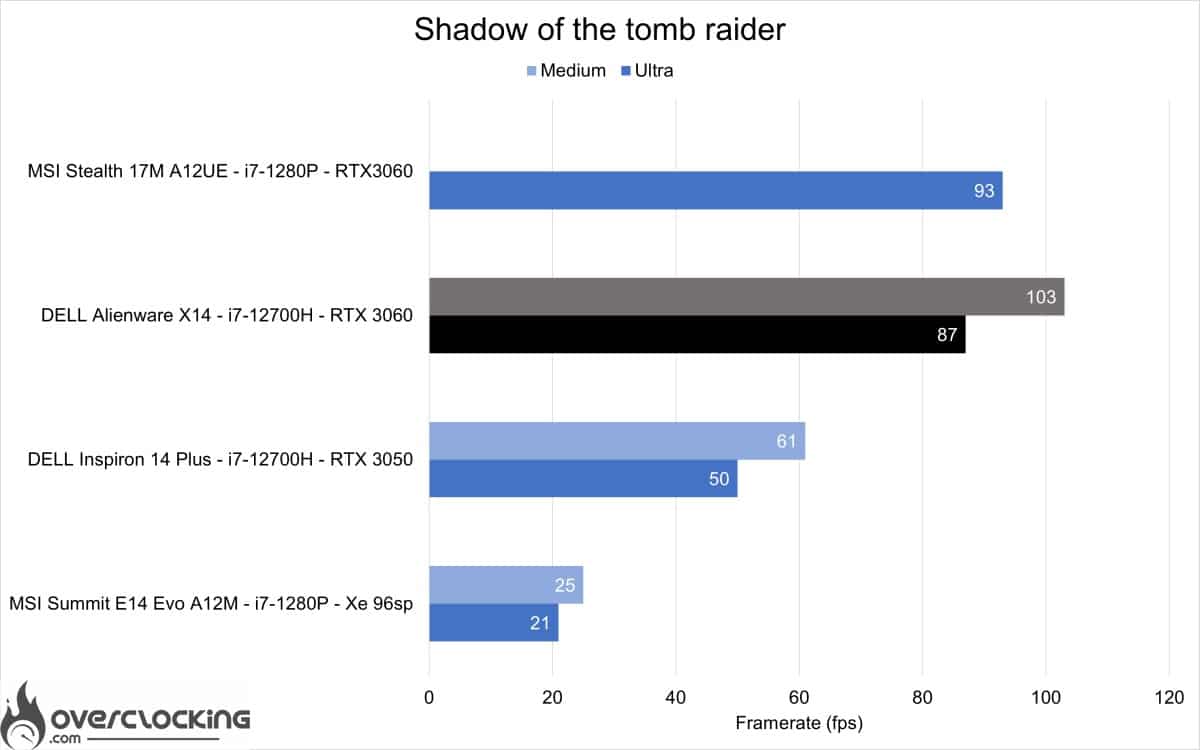
As we can see it will be possible to play this title on our machine, it will however be advisable to go through the DLSS to gain a little performance and reach the 144 FPS of the screen.
Anno 1800
Results of the integrated benchmark of Anno 1800. In medium and ultra quality, in 1080p and DX12.
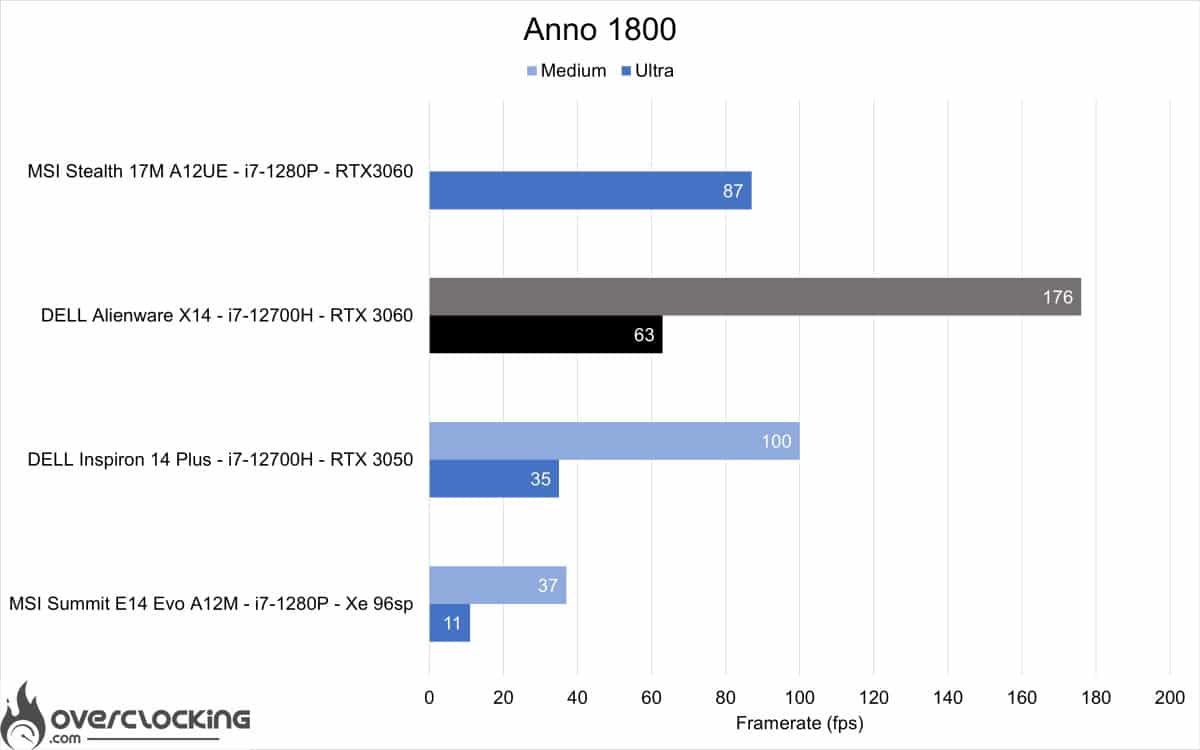
For a game like Anno 1800, even at maximum it is possible to play the game. But, it will be better to lower the quality a bit to take advantage of the high refresh rate of the screen.
Call of Duty Modern Warfare 2 – 2022
Results of the integrated benchmark of MW2. In medium and ultra quality, in 1080p and DX12.
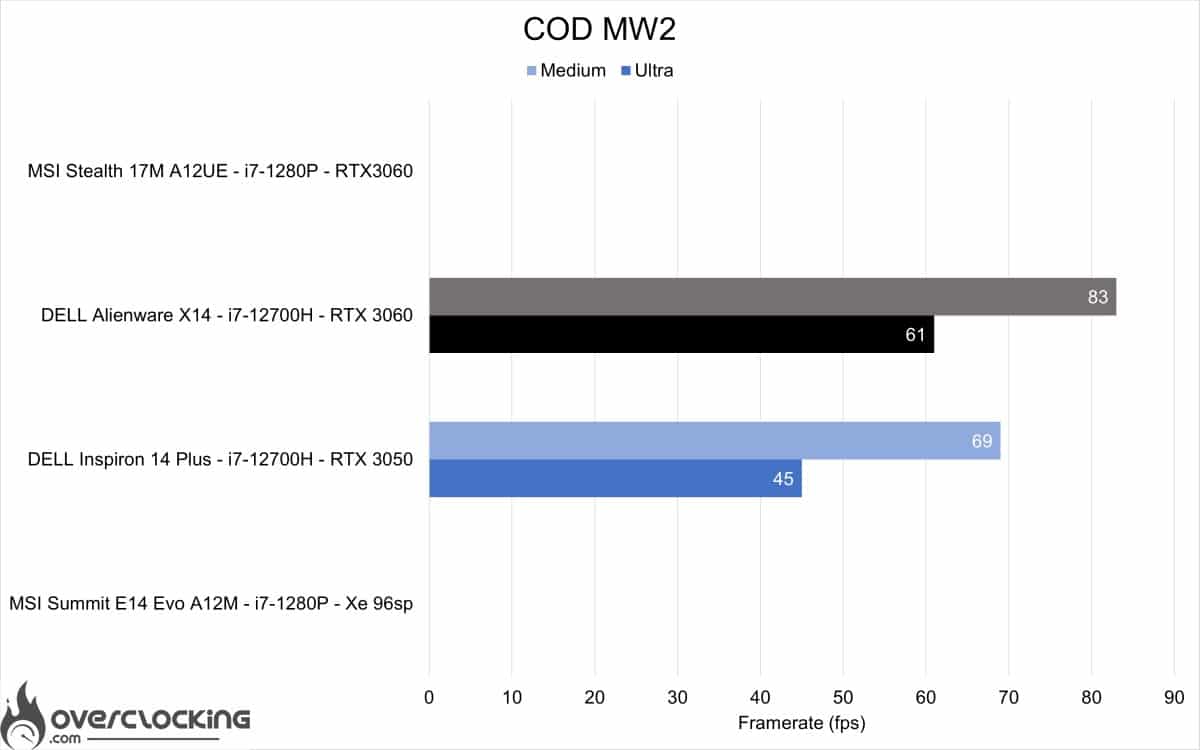
We can easily play MW2 on this Alienware X14, but we will have to opt for DLSS to get closer to 144 FPS.
This Alienware X14 will be a good partner for games in 1080p, e-sport titles like Valorant will run on it without any problem. However, you will have to use a headset because the ventilation is quickly heard.
[nextpage title=”Temperature and Power Consumption”]
Temperature and consumption
The temperatures measured during the tests were very high. On benchmarks like Cinebench R20 and R23 we reached 100 °C at the maximum on the CPU. Once the fans were on, the temperature dropped to 75°C and then stagnated at 60°C with the throttle. The heat on the GPU side remains relatively contained with about 67 °C under load on 3Dmark. In spite of the strong heating of the components, the PC remains quite cool at the chassis level. Whether in idle or under load.
To cool the configuration, we have two fans on the back that suck in cool air from the back and sides and expel it to the back of the device.


Surface temperature in idle
The surface of the keyboard and trackpad stays under 30°C in idle, which is a good temperature.
Surface temperature under load
Under load this time, the surface of the keyboard and trackpad rises to almost 48°C in front of the screen and at the top right of the keyboard. Quite high temperatures, but the areas most in contact with the users remain around 30 to 35°C.
Consumption
As for the battery, we have a PC equipped with an 80Wh battery. Concerning the consumption, we oscillate between 8W and 20W with an average of 11W in idle and can go up to more than 110 W in CPU use or 135 W in CPU use (71W) and GPU (65W) on MW2. The battery lasts about 6h to 8h in mixed use Photoshop, internet, Office. And recharges in a little less than an hour.
[nextpage title=”Conclusion “]
Conclusion
The Dell Alienware X14 is not intended for a hardcore gamer public because of its limited power and cooling system. Despite this, it manages to run the latest AAA titles without any trouble while containing the heat. Here, only the CPU part seems to be the cause of this decadence of Watt to be dissipated, a bridging in power of the chip could offer good results.
This laptop also has interesting assets for a varied use with an excellent factory calibrated panel. Coupled with its unbridled power, it could just as well be a good machine for video or photo rendering in addition to some gaming sessions on Warzone.
As a reminder, the Dell Alienware X14 is available at $2.200 or 2.400 € for the i7 12700H and RTX 3060 version. Here, only the storage is scalable, which may allow a switch to 2TB or 4TB in the future.
We liked:
- The performance of the CPU
- The performance of the GPU
- The weight and the thinness of the chassis
- The efficient cooling for the size and power
- The quality panel for photo/video use
- The keyboard is pleasant to use
- The autonomy for its performance
We would have liked:
- A second USB A port
- A digital fingerprint reader
- Upgradeable RAM
 This is my first Alienware laptop test and the quality of the product leaves me wondering about my future choices. Because here we have a condensed power in a mini format with a battery worthy of a 15 inch laptop. Everything breathes quality. Nevertheless, some points are annoying, such as the connectivity or the ultra closed bios that do not allow the possibility to adjust the machine to its use.

