

Although they seem like an attractive solution on paper, passive graphics cards are becoming increasingly rare. The reason for this is linked to the rise in GPU power consumption, which makes these solutions difficult to implement. However, in NVIDIA’s lineup, we find the RTX 5060, a card whose 145W TDP still makes it suitable for this kind of setup. That’s exactly what one user tried by mounting a 2.5 kg heatsink on it!
He’s turned his RTX 5060 into a passively cooled card!
2.5 kg of aluminum!
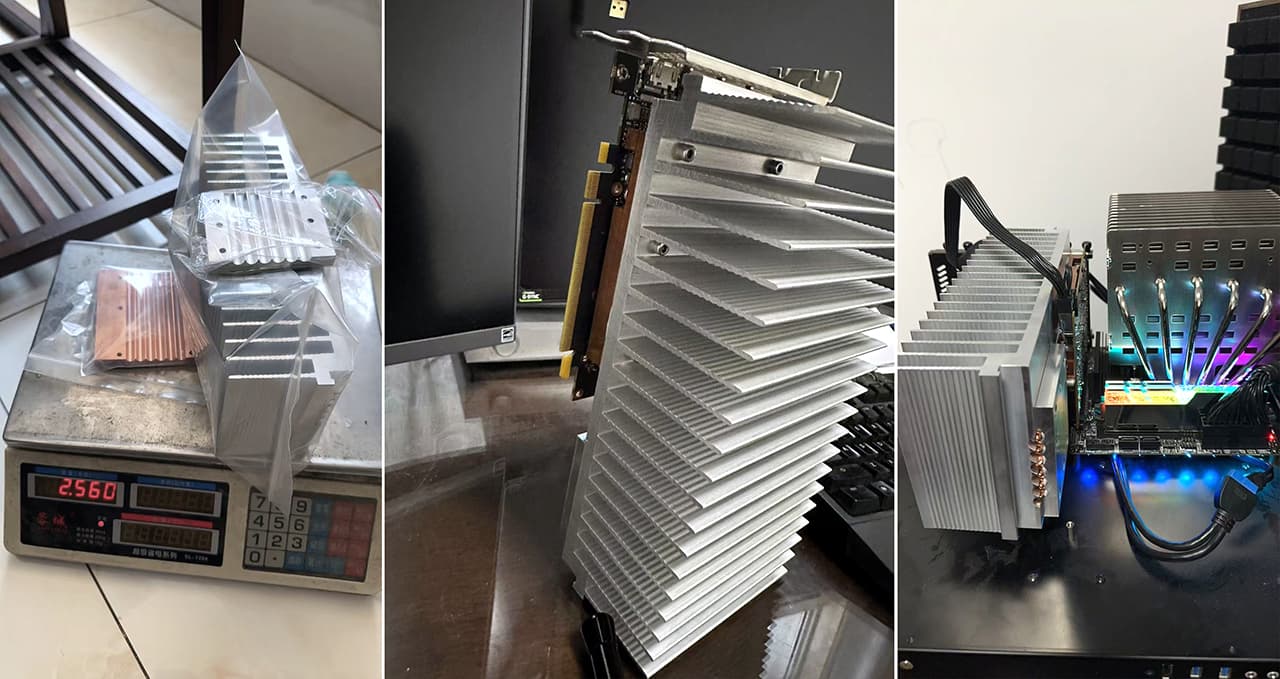
As you can see, the user in question acquired a massive block of aluminum with machined aluminum fins. These fins are particularly thick and well-spaced apart. The goal is to allow heat to rise through the structure without the need for a fan. This type of solution relies on natural convection to cool the graphics card.
Of course, there are six copper heat pipes designed to improve heat distribution throughout the structure.
In any case, as you can see, the design is truly imposing. While the RTX 5060’s relatively low TDP allows for compact cards, the switch to passive cooling here drastically increases the footprint, bringing it close to that of an RTX 5090, for example. Moreover, the setup lies flat, which helps relieve stress on the graphics card’s PCB. At the same time, with over 2.5 kg of heatsink weight on the back, it’s clear that this could eventually cause the PCB to crack.
Solutions on the decline:
The major advantage of passive cooling solutions is that noise is virtually eliminated. Indeed, without spinning fans, there’s less noise… Plus, reliability is improved since there are no moving parts—no bearings that might fail, etc. Likewise, maintenance is easier thanks to the wide fins, which make it simple to remove dust. However, once again, the increase in GPU power consumption makes these cards less practical.