











As we said a few hours ago, the arrival of the RTX 50 on notebooks is underway. While we don’t yet have a technical opinion on the products, the problem with these new ranges is clarity for the end user. This was already the case with the previous generation, since desktop and mobile chips have the same name. However, the reality of performance is very different. Obviously, those familiar with the world of hardware are now aware of this subtlety. But frankly, do you think that the majority of customers are aware of these differences? In reality, an RTX 5090 in a laptop can be 50% slower than an RTX 5090 in a desktop PC.
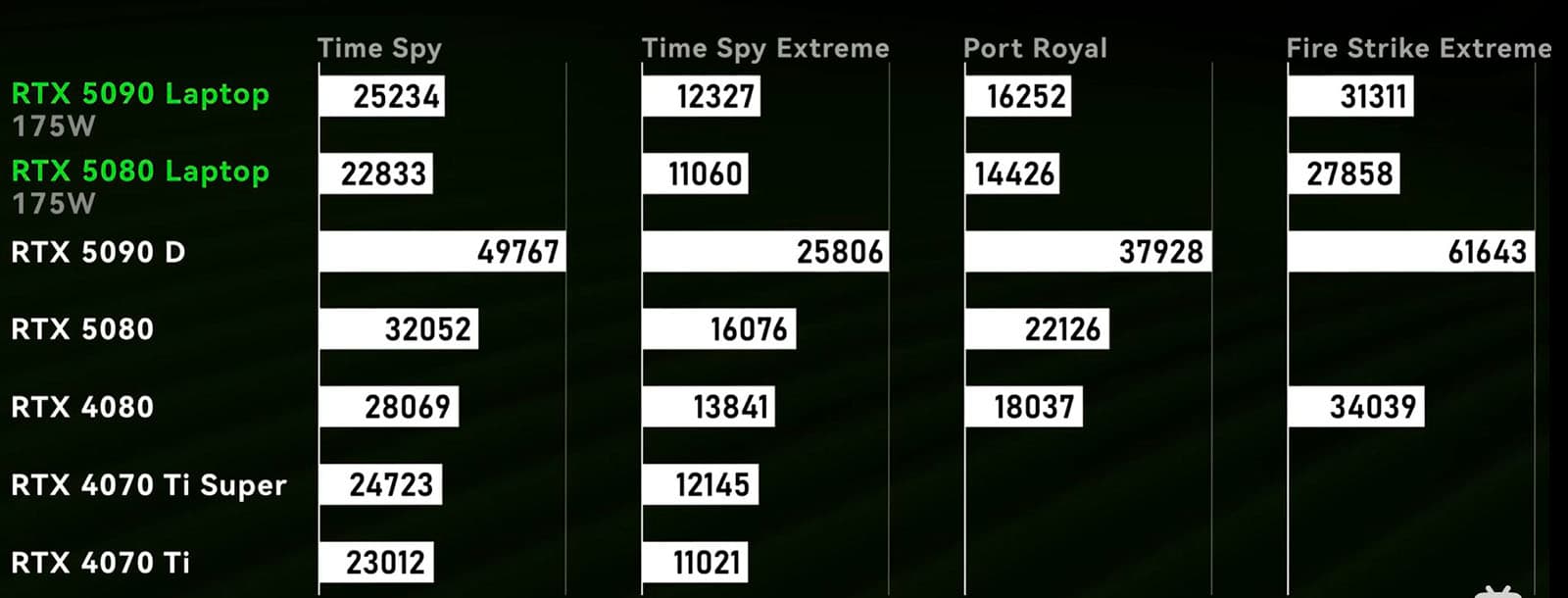
Let’s take the top of the range RTX 50 series. As you saw in our tests, the RTX 5090 FE that you hope one day to house in your PC consumes no less than 575W. But when this chip is transplanted into a laptop, the RTX 5090 chip sees its power consumption limited to 175W (and that’s the highest value).
RTX 5090 laptops and co: the commercial name is a problem
If we go into the tests and the detailed figures, you’ll understand better what’s bothering us. When we analyse the results, it’s not far-fetched to say that the difference in performance between the GeForce RTX 5090 Laptop and the RTX 4090 Laptop remains extremely tenuous. The former is positioned as a rival to the GeForce RTX 4070 Ti SUPER, while the latter is aligned with the RTX 4070 Ti . This proximity in their capabilities could explain why direct comparisons between the RTX 5090 and RTX 4090 are rare…