

Over the years, graphics cards have become increasingly heavy. Heat sinks are not only bulkier but also heavier. As a result, when the cards aren’t properly supported, they end up tilting—sometimes dangerously so. The problem is that the weight can damage the cards’PCBs and render them inoperable. And when the PCB cracks, there’s a chance that warranty service will be denied because the warranty doesn’t cover physical damage, obviously…
A big GPU? Think about the support!
€7 that can save a card worth over €1,000:
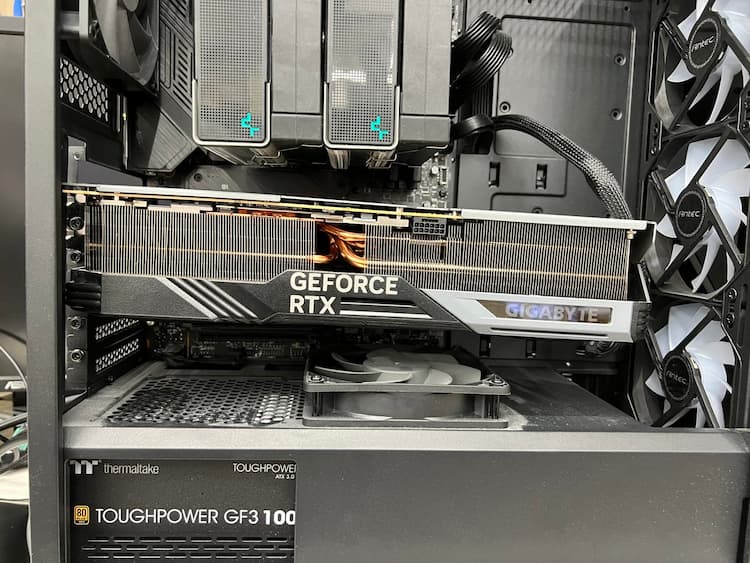
In a nutshell, the Japanese store PCONES reminds the user who asked the question on X, wondering whether to add a support bracket for their graphics card. The store’s response leaves no doubt about what happens if you don’t add one: the card tilts significantly. The example shared is striking; the Gigabyte model shown has a concerning tilt. The problem is that the machine risks damage, such as a torn PCIe slot near the GPU.
There is no shortage of solutions:
Fortunately, some manufacturers include a dedicated graphics card bracket in the accessories. If yours doesn’t come with one, you can always order one from Amazon, which offers screw-on models that fit between the power supply shroud and your graphics card. If you’re lucky, your case already includes this type of bracket. If you don’t have extra money to spend on your computer, a stack of LEGO bricks, a small figurine, a piece of wood, or a 3D-printed bracket will do the trick. The key is that the bracket must be rigid to support your card as well as possible.
And when transporting your PC, if possible, try to remove your graphics card to prevent any damage caused by bumps in the road.