

Until now, third-party monitoring software has been unable to read the hotspot sensor on NVIDIA’s RTX 50 series. This is because the sensor is not available via the public API shared by NVIDIA, and developers must find other ways to enable sensor reading. HWMonitor was the first to offer this capability, and HWiNFO is now following suit. For its part, the developer of MSI Afterburner explains that, for partnership reasons, this is not something they will be able to do.
HWiNFO now supports reading the GPU hotspot for the RTX 50 series!
Right on the heels of HWMonitor!
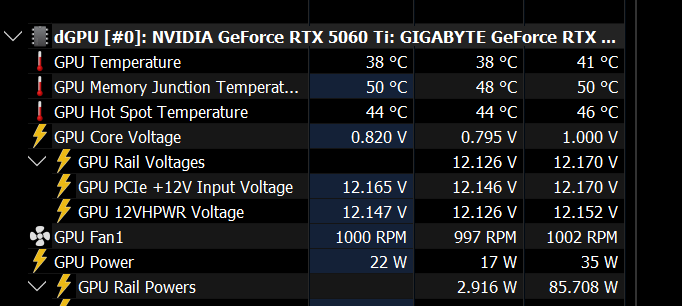
Broadly speaking, when the RTX 50 series launched, we learned that reading this sensor wasn’t possible. Then, Brazilian modder and repair technician Paulo Gomes indicated that it was possible to access it using MODS, an internal NVIDIA diagnostic tool. Finally, yesterday, we learned that HWMonitor could read this sensor.
It is under these circumstances that HWiNFO has now also made it possible to read the sensor. But this doesn’t seem straightforward, as the developers appear to have discovered two different sensors in their readings. While one of them corresponds to the hotspot sensor, it’s possible that the second one is related to a VRM hotspot—the hottest point on the power supply stage.
No hotspot reading for Afterburner!
Unfortunately, reading this sensor won’t be possible in Afterburner—at least not without a policy change on NVIDIA’s part. After all, it’s an official third-party partner software of NVIDIA. Consequently, for legal and marketing reasons, its development must rely on the API provided by NVIDIA. Its developer also notes that software displaying these sensor values is based on reverse-engineering the API or direct access to the RTX 50GPUs.
In any case, NVIDIA wouldn’t be very happy with this approach, which is a real shame. Knowing your GPU’s hotspot is very useful, as it lets you determine whether a heatsink or water block is properly mounted on the card, for example.