

Today we’re reviewing a Geekom AS6 mini PC. This is a mini PC equipped with a Ryzen 9 6900HX chip. Initially offered in barebone format by Asus with the ExperCenter range, the version we’re testing here is equipped with a 1TB SSD and 32GB RAM.
The Geekom AS6 is available for €769 in its R9-6900HX version with 32 Gb RAM and 1 TB SSD, and €649 in its R7-6800H version with 32 Gb RAM and 1 TB SSD.

Thanks to Geekom for providing us with this copy.
[nextpage title=”The Geekom AS6 – Ryzen 9-6900HX”]
The Geekom AS6 is a small mini PC measuring 120 x 130 x 58 mm. The processor is an AMD Ryzen 9 6900HX, accompanied in our case by 32 GB DDR5-4800 Mt/s RAM and a 1 TB NVMe SSD.
We start by unpacking the device. This mini PC comes in very compact packaging, identical to the Asus packaging except for the colors. Inside, we find the mini PC on the left in plastic packaging. On the right, we have the documents, as well as the charger and the VESA support with its screws for mounting on a screen or chassis.


Let’s talk about the charger, which is a 120W 20V power supply with cylindrical connectors to be plugged into the rear of the PC.


We’ve also bundled an HDMI cable and a VESA bracket with the necessary screws.


Presentation
To begin with, the Geekom AS6 is very compact in this version, weighing in at just 757g. The overall design is largely plastic.


Then there are the connectors, a very complete solution. We have 2 USB type-A 3.2 gen 1 ports on the front, as well as a 3.5mm jack and a USB type-C gen 4 port. On the rear, we have a USB type-C gen 4 port, 2 HDMI 2.1 video outputs and a DisplayPort 1.4 output, 3 USB type-A 3.2 gen 2 ports. As for network connectivity, we have a 2.5 Gb RJ45 socket, Wi-Fi 6E and Bluetooth 5.2. This is a very complete solution.
The special feature here is the second DisplayPort 1.4 port on the top cover. On Asus ExpertCenter products, this can be configured as an RS232, VGA, HDMI, RJ45 or DisplayPort port.


[nextpage title=”Configuration overview”]
The configuration of this Geekom AS6 is based on an AMD Zen 3 platform. The CPU used (Ryzen 9 6900HX) is very interesting, featuring a 768-core RDNA2 IGP.
The various components
We start with the CPU, motherboard and RAM, here on CPU-Z, we can see that the Geekom AS6 is equipped with an R9-6900HX with 8 cores capable of 4.9Ghz. For RAM, we’re looking at 32GB of DDR5 memory at 4800 Mt/s CL40.

Let’s move on to the graphics card. Here, we’re on the IGP integrated into the R9-6900HX, with the AMD Radeon 680m (768 cores) on RDNA 2 architecture, capable of going up to 2.4 Ghz.

For storage, we have a 1TB Kingston NV2 PCIe 4.0 x4. This offers very good performance in terms of access time, but with relatively low data rates.


Disassembly, repair and upgrade
Disassembly is performed by removing the 4 screws on the back of the device, giving access to the replaceable components. As for removing the motherboard, it’s impossible to remove it here – how did it get in there?


From a modification point of view, we have access to the M.2 PCie 4.0 slot on the motherboard, as well as a second M.2 PCie 4.0 slot located on a PCB in the device cover and connected to the motherboard via a ribbon cable. On the back of this second PCB, we also find a 2.5″ SATA slot for a third SSD or HDD. We also have access to the Wi-Fi card under the M.2 2280 PCIe slot and two so-dimm DDR5 slots.


[nextpage title=”Test protocol”]
The test protocol has been revised to offer something more complete. It’s the same protocol as for notebook PCs, with a few adjustments, notably concerning autonomy, screen and video game measurements, which have no place here.
The protocol
- Heat and thermal efficiency
- Synthetic CPU test
Cinebench R20
Cinebench R23
Geekbench 3
Geekbench 5
3DMark CPU Profile
Aida 64 - Synthetic GPU performance
3DMark Timespy
3DMark Timespy extreme
3DMark Firestrike
3DMark Firestrike Extreme
3DMark Firestrike Ultra - Productivity performance
PCMark 10 Extented
PCMark 10 Applications test
Blender Benchmark
PugetBench Davinci Resolve
The tests were performed with the AMD Adrenalin 23.5.2 driver version.
[nextpage title=”Heating and thermal efficiency”]
To test the machine’s heating, we opted for two separate tests: first, heating under IDLE and then heating under CPU load on Cinebench R23 for 10 minutes.
The cooling system
Exterior
On the outside, we have two openings on the sides of the device to draw in fresh air for the fan. The fan expels hot air from the rear of the mini PC through a third vent.
Inside
As mentioned above, it’s impossible to remove the motherboard and access the cooling system. However, we know from exploded views on the product page that it consists of two heat pipes connected to a radiator with a fan blowing through it.
CPU heating only
In IDLE :

After 8 min of Cinebench R23:

We start with heating in IDLE and on Cinebench R23 after 10 min of stress. The CPU rose to 83°C on 1 core in the first few minutes before stabilizing at around 74°C. Power consumption and frequency dropped from 59 W and 4700 MHz to 35 W and 3700 MHz during this stress test. On the surface, the maximum temperature was 32.7°C at the rear of the device, while the desktop at the rear was 31°C.
The hot spot on the front is the USB dongle of the Logitech keyboard-mouse combo.
[nextpage title=”Synthetic CPU performance”]
Synthetic CPU performance
Now let’s see what this machine’s got up its sleeve, starting with CPU and memory performance on a few synthetic benchmarks. Intel’s R9-6900HX will be compared with the Ryzen 7 7735HS found in the PCS Elimina PRO 16 M, based on the same architecture.
Cinebench R20

We start with Cinebench R20, where the R9-6900HX performs slightly better than the R7-7735HS, but still lags far behind the i7-1360P.
Cinebench R23

Moving on to Cinebench R23, here performance falls back against the other two CPUs. We can clearly see that Intel is winning this battle in terms of raw CPU performance.
Geekbench 3

On Geekbench 3, performance is once again very good, on a par with an i5 12400.
Geekbench 5

For Geekbench 5, the R9-6900HX moves up the rankings and dethrones the i7-1360p on ultraportables.
3DMark CPU Profile

For 3DMark CPU Profile, the R9-6900HX is this time well behind the Intel-based competition.
Aida 64

For AIDA64, we’re mainly looking at RAM, and here performance is in line with the memory kit used. Latency is quite good, and data rates are fairly low for DDR5 at 4800 Mt/s.
In itself, the performance of this Ryzen 9 6900HX lags behind Intel solutions, but we’ll see that the IGP part makes up for it in terms of productivity and content creation.
[nextpage title=”Synthetic GPU performance”]
Synthetic GPU performance
Now that we know the performance of the CPU part, we can move on to the GPU on a few synthetic benchmarks. Here, we’ll compare the performance of the AMD radeon 680m with the Intel Xe 96sp i7-1360P, which uses the same graphics architecture. Tests were carried out on a Dell SN2421NX 1080p HDMI display.
3DMark Timespy
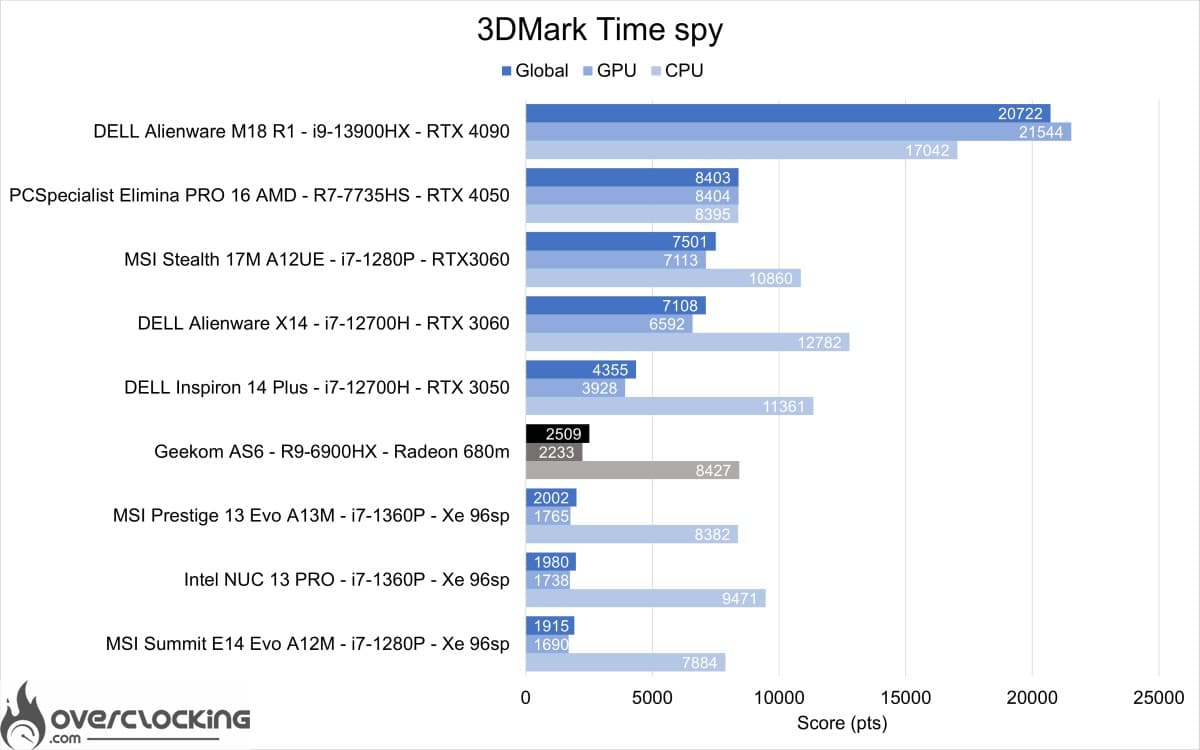
Let’s start with 3DMark Time Spy, where we achieved 25% better graphics performance than the Intel Xe 96sp.
3DMark Timespy extreme

As with Time Spy, the extreme version of the benchmark delivers 20% to 25% better performance than the Intel Xe IGPs.
3DMark Firestrike
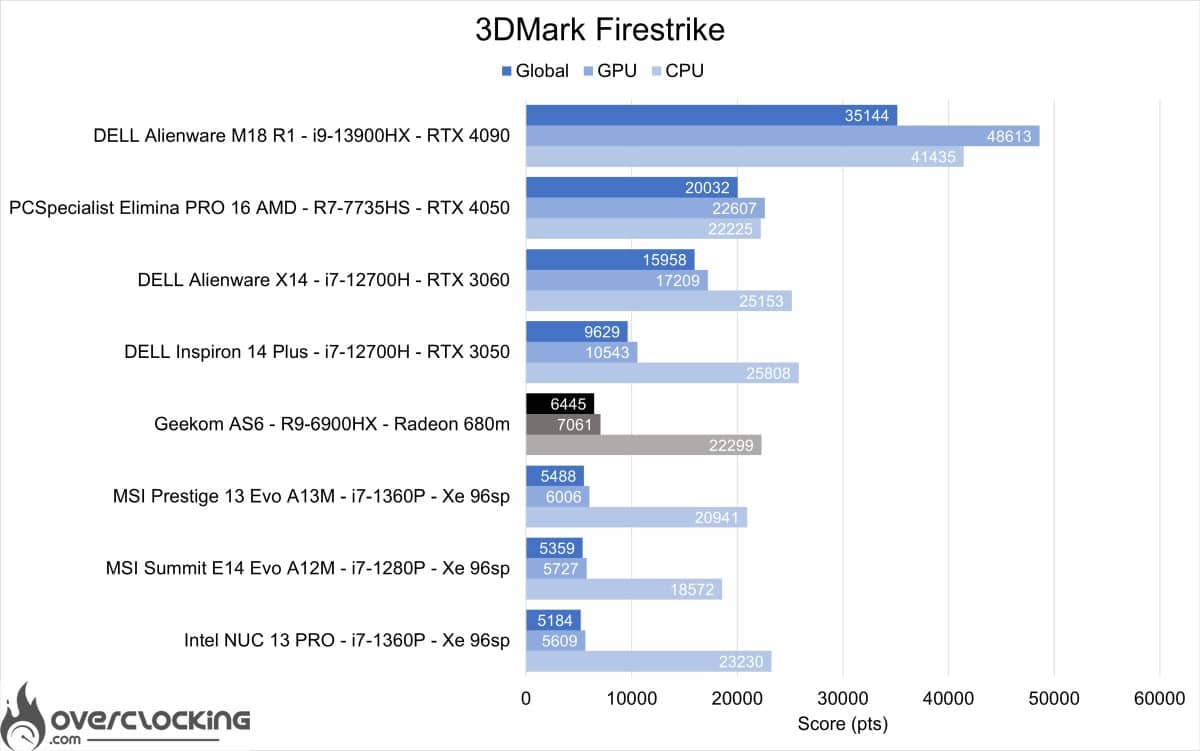
On 3DMark Firestrike, the Geekom AS6 does even better, this time with a 17 th improvement over Intel solutions.
3DM Firestrike Extreme
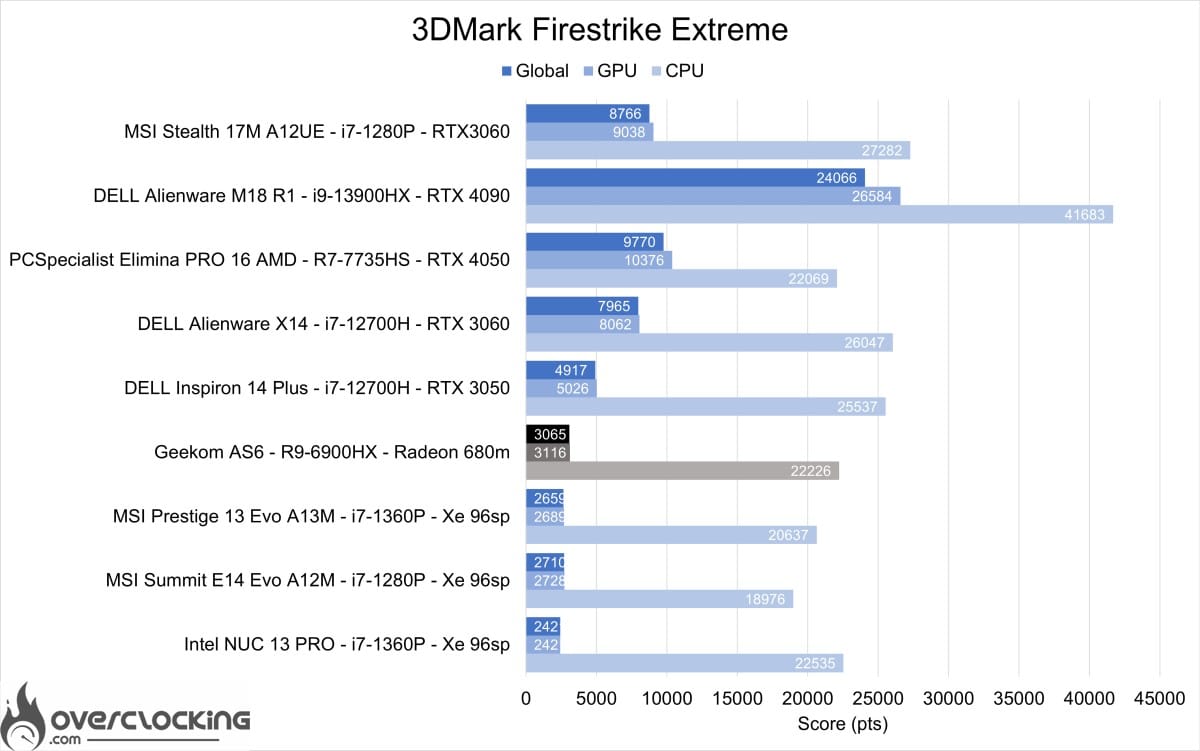
On 3DMark Firestrike Extreme, the gap remains the same. We’d also like to highlight the CPU’s excellent performance on all 3DMark benchmarks.
3DM Firestrike Ultra
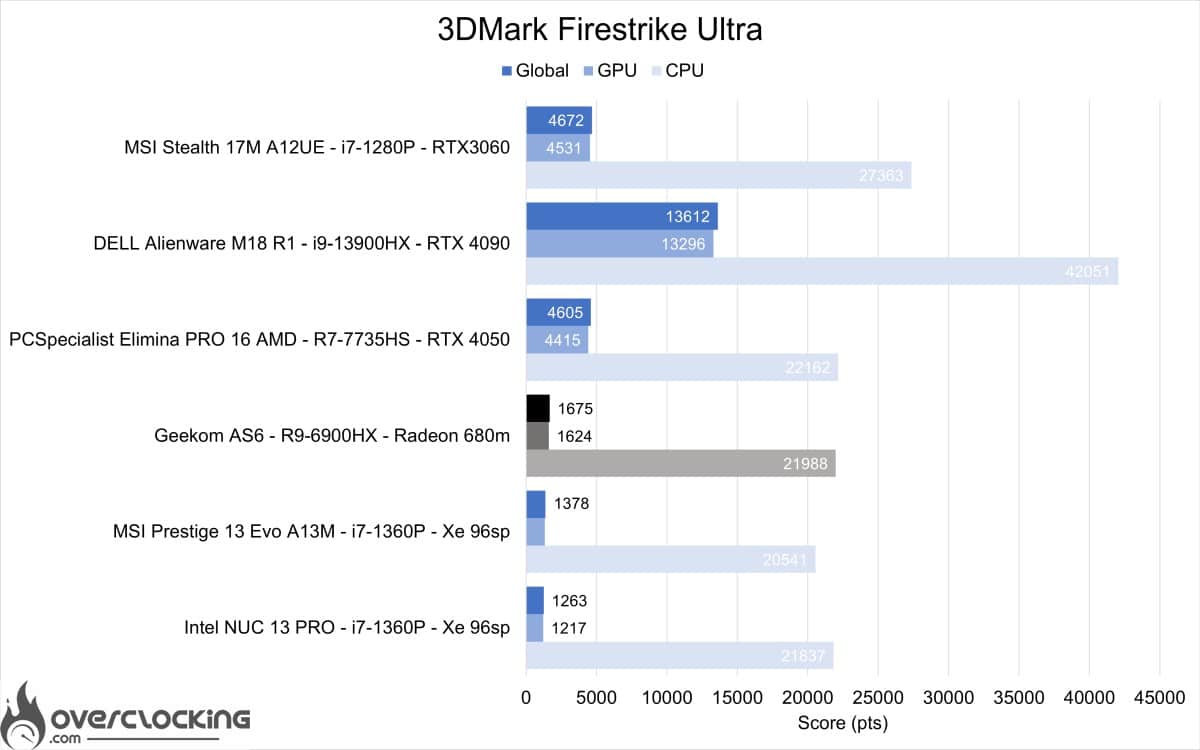
On Firestrike Ultra, the performance of this AMD IGP is once again very good.
It’s fair to say that we were pleasantly surprised by this IGP, which managed to get no less than 70% performance out of the low-TDP RTX 3050 mobile. It will therefore certainly be possible to play small games such as CS:GO or LoL in good 1080p conditions.
[nextpage title=”Productivity performance”]
Productivity performance
In this section, we’ll focus on productivity performance. In other words, the machine’s performance on software such as Microsoft Office, Blender or DaVinci Resolve. The only problem here is that it’s impossible to finish the Puget Bench Davinci Resolve benchmark, but Asertes’ initial feedback on video rendering looks very promising with this IGP.
PCMark 10 Extented

On PCMark 10, we have very good performance, well ahead of Intel architectures. A faster SSD could also help boost the score.
PCMark 10: application

The benchmark presented here uses the Microsoft Office suite to give us our machine’s performance on Word, Excel and Powerpoint. Here, performance is quite good, even if Intel platforms are still ahead.
Blender

Moving on to the Blender benchmark, here we have almost double the performance of Intel solutions, thanks to the IGP, which can be used for rendering.
The Geekom AS6 seems to be the ideal small-format PC companion for photo retouching and video editing. It also performs well on the Office suite, making it a more versatile mini PC than Intel-based solutions.
[nextpage title=”Conclusion”]
We’ve come to the end of this test, which was a first for me with a Zen 3-based PC. In fact, we carried out these tests before those of the PCS Elimina PRO 16 M. Here we have a very well-designed system, with a wide range of connectors and up to 3 different storage devices. In itself, it’s a perfect solution for storing and processing large quantities of video in a compact footprint.
At less than €770 with SSD and RAM, it’s an excellent value for money for anyone looking for a high-performance mini PC.

As a reminder, the Geekom AS6 is available for €769 in its R9-6900HX version with 32 Gb RAM and 1 TB SSD, and €649 in its R7-6800H version with 32 Gb RAM and 1 TB SSD.
If you’d like to buy this Geekom AS6 mini PC, please consider the discount code (€30 discount) AS6PRGK to be applied on the Geekom online store.
The Geekom AS6 – R9-6900HX
We liked :
- CPU performance
- Compact size
- Connectivity
- Efficient cooling
- Build quality
- Upgradability
We would have liked :
- Easier removal of the motherboard for maintenance
- A Barebone version
 In the final analysis, we’ve decided to award the Geekom AS6 a Gold rating. Although performance is very good, we would have liked to see a new product with the latest 12-core AMD Zen 4 chips. However, performance is very good and rivals Intel CPUs in terms of productivity. The positive point here is the AMD IGP, which brings real gains in video editing and content creation.