

Today, we review the ECS LIVA Q3H mini PC in its celeron n5100 version. It has a video input that allows you to connect a second PC and display its content on the video output of the Q3H.
The ECS LIVA Q3H is available in Pentium N6000 or Celeron N5100 and N4500 versions at a price around 300 €. The onboard memory is 4 Gb LPDDR4X with 64 to 128Gb of eMMC memory.

Thanks to ECS for providing us with this copy.
[nextpage title=”The ECS Liva Q3H”]
The ECS LIVA Q3H is a very small mini PC with 74mm x 74mm x 34.6mm. It embeds Embedded Intel Jasper Lake components. Its small footprint allows it to be deployed in meeting rooms as a standalone PC while offering users the ability to display content from their personal PC via the HDMI input on the back.
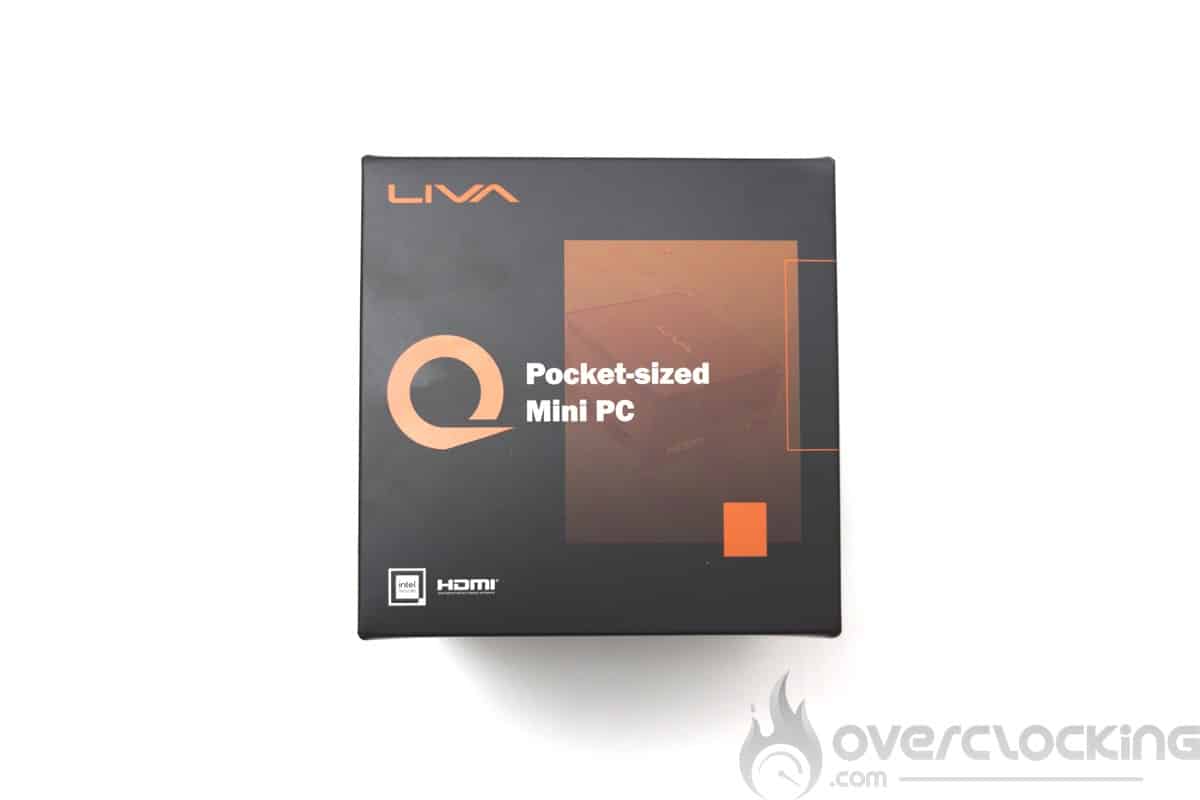
We start with the unpacking of the device, this mini PC comes in a small box integrating the power supply, a VESA bracket and power adapters. There is however no notice, notice which is also non-existent of the ECS site.


The 12V power supply provides 36W of power.
Presentation
The ECS Liva Q3H mini PC embeds the bare minimum in terms of IO connection. We have 3 USB ports, an Ethernet port and two HDMI ports (In and OUT). All this connectivity is arranged on both sides of the device. There is also a ventilation outlet on the back of the device and the 12V power connector.


Regarding the HDMI sockets, it should be noted that the HDMI IN automatically displays on the HDMI OUT if a device is connected to it. Impossible to record the image on this port. To change the source, you will have to either unplug the HDMI IN cable or plug a switch on a socket inside the box. A rubber cap can be removed from the side of the device to reach it.
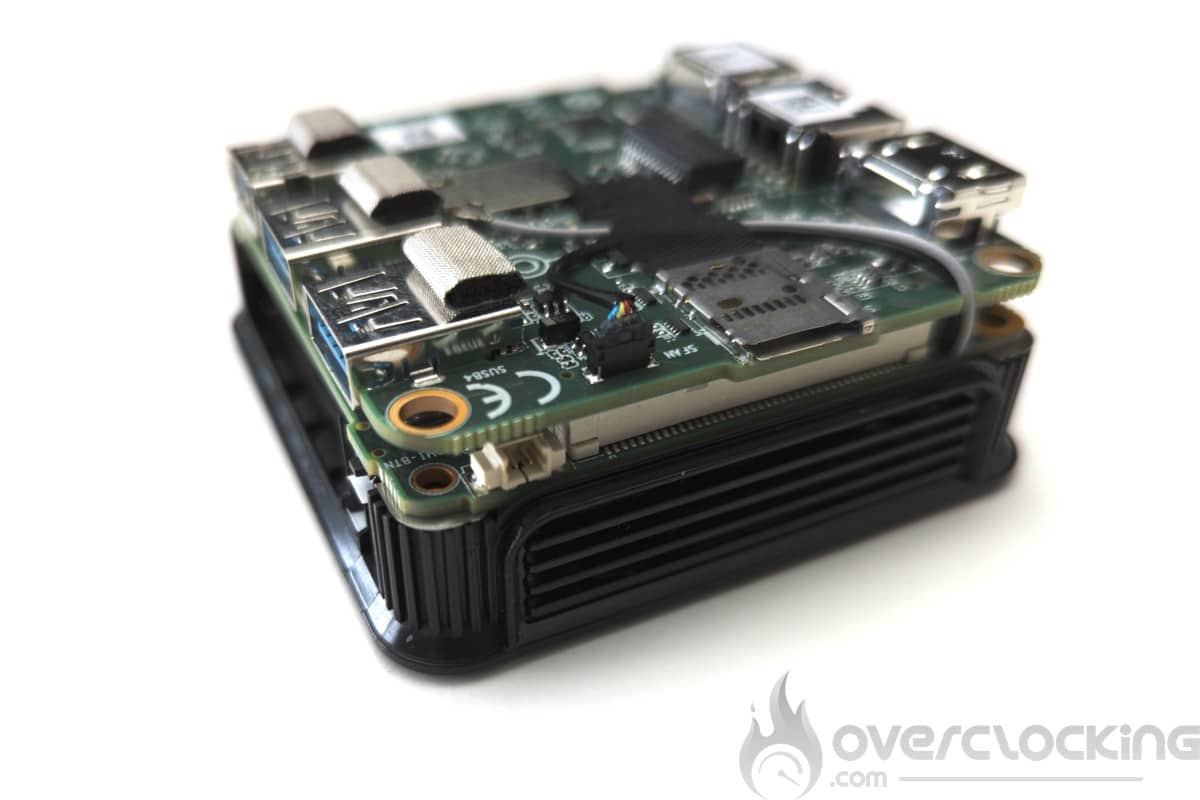
On the sides of the device, we also have vents. But also a micro-SD slot and a Kensington anti-theft connector.


On the back of the device we have the mounting points for the VESA adapter provided in the bundle.

[nextpage title=”Configuration overview”]
The configuration of this ECS LIVA Q3H is based on an Intel Jasper Lake chip. In the case of our test unit, we have a Celeron N5100 4 core at 2.8Ghz. It is also available in 4 core 3,1Ghz version with the Pentium Silver N6000 and 2 core 2,8Ghz with the Celeron N4500.
The different components:
We start with the CPU, motherboard and RAM, here on CPU-Z, we can see that this Q3H is equipped with an Intel Celeron N5100 at 2.8Ghz and 4 core. For the RAM, we have two chips of 2 Gb of LPDDR4X.

Let’s move on to the graphics card. Here, we are on an IGP Intel UHD Graphics with 24 execution units. So we can’t expect to play with it. During this test, we tried to launch a simple Counter Strike Global Offensive and it would not even launch.
For storage, we have 64 Gb of eMMC memory. This is cheaper than a sata or nvme drive, but offers lower performance.


Disassembly, repair and upgrade:
Disassembly is done by removing the 4 screws on the back of the device, once this is done, you will need to remove the top of the device. These screws are also used to apply pressure between the die of the processor and the cooling.


From a modification point of view, there is nothing we can do except replace the cooling system with a better one. Here, all elements are soldered to the PCBs. The PCBs are connected to each other in sandwich mode to save space.


[nextpage title=”Test protocol”]
The test protocol has been revised to better fit this low performance mini PC. Here, we will not test games or 3D tests and productivity tests will be limited to Microsoft Office.
The protocol :
- Warm up
- Synthetic CPU test
Cinebench R15
Geekbench 3
Aida 64 - Productivity performance
PCMark 10 Applications test
[nextpage title=”Autonomy and heating”]
The cooling system
Exterior
On the outside, we have two vents on both sides of this mini PC. The top of the device is slightly raised.
Interior


Inside, once everything is disassembled, we have access to the cooler. It is a piece of cast aluminum overhung by a fan. There are off-set fins through which the air blown by the fan passes. The interface with the processor and the memory is done via thermal pads, the pressure applied here to maintain them in contact comes from the screws on the bottom of the device.
Heating of the CPU alone
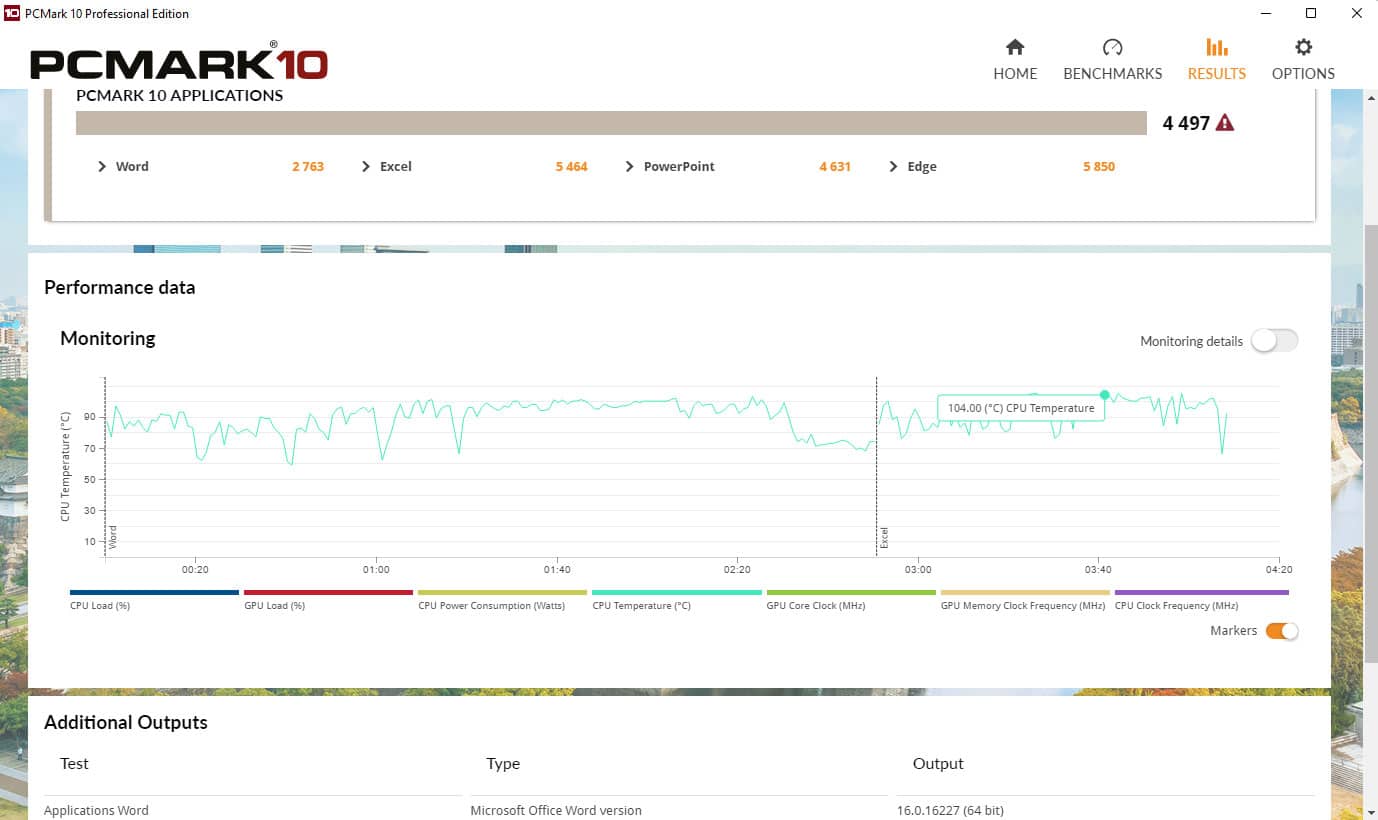
Concerning the heating, it is not at all mastered. Here, the simple fact of launching a benchmark on Excel, Word and Powerpoint generates a heating and an increase of the ventilation not very pleasant. We reach 105°C on the processor on Excel, Cinebench R15 or even Geekbench 3. In IDLE we are around 60°C. The device heats up a lot and this is in no way related to its performance.
[nextpage title=”Performance”]
Synthetic CPU performance
Let’s see what this mini PC has in its belly. Considering these specifications, we shouldn’t expect high performance.
Cinebench R15

We start with Cinebench R15, with a little more than 300 points we are on low performance. To compare we have today the Ecores on intel 12th and 13th gen processors which offer more performance with 4 cores. As an example, the Intel N100 or N200, with only 4 Ecores, offer up to twice the performance for a lower consumption.
Geekbench 3
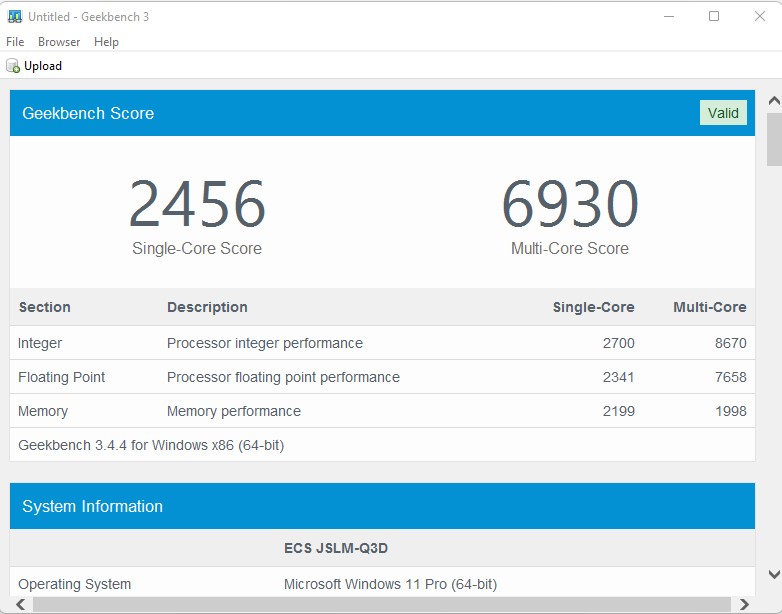
On Geekbench 3, the performance is once again very disappointing. Here, even a Ryzen 3 1200 shows almost twice the performance.
Aida 64
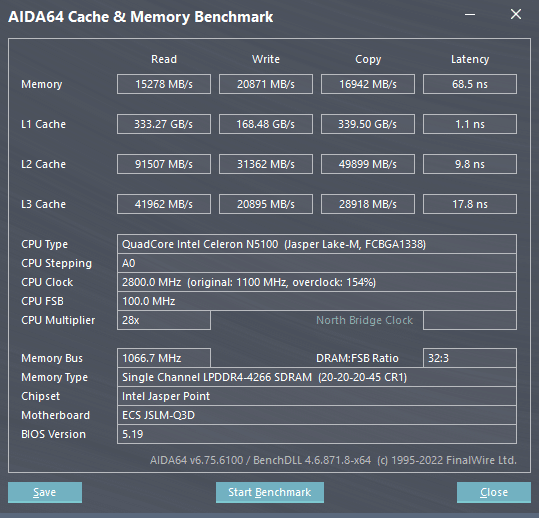
For AIDA64, we look mainly at the RAM and here the performance is disappointing. High latency and extremely low. Although the memory is given for 4266 Mt/s, the performance is actually closer to 2133 Mt/s in single channel.
PCMark 10: application
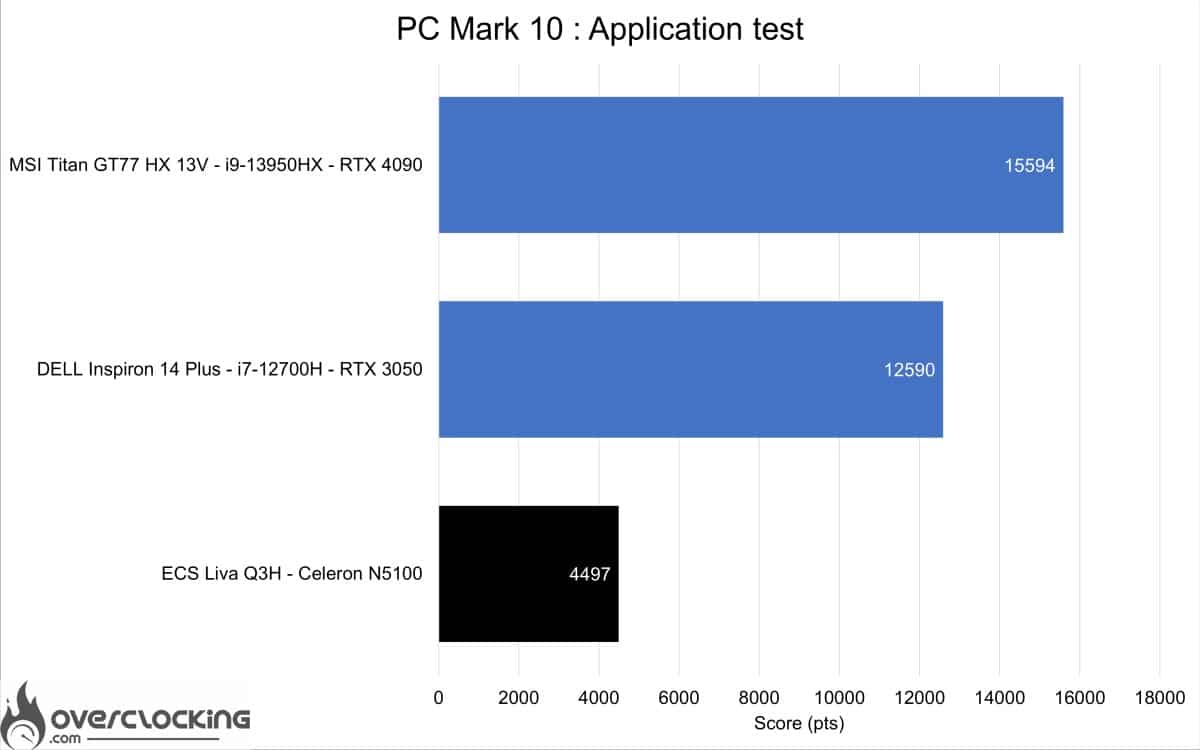
The benchmark presented here uses the Microsoft office suite to give us the performance of our machine on Word, Excel and Powerpoint. This is the most impactful negative point. Because here the N5100 combined with the 4 Gb of RAM do not even manage to make more than 5000 points on this benchmark. Considering the target of such a product, we would have liked at least 10,000 points.
[nextpage title=”Conclusion”]
Conclusion
The ECS Liva Q3H could have been a very interesting Mini PC for meeting rooms and/or home console game streaming. Unfortunately, it is not. For its main use, the Liva Q3H lacks CPU performance and RAM quantity. This is a pity, because it struggles with everyday tasks and is not very hot. On the other hand, this Mini PC could have been particularly interesting if it had integrated an Intel N200 or N300 coupled with 8Gb of RAM. Moreover, we would have liked to have the possibility to record the video stream in HDMI In, which would have made it a perfect living room PC.

The ECS LIVA Q3H is available in Pentium N6000 or Celeron N5100 and N4500 versions at a price around €300. The embedded memory is 4 Gb LPDDR4X with 64 to 128Gb of eMMC memory.
The ECS Liva Q3H
We liked:
- The HDMI input to plug in and act as an HDMI gateway
- The compact size
- Low power consumption
- The VESA support in bundle
We would have liked :
- Better performance (an Intel N series alderlake for example)
- A more efficient cooling
- At least 120gb of storage
- At least 8 Gb of ram
- The possibility to record on the HDMI input
 With a performance approaching that of a 6th generation Intel Celeron, this Liva Q3H cannot perform even the simplest everyday tasks. At the slightest load, the CPU goes up to over 100°C. We have a performance twice as low as 4 Ecore Alderlake for a higher power consumption. So it’s hard to recommend this Mini PC, which seemed interesting enough with its HDMI inputs and outputs.