

NVIDIA continues to expand its line of RTX 4000 graphics cards built around “ADA Lovelace”. Today we received a copy of the NVIDIA RTX 4070 Founders Edition card. If you have read our last test dedicated to the Gigabyte RTX 4070 Ti Gaming OC, you can imagine that this RTX 4070 model will be dedicated to the 1440p definition. We will therefore judge its potential against the reference cards in 1440p definition. A little downside on our side since we were unable to get our hands on an RTX 3080, the only card we no longer have in stock in the lab. As soon as it is available, we will update our graphics.
Let’s start with some good news as NVIDIA announces the availability of its Founders Edition model for 659 euros ($599). No doubt that once again, we will have to keep an eye on the price/performance ratio, especially compared to the previous generation. The cards will be available this Thursday, April 13, 2023 with a stock announced as important and partner cards that will benefit from the MSRP rate.

Thanks to NVIDIA for making this sample of the RTX 4080 Founders Edition available.
[nextpage title=”NVIDIA RTX 4070 Founders Edition: “]
Architecture:
As a reminder, the cards of the “Founders Edition” series are unique models offered by NVIDIA. The main advantage of these cards is to be proposed at a “locked” price which will not change in the weeks or months to come unless the price is reduced. This NVIDIA RTX 4070 Founders Edition is listed at 649 euros on the NVIDIA website. NVIDIA partners will also offer their own model, but at a higher price even if NVIDIA announces a larger number of cards at MSRP! Visually, NVIDIA has kept a similar design to the previous cards with here a width of 2 slots with very interesting proportions since it will find its place very easily in any case.
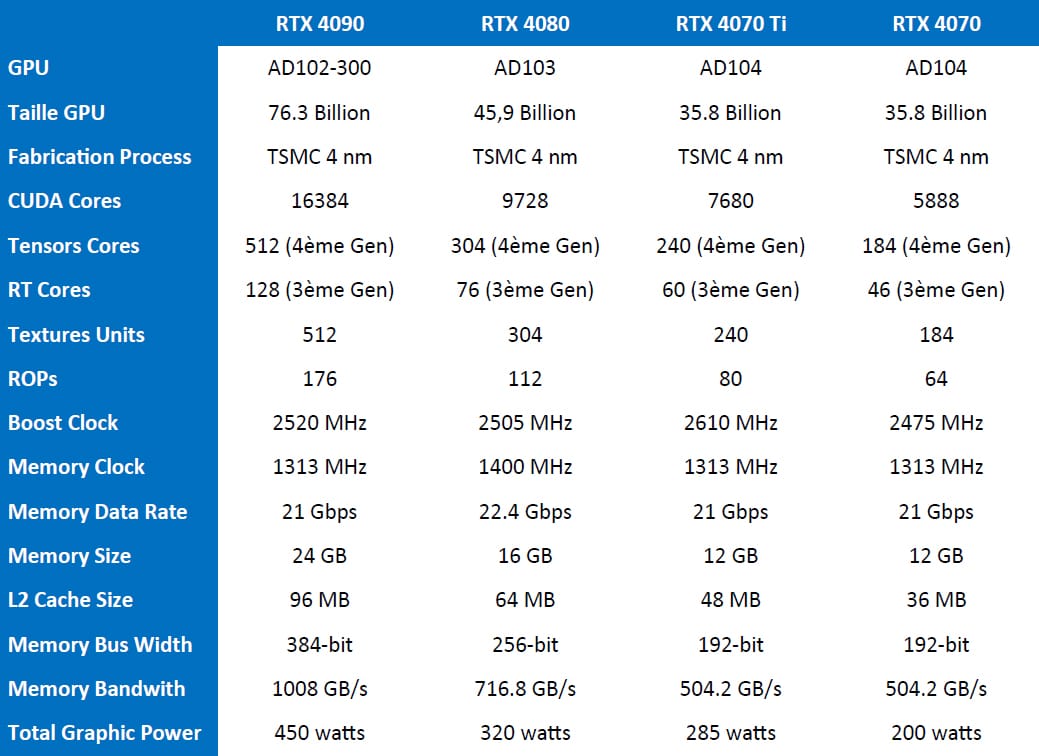
This RTX 4070 has an AD104-250 GPU with 5888 CUDA cores which is 1792 cores less than the RTX 4070 Ti. It is equipped with a manufacturing process in 4 nm manufacturing process from TSMC and not the 8 nm made by Samsung which allows to lower the TGP to 200 watts only.
In terms of memory, there are 12 GB of GDDR6X memory in 192-bit, which translates into a bandwidth of 504 GB/s. The speed of this RTX 4070 should be slightly faster than the RTX 3080 according to NVIDIA while consuming less. On page four of our article, we will go into more detail about the new features of this new architecture, including DLSS 3 support.
The bundle of this Founders Edition:
So what do we find in this imposing box? As usual, NVIDIA has taken great care of the packaging of its card by offering a cardboard box where the RTX 4070 FE is hidden. It’s always very exciting to discover the new packaging proposed by NVIDIA when a new generation arrives.


The box is simply huge with dimensions of 395 x 195 x 192 mm.
The box opens from the front to reveal the RTX 4070 Founders Edition. Once this one is removed, we find a small box that contains the adapter for the card’s power supply.


In the bundle, there is a 16-pin (12 + 4) to two 8-pin 150W adapters (300W in total). This adapter is necessary for those who do not have a power supply with a 16-pin port or the adapter of their own power supply.
Please note that NVIDIA is the only supplier of the adapter and therefore provides it to its partners. We also received the 12 + 4 pin connector from Corsair as well as the one proposed by be quiet! which feeds directly into the power supply.
The cooling :
NVIDIA has retained the proven cooling principle of the previous generation. The fans are 92mm models and are responsible for keeping the radiator in contact with the graphics chip and the various components of the PCB cool. The black fans have 7 blades and will remain idle when the card is not in use and the temperature remains below 35°C. Personally, it is a very interesting and all-purpose format, while the finish of the card has nothing to envy to NVIDIA’s partner brands.


The goal is, as with any cooling system, to keep the GPU cool while producing the least noticeable noise. So NVIDIA had the idea to use two fans but placed on both sides of the graphics card. The one on the left sucks in the air inside your case and is then expelled from the back of the card.


The other fan, located on the right, also sucks air from your case to dissipate the heat of the vapor chamber before being expelled in the upper position, still within your case. Needless to say, you’ll need to opt for good air circulation within your case if you want to keep your components cool.
Connections :
To power the card, we find the new 16-pin mini-connectors. As we mentioned above, NVIDIA provides in its bundle an adapter to connect three 8-pin connectors.


The card has three DisplayPort 1.4 video outputs and an HDMI 2.1 port.
[nextpage title=”Specifications and PCB:”]
Technical specifications:
In terms of frequency, the base frequency is announced at 1920 MHz when the Boost is at 2475 MHz. The 12 GB of G-DDR6X memory runs at 1400 MHz (504 GB/s) on a 192 bit bus. Since this is the reference card proposed by NVIDIA, the frequencies are also those of reference. We will be able to compare them with our partners’ cards to see if they have factory overclocking.
A little passage through GPU-Z to check that the information read is correct. The GPU frequency is 1920 MHz, and the Boost frequency is 2475 MHz. Don’t forget that the latter will be higher during benchmarks depending on the quality of your chip and determined by GPU Boost 4.0. The memory has a frequency of 1400 MHz.

Let’s unpack the PCB:
As we let you know, we did not disassemble our RTX 3070 Ti at the moment. The procedure is quite long and the timing for the publication of the test did not allow us to do it in good conditions.
[nextpage title=”New technological innovations: “]
A new generation automatically means a lot of technological innovations and this RTX 4070, like its big sisters, the RTX 4090, 4080 and 4070 Ti, is no exception to the rule. We will try to mention the most important ones in this page a little more theoretical.
New Ada Lovelace architecture:
On September 21 at 5pm, NVIDIA unveiled part of its future range of graphics cards architected around “ADA Lovelace”. Technically, this chip is out of the ordinary with its 76 billion transistors, its N4 engraving by TSMC, the Shader Execution Reordering, its 90 TFLOPS, its 200 RT TFLOPS, its 1400 Tensor TFLOPS and a maximum of 18432 CUDA Cores in a single GPU. This is quite impressive compared to the previous generation Ampere.


The chip is organized into 12 Graphics Processing Clusters (GPC) each containing 72 Texture Processing Clusters (TPC) with 144 Streaming Multiprocessors (SM). The Streaming Multiprocessors benefit from a new technology called Shader Execution Reordering (SER) which allows to multiply by two the Ray Tracing operations. We can also notice that the chip of the RTX 4090 is amputated allowing perhaps to see a future RTX 4090 Ti land.


These new RTX also come with 4th generation Tensor Cores, which will be very useful for DLSS and DLSS 3 AI as well as 3rd generation RT Cores which will allow to double the performance of Ray Tracing. In addition to the evolution of generation, their number also increases compared to the previous generation depending on the model.


By the way, here is a comparison table to judge the differences between these cards.
DLSS 3 is now available and operational:
One of the announcements of NVIDIA during its conference is the arrival of DLSS 3. Be careful though, this one is only compatible with the RTX 4000. Owners of a previous generation card will be happy with the DLSS 2 that NVIDIA will continue to develop in the coming months.
As a reminder, until now, the principle of DLSS (Deep learning super sampling) was to allow a gain in terms of FPS by replacing the antialiasing TAA. The idea is to calculate the rendering in a lower definition than that chosen in the parameters and then to replay it in the definition said using an AI applied via the Tensor Core while maintaining an image quality as perfect as possible.


Today, with the arrival of DLSS 3, things are changing even if the fundamental principle of increasing the number of FPS is still the main reason. The novelty comes from the fact that DLSS 3 allows you to add whole intermediate images and no longer pixels. This increases the number of frames per second and consequently the fluidity. To achieve this, DLSS3 uses an optical flow gas pedal integrated into the new RTX 4000 architecture. This is why previous generations that do not have this will not be able to benefit from DLSS 3. We will have to be careful during our tests and compare what is comparable because yes, of course DLSS 3 will be more powerful but it is difficult to judge it on the Ampere generation which does not support it.
Even if the main function is to increase the number of FPS, NVIDIA also reminds the importance of latency. We had already dealt with this subject by talking about Nvidia Reflex. To summarize simply, the principle is to reduce the latency in games as much as possible, that is to say the time that elapses between the moment you click on the button of your mouse and its manifestation on the screen. In order to be able to perform all the readings, a compatible mouse will be necessary.


The latest advances from NVIDIA could turn the world of e-sports upside down, as we could see 1440p 27″ displays replacing the current 1080p 25″ displays. Finally, NVIDIA has already announced over 35 games that are compatible and ready to use DLSS 3. We will of course add games that support DLSS 3 to our tests. Of course DLSS 3 games are backwards compatible with DLSS 2 technology.
AV1 hardware compression:
NVIDIA is now integrating its 8th generation NVENC encoder with AV1 which is 40% more efficient than H.264. The arrival of AV1 will be very useful especially for streaming.
[nextpage title=”The test configuration: “]
As we said in the introduction, we are (again) busy updating all our graphics using the latest drivers from NVIDIA, AMD and of course INTEL. We also took the opportunity to slightly modify our test configuration. So here we go again for a new series of tests and therefore of graphics on this slightly modified configuration:
- Motherboard: ROG Maximus Z690 APEX
- Processor: Intel Alder Lake i9-12900K
- Memory : 32 GB Corsair Vengeance 5600 CL38 DDR5
- Graphics Card : NVIDIA RTX 4070 FE
- Cooling system : ROG Ryujin II 360 from Asus
- SSD : Western Digital Black SN750 2 TB + EKWB radiator
- Power supply: Corsair AX1600i + 12VHPWR 600W adapter
- Operating system : Windows 11 64 bits
For this test, we used a high-end configuration using an i9-12900K processor and DDR5. The use of a 144 Hz 4K display is also a prerequisite. For our tests we use a copy of the ROG PG27UQ.
The drivers used are NVIDIA 517.48 and AMD 22.9.2. For this RTX 4070 Founders Edition, we used the press drivers in version 531.42.
Our test protocol:
All cards are tested at stock frequencies and without any optimization. For the various benchmarks, whether synthetic or gaming, we will opt for 1080p, 1440p and 2160p resolutions depending on the performance of the card. Here, with this mid-range model, we will use 1440p and 2160p definitions.
As you can see, we have switched to Windows 11 and we have enabled in the BIOS, the ” ReSize BAR ” visible in GPU-Z. Now that you know everything about our test configuration, it’s time to start!
[nextpage title=”Synthetic benchmarks: “]
Our first series of tests will be dedicated to synthetic benchmarks. These are often used for overclocking competitions but are also very interesting to compare different GPUs. So we will focus on the 3DMark benchmarks.
We will test the following benchmarks:
- Fire Strike (1080p)
- Fire Strike Ultra (2160p)
- Time Spy (1440p)
- Time Spy Extreme (2160p)
- 3DMark Speed Way
- DirectX Raytracing
- Intel XeSS
- Mesh Shader
- 3DMark DLSS Feature Test (2160p)
3DMark Fire Strike and Fire Strike Ultra:
Let’s start with 3DMark Fire Strike, which is one of the most used benchmarks today. It consists of two graphics tests, a CPU test and a fourth test that combines GPU and CPU. Don’t forget to deactivate the demo which doesn’t bring anything in the final score and prolongs the benchmark duration (unnecessarily). The version used for these tests is of course the latest one.

The first benchmark we run with this NVIDIA RTX 4070 Founders Edition and the least we can say is that it is indeed where we expected it to be, behind the RTX 3080 Ti. It gets a score of 37790 points here.

The same observation under Fire Strike Ultra, but with a more pronounced difference with the RTX 3080 Ti. Remember that this benchmark is done in a 2160p definition where our RTX 4070 might show its limits.
3DMark Time Spy and Time Spy Extreme:
The second test is 3DMark Time Spy. Although this one is done in 1440p, it has the particularity of using DirectX 12. It consists of two graphical tests and a CPU test. As for Fire Strike, don’t forget to disable the demo. These two first benchmarks are proposed by UL Benchmark.

The performance obtained in Time Spy is often representative of what we will have in games. Here, our sample of the day stands out against the RTX 3070 Ti, which should give us a comfortable lead in 1440p for the gaming part.

Under 3DMark Time Spy Extreme, it is an excellent score that we obtain since it reaches 8592 points. We can also see that the difference between these first four benchmarks and the RTX 4070 Ti version is significant.
3DMark Speed Way
The latest benchmark from Ulbenchmark and it’s nice to be able to say that we’re going to have a good time on this Speed Way. It uses DirectX 12 and is by default in a 1440p definition. We have not modified anything and we use the original benchmark.

Here too, our RTX 4070 FE scores 4485 points and takes the lead over the AMD cards of the RX 6000 generation.
3DMark DirectX Raytracing:
UL Benchmarks has added a new test to its series of benchmarks to measure Ray Tracing performance. The idea will be to use the 3DMark DirectX Ray Tracing test to compare the performance of Ray Tracing hardware dedicated to AMD and NVIDIA graphics cards but now also to Intel!
The 3DMark DirectX Ray Tracing test is designed to make Ray Tracing the limiting factor. Instead of relying on traditional rendering, the entire scene is traced and drawn in one pass. The test result will depend entirely on the performance of the Ray Tracing. It will be easy to measure and compare the performance of the different cards between them.

This benchmark has always been dominated by NVIDIA cards and our sample of the day is no exception to the rule as we get a score of 51.4 FPS. It is the addition of the CUDA cores and the increase in frequency that has a huge impact on the performance gain.
3DMark Intel XeSS
UL Benchmarks in collaboration with Intel will add this new benchmark to the 3DMark suite. We had early access to this new test for our testing. This Intel XeSS test is designed to evaluate and compare the performance and image quality of XeSS (Xe Super Sampling). There are four XeSS modes to choose from: Ultra Quality, Quality, Balanced and Performance. The 3DMark inspection tool helps you compare image quality with a side-by-side view of XeSS rendering and native resolution rendering. You need a graphics card that supports Intel XeSS to run this test.
So we’ll have two scores, a FPS number with XeSS disabled and then on the right with XeSS enabled. The mode chosen is “Ultra Quality” which is actually the default mode for the benchmark.

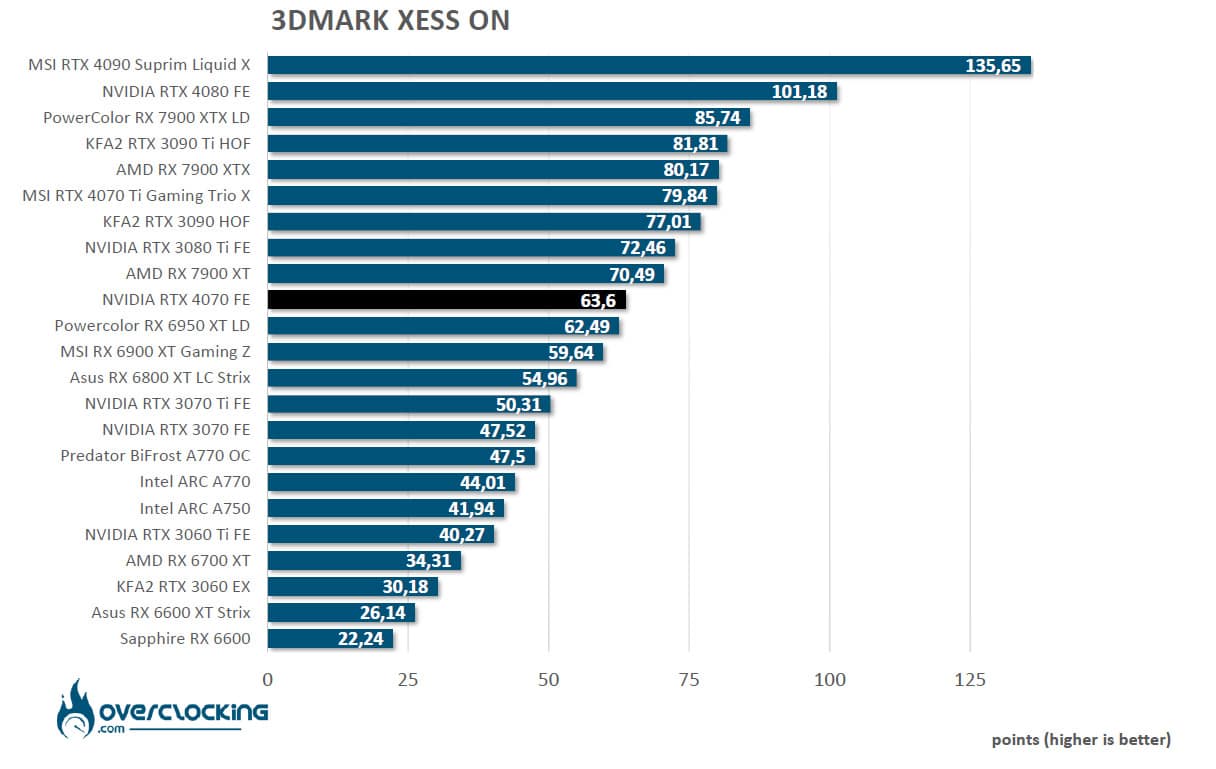
In this new benchmark, all graphics cards without exception take advantage of XeSS, but it is Intel that has the best gain. ARC models see a gain of 50% while NVIDIA and AMD models see a gain of more or less 30 to 35%.
3DMark DLSS Feature Test:
We had not kept this benchmark since it only concerns DLSS compatible cards and was therefore not useful for our comparative tests. Here, we have retested it since it officially supports DLSS 3 since the end of the NDA on the RTX 4090.
So we’re going to run a 2160p benchmark with DLSS disabled first, then with DLSS 2 performance and finally with DLSS 3 performance.

Our NVIDIA RTX 4070 Founders Edition scores 23 FPS without DLSS, then 64 FPS (+178%) with DLSS 2 enabled. DLSS 3 still provides a 367% gain over DLSS 2, so we can see how much of an improvement DLSS 3 brings to the gaming experience.
Well, as we conclude this first series of synthetic tests, we are right in the expected performance. We are behind the RTX 3080 Ti but with performance well above the RTX 3070 Ti. We should have excellent performance in 1440p. There is also a big performance gap between the RTX 4070 and the RTX 4070 Ti.
[nextpage title=”1440p gaming performance: “]
We decided to select six games, as they seem to be representative enough. We opted for DirectX12 and Vulkan with the following games:
- The Division 2 (DirectX 12)
- Borderlands 3 (DirectX 12)
- Red Dead Redemption II (Vulkan)
- Far Cry 6 (DirectX 12)
- Watch Dogs: Legion (DirectX 12)
- Cyberpunk 2077 (DirectX12)
We have chosen to use the benchmarks integrated in these different games.
Why do we do this? Simply to allow you to compare your results with ours if you also have a copy of one of these games. It’s a thought that seemed relevant to us and that will allow you to compare your results with ours.
As we mentioned earlier, we have activated the Resizable Bar in the BIOS, which is now supported by all (recent) GPUs. Finally, we have opted only for 2160p definition and selected the cards that are able to compete at this level. Unfortunately, we don’t have any RTX 3080’s available at the moment to add performance to our graphics.
We also decided to harden the graphics quality of some games since the next generations should be more powerful, both from NVIDIA and from the next AMD graphics cards.
We originally thought we would just offer you the performance in 1440p definition, but we decided to also add 2160p for the rasterization tests so that you understand the placement of this NVIDIA RTX 4070.
The Division 2:
The Division 2 game will be tested under DirectX 12. As far as graphics settings are concerned, they will be set to ” ultra ” mode with vertical synchronization disabled.
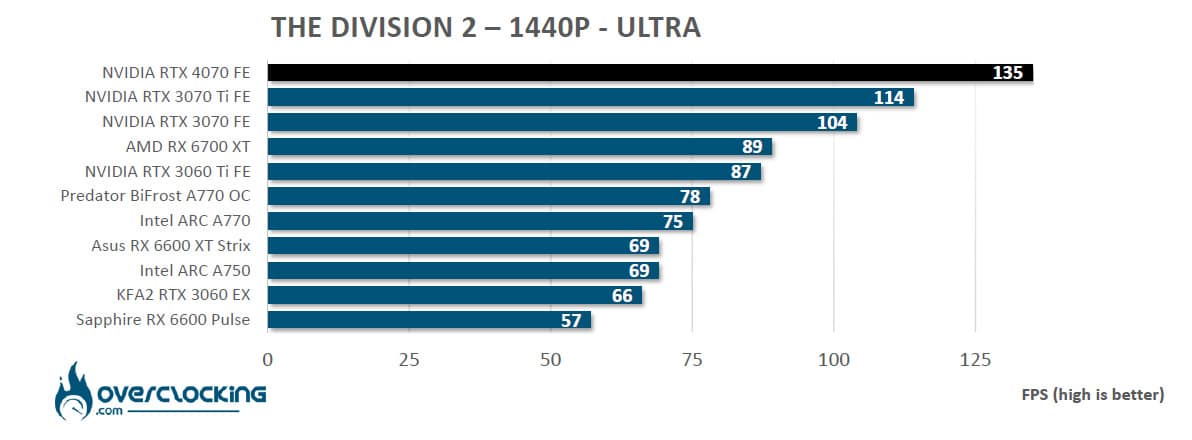
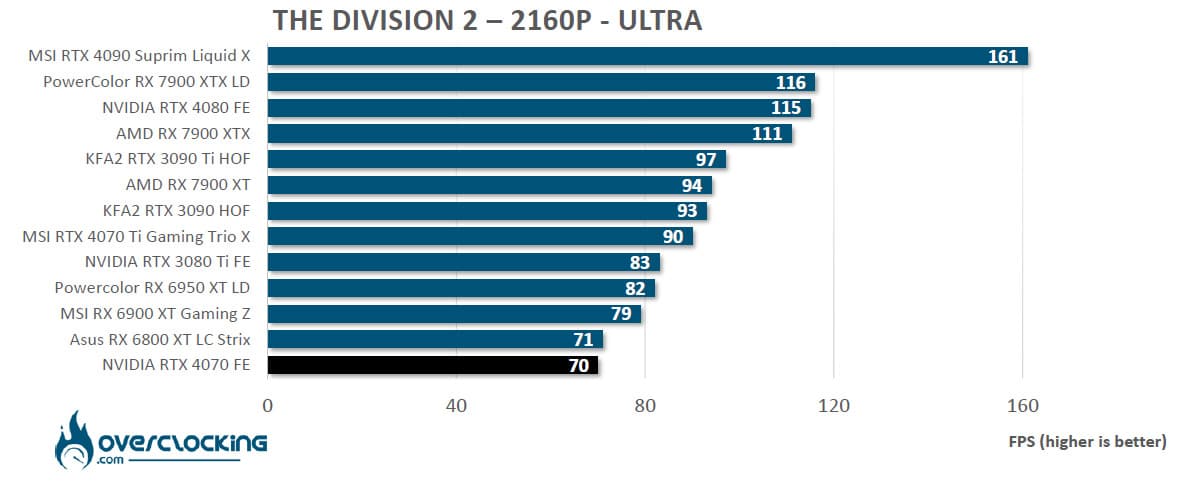
First game we test and our NVIDIA RTX 4070 largely dominates the 1440p definition. Even if the RTX 3080 is not yet available in our table, we can easily imagine that the performance of the RTX 3070 Ti is almost identical to the one obtained with our RTX 4070. As we expected, in 2160p, it is the last place that is occupied by our sample of the day.
Borderlands 3:
For the second game, we switch to Borderlands 3. The graphic options are set to ” Brutal “. It is important to know that Borderlands 3 is quite greedy and that this choice of settings has a strong impact on the FPS. It is a game that is often praised in the announcements of new graphics cards and precisely in this Brutal mode.
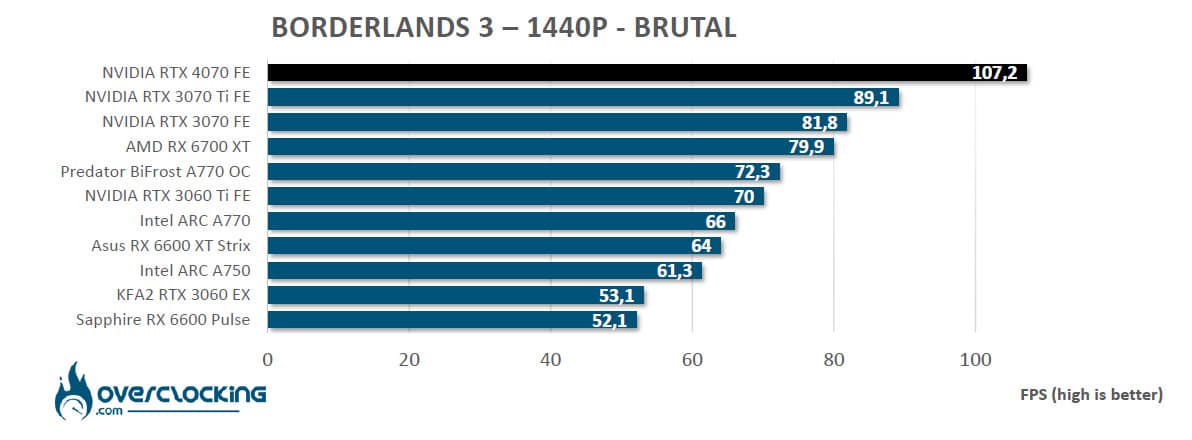
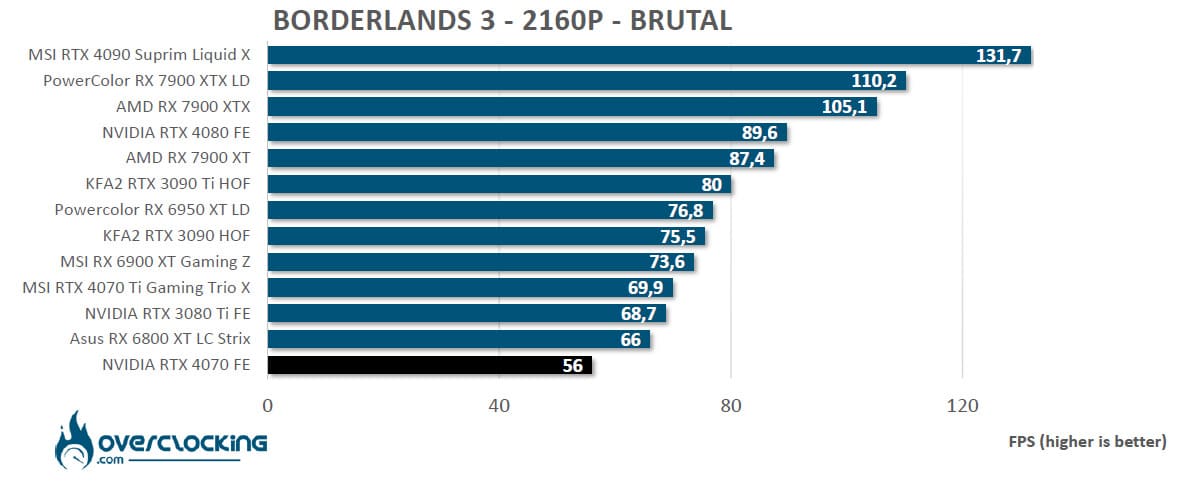
We continue with the same high performance in Borderlands 3 with an average of 107.2 FPS. The previous observation is identical in 2160p.
Red Dead Redemption 2:
Third game and not the least, Red Dead Redemption II on PC. The advantage of this opus is to offer the possibility to test the integrated benchmark under Vulkan. We opt for the graphics options in ” ultra “.


Third game and not the least, RDR2 offers the possibility to test the integrated benchmark under Vulkan. We’ll see if our RTX 4070 is as comfortable in 1440p and well it’s still the case with an average of 99.9 FPS. In 2160p, it is still too complicated for our RTX 4070 even if the symbolic average of 60 FPS is exceeded.
Far Cry 6:
Far Cry 6 supports the DXR as well as the SFR proposed by AMD. We will also find it on the next page. For our benchmarks, we opted for an ” ultra ” graphic quality.
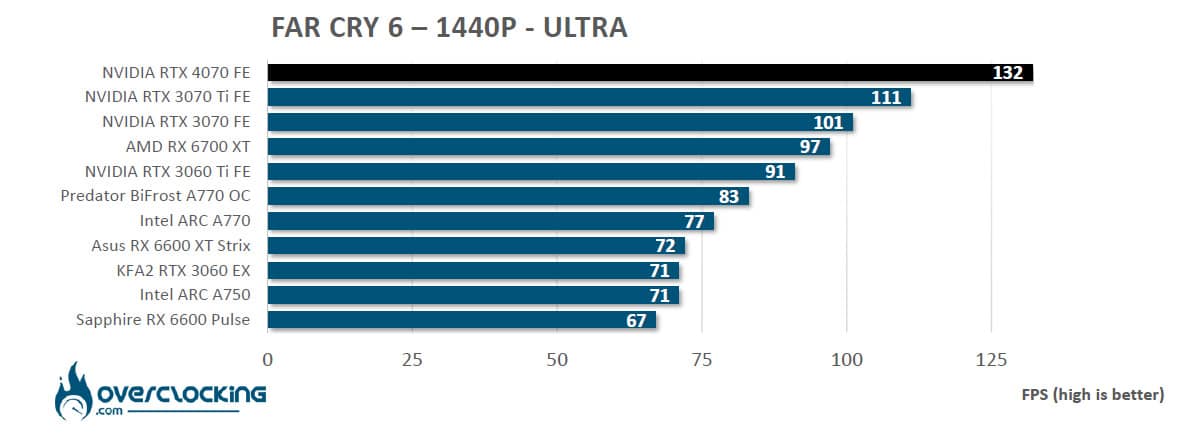

Even though our report on this game showed an advantage for the RX 6000 cards, the NVIDIA RTX 4070 Founders Edition achieved an average of 132 FPS, thus continuing to crush the competition in 1440p. Even if the average of 73 FPS obtained in 2160p is rather good, the gap with the cards of this definition is very important with a 20% delay on the RTX 4070 Ti.
Watch Dogs Legion:
Last but not least, Watch Dogs Legion which will also be used for our tests with Ray Tracing and DLSS. For our benchmarks, we have opted for an “ultra” graphic quality.
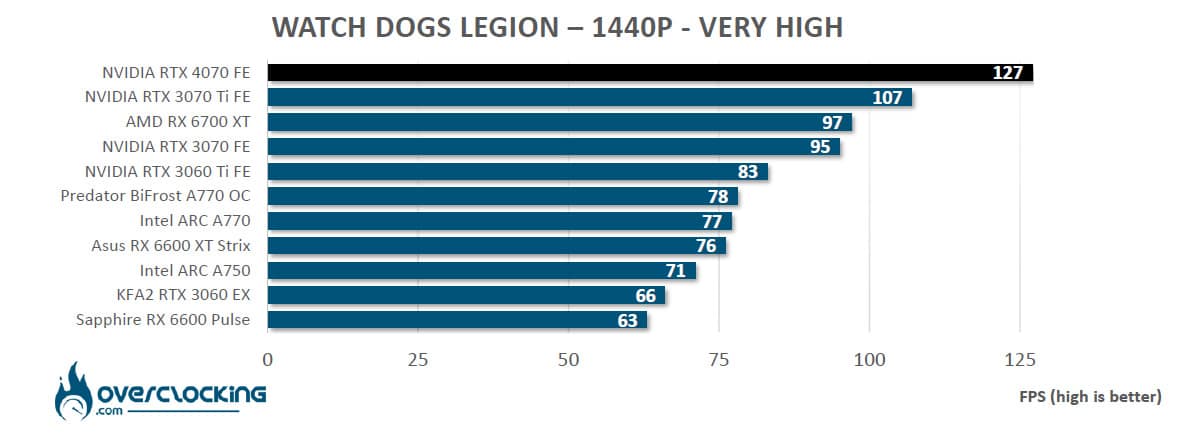
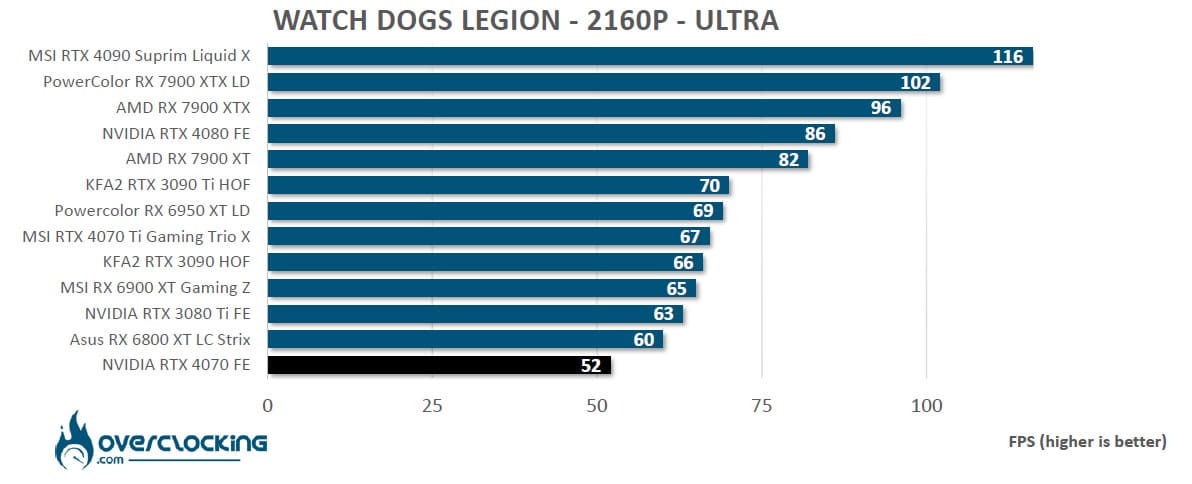
In the Watch Dogs Legion benchmark, the RTX 4070 widens the gap and this time reaches an average of 127 FPS. Here, in 2160p, the performance difference between the RTX 4070 and RTX 4070 Ti reaches 28%!
Cyberpunk 2077:
This is a game that we wanted to add for a while and now it’s done since it has an integrated benchmark. We will also use this game for our tests with Ray Tracing. For our benchmarks, we have opted for an ” ultra ” graphic quality.
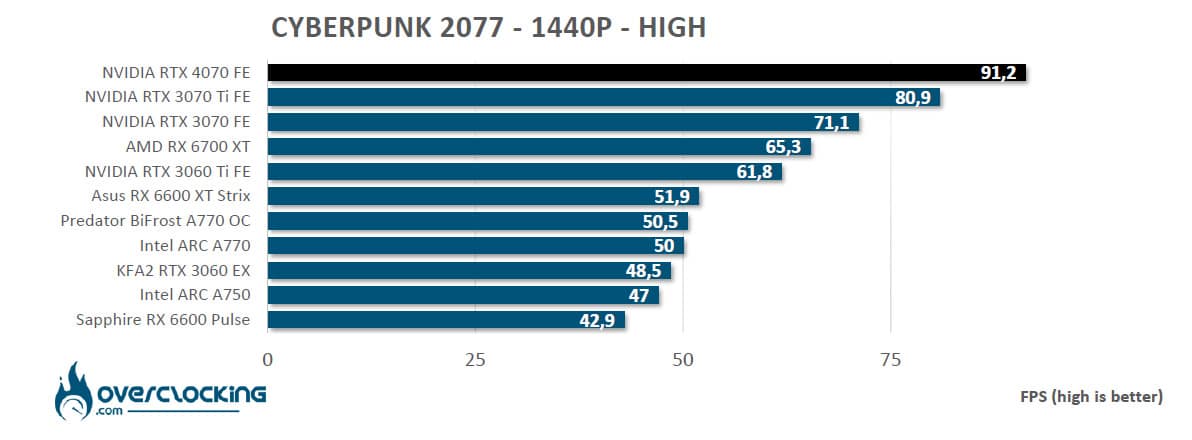

New and last benchmark of this panel of games. This is the one that shows the strongest performance with our graphics cards since all the cards do not pass the 60 FPS mark in 1440p. As you can imagine, no difficulty for our RTX 4070 which reaches 91.2 FPS.
The average of the games:
For the gaming average, the NVIDIA RTX 3070 in 1440p was our benchmark. The other cards score either higher or lower depending on their performance against this model.


With the RTX 3070, the contract is perfectly fulfilled with a clear increase in performance since we reach 32% gain. Even if we no longer have the RTX 3080 10GB, we had in our test of the MSI RTX 3080 Gaming X a gain of 30% against the RTX 3070. So here we are on an RTX 4070 that does slightly better than the RTX 3080 of the previous generation. The “12 GB” version seems to be a bit more powerful.
As for the 2160p definition, our RTX 4070 takes the last place as we imagined since this new card is primarily intended for the 1440p definition!
[nextpage title=”Ray tracing and DLSS/FSR performances:”]
Let’s now take a look at the seven games that we have selected and that support Ray Tracing and DLSS as well as for some of them AMD’s FSR and Intel’s new XeSS technology that is supported by Shadow Tomb Raider and Hitman 3. As we have already reminded you, if the DLSS remains the property of NVIDIA, the FSR and the XeSS can be used with all cards from AMD, Intel and even NVIDIA.
The seven DirectX 12 games that we will test with Ray Tracing and DLSS, FSR or XeSS are :
- Shadow of the Tomb Raider (DLSS)
- Watch Dogs: Legion (DLSS)
- Metro Exodus PC Enhanced Edition (DLSS)
- Far Cry 6 (DLSS – FSR)
- Cyberpunk 2077 (DLSS 3 – FSR)
- Hitman 3 (DLSS 3 – XeSS)
- Forza Horizon 5 (DLSS 3)
No change for this new series of games since we remain in the 1440p definition. Depending on the card, we will use DLSS for NVIDIA and either FSR or XeSS for AMD models. If FSR is not available in a game, then we will use XeSS on our AMD card.
So, you will find at first only 3 graphics cards because we had to update our 1440p Ray Tracing test at the last minute. Please note that the other cards used for the 1440p Ray Tracing tests will not follow in this definition. But we will completely update these graphics soon.
The DLSS 3: watch out for our results!
As you know, NVIDIA unveiled DLSS 3 when the RTX 4000 graphics cards were released, and in particular for the launch of the RTX 4090 version. So why a warning? Because NVIDIA now offers DLSS3 support on many games but it is only supported by RTX 4000. To put it simply, if we test a game that benefits from DLSS 3, our RTX 4070 will benefit from it but an RTX 3070 Ti will be satisfied with DLSS 2, hence the differences will be even greater.
We currently have three games that support DLSS 3 and we will increase this number in the coming weeks. You can find the list of supported games by following this link.
Shadow of the Tomb Raider:
First we add to this comparison and it supports Ray Tracing and DLSS 2.0. Three levels of Ray Tracing are offered in the game (medium – high – ultra) and the four levels of DLSS (performance – quality – balanced – ultra performance).
For our benchmarks, we opted for ” very high ” graphics quality, ” ultra ” Ray Tracing and ” balanced ” DLSS.

With the Ray Tracing activated in ultra, an average of 107 FPS is already reached. The addition of DLSS 2.3 allows our average to climb to 164 FPS, so there is no difficulty to enjoy 1440p with Ray Tracing activated. A small remark, Shadow Of The Tomb Raider has been implemented with XeSS, which allows AMD cards to benefit from this technology. We can still judge the difference between the two technologies.
Watch Dogs Legion:
Second game, Watch Dogs Legion supports Ray Tracing and DLSS 2.0. It is one of the most demanding games of the moment. Three levels of Ray Tracing are offered in the game (medium – high – ultra) and four levels of DLSS (performance – quality – balanced – ultra performance).
For our benchmarks, we opted for a very high graphics quality, a ” high ” Ray Tracing and a ” balanced ” DLSS.

The Ray Tracing in Watch Dogs Legion makes the cards suffer except for our sample of the day, as it gets an average of 69 FPS. Enabling DLSS 2 will boost the FPS to an average of 101 frames per second.
Metro Exodus PC Enhanced Edition:
Third game and supports DLSS 2.0. We have dedicated a file to it. Three levels of Ray Tracing are offered in the game and four levels of DLSS (performance – quality – balanced – ultra performance).
For our benchmarks, we chose ultra graphics quality, ” ultra ” Ray Tracing and DLSS in ” balanced ” mode.

We continue with the greedy games and it is only our RTX 4070 that manages to pass the 60 FPS mark. The DLSS in “balanced” mode allows here a gain of almost 62.4% to our sample of the day.
Far Cry 6:
Far Cry 6 supports DXR as well as the FSR proposed by AMD but not DLSS.
For our benchmarks, we have opted for an Ultra graphics quality, we have activated both DRX options as well as FSR in ” balanced ” mode.

In Far Cry 6, FSR is the only choice available to boost FPS after enabling Ray Tracing. All our cards can benefit from it, regardless of the manufacturer. The FSR is to the advantage of the AMD model which manages to outperform our RTX 4070 for the first time when it is activated.
Cyberpunk 2077:
New game we added that offers in its settings the activation of DLSS but also FSR.
For our benchmarks, we chose a “high” graphic quality, a “medium” Ray Tracing and a ” balanced ” DLSS/FSR.
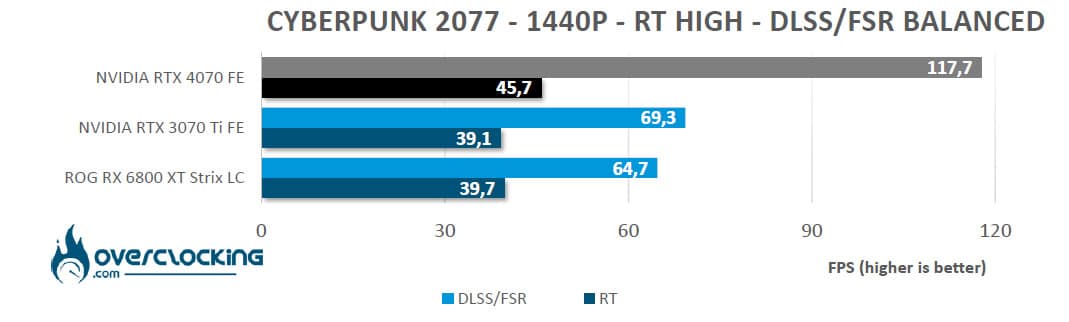
This is the most demanding game where our cards have a hard time keeping up. Here, an average of 45.7 FPS is obtained. The DLSS 3, which we mentioned at the beginning of the page, offers a very important gain as you can see on our graph. Please note that at the time of this article, the 1.62 patch had just been released.
Hitman 3:
Hitman 3 now supports DLSS, FSR and XeSS technology. Depending on the model of the tested card, we choose one of these three technologies.
For our benchmarks, we chose “high” graphics quality, ” enabled ” Ray Tracing and ” balanced ” DLSS/Xess.

We find an already usual situation with our RTX 4070 dominating this graphic in the absence of the RTX 3080 which would have been in the same performance range. Although supporting DLSS 3, we were not able to judge a larger gap with the use of our RTX 4070.
Forza Horizon 5:
Latest game added to our panel as this one is now DLSS 3 compatible. For our benchmarks, we chose ” extreme ” graphics quality, ” enabled ” Ray Tracing and ” quality ” DLSS/Xess.

This new game, which also supports DLSS 3, shows its potential. With Ray Tracing enabled, our RTX 4070 is in second place, but with DLSS 3 enabled, the clear advantage goes to our sample of the day!
So Ray Tracing with the RTX 4070:
On our seven tested games, our RTX 4070 has no problems and apart from under Cyberpunk 2077, the average is always above 60 FPS. We could have tightened up the graphics options even more, but then the other cards would have been in big trouble. As we said, as soon as we get our hands on an RTX 3080, we will update these graphics.
[nextpage title=”Temperature, power consumption and nuisance: “]
Temperature:
In order to measure the temperatures, we opted for the Superposition stress test in Extreme mode. We opted for three 5 minutes runs with 10 minutes interval between each test. We took advantage of this benchmark in order to measure the power consumption of the graphics card for the table above.
In order to know the temperature in Idle, after having finished the three loops of the stress test, we let the card rest for 20 minutes before reading the temperature. It should be taken into account that most of the cards benefit from the “0 dBa” technology and therefore, that the fans turn off below a certain temperature, often between 50 and 55°C. This means that it takes longer to dissipate the heat after a period of stress testing or gaming. A card without this technology will be noisier than the others at rest. Small reminder: our temperature readings are taken in Open-Air. In a closed case, the cards will necessarily be hotter.

As we suspected, the temperatures are excellent thanks to the proven cooling system. This cooling should allow us to take advantage of the overclocking potential but also reduce noise considerably. The fans of our NVIDIA RTX 4070 Founders Edition remain idle when the temperatures are cool.
Power consumption (whole configuration):
We use a power meter by reading the power consumption on the outlet of our power supply. Our modular power supply is a CORSAIR AX1600i. The result we propose is the average of the total consumption of our configuration. Only the graphics card changes between each reading. It is therefore easy to calculate the difference between each graphics card.

We suspected it, but it was a great surprise regarding the global consumption of our configuration equipped with our NVIDIA RTX 4070 Founders Edition since the average of our PC reaches 284 watts. Please note that the benchmark used only solicits the GPU. For a gaming use, the global consumption of our configuration will be more important but that with all our graphic cards.
This result is an excellent surprise and is related to the new fineness of the engraving. Our RTX 4070 is almost as good as the RTX 3060! As soon as we get our hands on the PCAT tool or the new version of the ElmorLabs PMD Power Measurement Device that supports 12+4 pins, we will update this graph by isolating only the graphics card.
[nextpage title=”Overclocking:”]
Overclocking via MSI Afterburner:
Heading to the latest release of MSI Afterburner software from MSI, version 4.6.4 Beta 3. This is the overclocking software designed by MSI but will be compatible with other brands of GPUs. The software is really well designed but you will have to go through the advanced mode in order to have access to all the settings possibilities.
To test our overclocking, we are going to concentrate first on the Time Spy benchmark. Let’s go! We choose a maximum fan speed, we set the power limit to the maximum, i.e. to 109% and off we go! At first, we only push the GPU frequency in 50 MHz steps until the benchmark is no longer running. Once we have a stable GPU frequency, we move on to increasing the memory frequency.
By default, at stock frequencies , our NVIDIA RTX 4070 Founders Edition gets an overall score of 18046 points and 18028 points for the GPU score. The boost frequency reaches a maximum of 2790 MHz with the GPU temperature rising to 65 °C.


In the end, I was able to push the Boost frequency to 3060 MHz and the memory to 1463 MHz. This allows me to obtain excellent scores and thus to gain more points. The limit is around 3080 MHz, if the card goes higher, the benchmark crashes. The overall score is now 19259 points and the GPU score is 19439 points (+7.8%).
Of course, now that you have the maximum frequencies, you’ll have to test with the fans in AUTO and why not, redo a new ventilation curve in order to hold these new frequencies or close to them. Now, the performance in overclocking will depend on your card. On the other hand, we would like to see this RTX 4070 equipped with a waterblock to push it to its limits.
[nextpage title=”The last word:”]
The RTX 4070: the right plan to upgrade your configuration?
With the RTX 4090, NVIDIA has slapped the competition and even its previous generation in terms of raw performance. So, what about this NVIDIA RTX 4070 Founders Edition, which is positioned as a mid-range model and especially, what is the performance/price ratio worth compared to the RTX 3080 of the previous generation?
Let’s start with the performance, which is just as we expected. We are on almost the same performance as the RTX 3080 12 GB. Let’s go directly to the price to continue this conclusion since all eyes will be riveted on the price. On their side, NVIDIA announces a price of 659 euros – $599 for this RTX 4070 when the RTX 3080 10 GB was sold at 719 – $699 euros and then passed to 759 euros because of the euro / dollar rate. We are therefore on a very interesting MSRP price for this RTX 4070 Founders Edition when we know that globally all computer components have seen their price increase in recent months. But above all, this is not the only advantage that this graphics card has over the previous generation!
Let’s start with the power consumption, which has improved significantly compared to the previous generation and which is a very important point for us! We are now on the equivalent of the consumption of the RTX 3060! On the other hand, NVIDIA continues to evolve its DLSS with version 3 which offers a gain in performance even more interesting than on the previous generations. Indeed, this one is only compatible with graphics cards of the current generation, i.e. the RTX 4000. As a reminder, the DLSS3 uses an optical flow gas pedal integrated into the new RTX 4000 architecture. This is why previous generations that do not have it will not be able to benefit from DLSS 3.
If NVIDIA, with its Founders Edition, has a card with an excellent quality-price ratio, we will have to see at what price the partner cards will be sold. We have been confirmed that several models of partner cards will be available from the launch at MSRP prices. So watch out for the launch on April 13 at 3pm for all the cards!
This NVIDIA RTX 4070 Founders Edition:
As for our model of the day, the Founders Edition, it does the job perfectly thanks to its excellent cooling system. The card does not heat up at all and the fans are very quiet. As we said, the Founders Edition is our favorite because it will fit in any case since it is even shorter than the RTX 3070 Ti FE. If you are a fan of the design of this card or if you want to integrate it into a liquid cooling loop later on, you can go for it with your eyes closed.
We liked:
- A card to take full advantage of the 1440p
- Performance equivalent to the RTX 3080 12 GB
- A very well thought out power supply with quality components
- Excellent overclocking potential
- The GDDR6X memory is still as docile as ever when overclocking
- Excellent cooling system combined with low noise levels
- Very reliable noise levels
- Power consumption has improved significantly!
- The quality of design of the Founders Edition card
- Very attractive price compared to the RTX 3080
- DLSS 3 support and the arrival of more and more compatible games
We would have liked:
- Not really a remark but we will remain attentive to the number of cards available at the price of $599-659 euros!
 In the RTX 4000 range, this RTX 4070 is for us the card with the most interesting price/performance ratio. If you have the budget, it is an excellent choice to build a new configuration to take full advantage of the 1440p definition. The power consumption is largely down compared to the previous generation and if you have DLSS 3 compatible games, you will be able to take full advantage of Ray Tracing. Good news also because several partners should offer RTX 4070 customs at MSRP, ie $599 /659 euros. See you on April 13th so that we can give you an overview of the cards and prices of the partner versions.