

[nextpage title=”Introduction: “]
It’s a “monster” that we welcome to the lab today with a copy of the Pro WS W790E-SAGE SE motherboard from Asus. The SE specification stands for “Special Edition”. Of course, if you follow us regularly, you know that this model is intended to host the new Xeon W-3400 and W-2400 processors codenamed Sapphire Rapids. These platforms are intended for the workstation market, i.e. professional, for servers and data centres. As you might expect, we will of course be using this Pro WS W790E-SAGE SE as a high-performance configuration for our benchmarks. We received the motherboard first, and in a few weeks’ time we’ll be putting the 56-core Intel Xeon w9-3495X processor through its paces.

A big thank you to Asus France for having chosen us to test this motherboard and to Intel France for the processor. Please note that our colleague JigFio also has a copy of this motherboard and will propose you the assembly of an extreme configuration.
[nextpage title=”Pro WS W790E-SAGE SE:”]
As we said in the introduction, this Pro WS W790E-SAGE SE motherboard has the reference SE for ” Special Edition “. Asus has a second motherboard in its range, the Pro WS W790-ACE model, which is aimed more at the Xeon processors of the W-2400 series. So we have in our hands the most high-end version.
The bundle :
A quick tour through the bundle of this Asus Pro WS W790E-SAGE SE to see if it benefits from “special accessories”. As this is a motherboard that is intended for the professional environment, the bundle should be reduced and different from what we are used to finding on consumer boards.


Finally, we find a rather classic bundle with the SATA cables, the Q-connector, the quick installation guide, the manual, … and a particular tool, the “VRM Fan holder” which is fixed on the radiator covering the VRM and which allows to fix three 40 mm fans.
The architecture and the W790 chipset :
The Pro WS W790E-SAGE SE is built around Intel’s W790 chipset, and this motherboard has a new socket with the reference of LGA-4677. As you can see, the socket size is larger than what we are used to seeing with the LGA-1700.
The part that covers the external connectors is covered by a transparent smoked grey cover that lets you see what is hidden underneath. On the back of the motherboard there is a protective aluminium cover that covers almost the entire surface of the board and protects the back of the socket.


The W790 chipset of course supports PCIe 5.0, which offers higher storage performance than the previous generation, as well as DDR5 support.
The different heatsinks :
The dimensions of the board are 305 mm x 330 mm, which corresponds to the SSI-EEB format. If you purchase this motherboard, please check that your case is compatible with this format.
The dominant colour on the PCB is black. This is a choice made by Asus to keep the colour neutral. The design is quite unusual as the memory slots are above and below the socket, whereas if you remember the X299 chipset, the memory slots were on the left and right of the processor.
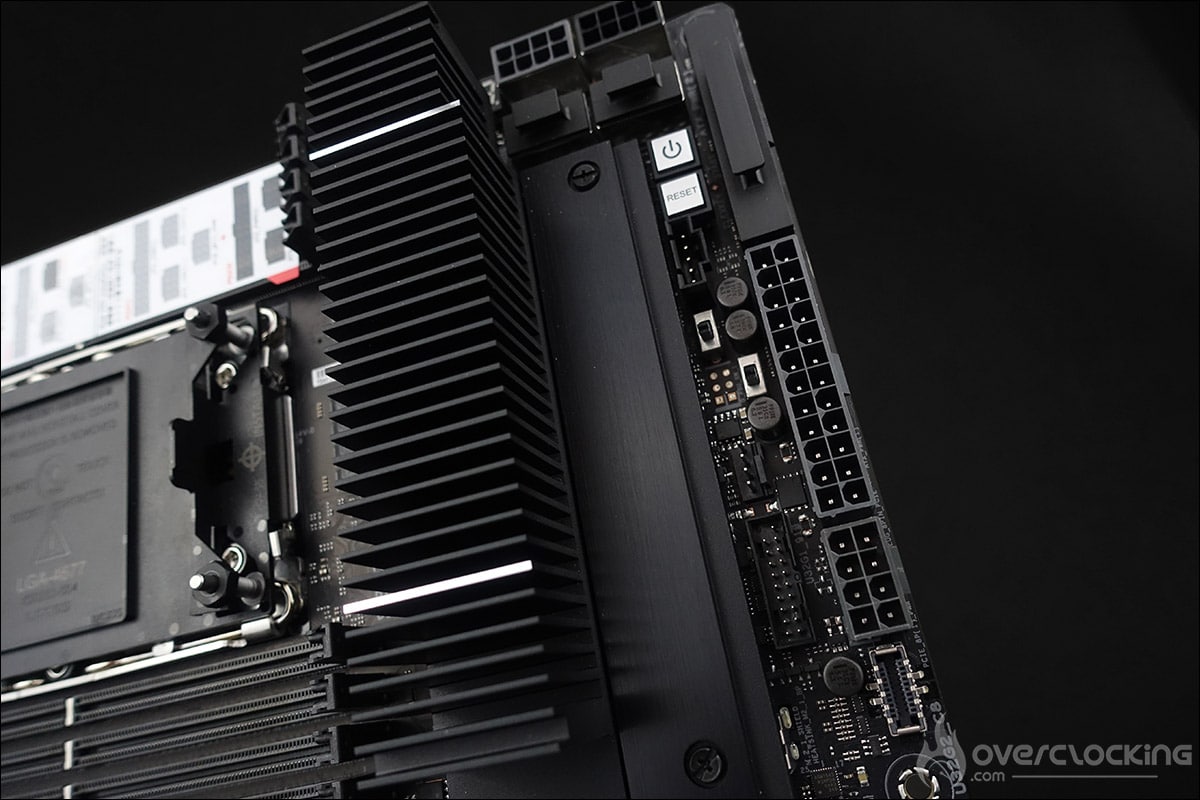

Let’s start the tour with the radiators, of which there are two ! First of all, the imposing radiator located on the right side of the socket and which covers the power supply stage. The second one is the one that covers the chipset. The height is low in order to allow for easy installation of the graphics cards.
The socket and PCIe :
The space around the socket is quite small and this is quite logical considering the size of this LGA-4677 socket as well as the presence of the four memory slots on both sides. The Pro WS W790E-SAGE SE can accommodate a maximum of eight DDR5 memory modules. It supports quad channel memory kits up to 6800+ (OC) and a maximum of 2 TB.


There are no less than seven PCIe 5.0 16x ports. To power all this, the card has two 24-pin connectors and four 8-pin connectors next to the power stages. You can see on the sticker below how to power this card.


Three M.2 SSD slots:
A long black aluminium plate covers two M.2 SSD slots on the PCB. Both slots are 22110 format and PCIe 5.0 compatible.


A third slot, again 22110 but PCIe 4.0 is also underneath an aluminium cover and is located under the chipset. As you can see, they all have the same quick release system that is already present on many of the mainstream motherboards.
[nextpage title=”The PCB and connectors: “]
The clocker tools :
Let’s start with the elements inserted on the PCB which can be interesting tools for overclockers. There are quite a few of them on this model, which is perhaps surprising on this type of motherboard. This confirms the desire of Asus to offer a professional board but with tools for overclocking.
- The power button: allows the motherboard to be turned on.
- The FlexKEY (reset): allows to restart the motherboard in case of failure. The button can now be assigned to another task such as the function(Safe Boot or disable backlight).
- Safe Boot: allows to restart the board even if the settings chosen in the bios do not allow the boot. This avoids having to do a CMOS Clear to reboot and thus lose your encoded settings.


- ReTry Button: during cold tests, sometimes the OS freezes and a reset does not allow to restart the motherboard: only solution 6, 7 seconds by holding down the START button. With the ReTry button, it restarts immediately.
- LN2 jumper: enables LN2 profiles in the bios.
- The Q-LED: 4 LEDs (CPU – DRAM – VGA – BOOT) that allow to diagnose errors during the boot of the card. The one that stays lit corresponds to the problem.


- The Q-Code: displays a code that corresponds to the component responsible for the error during boot. This is now displayed on the OLED screen and the list of codes can be found in the manual.
- The CMOS CLR: allows you to clear the BIOS settings to return to the default settings.
The PCB:
Our Asus Pro WS W790E-SAGE SE is based on a 14 + 1 + 1 phase power supply. The CPU part consists of 12 phases. We are waiting for more information about the management of this power supply stage.


The mosfets in the power stages generate the most heat as they are responsible for the voltage conversion and delivery to the CPU from the 12 volt EPS connector. It will therefore be necessary to keep them cool via the large heatsink on top of them.
Connectors :
The rear panel features the following. First of all, the Clear CMOS and the button to flash the BIOS from a USB stick.


In terms of USB ports, this Pro WS W790E-SAGE SE has two USB 2.0, four USB 3.2 Gen 2 Type A, one USB 3.2 Gen 2 Type C and one USB 3.2 Gen 2×2 Type C. There are also two Intel 10Gb Ethernet ports and a Realtek 1FB. Finally, there is a VGA port, audio outputs and an optical output.
Waiting for the next part:
We are of course waiting to receive the processor and the memory kit in order to start testing. We will be able to test an aircooling solution with a copy of the Noctua NH-U14S DX-4677. We will also use a liquid cooling loop and nitrogen to take full advantage of the W-3495X CPU’s potential. This motherboard and CPU have already broken a lot of records, as you might expect. See you soon for a full review of the board.