

[nextpage title=”Introduction:”]
It’s been a few months since we last had the opportunity to receive a Powercolor card in the lab. Today we have that chance with an RX 6950 XT Liquid Devil. This is the second card of this “Liquid Devil” series that we will have the opportunity to test after the RX 6800 XT tested in March last year.
As the name suggests, we will be testing a version for use with a liquid cooling loop. This model has a waterblock pre-installed by Powercolor. We would like to take this opportunity to thank Powercolor for making this RX 6950 XT Liquid Devil available and for the goodies we received for this occasion.

[nextpage title=”The new RX 6×50 XT game:”]
AMD has just made a very slight refresh of its range by proposing three new cards: the RX 6650 XT, the RX 6750 XT and the RX 6950 XT, still based on the RDNA2 architecture and built on 7nm process from TSMC. Three cards for the three resolutions that are 1080p, 1440p and 2160p. Each of these cards has its own target.
But basically, what changes ? Almost nothing. All three versions will see an increase in memory frequency and boost frequency, but this will depend on the manufacturer. The amount of memory remains unchanged with 16 GB for the RX 6950 XT, 12 GB for the RX 6750 XT and finally 8 GB for the RX 6750 XT. The increase in memory frequency will of course result in a slightly higher power consumption than the previous models.


We can therefore expect an increase in performance of between 5 and 10%. As far as recommended prices are concerned, AMD gives a reference price of $1099 for the RX 6950 XT, $549 for the RX 6750 XT and finally $399 for the RX 6750 XT.


AMD also highlights the performance of its cards when combined with the Ryzen 7 5800X3D. Unfortunately, not having been sampled by AMD on this processor, it is difficult for us to give you any feedback. The other presentation slides show the expected performance of these three cards against NVIDIA’s models. AMD’s idea is to dethrone the RTX 3090 in 2160p, the RTX 3070 in 1440p and the RTX 3060 in 1080p.


Now that we’ve seen these slides, it’s time for us to make our own opinion by offering today’s test of the Powercolor RX 6950 XT Liquid Devil and the MSI RX 6750 XT Gaming X Trio. So, did AMD win the bet with this refresh ? [nextpage title=”Powercolor RX 6950 XT Liquid Devil: “]
The architecture :
This Powercolor RX 6950 XT Liquid Devil is the first card we are testing that is part of the AMD refresh. It still benefits from the RDNA2 architecture but is distinguished by the name of its chip, which is an «XTXH». This is a “bonned” chip that has a higher boost frequency. This is the third card with this chip that we have welcomed to the lab. We have already tested the Powercolor RX 6900 XT Red Devil Ultimate and recently the MSI RX 6900 XT Gaming Z Trio.
This RX 6950 XT is equipped with a Navi 21 XTXH GPU on a 7nm manufacturing process by TSMC. The size of the chip is very impressive with its 519 mm², it’s not nicknamed “Big Navi” for nothing… The chip has 26.8 billion transistors. Compared to the RX 6800 XT chip, this RX 6950 XT has 100% enabled units and a full memory bus. On the next page we will explain where the differences with the RX 6900 XT version lie via the GPU-Z screenshots.


The bundle :
As you might expect, the box is quite large, measuring 380 x 295 x 120 mm. The box is opened from the bottom to reveal the inside and what the bundle is made of. First of all, there is a cardboard sheet containing the information and characteristics of this version. Once this is removed, we discover a first box with the reference « Liquid Devil Dye Pack ». This is a series of 3 bottles of dye to choose the colour that suits you best. This will allow you to colour your coolant loop. This is a kit comparable to the EK-CryoFuel Dye Pack.


Next, Powercolor provides you with a few accessories, a 6 mm Allen key and two plugs that are needed when installing your cooling loop. The waterblock has 4 connection possibilities, and only needs one input and one output, so you will need to plug two of them. We will come back to this point in detail when installing the liquid cooling loop.


Finally, there is a card inviting you to join the private club of Powercolor graphics card owners and the installation guide. The graphics card is located underneath the bundle, perfectly protected by a pre-cut foam to ensure that it is delivered to you in the best possible condition.
Cooling :
This “Liquid Devil” version is equipped with a waterblock to keep the GPU, the memory chips and the power stages cool. The waterblock is a model from EK and customised for the occasion by Powercolor. A large part of the internal maze is hidden by the “Devil” logo and the EK logo can be found at the bottom right. The logo has an RGB backlight that can be set using the Devil Zone RGB software. By default, the card will be illuminated in red.


A switch on the top of the card allows you to choose either the “OC” BIOS or the “Unleash” BIOS when the card is powered up- we will look at the difference between these two BIOSes in GPU-Z, even if we already know which one we will use… By default, the “OC” BIOS is selected.


Recently we tested the ROG RTX 3090 Ti Strix LC OC. This model comes with an AIO cooling system already pre-installed. In the case of this Liquid Devil version, the buyer will have to design it. As we had already done with the AlphacoolEisblock Aurora Acryl GPX-N RTX 3090 HOF, we opted for the Alphacool Eisbaer Extreme Liquid CPU Cooler 280 AIO, which we had tested on the website of our colleagues Vonguru.
Powercolor has also fitted a backplateto stiffen the PCB and prevent it from twisting. There is enough space between the PCB and the backplate to ensure good air circulation.


Connectors :
To power the card, there are three 8-pin connectors. AMD recommends using a 1000 watt power supply for your configuration if you opt for an RX 6950 XT. Finally, you should know that the card has three DisplayPort 1.4a video outputs as well as an HDMI 2.1 port.


Finally, the use of a waterblock allows this model to take up the thickness of only two slots, ideal for tighter spaces. [nextpage title=”Specifications and PCB: “]
Technical specifications :
As mentioned on the previous page, this Powercolor RX 6950 XT Liquid Devil has two BIOSes. The first one is labelled OC and the second Unleash. The differences are in the GPU and boost frequency. We opted for the more aggresive of the two, i.e. the “Unleash” BIOS. In terms of frequency, the base frequency is announced at 2343 MHz, while the boost is at 2565 MHz. The 16 GB of G-DDR6 memory from Samsung runs at 2250 MHz (575.5 GB/s) on a 256-bit bus. A quick trip to GPU-Z to check that the information read is correct. The GPU frequency is 2343 MHz, and the Boost frequency is 2565 MHz. Don’t forget that the latter will be higher during benchmarks depending on the quality of your chip. The memory has a frequency of 2250 MHz.


Speaking of chip quality, you should know that even though GPU-Z no longer gives this information, it is possible to find the Asic via the HWinfo software. This is a value in % that gives an idea of the quality of the graphics chip. The higher the value, the better the overclockingpotential of the chip.
 So we installed this software to find out this value. Good news since the software announces 87%. We’ll see what happens during our first overclocking session!
What about the RX 6900 XT?
Of course we wanted to compare this Powercolor RX 6950 XT Liquid Devil with the model in our test charts, the MSI RX 6900 XT Gaming Z Trio, which is an XTXH version. This one already benefits from slightly better performance than the basic RX 6900 XT.


In reality, what we imagined is confirmed. The RX 6950 XT benefits from a BIOS that is quite similar to that of the AMD RX 6900 XT LC version, which is intended for the OEM market. As a reminder, this card was released a few months ago and everyone thought it was the RX 6950 XT at that time. We told you about it in this brief.
The PCB :
Due to lack of time, we have not yet disassembled the waterblock in order to discover the insides of the PCB. Despite this, the PCB should most likely be identical to that of the Powercolor RX 6900 XT Red Devil Ultimate which we also tested.


This one had 16 phases for the GPU and 3 for the memory. One thing is for sure, we can’t wait to see what it has in store and its overclocking potential!
[nextpage title=”The test configuration: “]
As we said in the introduction, we have just completed a complete upgrade of our test setup to Alder Lake, DDR5 and Windows 11. This is the first card we will officially test on this new configuration. Of course, all our previous cards have been retested on this configuration in order to update our various charts.
- Motherboard : ROG Maximus Z690 Extreme
- Processor: Intel Alder Lake i7-12700KF
- Memory : 32 GB Corsair Platinum RGB 5200 CL38 DDR5
- Graphics Card : Powercolor RX 6950 XT Liquid Devil
- Cooling system: ROG Ryujin II 360
- SSD: Western Digital Black SN750 2 TB + EKWB radiator
- Power supply: Corsair AX1600i
- Operating system: Windows 11 64 bits
- Display: Asus PG27UQ


Our test protocol :
All cards are tested at stock frequencies and without any optimization. For the various benchmarks, both synthetic and gaming, we will opt for 1080p, 1440p and 2160p resolutions depending on the card’s performance. As you can see, we have switched to Windows 11 and we have enabled the ReSize BAR in the BIOS as you can see in these screenshots.
Now that you know everything about our test setup, it’s time to get started! With this Powercolor RX 6950 XT Liquid Devil we are going to focus mainly on 2160p resolution.
[nextpage title=”Synthetic benchmarks: “]
Our first series of tests will be dedicated to synthetic benchmarks. These are often used for overclocking competitions but are also very interesting to compare different GPUs. We will therefore focus on benchmarks from the 3DMark series. We will test the following benchmarks:
- Fire Strike (1080p)
- Fire Strike Ultra (2160p)
- Time Spy (1440p)
- Time Spy Extreme (2160p)
- DirectX Raytracing
- Mesh Shader
3DMark Fire Strike and Fire Strike Ultra :
Let’s start with 3DMark Fire Strike, which is one of the most used benchmarks today. It consists of two graphics tests, a CPU test and a fourth test that combines GPU and CPU. Don’t forget to deactivate the demo which doesn’t add anything to the final score and prolongs the benchmark (unnecessarily). The version used for these tests is of course the latest one.
 The first benchmark that we carry out with this RX 6950 XT and I remind you, the “Unleash” BIOS. Well, right from the start, it hits very hard with a score that passes the 40K mark with the very nice score of 40903 points. It is quite simply the best performing card we have ever had in our hands !
 The same applies to Fire Strike Ultra with a score of 15276 points, leading the MSI RX 6900 XT Gaming Z with its XTXH chip by 752 points. This new refresh undoubtedly dominates the 3DMark Fire Strike benchmarks.
3DMark Time Spy and Time Spy Extreme :
The second test is 3DMark Time Spy. Although this one is done in 1440p, it is special because it uses DirectX 12. It consists of two graphics tests and a CPU test. As with Fire Strike, don’t forget to disable the demo. These first two benchmarks are provided by UL Benchmark.

The performance obtained in Time Spy is always fairly representative of what we will get in games. Here we can see that the RX 6950 XT once again takes the top spot.

Under 3DMark Time Spy Extreme, our sample of the day moves down a step to take second place in this ranking, a few hundred points behind NVIDIA’s RTX 3090 Ti.
3DMark DirectX Raytracing :
UL Benchmarks has added a new test to its series of benchmarks to measure Ray Tracing performance. The idea will be to use the 3DMark DirectX Raytracing test to compare the performance of dedicated Ray Tracing hardware to graphics cards from AMD and NVIDIA. The 3DMark DirectX Raytracing test is designed to make Ray Tracing the limiting factor. Instead of relying on traditional rendering, the entire scene is traced and drawn in a single pass. The test result will depend entirely on Ray Tracing performance. This makes it easy to measure and compare the performance between different cards.

The advantage of Ray Tracing is always for the greens, with our RX 6950 XT scoring 30 points, well behind the best NVIDIA GPUs.
3DMark Mesh Shader:
Here is the new test we added to the synthetic benchmarks: Mesh Shader. We added it because it is supported by AMD’s RDNA 2 architecture and therefore our RX 6000. It allows us to analyse the level of performance of the GPUs concerning this functionality. As a reminder, it allows to exploit more complex calculations at the geometry level, in a more flexible way, for each meshlet. The result displayed is the one with the Mesh Shaders active.

The score under 3DMark Mesh Shader improves again and now rivals the RTX 3080 Ti and especially the RTX 3090. This concludes this first series of benchmarks, which suggests excellent performance for the future.
[nextpage title=”Gaming performance: “]
We decided to select five games because they seem to us to be sufficiently representative. We chose DirectX11, DirectX12 and Vulkan with the following games:
- The Division 2 (DirectX 12)
- Borderlands 3 (DirectX 12)
- Red Dead Redemption II (Vulkan)
- Far Cry 6 (DirectX 12)
- Watch Dogs: Legion (DirectX 12)
We have chosen to use the benchmarks integrated in these different games. Why did we do this ? Simply to allow you to compare your results with ours if you also have a copy of one of these games. It’s a thought that seemed relevant to us and that will allow you to compare your results with ours. As we mentioned on page 4 of this article, we have enabled the Resizable Bar in the BIOS, which is supported by both NVIDIA and AMD cards. Finally, we have opted specifically for 2160p resolution that is most suitable for use with this RX 6950 XT.
The Division 2:
The Division 2 will be tested under DirectX 12. As far as the graphics settings are concerned, they will be set to ” ultra ” mode with vertical synchronization disabled.

First game and the trend seen in the synthetic benchmarks seems to be confirmed in The Division 2. The 2160p performance is very good and is close to AMD’s goal of overtaking the RTX 3090 in Green.
Borderlands 3:
For the second game, we switch to Borderlands 3. The graphics options are set to “Brutal”. Borderlands 3 is quite demanding and this choice of settings has a strong impact on FPS. This is a game that is often mentioned in new graphics card announcements.

Here, things are looking up for our RX 6950 XT which takes the lead over the RTX 3090. As you can see, there is no difficulty in 4K with the graphics options set to the highest choice.
Red Dead Redemption 2:
Third game and not the least, Red Dead Redemption II on PC. The advantage of this new opus is to offer the possibility to test the integrated benchmark under Vulkan. We opt for “Ultra” graphics options.

Our sample of the day is neck and neck with the RTX 3090, beating it by a slim margin.
Far Cry 6:
The latest game we are adding to this section as it supports DXR as well as the SFR offered by AMD. We will also find it on the next page. For our benchmarks, we have opted for “Ultra” graphics quality.

Even though our game report showed an advantage for the RX 6000 cards, this is the first time that our RX 6950 XT has taken the top spot.
Watch Dogs Legion:
Last but not least, Watch Dogs Legion will also be used for our tests with Ray Tracing. For our benchmarks, we opted for “Very High” graphics quality.

The trend is confirmed for our RX 6950 XT, which seems to be able to pass the RTX 3090, which was the target of this refresh proposed by AMD for the 2160p definition.
The average game:
For the gaming average, it’s no surprise that we chose NVIDIA’s RTX 3080 10 GB as our reference card. The other cards score either higher or lower depending on their performance against this model.

Please note that we are comparing against an RX 6900 XT with an XTXH chip and not a traditional RX 6900 XT where the differences would have been even greater. Moreover, the “traditional” RX 6900 XT is slightly behind the NVIDIA RTX 3090. The goal seems to be perfectly met with an RX 6950 XT that does better than NVIDIA’s RTX 3090, even though the “Ti” model is still the one that dominates our results. In a few weeks time, we will take another week to update our graphics by retesting all the cards with the latest drivers. It is impossible for us to do this with every new GPU release.
[nextpage title=”Ray tracing and DLSS/FSR performance:”]
Let’s now take a look at the four games we have selected that support Ray Tracing and DLSS. We will be able to judge the impact of these two technologies on FPS. As you can see, some games support first generation DLSS and others support 2.0. We have also added Far Cry 6 which supports DirectX Ray Tracing and AMD’s SFR but is still compatible with NVIDIA graphics cards. The four DirectX 12 games we will be testing with Ray Tracing or DirectX Ray Tracing and DLSS or SFR are :
- Shadow of the Tomb Raider
- Watch Dogs: Legion
- Metro Exodus PC Enhanced Edition
- Far Cry 6
Shadow of the Tomb Raider:
The first one we’re adding to this comparison that supports Ray Tracing and DLSS 1.0. Three levels of Ray Tracing are offered in the game (medium – high – ultra) and only one level of DLSS. For our benchmarks, we opted for “Ultra” graphics quality, “Ultra” Ray Tracing and DLSS enabled.

Even if the score is still improving, in 2160p, the 60 FPS bar is still not reached, you will have to be less greedy with the RT or do without at this resolution. We will come back very soon to the performance details of the new drivers that we have not yet explained to you.
Watch Dogs Legion:
Second game, Watch Dogs Legion supports Ray Tracing and DLSS 2.0. It is one of the most demanding games of the moment. Three levels of Ray Tracing are offered in the game (medium – high – ultra) and four levels of DLSS (performance – quality – balanced – ultra performance). For our benchmarks, we opted for “Ultra” graphics quality, “High” Ray Tracing and “Balanced” DLSS.

This second game is much more demanding and the activation of Ray Tracing hurts a lot since we are on an average of 34 FPS in 2160p. You will have to either do without it for this game or choose RT with 1440p resolution.
Metro Exodus PC Enhanced Edition :
Our third game supports DLSS 2.0. We have devoted a report to it. Three levels of Ray Tracing are offered in the game and four levels of DLSS (performance – quality – balanced – ultra performance). For our benchmarks, we opted for “Ultra” graphics quality, “High” Ray Tracing and “Quality” DLSS.

We continue with the demanding games and find ourselves in the same situation as previously..
Far Cry 6:
The latest game we are adding to this section as it supports DXR as well as the SFR offered by AMD. For our benchmarks, we chose “Ultra” graphics quality, we enabled both DRX and FSR in “Quality ” mode for 2160p.

In 2160p, no worries for our RX 6950 XT, which averages 94 FPS, 78 with DRX active and rises to 117 FPS when Fidelity FX Super Resolution (FSR) is activated. We expect more games to support FSR but we will also come back to the RSR (Radeon Super Resolution) in an article very soon, which allows us to go from 1440p to 2160p with a higher average FPS than natively in 2160p. [nextpage title=”Temperature, power consumption and nuisance: “]
Thermals :
In order to measure temperatures, we opted for the Superposition stress test in Extreme mode. We do three 5-minute runs with a 10-minute interval between each test. We took advantage of this benchmark to record the power consumption of the graphics card for the table below. In order to know the temperature in Idle, after completing the three loops of the stress test, we let the card rest for 20 minutes before reading the temperature. It should be noted that most cards have “0 dBa” technology and therefore the fans cut out below a certain temperature, often between 50 and 55°C. This means that it takes longer to dissipate the heat after a period of stress testing or gaming. A card without this technology will be noisier than others when not in use. A reminder: our temperature readings are taken in Open-Air. In a closed case, the cards will necessarily be hotter.

As we could expect from the liquid cooling system, the heat dissipation is optimal. Now, the performance will depend on the quality and size of your cooling loop. Here, we can say that ours does the job !
Accoustics :
For the noise measurement, we use a sound level meter placed 40 cm away from our graphics card. All other components that may make noise (fans and liquid circuit pump) are disabled.

As above, the noise level will depend on your cooling loop. Here, our Alphacool AIO has two 140mm Silent Wings 3 fans that are ultra quiet.
Power Draw (full configuration):
We use a wattmeter to measure the power draw at the output of our power supply. Our modular power supply is a CORSAIR AX1600i. The result we offer you is the average of the total power consumption of our configuration. Only the graphics card changes between each reading. It is therefore easy to calculate the difference between each graphics card.
 It was to be expected, it is clearly accentuated compared to the RX 6900 XT but also compared to the RTX 3090 from NVIDIA. Without yet reaching the consumption of the “Ti” version, this is one of the criticisms that can be made of this model, but there is no other choice at the moment if you want to obtain better performance. Our table reflects the performance of the GPUs from bottom to top.
[nextpage title=”Overclocking: “]
As I hinted at during this article, I’m eager to start overclocking this Powercolor RX 6950 XT Liquid Devil. The original card is already pushing hard as you can see from the results in the synthetic benchmarks and in games. But you’ve come to know us, we can’t get enough. On top of that, the card has a liquid cooling system, which gives us some extra cooling potential. Let’s get started!
Step 1: Benchmark scores
Of course, it is important to know the scores we obtained on the two benchmarks we are going to test first. The score obtained with our Powercolor RX 6950 XT Liquid Devil under 3DMark Fire Strike is 40903 points and under 3DMark Time Spy 21656 points.
Step 2: OC via RADEON drivers
To overclock this Powercolor RX 6950 XT Liquid Devil we will use the RADEON drivers to make the modifications. Using the AMD drivers, via the driver interface – performance – setting – manual setting, that we will begin the overclocking. As a reminder, we are going to work on the GPU frequency, the memory frequency, the memory latency as well as the power limit, here on this model of 20% over “stock”.

The question that will arise is whether we will find ourselves facing a limit that will make us obtain worse scores, as was the case with the MSI RX 6900 XT Gaming Z Trio. We had to use the More Power Tool software.
Step 3: no limit concerns at present
So we started the tests with the 3DMark Time Spy benchmark. And here are the different scores we got. The best score we got was 22915 points (6% gain) with a max boost frequency of 2821 MHz. If we go higher, the benchmark crashes and most likely due to the lack of voltage. We are currently limited to 1.20 volts.

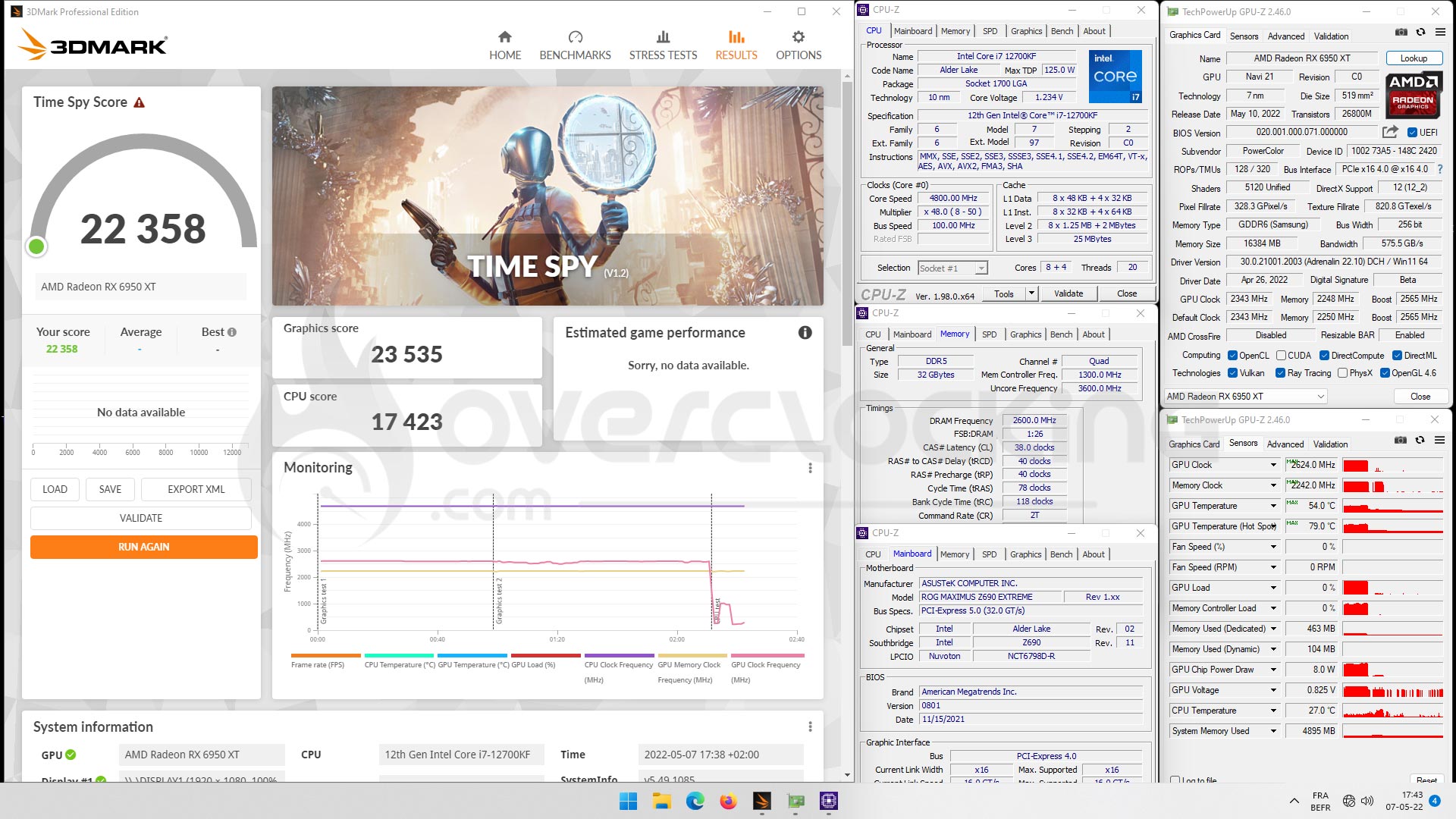


With the same parameters, under 3DMark Fire Strike, our score increases to 42245 points (gain of 3.2%) and by deactivating tesselation to 44094 points (gain of 7.8%).


Step 4: go further
Of course, we don’t intend to stop there. The idea is to cool down this card, as we did with the Powercolor RX 6900 XT Red Devil Ultimate, and install it on our Z690 configuration with our 12900KS. [nextpage title=”The last word:”]
An interesting refresh on paper but was it necessary?
So, first of all, AMD has succeeded in its goal of putting the RX 6950 XT ahead of NVIDIA’s RTX 3090. The increase in memory frequency as well as that of the GPU makes it possible to increase the scores in our various benchmarks. But all this comes at a price, with a higher power consumption than the model it replaces. Will these two models coexist in the coming weeks or will this RX 6950 XT replace the RX 6900 XT ?
At the time of writing, the trend is for both models to be available depending on market demand. However, the RX 6650 XT will replace the RX 6600 XT. The performance is excellent in 2160p and allows it to take second place behind the new RTX 3090 Ti. However, as soon as you switch to games using Ray Tracing, things get complicated. Now, you should know that we’ll be back very soon with an article on the RSR (Radeon Super Resolution) brought by the latest drivers, which allows to go from 1440p to 2160p with a higher average FPS than natively in 2160p. We will also take the opportunity to retest all our cards with the latest drivers. As you can imagine, it is simply impossible, due to lack of time, to do this on a regular basis.
Last but not least, the price. Even if the recommended price by AMD is 1099$, we find it hard to belive it will be possible to find cards at this price, or a reference model proposed by AMD. The current situation with graphics card availability seems to be improving at last, so let’s hope this bodes well for the price of this new model.
Powercolor RX 6950 XT Liquid Devil
As for our model of the day, the Powercolor RX 6950 XT Liquid Devil, it was once again a real pleasure to be able to test this type of graphics card. We really like these high-end graphics cards that benefit from a liquid cooling solution. This allows the Powercolor RX 6950 XT Liquid Devil to deliver its full power without any restrictions. Of course, you will have to deal with the design of a cooling loop, but this is a logical thing to do when you opt for a graphics card that has a waterblock as standard.

The fact that an EK waterblock was chosen also seems to be a very good choice. I’ve been using EK components for years for my tests but also for my daily boxes and I’ve never had any complaints about the quality of the products. The waterblock, without being extravagant, is very nice and the default red backlight is simply sublime. Powercolor has done a great job on this model and we can’t wait to unlock the voltage to continue pushing this card in overclocking! As for the retail price, we are still waiting for it.
We liked it:
- A refresh that achieves its goal
- A card to take advantage of 2160p resolution
- A very well designed power delivery with quality components
- A very good overclocking potential
- The GDDR6 memory is still docile when overclocking
- Backlighting that does not go overboard
- The presence of two BIOSes, including the “Unleash” version
- The quality of finish of the card and the waterblock
- The possibility to design the loop according to your wishes
- The “Liquid Devil” series from Powercolor
We would have liked :
- Lower power consumption, which is logical, even if still more contained than the RTX 3090Ti
- To have the possibility to modify the voltage beyond 1.20 volts
 Powercolor offers an excellent alternative to its already very efficient air cooling systems, such as the Red Devil. We are once again under the spell of this Powercolor RX 6950 XT Liquid Devil, whose frequencies soar and remain stable thanks to liquid cooling. We like the fact that each user can decide which liquid cooling loop they want to design to keep this little gem cool. Thank you to Powercolor for giving us the opportunity to test this high-end model!